-
qt生成帮助文档过程
qt生成帮助文档过程中必须依赖的的几种文件:
.qdoc文件:txt格式,按qt documentation的规范编写的详细信息文档,.qdoc文件一般是总体介绍用的,关于类的documentation规范的详细信息一般都放在.cpp文件中。docmentation中有相关链接关联的语法。
.qdocconf文件:txt格式,用于告诉qdoc.exe具体怎么去根据列出的路径下的.qdoc、.cpp等文件中的documentation标记, 生成.html、manifest.xml以及.hph等文件。.qhp文件:qt help project文件,xml格式,用于详细记录所有关键字,以及各个关键字之间的联系链接等等。
.qch文档:qt compressed help文件,二进制格式,php文件的压缩形式。
.qhcp文件:qt help collection project 文件,xml格式,用于关联多个qch文件。
.qhc文件:qt help collection文件,二进制格式,qhcp文件的压缩形式。

具体参考:目录->Qt Help->The Qt Help Framework
具体文件:qthelp://org.qt-project.qthelp.5120/qthelp/qthelp-framework.html
qt帮助文档生成过程(目录->QDoc Manual->Getting Started with QDoc):
主要参考qt自身的Assistant工具的部分源码内容,这个工具的源码比较独立。位置在:“QtInstallDir\Qt5.12.0\5.12.0\Src\qttools\src\assistant”Qt Doc部分
1、写出.qdocconf文件,指定要生成doc的路径、生成文件格式、生成路径以及定义属性和变量等等。(目录->QDoc Manual->Creating QDoc Configuration Files)
下面是qtassitant.qdocconf文件:- include($QT_INSTALL_DOCS/global/qt-module-defaults.qdocconf)
- project = QtAssistant
- description = Qt Assistant Manual
- examplesinstallpath = assistant
- qhp.projects = QtAssistant
- qhp.QtAssistant.file = qtassistant.qhp
- qhp.QtAssistant.namespace = org.qt-project.qtassistant.$QT_VERSION_TAG
- qhp.QtAssistant.virtualFolder = qtassistant
- qhp.QtAssistant.indexTitle = Qt Assistant Manual
- qhp.QtAssistant.filterAttributes = qt $QT_VERSION tools assistant
- qhp.QtAssistant.customFilters.QtAssistant.name = Qt Assistant Manual
- qhp.QtAssistant.customFilters.QtAssistant.filterAttributes = qt tools assistant
- qhp.QtAssistant.subprojects = manual examples
- qhp.QtAssistant.subprojects.manual.title = Manual
- qhp.QtAssistant.subprojects.manual.indexTitle = Qt Assistant Manual
- qhp.QtAssistant.subprojects.manual.selectors = fake:page
- qhp.QtAssistant.subprojects.examples.title = Examples
- qhp.QtAssistant.subprojects.examples.indexTitle = Qt Assistant Examples
- qhp.QtAssistant.subprojects.examples.selectors = fake:example
- qhp.QtAssistant.subprojects.examples.sortPages = true
- language = Cpp
- sourcedirs = ..
- exampledirs = ../../../../examples/assistant \
- snippets
- imagedirs = images
- depends += qtdoc qmake
- # Use a generic thumbnail image for examples that have no images in their docs
- manifestmeta.thumbnail.names += "QtAssistant/Remote Control Example"
- navigation.landingpage = "Qt Assistant Manual"
include($QT_INSTALL_DOCS/global/qt-module-defaults.qdocconf)所包含的文件在QtInstallDIr\Qt5.12.0\5.12.0\msvc2015_64\doc\global中或在src/qtbase/global中可以找到。该语句表示执行qtassistant.qdocconf之前会先执行qt-module-defaults.qdocconf。
2、按QDoc的documentation规范在C++文件、qml文件或 .qdoc文件中写出自己的Document标记(目录->QDoc Manual->Writing Documentation)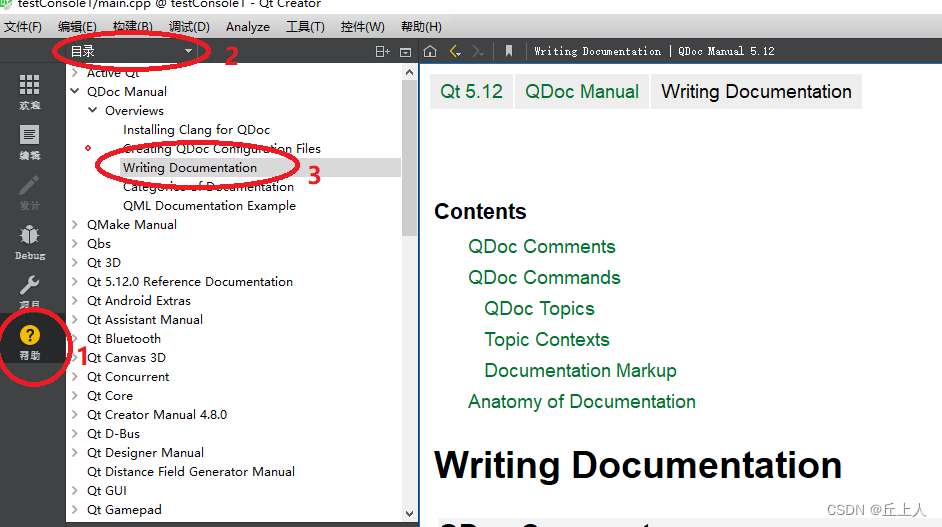
下面是QtInstallDir\Qt5.12.0\5.12.0\Src\qttools\src\assistant\assistant\doc\src\assistant-manual.qdoc 中的部分内容:- /*!
- \page qtassistant-index.html
- \title Qt Assistant Manual
- \ingroup qttools
- \startpage {Qt Reference Pages}
- \nextpage Qt Assistant Quick Guide
- \keyword Qt Assistant
- \QA is a tool for viewing on-line documentation in Qt help file format.
- For more information about basic \QA functions, see
- \l{Qt Assistant Quick Guide}.
- Qt installations include a set of reference and tools documentation that
- you can view in the Qt Creator IDE and in \QA. You can add custom
- documentation to the set of documents displayed in the \QA main view. For
- detailed information about all \QA functions, see \l{Using Qt Assistant}.
- You can use \QA as the help viewer in your applications. You can display
- your own documentation and customize \QA to look and feel like part of your
- application. You can change the window title or icon, as well as menu texts
- and actions. For more information, see \l{Customizing Qt Assistant}.
- \section1 Table of Contents
- \list
- \li \l{Qt Assistant Quick Guide}
- \li \l{Using Qt Assistant}
- \li \l{Customizing Qt Assistant}
- \endlist
- */
3、运行
qdoc qtassistant.qdocconfqdoc会按qtassitant.docconf所设置的要求生成html和qhp文件。
Qt Assistant 部分:4、利用qthelpgenerator和前面生成的php文件生成qch文件
qhelpgenerator qtassistant.qhp -o qtassistant.qch5、编辑qtassistant.qhcp文件。再用qthelpgenerator生成qhc文件。
qhelpgenerator qtassistant.qhcp -o qtassistant.qhc6、运行
assistant -collectionFile qtassistant.qhc也可以通过Assistant的配置界面添加:

详细解释具体参考:目录->Qt Assistant Manual->Qt Assistant Examples->Simple Text Viewer Exampleqt assitant 依赖qch文件,每一个模块都拥有自己的qch文件,存放在QInatallDir\Qt5.12.0\Docs\Qt-5.12.0\中。用户可以生成自己内容相关的帮助手册,可以通过qt5.12.0帮助手册中的qdoc manual 并结合qt src中相关内容生成qt帮助手册的过程进行学习。qhp、qch、qhc、qhcp之间的关系及这些文件的作用可以参考
目录->Qt Help ->The Qt Help Framework。
具体文件位置:qthelp://org.qt-project.qthelp.5120/qthelp/qthelp-framework.html目录->Qt Assistant Manual->Qt Assistant Examples->Simple Text Viewer Example
->Creating Documentation and Customizing Qt Assistant 项。
具体文件位置:qthelp://org.qt-project.qtassistant.5120/qtassistant/qtassistant-simpletextviewer-example.htmlassitant可以指定自定义的qch文件,这样就只会展示指定的qch文件内容。未指定正确的qch文件,qt会生成默认的qch文件,其包含了qt原始的所有模块内容。
Qt Creator Manual->Using the Help ModeYou can display external documentation in the Help mode. To augment or replace the documentation that ships with Qt Creator and Qt:
For information on how to prepare your documentation and create a .qch file, see The Qt Help Framework.
-
相关阅读:
重学java 71.网络编程
孙哥Spring源码第21集
Istio资源监听原理
关于requires_grad和优化器optim中parameters的记录
R语言计算代码的运行时间:使用tictoc包计算代码的运行时间长短、将toc的结果赋值值变量、可以获取详细信息(开始时间、结束时间、tic内容等)
Linux信号
信息化发展74
请解释Java中的策略模式,并举例说明其应用场景和实现方式。请解释Java中的模板方法模式,并讨论其在实际项目中的应用。
【for lovelier】IDEA + LeetCode Editor 最佳实践
Maven下载+配置+idea配置
- 原文地址:https://blog.csdn.net/qiushangren/article/details/126761134
