-
以深圳为例Python一键生成核酸检测日历
📢作者: 小小明-代码实体
📢博客主页:https://blog.csdn.net/as604049322
📢欢迎点赞 👍 收藏 ⭐留言 📝 欢迎讨论!
大家好,我是小小明。鉴于深圳最近每天都要做核酸,我觉得有必要用程序生成自己的检测日历,方便查看。
首先我们需要从
深i您-自主申报的微信小程序中提取自己的核酸检测记录,然后使用绘图库自动绘制检测日历。UI自动化提取检测记录
首先,我们在PC端微信打开
深i您-自主申报微信小程序:
点击 核酸检测记录,再点击自己的姓名即可查看自己的核酸检测记录:

下面我们打开
inspect.exe工具分析查看节点:
于是开始编码:
import pandas as pd import uiautomation as auto pane = auto.PaneControl(searchDepth=1, Name="深i您 - 自主申报") pane.SetActive(waitTime=0.01) pane.SetTopmost(waitTime=0.01) tags = pane.GetFirstChildControl().GetFirstChildControl() \ .GetLastChildControl().GetFirstChildControl() \ .GetChildren() result = [] for tag in tags: tmp = [] for item, depth in auto.WalkControl(tag, maxDepth=4): if item.ControlType != auto.ControlType.TextControl: continue tmp.append(item.Name) row = {"检测结果": tmp[1]} for k, v in zip(tmp[2::2], tmp[3::2]): row[k[:-1]] = v result.append(row) pane.SetTopmost(False, waitTime=0.01) df = pd.DataFrame(result) df.采样时间 = pd.to_datetime(df.采样时间) df.检测时间 = pd.to_datetime(df.检测时间) df.head()- 1
- 2
- 3
- 4
- 5
- 6
- 7
- 8
- 9
- 10
- 11
- 12
- 13
- 14
- 15
- 16
- 17
- 18
- 19
- 20
- 21
- 22
- 23
- 24
- 25
- 26
结果如下:
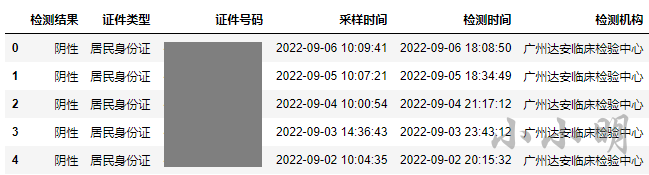
有了检测数据,我们就可以生成检测日历了。也可以先将检测数据保存起来:
df.to_excel(f"{pd.Timestamp('now').date()}核酸检测记录.xlsx", index=False)- 1
注意:其他省市的童鞋,请根据自己城市对应的小程序实际情况编写代码进行提取。
原本想抓包获取检测数据,却发现新版的PC端微信的小程序已经无法被抓包,暂时还未理解啥原理啥实现的。
后面碰到正在检测的记录上面的代码会报错,分析节点后,下面升级到能够兼容出现检测记录的情况:
import pandas as pd import uiautomation as auto pane = auto.PaneControl(searchDepth=1, Name="深i您 - 自主申报") pane.SetActive(waitTime=0.01) pane.SetTopmost(waitTime=0.01) tag = pane.GetFirstChildControl().GetFirstChildControl() \ .GetLastChildControl().GetFirstChildControl() tmp = [] for item, depth in auto.WalkControl(tag, maxDepth=2): if item.ControlType != auto.ControlType.TextControl: continue tmp.append(item.Name) result = [] tags = tag.GetChildren() if tmp: row = {"检测结果": tmp[1]} for k, v in zip(tmp[2::2], tmp[3::2]): row[k[:-1]] = v result.append(row) for tag in tags: if tag.Name or tag.GetFirstChildControl().Name: continue tmp = [] for item, depth in auto.WalkControl(tag, maxDepth=4): if item.ControlType != auto.ControlType.TextControl: continue tmp.append(item.Name) row = {"检测结果": tmp[1]} for k, v in zip(tmp[2::2], tmp[3::2]): row[k[:-1]] = v result.append(row) pane.SetTopmost(False, waitTime=0.01) df = pd.DataFrame(result) df.采样时间 = pd.to_datetime(df.采样时间) df.检测时间 = pd.to_datetime(df.检测时间) df.head()- 1
- 2
- 3
- 4
- 5
- 6
- 7
- 8
- 9
- 10
- 11
- 12
- 13
- 14
- 15
- 16
- 17
- 18
- 19
- 20
- 21
- 22
- 23
- 24
- 25
- 26
- 27
- 28
- 29
- 30
- 31
- 32
- 33
- 34
- 35
- 36
- 37
- 38

生成核酸检测日历
经过几小时的测试,最终编写出如下方法:
import calendar from PIL import Image, ImageFont, ImageDraw def create_calendar_img(year, month, days): "作者:小小明 https://xxmdmst.blog.csdn.net" font = ImageFont.truetype('msyh.ttc', size=20) im = Image.new(mode='RGB', size=(505, 251), color="white") draw = ImageDraw.Draw(im=im) draw.rectangle((0, 0, 504, 40), fill='#418CFA', outline='black', width=1) draw.text(xy=(170, 0), text=f"{year}年{month}月", fill=0, font=ImageFont.truetype('msyh.ttc', size=30)) title_datas = ['星期一', '星期二', '星期三', '星期四', '星期五', '星期六', '星期日'] for i, title_data in enumerate(title_datas): draw.rectangle((i*72, 40, (i+1)*72, 70), fill='lightblue', outline='black', width=1) draw.text(xy=(i*72+7, 40), text=title_data, fill=0, font=font) # 第一天是星期几和一个月的天数 weekday, day_num = calendar.monthrange(year, month) col, row = weekday, 1 for i in range(1, day_num+1): if col >= 7: col = 0 row += 1 fill = "#009B3C" if i in days else None draw.rectangle((col*72, 40+30*row, (col+1)*72, 40+30*(row+1)), fill=fill, outline='black', width=1) draw.text(xy=(col*72+24, 40+30*row), text=str(i).zfill(2), fill=0, font=font) col += 1 return im- 1
- 2
- 3
- 4
- 5
- 6
- 7
- 8
- 9
- 10
- 11
- 12
- 13
- 14
- 15
- 16
- 17
- 18
- 19
- 20
- 21
- 22
- 23
- 24
- 25
- 26
- 27
- 28
- 29
- 30
- 31
- 32
- 33
然后我们可以生成最近1-3个月的核酸检测日历:
dates = df.采样时间.dt.date.sort_values().astype(str) for month, date_split in dates.groupby(dates.str[:7]): year, month = map(int, month.split("-")) days = date_split.str[-2:].astype(int) im = create_calendar_img(year, month, days.values) display(im)- 1
- 2
- 3
- 4
- 5
- 6

可以看到我最近连续9天都是每天做一次核酸。
如果有需要,这些图片也可以按需保存:
im.save(f"{year}年{month}月检测记录.jpg")- 1
-
相关阅读:
【MySQL】 Java的JDBC编程
Python学习记录 异常处理
AIGC技术:发展、应用与前景
树状数组——一个简单的整数问题2
NAS磁盘挂载
能否向右位移?且偏移大小是-1?
Understanding JSON Schema
db-cdc之mysql 深入了解并使用binlog
RHCE-VDO
ARM汇编之乘法指令
- 原文地址:https://blog.csdn.net/as604049322/article/details/126737583
