-
day15学习总结
一、会话
简介:
生活中的会话:例子:打电话 ==> 拨号 ==>等待接通 ==>接通 ==>聊天 ==>挂断
开发中的会话:浏览器与服务器进行多次交互 多次请求与响应
Cookie是客户端会话对象
会话的生命周期:
开始:随着浏览器打开发送第一次请求,表示会话开始
结束:随着浏览器的关闭 表示会话结束
作用:
用于客户端与服务器进行数据传输
数据的共享
会话技术:
Cookie 与 Session
二、Cookie会话
简介:

Cookie一般与Session搭配使用
Cookie用于储存用户的信息(不是很重要的信息) 保存到浏览器中
Cookie的特点:
A.Cookie 是以键值对来进行存储
B.Cookie 存储数据的长度不能超过4kb
C.Cookie默认的生命周期 是随着浏览器的开始而开始 随着浏览器关闭而关闭
D.Cookie是将数据保存在浏览器中 存储的都是一些不重要的信息
使用场景:
登录的时候保存用户名与密码在浏览器中:

智能推送:

查看当前网站Cookie:


查看所有的Cookie:

删除所有的Cookie:

案例:
需求:

- <%--
- Created by IntelliJ IDEA.
- User: 86182
- Date: 2022/9/6
- Time: 9:45
- To change this template use File | Settings | File Templates.
- --%>
- <%@ page contentType="text/html;charset=UTF-8" language="java" %>
- <html>
- <head>
- <title>$Title$title>
- head>
- <body>
- <%
- //获取cookie数据
- Cookie[] cookies = request.getCookies();
- //对数组进行非空验证
- if (cookies != null && cookies.length > 0){
- for (Cookie c : cookies){
- if ("uname".equals(c.getName())){
- pageContext.setAttribute("uname",c.getValue());
- }else if ("upwd".equals(c.getName())){
- pageContext.setAttribute("upwd",c.getValue());
- }
- }
- }
- %>
- <form action="${pageContext.request.contextPath}/userServlet" method="post">
- <p>
- 用户名:<input type="text" name="uname" value="${uname}">
- p>
- <p>
- 密码:<input type="password" name="upwd" value="${upwd}">
- p>
- <p>
- <input type="submit" value="提交">
- p>
- form>
- body>
- html>
userServlet类:
- package com.qf.servlet;
- import javax.servlet.ServletException;
- import javax.servlet.annotation.WebServlet;
- import javax.servlet.http.Cookie;
- import javax.servlet.http.HttpServlet;
- import javax.servlet.http.HttpServletRequest;
- import javax.servlet.http.HttpServletResponse;
- import java.io.IOException;
- @WebServlet(name = "userServlet",urlPatterns = "/userServlet")
- public class UserServlet extends HttpServlet {
- @Override
- protected void service(HttpServletRequest req, HttpServletResponse resp) throws ServletException, IOException {
- //获取前端传输的数据
- String uname = req.getParameter("uname");
- String upwd = req.getParameter("upwd");
- //判断是否登录成功
- if ("admin".equals(uname) && "123456".equals(upwd)){
- //将数据保存到cookie中
- Cookie cookieName = new Cookie("uname",uname);
- //设置cookie保存时间 秒为单位
- cookieName.setMaxAge(60*60);
- Cookie cookieUpwd = new Cookie("upwd",upwd);
- cookieUpwd.setMaxAge(60*60);
- //将cookie对象添加到响应对象中
- resp.addCookie(cookieName);
- resp.addCookie(cookieUpwd);
- }else {
- //登录失败 重新跳转到登录页面
- req.getRequestDispatcher("index.jsp").forward(req,resp);
- }
- }
- }
三、Session会话
简介:
Session是服务器会话对象
Session是四大作用域对象
Sesssion的唯一标识是sessionId 这个session保存在Cookie中 每次重新打开浏览器 都会创建一个唯一的sessionId
Session与Cookie搭配使用
Session原理:

Session 使用场景:
登录成功之后显示用户名:

银行项目的登录验证
政府内部项目登录验证
页面访问的验证
获取Session:
jsp中获取:因为是内置对象
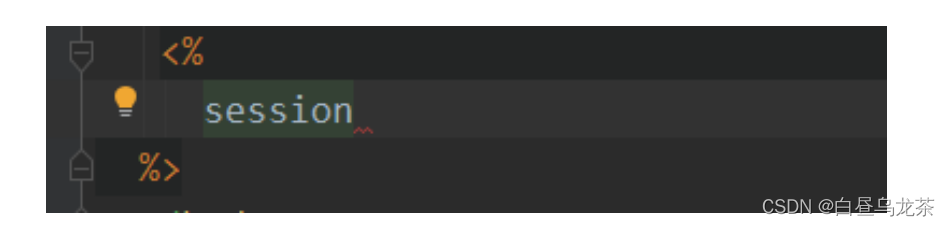
在Servlet中获取:通过请求对象获取

设置session失效的时间:
在web.xml中设置:以分钟为单位

使用java设置:以秒为单位

清空sesssion值:

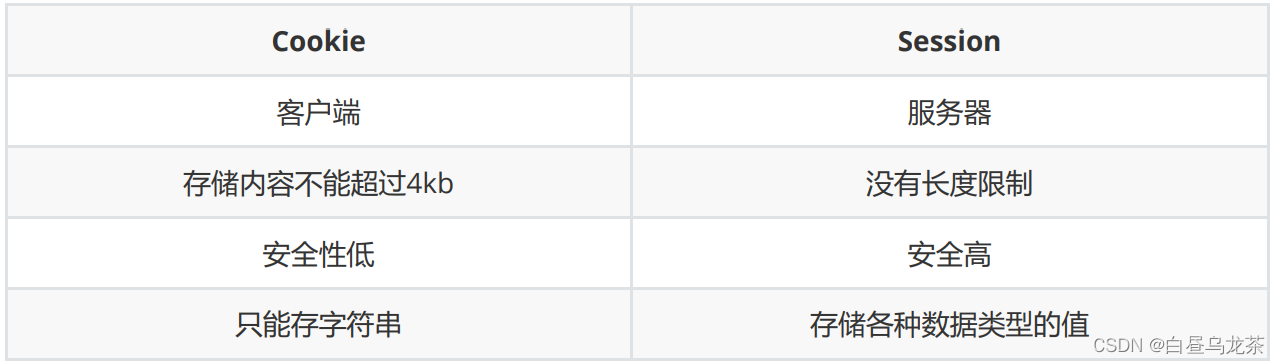
Cookie 与Session比较:
案例:
需求:

jsp页面:
a.jsp
- <%--
- Created by IntelliJ IDEA.
- User: 86182
- Date: 2022/9/6
- Time: 11:27
- To change this template use File | Settings | File Templates.
- --%>
- <%@ page contentType="text/html;charset=UTF-8" language="java" %>
- <html>
- <head>
- <title>Titletitle>
- head>
- <body>
- <form action="${pageContext.request.contextPath}/demoServlet" method="post">
- <p style="color: red">
- ${msg}
- p>
- <p>
- 用户名:<input type="text" name="uname">
- p>
- <p>
- 密码:<input type="password" name="upwd">
- p>
- <p>
- <input type="submit" value="登录">
- p>
- form>
- body>
- html>
b.jsp
- <%--
- Created by IntelliJ IDEA.
- User: 86182
- Date: 2022/9/6
- Time: 11:33
- To change this template use File | Settings | File Templates.
- --%>
- <%@ page contentType="text/html;charset=UTF-8" language="java" %>
- <html>
- <head>
- <title>Titletitle>
- head>
- <body>
- <%
- //验证session是否为空
- Object uname = session.getAttribute("uname");
- if (uname==null||"".equals(uname)){
- //提示信息
- request.setAttribute("msg","非法登录,小心腿打断");
- //转发
- request.getRequestDispatcher("a.jsp").forward(request,response);
- return;
- }
- %>
- <h1>欢迎来到VIP洗脚城,用户:${uname}h1>
- body>
- html>
demoServlet类:
- package com.qf.servlet;
- import javax.servlet.ServletException;
- import javax.servlet.annotation.WebServlet;
- import javax.servlet.http.HttpServlet;
- import javax.servlet.http.HttpServletRequest;
- import javax.servlet.http.HttpServletResponse;
- import javax.servlet.http.HttpSession;
- import java.io.IOException;
- @WebServlet(name = "demoServlet",urlPatterns = "/demoServlet")
- public class DemoServlet extends HttpServlet {
- @Override
- protected void service(HttpServletRequest req, HttpServletResponse resp) throws ServletException, IOException {
- //获取前端传递的数据
- String uname = req.getParameter("uname");
- String upwd = req.getParameter("upwd");
- //验证是否登录成功
- if ("admin".equals(uname)&&"123456".equals(upwd)){
- //将数据保存到session中
- HttpSession session = req.getSession();
- session.setAttribute("uname",uname);
- //重定向
- resp.sendRedirect("b.jsp");
- }else {
- //登录失败
- req.setAttribute("msg","登录失败");
- req.getRequestDispatcher("a.jsp").forward(req,resp);
- }
- }
- }
四、时间处理
MySQL中的时间:
date ==> 年 月 日
time ==> 时 分 秒
datetime ==> 年 月 日 时 分 秒
java中的时间:
1. Date Calendar
2.对时间格式化类 SimpleDateFormat
Date parse(String text) ==> 将字符串转换为
Date public StringBuffer format(Date date) ==> 将Date转换为指定格式的字符串
前端时间处理-My97 DatePicker:
下载地址:
My97日期控件 下载 & 更新日志 My97Datepicker Download & Changelog
使用:
step01 下载资源 并解压

step02 copy素材到web目录下

step03 在页面中使用
- <%--
- Created by IntelliJ IDEA.
- User: 86182
- Date: 2022/9/6
- Time: 14:37
- To change this template use File | Settings | File Templates.
- --%>
- <%@ page contentType="text/html;charset=UTF-8" language="java" %>
- <html>
- <head>
- <title>Titletitle>
- <script src="${pageContext.request.contextPath}/My97DatePicker/jquery-1.8.3.js">script>
- <script src="${pageContext.request.contextPath}/My97DatePicker/WdatePicker.js">script>
- head>
- <body>
- <input type="text" id="d241" onclick="WdatePicker({dateFmt:'yyyy-MM-dd HH:mm:ss'})" class="Wdate" style="width:300px"/>
- body>
- html>
五、解决乱码
数据库编码格式:

配置文件:
Tomcat:
step01 修改配置文件server.xml


Servlet:
- req.setCharacterEncoding("UTF-8");
- resp.setContentType("text/html;charset=utf-8");
- resp.setCharacterEncoding("UTF-8");
-
相关阅读:
【刷爆LeetCode】七月算法集训(20)二叉搜索树
【第67题】JAVA高级技术-多线程1(查看线程的运行状态)
【花雕动手做】有趣好玩的音乐可视化系列小项目(14)---水杯水瓶灯
安装Vmware workstations 16 Microsoft Visual C++ 2019 x86 Minimum Runtime报错解决办法
选择排序算法(C++版)
隧道技术的三种应用场景(IPv6,多播,VPN)
CMMI2.0之我见-技术解决方案TS&产品集成PI
破防了,原来这才是机房运维的正确方法
线代 | 目标120以上的综合提高题
JXLS2同一个sheet多个表格循环覆盖下面表格数据问题
- 原文地址:https://blog.csdn.net/qq_53884348/article/details/126719465
