-
Vue(模板语法 2)
一、事件处理器
1.1事件修饰符
Vue通过由点(.)表示的指令后缀来调用修饰符
<a v-on:click.stop="doThis">a> <form v-on:submit.prevent="onSubmit">form> <a v-on:click.stop.prevent="doThat">a> <form v-on:submit.prevent>form> <div v-on:click.capture="doThis">...div> <div v-on:click.self="doThat">...div> <a v-on:click.once="doThis">a>- 1
- 2
- 3
- 4
- 5
- 6
- 7
- 8
- 9
- 10
- 11
- 12
- 13
- 14
1.2事件冒泡
1.3什么是事件冒泡


添加.stop阻止事件冒泡
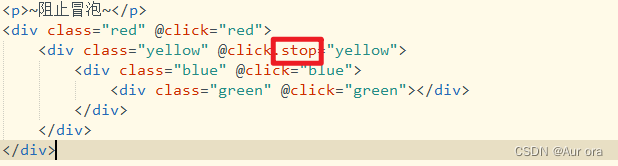
当我们再次点击yellow这个容器,只会弹出相对应的弹出框了

DOCTYPE html> <html> <head> <meta charset="utf-8"> <script src="https://cdn.bootcdn.net/ajax/libs/vue/2.6.10/vue.js">script> <title>title> <style> .red{ height: 400px; width:400px; background-color: red; } .yellow{ height: 300px; width:300px; background-color: yellow; } .blue{ height: 200px; width:200px; background-color: skyblue; } .green{ height: 100px; width:100px; background-color: springgreen; } style> head> <body> <div id="app"> <p>~阻止冒泡~p> <div class="red" @click="red"> <div class="yellow" @click.stop="yellow"> <div class="blue" @click.stop="blue"> <div class="green" @click="green">div> div> div> div> div> body> <script> new Vue({ el:'#app', data(){ return{ msg:'hello vue' } }, methods:{ red(){ alert('red') }, yellow(){ alert('yellow') }, blue(){ alert('blue') }, green(){ alert('green') }, dwss(){ alert(this.msg); // console.log(this.msg) } } }) script> html>- 1
- 2
- 3
- 4
- 5
- 6
- 7
- 8
- 9
- 10
- 11
- 12
- 13
- 14
- 15
- 16
- 17
- 18
- 19
- 20
- 21
- 22
- 23
- 24
- 25
- 26
- 27
- 28
- 29
- 30
- 31
- 32
- 33
- 34
- 35
- 36
- 37
- 38
- 39
- 40
- 41
- 42
- 43
- 44
- 45
- 46
- 47
- 48
- 49
- 50
- 51
- 52
- 53
- 54
- 55
- 56
- 57
- 58
- 59
- 60
- 61
- 62
- 63
- 64
- 65
- 66
- 67
- 68
- 69
- 70
- 71
- 72
click 事件只能点击一次
.once<p>~发送~p> <input type="text" v-model="msg"/> <button type="button" @click.once='dwss'>点我试试button>- 1
- 2
- 3

1.3 按键修饰符
Vue允许为v-on在监听键盘事件时添加按键修饰符
Vue为最常用的按键提供了别名
全部的按键别名:
.enter
.tab
.delete (捕获 “删除” 和 “退格” 键)
.esc
.space
.up
.down
.left
.right
.ctrl
.alt
.shift
.meta在click后添加.enter之后我们可以用回车就会触发事件
<p>~按键修饰符~p> <input type="text" v-model="msg" @keyup.tap='dwss'/>- 1
- 2

二、自定义组件
组件(Component)是Vue最强大的功能之一
组件可以扩展HTML元素,封装可重用的代码
组件系统让我们可以用独立可复用的小组件来构建大型应用,几乎任意类型的应用的界面都可以抽象为一个组件树全局和局部组件
全局组件:Vue.component(tagName, options),tagName为组件名,options为配置选项
局部组件: new Vue({el:‘#d1’,components:{…}})注册后,我们可以使用以下方式来调用组件:- 1
- 2
props
props是父组件用来传递数据的一个自定义属性。
父组件的数据需要通过props把数据传给子组件,子组件需要显式地用props选项声明 “prop”<body> <div id="app"> <p>~简单组件~p> <my-button>my-button> <p>父组件 传参 给 子组件p> <my-button m='zhangsan' n='3'>my-button> div> body> <script> Vue.component('my-button',{ template:'' // template:'', // props:['m','n'] }) new Vue({ el:'#app', data(){ return{ msg:'hello vue' } } }) script>- 1
- 2
- 3
- 4
- 5
- 6
- 7
- 8
- 9
- 10
- 11
- 12
- 13
- 14
- 15
- 16
- 17
- 18
- 19
- 20
- 21
- 22
- 23
- 24
- 25
- 26
- 27
- 28

父组件传参给子组件,所用props

三、组件通信
自定义事件
监听事件: o n ( e v e n t N a m e ) 触发事件: on(eventName) 触发事件: on(eventName)触发事件:emit(eventName)注意事项:
注1:Vue自定义事件是为组件间通信设计
vue中父组件通过prop传递数据给子组件,而想要将子组件的数据传递给父组件,则可以通过自定义事件的绑定
父Vue实例->Vue实例,通过prop传递数据
子Vue实例->父Vue实例,通过事件传递数据
注2:事件名
不同于组件和prop,事件名不存在任何自动化的大小写转换。而是触发的事件名需要完全匹配监听这个事件所用的名称DOCTYPE html> <html> <head> <meta charset="utf-8"> <script src="https://cdn.bootcdn.net/ajax/libs/vue/2.6.10/vue.js">script> <title>title> head> <body> <div id="app"> <p>子组件 传参 给 父组件p> <my-button m='zhangsan' n='3' @mymethod="xxx">my-button> div> body> <script> Vue.component('my-button',{ template:'', props:['m','n'], methods:{ sub(){ var name = "张三"; var sex = "男"; var age = 18; console.log(name); console.log(sex); console.log(age); // 子组件将参数传递给父组件 的关键在于 // 1.$emit 2.自定义事件 this.$emit('mymethod',name,sex,age); } } }) // 外部组件 new Vue({ el:'#app', data(){ return{ msg:'hello vue' } }, methods:{ xxx(a,b,c){ console.log(a+" "+b+" "+c) } } }) script> html>- 1
- 2
- 3
- 4
- 5
- 6
- 7
- 8
- 9
- 10
- 11
- 12
- 13
- 14
- 15
- 16
- 17
- 18
- 19
- 20
- 21
- 22
- 23
- 24
- 25
- 26
- 27
- 28
- 29
- 30
- 31
- 32
- 33
- 34
- 35
- 36
- 37
- 38
- 39
- 40
- 41
- 42
- 43
- 44
- 45
- 46
- 47
- 48
- 49
- 50
- 51
- 52


四、案例
表单
表单提交事件DOCTYPE html> <html> <head> <meta charset="utf-8"> <script src="https://cdn.bootcdn.net/ajax/libs/vue/2.6.10/vue.js">script> <title>title> head> <body> <div id="app"> <form> 姓名:<input type="text" v-model="uname" /><br> 密码:<input type="password" v-model="pwd" /><br> 性别: <input name="sex" type="radio" checked="checked" /> <input name="sex" type="radio" /><br> 爱好: <div v-for="l in likes"> <input v-model="hobby" type="checkbox" :value="l.id" />{{l.name}} div><br> 英语等级: <select v-model="selectedVal"> <option v-for="e in English" :value="e.id">{{e.name}}option> select><br> <input @click="show" type="checkbox" /><br> <input v-show="showFlag" @click="sub" type="button" value="ok" /> form> div> body> <script> new Vue({ el: '#app', data() { return { uname: null, pwd: null, sex: '男', likes: [ //爱好数据源 { id: 1, name: '篮球' }, { id: 2, name: '足球' }, { id: 3, name: '台球' }, { id: 4, name: '棒球' } ], English: [ //英语等级数据源 { id: 1, name: '优' }, { id: 2, name: '良' }, { id: 3, name: '差' }, ], hobby: [], //用来存放选中的爱好 selectedVal: 0, showFlag: false } }, methods: { show() { this.showFlag = true; }, sub(){ // 后续都是json数据交互,向后台提交json对象 var obj={ uname:this.uname, pwd:this.pwd, sex:this.sex, hobby:this.hobby, level:this.selectedVal } console.log(obj); } } }) script> html>- 1
- 2
- 3
- 4
- 5
- 6
- 7
- 8
- 9
- 10
- 11
- 12
- 13
- 14
- 15
- 16
- 17
- 18
- 19
- 20
- 21
- 22
- 23
- 24
- 25
- 26
- 27
- 28
- 29
- 30
- 31
- 32
- 33
- 34
- 35
- 36
- 37
- 38
- 39
- 40
- 41
- 42
- 43
- 44
- 45
- 46
- 47
- 48
- 49
- 50
- 51
- 52
- 53
- 54
- 55
- 56
- 57
- 58
- 59
- 60
- 61
- 62
- 63
- 64
- 65
- 66
- 67
- 68
- 69
- 70
- 71
- 72
- 73
- 74
- 75
- 76
- 77
- 78
- 79
- 80
- 81
- 82
- 83
- 84
- 85
- 86
- 87
- 88
- 89
- 90
- 91
- 92
- 93
- 94
- 95

————————————————————————————
今天的分享就到这里了,若有问题,欢迎大家指正! -
相关阅读:
初窥门径代码起手,Go lang1.18入门精炼教程,由白丁入鸿儒,首次运行golang程序EP01
vue3 源码解析(1)— reactive 响应式实现
MySQL之中间件Mycat实现读写分离
Spring使用(三)
如何搭建自己的图床
npm 安装第三方字体库
干货 | 一文搞定 uiautomator2 自动化测试工具使用
MySQL高级语句(一)
Web APIs Web APIs第二天
Transformer英语-法语机器翻译实例
- 原文地址:https://blog.csdn.net/qq_65345936/article/details/126689193
