-
【java_wxid项目】【第八章】【Apache ShardingSphere集成】
主项目链接:https://gitee.com/java_wxid/java_wxid
项目架构及博文总结:- 点击:【使用Spring Boot快速构建应用】
- 点击:【使用Spring Cloud Open Feign基于动态代理动态构造请求实现与其他系统进行交互】
- 点击:【使用Spring Cloud Hystrix实现服务容错、熔断、降级、监控】
- 点击:【使用Spring Cloud Ribbon以库的方式集成到服务的消费方实现客户端负载均衡】
- 点击:【使用Spring Cloud Gateway作为API网关服务进行请求拦截、服务分发、降级、限流】
- 点击:【使用Spring Cloud Security Oauth2作为微服务统一认证中心实现用户认证和授权访问】
- 点击:【使用Spring Cloud Stream作为消息驱动用于动态的切换中间件】
- 点击:【使用Spring Cloud Skywalking基于字节码注入通过探针方式进行链路追踪、分布式追踪、性能指标分析、应用和服务依赖分析】
- 点击:【使用Spring Cloud Alibaba Nacos实现服务注册/发现/续约/剔除/下线、心跳检测、服务配置管理、基于长轮训机制实现配置动态变更】
- 点击:【使用Spring Cloud Alibaba Seata作为对项目代码无入侵的分布式事务解决方案】
- 点击:【使用Spring Cloud Alibaba Sentinel实现高可用流量防护】
- 点击:【使用Apache ShardingSphere作为关系型数据库中间件实现分库分表、读写分离】
- 点击:【使用Apache Mybatis作为持久层框架用于定制化SQL、存储过程以及高级映射】
- 点击:【使用Redis作为高性能分布式缓存数据库】
- 点击:【使用ElasticSearch全文搜索】
- 点击:【使用MongoDB非关系型数据库】
- 点击:【使用xxl-job作为分布式任务调度平台】
- 点击:【使用Elasticsearch + Logstash + Kibana作为日志收集系统】
- 点击:【使用Apifox作为API文档、API调试、API Mock、API自动化测试】
- 点击:【使用Apache Spark作为基于内存计算的大数据分析引擎用于批处理、交互式查询】
- 点击:【使用ETL工具将数据源抽取到HDFS作为高可靠、高吞吐量的分布式文件系统存储,通过Hive清洗、处理和计算原始数据,Hive清洗处理后的结果,将存入Hbase,海量数据随机查询场景从HBase查询数据】
- 点击:【使用领域驱动DDD设计和设计模式进行开发】
- 点击:【使用Netty基于Java NIO封装的高性能的网络通信框架】
- 点击:【使用k8s、docker、docker-compose、宝塔面板进行环境搭建和部署】
- 点击:【使用Vue渐进式JavaScript框架作为适用场景丰富的Web前端框架】
- 点击:【分享人才筛选、工作分配、高效办公、项目推动等团队管理经验】
项目模块:
前期规划,实现部分java_wxid ├── demo // 演示模块 │ └── 模块名称:apache-mybatis-demo模块 //Apache Mybatis集成(已实现并有博文总结) │ └── 模块名称:apache-shardingsphere-demo模块 //Apache ShardingSphere集成(已实现并有博文总结) │ └── 模块名称:design-demo模块 //设计模式实战落地(已实现并有博文总结) │ └── 模块名称:elasticsearch-demo模块 //ElasticSearch集成(已实现并有博文总结) │ └── 模块名称:mongodb-demo模块 //MongoDB集成(已实现并有博文总结) │ └── 模块名称:redis-demo模块 //Redis集成(已实现并有博文总结) │ └── 模块名称:spring-boot-demo模块 //Spring Boot快速构建应用(已实现并有博文总结) │ └── 模块名称:spring-cloud-alibaba-nacos-demo模块 //Spring Cloud Alibaba Nacos集成(已实现并有博文总结) │ └── 模块名称:spring-cloud-alibaba-seata-demo模块 //Spring Cloud Alibaba Seata集成(已实现并有博文总结) │ └── 模块名称:spring-cloud-alibaba-sentinel-demo模块 //Spring Cloud Alibaba Sentinel集成(已实现并有博文总结) │ └── 模块名称:spring-cloud-gateway-demo模块 //Spring Cloud Gateway集成(已实现并有博文总结) │ └── 模块名称:spring-cloud-hystrix-demo模块 //Spring Cloud Hystrix集成(已实现并有博文总结) │ └── 模块名称:spring-cloud-open-feign-demo模块 //Spring Cloud Open Feign集成(已实现并有博文总结) │ └── 模块名称:spring-cloud-ribbon-demo模块 //Spring Cloud Ribbon集成(已实现并有博文总结) │ └── 模块名称:spring-cloud-security-oauth2-demo模块 //Spring Cloud Security Oauth2集成(已实现并有博文总结) │ └── 模块名称:spring-cloud-security-oauth2-sso-client-demo模块 //Spring Cloud Security Oauth2集成(已实现并有博文总结) │ └── 模块名称:spring-cloud-skywalking-demo模块 //Spring Cloud Skywalking集成(已实现并有博文总结) │ └── 模块名称:spring-cloud-stream-demo模块 //Spring Cloud Stream集成(已实现并有博文总结) │ └── 模块名称:swagger-demo模块 //springfox-swagger2集成(已实现并有博文总结) │ └── 模块名称:xxl-job模块 //xxl-job集成(已实现并有博文总结) │ └── 模块名称:apache-spark-demo模块 //Apache Spark集成 │ └── 模块名称:etl-hdfs-hive-hbase-demo模块 //ETL、HDFS、Hive、Hbase集成 │ └── 模块名称:ddd-mode-demo模块 //DDD领域设计 │ └── 模块名称:netty-demo模块 //Netty集成 │ └── 模块名称:vue-demo模块 //前端vue集成 ├── document // 文档 │ └── JavaKnowledgeDocument //java知识点 │ └── java基础知识点.md │ └── mq知识点.md │ └── mysql知识点.md │ └── redis知识点.md │ └── springcould知识点.md │ └── spring知识点.md │ └── FounderDocument //创始人 │ └── 创始人.md- 1
- 2
- 3
- 4
- 5
- 6
- 7
- 8
- 9
- 10
- 11
- 12
- 13
- 14
- 15
- 16
- 17
- 18
- 19
- 20
- 21
- 22
- 23
- 24
- 25
- 26
- 27
- 28
- 29
- 30
- 31
- 32
- 33
- 34
- 35
- 36
- 37
系列文章:快速集成各种微服务相关的技术,帮助大家可以快速集成到自己的项目中,节约开发时间。
提示:系列文章还未全部完成,后续的文章,会慢慢补充进去的。文章目录
- 创建apache-shardingsphere-demo项目
- 修改pom.xml
- 修改ApacheShardingsphereDemoApplication
- 创建application.properties
- 创建application01.properties
- 创建application02.properties
- 创建application03.properties
- 创建application04.properties
- 创建Course
- 创建Dict
- 创建User
- 创建CourseMapper
- 创建DictMapper
- 创建UserMapper
- 创建MyComplexDSShardingAlgorithm
- 创建MyComplexTableShardingAlgorithm
- 创建MyHintTableShardingAlgorithm
- 创建MyPreciseDSShardingAlgorithm
- 创建MyPreciseTableShardingAlgorithm
- 创建MyRangeDSShardingAlgorithm
- 创建MyRangeTableShardingAlgorithm
- 创建course.sql
- 创建t_dict.sql
- 创建t_user.sql
- 修改ApacheShardingsphereDemoApplicationTests
- 校验Apache ShardingSphere是否正常工作
创建apache-shardingsphere-demo项目
项目代码:https://gitee.com/java_wxid/java_wxid/tree/master/demo/apache-shardingsphere-demo
项目结构如下(示例):

修改pom.xml
代码如下(示例):
<?xml version="1.0" encoding="UTF-8"?> <project xmlns="http://maven.apache.org/POM/4.0.0" xmlns:xsi="http://www.w3.org/2001/XMLSchema-instance" xsi:schemaLocation="http://maven.apache.org/POM/4.0.0 https://maven.apache.org/xsd/maven-4.0.0.xsd"> <modelVersion>4.0.0</modelVersion> <groupId>com.example</groupId> <artifactId>apache-shardingsphere-demo</artifactId> <version>0.0.1-SNAPSHOT</version> <name>apache-shardingsphere-demo</name> <description>Demo project for Spring Boot</description> <build> <plugins> <plugin> <groupId>org.apache.maven.plugins</groupId> <artifactId>maven-compiler-plugin</artifactId> <configuration> <source>8</source> <target>8</target> </configuration> </plugin> </plugins> </build> <dependencyManagement> <dependencies> <dependency> <groupId>org.springframework.boot</groupId> <artifactId>spring-boot-dependencies</artifactId> <version>2.3.1.RELEASE</version> <type>pom</type> <scope>import</scope> </dependency> </dependencies> </dependencyManagement> <dependencies> <dependency> <groupId>org.apache.shardingsphere</groupId> <artifactId>sharding-jdbc-spring-boot-starter</artifactId> <version>4.1.1</version> </dependency> <dependency> <groupId>org.springframework.boot</groupId> <artifactId>spring-boot-starter</artifactId> <version>2.4.5</version> </dependency> <dependency> <groupId>org.springframework.boot</groupId> <artifactId>spring-boot-starter-test</artifactId> <version>2.4.1</version> </dependency> <dependency> <groupId>com.alibaba</groupId> <artifactId>druid</artifactId> <version>1.1.23</version> </dependency> <dependency> <groupId>mysql</groupId> <artifactId>mysql-connector-java</artifactId> <version>8.0.22</version> </dependency> <dependency> <groupId>com.baomidou</groupId> <artifactId>mybatis-plus-boot-starter</artifactId> <version>3.3.2</version> </dependency> <dependency> <groupId>junit</groupId> <artifactId>junit</artifactId> <scope>test</scope> </dependency> </dependencies> </project>- 1
- 2
- 3
- 4
- 5
- 6
- 7
- 8
- 9
- 10
- 11
- 12
- 13
- 14
- 15
- 16
- 17
- 18
- 19
- 20
- 21
- 22
- 23
- 24
- 25
- 26
- 27
- 28
- 29
- 30
- 31
- 32
- 33
- 34
- 35
- 36
- 37
- 38
- 39
- 40
- 41
- 42
- 43
- 44
- 45
- 46
- 47
- 48
- 49
- 50
- 51
- 52
- 53
- 54
- 55
- 56
- 57
- 58
- 59
- 60
- 61
- 62
- 63
- 64
- 65
- 66
- 67
- 68
- 69
- 70
- 71
- 72
- 73
- 74
- 75
修改ApacheShardingsphereDemoApplication
代码如下(示例):
package com.example.apacheshardingspheredemo; import org.mybatis.spring.annotation.MapperScan; import org.springframework.boot.SpringApplication; import org.springframework.boot.autoconfigure.SpringBootApplication; @MapperScan("com.example.apacheshardingspheredemo.mapper") @SpringBootApplication public class ApacheShardingsphereDemoApplication { public static void main(String[] args) { SpringApplication.run(ApacheShardingsphereDemoApplication.class, args); } }- 1
- 2
- 3
- 4
- 5
- 6
- 7
- 8
- 9
- 10
- 11
- 12
- 13
- 14
- 15
- 16
创建application.properties
真正运行的配置
代码如下(示例):#配置数据源 spring.shardingsphere.datasource.names=m1 spring.shardingsphere.datasource.m1.type=com.alibaba.druid.pool.DruidDataSource spring.shardingsphere.datasource.m1.driver-class-name=com.mysql.cj.jdbc.Driver spring.shardingsphere.datasource.m1.url=jdbc:mysql://110.42.239.246:3306/coursedb?serverTimezone=GMT%2B8 spring.shardingsphere.datasource.m1.username=root spring.shardingsphere.datasource.m1.password=591e242ca29b9c37 #course是逻辑表名,actual-data-nodes是真实表分布,也就是sharding里面的逻辑表course对应的是m0库中course_1和course_2 spring.shardingsphere.sharding.tables.course.actual-data-nodes=m1.course_$->{1..2} #主键生成策略,cid作为主键 spring.shardingsphere.sharding.tables.course.key-generator.column=cid #使用雪花算法生成主键 spring.shardingsphere.sharding.tables.course.key-generator.type=SNOWFLAKE #雪花算法需要有一个参数worker.id,这个是可选的 spring.shardingsphere.sharding.tables.course.key-generator.props.worker.id=1 #表策略:选择inline依赖策略,sharding-column分片键cid spring.shardingsphere.sharding.tables.course.table-strategy.inline.sharding-column=cid #表策略:algorithm-expression分片算法cid模2加1 spring.shardingsphere.sharding.tables.course.table-strategy.inline.algorithm-expression=course_$->{cid%2+1} #其他运行属性 spring.shardingsphere.props.sql.show = true spring.main.allow-bean-definition-overriding=true- 1
- 2
- 3
- 4
- 5
- 6
- 7
- 8
- 9
- 10
- 11
- 12
- 13
- 14
- 15
- 16
- 17
- 18
- 19
- 20
- 21
- 22
- 23
创建application01.properties
代码如下(示例):
#配置数据源 spring.shardingsphere.datasource.names=m1 spring.shardingsphere.datasource.m1.type=com.alibaba.druid.pool.DruidDataSource spring.shardingsphere.datasource.m1.driver-class-name=com.mysql.cj.jdbc.Driver spring.shardingsphere.datasource.m1.url=jdbc:mysql://110.42.239.246:3306/coursedb?serverTimezone=GMT%2B8 spring.shardingsphere.datasource.m1.username=root spring.shardingsphere.datasource.m1.password=591e242ca29b9c37 #course是逻辑表名,actual-data-nodes是真实表分布,也就是sharding里面的逻辑表course对应的是m0库中course_1和course_2 spring.shardingsphere.sharding.tables.course.actual-data-nodes=m1.course_$->{1..2} #主键生成策略,cid作为主键 spring.shardingsphere.sharding.tables.course.key-generator.column=cid #使用雪花算法生成主键 spring.shardingsphere.sharding.tables.course.key-generator.type=SNOWFLAKE #雪花算法需要有一个参数worker.id,这个是可选的 spring.shardingsphere.sharding.tables.course.key-generator.props.worker.id=1 #表策略:选择inline依赖策略,sharding-column分片键cid spring.shardingsphere.sharding.tables.course.table-strategy.inline.sharding-column=cid #表策略:algorithm-expression分片算法cid模2加1 spring.shardingsphere.sharding.tables.course.table-strategy.inline.algorithm-expression=course_$->{cid%2+1} #其他运行属性 spring.shardingsphere.props.sql.show = true spring.main.allow-bean-definition-overriding=true- 1
- 2
- 3
- 4
- 5
- 6
- 7
- 8
- 9
- 10
- 11
- 12
- 13
- 14
- 15
- 16
- 17
- 18
- 19
- 20
- 21
- 22
- 23
- 24
- 25
创建application02.properties
代码如下(示例):
#配置多个数据源 spring.shardingsphere.datasource.names=m1,m2 spring.shardingsphere.datasource.m1.type=com.alibaba.druid.pool.DruidDataSource spring.shardingsphere.datasource.m1.driver-class-name=com.mysql.cj.jdbc.Driver spring.shardingsphere.datasource.m1.url=jdbc:mysql://110.42.239.246:3306/coursedb?serverTimezone=GMT%2B8 spring.shardingsphere.datasource.m1.username=root spring.shardingsphere.datasource.m1.password=591e242ca29b9c37 spring.shardingsphere.datasource.m2.type=com.alibaba.druid.pool.DruidDataSource spring.shardingsphere.datasource.m2.driver-class-name=com.mysql.cj.jdbc.Driver spring.shardingsphere.datasource.m2.url=jdbc:mysql://110.42.239.246:3306/coursedb2?serverTimezone=GMT%2B8 spring.shardingsphere.datasource.m2.username=root spring.shardingsphere.datasource.m2.password=591e242ca29b9c37 #真实表分布,分库,分表 spring.shardingsphere.sharding.tables.course.actual-data-nodes=m$->{1..2}.course_$->{1..2} spring.shardingsphere.sharding.tables.course.key-generator.column=cid spring.shardingsphere.sharding.tables.course.key-generator.type=SNOWFLAKE spring.shardingsphere.sharding.tables.course.key-generator.props.worker.id=1 #inline分片策略 #spring.shardingsphere.sharding.tables.course.table-strategy.inline.sharding-column=cid #spring.shardingsphere.sharding.tables.course.table-strategy.inline.algorithm-expression=course_$->{cid%2+1} #spring.shardingsphere.sharding.tables.course.database-strategy.inline.sharding-column=cid #spring.shardingsphere.sharding.tables.course.database-strategy.inline.algorithm-expression=m$->{cid%2+1} #standard标准分片策略 #spring.shardingsphere.sharding.tables.course.table-strategy.standard.sharding-column=cid #spring.shardingsphere.sharding.tables.course.table-strategy.standard.precise-algorithm-class-name=com.roy.shardingDemo.algorithem.MyPreciseTableShardingAlgorithm #spring.shardingsphere.sharding.tables.course.table-strategy.standard.range-algorithm-class-name=com.roy.shardingDemo.algorithem.MyRangeTableShardingAlgorithm spring.shardingsphere.sharding.tables.course.database-strategy.standard.sharding-column=cid spring.shardingsphere.sharding.tables.course.database-strategy.standard.precise-algorithm-class-name=com.roy.shardingDemo.algorithem.MyPreciseDSShardingAlgorithm spring.shardingsphere.sharding.tables.course.database-strategy.standard.range-algorithm-class-name=com.roy.shardingDemo.algorithem.MyRangeDSShardingAlgorithm #complex复杂分片策略 #spring.shardingsphere.sharding.tables.course.table-strategy.complex.sharding-columns= cid, user_id #spring.shardingsphere.sharding.tables.course.table-strategy.complex.algorithm-class-name=com.roy.shardingDemo.algorithem.MyComplexTableShardingAlgorithm # #spring.shardingsphere.sharding.tables.course.database-strategy.complex.sharding-columns=cid, user_id #spring.shardingsphere.sharding.tables.course.database-strategy.complex.algorithm-class-name=com.roy.shardingDemo.algorithem.MyComplexDSShardingAlgorithm #hint强制路由策略 spring.shardingsphere.sharding.tables.course.table-strategy.hint.algorithm-class-name=com.roy.shardingDemo.algorithem.MyHintTableShardingAlgorithm #广播表配置 spring.shardingsphere.sharding.broadcast-tables=t_dict spring.shardingsphere.sharding.tables.t_dict.key-generator.column=dict_id spring.shardingsphere.sharding.tables.t_dict.key-generator.type=SNOWFLAKE spring.shardingsphere.props.sql.show = true spring.main.allow-bean-definition-overriding=true- 1
- 2
- 3
- 4
- 5
- 6
- 7
- 8
- 9
- 10
- 11
- 12
- 13
- 14
- 15
- 16
- 17
- 18
- 19
- 20
- 21
- 22
- 23
- 24
- 25
- 26
- 27
- 28
- 29
- 30
- 31
- 32
- 33
- 34
- 35
- 36
- 37
- 38
- 39
- 40
- 41
- 42
- 43
- 44
- 45
- 46
- 47
- 48
- 49
- 50
- 51
- 52
- 53
创建application03.properties
代码如下(示例):
spring.shardingsphere.datasource.names=m1 spring.shardingsphere.datasource.m1.type=com.alibaba.druid.pool.DruidDataSource spring.shardingsphere.datasource.m1.driver-class-name=com.mysql.cj.jdbc.Driver spring.shardingsphere.datasource.m1.url=jdbc:mysql://110.42.239.246:3306/coursedb?serverTimezone=GMT%2B8 spring.shardingsphere.datasource.m1.username=root spring.shardingsphere.datasource.m1.password=591e242ca29b9c37 spring.shardingsphere.sharding.tables.t_dict.actual-data-nodes=m1.t_dict_$->{1..2} spring.shardingsphere.sharding.tables.t_dict.key-generator.column=dict_id spring.shardingsphere.sharding.tables.t_dict.key-generator.type=SNOWFLAKE spring.shardingsphere.sharding.tables.t_dict.key-generator.props.worker.id=1 spring.shardingsphere.sharding.tables.t_dict.table-strategy.inline.sharding-column=ustatus spring.shardingsphere.sharding.tables.t_dict.table-strategy.inline.algorithm-expression=t_dict_$->{ustatus.toInteger()%2+1} spring.shardingsphere.sharding.tables.user.actual-data-nodes=m1.t_user_$->{1..2} spring.shardingsphere.sharding.tables.user.key-generator.column=user_id spring.shardingsphere.sharding.tables.user.key-generator.type=SNOWFLAKE spring.shardingsphere.sharding.tables.user.key-generator.props.worker.id=1 spring.shardingsphere.sharding.tables.user.table-strategy.inline.sharding-column=ustatus spring.shardingsphere.sharding.tables.user.table-strategy.inline.algorithm-expression=t_user_$->{ustatus.toInteger()%2+1} #绑定表示例 spring.shardingsphere.sharding.binding-tables[0]=user,t_dict spring.shardingsphere.props.sql.show = true spring.main.allow-bean-definition-overriding=true- 1
- 2
- 3
- 4
- 5
- 6
- 7
- 8
- 9
- 10
- 11
- 12
- 13
- 14
- 15
- 16
- 17
- 18
- 19
- 20
- 21
- 22
- 23
- 24
- 25
- 26
- 27
- 28
- 29
- 30
创建application04.properties
代码如下(示例):
#配置主从数据源,要基于MySQL主从架构。 spring.shardingsphere.datasource.names=m0,s0 spring.shardingsphere.datasource.m0.type=com.alibaba.druid.pool.DruidDataSource spring.shardingsphere.datasource.m0.driver-class-name=com.mysql.cj.jdbc.Driver spring.shardingsphere.datasource.m0.url=jdbc:mysql://139.224.137.74:3307/masterdemo?serverTimezone=GMT%2B8 spring.shardingsphere.datasource.m0.username=root spring.shardingsphere.datasource.m0.password=ca0a997ee4770063 spring.shardingsphere.datasource.s0.type=com.alibaba.druid.pool.DruidDataSource spring.shardingsphere.datasource.s0.driver-class-name=com.mysql.cj.jdbc.Driver spring.shardingsphere.datasource.s0.url=jdbc:mysql://106.14.132.94:3308/masterdemo?serverTimezone=GMT%2B8 spring.shardingsphere.datasource.s0.username=root spring.shardingsphere.datasource.s0.password=JHWLXeT56iJiBwDG #读写分离规则, m0 主库,s0 从库 spring.shardingsphere.sharding.master-slave-rules.ds0.master-data-source-name=m0 spring.shardingsphere.sharding.master-slave-rules.ds0.slave-data-source-names[0]=s0 #基于读写分离的表分片 spring.shardingsphere.sharding.tables.t_dict.actual-data-nodes=ds0.t_dict spring.shardingsphere.sharding.tables.t_dict.key-generator.column=dict_id spring.shardingsphere.sharding.tables.t_dict.key-generator.type=SNOWFLAKE spring.shardingsphere.sharding.tables.t_dict.key-generator.props.worker.id=1 spring.shardingsphere.props.sql.show = true spring.main.allow-bean-definition-overriding=true- 1
- 2
- 3
- 4
- 5
- 6
- 7
- 8
- 9
- 10
- 11
- 12
- 13
- 14
- 15
- 16
- 17
- 18
- 19
- 20
- 21
- 22
- 23
- 24
- 25
- 26
- 27
- 28
创建Course
代码如下(示例):
package com.example.apacheshardingspheredemo.entity; /** * @Author: liaozhiwei * @Description: TODO * @Date: Created in 21:16 2022/9/2 */ public class Course { private Long cid; private String cname; private Long userId; private String cstatus; public Long getCid() { return cid; } public void setCid(Long cid) { this.cid = cid; } public String getCname() { return cname; } public void setCname(String cname) { this.cname = cname; } public Long getUserId() { return userId; } public void setUserId(Long userId) { this.userId = userId; } public String getCstatus() { return cstatus; } public void setCstatus(String cstatus) { this.cstatus = cstatus; } @Override public String toString() { return "Course{" + "cid=" + cid + ", cname='" + cname + '\'' + ", userId=" + userId + ", cstatus='" + cstatus + '\'' + '}'; } }- 1
- 2
- 3
- 4
- 5
- 6
- 7
- 8
- 9
- 10
- 11
- 12
- 13
- 14
- 15
- 16
- 17
- 18
- 19
- 20
- 21
- 22
- 23
- 24
- 25
- 26
- 27
- 28
- 29
- 30
- 31
- 32
- 33
- 34
- 35
- 36
- 37
- 38
- 39
- 40
- 41
- 42
- 43
- 44
- 45
- 46
- 47
- 48
- 49
- 50
- 51
- 52
- 53
- 54
- 55
- 56
- 57
创建Dict
代码如下(示例):
package com.example.apacheshardingspheredemo.entity; import com.baomidou.mybatisplus.annotation.TableName; /** * @Author: liaozhiwei * @Description: TODO * @Date: Created in 21:16 2022/9/2 */ @TableName("t_dict") public class Dict { private Long dictId; private String ustatus; private String uvalue; public Long getDictId() { return dictId; } public void setDictId(Long dictId) { this.dictId = dictId; } public String getUstatus() { return ustatus; } public void setUstatus(String ustatus) { this.ustatus = ustatus; } public String getUvalue() { return uvalue; } public void setUvalue(String uvalue) { this.uvalue = uvalue; } @Override public String toString() { return "Dict{" + "dictId=" + dictId + ", ustatus='" + ustatus + '\'' + ", uvalue='" + uvalue + '\'' + '}'; } }- 1
- 2
- 3
- 4
- 5
- 6
- 7
- 8
- 9
- 10
- 11
- 12
- 13
- 14
- 15
- 16
- 17
- 18
- 19
- 20
- 21
- 22
- 23
- 24
- 25
- 26
- 27
- 28
- 29
- 30
- 31
- 32
- 33
- 34
- 35
- 36
- 37
- 38
- 39
- 40
- 41
- 42
- 43
- 44
- 45
- 46
- 47
- 48
- 49
创建User
代码如下(示例):
package com.example.apacheshardingspheredemo.entity; import com.baomidou.mybatisplus.annotation.TableName; /** * @Author: liaozhiwei * @Description: TODO * @Date: Created in 21:16 2022/9/2 */ @TableName("user") public class User { private Long userId; private String username; private String ustatus; private int uage; public Long getUserId() { return userId; } public void setUserId(Long userId) { this.userId = userId; } public String getUsername() { return username; } public void setUsername(String username) { this.username = username; } public String getUstatus() { return ustatus; } public void setUstatus(String ustatus) { this.ustatus = ustatus; } public int getUage() { return uage; } public void setUage(int uage) { this.uage = uage; } @Override public String toString() { return "User{" + "userId=" + userId + ", username='" + username + '\'' + ", ustatus='" + ustatus + '\'' + ", uage=" + uage + '}'; } }- 1
- 2
- 3
- 4
- 5
- 6
- 7
- 8
- 9
- 10
- 11
- 12
- 13
- 14
- 15
- 16
- 17
- 18
- 19
- 20
- 21
- 22
- 23
- 24
- 25
- 26
- 27
- 28
- 29
- 30
- 31
- 32
- 33
- 34
- 35
- 36
- 37
- 38
- 39
- 40
- 41
- 42
- 43
- 44
- 45
- 46
- 47
- 48
- 49
- 50
- 51
- 52
- 53
- 54
- 55
- 56
- 57
- 58
- 59
- 60
创建CourseMapper
代码如下(示例):
package com.example.apacheshardingspheredemo.mapper; import com.baomidou.mybatisplus.core.mapper.BaseMapper; import com.example.apacheshardingspheredemo.entity.Course; /** * @Author: liaozhiwei * @Description: TODO * @Date: Created in 21:16 2022/9/2 */ public interface CourseMapper extends BaseMapper<Course> { }- 1
- 2
- 3
- 4
- 5
- 6
- 7
- 8
- 9
- 10
- 11
- 12
- 13
创建DictMapper
代码如下(示例):
package com.example.apacheshardingspheredemo.mapper; import com.baomidou.mybatisplus.core.mapper.BaseMapper; import com.example.apacheshardingspheredemo.entity.Dict; /** * @Author: liaozhiwei * @Description: TODO * @Date: Created in 21:16 2022/9/2 */ public interface DictMapper extends BaseMapper<Dict> { }- 1
- 2
- 3
- 4
- 5
- 6
- 7
- 8
- 9
- 10
- 11
- 12
- 13
创建UserMapper
代码如下(示例):
package com.example.apacheshardingspheredemo.mapper; import com.baomidou.mybatisplus.core.mapper.BaseMapper; import com.example.apacheshardingspheredemo.entity.User; import org.apache.ibatis.annotations.Select; import java.util.List; /** * @Author: liaozhiwei * @Description: TODO * @Date: Created in 21:16 2022/9/2 */ public interface UserMapper extends BaseMapper<User> { @Select("select u.user_id,u.username,d.uvalue ustatus from user u left join t_dict d on u.ustatus = d.ustatus") public List<User> queryUserStatus(); }- 1
- 2
- 3
- 4
- 5
- 6
- 7
- 8
- 9
- 10
- 11
- 12
- 13
- 14
- 15
- 16
- 17
- 18
创建MyComplexDSShardingAlgorithm
代码如下(示例):
package com.example.apacheshardingspheredemo.algorithem; import com.google.common.collect.Range; import org.apache.shardingsphere.api.sharding.complex.ComplexKeysShardingAlgorithm; import org.apache.shardingsphere.api.sharding.complex.ComplexKeysShardingValue; import java.math.BigInteger; import java.util.ArrayList; import java.util.Collection; import java.util.List; /** * @Author: liaozhiwei * @Description: complex复杂分片策略 多字段的分库分表 库策略 * @Date: Created in 21:16 2022/9/2 */ public class MyComplexDSShardingAlgorithm implements ComplexKeysShardingAlgorithm<Long> { // SELECT cid,cname,user_id,cstatus FROM course WHERE cid BETWEEN ? AND ? AND user_id = ? @Override public Collection<String> doSharding(Collection<String> availableTargetNames, ComplexKeysShardingValue<Long> shardingValue) { Range<Long> cidRange = shardingValue.getColumnNameAndRangeValuesMap().get("cid");//cid BETWEEN ? AND ? Collection<Long> userIdCol = shardingValue.getColumnNameAndShardingValuesMap().get("user_id");// user_id = ? Long upperVal = cidRange.upperEndpoint();//上限 Long lowerVal = cidRange.lowerEndpoint();//下限 List<String> res = new ArrayList<>(); for(Long userId: userIdCol){ BigInteger userIdB = BigInteger.valueOf(userId); //实现库策略 course_{userID%2+1} BigInteger target = (userIdB.mod(new BigInteger("2"))).add(new BigInteger("1")); res.add("m"+target); } return res; } }- 1
- 2
- 3
- 4
- 5
- 6
- 7
- 8
- 9
- 10
- 11
- 12
- 13
- 14
- 15
- 16
- 17
- 18
- 19
- 20
- 21
- 22
- 23
- 24
- 25
- 26
- 27
- 28
- 29
- 30
- 31
- 32
- 33
- 34
- 35
- 36
- 37
- 38
- 39
- 40
创建MyComplexTableShardingAlgorithm
代码如下(示例):
package com.example.apacheshardingspheredemo.algorithem; import com.google.common.collect.Range; import org.apache.shardingsphere.api.sharding.complex.ComplexKeysShardingAlgorithm; import org.apache.shardingsphere.api.sharding.complex.ComplexKeysShardingValue; import java.math.BigInteger; import java.util.ArrayList; import java.util.Collection; import java.util.List; /** * @Author: liaozhiwei * @Description: complex复杂分片策略 多字段的分库分表 表策略 * @Date: Created in 21:16 2022/9/2 */ public class MyComplexTableShardingAlgorithm implements ComplexKeysShardingAlgorithm<Long> { // SELECT cid,cname,user_id,cstatus FROM course WHERE cid BETWEEN ? AND ? AND user_id = ? @Override public Collection<String> doSharding(Collection<String> availableTargetNames, ComplexKeysShardingValue<Long> shardingValue) { Range<Long> cidRange = shardingValue.getColumnNameAndRangeValuesMap().get("cid"); Collection<Long> userIdCol = shardingValue.getColumnNameAndShardingValuesMap().get("user_id"); Long upperVal = cidRange.upperEndpoint(); Long lowerVal = cidRange.lowerEndpoint(); List<String> res = new ArrayList<>(); for(Long userId: userIdCol){ BigInteger userIdB = BigInteger.valueOf(userId); //实现表策略 course_{userID%2+1} BigInteger target = (userIdB.mod(new BigInteger("2"))).add(new BigInteger("1")); res.add(shardingValue.getLogicTableName()+"_"+target); } return res; } }- 1
- 2
- 3
- 4
- 5
- 6
- 7
- 8
- 9
- 10
- 11
- 12
- 13
- 14
- 15
- 16
- 17
- 18
- 19
- 20
- 21
- 22
- 23
- 24
- 25
- 26
- 27
- 28
- 29
- 30
- 31
- 32
- 33
- 34
- 35
- 36
- 37
- 38
- 39
- 40
创建MyHintTableShardingAlgorithm
代码如下(示例):
package com.example.apacheshardingspheredemo.algorithem; import org.apache.shardingsphere.api.sharding.hint.HintShardingAlgorithm; import org.apache.shardingsphere.api.sharding.hint.HintShardingValue; import java.util.Arrays; import java.util.Collection; /** * @Author: liaozhiwei * @Description: hint强制路由策略 * @Date: Created in 21:16 2022/9/2 */ public class MyHintTableShardingAlgorithm implements HintShardingAlgorithm<Integer> { /** * 可以只查某个表 * @param availableTargetNames * @param shardingValue * @return */ @Override public Collection<String> doSharding(Collection<String> availableTargetNames, HintShardingValue<Integer> shardingValue) { String key = shardingValue.getLogicTableName() + "_" + shardingValue.getValues().toArray()[0]; if(availableTargetNames.contains(key)){ return Arrays.asList(key); } throw new UnsupportedOperationException("route "+ key +" is not supported ,please check your config"); } }- 1
- 2
- 3
- 4
- 5
- 6
- 7
- 8
- 9
- 10
- 11
- 12
- 13
- 14
- 15
- 16
- 17
- 18
- 19
- 20
- 21
- 22
- 23
- 24
- 25
- 26
- 27
- 28
- 29
- 30
- 31
创建MyPreciseDSShardingAlgorithm
代码如下(示例):
package com.example.apacheshardingspheredemo.algorithem; import org.apache.shardingsphere.api.sharding.standard.PreciseShardingAlgorithm; import org.apache.shardingsphere.api.sharding.standard.PreciseShardingValue; import java.math.BigInteger; import java.util.Collection; /** * @Author: liaozhiwei * @Description: 库策略 * @Date: Created in 21:16 2022/9/2 */ public class MyPreciseDSShardingAlgorithm implements PreciseShardingAlgorithm<Long> { //select * from course where cid = ? or cid in (?,?) @Override public String doSharding(Collection<String> availableTargetNames, PreciseShardingValue<Long> shardingValue) { String logicTableName = shardingValue.getLogicTableName(); String cid = shardingValue.getColumnName(); Long cidValue = shardingValue.getValue(); BigInteger shardingValueB = BigInteger.valueOf(cidValue); //实现库策略 m_$->{cid%2+1) BigInteger resB = (shardingValueB.mod(new BigInteger("2"))).add(new BigInteger("1")); String key = "m" + resB; if(availableTargetNames.contains(key)){ return key; } //couse_1, course_2 throw new UnsupportedOperationException("route "+ key +" is not supported ,please check your config"); } }- 1
- 2
- 3
- 4
- 5
- 6
- 7
- 8
- 9
- 10
- 11
- 12
- 13
- 14
- 15
- 16
- 17
- 18
- 19
- 20
- 21
- 22
- 23
- 24
- 25
- 26
- 27
- 28
- 29
- 30
- 31
- 32
创建MyPreciseTableShardingAlgorithm
代码如下(示例):
package com.example.apacheshardingspheredemo.algorithem; import org.apache.shardingsphere.api.sharding.standard.PreciseShardingAlgorithm; import org.apache.shardingsphere.api.sharding.standard.PreciseShardingValue; import java.math.BigInteger; import java.util.Collection; /** * @Author: liaozhiwei * @Description: 表策略:standard标准分片策略 * @Date: Created in 21:16 2022/9/2 */ public class MyPreciseTableShardingAlgorithm implements PreciseShardingAlgorithm<Long> { //select * from course where cid = ? or cid in (?,?) /** * * @param availableTargetNames 真实表的名称 * @param shardingValue 条件的值(占位符?的值) * @return */ @Override public String doSharding(Collection<String> availableTargetNames, PreciseShardingValue<Long> shardingValue) { String logicTableName = shardingValue.getLogicTableName(); String cid = shardingValue.getColumnName(); Long cidValue = shardingValue.getValue(); BigInteger shardingValueB = BigInteger.valueOf(cidValue); //实现表策略 course_$->{cid%2+1) BigInteger resB = (shardingValueB.mod(new BigInteger("2"))).add(new BigInteger("1")); String key = logicTableName+"_"+resB; if(availableTargetNames.contains(key)){ return key; } //couse_1, course_2 throw new UnsupportedOperationException("route "+ key +" is not supported ,please check your config"); } }- 1
- 2
- 3
- 4
- 5
- 6
- 7
- 8
- 9
- 10
- 11
- 12
- 13
- 14
- 15
- 16
- 17
- 18
- 19
- 20
- 21
- 22
- 23
- 24
- 25
- 26
- 27
- 28
- 29
- 30
- 31
- 32
- 33
- 34
- 35
- 36
- 37
- 38
- 39
- 40
创建MyRangeDSShardingAlgorithm
代码如下(示例):
package com.example.apacheshardingspheredemo.algorithem; import org.apache.shardingsphere.api.sharding.standard.RangeShardingAlgorithm; import org.apache.shardingsphere.api.sharding.standard.RangeShardingValue; import java.util.Arrays; import java.util.Collection; /** * @Author: liaozhiwei * @Description: 库策略:standard标准分片策略 范围查询 * @Date: Created in 21:16 2022/9/2 */ public class MyRangeDSShardingAlgorithm implements RangeShardingAlgorithm<Long> { @Override public Collection<String> doSharding(Collection<String> availableTargetNames, RangeShardingValue<Long> shardingValue) { //select * from course where cid between 1 and 100; Long upperVal = shardingValue.getValueRange().upperEndpoint();//上限 100 Long lowerVal = shardingValue.getValueRange().lowerEndpoint();//下限 1 //可以进行业务分库,这里不作处理了 //可以拿到它的真实库名 String logicTableName = shardingValue.getLogicTableName(); //我这里直接写死返回m1,m2 return Arrays.asList("m1","m2"); } }- 1
- 2
- 3
- 4
- 5
- 6
- 7
- 8
- 9
- 10
- 11
- 12
- 13
- 14
- 15
- 16
- 17
- 18
- 19
- 20
- 21
- 22
- 23
- 24
- 25
- 26
- 27
- 28
- 29
- 30
创建MyRangeTableShardingAlgorithm
代码如下(示例):
package com.example.apacheshardingspheredemo.algorithem; import org.apache.shardingsphere.api.sharding.standard.RangeShardingAlgorithm; import org.apache.shardingsphere.api.sharding.standard.RangeShardingValue; import java.util.Arrays; import java.util.Collection; /** * @Author: liaozhiwei * @Description: 表策略:standard标准分片策略 范围查询 * @Date: Created in 21:16 2022/9/2 */ public class MyRangeTableShardingAlgorithm implements RangeShardingAlgorithm<Long> { @Override public Collection<String> doSharding(Collection<String> availableTargetNames, RangeShardingValue<Long> shardingValue) { //select * from course where cid between 1 and 100; Long upperVal = shardingValue.getValueRange().upperEndpoint();//上限 between 1 and 100中的100 Long lowerVal = shardingValue.getValueRange().lowerEndpoint();//下限 between 1 and 100中的1 //可以进行业务分表,这里不作处理了 String logicTableName = shardingValue.getLogicTableName(); //直接写死返回真实表course_1、course_2 return Arrays.asList(logicTableName+"_1",logicTableName+"_2"); } }- 1
- 2
- 3
- 4
- 5
- 6
- 7
- 8
- 9
- 10
- 11
- 12
- 13
- 14
- 15
- 16
- 17
- 18
- 19
- 20
- 21
- 22
- 23
- 24
- 25
- 26
- 27
创建course.sql
代码如下(示例):
-- 在三个库中创建 CREATE TABLE course_1 ( cid BIGINT(20) PRIMARY KEY, cname VARCHAR(50) NOT NULL, user_id BIGINT(20) NOT NULL, cstatus varchar(10) NOT NULL ); CREATE TABLE course_2 ( cid BIGINT(20) PRIMARY KEY, cname VARCHAR(50) NOT NULL, user_id BIGINT(20) NOT NULL, cstatus varchar(10) NOT NULL );- 1
- 2
- 3
- 4
- 5
- 6
- 7
- 8
- 9
- 10
- 11
- 12
- 13
- 14
创建t_dict.sql
代码如下(示例):
-- 在三个库中创建 CREATE TABLE `t_dict` ( `dict_id` bigint(0) PRIMARY KEY NOT NULL, `ustatus` varchar(100) NOT NULL, `uvalue` varchar(100) NOT NULL ); -- 在userdb中创建 CREATE TABLE `t_dict_1` ( `dict_id` bigint(0) PRIMARY KEY NOT NULL, `ustatus` varchar(100) NOT NULL, `uvalue` varchar(100) NOT NULL ); CREATE TABLE `t_dict_2` ( `dict_id` bigint(0) PRIMARY KEY NOT NULL, `ustatus` varchar(100) NOT NULL, `uvalue` varchar(100) NOT NULL );- 1
- 2
- 3
- 4
- 5
- 6
- 7
- 8
- 9
- 10
- 11
- 12
- 13
- 14
- 15
- 16
- 17
创建t_user.sql
代码如下(示例):
--在userdb中创建 CREATE TABLE `t_user` ( `user_id` bigint(0) PRIMARY KEY NOT NULL, `username` varchar(100) NOT NULL, `ustatus` varchar(50) NOT NULL, `uage` int(3) ); CREATE TABLE `t_user_1` ( `user_id` bigint(0) PRIMARY KEY NOT NULL, `username` varchar(100) NOT NULL, `ustatus` varchar(50) NOT NULL, `uage` int(3) ); CREATE TABLE `t_user_2` ( `user_id` bigint(0) PRIMARY KEY NOT NULL, `username` varchar(100) NOT NULL, `ustatus` varchar(50) NOT NULL, `uage` int(3) );- 1
- 2
- 3
- 4
- 5
- 6
- 7
- 8
- 9
- 10
- 11
- 12
- 13
- 14
- 15
- 16
- 17
- 18
- 19
- 20
修改ApacheShardingsphereDemoApplicationTests
代码如下(示例):
package com.example.apacheshardingspheredemo; import com.baomidou.mybatisplus.core.conditions.query.QueryWrapper; import com.example.apacheshardingspheredemo.entity.Course; import com.example.apacheshardingspheredemo.entity.Dict; import com.example.apacheshardingspheredemo.entity.User; import com.example.apacheshardingspheredemo.mapper.CourseMapper; import com.example.apacheshardingspheredemo.mapper.DictMapper; import com.example.apacheshardingspheredemo.mapper.UserMapper; import org.apache.shardingsphere.api.hint.HintManager; import org.junit.jupiter.api.Test; import org.junit.runner.RunWith; import org.springframework.boot.test.context.SpringBootTest; import org.springframework.test.context.junit4.SpringRunner; import javax.annotation.Resource; import java.util.List; @RunWith(SpringRunner.class) @SpringBootTest class ApacheShardingsphereDemoApplicationTests { @Resource CourseMapper courseMapper; @Resource DictMapper dictMapper; @Resource UserMapper userMapper; @Test public void addCourse(){ for(int i = 0 ; i < 10 ; i ++){ Course c = new Course(); // c.setCid(Long.valueOf(i));//配置文件里面选择了雪花算法生成主键id,所以这里就不需要cid自己生成了 c.setCname("shardingsphere"); c.setUserId(Long.valueOf(""+(1000+i))); c.setCstatus("1"); courseMapper.insert(c); } } @Test public void queryCourse(){ //select * from course QueryWrapper<Course> wrapper = new QueryWrapper<>(); wrapper.orderByDesc("cid"); wrapper.eq("cid",553684818806706177L); // wrapper.in() List<Course> courses = courseMapper.selectList(wrapper); courses.forEach(course -> System.out.println(course)); } @Test public void queryOrderRange(){ //select * from course QueryWrapper<Course> wrapper = new QueryWrapper<>(); wrapper.between("cid",553684818806706177L,553684819184193537L); // wrapper.in() List<Course> courses = courseMapper.selectList(wrapper); courses.forEach(course -> System.out.println(course)); } @Test public void queryCourseComplex(){ QueryWrapper<Course> wrapper = new QueryWrapper<>(); wrapper.between("cid",553684818806706177L,553684819184193537L); wrapper.eq("user_id",1009L); // wrapper.in() List<Course> courses = courseMapper.selectList(wrapper); courses.forEach(course -> System.out.println(course)); } @Test public void queryCourseByHint(){ HintManager hintManager = HintManager.getInstance(); hintManager.addTableShardingValue("course",2); List<Course> courses = courseMapper.selectList(null); courses.forEach(course -> System.out.println(course)); hintManager.close(); } @Test public void addDict(){ Dict d1 = new Dict(); d1.setUstatus("1"); d1.setUvalue("正常"); dictMapper.insert(d1); Dict d2 = new Dict(); d2.setUstatus("0"); d2.setUvalue("不正常"); dictMapper.insert(d2); for(int i = 0 ; i < 10 ; i ++){ User user = new User(); user.setUsername("user No "+i); user.setUstatus(""+(i%2)); user.setUage(i*10); userMapper.insert(user); } } @Test public void queryUserStatus(){ List<User> users = userMapper.queryUserStatus(); users.forEach(user -> System.out.println(user)); } @Test public void addDictByMS(){ Dict d1 = new Dict(); d1.setUstatus("1"); d1.setUvalue("正常"); dictMapper.insert(d1); Dict d2 = new Dict(); d2.setUstatus("0"); d2.setUvalue("不正常"); dictMapper.insert(d2); } @Test public void queryDictByMS(){ List<Dict> dicts = dictMapper.selectList(null); dicts.forEach(dict -> System.out.println(dict)); } }- 1
- 2
- 3
- 4
- 5
- 6
- 7
- 8
- 9
- 10
- 11
- 12
- 13
- 14
- 15
- 16
- 17
- 18
- 19
- 20
- 21
- 22
- 23
- 24
- 25
- 26
- 27
- 28
- 29
- 30
- 31
- 32
- 33
- 34
- 35
- 36
- 37
- 38
- 39
- 40
- 41
- 42
- 43
- 44
- 45
- 46
- 47
- 48
- 49
- 50
- 51
- 52
- 53
- 54
- 55
- 56
- 57
- 58
- 59
- 60
- 61
- 62
- 63
- 64
- 65
- 66
- 67
- 68
- 69
- 70
- 71
- 72
- 73
- 74
- 75
- 76
- 77
- 78
- 79
- 80
- 81
- 82
- 83
- 84
- 85
- 86
- 87
- 88
- 89
- 90
- 91
- 92
- 93
- 94
- 95
- 96
- 97
- 98
- 99
- 100
- 101
- 102
- 103
- 104
- 105
- 106
- 107
- 108
- 109
- 110
- 111
- 112
- 113
- 114
- 115
- 116
- 117
- 118
- 119
- 120
- 121
- 122
- 123
- 124
- 125
- 126
- 127
- 128
校验Apache ShardingSphere是否正常工作
分表插入
把application01.properties的配置复制粘贴到application.properties里面
如下图(示例):

配置如下(示例):#配置数据源 spring.shardingsphere.datasource.names=m1 spring.shardingsphere.datasource.m1.type=com.alibaba.druid.pool.DruidDataSource spring.shardingsphere.datasource.m1.driver-class-name=com.mysql.cj.jdbc.Driver spring.shardingsphere.datasource.m1.url=jdbc:mysql://110.42.239.246:3306/coursedb?serverTimezone=GMT%2B8 spring.shardingsphere.datasource.m1.username=root spring.shardingsphere.datasource.m1.password=591e242ca29b9c37 #course是逻辑表名,actual-data-nodes是真实表分布,也就是sharding里面的逻辑表course对应的是m0库中course_1和course_2 spring.shardingsphere.sharding.tables.course.actual-data-nodes=m1.course_$->{1..2} #主键生成策略,cid作为主键 spring.shardingsphere.sharding.tables.course.key-generator.column=cid #使用雪花算法生成主键 spring.shardingsphere.sharding.tables.course.key-generator.type=SNOWFLAKE #雪花算法需要有一个参数worker.id,这个是可选的 spring.shardingsphere.sharding.tables.course.key-generator.props.worker.id=1 #表策略:选择inline依赖策略,sharding-column分片键cid spring.shardingsphere.sharding.tables.course.table-strategy.inline.sharding-column=cid #表策略:algorithm-expression分片算法cid模2加1 spring.shardingsphere.sharding.tables.course.table-strategy.inline.algorithm-expression=course_$->{cid%2+1} #其他运行属性 spring.shardingsphere.props.sql.show = true spring.main.allow-bean-definition-overriding=true- 1
- 2
- 3
- 4
- 5
- 6
- 7
- 8
- 9
- 10
- 11
- 12
- 13
- 14
- 15
- 16
- 17
- 18
- 19
- 20
- 21
- 22
- 23
- 24
- 25
生成coursedb库,同时把course.sql执行一下,生成二个表course_1,course_2
如下图(示例):

去ApacheShardingsphereDemoApplicationTests运行addCourse方法
如下图(示例):

控制台打印的日志:
如下(示例):org.springframework.boot.test.context.SpringBootTestContextBootstrapper=true} . ____ _ __ _ _ /\\ / ___'_ __ _ _(_)_ __ __ _ \ \ \ \ ( ( )\___ | '_ | '_| | '_ \/ _` | \ \ \ \ \\/ ___)| |_)| | | | | || (_| | ) ) ) ) ' |____| .__|_| |_|_| |_\__, | / / / / =========|_|==============|___/=/_/_/_/ :: Spring Boot :: (v2.3.1.RELEASE) 2022-09-03 21:45:11.279 INFO 31084 --- [ main] ApacheShardingsphereDemoApplicationTests : Starting ApacheShardingsphereDemoApplicationTests on DESKTOP-42NQPIS with PID 31084 (started by Machenike in W:\Personal\java_wxid\demo\apache-shardingsphere-demo) 2022-09-03 21:45:11.279 INFO 31084 --- [ main] ApacheShardingsphereDemoApplicationTests : No active profile set, falling back to default profiles: default 2022-09-03 21:45:12.108 INFO 31084 --- [ main] trationDelegate$BeanPostProcessorChecker : Bean 'stringToNoneShardingStrategyConfigurationConverter' of type [org.apache.shardingsphere.spring.boot.converter.StringToNoneShardingStrategyConfigurationConverter] is not eligible for getting processed by all BeanPostProcessors (for example: not eligible for auto-proxying) 2022-09-03 21:45:12.124 INFO 31084 --- [ main] trationDelegate$BeanPostProcessorChecker : Bean 'spring.shardingsphere.sharding-org.apache.shardingsphere.shardingjdbc.spring.boot.sharding.SpringBootShardingRuleConfigurationProperties' of type [org.apache.shardingsphere.shardingjdbc.spring.boot.sharding.SpringBootShardingRuleConfigurationProperties] is not eligible for getting processed by all BeanPostProcessors (for example: not eligible for auto-proxying) 2022-09-03 21:45:12.124 INFO 31084 --- [ main] trationDelegate$BeanPostProcessorChecker : Bean 'spring.shardingsphere.masterslave-org.apache.shardingsphere.shardingjdbc.spring.boot.masterslave.SpringBootMasterSlaveRuleConfigurationProperties' of type [org.apache.shardingsphere.shardingjdbc.spring.boot.masterslave.SpringBootMasterSlaveRuleConfigurationProperties] is not eligible for getting processed by all BeanPostProcessors (for example: not eligible for auto-proxying) 2022-09-03 21:45:12.124 INFO 31084 --- [ main] trationDelegate$BeanPostProcessorChecker : Bean 'spring.shardingsphere.encrypt-org.apache.shardingsphere.shardingjdbc.spring.boot.encrypt.SpringBootEncryptRuleConfigurationProperties' of type [org.apache.shardingsphere.shardingjdbc.spring.boot.encrypt.SpringBootEncryptRuleConfigurationProperties] is not eligible for getting processed by all BeanPostProcessors (for example: not eligible for auto-proxying) 2022-09-03 21:45:12.140 INFO 31084 --- [ main] trationDelegate$BeanPostProcessorChecker : Bean 'spring.shardingsphere.shadow-org.apache.shardingsphere.shardingjdbc.spring.boot.shadow.SpringBootShadowRuleConfigurationProperties' of type [org.apache.shardingsphere.shardingjdbc.spring.boot.shadow.SpringBootShadowRuleConfigurationProperties] is not eligible for getting processed by all BeanPostProcessors (for example: not eligible for auto-proxying) 2022-09-03 21:45:12.140 INFO 31084 --- [ main] trationDelegate$BeanPostProcessorChecker : Bean 'spring.shardingsphere-org.apache.shardingsphere.shardingjdbc.spring.boot.common.SpringBootPropertiesConfigurationProperties' of type [org.apache.shardingsphere.shardingjdbc.spring.boot.common.SpringBootPropertiesConfigurationProperties] is not eligible for getting processed by all BeanPostProcessors (for example: not eligible for auto-proxying) 2022-09-03 21:45:12.403 INFO 31084 --- [ main] trationDelegate$BeanPostProcessorChecker : Bean 'org.apache.shardingsphere.shardingjdbc.spring.boot.SpringBootConfiguration' of type [org.apache.shardingsphere.shardingjdbc.spring.boot.SpringBootConfiguration$$EnhancerBySpringCGLIB$$9d45b047] is not eligible for getting processed by all BeanPostProcessors (for example: not eligible for auto-proxying) 2022-09-03 21:45:12.773 INFO 31084 --- [ main] com.alibaba.druid.pool.DruidDataSource : {dataSource-1} inited 2022-09-03 21:45:14.393 INFO 31084 --- [ main] o.a.s.core.log.ConfigurationLogger : ShardingRuleConfiguration: tables: course: actualDataNodes: m1.course_$->{1..2} keyGenerator: column: cid props: worker.id: '1' type: SNOWFLAKE logicTable: course tableStrategy: inline: algorithmExpression: course_$->{cid%2+1} shardingColumn: cid 2022-09-03 21:45:14.409 INFO 31084 --- [ main] o.a.s.core.log.ConfigurationLogger : Properties: sql.show: 'true' 2022-09-03 21:45:14.462 INFO 31084 --- [ main] ShardingSphere-metadata : Loading 1 logic tables' meta data. 2022-09-03 21:45:15.828 INFO 31084 --- [ main] ShardingSphere-metadata : Loading 7 tables' meta data. 2022-09-03 21:45:16.730 INFO 31084 --- [ main] ShardingSphere-metadata : Meta data load finished, cost 2321 milliseconds. _ _ |_ _ _|_. ___ _ | _ | | |\/|_)(_| | |_\ |_)||_|_\ / | 3.3.2 2022-09-03 21:45:18.840 WARN 31084 --- [ main] c.b.m.core.metadata.TableInfoHelper : Can not find table primary key in Class: "com.example.apacheshardingspheredemo.entity.Course". 2022-09-03 21:45:18.978 WARN 31084 --- [ main] c.b.m.core.metadata.TableInfoHelper : Can not find table primary key in Class: "com.example.apacheshardingspheredemo.entity.Dict". 2022-09-03 21:45:19.009 WARN 31084 --- [ main] c.b.m.core.metadata.TableInfoHelper : Can not find table primary key in Class: "com.example.apacheshardingspheredemo.entity.User". 2022-09-03 21:45:19.056 INFO 31084 --- [ main] ApacheShardingsphereDemoApplicationTests : Started ApacheShardingsphereDemoApplicationTests in 8.12 seconds (JVM running for 10.404) 2022-09-03 21:45:19.896 INFO 31084 --- [ main] ShardingSphere-SQL : Logic SQL: INSERT INTO course ( cname, user_id, cstatus ) VALUES ( ?, ?, ? ) 2022-09-03 21:45:19.896 INFO 31084 --- [ main] ShardingSphere-SQL : SQLStatement: InsertStatementContext(super=CommonSQLStatementContext(sqlStatement=org.apache.shardingsphere.sql.parser.sql.statement.dml.InsertStatement@31433df9, tablesContext=org.apache.shardingsphere.sql.parser.binder.segment.table.TablesContext@2d4a0671), tablesContext=org.apache.shardingsphere.sql.parser.binder.segment.table.TablesContext@2d4a0671, columnNames=[cname, user_id, cstatus], insertValueContexts=[InsertValueContext(parametersCount=3, valueExpressions=[ParameterMarkerExpressionSegment(startIndex=59, stopIndex=59, parameterMarkerIndex=0), ParameterMarkerExpressionSegment(startIndex=62, stopIndex=62, parameterMarkerIndex=1), ParameterMarkerExpressionSegment(startIndex=65, stopIndex=65, parameterMarkerIndex=2), DerivedParameterMarkerExpressionSegment(super=ParameterMarkerExpressionSegment(startIndex=0, stopIndex=0, parameterMarkerIndex=3))], parameters=[shardingsphere, 1000, 1])], generatedKeyContext=Optional[GeneratedKeyContext(columnName=cid, generated=true, generatedValues=[772939426555760640])]) 2022-09-03 21:45:19.896 INFO 31084 --- [ main] ShardingSphere-SQL : Actual SQL: m1 ::: INSERT INTO course_1 ( cname, user_id, cstatus , cid) VALUES (?, ?, ?, ?) ::: [shardingsphere, 1000, 1, 772939426555760640] 2022-09-03 21:45:20.213 INFO 31084 --- [ main] ShardingSphere-SQL : Logic SQL: INSERT INTO course ( cname, user_id, cstatus ) VALUES ( ?, ?, ? ) 2022-09-03 21:45:20.213 INFO 31084 --- [ main] ShardingSphere-SQL : SQLStatement: InsertStatementContext(super=CommonSQLStatementContext(sqlStatement=org.apache.shardingsphere.sql.parser.sql.statement.dml.InsertStatement@31433df9, tablesContext=org.apache.shardingsphere.sql.parser.binder.segment.table.TablesContext@32d1d6c5), tablesContext=org.apache.shardingsphere.sql.parser.binder.segment.table.TablesContext@32d1d6c5, columnNames=[cname, user_id, cstatus], insertValueContexts=[InsertValueContext(parametersCount=3, valueExpressions=[ParameterMarkerExpressionSegment(startIndex=59, stopIndex=59, parameterMarkerIndex=0), ParameterMarkerExpressionSegment(startIndex=62, stopIndex=62, parameterMarkerIndex=1), ParameterMarkerExpressionSegment(startIndex=65, stopIndex=65, parameterMarkerIndex=2), DerivedParameterMarkerExpressionSegment(super=ParameterMarkerExpressionSegment(startIndex=0, stopIndex=0, parameterMarkerIndex=3))], parameters=[shardingsphere, 1001, 1])], generatedKeyContext=Optional[GeneratedKeyContext(columnName=cid, generated=true, generatedValues=[772939428241870849])]) 2022-09-03 21:45:20.213 INFO 31084 --- [ main] ShardingSphere-SQL : Actual SQL: m1 ::: INSERT INTO course_2 ( cname, user_id, cstatus , cid) VALUES (?, ?, ?, ?) ::: [shardingsphere, 1001, 1, 772939428241870849] 2022-09-03 21:45:20.277 INFO 31084 --- [ main] ShardingSphere-SQL : Logic SQL: INSERT INTO course ( cname, user_id, cstatus ) VALUES ( ?, ?, ? ) 2022-09-03 21:45:20.277 INFO 31084 --- [ main] ShardingSphere-SQL : SQLStatement: InsertStatementContext(super=CommonSQLStatementContext(sqlStatement=org.apache.shardingsphere.sql.parser.sql.statement.dml.InsertStatement@31433df9, tablesContext=org.apache.shardingsphere.sql.parser.binder.segment.table.TablesContext@3e8afc2d), tablesContext=org.apache.shardingsphere.sql.parser.binder.segment.table.TablesContext@3e8afc2d, columnNames=[cname, user_id, cstatus], insertValueContexts=[InsertValueContext(parametersCount=3, valueExpressions=[ParameterMarkerExpressionSegment(startIndex=59, stopIndex=59, parameterMarkerIndex=0), ParameterMarkerExpressionSegment(startIndex=62, stopIndex=62, parameterMarkerIndex=1), ParameterMarkerExpressionSegment(startIndex=65, stopIndex=65, parameterMarkerIndex=2), DerivedParameterMarkerExpressionSegment(super=ParameterMarkerExpressionSegment(startIndex=0, stopIndex=0, parameterMarkerIndex=3))], parameters=[shardingsphere, 1002, 1])], generatedKeyContext=Optional[GeneratedKeyContext(columnName=cid, generated=true, generatedValues=[772939428510306304])]) 2022-09-03 21:45:20.285 INFO 31084 --- [ main] ShardingSphere-SQL : Actual SQL: m1 ::: INSERT INTO course_1 ( cname, user_id, cstatus , cid) VALUES (?, ?, ?, ?) ::: [shardingsphere, 1002, 1, 772939428510306304] 2022-09-03 21:45:20.359 INFO 31084 --- [ main] ShardingSphere-SQL : Logic SQL: INSERT INTO course ( cname, user_id, cstatus ) VALUES ( ?, ?, ? ) 2022-09-03 21:45:20.359 INFO 31084 --- [ main] ShardingSphere-SQL : SQLStatement: InsertStatementContext(super=CommonSQLStatementContext(sqlStatement=org.apache.shardingsphere.sql.parser.sql.statement.dml.InsertStatement@31433df9, tablesContext=org.apache.shardingsphere.sql.parser.binder.segment.table.TablesContext@8ce3f27), tablesContext=org.apache.shardingsphere.sql.parser.binder.segment.table.TablesContext@8ce3f27, columnNames=[cname, user_id, cstatus], insertValueContexts=[InsertValueContext(parametersCount=3, valueExpressions=[ParameterMarkerExpressionSegment(startIndex=59, stopIndex=59, parameterMarkerIndex=0), ParameterMarkerExpressionSegment(startIndex=62, stopIndex=62, parameterMarkerIndex=1), ParameterMarkerExpressionSegment(startIndex=65, stopIndex=65, parameterMarkerIndex=2), DerivedParameterMarkerExpressionSegment(super=ParameterMarkerExpressionSegment(startIndex=0, stopIndex=0, parameterMarkerIndex=3))], parameters=[shardingsphere, 1003, 1])], generatedKeyContext=Optional[GeneratedKeyContext(columnName=cid, generated=true, generatedValues=[772939428854239233])]) 2022-09-03 21:45:20.359 INFO 31084 --- [ main] ShardingSphere-SQL : Actual SQL: m1 ::: INSERT INTO course_2 ( cname, user_id, cstatus , cid) VALUES (?, ?, ?, ?) ::: [shardingsphere, 1003, 1, 772939428854239233] 2022-09-03 21:45:20.440 INFO 31084 --- [ main] ShardingSphere-SQL : Logic SQL: INSERT INTO course ( cname, user_id, cstatus ) VALUES ( ?, ?, ? ) 2022-09-03 21:45:20.440 INFO 31084 --- [ main] ShardingSphere-SQL : SQLStatement: InsertStatementContext(super=CommonSQLStatementContext(sqlStatement=org.apache.shardingsphere.sql.parser.sql.statement.dml.InsertStatement@31433df9, tablesContext=org.apache.shardingsphere.sql.parser.binder.segment.table.TablesContext@70805849), tablesContext=org.apache.shardingsphere.sql.parser.binder.segment.table.TablesContext@70805849, columnNames=[cname, user_id, cstatus], insertValueContexts=[InsertValueContext(parametersCount=3, valueExpressions=[ParameterMarkerExpressionSegment(startIndex=59, stopIndex=59, parameterMarkerIndex=0), ParameterMarkerExpressionSegment(startIndex=62, stopIndex=62, parameterMarkerIndex=1), ParameterMarkerExpressionSegment(startIndex=65, stopIndex=65, parameterMarkerIndex=2), DerivedParameterMarkerExpressionSegment(super=ParameterMarkerExpressionSegment(startIndex=0, stopIndex=0, parameterMarkerIndex=3))], parameters=[shardingsphere, 1004, 1])], generatedKeyContext=Optional[GeneratedKeyContext(columnName=cid, generated=true, generatedValues=[772939429193977856])]) 2022-09-03 21:45:20.440 INFO 31084 --- [ main] ShardingSphere-SQL : Actual SQL: m1 ::: INSERT INTO course_1 ( cname, user_id, cstatus , cid) VALUES (?, ?, ?, ?) ::: [shardingsphere, 1004, 1, 772939429193977856] 2022-09-03 21:45:20.511 INFO 31084 --- [ main] ShardingSphere-SQL : Logic SQL: INSERT INTO course ( cname, user_id, cstatus ) VALUES ( ?, ?, ? ) 2022-09-03 21:45:20.511 INFO 31084 --- [ main] ShardingSphere-SQL : SQLStatement: InsertStatementContext(super=CommonSQLStatementContext(sqlStatement=org.apache.shardingsphere.sql.parser.sql.statement.dml.InsertStatement@31433df9, tablesContext=org.apache.shardingsphere.sql.parser.binder.segment.table.TablesContext@2567c091), tablesContext=org.apache.shardingsphere.sql.parser.binder.segment.table.TablesContext@2567c091, columnNames=[cname, user_id, cstatus], insertValueContexts=[InsertValueContext(parametersCount=3, valueExpressions=[ParameterMarkerExpressionSegment(startIndex=59, stopIndex=59, parameterMarkerIndex=0), ParameterMarkerExpressionSegment(startIndex=62, stopIndex=62, parameterMarkerIndex=1), ParameterMarkerExpressionSegment(startIndex=65, stopIndex=65, parameterMarkerIndex=2), DerivedParameterMarkerExpressionSegment(super=ParameterMarkerExpressionSegment(startIndex=0, stopIndex=0, parameterMarkerIndex=3))], parameters=[shardingsphere, 1005, 1])], generatedKeyContext=Optional[GeneratedKeyContext(columnName=cid, generated=true, generatedValues=[772939429491773441])]) 2022-09-03 21:45:20.511 INFO 31084 --- [ main] ShardingSphere-SQL : Actual SQL: m1 ::: INSERT INTO course_2 ( cname, user_id, cstatus , cid) VALUES (?, ?, ?, ?) ::: [shardingsphere, 1005, 1, 772939429491773441] 2022-09-03 21:45:20.573 INFO 31084 --- [ main] ShardingSphere-SQL : Logic SQL: INSERT INTO course ( cname, user_id, cstatus ) VALUES ( ?, ?, ? ) 2022-09-03 21:45:20.573 INFO 31084 --- [ main] ShardingSphere-SQL : SQLStatement: InsertStatementContext(super=CommonSQLStatementContext(sqlStatement=org.apache.shardingsphere.sql.parser.sql.statement.dml.InsertStatement@31433df9, tablesContext=org.apache.shardingsphere.sql.parser.binder.segment.table.TablesContext@74bfdd66), tablesContext=org.apache.shardingsphere.sql.parser.binder.segment.table.TablesContext@74bfdd66, columnNames=[cname, user_id, cstatus], insertValueContexts=[InsertValueContext(parametersCount=3, valueExpressions=[ParameterMarkerExpressionSegment(startIndex=59, stopIndex=59, parameterMarkerIndex=0), ParameterMarkerExpressionSegment(startIndex=62, stopIndex=62, parameterMarkerIndex=1), ParameterMarkerExpressionSegment(startIndex=65, stopIndex=65, parameterMarkerIndex=2), DerivedParameterMarkerExpressionSegment(super=ParameterMarkerExpressionSegment(startIndex=0, stopIndex=0, parameterMarkerIndex=3))], parameters=[shardingsphere, 1006, 1])], generatedKeyContext=Optional[GeneratedKeyContext(columnName=cid, generated=true, generatedValues=[772939429751820288])]) 2022-09-03 21:45:20.573 INFO 31084 --- [ main] ShardingSphere-SQL : Actual SQL: m1 ::: INSERT INTO course_1 ( cname, user_id, cstatus , cid) VALUES (?, ?, ?, ?) ::: [shardingsphere, 1006, 1, 772939429751820288] 2022-09-03 21:45:20.624 INFO 31084 --- [ main] ShardingSphere-SQL : Logic SQL: INSERT INTO course ( cname, user_id, cstatus ) VALUES ( ?, ?, ? ) 2022-09-03 21:45:20.624 INFO 31084 --- [ main] ShardingSphere-SQL : SQLStatement: InsertStatementContext(super=CommonSQLStatementContext(sqlStatement=org.apache.shardingsphere.sql.parser.sql.statement.dml.InsertStatement@31433df9, tablesContext=org.apache.shardingsphere.sql.parser.binder.segment.table.TablesContext@7e76a66f), tablesContext=org.apache.shardingsphere.sql.parser.binder.segment.table.TablesContext@7e76a66f, columnNames=[cname, user_id, cstatus], insertValueContexts=[InsertValueContext(parametersCount=3, valueExpressions=[ParameterMarkerExpressionSegment(startIndex=59, stopIndex=59, parameterMarkerIndex=0), ParameterMarkerExpressionSegment(startIndex=62, stopIndex=62, parameterMarkerIndex=1), ParameterMarkerExpressionSegment(startIndex=65, stopIndex=65, parameterMarkerIndex=2), DerivedParameterMarkerExpressionSegment(super=ParameterMarkerExpressionSegment(startIndex=0, stopIndex=0, parameterMarkerIndex=3))], parameters=[shardingsphere, 1007, 1])], generatedKeyContext=Optional[GeneratedKeyContext(columnName=cid, generated=true, generatedValues=[772939429965729793])]) 2022-09-03 21:45:20.624 INFO 31084 --- [ main] ShardingSphere-SQL : Actual SQL: m1 ::: INSERT INTO course_2 ( cname, user_id, cstatus , cid) VALUES (?, ?, ?, ?) ::: [shardingsphere, 1007, 1, 772939429965729793] 2022-09-03 21:45:20.673 INFO 31084 --- [ main] ShardingSphere-SQL : Logic SQL: INSERT INTO course ( cname, user_id, cstatus ) VALUES ( ?, ?, ? ) 2022-09-03 21:45:20.673 INFO 31084 --- [ main] ShardingSphere-SQL : SQLStatement: InsertStatementContext(super=CommonSQLStatementContext(sqlStatement=org.apache.shardingsphere.sql.parser.sql.statement.dml.InsertStatement@31433df9, tablesContext=org.apache.shardingsphere.sql.parser.binder.segment.table.TablesContext@23f8036d), tablesContext=org.apache.shardingsphere.sql.parser.binder.segment.table.TablesContext@23f8036d, columnNames=[cname, user_id, cstatus], insertValueContexts=[InsertValueContext(parametersCount=3, valueExpressions=[ParameterMarkerExpressionSegment(startIndex=59, stopIndex=59, parameterMarkerIndex=0), ParameterMarkerExpressionSegment(startIndex=62, stopIndex=62, parameterMarkerIndex=1), ParameterMarkerExpressionSegment(startIndex=65, stopIndex=65, parameterMarkerIndex=2), DerivedParameterMarkerExpressionSegment(super=ParameterMarkerExpressionSegment(startIndex=0, stopIndex=0, parameterMarkerIndex=3))], parameters=[shardingsphere, 1008, 1])], generatedKeyContext=Optional[GeneratedKeyContext(columnName=cid, generated=true, generatedValues=[772939430171250688])]) 2022-09-03 21:45:20.673 INFO 31084 --- [ main] ShardingSphere-SQL : Actual SQL: m1 ::: INSERT INTO course_1 ( cname, user_id, cstatus , cid) VALUES (?, ?, ?, ?) ::: [shardingsphere, 1008, 1, 772939430171250688] 2022-09-03 21:45:20.720 INFO 31084 --- [ main] ShardingSphere-SQL : Logic SQL: INSERT INTO course ( cname, user_id, cstatus ) VALUES ( ?, ?, ? ) 2022-09-03 21:45:20.720 INFO 31084 --- [ main] ShardingSphere-SQL : SQLStatement: InsertStatementContext(super=CommonSQLStatementContext(sqlStatement=org.apache.shardingsphere.sql.parser.sql.statement.dml.InsertStatement@31433df9, tablesContext=org.apache.shardingsphere.sql.parser.binder.segment.table.TablesContext@2b058bfd), tablesContext=org.apache.shardingsphere.sql.parser.binder.segment.table.TablesContext@2b058bfd, columnNames=[cname, user_id, cstatus], insertValueContexts=[InsertValueContext(parametersCount=3, valueExpressions=[ParameterMarkerExpressionSegment(startIndex=59, stopIndex=59, parameterMarkerIndex=0), ParameterMarkerExpressionSegment(startIndex=62, stopIndex=62, parameterMarkerIndex=1), ParameterMarkerExpressionSegment(startIndex=65, stopIndex=65, parameterMarkerIndex=2), DerivedParameterMarkerExpressionSegment(super=ParameterMarkerExpressionSegment(startIndex=0, stopIndex=0, parameterMarkerIndex=3))], parameters=[shardingsphere, 1009, 1])], generatedKeyContext=Optional[GeneratedKeyContext(columnName=cid, generated=true, generatedValues=[772939430368382977])]) 2022-09-03 21:45:20.720 INFO 31084 --- [ main] ShardingSphere-SQL : Actual SQL: m1 ::: INSERT INTO course_2 ( cname, user_id, cstatus , cid) VALUES (?, ?, ?, ?) ::: [shardingsphere, 1009, 1, 772939430368382977] 2022-09-03 21:45:20.773 INFO 31084 --- [extShutdownHook] com.alibaba.druid.pool.DruidDataSource : {dataSource-1} closing ... 2022-09-03 21:45:20.789 INFO 31084 --- [extShutdownHook] com.alibaba.druid.pool.DruidDataSource : {dataSource-1} closed Disconnected from the target VM, address: '127.0.0.1:50297', transport: 'socket' Process finished with exit code 0- 1
- 2
- 3
- 4
- 5
- 6
- 7
- 8
- 9
- 10
- 11
- 12
- 13
- 14
- 15
- 16
- 17
- 18
- 19
- 20
- 21
- 22
- 23
- 24
- 25
- 26
- 27
- 28
- 29
- 30
- 31
- 32
- 33
- 34
- 35
- 36
- 37
- 38
- 39
- 40
- 41
- 42
- 43
- 44
- 45
- 46
- 47
- 48
- 49
- 50
- 51
- 52
- 53
- 54
- 55
- 56
- 57
- 58
- 59
- 60
- 61
- 62
- 63
- 64
- 65
- 66
- 67
- 68
- 69
- 70
- 71
- 72
- 73
- 74
- 75
- 76
- 77
- 78
- 79
- 80
- 81
- 82
- 83
- 84
- 85
- 86
- 87
- 88
- 89
- 90
- 91
- 92
- 93
- 94
- 95
- 96
- 97
- 98
- 99
- 100
- 101
- 102
- 103
- 104
- 105
- 106
- 107
- 108
- 109
- 110
- 111
- 112
- 113
- 114
- 115
- 116
- 117
- 118
- 119
- 120
- 121
- 122
- 123
- 124
- 125
- 126
- 127
- 128
- 129
- 130
- 131
- 132
- 133
- 134
- 135
- 136
- 137
- 138
- 139
- 140
- 141
- 142
- 143
- 144
- 145
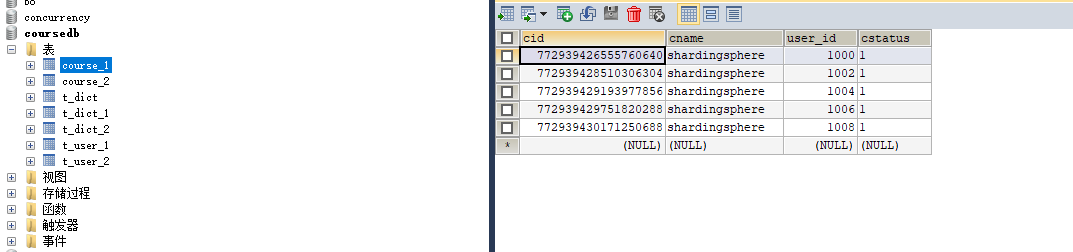
course_1如下图(示例):
 course_2如下图(示例):
 分别插入了五条记录,实现了分表插入
分库分表插入
清理一下表course_1,course_2的数据
把application02.properties的配置复制粘贴到application.properties里面
如下图(示例):
 这个策略是往m1的course_1和m2的course_2表里面插入数据
配置如下(示例):#配置多个数据源 spring.shardingsphere.datasource.names=m1,m2 #m1的mysql配置 spring.shardingsphere.datasource.m1.type=com.alibaba.druid.pool.DruidDataSource spring.shardingsphere.datasource.m1.driver-class-name=com.mysql.cj.jdbc.Driver spring.shardingsphere.datasource.m1.url=jdbc:mysql://110.42.239.246:3306/coursedb?serverTimezone=GMT%2B8 spring.shardingsphere.datasource.m1.username=root spring.shardingsphere.datasource.m1.password=591e242ca29b9c37 #m2的mysql配置 spring.shardingsphere.datasource.m2.type=com.alibaba.druid.pool.DruidDataSource spring.shardingsphere.datasource.m2.driver-class-name=com.mysql.cj.jdbc.Driver spring.shardingsphere.datasource.m2.url=jdbc:mysql://139.224.137.74:3306/coursedb?serverTimezone=GMT%2B8 spring.shardingsphere.datasource.m2.username=root spring.shardingsphere.datasource.m2.password=ca0a997ee4770063 #打印sql spring.shardingsphere.props.sql.show = true spring.main.allow-bean-definition-overriding=true #真实表分布,分库,分表 sharding里面的逻辑表course对应的是m1、m2库中course_1、course_2 spring.shardingsphere.sharding.tables.course.actual-data-nodes=m$->{1..2}.course_$->{1..2} spring.shardingsphere.sharding.tables.course.key-generator.column=cid spring.shardingsphere.sharding.tables.course.key-generator.type=SNOWFLAKE spring.shardingsphere.sharding.tables.course.key-generator.props.worker.id=1 #分表策略:inline分片策略(不支持范围查询比如between and) spring.shardingsphere.sharding.tables.course.table-strategy.inline.sharding-column=cid spring.shardingsphere.sharding.tables.course.table-strategy.inline.algorithm-expression=course_$->{cid%2+1} #分库策略 spring.shardingsphere.sharding.tables.course.database-strategy.inline.sharding-column=cid spring.shardingsphere.sharding.tables.course.database-strategy.inline.algorithm-expression=m$->{cid%2+1}- 1
- 2
- 3
- 4
- 5
- 6
- 7
- 8
- 9
- 10
- 11
- 12
- 13
- 14
- 15
- 16
- 17
- 18
- 19
- 20
- 21
- 22
- 23
- 24
- 25
- 26
- 27
- 28
去ApacheShardingsphereDemoApplicationTests运行addCourse方法
如下图(示例):
控制台打印的日志:
如下(示例):. ____ _ __ _ _ /\\ / ___'_ __ _ _(_)_ __ __ _ \ \ \ \ ( ( )\___ | '_ | '_| | '_ \/ _` | \ \ \ \ \\/ ___)| |_)| | | | | || (_| | ) ) ) ) ' |____| .__|_| |_|_| |_\__, | / / / / =========|_|==============|___/=/_/_/_/ :: Spring Boot :: (v2.3.1.RELEASE) 2022-09-04 10:25:23.829 INFO 28784 --- [ main] ApacheShardingsphereDemoApplicationTests : Starting ApacheShardingsphereDemoApplicationTests on DESKTOP-42NQPIS with PID 28784 (started by Machenike in W:\Personal\java_wxid\demo\apache-shardingsphere-demo) 2022-09-04 10:25:23.829 INFO 28784 --- [ main] ApacheShardingsphereDemoApplicationTests : No active profile set, falling back to default profiles: default 2022-09-04 10:25:24.608 INFO 28784 --- [ main] trationDelegate$BeanPostProcessorChecker : Bean 'stringToNoneShardingStrategyConfigurationConverter' of type [org.apache.shardingsphere.spring.boot.converter.StringToNoneShardingStrategyConfigurationConverter] is not eligible for getting processed by all BeanPostProcessors (for example: not eligible for auto-proxying) 2022-09-04 10:25:24.624 INFO 28784 --- [ main] trationDelegate$BeanPostProcessorChecker : Bean 'spring.shardingsphere.sharding-org.apache.shardingsphere.shardingjdbc.spring.boot.sharding.SpringBootShardingRuleConfigurationProperties' of type [org.apache.shardingsphere.shardingjdbc.spring.boot.sharding.SpringBootShardingRuleConfigurationProperties] is not eligible for getting processed by all BeanPostProcessors (for example: not eligible for auto-proxying) 2022-09-04 10:25:24.640 INFO 28784 --- [ main] trationDelegate$BeanPostProcessorChecker : Bean 'spring.shardingsphere.masterslave-org.apache.shardingsphere.shardingjdbc.spring.boot.masterslave.SpringBootMasterSlaveRuleConfigurationProperties' of type [org.apache.shardingsphere.shardingjdbc.spring.boot.masterslave.SpringBootMasterSlaveRuleConfigurationProperties] is not eligible for getting processed by all BeanPostProcessors (for example: not eligible for auto-proxying) 2022-09-04 10:25:24.640 INFO 28784 --- [ main] trationDelegate$BeanPostProcessorChecker : Bean 'spring.shardingsphere.encrypt-org.apache.shardingsphere.shardingjdbc.spring.boot.encrypt.SpringBootEncryptRuleConfigurationProperties' of type [org.apache.shardingsphere.shardingjdbc.spring.boot.encrypt.SpringBootEncryptRuleConfigurationProperties] is not eligible for getting processed by all BeanPostProcessors (for example: not eligible for auto-proxying) 2022-09-04 10:25:24.640 INFO 28784 --- [ main] trationDelegate$BeanPostProcessorChecker : Bean 'spring.shardingsphere.shadow-org.apache.shardingsphere.shardingjdbc.spring.boot.shadow.SpringBootShadowRuleConfigurationProperties' of type [org.apache.shardingsphere.shardingjdbc.spring.boot.shadow.SpringBootShadowRuleConfigurationProperties] is not eligible for getting processed by all BeanPostProcessors (for example: not eligible for auto-proxying) 2022-09-04 10:25:24.640 INFO 28784 --- [ main] trationDelegate$BeanPostProcessorChecker : Bean 'spring.shardingsphere-org.apache.shardingsphere.shardingjdbc.spring.boot.common.SpringBootPropertiesConfigurationProperties' of type [org.apache.shardingsphere.shardingjdbc.spring.boot.common.SpringBootPropertiesConfigurationProperties] is not eligible for getting processed by all BeanPostProcessors (for example: not eligible for auto-proxying) 2022-09-04 10:25:24.925 INFO 28784 --- [ main] trationDelegate$BeanPostProcessorChecker : Bean 'org.apache.shardingsphere.shardingjdbc.spring.boot.SpringBootConfiguration' of type [org.apache.shardingsphere.shardingjdbc.spring.boot.SpringBootConfiguration$$EnhancerBySpringCGLIB$$a8bf30d8] is not eligible for getting processed by all BeanPostProcessors (for example: not eligible for auto-proxying) 2022-09-04 10:25:25.285 INFO 28784 --- [ main] com.alibaba.druid.pool.DruidDataSource : {dataSource-1} inited 2022-09-04 10:25:26.580 INFO 28784 --- [ main] com.alibaba.druid.pool.DruidDataSource : {dataSource-2} inited 2022-09-04 10:25:26.981 INFO 28784 --- [ main] o.a.s.core.log.ConfigurationLogger : ShardingRuleConfiguration: tables: course: actualDataNodes: m$->{1..2}.course_$->{1..2} databaseStrategy: inline: algorithmExpression: m$->{cid%2+1} shardingColumn: cid keyGenerator: column: cid props: worker.id: '1' type: SNOWFLAKE logicTable: course tableStrategy: inline: algorithmExpression: course_$->{cid%2+1} shardingColumn: cid 2022-09-04 10:25:26.997 INFO 28784 --- [ main] o.a.s.core.log.ConfigurationLogger : Properties: sql.show: 'true' 2022-09-04 10:25:27.075 INFO 28784 --- [ main] ShardingSphere-metadata : Loading 1 logic tables' meta data. 2022-09-04 10:25:27.275 INFO 28784 --- [ main] ShardingSphere-metadata : Meta data load finished, cost 278 milliseconds. _ _ |_ _ _|_. ___ _ | _ | | |\/|_)(_| | |_\ |_)||_|_\ / | 3.3.2 2022-09-04 10:25:28.868 WARN 28784 --- [ main] c.b.m.core.metadata.TableInfoHelper : Can not find table primary key in Class: "com.example.apacheshardingspheredemo.entity.Course". 2022-09-04 10:25:29.006 WARN 28784 --- [ main] c.b.m.core.metadata.TableInfoHelper : Can not find table primary key in Class: "com.example.apacheshardingspheredemo.entity.Dict". 2022-09-04 10:25:29.037 WARN 28784 --- [ main] c.b.m.core.metadata.TableInfoHelper : Can not find table primary key in Class: "com.example.apacheshardingspheredemo.entity.User". 2022-09-04 10:25:29.084 INFO 28784 --- [ main] ApacheShardingsphereDemoApplicationTests : Started ApacheShardingsphereDemoApplicationTests in 5.594 seconds (JVM running for 7.034) 2022-09-04 10:25:29.924 INFO 28784 --- [ main] ShardingSphere-SQL : Logic SQL: INSERT INTO course ( cname, user_id, cstatus ) VALUES ( ?, ?, ? ) 2022-09-04 10:25:29.924 INFO 28784 --- [ main] ShardingSphere-SQL : SQLStatement: InsertStatementContext(super=CommonSQLStatementContext(sqlStatement=org.apache.shardingsphere.sql.parser.sql.statement.dml.InsertStatement@31183ee2, tablesContext=org.apache.shardingsphere.sql.parser.binder.segment.table.TablesContext@63f3366a), tablesContext=org.apache.shardingsphere.sql.parser.binder.segment.table.TablesContext@63f3366a, columnNames=[cname, user_id, cstatus], insertValueContexts=[InsertValueContext(parametersCount=3, valueExpressions=[ParameterMarkerExpressionSegment(startIndex=59, stopIndex=59, parameterMarkerIndex=0), ParameterMarkerExpressionSegment(startIndex=62, stopIndex=62, parameterMarkerIndex=1), ParameterMarkerExpressionSegment(startIndex=65, stopIndex=65, parameterMarkerIndex=2), DerivedParameterMarkerExpressionSegment(super=ParameterMarkerExpressionSegment(startIndex=0, stopIndex=0, parameterMarkerIndex=3))], parameters=[shardingsphere, 1000, 1])], generatedKeyContext=Optional[GeneratedKeyContext(columnName=cid, generated=true, generatedValues=[773130728878641152])]) 2022-09-04 10:25:29.924 INFO 28784 --- [ main] ShardingSphere-SQL : Actual SQL: m1 ::: INSERT INTO course_1 ( cname, user_id, cstatus , cid) VALUES (?, ?, ?, ?) ::: [shardingsphere, 1000, 1, 773130728878641152] 2022-09-04 10:25:30.061 INFO 28784 --- [ main] ShardingSphere-SQL : Logic SQL: INSERT INTO course ( cname, user_id, cstatus ) VALUES ( ?, ?, ? ) 2022-09-04 10:25:30.061 INFO 28784 --- [ main] ShardingSphere-SQL : SQLStatement: InsertStatementContext(super=CommonSQLStatementContext(sqlStatement=org.apache.shardingsphere.sql.parser.sql.statement.dml.InsertStatement@31183ee2, tablesContext=org.apache.shardingsphere.sql.parser.binder.segment.table.TablesContext@76cf91c9), tablesContext=org.apache.shardingsphere.sql.parser.binder.segment.table.TablesContext@76cf91c9, columnNames=[cname, user_id, cstatus], insertValueContexts=[InsertValueContext(parametersCount=3, valueExpressions=[ParameterMarkerExpressionSegment(startIndex=59, stopIndex=59, parameterMarkerIndex=0), ParameterMarkerExpressionSegment(startIndex=62, stopIndex=62, parameterMarkerIndex=1), ParameterMarkerExpressionSegment(startIndex=65, stopIndex=65, parameterMarkerIndex=2), DerivedParameterMarkerExpressionSegment(super=ParameterMarkerExpressionSegment(startIndex=0, stopIndex=0, parameterMarkerIndex=3))], parameters=[shardingsphere, 1001, 1])], generatedKeyContext=Optional[GeneratedKeyContext(columnName=cid, generated=true, generatedValues=[773130729809776641])]) 2022-09-04 10:25:30.061 INFO 28784 --- [ main] ShardingSphere-SQL : Actual SQL: m2 ::: INSERT INTO course_2 ( cname, user_id, cstatus , cid) VALUES (?, ?, ?, ?) ::: [shardingsphere, 1001, 1, 773130729809776641] 2022-09-04 10:25:30.153 INFO 28784 --- [ main] ShardingSphere-SQL : Logic SQL: INSERT INTO course ( cname, user_id, cstatus ) VALUES ( ?, ?, ? ) 2022-09-04 10:25:30.153 INFO 28784 --- [ main] ShardingSphere-SQL : SQLStatement: InsertStatementContext(super=CommonSQLStatementContext(sqlStatement=org.apache.shardingsphere.sql.parser.sql.statement.dml.InsertStatement@31183ee2, tablesContext=org.apache.shardingsphere.sql.parser.binder.segment.table.TablesContext@2ce24a1a), tablesContext=org.apache.shardingsphere.sql.parser.binder.segment.table.TablesContext@2ce24a1a, columnNames=[cname, user_id, cstatus], insertValueContexts=[InsertValueContext(parametersCount=3, valueExpressions=[ParameterMarkerExpressionSegment(startIndex=59, stopIndex=59, parameterMarkerIndex=0), ParameterMarkerExpressionSegment(startIndex=62, stopIndex=62, parameterMarkerIndex=1), ParameterMarkerExpressionSegment(startIndex=65, stopIndex=65, parameterMarkerIndex=2), DerivedParameterMarkerExpressionSegment(super=ParameterMarkerExpressionSegment(startIndex=0, stopIndex=0, parameterMarkerIndex=3))], parameters=[shardingsphere, 1002, 1])], generatedKeyContext=Optional[GeneratedKeyContext(columnName=cid, generated=true, generatedValues=[773130730195652608])]) 2022-09-04 10:25:30.153 INFO 28784 --- [ main] ShardingSphere-SQL : Actual SQL: m1 ::: INSERT INTO course_1 ( cname, user_id, cstatus , cid) VALUES (?, ?, ?, ?) ::: [shardingsphere, 1002, 1, 773130730195652608] 2022-09-04 10:25:30.224 INFO 28784 --- [ main] ShardingSphere-SQL : Logic SQL: INSERT INTO course ( cname, user_id, cstatus ) VALUES ( ?, ?, ? ) 2022-09-04 10:25:30.224 INFO 28784 --- [ main] ShardingSphere-SQL : SQLStatement: InsertStatementContext(super=CommonSQLStatementContext(sqlStatement=org.apache.shardingsphere.sql.parser.sql.statement.dml.InsertStatement@31183ee2, tablesContext=org.apache.shardingsphere.sql.parser.binder.segment.table.TablesContext@1e9d7366), tablesContext=org.apache.shardingsphere.sql.parser.binder.segment.table.TablesContext@1e9d7366, columnNames=[cname, user_id, cstatus], insertValueContexts=[InsertValueContext(parametersCount=3, valueExpressions=[ParameterMarkerExpressionSegment(startIndex=59, stopIndex=59, parameterMarkerIndex=0), ParameterMarkerExpressionSegment(startIndex=62, stopIndex=62, parameterMarkerIndex=1), ParameterMarkerExpressionSegment(startIndex=65, stopIndex=65, parameterMarkerIndex=2), DerivedParameterMarkerExpressionSegment(super=ParameterMarkerExpressionSegment(startIndex=0, stopIndex=0, parameterMarkerIndex=3))], parameters=[shardingsphere, 1003, 1])], generatedKeyContext=Optional[GeneratedKeyContext(columnName=cid, generated=true, generatedValues=[773130730493448193])]) 2022-09-04 10:25:30.224 INFO 28784 --- [ main] ShardingSphere-SQL : Actual SQL: m2 ::: INSERT INTO course_2 ( cname, user_id, cstatus , cid) VALUES (?, ?, ?, ?) ::: [shardingsphere, 1003, 1, 773130730493448193] 2022-09-04 10:25:30.285 INFO 28784 --- [ main] ShardingSphere-SQL : Logic SQL: INSERT INTO course ( cname, user_id, cstatus ) VALUES ( ?, ?, ? ) 2022-09-04 10:25:30.285 INFO 28784 --- [ main] ShardingSphere-SQL : SQLStatement: InsertStatementContext(super=CommonSQLStatementContext(sqlStatement=org.apache.shardingsphere.sql.parser.sql.statement.dml.InsertStatement@31183ee2, tablesContext=org.apache.shardingsphere.sql.parser.binder.segment.table.TablesContext@1e7d3d87), tablesContext=org.apache.shardingsphere.sql.parser.binder.segment.table.TablesContext@1e7d3d87, columnNames=[cname, user_id, cstatus], insertValueContexts=[InsertValueContext(parametersCount=3, valueExpressions=[ParameterMarkerExpressionSegment(startIndex=59, stopIndex=59, parameterMarkerIndex=0), ParameterMarkerExpressionSegment(startIndex=62, stopIndex=62, parameterMarkerIndex=1), ParameterMarkerExpressionSegment(startIndex=65, stopIndex=65, parameterMarkerIndex=2), DerivedParameterMarkerExpressionSegment(super=ParameterMarkerExpressionSegment(startIndex=0, stopIndex=0, parameterMarkerIndex=3))], parameters=[shardingsphere, 1004, 1])], generatedKeyContext=Optional[GeneratedKeyContext(columnName=cid, generated=true, generatedValues=[773130730749300736])]) 2022-09-04 10:25:30.285 INFO 28784 --- [ main] ShardingSphere-SQL : Actual SQL: m1 ::: INSERT INTO course_1 ( cname, user_id, cstatus , cid) VALUES (?, ?, ?, ?) ::: [shardingsphere, 1004, 1, 773130730749300736] 2022-09-04 10:25:30.367 INFO 28784 --- [ main] ShardingSphere-SQL : Logic SQL: INSERT INTO course ( cname, user_id, cstatus ) VALUES ( ?, ?, ? ) 2022-09-04 10:25:30.367 INFO 28784 --- [ main] ShardingSphere-SQL : SQLStatement: InsertStatementContext(super=CommonSQLStatementContext(sqlStatement=org.apache.shardingsphere.sql.parser.sql.statement.dml.InsertStatement@31183ee2, tablesContext=org.apache.shardingsphere.sql.parser.binder.segment.table.TablesContext@4805069b), tablesContext=org.apache.shardingsphere.sql.parser.binder.segment.table.TablesContext@4805069b, columnNames=[cname, user_id, cstatus], insertValueContexts=[InsertValueContext(parametersCount=3, valueExpressions=[ParameterMarkerExpressionSegment(startIndex=59, stopIndex=59, parameterMarkerIndex=0), ParameterMarkerExpressionSegment(startIndex=62, stopIndex=62, parameterMarkerIndex=1), ParameterMarkerExpressionSegment(startIndex=65, stopIndex=65, parameterMarkerIndex=2), DerivedParameterMarkerExpressionSegment(super=ParameterMarkerExpressionSegment(startIndex=0, stopIndex=0, parameterMarkerIndex=3))], parameters=[shardingsphere, 1005, 1])], generatedKeyContext=Optional[GeneratedKeyContext(columnName=cid, generated=true, generatedValues=[773130731093233665])]) 2022-09-04 10:25:30.367 INFO 28784 --- [ main] ShardingSphere-SQL : Actual SQL: m2 ::: INSERT INTO course_2 ( cname, user_id, cstatus , cid) VALUES (?, ?, ?, ?) ::: [shardingsphere, 1005, 1, 773130731093233665] 2022-09-04 10:25:30.418 INFO 28784 --- [ main] ShardingSphere-SQL : Logic SQL: INSERT INTO course ( cname, user_id, cstatus ) VALUES ( ?, ?, ? ) 2022-09-04 10:25:30.418 INFO 28784 --- [ main] ShardingSphere-SQL : SQLStatement: InsertStatementContext(super=CommonSQLStatementContext(sqlStatement=org.apache.shardingsphere.sql.parser.sql.statement.dml.InsertStatement@31183ee2, tablesContext=org.apache.shardingsphere.sql.parser.binder.segment.table.TablesContext@85cd413), tablesContext=org.apache.shardingsphere.sql.parser.binder.segment.table.TablesContext@85cd413, columnNames=[cname, user_id, cstatus], insertValueContexts=[InsertValueContext(parametersCount=3, valueExpressions=[ParameterMarkerExpressionSegment(startIndex=59, stopIndex=59, parameterMarkerIndex=0), ParameterMarkerExpressionSegment(startIndex=62, stopIndex=62, parameterMarkerIndex=1), ParameterMarkerExpressionSegment(startIndex=65, stopIndex=65, parameterMarkerIndex=2), DerivedParameterMarkerExpressionSegment(super=ParameterMarkerExpressionSegment(startIndex=0, stopIndex=0, parameterMarkerIndex=3))], parameters=[shardingsphere, 1006, 1])], generatedKeyContext=Optional[GeneratedKeyContext(columnName=cid, generated=true, generatedValues=[773130731307143168])]) 2022-09-04 10:25:30.418 INFO 28784 --- [ main] ShardingSphere-SQL : Actual SQL: m1 ::: INSERT INTO course_1 ( cname, user_id, cstatus , cid) VALUES (?, ?, ?, ?) ::: [shardingsphere, 1006, 1, 773130731307143168] 2022-09-04 10:25:30.480 INFO 28784 --- [ main] ShardingSphere-SQL : Logic SQL: INSERT INTO course ( cname, user_id, cstatus ) VALUES ( ?, ?, ? ) 2022-09-04 10:25:30.480 INFO 28784 --- [ main] ShardingSphere-SQL : SQLStatement: InsertStatementContext(super=CommonSQLStatementContext(sqlStatement=org.apache.shardingsphere.sql.parser.sql.statement.dml.InsertStatement@31183ee2, tablesContext=org.apache.shardingsphere.sql.parser.binder.segment.table.TablesContext@1c62d2ad), tablesContext=org.apache.shardingsphere.sql.parser.binder.segment.table.TablesContext@1c62d2ad, columnNames=[cname, user_id, cstatus], insertValueContexts=[InsertValueContext(parametersCount=3, valueExpressions=[ParameterMarkerExpressionSegment(startIndex=59, stopIndex=59, parameterMarkerIndex=0), ParameterMarkerExpressionSegment(startIndex=62, stopIndex=62, parameterMarkerIndex=1), ParameterMarkerExpressionSegment(startIndex=65, stopIndex=65, parameterMarkerIndex=2), DerivedParameterMarkerExpressionSegment(super=ParameterMarkerExpressionSegment(startIndex=0, stopIndex=0, parameterMarkerIndex=3))], parameters=[shardingsphere, 1007, 1])], generatedKeyContext=Optional[GeneratedKeyContext(columnName=cid, generated=true, generatedValues=[773130731567190017])]) 2022-09-04 10:25:30.480 INFO 28784 --- [ main] ShardingSphere-SQL : Actual SQL: m2 ::: INSERT INTO course_2 ( cname, user_id, cstatus , cid) VALUES (?, ?, ?, ?) ::: [shardingsphere, 1007, 1, 773130731567190017] 2022-09-04 10:25:30.531 INFO 28784 --- [ main] ShardingSphere-SQL : Logic SQL: INSERT INTO course ( cname, user_id, cstatus ) VALUES ( ?, ?, ? ) 2022-09-04 10:25:30.531 INFO 28784 --- [ main] ShardingSphere-SQL : SQLStatement: InsertStatementContext(super=CommonSQLStatementContext(sqlStatement=org.apache.shardingsphere.sql.parser.sql.statement.dml.InsertStatement@31183ee2, tablesContext=org.apache.shardingsphere.sql.parser.binder.segment.table.TablesContext@70840a5a), tablesContext=org.apache.shardingsphere.sql.parser.binder.segment.table.TablesContext@70840a5a, columnNames=[cname, user_id, cstatus], insertValueContexts=[InsertValueContext(parametersCount=3, valueExpressions=[ParameterMarkerExpressionSegment(startIndex=59, stopIndex=59, parameterMarkerIndex=0), ParameterMarkerExpressionSegment(startIndex=62, stopIndex=62, parameterMarkerIndex=1), ParameterMarkerExpressionSegment(startIndex=65, stopIndex=65, parameterMarkerIndex=2), DerivedParameterMarkerExpressionSegment(super=ParameterMarkerExpressionSegment(startIndex=0, stopIndex=0, parameterMarkerIndex=3))], parameters=[shardingsphere, 1008, 1])], generatedKeyContext=Optional[GeneratedKeyContext(columnName=cid, generated=true, generatedValues=[773130731781099520])]) 2022-09-04 10:25:30.531 INFO 28784 --- [ main] ShardingSphere-SQL : Actual SQL: m1 ::: INSERT INTO course_1 ( cname, user_id, cstatus , cid) VALUES (?, ?, ?, ?) ::: [shardingsphere, 1008, 1, 773130731781099520] 2022-09-04 10:25:30.596 INFO 28784 --- [ main] ShardingSphere-SQL : Logic SQL: INSERT INTO course ( cname, user_id, cstatus ) VALUES ( ?, ?, ? ) 2022-09-04 10:25:30.596 INFO 28784 --- [ main] ShardingSphere-SQL : SQLStatement: InsertStatementContext(super=CommonSQLStatementContext(sqlStatement=org.apache.shardingsphere.sql.parser.sql.statement.dml.InsertStatement@31183ee2, tablesContext=org.apache.shardingsphere.sql.parser.binder.segment.table.TablesContext@6e9f8160), tablesContext=org.apache.shardingsphere.sql.parser.binder.segment.table.TablesContext@6e9f8160, columnNames=[cname, user_id, cstatus], insertValueContexts=[InsertValueContext(parametersCount=3, valueExpressions=[ParameterMarkerExpressionSegment(startIndex=59, stopIndex=59, parameterMarkerIndex=0), ParameterMarkerExpressionSegment(startIndex=62, stopIndex=62, parameterMarkerIndex=1), ParameterMarkerExpressionSegment(startIndex=65, stopIndex=65, parameterMarkerIndex=2), DerivedParameterMarkerExpressionSegment(super=ParameterMarkerExpressionSegment(startIndex=0, stopIndex=0, parameterMarkerIndex=3))], parameters=[shardingsphere, 1009, 1])], generatedKeyContext=Optional[GeneratedKeyContext(columnName=cid, generated=true, generatedValues=[773130732053729281])]) 2022-09-04 10:25:30.596 INFO 28784 --- [ main] ShardingSphere-SQL : Actual SQL: m2 ::: INSERT INTO course_2 ( cname, user_id, cstatus , cid) VALUES (?, ?, ?, ?) ::: [shardingsphere, 1009, 1, 773130732053729281] 2022-09-04 10:25:30.667 INFO 28784 --- [extShutdownHook] com.alibaba.druid.pool.DruidDataSource : {dataSource-1} closing ... 2022-09-04 10:25:30.680 INFO 28784 --- [extShutdownHook] com.alibaba.druid.pool.DruidDataSource : {dataSource-1} closed 2022-09-04 10:25:30.680 INFO 28784 --- [extShutdownHook] com.alibaba.druid.pool.DruidDataSource : {dataSource-2} closing ... 2022-09-04 10:25:30.680 INFO 28784 --- [extShutdownHook] com.alibaba.druid.pool.DruidDataSource : {dataSource-2} closed Disconnected from the target VM, address: '127.0.0.1:55263', transport: 'socket' Process finished with exit code 0- 1
- 2
- 3
- 4
- 5
- 6
- 7
- 8
- 9
- 10
- 11
- 12
- 13
- 14
- 15
- 16
- 17
- 18
- 19
- 20
- 21
- 22
- 23
- 24
- 25
- 26
- 27
- 28
- 29
- 30
- 31
- 32
- 33
- 34
- 35
- 36
- 37
- 38
- 39
- 40
- 41
- 42
- 43
- 44
- 45
- 46
- 47
- 48
- 49
- 50
- 51
- 52
- 53
- 54
- 55
- 56
- 57
- 58
- 59
- 60
- 61
- 62
- 63
- 64
- 65
- 66
- 67
- 68
- 69
- 70
- 71
- 72
- 73
- 74
- 75
- 76
- 77
- 78
- 79
- 80
- 81
- 82
- 83
- 84
- 85
- 86
- 87
- 88
- 89
- 90
- 91
- 92
- 93
- 94
- 95
- 96
- 97
- 98
- 99
- 100
- 101
- 102
- 103
- 104
- 105
- 106
- 107
- 108
- 109
- 110
- 111
- 112
- 113
- 114
- 115
- 116
- 117
- 118
- 119
- 120
- 121
- 122
- 123
- 124
- 125
- 126
- 127
- 128
- 129
- 130
- 131
- 132
- 133
- 134
- 135
- 136
- 137
- 138
- 139
- 140
- 141
- 142
- 143
- 144
- 145
- 146
- 147
- 148
- 149
- 150
- 151
m1的course_1表
如下图(示例):
 m1的course_2表
如下图(示例):

m2的course_1表
如下图(示例):

m2的course_2表
如下图(示例):
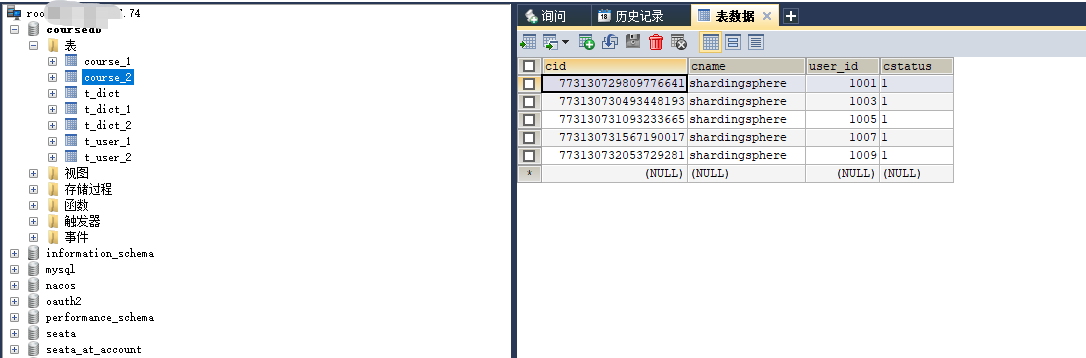
分库分表查询
前面有了分库分表插入,现在我们对插入的数据进行查询
inline分片策略
inline分片策略可以进行简单的查询,比如根据id查询,降序等等,不支持范围查询,比如between and等等。
如下图(示例):#配置多个数据源 spring.shardingsphere.datasource.names=m1,m2 #m1的mysql配置 spring.shardingsphere.datasource.m1.type=com.alibaba.druid.pool.DruidDataSource spring.shardingsphere.datasource.m1.driver-class-name=com.mysql.cj.jdbc.Driver spring.shardingsphere.datasource.m1.url=jdbc:mysql://110.42.239.246:3306/coursedb?serverTimezone=GMT%2B8 spring.shardingsphere.datasource.m1.username=root spring.shardingsphere.datasource.m1.password=591e242ca29b9c37 #m2的mysql配置 spring.shardingsphere.datasource.m2.type=com.alibaba.druid.pool.DruidDataSource spring.shardingsphere.datasource.m2.driver-class-name=com.mysql.cj.jdbc.Driver spring.shardingsphere.datasource.m2.url=jdbc:mysql://139.224.137.74:3306/coursedb?serverTimezone=GMT%2B8 spring.shardingsphere.datasource.m2.username=root spring.shardingsphere.datasource.m2.password=ca0a997ee4770063 #打印sql spring.shardingsphere.props.sql.show = true spring.main.allow-bean-definition-overriding=true #真实表分布,分库,分表 sharding里面的逻辑表course对应的是m1、m2库中course_1、course_2 spring.shardingsphere.sharding.tables.course.actual-data-nodes=m$->{1..2}.course_$->{1..2} spring.shardingsphere.sharding.tables.course.key-generator.column=cid spring.shardingsphere.sharding.tables.course.key-generator.type=SNOWFLAKE spring.shardingsphere.sharding.tables.course.key-generator.props.worker.id=1 #分表策略:inline分片策略(不支持范围查询比如between and) spring.shardingsphere.sharding.tables.course.table-strategy.inline.sharding-column=cid spring.shardingsphere.sharding.tables.course.table-strategy.inline.algorithm-expression=course_$->{cid%2+1} #分库策略 spring.shardingsphere.sharding.tables.course.database-strategy.inline.sharding-column=cid spring.shardingsphere.sharding.tables.course.database-strategy.inline.algorithm-expression=m$->{cid%2+1}- 1
- 2
- 3
- 4
- 5
- 6
- 7
- 8
- 9
- 10
- 11
- 12
- 13
- 14
- 15
- 16
- 17
- 18
- 19
- 20
- 21
- 22
- 23
- 24
- 25
- 26
- 27
- 28
配置还是和分库分表的一样
去ApacheShardingsphereDemoApplicationTests的queryCourse方法运行
如下图1(示例):
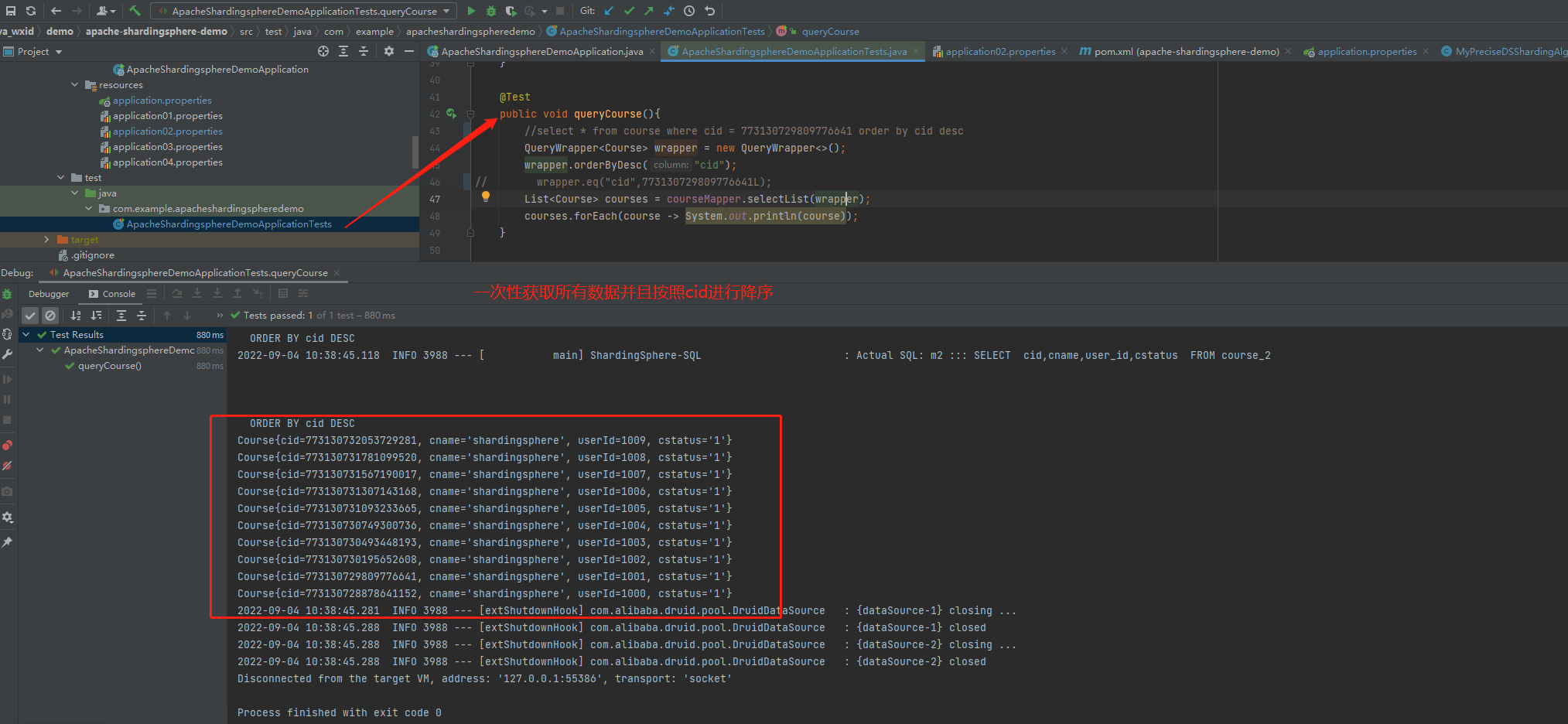
配置如下(示例):#配置多个数据源 spring.shardingsphere.datasource.names=m1,m2 #m1的mysql配置 spring.shardingsphere.datasource.m1.type=com.alibaba.druid.pool.DruidDataSource spring.shardingsphere.datasource.m1.driver-class-name=com.mysql.cj.jdbc.Driver spring.shardingsphere.datasource.m1.url=jdbc:mysql://110.42.239.246:3306/coursedb?serverTimezone=GMT%2B8 spring.shardingsphere.datasource.m1.username=root spring.shardingsphere.datasource.m1.password=591e242ca29b9c37 #m2的mysql配置 spring.shardingsphere.datasource.m2.type=com.alibaba.druid.pool.DruidDataSource spring.shardingsphere.datasource.m2.driver-class-name=com.mysql.cj.jdbc.Driver spring.shardingsphere.datasource.m2.url=jdbc:mysql://139.224.137.74:3306/coursedb?serverTimezone=GMT%2B8 spring.shardingsphere.datasource.m2.username=root spring.shardingsphere.datasource.m2.password=ca0a997ee4770063 #打印sql spring.shardingsphere.props.sql.show = true spring.main.allow-bean-definition-overriding=true #真实表分布,分库,分表 sharding里面的逻辑表course对应的是m1、m2库中course_1、course_2 spring.shardingsphere.sharding.tables.course.actual-data-nodes=m$->{1..2}.course_$->{1..2} spring.shardingsphere.sharding.tables.course.key-generator.column=cid spring.shardingsphere.sharding.tables.course.key-generator.type=SNOWFLAKE spring.shardingsphere.sharding.tables.course.key-generator.props.worker.id=1 #分表策略:inline分片策略(不支持范围查询比如between and) spring.shardingsphere.sharding.tables.course.table-strategy.inline.sharding-column=cid spring.shardingsphere.sharding.tables.course.table-strategy.inline.algorithm-expression=course_$->{cid%2+1} #分库策略 spring.shardingsphere.sharding.tables.course.database-strategy.inline.sharding-column=cid spring.shardingsphere.sharding.tables.course.database-strategy.inline.algorithm-expression=m$->{cid%2+1}- 1
- 2
- 3
- 4
- 5
- 6
- 7
- 8
- 9
- 10
- 11
- 12
- 13
- 14
- 15
- 16
- 17
- 18
- 19
- 20
- 21
- 22
- 23
- 24
- 25
- 26
- 27
- 28
. ____ _ __ _ _ /\\ / ___'_ __ _ _(_)_ __ __ _ \ \ \ \ ( ( )\___ | '_ | '_| | '_ \/ _` | \ \ \ \ \\/ ___)| |_)| | | | | || (_| | ) ) ) ) ' |____| .__|_| |_|_| |_\__, | / / / / =========|_|==============|___/=/_/_/_/ :: Spring Boot :: (v2.3.1.RELEASE) 2022-09-04 10:38:39.494 INFO 3988 --- [ main] ApacheShardingsphereDemoApplicationTests : Starting ApacheShardingsphereDemoApplicationTests on DESKTOP-42NQPIS with PID 3988 (started by Machenike in W:\Personal\java_wxid\demo\apache-shardingsphere-demo) 2022-09-04 10:38:39.503 INFO 3988 --- [ main] ApacheShardingsphereDemoApplicationTests : No active profile set, falling back to default profiles: default 2022-09-04 10:38:40.290 INFO 3988 --- [ main] trationDelegate$BeanPostProcessorChecker : Bean 'stringToNoneShardingStrategyConfigurationConverter' of type [org.apache.shardingsphere.spring.boot.converter.StringToNoneShardingStrategyConfigurationConverter] is not eligible for getting processed by all BeanPostProcessors (for example: not eligible for auto-proxying) 2022-09-04 10:38:40.290 INFO 3988 --- [ main] trationDelegate$BeanPostProcessorChecker : Bean 'spring.shardingsphere.sharding-org.apache.shardingsphere.shardingjdbc.spring.boot.sharding.SpringBootShardingRuleConfigurationProperties' of type [org.apache.shardingsphere.shardingjdbc.spring.boot.sharding.SpringBootShardingRuleConfigurationProperties] is not eligible for getting processed by all BeanPostProcessors (for example: not eligible for auto-proxying) 2022-09-04 10:38:40.305 INFO 3988 --- [ main] trationDelegate$BeanPostProcessorChecker : Bean 'spring.shardingsphere.masterslave-org.apache.shardingsphere.shardingjdbc.spring.boot.masterslave.SpringBootMasterSlaveRuleConfigurationProperties' of type [org.apache.shardingsphere.shardingjdbc.spring.boot.masterslave.SpringBootMasterSlaveRuleConfigurationProperties] is not eligible for getting processed by all BeanPostProcessors (for example: not eligible for auto-proxying) 2022-09-04 10:38:40.305 INFO 3988 --- [ main] trationDelegate$BeanPostProcessorChecker : Bean 'spring.shardingsphere.encrypt-org.apache.shardingsphere.shardingjdbc.spring.boot.encrypt.SpringBootEncryptRuleConfigurationProperties' of type [org.apache.shardingsphere.shardingjdbc.spring.boot.encrypt.SpringBootEncryptRuleConfigurationProperties] is not eligible for getting processed by all BeanPostProcessors (for example: not eligible for auto-proxying) 2022-09-04 10:38:40.305 INFO 3988 --- [ main] trationDelegate$BeanPostProcessorChecker : Bean 'spring.shardingsphere.shadow-org.apache.shardingsphere.shardingjdbc.spring.boot.shadow.SpringBootShadowRuleConfigurationProperties' of type [org.apache.shardingsphere.shardingjdbc.spring.boot.shadow.SpringBootShadowRuleConfigurationProperties] is not eligible for getting processed by all BeanPostProcessors (for example: not eligible for auto-proxying) 2022-09-04 10:38:40.321 INFO 3988 --- [ main] trationDelegate$BeanPostProcessorChecker : Bean 'spring.shardingsphere-org.apache.shardingsphere.shardingjdbc.spring.boot.common.SpringBootPropertiesConfigurationProperties' of type [org.apache.shardingsphere.shardingjdbc.spring.boot.common.SpringBootPropertiesConfigurationProperties] is not eligible for getting processed by all BeanPostProcessors (for example: not eligible for auto-proxying) 2022-09-04 10:38:40.590 INFO 3988 --- [ main] trationDelegate$BeanPostProcessorChecker : Bean 'org.apache.shardingsphere.shardingjdbc.spring.boot.SpringBootConfiguration' of type [org.apache.shardingsphere.shardingjdbc.spring.boot.SpringBootConfiguration$$EnhancerBySpringCGLIB$$a8bf30d8] is not eligible for getting processed by all BeanPostProcessors (for example: not eligible for auto-proxying) 2022-09-04 10:38:40.944 INFO 3988 --- [ main] com.alibaba.druid.pool.DruidDataSource : {dataSource-1} inited 2022-09-04 10:38:42.178 INFO 3988 --- [ main] com.alibaba.druid.pool.DruidDataSource : {dataSource-2} inited 2022-09-04 10:38:42.586 INFO 3988 --- [ main] o.a.s.core.log.ConfigurationLogger : ShardingRuleConfiguration: tables: course: actualDataNodes: m$->{1..2}.course_$->{1..2} databaseStrategy: inline: algorithmExpression: m$->{cid%2+1} shardingColumn: cid keyGenerator: column: cid props: worker.id: '1' type: SNOWFLAKE logicTable: course tableStrategy: inline: algorithmExpression: course_$->{cid%2+1} shardingColumn: cid 2022-09-04 10:38:42.586 INFO 3988 --- [ main] o.a.s.core.log.ConfigurationLogger : Properties: sql.show: 'true' 2022-09-04 10:38:42.648 INFO 3988 --- [ main] ShardingSphere-metadata : Loading 1 logic tables' meta data. 2022-09-04 10:38:42.833 INFO 3988 --- [ main] ShardingSphere-metadata : Meta data load finished, cost 247 milliseconds. _ _ |_ _ _|_. ___ _ | _ | | |\/|_)(_| | |_\ |_)||_|_\ / | 3.3.2 2022-09-04 10:38:44.185 WARN 3988 --- [ main] c.b.m.core.metadata.TableInfoHelper : Can not find table primary key in Class: "com.example.apacheshardingspheredemo.entity.Course". 2022-09-04 10:38:44.317 WARN 3988 --- [ main] c.b.m.core.metadata.TableInfoHelper : Can not find table primary key in Class: "com.example.apacheshardingspheredemo.entity.Dict". 2022-09-04 10:38:44.348 WARN 3988 --- [ main] c.b.m.core.metadata.TableInfoHelper : Can not find table primary key in Class: "com.example.apacheshardingspheredemo.entity.User". 2022-09-04 10:38:44.386 INFO 3988 --- [ main] ApacheShardingsphereDemoApplicationTests : Started ApacheShardingsphereDemoApplicationTests in 5.263 seconds (JVM running for 6.748) 2022-09-04 10:38:45.118 INFO 3988 --- [ main] ShardingSphere-SQL : Logic SQL: SELECT cid,cname,user_id,cstatus FROM course ORDER BY cid DESC 2022-09-04 10:38:45.118 INFO 3988 --- [ main] ShardingSphere-SQL : SQLStatement: SelectStatementContext(super=CommonSQLStatementContext(sqlStatement=org.apache.shardingsphere.sql.parser.sql.statement.dml.SelectStatement@2047adea, tablesContext=org.apache.shardingsphere.sql.parser.binder.segment.table.TablesContext@5af40e45), tablesContext=org.apache.shardingsphere.sql.parser.binder.segment.table.TablesContext@5af40e45, projectionsContext=ProjectionsContext(startIndex=8, stopIndex=32, distinctRow=false, projections=[ColumnProjection(owner=null, name=cid, alias=Optional.empty), ColumnProjection(owner=null, name=cname, alias=Optional.empty), ColumnProjection(owner=null, name=user_id, alias=Optional.empty), ColumnProjection(owner=null, name=cstatus, alias=Optional.empty)]), groupByContext=org.apache.shardingsphere.sql.parser.binder.segment.select.groupby.GroupByContext@1a06602f, orderByContext=org.apache.shardingsphere.sql.parser.binder.segment.select.orderby.OrderByContext@46591e98, paginationContext=org.apache.shardingsphere.sql.parser.binder.segment.select.pagination.PaginationContext@5b6cc344, containsSubquery=false) 2022-09-04 10:38:45.118 INFO 3988 --- [ main] ShardingSphere-SQL : Actual SQL: m1 ::: SELECT cid,cname,user_id,cstatus FROM course_1 ORDER BY cid DESC 2022-09-04 10:38:45.118 INFO 3988 --- [ main] ShardingSphere-SQL : Actual SQL: m1 ::: SELECT cid,cname,user_id,cstatus FROM course_2 ORDER BY cid DESC 2022-09-04 10:38:45.118 INFO 3988 --- [ main] ShardingSphere-SQL : Actual SQL: m2 ::: SELECT cid,cname,user_id,cstatus FROM course_1 ORDER BY cid DESC 2022-09-04 10:38:45.118 INFO 3988 --- [ main] ShardingSphere-SQL : Actual SQL: m2 ::: SELECT cid,cname,user_id,cstatus FROM course_2 ORDER BY cid DESC Course{cid=773130732053729281, cname='shardingsphere', userId=1009, cstatus='1'} Course{cid=773130731781099520, cname='shardingsphere', userId=1008, cstatus='1'} Course{cid=773130731567190017, cname='shardingsphere', userId=1007, cstatus='1'} Course{cid=773130731307143168, cname='shardingsphere', userId=1006, cstatus='1'} Course{cid=773130731093233665, cname='shardingsphere', userId=1005, cstatus='1'} Course{cid=773130730749300736, cname='shardingsphere', userId=1004, cstatus='1'} Course{cid=773130730493448193, cname='shardingsphere', userId=1003, cstatus='1'} Course{cid=773130730195652608, cname='shardingsphere', userId=1002, cstatus='1'} Course{cid=773130729809776641, cname='shardingsphere', userId=1001, cstatus='1'} Course{cid=773130728878641152, cname='shardingsphere', userId=1000, cstatus='1'} 2022-09-04 10:38:45.281 INFO 3988 --- [extShutdownHook] com.alibaba.druid.pool.DruidDataSource : {dataSource-1} closing ... 2022-09-04 10:38:45.288 INFO 3988 --- [extShutdownHook] com.alibaba.druid.pool.DruidDataSource : {dataSource-1} closed 2022-09-04 10:38:45.288 INFO 3988 --- [extShutdownHook] com.alibaba.druid.pool.DruidDataSource : {dataSource-2} closing ... 2022-09-04 10:38:45.288 INFO 3988 --- [extShutdownHook] com.alibaba.druid.pool.DruidDataSource : {dataSource-2} closed Disconnected from the target VM, address: '127.0.0.1:55386', transport: 'socket' Process finished with exit code 0- 1
- 2
- 3
- 4
- 5
- 6
- 7
- 8
- 9
- 10
- 11
- 12
- 13
- 14
- 15
- 16
- 17
- 18
- 19
- 20
- 21
- 22
- 23
- 24
- 25
- 26
- 27
- 28
- 29
- 30
- 31
- 32
- 33
- 34
- 35
- 36
- 37
- 38
- 39
- 40
- 41
- 42
- 43
- 44
- 45
- 46
- 47
- 48
- 49
- 50
- 51
- 52
- 53
- 54
- 55
- 56
- 57
- 58
- 59
- 60
- 61
- 62
- 63
- 64
- 65
- 66
- 67
- 68
- 69
- 70
- 71
- 72
- 73
- 74
- 75
- 76
- 77
- 78
- 79
- 80
- 81
- 82
- 83
- 84
- 85
- 86
- 87
- 88
- 89
- 90
- 91
- 92
- 93
如下图2(示例):

standard标准分片策略
standard标准分片策略 (>,>=, <=,<,=,IN 和 BETWEEN AND支持 只是根据一个字段来查询,也就是一个分片键)
配置如下(示例):#配置多个数据源 spring.shardingsphere.datasource.names=m1,m2 #m1的mysql配置 spring.shardingsphere.datasource.m1.type=com.alibaba.druid.pool.DruidDataSource spring.shardingsphere.datasource.m1.driver-class-name=com.mysql.cj.jdbc.Driver spring.shardingsphere.datasource.m1.url=jdbc:mysql://110.42.239.246:3306/coursedb?serverTimezone=GMT%2B8 spring.shardingsphere.datasource.m1.username=root spring.shardingsphere.datasource.m1.password=591e242ca29b9c37 #m2的mysql配置 spring.shardingsphere.datasource.m2.type=com.alibaba.druid.pool.DruidDataSource spring.shardingsphere.datasource.m2.driver-class-name=com.mysql.cj.jdbc.Driver spring.shardingsphere.datasource.m2.url=jdbc:mysql://139.224.137.74:3306/coursedb?serverTimezone=GMT%2B8 spring.shardingsphere.datasource.m2.username=root spring.shardingsphere.datasource.m2.password=ca0a997ee4770063 #打印sql spring.shardingsphere.props.sql.show = true spring.main.allow-bean-definition-overriding=true #真实表分布,分库,分表 sharding里面的逻辑表course对应的是m1、m2库中course_1、course_2 spring.shardingsphere.sharding.tables.course.actual-data-nodes=m$->{1..2}.course_$->{1..2} spring.shardingsphere.sharding.tables.course.key-generator.column=cid spring.shardingsphere.sharding.tables.course.key-generator.type=SNOWFLAKE spring.shardingsphere.sharding.tables.course.key-generator.props.worker.id=1 ##分表策略:inline分片策略(不支持范围查询比如between and) #spring.shardingsphere.sharding.tables.course.table-strategy.inline.sharding-column=cid #spring.shardingsphere.sharding.tables.course.table-strategy.inline.algorithm-expression=course_$->{cid%2+1} ##分库策略 #spring.shardingsphere.sharding.tables.course.database-strategy.inline.sharding-column=cid #spring.shardingsphere.sharding.tables.course.database-strategy.inline.algorithm-expression=m$->{cid%2+1} #standard标准分片策略 spring.shardingsphere.sharding.tables.course.table-strategy.standard.sharding-column=cid spring.shardingsphere.sharding.tables.course.table-strategy.standard.precise-algorithm-class-name=com.example.apacheshardingspheredemo.algorithem.MyPreciseTableShardingAlgorithm spring.shardingsphere.sharding.tables.course.table-strategy.standard.range-algorithm-class-name=com.example.apacheshardingspheredemo.algorithem.MyRangeTableShardingAlgorithm spring.shardingsphere.sharding.tables.course.database-strategy.standard.sharding-column=cid spring.shardingsphere.sharding.tables.course.database-strategy.standard.precise-algorithm-class-name=com.example.apacheshardingspheredemo.algorithem.MyPreciseDSShardingAlgorithm spring.shardingsphere.sharding.tables.course.database-strategy.standard.range-algorithm-class-name=com.example.apacheshardingspheredemo.algorithem.MyRangeDSShardingAlgorithm- 1
- 2
- 3
- 4
- 5
- 6
- 7
- 8
- 9
- 10
- 11
- 12
- 13
- 14
- 15
- 16
- 17
- 18
- 19
- 20
- 21
- 22
- 23
- 24
- 25
- 26
- 27
- 28
- 29
- 30
- 31
- 32
- 33
- 34
- 35
- 36
- 37
- 38
运行ApacheShardingsphereDemoApplicationTests的queryOrderRange方法
如下图(示例):

complex复杂分片策略
多字段的分库分表 (>,>=, <=,<,=,IN 和 BETWEEN AND 支持 复合分片策略支持对多个分片健操作)
配置如下(示例):#配置多个数据源 spring.shardingsphere.datasource.names=m1,m2 #m1的mysql配置 spring.shardingsphere.datasource.m1.type=com.alibaba.druid.pool.DruidDataSource spring.shardingsphere.datasource.m1.driver-class-name=com.mysql.cj.jdbc.Driver spring.shardingsphere.datasource.m1.url=jdbc:mysql://110.42.239.246:3306/coursedb?serverTimezone=GMT%2B8 spring.shardingsphere.datasource.m1.username=root spring.shardingsphere.datasource.m1.password=591e242ca29b9c37 #m2的mysql配置 spring.shardingsphere.datasource.m2.type=com.alibaba.druid.pool.DruidDataSource spring.shardingsphere.datasource.m2.driver-class-name=com.mysql.cj.jdbc.Driver spring.shardingsphere.datasource.m2.url=jdbc:mysql://139.224.137.74:3306/coursedb?serverTimezone=GMT%2B8 spring.shardingsphere.datasource.m2.username=root spring.shardingsphere.datasource.m2.password=ca0a997ee4770063 #打印sql spring.shardingsphere.props.sql.show = true spring.main.allow-bean-definition-overriding=true #真实表分布,分库,分表 sharding里面的逻辑表course对应的是m1、m2库中course_1、course_2 spring.shardingsphere.sharding.tables.course.actual-data-nodes=m$->{1..2}.course_$->{1..2} spring.shardingsphere.sharding.tables.course.key-generator.column=cid spring.shardingsphere.sharding.tables.course.key-generator.type=SNOWFLAKE spring.shardingsphere.sharding.tables.course.key-generator.props.worker.id=1 #complex复杂分片策略 多字段的分库分表 (>,>=, <=,<,=,IN 和 BETWEEN AND 支持 复合分片策略支持对多个分片健操作) spring.shardingsphere.sharding.tables.course.table-strategy.complex.sharding-columns= cid, user_id spring.shardingsphere.sharding.tables.course.table-strategy.complex.algorithm-class-name=com.example.apacheshardingspheredemo.algorithem.MyComplexTableShardingAlgorithm spring.shardingsphere.sharding.tables.course.database-strategy.complex.sharding-columns=cid, user_id spring.shardingsphere.sharding.tables.course.database-strategy.complex.algorithm-class-name=com.example.apacheshardingspheredemo.algorithem.MyComplexDSShardingAlgorithm- 1
- 2
- 3
- 4
- 5
- 6
- 7
- 8
- 9
- 10
- 11
- 12
- 13
- 14
- 15
- 16
- 17
- 18
- 19
- 20
- 21
- 22
- 23
- 24
- 25
- 26
- 27
- 28
- 29
运行ApacheShardingsphereDemoApplicationTests的queryCourseComplex方法
如下图(示例):
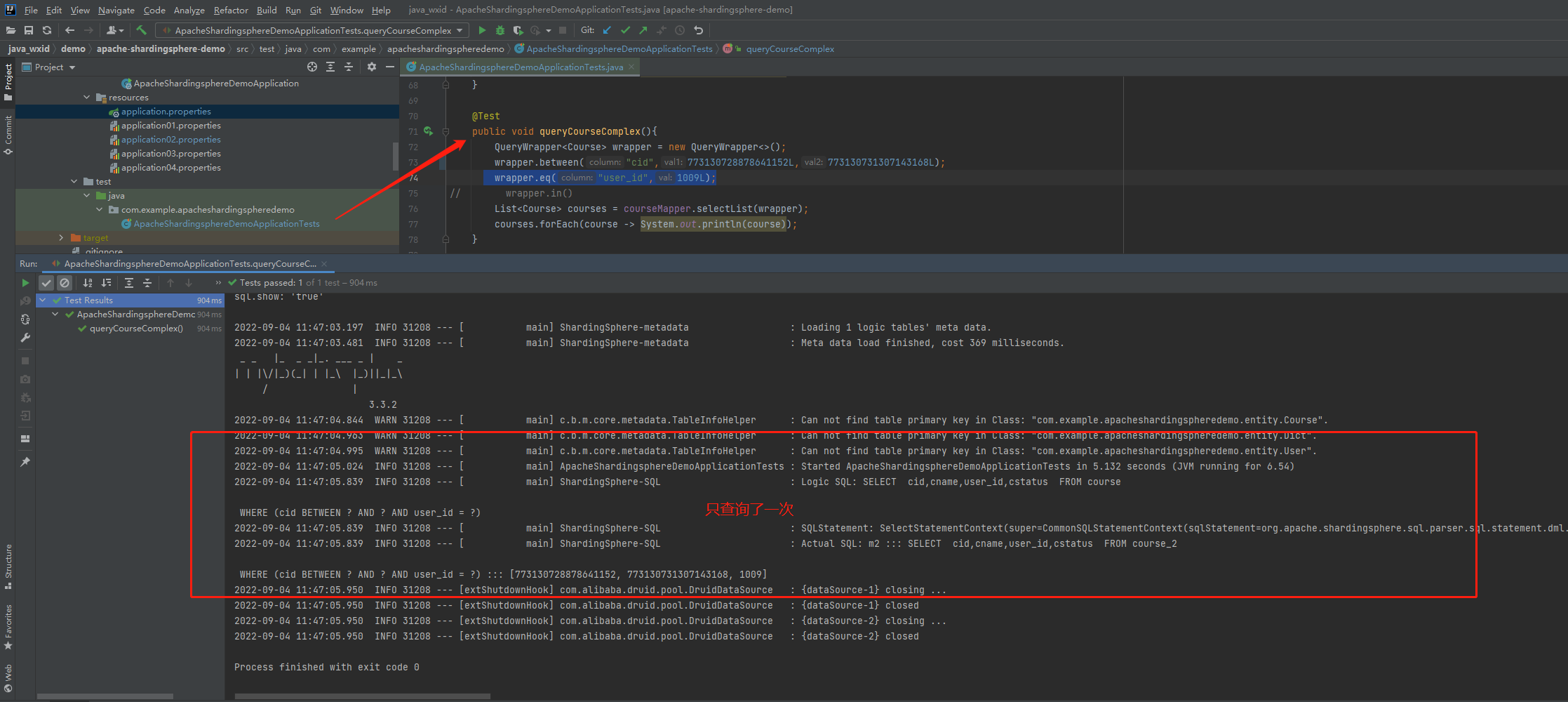 前面的queryOrderRange使用standard标准分片策略查询了四张表,现在queryCourseComplex我只查询了一张表就可以,提升了效率。
hint强制路由策略
配置如下(示例):
#配置多个数据源 spring.shardingsphere.datasource.names=m1,m2 #m1的mysql配置 spring.shardingsphere.datasource.m1.type=com.alibaba.druid.pool.DruidDataSource spring.shardingsphere.datasource.m1.driver-class-name=com.mysql.cj.jdbc.Driver spring.shardingsphere.datasource.m1.url=jdbc:mysql://110.42.239.246:3306/coursedb?serverTimezone=GMT%2B8 spring.shardingsphere.datasource.m1.username=root spring.shardingsphere.datasource.m1.password=591e242ca29b9c37 #m2的mysql配置 spring.shardingsphere.datasource.m2.type=com.alibaba.druid.pool.DruidDataSource spring.shardingsphere.datasource.m2.driver-class-name=com.mysql.cj.jdbc.Driver spring.shardingsphere.datasource.m2.url=jdbc:mysql://139.224.137.74:3306/coursedb?serverTimezone=GMT%2B8 spring.shardingsphere.datasource.m2.username=root spring.shardingsphere.datasource.m2.password=ca0a997ee4770063 #打印sql spring.shardingsphere.props.sql.show = true spring.main.allow-bean-definition-overriding=true #真实表分布,分库,分表 sharding里面的逻辑表course对应的是m1、m2库中course_1、course_2 spring.shardingsphere.sharding.tables.course.actual-data-nodes=m$->{1..2}.course_$->{1..2} spring.shardingsphere.sharding.tables.course.key-generator.column=cid spring.shardingsphere.sharding.tables.course.key-generator.type=SNOWFLAKE spring.shardingsphere.sharding.tables.course.key-generator.props.worker.id=1 # 表策略 spring.shardingsphere.sharding.tables.course.database-strategy.standard.sharding-column=cid spring.shardingsphere.sharding.tables.course.database-strategy.standard.precise-algorithm-class-name=com.example.apacheshardingspheredemo.algorithem.MyPreciseDSShardingAlgorithm spring.shardingsphere.sharding.tables.course.database-strategy.standard.range-algorithm-class-name=com.example.apacheshardingspheredemo.algorithem.MyRangeDSShardingAlgorithm #hint强制路由策略 指定分片值而非从SQL中提取分片值的方式进行分片的策略 spring.shardingsphere.sharding.tables.course.table-strategy.hint.algorithm-class-name=com.example.apacheshardingspheredemo.algorithem.MyHintTableShardingAlgorithm- 1
- 2
- 3
- 4
- 5
- 6
- 7
- 8
- 9
- 10
- 11
- 12
- 13
- 14
- 15
- 16
- 17
- 18
- 19
- 20
- 21
- 22
- 23
- 24
- 25
- 26
- 27
- 28
运行ApacheShardingsphereDemoApplicationTests的queryCourseComplex方法
如下图(示例):

广播表配置
广播表是在所有的数据源里面都存在的表
在所有的数据源中执行t_dict.sql文件里面的建表语句,创建三个表t_dict,t_dict_1,t_dict_2
配置如下(示例):#配置多个数据源 spring.shardingsphere.datasource.names=m1,m2 #m1的mysql配置 spring.shardingsphere.datasource.m1.type=com.alibaba.druid.pool.DruidDataSource spring.shardingsphere.datasource.m1.driver-class-name=com.mysql.cj.jdbc.Driver spring.shardingsphere.datasource.m1.url=jdbc:mysql://110.42.239.246:3306/coursedb?serverTimezone=GMT%2B8 spring.shardingsphere.datasource.m1.username=root spring.shardingsphere.datasource.m1.password=591e242ca29b9c37 #m2的mysql配置 spring.shardingsphere.datasource.m2.type=com.alibaba.druid.pool.DruidDataSource spring.shardingsphere.datasource.m2.driver-class-name=com.mysql.cj.jdbc.Driver spring.shardingsphere.datasource.m2.url=jdbc:mysql://139.224.137.74:3306/coursedb?serverTimezone=GMT%2B8 spring.shardingsphere.datasource.m2.username=root spring.shardingsphere.datasource.m2.password=ca0a997ee4770063 #打印sql spring.shardingsphere.props.sql.show = true spring.main.allow-bean-definition-overriding=true #真实表分布,分库,分表 sharding里面的逻辑表course对应的是m1、m2库中course_1、course_2 spring.shardingsphere.sharding.tables.course.actual-data-nodes=m$->{1..2}.course_$->{1..2} spring.shardingsphere.sharding.tables.course.key-generator.column=cid spring.shardingsphere.sharding.tables.course.key-generator.type=SNOWFLAKE spring.shardingsphere.sharding.tables.course.key-generator.props.worker.id=1 ##分表策略:inline分片策略(不支持范围查询比如between and) #spring.shardingsphere.sharding.tables.course.table-strategy.inline.sharding-column=cid #spring.shardingsphere.sharding.tables.course.table-strategy.inline.algorithm-expression=course_$->{cid%2+1} ##分库策略 #spring.shardingsphere.sharding.tables.course.database-strategy.inline.sharding-column=cid #spring.shardingsphere.sharding.tables.course.database-strategy.inline.algorithm-expression=m$->{cid%2+1} #standard标准分片策略 (>,>=, <=,<,=,IN 和 BETWEEN AND支持 只是根据一个字段来查询,也就是一个分片键) #spring.shardingsphere.sharding.tables.course.table-strategy.standard.sharding-column=cid #spring.shardingsphere.sharding.tables.course.table-strategy.standard.precise-algorithm-class-name=com.example.apacheshardingspheredemo.algorithem.MyPreciseTableShardingAlgorithm #spring.shardingsphere.sharding.tables.course.table-strategy.standard.range-algorithm-class-name=com.example.apacheshardingspheredemo.algorithem.MyRangeTableShardingAlgorithm # #spring.shardingsphere.sharding.tables.course.database-strategy.standard.sharding-column=cid #spring.shardingsphere.sharding.tables.course.database-strategy.standard.precise-algorithm-class-name=com.example.apacheshardingspheredemo.algorithem.MyPreciseDSShardingAlgorithm #spring.shardingsphere.sharding.tables.course.database-strategy.standard.range-algorithm-class-name=com.example.apacheshardingspheredemo.algorithem.MyRangeDSShardingAlgorithm #complex复杂分片策略 多字段的分库分表 (>,>=, <=,<,=,IN 和 BETWEEN AND 支持 复合分片策略支持对多个分片健操作) #spring.shardingsphere.sharding.tables.course.table-strategy.complex.sharding-columns= cid, user_id #spring.shardingsphere.sharding.tables.course.table-strategy.complex.algorithm-class-name=com.example.apacheshardingspheredemo.algorithem.MyComplexTableShardingAlgorithm # #spring.shardingsphere.sharding.tables.course.database-strategy.complex.sharding-columns=cid, user_id #spring.shardingsphere.sharding.tables.course.database-strategy.complex.algorithm-class-name=com.example.apacheshardingspheredemo.algorithem.MyComplexDSShardingAlgorithm #hint强制路由策略 指定分片值而非从SQL中提取分片值的方式进行分片的策略 #spring.shardingsphere.sharding.tables.course.table-strategy.hint.algorithm-class-name=com.example.apacheshardingspheredemo.algorithem.MyHintTableShardingAlgorithm #广播表配置 spring.shardingsphere.sharding.broadcast-tables=t_dict spring.shardingsphere.sharding.tables.t_dict.key-generator.column=dict_id spring.shardingsphere.sharding.tables.t_dict.key-generator.type=SNOWFLAKE- 1
- 2
- 3
- 4
- 5
- 6
- 7
- 8
- 9
- 10
- 11
- 12
- 13
- 14
- 15
- 16
- 17
- 18
- 19
- 20
- 21
- 22
- 23
- 24
- 25
- 26
- 27
- 28
- 29
- 30
- 31
- 32
- 33
- 34
- 35
- 36
- 37
- 38
- 39
- 40
- 41
- 42
- 43
- 44
- 45
- 46
- 47
- 48
- 49
- 50
- 51
- 52
- 53
运行ApacheShardingsphereDemoApplicationTests的addDict方法
如下图(示例):

m1的t_dict表如下图(示例):

m2的t_dict表如下图(示例):

二个库的t_dict表都插入了数据绑定表配置
前面的部分都是对单表进行查询,那如果对多个表进行关联呢
比如:select u.user_id,u.username,d.uvalue ustatus from user u left join t_dict d on u.ustatus = d.ustatus
正常分库分表查询是不是这样的:m1 ::: select u.user_id,u.username,d.uvalue ustatus from t_user_2 u left join t_dict_1 d on u.ustatus = d.ustatus m1 ::: select u.user_id,u.username,d.uvalue ustatus from t_user_2 u left join t_dict_2 d on u.ustatus = d.ustatus m1 ::: select u.user_id,u.username,d.uvalue ustatus from t_user_1 u left join t_dict_1 d on u.ustatus = d.ustatus m1 ::: select u.user_id,u.username,d.uvalue ustatus from t_user_1 u left join t_dict_2 d on u.ustatus = d.ustatus- 1
- 2
- 3
- 4
然后才把结果进行汇总,这样就会出现本来就十条数据,查询出来有二十条记录了,产生了笛卡尔积
User{userId=773233687314567169, username='user No 1', ustatus='null', uage=0} User{userId=773233687872409601, username='user No 3', ustatus='null', uage=0} User{userId=773233688304422913, username='user No 5', ustatus='null', uage=0} User{userId=773233688866459649, username='user No 7', ustatus='null', uage=0} User{userId=773233689327833089, username='user No 9', ustatus='null', uage=0} User{userId=773233687314567169, username='user No 1', ustatus='正常', uage=0} User{userId=773233687872409601, username='user No 3', ustatus='正常', uage=0} User{userId=773233688304422913, username='user No 5', ustatus='正常', uage=0} User{userId=773233688866459649, username='user No 7', ustatus='正常', uage=0} User{userId=773233689327833089, username='user No 9', ustatus='正常', uage=0} User{userId=773233687062908928, username='user No 0', ustatus='不正常', uage=0} User{userId=773233687692054528, username='user No 2', ustatus='不正常', uage=0} User{userId=773233688086319104, username='user No 4', ustatus='不正常', uage=0} User{userId=773233688560275456, username='user No 6', ustatus='不正常', uage=0} User{userId=773233689080369152, username='user No 8', ustatus='不正常', uage=0} User{userId=773233687062908928, username='user No 0', ustatus='null', uage=0} User{userId=773233687692054528, username='user No 2', ustatus='null', uage=0} User{userId=773233688086319104, username='user No 4', ustatus='null', uage=0} User{userId=773233688560275456, username='user No 6', ustatus='null', uage=0} User{userId=773233689080369152, username='user No 8', ustatus='null', uage=0}- 1
- 2
- 3
- 4
- 5
- 6
- 7
- 8
- 9
- 10
- 11
- 12
- 13
- 14
- 15
- 16
- 17
- 18
- 19
- 20
这个时候就需要绑定表了让t_user_1表和t_dict_1表进行绑定,t_user_2表和t_dict_2表进行绑定
主要的配置是spring.shardingsphere.sharding.binding-tables[0]=user,t_dict
配置如下(示例):spring.shardingsphere.datasource.names=m1 spring.shardingsphere.datasource.m1.type=com.alibaba.druid.pool.DruidDataSource spring.shardingsphere.datasource.m1.driver-class-name=com.mysql.cj.jdbc.Driver spring.shardingsphere.datasource.m1.url=jdbc:mysql://110.42.239.246:3306/coursedb?serverTimezone=GMT%2B8 spring.shardingsphere.datasource.m1.username=root spring.shardingsphere.datasource.m1.password=591e242ca29b9c37 spring.shardingsphere.sharding.tables.t_dict.actual-data-nodes=m1.t_dict_$->{1..2} spring.shardingsphere.sharding.tables.t_dict.key-generator.column=dict_id spring.shardingsphere.sharding.tables.t_dict.key-generator.type=SNOWFLAKE spring.shardingsphere.sharding.tables.t_dict.key-generator.props.worker.id=1 spring.shardingsphere.sharding.tables.t_dict.table-strategy.inline.sharding-column=ustatus spring.shardingsphere.sharding.tables.t_dict.table-strategy.inline.algorithm-expression=t_dict_$->{ustatus.toInteger()%2+1} spring.shardingsphere.sharding.tables.user.actual-data-nodes=m1.t_user_$->{1..2} spring.shardingsphere.sharding.tables.user.key-generator.column=user_id spring.shardingsphere.sharding.tables.user.key-generator.type=SNOWFLAKE spring.shardingsphere.sharding.tables.user.key-generator.props.worker.id=1 spring.shardingsphere.sharding.tables.user.table-strategy.inline.sharding-column=ustatus spring.shardingsphere.sharding.tables.user.table-strategy.inline.algorithm-expression=t_user_$->{ustatus.toInteger()%2+1} #绑定表示例 spring.shardingsphere.sharding.binding-tables[0]=user,t_dict spring.shardingsphere.props.sql.show = true spring.main.allow-bean-definition-overriding=true- 1
- 2
- 3
- 4
- 5
- 6
- 7
- 8
- 9
- 10
- 11
- 12
- 13
- 14
- 15
- 16
- 17
- 18
- 19
- 20
- 21
- 22
- 23
- 24
- 25
- 26
- 27
- 28
先后执行addDict方法和queryUserStatus方法
代码如下(示例):/** * 添加广播表 */ @Test public void addDict(){ Dict d1 = new Dict(); d1.setUstatus("1"); d1.setUvalue("正常"); dictMapper.insert(d1); Dict d2 = new Dict(); d2.setUstatus("0"); d2.setUvalue("不正常"); dictMapper.insert(d2); for(int i = 0 ; i < 10 ; i ++){ User user = new User(); user.setUsername("user No "+i); user.setUstatus("" + (i%2)); user.setUage(i * 10); userMapper.insert(user); } } /** * 绑定表查询 */ @Test public void queryUserStatus(){ List<User> users = userMapper.queryUserStatus(); users.forEach(user -> System.out.println(user)); }- 1
- 2
- 3
- 4
- 5
- 6
- 7
- 8
- 9
- 10
- 11
- 12
- 13
- 14
- 15
- 16
- 17
- 18
- 19
- 20
- 21
- 22
- 23
- 24
- 25
- 26
- 27
- 28
- 29
- 30
- 31
- 32
将本地的查询
select u.user_id,u.username,d.uvalue ustatus from user u left join t_dict d on u.ustatus = d.ustatus进行分库分表拆分
日志打印如下(示例):m1 ::: select u.user_id,u.username,d.uvalue ustatus from t_user_1 u left join t_dict_1 d on u.ustatus = d.ustatus m1 ::: select u.user_id,u.username,d.uvalue ustatus from t_user_2 u left join t_dict_2 d on u.ustatus = d.ustatus- 1
- 2
查询出来的结果如下(示例):
User{userId=773233687062908928, username='user No 0', ustatus='不正常', uage=0} User{userId=773233687692054528, username='user No 2', ustatus='不正常', uage=0} User{userId=773233688086319104, username='user No 4', ustatus='不正常', uage=0} User{userId=773233688560275456, username='user No 6', ustatus='不正常', uage=0} User{userId=773233689080369152, username='user No 8', ustatus='不正常', uage=0} User{userId=773233687314567169, username='user No 1', ustatus='正常', uage=0} User{userId=773233687872409601, username='user No 3', ustatus='正常', uage=0} User{userId=773233688304422913, username='user No 5', ustatus='正常', uage=0} User{userId=773233688866459649, username='user No 7', ustatus='正常', uage=0} User{userId=773233689327833089, username='user No 9', ustatus='正常', uage=0}- 1
- 2
- 3
- 4
- 5
- 6
- 7
- 8
- 9
- 10
读写分离
主库配置修改
我这里用的是宝塔面板安装的mysql所以直接在首页点击mysql就可以直接进到配置页修改配置了
 主要需要修改的是以下几个属性:
-
server-id:服务节点的唯一标识。需要给集群中的每个服务分配一个单独的ID。
-
log-bin:打开Binlog日志记录,并指定文件名。
-
log-bin-index:Binlog日志文件
重启MySQL服务,
service mysqld restart然后,我们需要给root用户分配一个replication slave的权限。
GRANT REPLICATION SLAVE ON *.* TO 'root'@'%'; flush privileges; #查看主节点同步状态: show master status;- 1
- 2
- 3
- 4
如下图(示例):

在实际生产环境中,通常不会直接使用root用户,而会创建一个拥有全部权限的用户来负责主从同步。
如下图(示例):

这个指令结果中的File和Position记录的是当前日志的binlog文件以及文件中的索引。
后面的Binlog_Do_DB和Binlog_Ignore_DB这两个字段是表示需要记录binlog文件的库以及不需要记录binlog文件的库。目前我们没有进行配置,就表示是针对全库记录日志。
开启binlog后,数据库中的所有操作都会被记录到datadir当中,以一组轮询文件的方式循环记录。而指令查到的File和Position就是当前日志的文件和位置。而在后面配置从服务时,就需要通过这个File和Position通知从服务从哪个地方开始记录binLog。
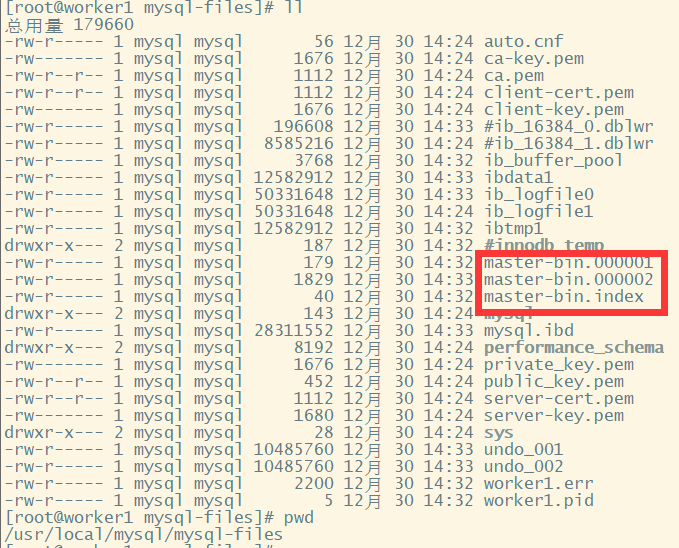
从库配置修改
#打开从服务二进制日志 log-bin = mysql-slave-bin binlog_format = mixed #主库和从库需要不一致 server-id = 2 #打开MySQL中继日志 relay-log-index = slave-relay-bin.index relay-log = slave-relay-bin #设置只读 read_only = 1- 1
- 2
- 3
- 4
- 5
- 6
- 7
- 8
- 9
- 10
如下图(示例):
 主要需要关注的几个属性:
-
server-id:服务节点的唯一标识,主库和从库需要不一致
-
relay-log:打开从服务的relay-log日志。
-
log-bin:打开从服务的bin-log日志记录。
启动mysqls的服务,并设置他的主节点同步状态
#设置同步主节点: CHANGE MASTER TO MASTER_HOST='139.224.137.74', MASTER_USER='root', MASTER_PASSWORD='ca0a997ee4770063', MASTER_PORT=3306, MASTER_LOG_FILE='mysql-master-bin.000001', MASTER_LOG_POS= 120, MASTER_CONNECT_RETRY=30; #开启slave start slave; #查看主从同步状态 show slave status;- 1
- 2
- 3
- 4
- 5
- 6
执行sql如下(示例):

CHANGE MASTER指令中需要指定的MASTER_LOG_FILE和MASTER_LOG_POS必须与主服务中查到的保持一致。并且后续如果要检查主从架构是否成功,也可以通过检查主服务与从服务之间的File和Position这两个属性是否一致来确定。
如下(示例):

主从集群测试
去主库创建syncdemo库,观察从库是否生成syncdemo库
主库如下图(示例):
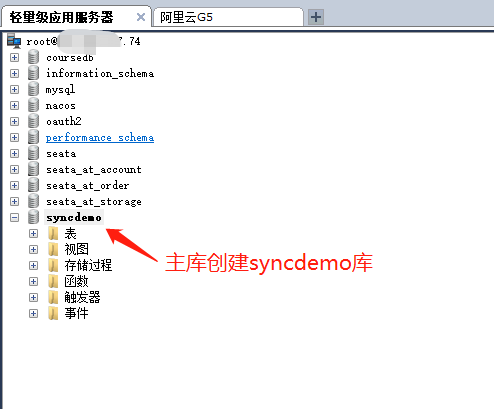
从库如下(示例):

可以发现库同步了然后在主库创建表
代码如下(示例):-- 在三个库中创建 CREATE TABLE `t_dict` ( `dict_id` BIGINT(0) PRIMARY KEY NOT NULL, `ustatus` VARCHAR(100) NOT NULL, `uvalue` VARCHAR(100) NOT NULL );- 1
- 2
- 3
- 4
- 5
- 6
- 7
主库生成表如下(示例):
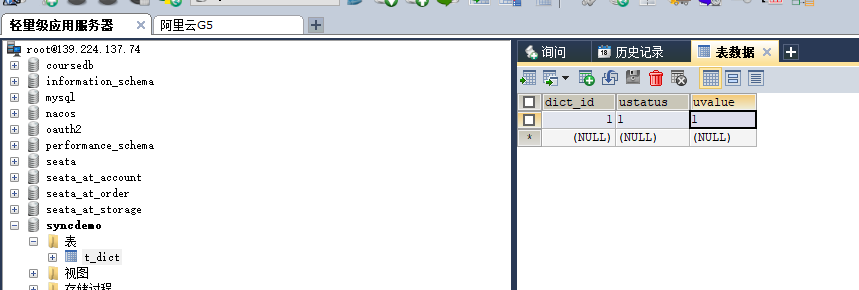
从库生成表如下(示例):

可以发现表同步了主库的t_dict表插入一条数据如下(示例):
从库的t_dict表也生成一条数据如下(示例):

表数据也同步了写操作存储到m0,读操作从s0读取
配置如下(示例):
#配置主从数据源,要基于MySQL主从架构。 spring.shardingsphere.datasource.names=m0,s0 spring.shardingsphere.datasource.m0.type=com.alibaba.druid.pool.DruidDataSource spring.shardingsphere.datasource.m0.driver-class-name=com.mysql.cj.jdbc.Driver spring.shardingsphere.datasource.m0.url=jdbc:mysql://139.224.137.74:3306/masterdemo?serverTimezone=GMT%2B8 spring.shardingsphere.datasource.m0.username=root spring.shardingsphere.datasource.m0.password=ca0a997ee4770063 spring.shardingsphere.datasource.s0.type=com.alibaba.druid.pool.DruidDataSource spring.shardingsphere.datasource.s0.driver-class-name=com.mysql.cj.jdbc.Driver spring.shardingsphere.datasource.s0.url=jdbc:mysql://106.14.132.94:3306/slavedemo?serverTimezone=GMT%2B8 spring.shardingsphere.datasource.s0.username=root spring.shardingsphere.datasource.s0.password=JHWLXeT56iJiBwDG #读写分离规则, m0 主库,s0 从库 spring.shardingsphere.sharding.master-slave-rules.ds0.master-data-source-name=m0 spring.shardingsphere.sharding.master-slave-rules.ds0.slave-data-source-names[0]=s0 #基于读写分离的表分片 spring.shardingsphere.sharding.tables.t_dict.actual-data-nodes=ds0.t_dict spring.shardingsphere.sharding.tables.t_dict.key-generator.column=dict_id spring.shardingsphere.sharding.tables.t_dict.key-generator.type=SNOWFLAKE spring.shardingsphere.sharding.tables.t_dict.key-generator.props.worker.id=1 spring.shardingsphere.props.sql.show = true spring.main.allow-bean-definition-overriding=true- 1
- 2
- 3
- 4
- 5
- 6
- 7
- 8
- 9
- 10
- 11
- 12
- 13
- 14
- 15
- 16
- 17
- 18
- 19
- 20
- 21
- 22
- 23
- 24
- 25
- 26
- 27
- 28
依次执行addDictByMS方法和queryDictByMS方法
代码如下(示例):
/** * 主库插入 */ @Test public void addDictByMS(){ Dict d1 = new Dict(); d1.setUstatus("1"); d1.setUvalue("正常"); dictMapper.insert(d1); Dict d2 = new Dict(); d2.setUstatus("0"); d2.setUvalue("不正常"); dictMapper.insert(d2); } /** * 从库读取 */ @Test public void queryDictByMS(){ List<Dict> dicts = dictMapper.selectList(null); dicts.forEach(dict -> System.out.println(dict)); }- 1
- 2
- 3
- 4
- 5
- 6
- 7
- 8
- 9
- 10
- 11
- 12
- 13
- 14
- 15
- 16
- 17
- 18
- 19
- 20
- 21
- 22
- 23
- 24
控制台打印如下(示例):
_ _ |_ _ _|_. ___ _ | _ | | |\/|_)(_| | |_\ |_)||_|_\ / | 3.3.2 2022-09-04 20:59:03.749 WARN 47380 --- [ main] c.b.m.core.metadata.TableInfoHelper : Can not find table primary key in Class: "com.example.apacheshardingspheredemo.entity.Course". 2022-09-04 20:59:03.898 WARN 47380 --- [ main] c.b.m.core.metadata.TableInfoHelper : Can not find table primary key in Class: "com.example.apacheshardingspheredemo.entity.Dict". 2022-09-04 20:59:03.950 WARN 47380 --- [ main] c.b.m.core.metadata.TableInfoHelper : Can not find table primary key in Class: "com.example.apacheshardingspheredemo.entity.User". 2022-09-04 20:59:04.002 INFO 47380 --- [ main] ApacheShardingsphereDemoApplicationTests : Started ApacheShardingsphereDemoApplicationTests in 5.339 seconds (JVM running for 6.826) 2022-09-04 20:59:04.861 INFO 47380 --- [ main] ShardingSphere-SQL : Logic SQL: INSERT INTO t_dict ( ustatus, uvalue ) VALUES ( ?, ? ) 2022-09-04 20:59:04.861 INFO 47380 --- [ main] ShardingSphere-SQL : SQLStatement: InsertStatementContext(super=CommonSQLStatementContext(sqlStatement=org.apache.shardingsphere.sql.parser.sql.statement.dml.InsertStatement@14d81f2c, tablesContext=org.apache.shardingsphere.sql.parser.binder.segment.table.TablesContext@5dd3727c), tablesContext=org.apache.shardingsphere.sql.parser.binder.segment.table.TablesContext@5dd3727c, columnNames=[ustatus, uvalue], insertValueContexts=[InsertValueContext(parametersCount=2, valueExpressions=[ParameterMarkerExpressionSegment(startIndex=51, stopIndex=51, parameterMarkerIndex=0), ParameterMarkerExpressionSegment(startIndex=54, stopIndex=54, parameterMarkerIndex=1), DerivedParameterMarkerExpressionSegment(super=ParameterMarkerExpressionSegment(startIndex=0, stopIndex=0, parameterMarkerIndex=2))], parameters=[1, 正常])], generatedKeyContext=Optional[GeneratedKeyContext(columnName=dict_id, generated=true, generatedValues=[773290175286480896])]) 2022-09-04 20:59:04.861 INFO 47380 --- [ main] ShardingSphere-SQL : Actual SQL: m0 ::: INSERT INTO t_dict ( ustatus, uvalue , dict_id) VALUES (?, ?, ?) ::: [1, 正常, 773290175286480896] 2022-09-04 20:59:05.000 INFO 47380 --- [ main] ShardingSphere-SQL : Logic SQL: INSERT INTO t_dict ( ustatus, uvalue ) VALUES ( ?, ? ) 2022-09-04 20:59:05.000 INFO 47380 --- [ main] ShardingSphere-SQL : SQLStatement: InsertStatementContext(super=CommonSQLStatementContext(sqlStatement=org.apache.shardingsphere.sql.parser.sql.statement.dml.InsertStatement@14d81f2c, tablesContext=org.apache.shardingsphere.sql.parser.binder.segment.table.TablesContext@361f26b4), tablesContext=org.apache.shardingsphere.sql.parser.binder.segment.table.TablesContext@361f26b4, columnNames=[ustatus, uvalue], insertValueContexts=[InsertValueContext(parametersCount=2, valueExpressions=[ParameterMarkerExpressionSegment(startIndex=51, stopIndex=51, parameterMarkerIndex=0), ParameterMarkerExpressionSegment(startIndex=54, stopIndex=54, parameterMarkerIndex=1), DerivedParameterMarkerExpressionSegment(super=ParameterMarkerExpressionSegment(startIndex=0, stopIndex=0, parameterMarkerIndex=2))], parameters=[0, 不正常])], generatedKeyContext=Optional[GeneratedKeyContext(columnName=dict_id, generated=true, generatedValues=[773290176016289793])]) 2022-09-04 20:59:05.000 INFO 47380 --- [ main] ShardingSphere-SQL : Actual SQL: m0 ::: INSERT INTO t_dict ( ustatus, uvalue , dict_id) VALUES (?, ?, ?) ::: [0, 不正常, 773290176016289793] 2022-09-04 20:59:05.089 INFO 47380 --- [extShutdownHook] com.alibaba.druid.pool.DruidDataSource : {dataSource-1} closing ... 2022-09-04 20:59:05.097 INFO 47380 --- [extShutdownHook] com.alibaba.druid.pool.DruidDataSource : {dataSource-1} closed 2022-09-04 20:59:05.097 INFO 47380 --- [extShutdownHook] com.alibaba.druid.pool.DruidDataSource : {dataSource-2} closing ... 2022-09-04 20:59:05.097 INFO 47380 --- [extShutdownHook] com.alibaba.druid.pool.DruidDataSource : {dataSource-2} closed Disconnected from the target VM, address: '127.0.0.1:60227', transport: 'socket' Process finished with exit code 0- 1
- 2
- 3
- 4
- 5
- 6
- 7
- 8
- 9
- 10
- 11
- 12
- 13
- 14
- 15
- 16
- 17
- 18
- 19
- 20
- 21
- 22
- 23
- 24
- 25
- 26
- 27
可以发现写操作的二条sql都是对主库进行写入如下(示例):
m0 ::: INSERT INTO t_dict ( ustatus,uvalue , dict_id) VALUES (?, ?, ?) ::: [1, 正常, 773290175286480896] m0 ::: INSERT INTO t_dict ( ustatus,uvalue , dict_id) VALUES (?, ?, ?) ::: [0, 不正常, 773290176016289793]- 1
- 2
主库表有数据生成如下(示例):
 但是我们前面配置了主从同步,所以从库的表里面也有数据生成,但是在sql层面我们仅仅对主库进行写的操作,从库的表数据生成是mysql层面,这里需要区分一下。
从库数据生成如下(示例):

执行queryDictByMS方法查询
控制台打印如下(示例):_ _ |_ _ _|_. ___ _ | _ | | |\/|_)(_| | |_\ |_)||_|_\ / | 3.3.2 2022-09-04 21:01:20.265 WARN 49292 --- [ main] c.b.m.core.metadata.TableInfoHelper : Can not find table primary key in Class: "com.example.apacheshardingspheredemo.entity.Course". 2022-09-04 21:01:20.450 WARN 49292 --- [ main] c.b.m.core.metadata.TableInfoHelper : Can not find table primary key in Class: "com.example.apacheshardingspheredemo.entity.Dict". 2022-09-04 21:01:20.500 WARN 49292 --- [ main] c.b.m.core.metadata.TableInfoHelper : Can not find table primary key in Class: "com.example.apacheshardingspheredemo.entity.User". 2022-09-04 21:01:20.536 INFO 49292 --- [ main] ApacheShardingsphereDemoApplicationTests : Started ApacheShardingsphereDemoApplicationTests in 5.389 seconds (JVM running for 6.911) 2022-09-04 21:01:21.334 INFO 49292 --- [ main] ShardingSphere-SQL : Logic SQL: SELECT dict_id,ustatus,uvalue FROM t_dict 2022-09-04 21:01:21.334 INFO 49292 --- [ main] ShardingSphere-SQL : SQLStatement: SelectStatementContext(super=CommonSQLStatementContext(sqlStatement=org.apache.shardingsphere.sql.parser.sql.statement.dml.SelectStatement@53fbb2b4, tablesContext=org.apache.shardingsphere.sql.parser.binder.segment.table.TablesContext@7434ee13), tablesContext=org.apache.shardingsphere.sql.parser.binder.segment.table.TablesContext@7434ee13, projectionsContext=ProjectionsContext(startIndex=8, stopIndex=29, distinctRow=false, projections=[ColumnProjection(owner=null, name=dict_id, alias=Optional.empty), ColumnProjection(owner=null, name=ustatus, alias=Optional.empty), ColumnProjection(owner=null, name=uvalue, alias=Optional.empty)]), groupByContext=org.apache.shardingsphere.sql.parser.binder.segment.select.groupby.GroupByContext@44a14de0, orderByContext=org.apache.shardingsphere.sql.parser.binder.segment.select.orderby.OrderByContext@50fd739d, paginationContext=org.apache.shardingsphere.sql.parser.binder.segment.select.pagination.PaginationContext@5e1d1524, containsSubquery=false) 2022-09-04 21:01:21.334 INFO 49292 --- [ main] ShardingSphere-SQL : Actual SQL: s0 ::: SELECT dict_id,ustatus,uvalue FROM t_dict Dict{dictId=1, ustatus='1', uvalue='1'} Dict{dictId=773290175286480896, ustatus='1', uvalue='正常'} Dict{dictId=773290176016289793, ustatus='0', uvalue='不正常'} 2022-09-04 21:01:21.477 INFO 49292 --- [extShutdownHook] com.alibaba.druid.pool.DruidDataSource : {dataSource-1} closing ... 2022-09-04 21:01:21.479 INFO 49292 --- [extShutdownHook] com.alibaba.druid.pool.DruidDataSource : {dataSource-1} closed 2022-09-04 21:01:21.479 INFO 49292 --- [extShutdownHook] com.alibaba.druid.pool.DruidDataSource : {dataSource-2} closing ... 2022-09-04 21:01:21.479 INFO 49292 --- [extShutdownHook] com.alibaba.druid.pool.DruidDataSource : {dataSource-2} closed Disconnected from the target VM, address: '127.0.0.1:60301', transport: 'socket' Process finished with exit code 0- 1
- 2
- 3
- 4
- 5
- 6
- 7
- 8
- 9
- 10
- 11
- 12
- 13
- 14
- 15
- 16
- 17
- 18
- 19
- 20
- 21
sql查询如下(示例):
s0 ::: SELECT dict_id,ustatus,uvalue FROM t_dictDict{dictId=1, ustatus='1', uvalue='1'}- 1
可以发现读操作是在从库上面读取的
到现在读写分离才算正常工作了。
-
相关阅读:
3ESXi安装
自阿里 P8 爆出 1031 道 java 面试题后,我在 某直聘狂拿千份 Offer
查阅标准文档以及effective c++作者文笔 真正搞懂万能引用和引用折叠以及完美转发
StringBuffer与StringBulider的区别?来看看源码
Redis快速上手篇五(持久化)
【Java面试题】wait和sleep是否会触发锁的释放以及CPU资源的释放?
react&antd问题(4)
分析ORACLE批量更新中的ORA-00911错误:MyBatis <foreach> 场景与解决方案
JdbcTemplate概述和测试
[kaldi] alignment 对齐 (音素级和词级)
- 原文地址:https://blog.csdn.net/java_wxid/article/details/126682757
