-
java — 认识String类的常用方法(上)
1 字符串构造
String类提供的构造方式非常多,常用的就以下三种:
- 使用常量串构造。
- 直接newString对象。
- 使用字符数组进行构造。
public static void main(String[] args) { // 使用常量串构造 String s1 = "hello world"; System.out.println(s1); // 直接newString对象 String s2 = new String("hello world"); System.out.println(s1); // 使用字符数组进行构造 char[] array = {'h', 'e', 'l', 'l', 'o', 'w', 'o', 'r', 'l', 'd'}; String s3 = new String(array); System.out.println(s1); }- 1
- 2
- 3
- 4
- 5
- 6
- 7
- 8
- 9
- 10
- 11
- 12
- 13
- 14
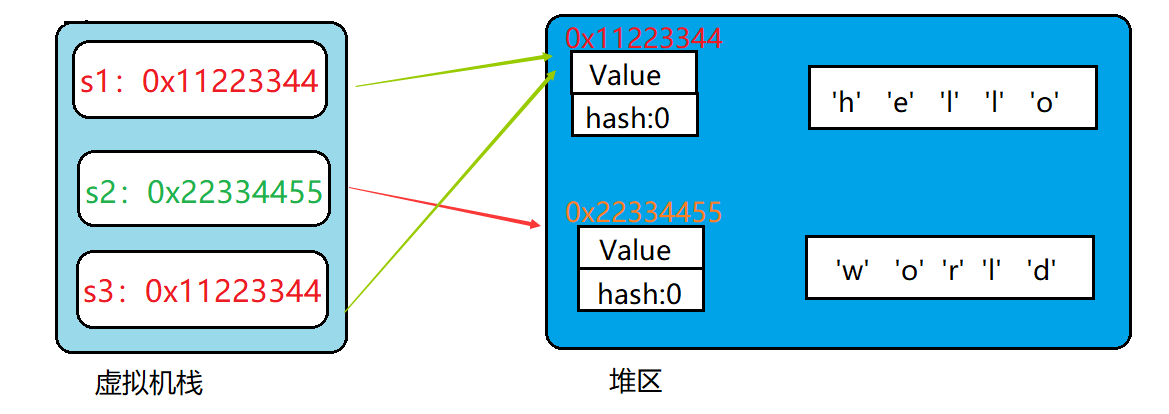
- String是引用类型,内部并不存储字符串本身。
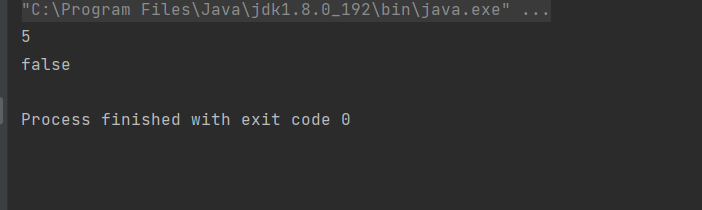
public static void main(String[] args) { // s1和s2引用的是不同对象 s1和s3引用的是同一对象 String s1 = new String("hello"); String s2 = new String("world"); String s3 = s1; // 获取字符串长度---输出5 System.out.println(s1.length()); // 如果字符串长度为0,返回true,否则返回false System.out.println(s1.isEmpty()); }- 1
- 2
- 3
- 4
- 5
- 6
- 7
- 8
- 9
- 10
- 在Java中“”引起来的也是String类型对象。
// 打印"hello"字符串(String对象)的长度 System.out.println("hello".length());- 1
- 2
2 String对象的比较
- ==比较是否引用同一个对象。
注意:
对于内置类型,== 比较的是变量中的值;
对于引用类型 == 比较的是引用中的地址。
public static void main(String[] args) { int a = 100; int b = 200; int c = 100; // 对于基本类型变量,== 比较两个变量中存储的值是否相同 System.out.println(a == b); // false System.out.println(a == c); // true // 对于引用类型变量,== 比较两个引用变量引用的是否为同一个对象 String str1 = new String("abcdef"); String str2 = new String("abcdef"); String str3 = new String("abc"); String str4 = str1; System.out.println(str1 == str2); // false System.out.println(str2 == str3); // false System.out.println(str1 == str4); // true }- 1
- 2
- 3
- 4
- 5
- 6
- 7
- 8
- 9
- 10
- 11
- 12
- 13
- 14
- 15
- 16
- 17
- 18

- boolean equals(Object anObject) 方法:按照字典序比较。
字典序:字符大小的顺序
public static void main(String[] args) { String s1 = new String("abcdef"); String s2 = new String("abcdef"); String s3 = new String("abc"); // s1、s2、s3引用的是三个不同对象,因此==比较结果全部为false System.out.println(s1 == s2); // false System.out.println(s1 == s3); // false // equals比较:String对象中的逐个字符 // 虽然s1与s2引用的不是同一个对象,但是两个对象中放置的内容相同,因此输出true // s1与s3引用的不是同一个对象,而且两个对象中内容也不同,因此输出false System.out.println(s1.equals(s2)); // true System.out.println(s1.equals(s3)); // false }- 1
- 2
- 3
- 4
- 5
- 6
- 7
- 8
- 9
- 10
- 11
- 12
- 13
- 14
- 15

- int compareTo(String s) 方法: 按照字典序进行比较。、
与equals不同的是,equals返回的是boolean类型,而compareTo返回的是int类型。具体比较方式:
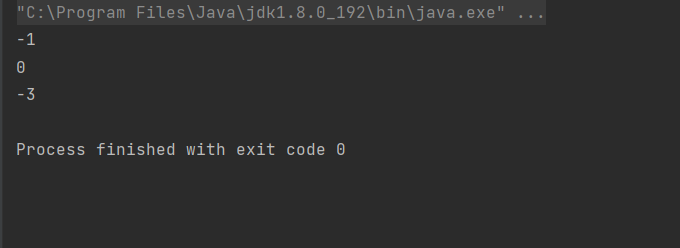
- . 先按照字典次序大小比较,如果出现不等的字符,直接返回这两个字符的大小差值。
- 如果前k个字符相等(k为两个字符长度最小值),返回值两个字符串长度差值。
public static void main(String[] args) { String s1 = new String("abc"); String s2 = new String("ac"); String s3 = new String("abc"); String s4 = new String("abcdef"); System.out.println(s1.compareTo(s2)); // 不同输出字符差值-1 System.out.println(s1.compareTo(s3)); // 相同输出 0 System.out.println(s1.compareTo(s4)); // 前k个字符完全相同,输出长度差值 -3 }- 1
- 2
- 3
- 4
- 5
- 6
- 7
- 8
- 9
- int compareToIgnoreCase(String str) 方法:与compareTo方式相同,但是忽略大小写比较。
public static void main(String[] args) { String s1 = new String("abc"); String s2 = new String("ac"); String s3 = new String("ABc"); String s4 = new String("abcdef"); System.out.println(s1.compareToIgnoreCase(s2)); // 不同输出字符差值-1 System.out.println(s1.compareToIgnoreCase(s3)); // 相同输出 0 System.out.println(s1.compareToIgnoreCase(s4)); // 前k个字符完全相同,输出长度差值 -3 }- 1
- 2
- 3
- 4
- 5
- 6
- 7
- 8
- 9

3 字符串查找
char charAt(int index) 返回index位置上字符,如果index为负数或者越界,抛出IndexOutOfBoundsException异常
int indexOf(int ch) 返回ch第一次出现的位置,没有返回-1
int indexOf(int ch, int fromIndex) 从fromIndex位置开始找ch第一次出现的位置,没有返回-1
int indexOf(String str) 返回str第一次出现的位置,没有返回-1
int indexOf(String str, int fromIndex) 从fromIndex位置开始找str第一次出现的位置,没有返回-1
int lastIndexOf(int ch) 从后往前找,返回ch第一次出现的位置,没有返回-1
int lastIndexOf(int ch, int fromIndex) 从fromIndex位置开始找,从后往前找ch第一次出现的位置,没有返回-1
int lastIndexOf(String str) 从后往前找,返回str第一次出现的位置,没有返回-1
int lastIndexOf(String str, intfromIndex) 从fromIndex位置开始找,从后往前找str第一次出现的位置,没有返回-1
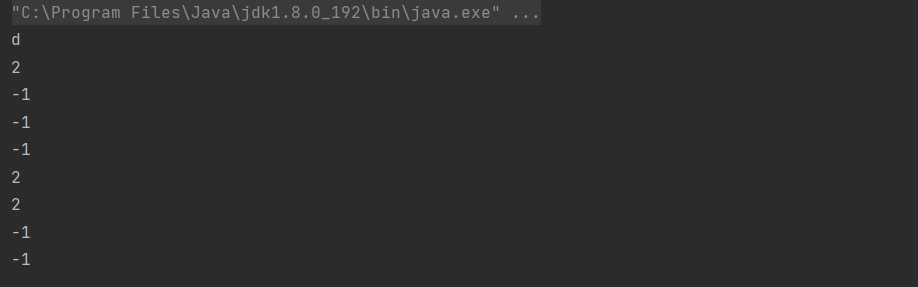
public static void main(String[] args) { String s = "abcdefghijkopqrstovwxyz"; System.out.println(s.charAt(3)); //d System.out.println(s.indexOf('c')); //2 System.out.println(s.indexOf('c', 10)); //-1 System.out.println(s.indexOf("bbb")); //-1 System.out.println(s.indexOf("bbb", 10)); //-1 System.out.println(s.lastIndexOf('c')); //2 System.out.println(s.lastIndexOf('c', 10)); //2 System.out.println(s.lastIndexOf("bbb")); //-1 System.out.println(s.lastIndexOf("bbb", 10));//-1 }- 1
- 2
- 3
- 4
- 5
- 6
- 7
- 8
- 9
- 10
- 11
- 12
上述方法都是实例方法。4 转化
- 数值和字符串转化
public static void main(String[] args) { //数字转字符串 String s1 = String.valueOf(1234); String s2 = String.valueOf(12.34); String s3 = String.valueOf(true); String s4 = String.valueOf(false); System.out.println(s1); System.out.println(s2); System.out.println(s3); System.out.println(s4); System.out.println("================================="); //字符串转数字 //注意:Integer、Double等是Java中的包装类型,这个后面会讲到 int data1 = Integer.parseInt("1234"); double data2 = Double.parseDouble("12.34"); System.out.println(data1); System.out.println(data2); }- 1
- 2
- 3
- 4
- 5
- 6
- 7
- 8
- 9
- 10
- 11
- 12
- 13
- 14
- 15
- 16
- 17
- 18
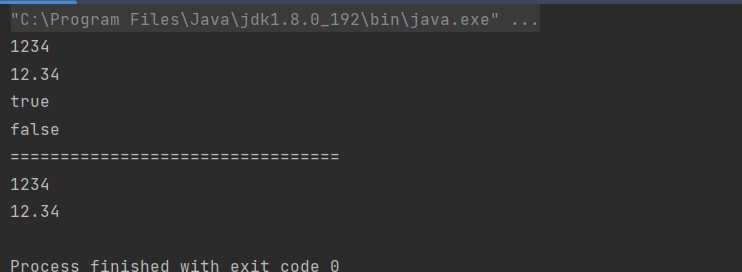
- 大小写转换
public static void main(String[] args) { String s1 = "abc"; String s2 = "ABC"; //将s1转成大写输出 System.out.println(s1.toUpperCase()); //将s2转成小写输出 System.out.println(s2.toLowerCase()); }- 1
- 2
- 3
- 4
- 5
- 6
- 7
- 8
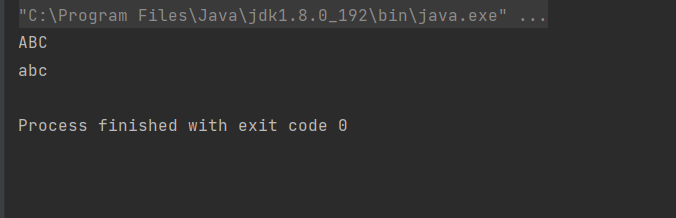
- 字符串转数组
public static void main(String[] args) { String str = "abcdef"; // 字符串转数组 char[] ch = str.toCharArray(); for (int i = 0; i < ch.length; i++) { //输出字符串的每一个字符 System.out.print(ch[i]); } System.out.println(); // 数组转字符串 String s2 = new String(ch); System.out.println(s2); }- 1
- 2
- 3
- 4
- 5
- 6
- 7
- 8
- 9
- 10
- 11
- 12
- 13
- 格式化
public static void main(String[] args) { String str = String.format("%d-%d-%d", 2022, 9,12); System.out.println(str); }- 1
- 2
- 3
- 4
5 字符串替换
用一个新的字符串替换掉一个旧的字符串。

public static void main(String[] args) { String str = "ILoveChiina ILoveFriend"; System.out.println(str.replaceAll("I", "You")); System.out.println(str.replaceFirst("I", "You")); }- 1
- 2
- 3
- 4
- 5
System.out.println(str.replaceAll(“I”, “You”));
这段代码的意思是,将字符串中所有的"I"字母全部转变为"You"。
System.out.println(str.replaceFirst(“I”, “You”));
这段代码的意思是,将字符串中的第一个"I"字母转变为"You"。
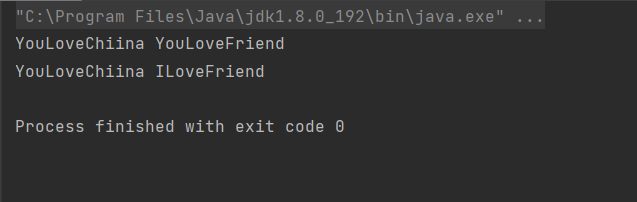
注意事项:由于字符串是不可变对象, 替换不修改当前字符串, 而是产生一个新的字符串
6 字符串拆分
将一个完整的字符串按照指定的分隔符划分为若干个子字符串
String[] split(String regex) 将字符串全部拆分
String[] split(String regex, int limit) 将字符串以指定的格式,拆分为limit组
按空格拆分public static void main(String[] args) { String str = "hello world hello LiHua" ; String[] result = str.split(" ") ; //按照空格拆分 for(String s: result) { System.out.println(s); } }- 1
- 2
- 3
- 4
- 5
- 6
- 7
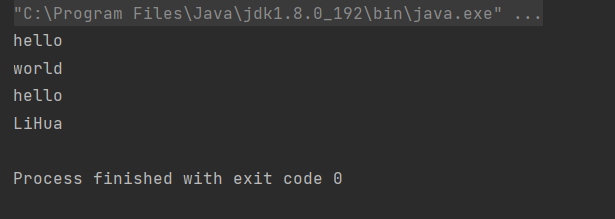
按字符串部分拆分String[] result = str.split(" ",2) ;
这段代码中的双引号表示根据什么分隔符拆分;数字表示根据当前分隔符拆成多少个字符串。public static void main(String[] args) { String str = "hello world hello LiHua" ; String[] result = str.split(" ",2) ; for(String s: result) { System.out.println(s); } }- 1
- 2
- 3
- 4
- 5
- 6
- 7

有些特殊字符作为分割符可能无法正确切分,需要加上转义。
拆分一个IP地址public static void main(String[] args) { String str = "192.168.10.10" ; String[] result = str.split("\\.") ; for(String s: result) { System.out.println(s); } }- 1
- 2
- 3
- 4
- 5
- 6
- 7
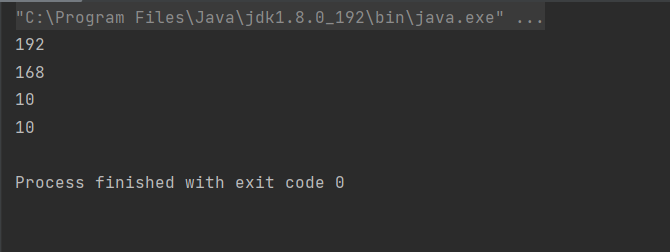
注意事项:- 字符"|“,”*“,”+"都得加上转义字符,前面加上 “\” 。
- 而如果是 “” ,那么就得写成 “\\” 。
- 如果一个字符串中有多个分隔符,可以用"|"作为连字符。
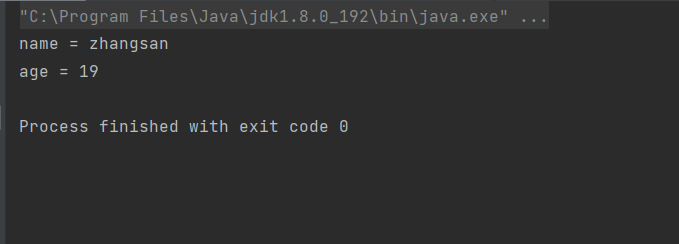
public static void main(String[] args) { String str = "name=zhangsan&age=19"; String[] result = str.split("&"); for (int i = 0; i < result.length; i++) { String[] temp = result[i].split("="); System.out.println(temp[0] + " = " + temp[1]); } }- 1
- 2
- 3
- 4
- 5
- 6
- 7
- 8
- 9
7 字符串截取
从一个完整的字符串之中截取出部分内容。
String substring(int beginIndex) 从指定索引截取到结尾
String substring(int beginIndex, int endIndex) 截取部分内容
public static void main(String[] args) { String str = "helloworld"; System.out.println(str.substring(5)); }- 1
- 2
- 3
- 4
- 5
截取结尾5个字符
指定截取部分public static void main(String[] args) { String str = "helloworld"; System.out.println(str.substring(0, 5)); }- 1
- 2
- 3
- 4
第一个参数表示从第0个字符开始截取;第二个参数表示到第5个字符截取结束。
注意事项:
- 索引从0开始
- 注意前闭后开区间的写法, substring(0, 5) 表示包含 0 号下标的字符, 不包含 5 号下标
8. 其他操作方法

trim()方法的使用public static void main(String[] args) { String str1 = " zhang san " ; String str2 = " hello java "; System.out.println("["+str1+"]");//去除前str1 System.out.println("["+str2+"]");//去除前str2 System.out.println("----------------------------"); System.out.println("["+str1.trim()+"]");//去除后str1 System.out.println("["+str2.trim()+"]");//去除后str2 }- 1
- 2
- 3
- 4
- 5
- 6
- 7
- 8
- 9
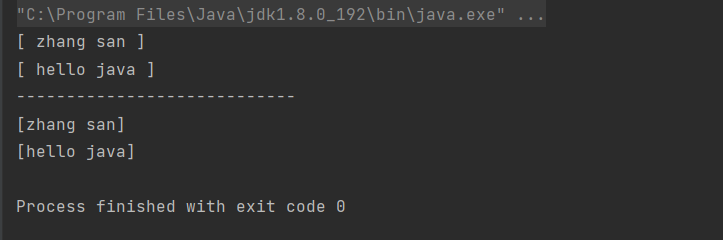
trim 会去掉字符串开头和结尾的空白字符(空格, 换行, 制表符等)。
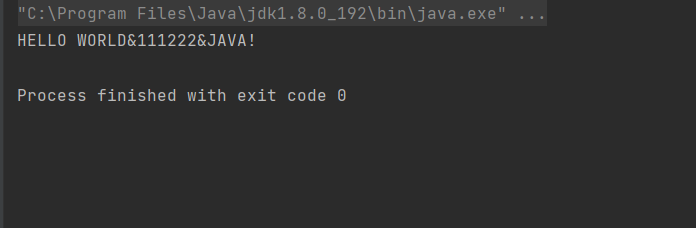
toUpperCase()的使用将字符串中的所有字母转成大写,这里注意是所有的字母并不是所有的字符。
public static void main(String[] args) { String str = "hello world&111222&java!"; System.out.println(str.toUpperCase()); }- 1
- 2
- 3
- 4
- 5
toLowerCase()的使用将字符串中的所有字母转成小写,这里注意是所有的字母并不是所有的字符。
public static void main(String[] args) { String str = "HELLO WORLD&111222&JAVA!"; System.out.println(str.toLowerCase()); }- 1
- 2
- 3
- 4

-
相关阅读:
wpf资源Resources探究性学习(一)
java计算机毕业设计西安市城市绿地管理系统源程序+mysql+系统+lw文档+远程调试
《庆余年》角色穿越高考:谁将笑傲现代考场?
未来属于 Firefly:通过最新的生成式 AI 创新解锁新的创造力水平
Linux FrameBuffer(二)- VMware虚拟机的Ubuntu系统FrameBuffer画图
TCP协议IP网络音柱
SpringBoot SpringBoot 开发实用篇 1 热部署 1.4 关闭热部署功能
Leetcode 1582. 二进制矩阵中的特殊位置
四舍五入(基础语法)
【BUG】第一次创建vue3+vite项目启动报错Error: Cannot find module ‘worker_threads‘
- 原文地址:https://blog.csdn.net/m0_63033419/article/details/126665548
