-
python requests.post请求404问题
问题场景
有时候,在编写一段http接口请求程序时,发现代码中的header头和请求体中都是原网页中一样,但是,在实际请求时,接口却返回404,代码如下
header = { # ':authority': 'm.ctrip.com', # ':method': 'POST', # ':path': '/restapi/soa2/20405/getPCSightList', # ':scheme': 'https', 'accept': '*/*', 'accept-encoding': 'gzip, deflate, br', 'accept-language': 'zh-CN,zh;q=0.9', 'authorization': 'xx', 'cache-control': "no-cache", 'content-length': '373', 'content-type': 'application/json;charset:utf-8;', 'cookies': 'xx', 'origin': 'https://www.tripadvisor.cn', 'pragma': 'no-cache', 'referer': 'https://www.tripadvisor.cn/Attractions-g60763-New_York_City_New_York-Vacations.html', 'sec-ch-ua': "'.Not/A)Brand';v='99', 'Google Chrome';v='103', 'Chromium';v='103'", 'sec-ch-ua-mobile': '?0', 'sec-ch-ua-platform': 'macOS', 'sec-fetch-dest': 'empty', 'sec-fetch-mode': 'cors', 'sec-fetch-site': 'cross-site', 'user-agent': 'Mozilla/5.0 (Macintosh; Intel Mac OS X 10_15_7) AppleWebKit/537.36 (KHTML, like Gecko) Chrome/103.0.0.0 Safari/537.36', 'x-ta-uid': 'cd58b674-7dba-484a-a908-3239120cd728' } url = 'https://m.ctrip.com/restapi/soa2/20405/getPCSightList' data = {"geoId":60763,"pageIndex":1,"pageSize":30,"travelRanking":"false","needSelectedFilters":"true","filters":[{"type":"subcategory","param":""},{"type":"subtype","param":""},{"type":"neighborhood","param":""},{"type":"travelerRating","param":""},{"type":"awards","param":""},{"type":"waypointairport","param":""},{"type":"waypointstation","param":""},{"type":"other","param":""}]} response = requests.post(url=url, data=data, headers=header) print(response.status_code)- 1
- 2
- 3
- 4
- 5
- 6
- 7
- 8
- 9
- 10
- 11
- 12
- 13
- 14
- 15
- 16
- 17
- 18
- 19
- 20
- 21
- 22
- 23
- 24
- 25
- 26
- 27
- 28
- 29
运行结果为

问题分析
既然404,那就排查问题,data和header都是直接从复制浏览器中复制过来的,不会有问题,那有问题的必然是request.post中的方法问题
查看request.post源码

从源码中可以看到,request.post可以接受两个参数,一个是data,还有一个是json,
data是以字典的形式发送body,json则是以json数据格式发送body
通过这两个注释可以很明显的发现,requests.post在发送请求时,会根据当前传递的参数来选择不同的方式,可以理解为一种是表单形式,还有一种是json格式postman测试
通过postman来测试两种不同请求下的情况
form表单

Json数据
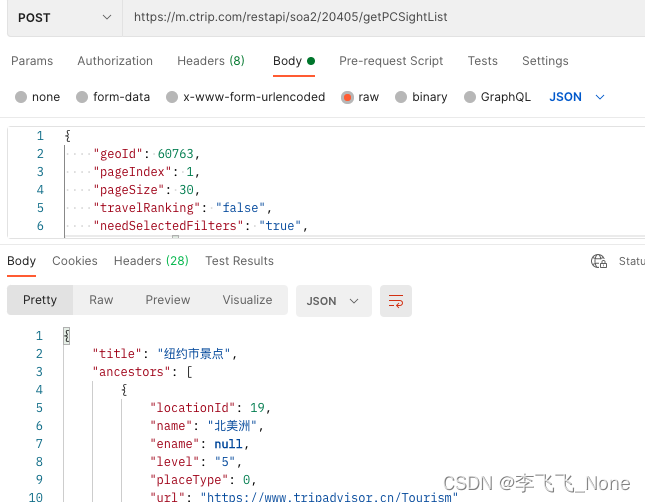
通过postman测试可以发现,当前服务后端接口仅接受json格式的数据,即content-type为application.json
问题解决
将原先代码中data替换成json
response = requests.post(url=url, json=data, headers=JsonHeader)- 1

这个时候肯定有人会问,那我使用data传递数据时,将header头中的content-type指定为application/json不就行了,但其实是不行的,就算自己指定了,最后request.body的值也是类似于key1=value1&key2=value2这种形式
结论
- 当request.post使用json来传递参数时,即使不指定content-type类型,也会默认指定application/json

- 使用data传递参数时,将会以表单的形式进行提交,并且后续将通过urlencode转换成字符串,及key1=value1&key2=value2的形式

- 使用data时,即使指定了content-type也不会生效,后续将会被默认替换掉
因此,需要根据自己实际情况来分析当前接口接收数据时使用的是什么格式,但目前一般的网站都开始采用application/jsond的数据格式
-
相关阅读:
字符串_判断某个字符串是否出现在当前字符串中
数据库_外键foreign key
【NodeJs-5天学习】第二天篇③ ——Express Web框架 和 中间件
POI导入带有合并单元格的excel,demo实例,直接可以运行
leetcode经典面试150题---5.多数元素
Vue(Vuex插件)
前端三剑客快速入门(二)
C# 实例解释面向对象编程中的接口隔离原则
护眼灯值不值得买?显色指数最好的护眼灯推荐
编写程序,要求输入x的值,输出y的值。分别用(1)不嵌套的if语句(2)嵌套的if语句(3)if-else语句(4)switch语句。
- 原文地址:https://blog.csdn.net/qq_42293758/article/details/126678905
