-
http 协议目录操作--mongoose
前几篇文章已经介绍了文件的下载与上传,操作的都是文件,而如果是操作目录呢,应该怎么做呢?这里介绍的还是 mongoose 源码接口。先看实际操作的效果:

这里有两个目录,点击后可以进到目录里:
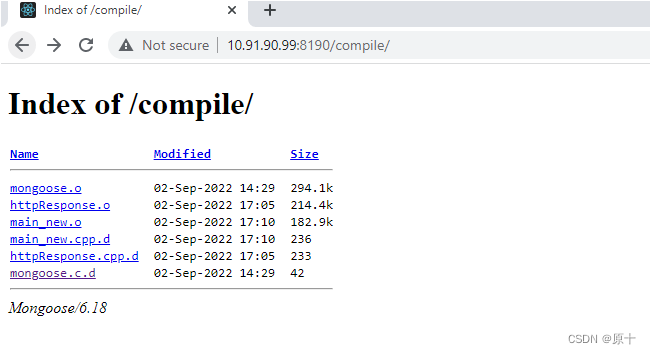
可以点击查看目录里文件的内容:

要实现目录的展示,就加了一段代码:

整个 handleRequest() 函数的代码为:
- void handleRequest(struct mg_connection *connection, int32_t event, void *data)
- {
- struct http_message* msg = (struct http_message*)data;
- std::string uri(msg->uri.p, msg->uri.len);
- tracef("connect from ip: %s, uri = %s\n", inet_ntoa(connection->sa.sin.sin_addr), uri.c_str());
- //设置资源根目录
- if(uri == "/")
- {
- struct mg_serve_http_opts opts;
- memset(&opts, 0, sizeof(opts));
- opts.enable_directory_listing = "yes";
- opts.document_root = "./";
- mg_serve_http(connection, msg, opts);
- //第一次请求根目录时,可以不往下处理了
- return;
- }
- CHttpResponse response;
- //保存请求头,用于应答
- for (int32_t index = 0; index < MG_MAX_HTTP_HEADERS; ++index)
- {
- if (msg->header_names[index].p == nullptr || msg->header_names[index].len == 0
- || std::string(msg->header_names[index].p,msg->header_names[index].len).find("Accept") != std::string::npos)
- {
- continue;
- }
- std::string header(msg->header_names[index].p, msg->header_names[index].len);
- std::string value(msg->header_values[index].p, msg->header_values[index].len);
- response.setHead(header.c_str(), value.c_str());
- }
- //请求的方法,GET、POST、PUT等
- std::string method(msg->method.p, msg->method.len);
- tracef("request method: %s\n", method.c_str());
- std::string fileName = uri.substr(1);
- if(fileName.at(fileName.length() - 1) == '/') //目录最后多一个"/"
- {
- fileName = fileName.substr(0, fileName.length() - 1);
- }
- struct stat st;
- //文件或目录存在
- if(lstat(fileName.c_str(), &st) == 0)
- {
- if(S_ISDIR(st.st_mode)) //目录
- {
- tracef("%s is a dirctory\n", fileName.c_str());
- struct mg_serve_http_opts opts;
- memset(&opts, 0, sizeof(opts));
- opts.enable_directory_listing = "yes";
- opts.document_root = "./";
- mg_serve_http(connection, msg, opts);
- }
- else if(S_ISREG(st.st_mode)) //普通文件
- {
- tracef("%s is a regular file\n", fileName.c_str());
- if(method == "GET")
- {
- if(!isGiantFile(fileName.c_str()))
- {
- if(response.setBody(fileName.c_str()) == 0) //文件大小为0直接返回错误信息
- {
- mg_http_send_error(connection, 500, "file length is 0");
- return;
- }
- std::string content;
- response.getContent(content);
- mg_send(connection, content.c_str(), content.length());
- }
- else
- {
- //处理大文件,采用分块传输的方式
- std::string headers;
- headers.append("HTTP/1.1 200 ok").append("\r\n");
- response.getHead(headers);
- headers.append("Content-Type: application/octet-stream").append("\r\n");
- headers.append("Transfer-Encoding: chunked").append("\r\n").append("\r\n");
- mg_send(connection, headers.c_str(), headers.length());
- sendGiantFile(connection, fileName.c_str());
- }
- }
- }
- }
- else
- {
- mg_http_send_error(connection, 404, NULL);
- }
- }
这里只是简单地处理了目录和普通文件的区别,还有其他如字符设备文件、块设备文件、链接文件、socket 文件这里不作处理。
函数原型:
void mg_serve_http(struct mg_connection *nc, struct http_message *hm, struct mg_serve_http_opts opts)就是用来设置目录的,我们可以简单看下这个函数做了什么。

函数的第三个参数其实可以不给成员赋值,这里都赋了默认值 。其实这个参数最主要关心两个成员:opts.document_root 和 opts.enable_directory_listing。opts.document_root 主要是标记起点,可以理解为从哪里去查找文件或目录来进行展示;opts.enable_directory_listing 可以理解为是否要展示。

接下来的函数 mg_uri_to_local_path(hm, &opts, &path, &path_info) 就是要把请求过来的目录(uri)进行本地化处理,因为我们请求目录的时候的 uri 是这样的:
http://10.91.90.99:8190/compile/那服务器必须要把目标目录 compile 进行本地化,最后得出它是在哪个目录下,如用 GDB 跟踪调试时,当请求目录是 compile 时,实际得出的是:

这样就得出了 compile 的相对路径了,那程序本身就可以访问这个目录。
- MG_INTERNAL void mg_send_http_file(struct mg_connection *nc, char *path,
- const struct mg_str *path_info,
- struct http_message *hm,
- struct mg_serve_http_opts *opts)
而这个函数最主要是做什么呢?它其实就是显示指定目录下文件列表了:

- static void mg_send_directory_listing(struct mg_connection *nc, const char *dir,
- struct http_message *hm,
- struct mg_serve_http_opts *opts)
这个函数里就是收集指定目录下的文件信息了,然后它会将它们组成 html 的形式进行发送,浏览器收到后就以 html 页面的形式展示,以 chunked 方式发送,这个 html 形式如下:
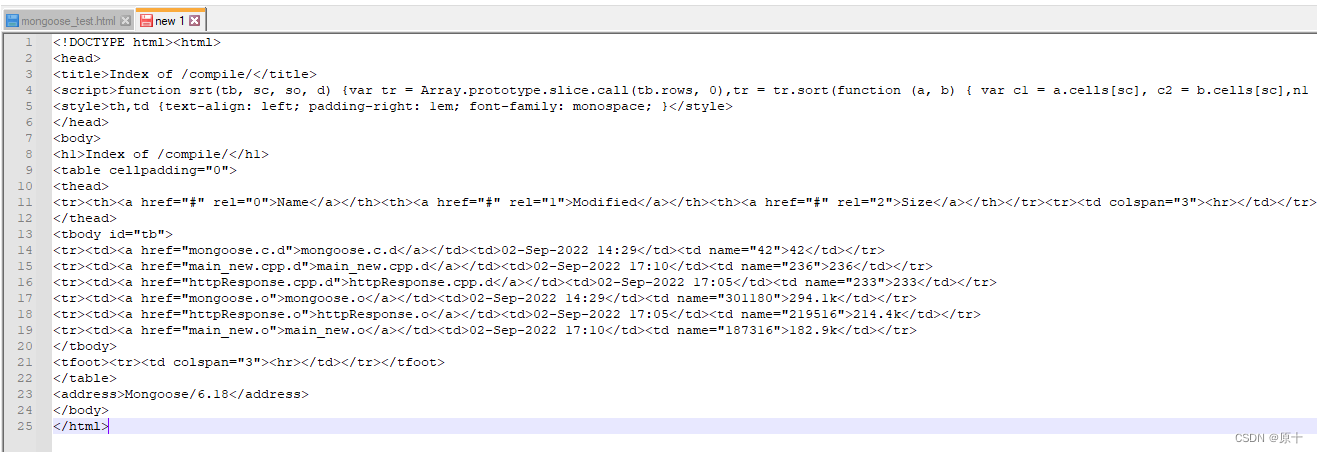
源码片段如下:

这样目录操作就已经正常了。
-
相关阅读:
ORB-SLAM2 ---- Frame::AssignFeaturesToGrid函数
新书推荐:11.6 调用约定
数据结构系列-堆的实现
CentOS 7 不显示ip
Go语言结构体指针
注释Java
【新书推荐】Cleaning Data for Effective Data Science
Spark On Yarn基本原理及部署
为dev c++配置图形开发环境easyx之mingw32
移动医疗科技:开发互联网医院系统源码
- 原文地址:https://blog.csdn.net/tianyexing2008/article/details/126668779
