-
linux系统编程专题(五) 系统调用之文件IO
一、open函数
系统调用提供了open函数,open函数在打开不存在的文件时候允许创建,同时提供了两种实现方式,这两种区别在于创建的文件是否可以写入指定权限。
1.1、普通打开
函数 int open(char *pathname, int flags) 参数 pathname:要打开的文件路径名
flags:文件打开方式,#include返回值 成功: 打开文件所得到对应的文件描述符(整数)
失败: -1, 设置errno示例 :打开文件不存在错误
新建
open_err.c文件#include#include #include #include int main() { int fd = open("/root/systemCall2/test", O_RDONLY | O_CREAT); printf("fd = %d\n",fd); if (fd < 0) { printf("errno = %d\n",errno); printf("open test error: %s\n", strerror(errno)); } return 0; } - 1
- 2
- 3
- 4
- 5
- 6
- 7
- 8
- 9
- 10
- 11
- 12
- 13
- 14
gcc open_err.c生成可执行文件a.out,执行a.out

1.2、指定权限打开
函数 int open(char *pathname, int flags, mode_t mode) 参数 pathname:要打开的文件路径名
flags:文件打开方式
O_RDONLY|O_WRONLY|O_RDWR
O_CREAT|O_APPEND|O_TRUNC|O_EXCL|O_NONBLOCK…
mode:参数3使用的前提, 参数2指定了 O_CREAT
取值8进制数,用来描述文件的访问权限,如: rwx 0664
创建文件最终权限 = mode & ~umask返回值 成功: 打开文件所得到对应的文件描述符(整数)
失败: -1, 设置errno示例:根据公式创建文件最终权限 = mode & ~umask,指定权限打开创建文件
创建a.txt文件
#include#include #include #include int main() { int fd = open("a.txt", O_CREAT, 0664); printf("fd = %d\n", fd); if (fd < 0) { printf("errno = %d\n", errno); printf("open test error: %s\n", strerror(errno)); } return 0; } - 1
- 2
- 3
- 4
- 5
- 6
- 7
- 8
- 9
- 10
- 11
- 12
- 13
- 14
权限计算
打印文件权限命令:ll

计算机对权限设置用的八进制处理,详细对照表:
权限 二进制 八进制 — 000 0 –x 001 1 -w- 010 2 -wx 011 3 r– 100 4 r-x 101 5 rw- 110 6 rwx 111 7 查表可知,a.txt的权限为:644(o)。接下来验证:
创建文件最终权限 = mode & ~umask。

查询umask为0022,即664(o) & ~022(o) = 644(o)
110110100 && ~10010 = 110100100
而~0 0001 0010 =1 1110 1101
即110110100 && 1 1110 1101= 1 1010 0100
三者计算,验证成功
1 1011 0100
1 1110 1101
1 1010 0100二、read函数
函数 ssize_t read(int fd, void *buf, size_t count); 参数 fd:文件描述符
buf:存数据的缓冲区
count:缓冲区大小返回值 0:读到文件末尾。
成功:> 0 读到的字节数。
失败:-1, 设置 errno
-1:并且 errno = EAGIN 或 EWOULDBLOCK,说明不是 read 失败,而是 read 在以非阻塞方式读一个设备文件(网络文件),并且文件无数据。三、write函数
函数 ssize_t write(int fd, const void *buf, size_t count); 参数 fd:文件描述符
buf:待写出数据的缓冲区
count:数据大小返回值 成功:写入的字节数。
失败:-1, 设置 errno示例:调用系统read、write函数实现拷贝
mycp.c/* *./mycp src dst 命令行参数实现简单的cp命令 */ #include#include #include #include char buf[1024]; int main(int argc, char *argv[]) { int src, dst; int n; src = open(argv[1], O_RDONLY); //只读打开源文件 if(src < 0){ perror("open src error"); exit(1); } //只写方式打开,覆盖原文件内容,不存在则创建,rw-r--r-- dst = open(argv[2], O_WRONLY|O_TRUNC|O_CREAT, 0644); if(src < 0){ perror("open dst error"); exit(1); } while((n = read(src, buf, 1024))){ if(n < 0){ perror("read src error"); exit(1); } write(dst, buf, n); //不应写出1024, 读多少写多少 } close(src); close(dst); return 0; } - 1
- 2
- 3
- 4
- 5
- 6
- 7
- 8
- 9
- 10
- 11
- 12
- 13
- 14
- 15
- 16
- 17
- 18
- 19
- 20
- 21
- 22
- 23
- 24
- 25
- 26
- 27
- 28
- 29
- 30
- 31
- 32
- 33
- 34
- 35
- 36
- 37
- 38
- 39
编译gcc mycp.c,运行
./a.out mycp.c 拷贝.c- 1

注意内存泄漏:关闭时close文件,如果不释放会持续存在内存里,占据内存空间,同时一个进程分配的文件描述符是有限的1024个,如果超出就直接报错。
四、系统调用和库函数比较
4.1、库函数实现读写
fputc/fgetc为c语言的库函数,我们用它实现读写步骤:
gcc文件夹中有一个4.6M的dict.txt,创建c文件
vim read_cmp_getc.c- 1
#include#include #include #include #include #include #define N 1024 int main(int argc, char *argv[]) { int fd, fd_out; int n; char buf[N]; fd = open("dict.txt", O_RDONLY); if(fd < 0){ perror("open dict.txt error"); exit(1); } fd_out = open("dict.cp", O_WRONLY|O_CREAT|O_TRUNC, 0644); if(fd < 0){ perror("open dict.cp error"); exit(1); } while((n = read(fd, buf, N))){ if(n < 0){ perror("read error"); exit(1); } write(fd_out, buf, n); } close(fd); close(fd_out); return 0; } - 1
- 2
- 3
- 4
- 5
- 6
- 7
- 8
- 9
- 10
- 11
- 12
- 13
- 14
- 15
- 16
- 17
- 18
- 19
- 20
- 21
- 22
- 23
- 24
- 25
- 26
- 27
- 28
- 29
- 30
- 31
- 32
- 33
- 34
- 35
- 36
- 37
- 38
- 39
- 40
编译:gcc read_cmp_getc.c
运行:./a.out
运行结果会拷贝一份dict.txt到dict.cp

4.2、系统调用与库函数谁更快
4.2.1、c语言统计时间差demo
这里引入时间库函数
#include#include #include // 程序运行时间差 void timeDiff(struct timeval time_start, struct timeval time_end) { long timestamp_start = time_start.tv_sec * 1000 + time_start.tv_usec / 1000; long timestamp_end = time_end.tv_sec * 1000 + time_end.tv_usec / 1000; printf("程序运行时间差: %ld\n", timestamp_end - timestamp_start); printf("程序运行微秒时间差: %ld\n", time_end.tv_usec - time_start.tv_usec); } int main() { struct timeval time_start, time_end; gettimeofday(&time_start, NULL); sleep(1); gettimeofday(&time_end, NULL); timeDiff(time_start, time_end); return 0; } - 1
- 2
- 3
- 4
- 5
- 6
- 7
- 8
- 9
- 10
- 11
- 12
- 13
- 14
- 15
- 16
- 17
- 18
- 19
- 20
- 21
运行结果
程序运行时间差: 1003
程序运行微秒时间差: 25664.2.2、统计
系统调用耗时基于上面
系统调用使用read、write函数
/* * 系统调用 */ #include#include #include #include #include char buf[1024]; // 程序运行时间差 void timeDiff(struct timeval time_start, struct timeval time_end) { long timestamp_start = time_start.tv_sec * 1000 + time_start.tv_usec / 1000; long timestamp_end = time_end.tv_sec * 1000 + time_end.tv_usec / 1000; printf("程序运行时间差: %ld\n", timestamp_end - timestamp_start); printf("程序运行微秒时间差: %ld\n", time_end.tv_usec - time_start.tv_usec); } void copy(){ int src, dst; int n; src = open("dict.txt", O_RDONLY); //只读打开源文件 if(src < 0){ perror("open src error"); exit(1); } //只写方式打开,覆盖原文件内容,不存在则创建,rw-r--r-- dst = open("dict.cp", O_WRONLY|O_TRUNC|O_CREAT, 0644); if(src < 0){ perror("open dst error"); exit(1); } while((n = read(src, buf, 1024))){ if(n < 0){ perror("read src error"); exit(1); } write(dst, buf, n); //不应写出1024, 读多少写多少 } close(src); close(dst); } int main(int argc, char *argv[]) { struct timeval time_start, time_end; gettimeofday(&time_start, NULL); for (int i = 0; i < 100; ++i) { copy(); } gettimeofday(&time_end, NULL); timeDiff(time_start, time_end); return 0; } - 1
- 2
- 3
- 4
- 5
- 6
- 7
- 8
- 9
- 10
- 11
- 12
- 13
- 14
- 15
- 16
- 17
- 18
- 19
- 20
- 21
- 22
- 23
- 24
- 25
- 26
- 27
- 28
- 29
- 30
- 31
- 32
- 33
- 34
- 35
- 36
- 37
- 38
- 39
- 40
- 41
- 42
- 43
- 44
- 45
- 46
- 47
- 48
- 49
- 50
- 51
- 52
- 53
- 54
- 55
- 56
运行结果
程序运行时间差: 17
程序运行微秒时间差: 170814.2.3、统计
库函数耗时同上,对同一个文件进行100次读写
库函数使用fputc/fgetc 实现读写
/** * 库函数 */ #include#include #include #include // 程序运行时间差 void timeDiff(struct timeval time_start, struct timeval time_end) { long timestamp_start = time_start.tv_sec * 1000 + time_start.tv_usec / 1000; long timestamp_end = time_end.tv_sec * 1000 + time_end.tv_usec / 1000; printf("程序运行毫秒时间差: %ld\n", timestamp_end - timestamp_start); printf("程序运行微秒时间差: %ld\n", time_end.tv_usec - time_start.tv_usec); } void copy(){ FILE *fp, *fp_out; int n; fp = fopen("dict.txt", "r"); if(fp == NULL){ perror("fopen error"); exit(1); } fp_out = fopen("dict.cp", "w"); if(fp_out == NULL){ perror("fopen error"); exit(1); } while((n = fgetc(fp)) != EOF){ fputc(n, fp_out); } fclose(fp); fclose(fp_out); } int main(int argc, char *argv[]) { struct timeval time_start, time_end; gettimeofday(&time_start, NULL); for (int i = 0; i < 100; ++i) { copy(); } gettimeofday(&time_end, NULL); timeDiff(time_start, time_end); return 0; } - 1
- 2
- 3
- 4
- 5
- 6
- 7
- 8
- 9
- 10
- 11
- 12
- 13
- 14
- 15
- 16
- 17
- 18
- 19
- 20
- 21
- 22
- 23
- 24
- 25
- 26
- 27
- 28
- 29
- 30
- 31
- 32
- 33
- 34
- 35
- 36
- 37
- 38
- 39
- 40
- 41
- 42
- 43
- 44
- 45
- 46
- 47
- 48
- 49
- 50
- 51
运行结果
程序运行毫秒时间差: 17
程序运行微秒时间差: 166794.2.4、库函数更快的原因
结果是库函数以微弱优势胜出,实际上每次操作时间都会有波动,这里从理论上进行分析
库函数更快的原因:
-
标准IO函数自带用户缓冲区,系统调用无用户级缓冲,系统缓冲区是都有的。
-
read/write,每次写一个字节,会频繁进行内核态和用户态的切换,非常耗时。
-
fgetc/fputc,自带缓冲区,大小为4096字节,它并不是一个字节一个字节地写,内核和用户切换就比较少,这称之为“预读入缓输出机制”
-
系统函数并不一定比库函数更高效,一般情况下能使用库函数的地方,尽量使用库函数。
4.2.5、预读入缓输出机制
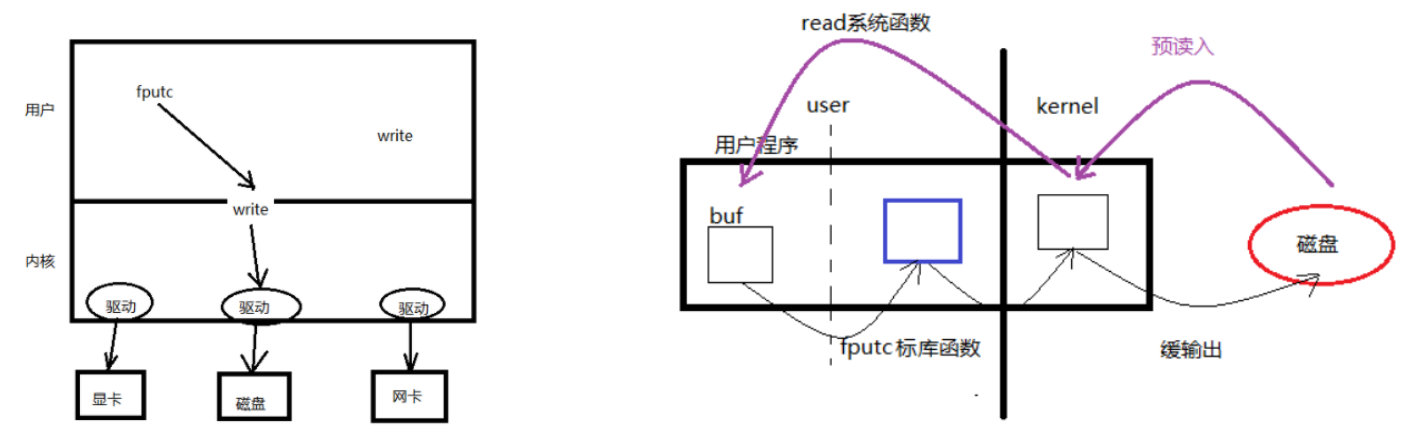
- 左图:库函数访问磁盘流程图
图中:fputc的话,没有办法直接进入内核,应该向下调用write,因为只用系统调用才能进入系统内核空间,进入内核以后,才有办法去调用驱动层,最终驱动硬件工作。
- 右图:预读入缓输出机制图解
上面分支:预读入流程详解
中间黑色竖线将图区分为用户空间与系统空间。操作系统从磁盘读取数据到内核空间buff,不是只读一个字节。操作系统会尽可能多的从磁盘读数据到达内核缓冲区里面,这种就叫做预读入。
系统调用是直接调用内核,少了中间的缓存,因此会对内核操作会更频繁
下面分支:缓输出流程详解
左边用户程序buff中存在数据,fputc标准库函数也会有一个buff来进行缓冲,在写入的时候fputc的缓冲达到4096字节(即4k)才开始向kernel(操作系统)写入数据。这种就叫做缓输出。
好处是一次写入较多数据,避免了上下文的频繁切换
五、文件描述符
使用open文件打开就是一个文件描述符,文件描述符是个int类型数据
int fd = open("/root/systemCall2/test", O_RDONLY | O_CREAT);- 1

开一个进程(例如运行./a.out),每个进程都有一个PCB进程控制块。PCB进程控制块,本质是一个结构体,成员:
1、文件描述符表,文件描述符是指向一个文件结构体的指针
2、文件描述符:0/1/2/3/4。。。。/1023 (一个进程同一时间只能打开1024个文件)。
左侧为文件描述符,为整数,右侧为打开的文件描述符(本质上为文件结构体的指针)
-
0 - STDIN_FILENO 键盘
-
1 - STDOUT_FILENO 显示器
-
2 - STDERR_FILENO 标准错误
六、阻塞和非阻塞
产生阻塞的场景:读设备文件,读网络文件的属性。(读常规文件无阻塞概念。)
在linux下一切皆文件,操作键盘时,操作系统写入的是/dev/tty文件
-
/dev/tty – 终端文件。
-
open(“/dev/tty”, O_RDWR | O_NONBLOCK) — 设置 /dev/tty 非阻塞状态。(默认为阻塞状态)
6.1、阻塞
新建
block_readtty.c文件STDIN_FILENO为打开好的键盘文件描述符
#include#include #include int main(void) { char buf[10]; int n; n = read(STDIN_FILENO, buf, 10); // #define STDIN_FILENO 0 STDOUT_FILENO 1 STDERR_FILENO 2 if(n < 0){ perror("read STDIN_FILENO"); exit(1); } write(STDOUT_FILENO, buf, n); return 0; } - 1
- 2
- 3
- 4
- 5
- 6
- 7
- 8
- 9
- 10
- 11
- 12
- 13
- 14
- 15
- 16
- 17
- 18
- 19
运行结果
光标等待输入,一直阻塞到按回车键,输入12个字符"asdf1234asdf",打印10个字符"asdf1234as",剩下的"df"作为命令接着在终端执行

6.2、非阻塞
新建
nonblock_readtty.c文件,首先以非阻塞的方式打开文件(O_NONBLOCK为非阻塞)fd = open("/dev/tty", O_RDONLY|O_NONBLOCK);- 1
通过查上面open函数,如果fd小于0,说明打开失败
n = read(fd, buf, 10);- 1
然后读文件,查上面read函数,如果n小于0说明读取失败。失败的情况下如果errno == EAGAIN则说明阻塞了。
因此这里使用sleep2秒轮询等待的方式,等键盘输入
#include#include #include #include #include #include int main(void) { char buf[10]; int fd, n; fd = open("/dev/tty", O_RDONLY|O_NONBLOCK); if (fd < 0) { perror("open /dev/tty"); exit(1); } tryagain: n = read(fd, buf, 10); if (n < 0) { if (errno != EAGAIN) { // if(errno != EWOULDBLOCK) perror("read /dev/tty"); exit(1); } else { write(STDOUT_FILENO, "try again\n", strlen("try again\n")); sleep(2); goto tryagain; } } write(STDOUT_FILENO, buf, n); close(fd); return 0; } - 1
- 2
- 3
- 4
- 5
- 6
- 7
- 8
- 9
- 10
- 11
- 12
- 13
- 14
- 15
- 16
- 17
- 18
- 19
- 20
- 21
- 22
- 23
- 24
- 25
- 26
- 27
- 28
- 29
- 30
- 31
- 32
- 33
- 34
- 35
- 36
- 37
运行结果
两次输入“asfd”、“zhanglei ”,并按回车,打印了“asfdzhangl”,其余的“ei"溢出了

6.3、非阻塞超时处理
对非阻塞添加超时处理,新建
nonblock_timeout.c#include#include #include #include #include #include #define MSG_TRY "try again\n" #define MSG_TIMEOUT "time out\n" int main(void) { char buf[10]; int fd, n, i; fd = open("/dev/tty", O_RDONLY|O_NONBLOCK); if(fd < 0){ perror("open /dev/tty"); exit(1); } printf("open /dev/tty ok... %d\n", fd); for (i = 0; i < 5; i++){ n = read(fd, buf, 10); if (n > 0) { //说明读到了东西 break; } if (errno != EAGAIN) { //EWOULDBLOCK perror("read /dev/tty"); exit(1); } else { write(STDOUT_FILENO, MSG_TRY, strlen(MSG_TRY)); sleep(2); } } if (i == 5) { write(STDOUT_FILENO, MSG_TIMEOUT, strlen(MSG_TIMEOUT)); } else { write(STDOUT_FILENO, buf, n); } close(fd); return 0; } - 1
- 2
- 3
- 4
- 5
- 6
- 7
- 8
- 9
- 10
- 11
- 12
- 13
- 14
- 15
- 16
- 17
- 18
- 19
- 20
- 21
- 22
- 23
- 24
- 25
- 26
- 27
- 28
- 29
- 30
- 31
- 32
- 33
- 34
- 35
- 36
- 37
- 38
- 39
- 40
- 41
- 42
- 43
- 44
- 45
- 46
运行结果:
输入”asdf"、“fda”,回车后输出两者的相加

6.4、fcntl改变访问控制属性
fcntl 用来改变一个【已经打开】的文件的访问控制属性
函数 int (int fd, int cmd, …) 参数 fd:文件描述符
cmd:命令,决定了后续参数个数
获取文件状态: F_GETFL
设置文件状态: F_SETFL返回值 int flgs = fcntl(fd, F_GETFL);
flgs |= O_NONBLOCK;
fcntl(fd, F_SETFL, flgs);示例:终端文件默认是阻塞读的,这里用fcntl将其更改为非阻塞读:
新建
fcntl.c#include#include #include #include #include #include #define MSG_TRY "try again\n" int main(void) { char buf[10]; int flags, n; flags = fcntl(STDIN_FILENO, F_GETFL); //获取stdin属性信息 if(flags == -1){ perror("fcntl error"); exit(1); } flags |= O_NONBLOCK; int ret = fcntl(STDIN_FILENO, F_SETFL, flags); if(ret == -1){ perror("fcntl error"); exit(1); } tryagain: n = read(STDIN_FILENO, buf, 10); if(n < 0){ if(errno != EAGAIN){ perror("read /dev/tty"); exit(1); } sleep(3); write(STDOUT_FILENO, MSG_TRY, strlen(MSG_TRY)); goto tryagain; } write(STDOUT_FILENO, buf, n); return 0; } - 1
- 2
- 3
- 4
- 5
- 6
- 7
- 8
- 9
- 10
- 11
- 12
- 13
- 14
- 15
- 16
- 17
- 18
- 19
- 20
- 21
- 22
- 23
- 24
- 25
- 26
- 27
- 28
- 29
- 30
- 31
- 32
- 33
- 34
- 35
- 36
- 37
- 38
- 39
- 40
- 41
运行结果:
输入字符串后,每间隔3秒打印一个try again,直到按下回车键,打印输入内容并终止程序

系统终端本来是阻塞的方式读取的,这里通过fcntl系统调用的方式改成了非阻塞
标志位的按位或运算:
对应的2个二进位有一个为1时,结果位就为1,1|1=1,1|0=1,0|0=0
flags |= O_NONBLOCK;- 1
errno == EAGAIN说明 read 在以非阻塞方式读一个设备文件,反过来errno != EAGAIN就可以作为系统异常抛出
七、lseek 函数
-
文件偏移,Linux 中可使用系统函数 lseek 来修改文件偏移量(读写位置)
-
每个打开的文件都记录着当前读写位置,打开文件时读写位置是 0,表示文件开头,通常读写多少个字节就会将读写位置往后移多少个字节。但是有一个例外,如果以 O_APPEND 方式打开,每次写操作都会在文件末尾追加数据,然后将读写位置移到新的文件末尾。lseek 和标准 I/O 库的 fseek 函数类似,可以移动当前读写位置(或者叫偏移量)。
函数 off_t lseek(int fd, off_t offset, int whence); 参数 fd:文件描述符
offset: 偏移量
whence:起始偏移位置: SEEK_SET/SEEK_CUR/SEEK_END返回值 成功:较起始位置偏移量
失败:-1 errno应用场景 1. 文件的“读”、“写”使用同一偏移位置。
2. 使用lseek获取文件大小
3. 使用lseek拓展文件大小:要想使文件大小真正拓展,必须引起IO操作。
使用 truncate 函数,直接拓展文件。 int ret = truncate(“dict.cp”, 250);示例:讲内置的字符串写入到lseek.txt文件中,同时输出到终端
新建文件
lseek.c#include#include #include #include #include int main(void) { int fd, n; char msg[] = "It's a test for lseek\n"; char ch; fd = open("lseek.txt", O_RDWR|O_CREAT, 0644); if(fd < 0){ perror("open lseek.txt error"); exit(1); } write(fd, msg, strlen(msg)); //使用fd对打开的文件进行写操作,文件读写位置位于文件结尾处。 lseek(fd, 0, SEEK_SET); //修改文件读写指针位置,位于文件开头。 注释该行会怎样呢? while((n = read(fd, &ch, 1))){ if(n < 0){ perror("read error"); exit(1); } write(STDOUT_FILENO, &ch, n); //将文件内容按字节读出,写出到屏幕 } close(fd); return 0; } - 1
- 2
- 3
- 4
- 5
- 6
- 7
- 8
- 9
- 10
- 11
- 12
- 13
- 14
- 15
- 16
- 17
- 18
- 19
- 20
- 21
- 22
- 23
- 24
- 25
- 26
- 27
- 28
- 29
- 30
- 31
- 32
- 33
- 34
写文件执行完,读写指针位置位于文件结尾处,注释掉
lseek(fd, 0, SEEK_SET);- 1
会导致指针没办法继续读取内容,因为最终没有输出到屏幕
-
相关阅读:
代驾APP_第一章_项目环境搭建_第二节
CentOS升级为python
IDEA 设置提示信息
多线程查询,效率翻倍
高等数值计算方法学习笔记第5章【解线性方程组的直接方法】
Linux系统目录详解
阿里P8又出一份堪称天花板级别《Java 核心面试笔记》被 GitHub 开源了
人工智能轨道交通行业周刊-第13期(2022.9.5-9.11)
旋转衬垫控制器 ( Rotation Shim Controller ) 是什么
力扣198. 打家劫舍
- 原文地址:https://blog.csdn.net/liuxingyuzaixian/article/details/126667742
