-
SpringBoot 整合 RabbitMQ 消息过期 TTL、死信队列 (三) 有图 有源码
创建时间 2022年8月31日
标签:Java、SpringBoot、RabbitMQ、队列
注释:RabbiMQ TTL 消息过期、死信队列
来源:https://www.cnblogs.com/lonely-wolf/p/14225132.html
阅读这篇文章之前!确保你已经对 RabbitMQ 有了基础的理解,了解 Direct、Fanout 模式,使用SpringBoot整合过 RabbitMQ。如果没有!请不要轻易尝试此文章
浪费别人的时间就是在谋财害命
本文涉及的所有代码均已上传至 Gitee 链接:https://gitee.com/Array_Xiang/spring-boot-rabbit-mq.git
正文开始
简单的发消息我们已经会了,难道就要止步于此吗?显然是不能的,要玩就要玩一点高级的,所以我们来给RabbitMQ加点佐料
T T L
TTL (Time-To-Live)即一条消息在队列中最大存活时间,在一条队列中超过配置的 TTL 消息称为已死消息,但是要注意的事,已死掉的消息不能立即从队列中删除的,但是能保证已死的消息不会被投递出去。
设置 TTL 的方式有两种
-
给队列设置x-message-ttl,此时所有投递到队列 消息,都会在达到 TTL 时称为已死消息
这种情况就会出现当一条消息同时路由到 N 个带TTL 时间的队列,而由于每个队列的 TTL 不一定相同,所以同一条消息在不同的队列中可能会在不同的时间死亡,或者不死亡(没设置TTL)所以一个队列的消息死亡不会影响到其他队列中的消息
-
单独给某一条消息设置过期时间
此时需要注意的是,当消息达到 TTL 时,可能不会马上被丢弃,因为只有处于队列头部消息过期才会被丢弃,假如队列头部的消息没有设置 TTL,而第二条设置了 TTL,那么即使第2条已经死亡,也要等到头部消息被消费之后才会被丢弃。而已死消息在呗丢弃之前也会被计入统计数据(total)所以为了更好的利用 TTL 特性,建议让消费者在线消费消息,这样才能保证消息更快的被丢弃,防止消费堆积。
消息过期可能在发送途中(还没到消费者那)就就过期了
队列生存
和 TTL 针对消息不同的是,我们可以通过设置过期时间属性 ‘x-expries’ 来处理队列,当在指定过期时间内未使用队列时,服务器保证将删除队列
上代码
在 Provider 上配置 RabbitConfig 配置类
package com.liuyuncen.config; import org.springframework.amqp.core.Binding; import org.springframework.amqp.core.BindingBuilder; import org.springframework.amqp.core.DirectExchange; import org.springframework.amqp.core.Queue; import org.springframework.beans.factory.annotation.Qualifier; import org.springframework.context.annotation.Bean; import org.springframework.context.annotation.Configuration; import java.util.HashMap; import java.util.Map; /** * @belongsProject: rabbitmq_springboot * @belongsPackage: com.liuyuncen.config * @author: Xiang想 * @createTime: 2022-08-31 16:16 * @description: TODO * @version: 1.0 */ @Configuration public class RabbitConfig { //直连交换机 @Bean public DirectExchange directExchange(){ return new DirectExchange("ttl-exchange"); } @Bean public Queue ttlQueue(){ Map<String,Object> map = new HashMap<>(); // 队列中所有消息5秒后过期 map.put("x-message-ttl",5000); // 队列闲置 10 秒后被删除 map.put("x-expires",10000); // durable:是否持久 // exclusive: 是否排他,如果为true时,只对当前队列有效,一旦断开,队列立刻删除 // autoDelete:是否自动删除,前提是必须呀喔有一个消费者先连上,然后所有消费者断开,就自己删除 return new Queue("ttl-queue",false,false,false,map); } @Bean public Binding ttlBindExchange(@Qualifier("ttlQueue") Queue queue, @Qualifier("directExchange")DirectExchange directExchange){ return BindingBuilder.bind(queue).to(directExchange).with("ttl"); } }- 1
- 2
- 3
- 4
- 5
- 6
- 7
- 8
- 9
- 10
- 11
- 12
- 13
- 14
- 15
- 16
- 17
- 18
- 19
- 20
- 21
- 22
- 23
- 24
- 25
- 26
- 27
- 28
- 29
- 30
- 31
- 32
- 33
- 34
- 35
- 36
- 37
- 38
- 39
- 40
- 41
- 42
- 43
- 44
- 45
- 46
- 47
- 48
然后再写一个接口
package com.liuyuncen.controller; import org.springframework.amqp.rabbit.core.RabbitTemplate; import org.springframework.beans.factory.annotation.Autowired; import org.springframework.web.bind.annotation.GetMapping; import org.springframework.web.bind.annotation.RequestMapping; import org.springframework.web.bind.annotation.RestController; import java.time.LocalDateTime; import java.time.format.DateTimeFormatter; /** * @belongsProject: rabbitmq_springboot * @belongsPackage: com.liuyuncen.controller * @author: Xiang想 * @createTime: 2022-08-31 16:27 * @description: TODO * @version: 1.0 */ @RestController @RequestMapping("/ttl") public class TTLConroller { @Autowired RabbitTemplate rabbitTemplate; @GetMapping("/sendTtl") public String sendTtl(){ String time = LocalDateTime.now().format(DateTimeFormatter.ofPattern("yyyy-MM-dd HH:mm:ss")); String msg = time + " 我是ttl 消息"; System.out.println("provider 发送消息:" + msg); rabbitTemplate.convertAndSend("ttl-exchange","ttl",msg); return "ok"; } }- 1
- 2
- 3
- 4
- 5
- 6
- 7
- 8
- 9
- 10
- 11
- 12
- 13
- 14
- 15
- 16
- 17
- 18
- 19
- 20
- 21
- 22
- 23
- 24
- 25
- 26
- 27
- 28
- 29
- 30
- 31
- 32
- 33
- 34
- 35
- 36
因为这里设置的是10秒闲时删除队列,所以我们要写一个定时任务,让他3秒跑一次,记得在启动类上添加
@EnableScheduling@Component public class AutoTask { @Autowired private TTLConroller ttlConroller; @Scheduled(cron = "*/3 * * * * ?") public void task(){ String nowTime = LocalDateTime.now().format(DateTimeFormatter.ofPattern("yyyy-MM-dd HH:mm:ss")); ttlConroller.sendTtl(); System.out.println("自动执行 每隔三秒执行1次" + nowTime); } }- 1
- 2
- 3
- 4
- 5
- 6
- 7
- 8
- 9
- 10
- 11
- 12
接下来写消费者
package com.liuyuncen.receiver; import org.springframework.amqp.rabbit.annotation.RabbitHandler; import org.springframework.amqp.rabbit.annotation.RabbitListener; import org.springframework.stereotype.Component; /** * @belongsProject: rabbitmq_springboot * @belongsPackage: com.liuyuncen.receiver * @author: Xiang想 * @createTime: 2022-08-31 16:25 * @description: TODO * @version: 1.0 */ @Component public class TTLRecevier { @RabbitHandler @RabbitListener(queues = "ttl-queue") public void ttlConsumer(String message){ System.out.println("message = " + message); } }- 1
- 2
- 3
- 4
- 5
- 6
- 7
- 8
- 9
- 10
- 11
- 12
- 13
- 14
- 15
- 16
- 17
- 18
- 19
- 20
- 21
- 22
- 23
这里要注意启动顺序,如果是先启动消费者,消费者会报一个找不到队列的异常,一段时间找不到后,程序就会终止
![[外链图片转存失败,源站可能有防盗链机制,建议将图片保存下来直接上传(img-5hveTQzT-1662097993521)(images/image-20220831165202129.png)]](https://1000bd.com/contentImg/2023/10/30/152737529.png)
所以我们要先启动生产者,然后快速的启动消费者

看到此时生产者正在自动生成数据,消费者也在一直消费数据

我们的队列也在 rabbitMQ中,此时,我们把消费者停掉,让数据无法消费
大概过了10秒,ttl-queue 就队列里找不到了。
其他属性
队列中还有其他一些属性可以设置,在这里我们就不一一举例了:
- x-message-ttl:队列中消息的存活时间(毫秒),达到TTL的消息可能会被删除。
- x-expires:队列在多长时间(毫秒)没有被访问以后会被删除。
- x-max-length:队列中的最大消息数。
- x-max-length-bytes:队列的最大容量(bytes)。
- overflow:队列溢出之后的策略。主要可以配置如下参数:
reject-publish- 直接丢弃最近发布的消息,如若启用了publisher confirm(发布者确认),发布者将通过发送basic.nack消息通知拒绝,如果当前队列绑定有多个消费者,则消息在收到basic.nack拒绝通知后,仍然会被发布到其他队列;drop-head- 丢弃队列头部消息(集群模式下只支持这种策略)reject-publish-dlx- 最近发布的消息会进入死信队列。 - x-dead-letter-exchange:队列的死信交换机。
- x-dead-letter-routing-key:死信交换机的路由键。
- x-single-active-consumer:true/false。表示是否最多只允许一个消费者消费,如果有多个消费者同时绑定,则只会激活第一个,除非第一个消费者被取消或者死亡,才会自动转到下一个消费者。
- x-max-priority:队列中消息的最大优先级, 消息的优先级不能超过它。
- x-queue-mode:
3.6.0版本引入的,主要是为了实现惰性加载。队列将收到的消息尽可能快的进行持久化操作到磁盘上,然后只有在用户请求的时候才会加载到RAM内存。这个参数支持两个值:default和lazy。当不进行设置的时候,就是默认为default,不做任何改变;当设置为lazy就会进行懒加载。 - x-queue-master-locator:为了保证消息的
FIFO,所以在高可用集群模式下需要选择一个节点作为主节点。这个参数主要有三种模式:min-masters- 托管最小数量的绑定主机的节点;client-local- 选择声明的队列已经连接到客户端的节点;random- 随机选择一个节点。
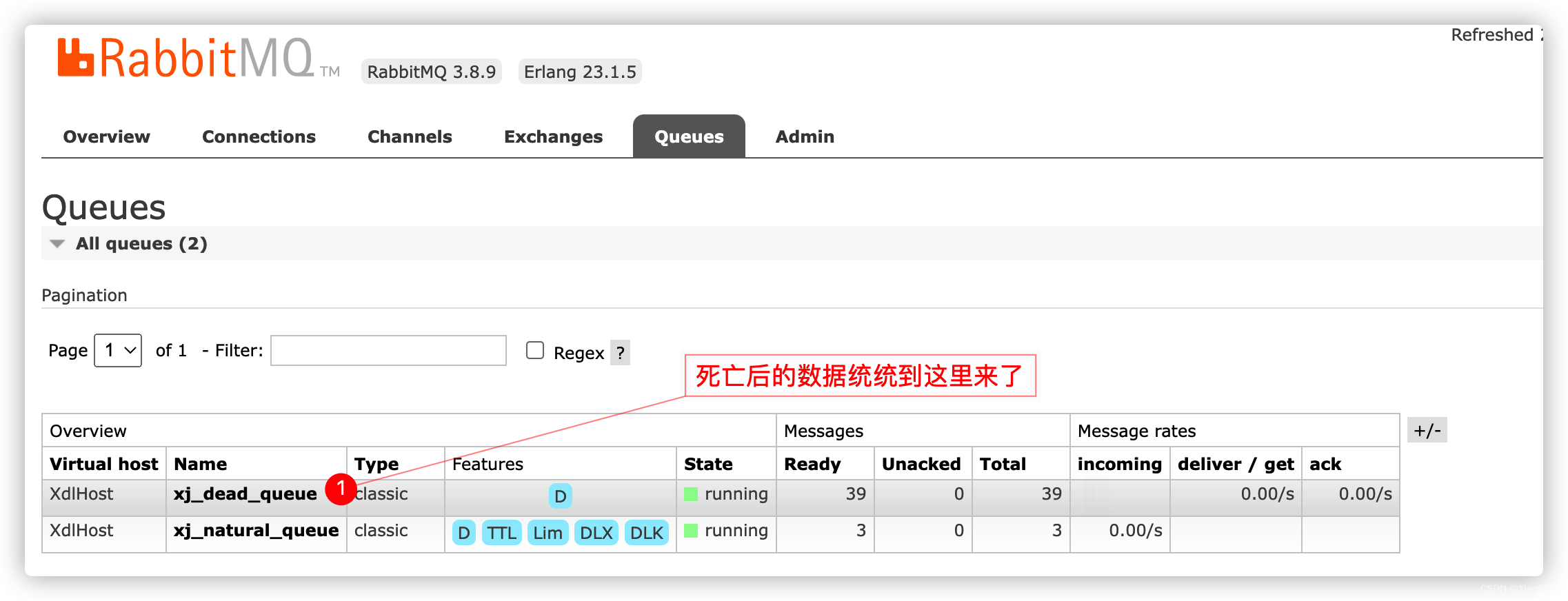
死信队列
上面参数中有个词
死信队列这是个啥,好像很好玩的样子。其实是指已死的消息,或者说无家可归的消息。有个消息进入死信队列,主要有三个条件
- 消息被下方在拒绝并未设置重回队列
- 消息过期了,即设置了 TTL
- 消息达到长度了,超过了 Max length 或 Max length bytes,则队列头部会被送到死信队列
package com.liuyuncen.config; import org.springframework.amqp.core.*; import org.springframework.beans.factory.annotation.Qualifier; import org.springframework.context.annotation.Bean; import org.springframework.context.annotation.Configuration; /** * @belongsProject: rabbitmq_springboot * @belongsPackage: com.liuyuncen.config * @author: Xiang想 * @createTime: 2022-08-31 17:41 * @description: TODO * @version: 1.0 */ @Configuration public class RabbitConfig { // 定义正常交换机和正常队列信息(交换机名、队列名、路由key) public static final String queue_name = "xj_natural_queue"; public static final String exchange_name = "xj_natural_exchange"; public static final String routing_key = "xj_natural_routingKey"; // 定义死信交换机名、死信队列名、路由key public static final String queue_name_dead = "xj_dead_queue"; public static final String exchange_name_dead = "xj_dead_exchange"; public static final String routing_key_dead = "xj_dead_routingKey"; /** * 设置正常的消息队列; * 正常的消息队列具备以下几种功能: * 1、消息正常消费,需要绑定对应的消费者(这里为了测试死信,不创建消费者) * 2、当消息失效后,需要将指定的消息发送至 死信交换机 中 * @return */ @Bean(value = "getNaturalQueue") public Queue getNaturalQueue(){ return QueueBuilder.durable(queue_name) // 正常的队列,在消息失效后,需要将消息丢入 死信 交换机中 // 这里只需要针对名称进行绑定 .withArgument("x-dead-letter-exchange",exchange_name_dead) // 丢入 死信交换机,需要设定指定的 routingkey .withArgument("x-dead-letter-routing-key",routing_key_dead) // 设置正常队列中消息的存活时间为 10s,当然也可以针对单个消息进行设定不同的过期时间 .withArgument("x-message-ttl",10000) // 设定当前队列中,允许存放的最大消息数目 .withArgument("x-max-length",10) .build(); } /** * 设定正常的消息交换机 * @return */ @Bean(value = "getNaturalExchange") public Exchange getNaturalExchange(){ // 这里为了测试,采取 direct exchange return ExchangeBuilder.directExchange(exchange_name) .durable(true) // 设定持久化 .build(); } /** * 将正常的消息交换机和正常的消息队列进行绑定 * @param queue * @param directExchange * @return */ @Bean public Binding bindNaturalExchangeAndQueue( @Qualifier(value = "getNaturalQueue") Queue queue, @Qualifier(value = "getNaturalExchange") Exchange directExchange ){ return BindingBuilder // 绑定消息队列 .bind(queue) // 至指定的消息交换机 .to(directExchange) // 匹配 routingkey .with(routing_key) // 无参数,不加会报错提示 .noargs(); } /** * 定义死信队列 * @return */ @Bean(value = "getDealQueue") public Queue getDealQueue(){ return QueueBuilder.durable(queue_name_dead).build(); } /** * 定义死信交换机 * @return */ @Bean(value = "getDeadExchange") public Exchange getDeadExchange(){ return ExchangeBuilder.directExchange(exchange_name_dead).durable(true).build(); } /** * 将死信交换机和死信队列进行绑定 * @param deadQueue * @param directDeadExchange * @return */ @Bean public Binding bindDeadExchangeAndQueue( @Qualifier(value = "getDealQueue") Queue deadQueue, @Qualifier(value = "getDeadExchange") Exchange directDeadExchange ){ return BindingBuilder.bind(deadQueue).to(directDeadExchange).with(routing_key_dead).noargs(); } }- 1
- 2
- 3
- 4
- 5
- 6
- 7
- 8
- 9
- 10
- 11
- 12
- 13
- 14
- 15
- 16
- 17
- 18
- 19
- 20
- 21
- 22
- 23
- 24
- 25
- 26
- 27
- 28
- 29
- 30
- 31
- 32
- 33
- 34
- 35
- 36
- 37
- 38
- 39
- 40
- 41
- 42
- 43
- 44
- 45
- 46
- 47
- 48
- 49
- 50
- 51
- 52
- 53
- 54
- 55
- 56
- 57
- 58
- 59
- 60
- 61
- 62
- 63
- 64
- 65
- 66
- 67
- 68
- 69
- 70
- 71
- 72
- 73
- 74
- 75
- 76
- 77
- 78
- 79
- 80
- 81
- 82
- 83
- 84
- 85
- 86
- 87
- 88
- 89
- 90
- 91
- 92
- 93
- 94
- 95
- 96
- 97
- 98
- 99
- 100
- 101
- 102
- 103
- 104
- 105
- 106
- 107
- 108
- 109
- 110
- 111
- 112
- 113
- 114
- 115
- 116
- 117
package com.liuyuncen.service; import org.springframework.amqp.core.Message; import org.springframework.amqp.rabbit.connection.CorrelationData; import org.springframework.amqp.rabbit.core.RabbitTemplate; import org.springframework.beans.factory.annotation.Autowired; import org.springframework.stereotype.Service; /** * @belongsProject: rabbitmq_springboot * @belongsPackage: com.liuyuncen.service * @author: Xiang想 * @createTime: 2022-08-31 17:43 * @description: TODO * @version: 1.0 */ @Service public class RabbitService implements RabbitTemplate.ConfirmCallback,RabbitTemplate.ReturnCallback { @Autowired RabbitTemplate rabbitTemplate; /** * 直接发送消息 * @param exchange * @param routingKey * @param msg */ public void sendMessage(String exchange,String routingKey,Object msg) { // 设置交换机处理失败消息的模式 true 表示消息由交换机 到达不了队列时,会将消息重新返回给生产者 // 如果不设置这个指令,则交换机向队列推送消息失败后,不会触发 setReturnCallback rabbitTemplate.setMandatory(true); //消息消费者确认收到消息后,手动ack回执 rabbitTemplate.setConfirmCallback(this); // return 配置 rabbitTemplate.setReturnCallback(this); //发送消息 rabbitTemplate.convertAndSend(exchange,routingKey,msg); } /** * 交换机并未将数据丢入指定的队列中时,触发 * channel.basicPublish(exchange_name,next.getKey(), true, properties,next.getValue().getBytes()); * 参数三:true 表示如果消息无法正常投递,则return给生产者 ;false 表示直接丢弃 * @param message 消息对象 * @param replyCode 错误码 * @param replyText 错误信息 * @param exchange 交换机 * @param routingKey 路由键 */ @Override public void returnedMessage(Message message, int replyCode, String replyText, String exchange, String routingKey) { System.out.println("---- returnedMessage ----replyCode="+replyCode+" replyText="+replyText+" "); } /** * 消息生产者发送消息至交换机时触发,用于判断交换机是否成功收到消息 * @param correlationData 相关配置信息 * @param ack exchange 交换机,判断交换机是否成功收到消息 true 表示交换机收到 * @param cause 失败原因 */ @Override public void confirm(CorrelationData correlationData, boolean ack, String cause) { System.out.println("---- confirm ----ack="+ack+" cause="+String.valueOf(cause)); System.out.println("correlationData -->"+correlationData.toString()); if(ack){ // 交换机接收到 System.out.println("---- confirm ----ack==true cause="+cause); }else{ // 没有接收到 System.out.println("---- confirm ----ack==false cause="+cause); } } }- 1
- 2
- 3
- 4
- 5
- 6
- 7
- 8
- 9
- 10
- 11
- 12
- 13
- 14
- 15
- 16
- 17
- 18
- 19
- 20
- 21
- 22
- 23
- 24
- 25
- 26
- 27
- 28
- 29
- 30
- 31
- 32
- 33
- 34
- 35
- 36
- 37
- 38
- 39
- 40
- 41
- 42
- 43
- 44
- 45
- 46
- 47
- 48
- 49
- 50
- 51
- 52
- 53
- 54
- 55
- 56
- 57
- 58
- 59
- 60
- 61
- 62
- 63
- 64
- 65
- 66
- 67
- 68
- 69
- 70
- 71
- 72
- 73
- 74
- 75
- 76
- 77
- 78
package com.liuyuncen.task; import com.liuyuncen.config.RabbitConfig; import com.liuyuncen.service.RabbitService; import org.springframework.beans.factory.annotation.Autowired; import org.springframework.scheduling.annotation.Scheduled; import org.springframework.stereotype.Component; import java.time.LocalDateTime; import java.time.format.DateTimeFormatter; /** * @belongsProject: rabbitmq_springboot * @belongsPackage: com.liuyuncen.task * @author: Xiang想 * @createTime: 2022-08-31 17:46 * @description: TODO * @version: 1.0 */ @Component public class RabbitTask { @Autowired RabbitService rabbitService; @Scheduled(cron = "*/3 * * * * ?") public void task(){ String time = LocalDateTime.now().format(DateTimeFormatter.ofPattern("yyyy-MM-dd HH:mm:ss")); String msg = time + " 我是 xdl 消息"; System.out.println(msg); rabbitService.sendMessage(RabbitConfig.exchange_name,RabbitConfig.routing_key,msg); } }- 1
- 2
- 3
- 4
- 5
- 6
- 7
- 8
- 9
- 10
- 11
- 12
- 13
- 14
- 15
- 16
- 17
- 18
- 19
- 20
- 21
- 22
- 23
- 24
- 25
- 26
- 27
- 28
- 29
- 30
- 31
- 32
- 33
- 34
-
-
相关阅读:
贝叶斯学习
【CSS】字体图标与favicon图标
Python爬虫打印状态码为521,返回数据为乱码?
第十章《日期与时间》第5节:Period与Duration
k8s笔记20--基于 K8S 的 cicd 概述
【5G NR】3GPP常用协议整理
机器学习实验一:使用 Logistic 回归来预测患有疝病的马的存活问题
pandas连接oracle数据库并拉取表中数据到dataframe中、筛选当前时间(sysdate)到一天之前的所有数据(筛选一天范围数据)
Python 基于OpenCV+face_recognition实现人脸捕捉与人脸识别
八股文之springboot
- 原文地址:https://blog.csdn.net/qq_39550368/article/details/126661407