-
jenkins-自动化打包部署
环境:
centos 7.2或者更新
rmp包:官方下载地址 Redhat Jenkins Packages
java-1.8.0
安装:
- [root@jenkins ~]# yum install wget java-1.8.0 -y
- [root@jenkins ~]# cd /var/opt/
- [root@jenkins opt]# wget https://pkg.jenkins.io/redhat-stable/jenkins-2.176.2-1.1.noarch.rpm
- [root@jenkins opt]# yum install ./jenkins-2.176.2-1.1.noarch.rpm -y
配置:jenkins 配置文件 /etc/sysconfig/jenkins ,可以根据需求自行修改
- [root@jenkins opt]# grep '^[^#]' /etc/sysconfig/jenkins
- JENKINS_HOME="/data/jenkins" #jenkins的数据目录
- JENKINS_JAVA_CMD=""
- JENKINS_USER="jenkins"
- JENKINS_JAVA_OPTIONS="-Djava.awt.headless=true"
- JENKINS_PORT="8080" #jenkins 通过web访问的端口
- JENKINS_LISTEN_ADDRESS=""
- JENKINS_HTTPS_PORT=""
- JENKINS_HTTPS_KEYSTORE=""
- JENKINS_HTTPS_KEYSTORE_PASSWORD=""
- JENKINS_HTTPS_LISTEN_ADDRESS=""
- JENKINS_DEBUG_LEVEL="5"
- JENKINS_ENABLE_ACCESS_LOG="no"
- JENKINS_HANDLER_MAX="100"
- JENKINS_HANDLER_IDLE="20"
- JENKINS_ARGS=""
- mkdir /data/jenkins -pv
- chown jenkins.jenkins /data/jenkins
访问web 并进行配置

稍等一会,就可以正常登录了

根据需要安装自定义插件,本次选择是推荐安装

等待安装,估计需要5分钟左右,如果中间有失败,重试就行,安装完成之后,会自动跳入如下页面,然后自己创建用户,或者直接使用admin 账户

开始登录:

登录之后,安装一些插件,点击系统管理,进入 插件管理,选择可选插件,然后过滤下载
Maven Release Plug-in
Publish Over SSH
Multijob


安装之后,点击系统管理,进入 全局工具配置

配置maven

配置远程服务器信息 Publish over SSH
系统管理 系统设置,然后搜索 Publish over SSH
填写远程机器的登录信息,填写之后 一定要测试一下,是否认证成功

如果有需要用到的全局变量,也可以在系统设置里面配置,如下
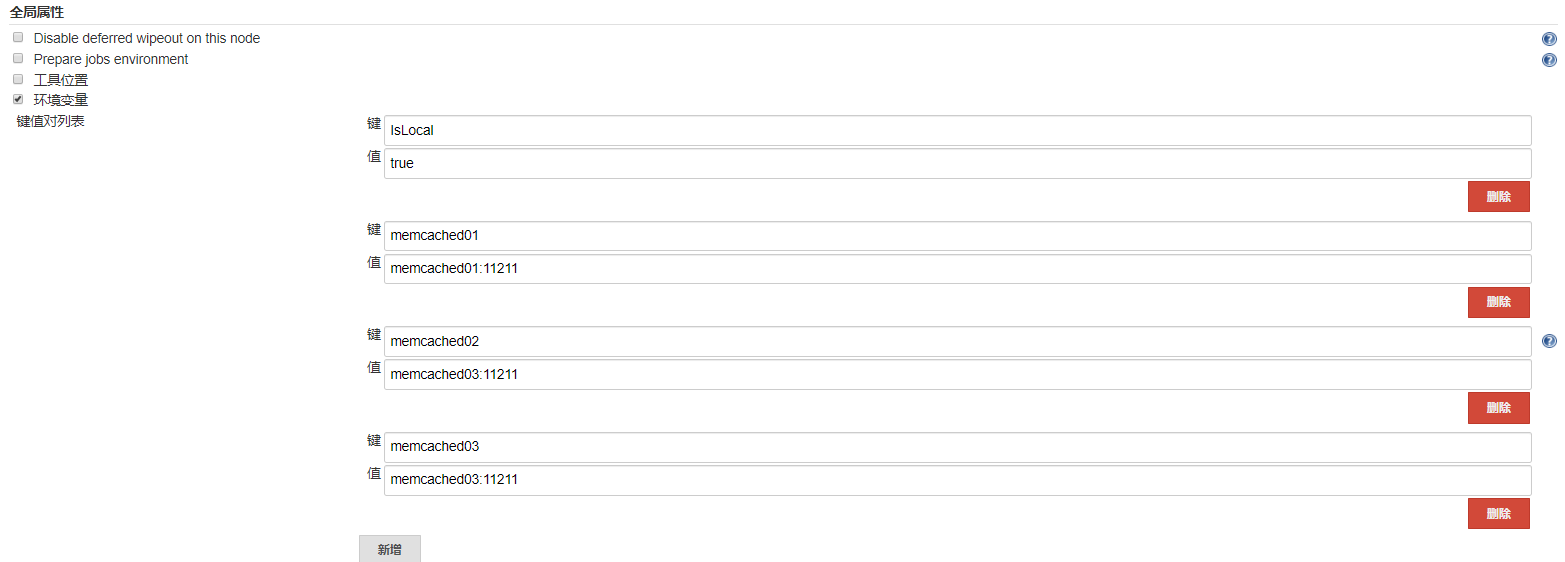
准备工作差不多了,现在需要创建一个maven 任务,测试一下

这个定时删除旧的构建,还可以节省磁盘空间


构建触发器,根据需要选择,默认为第一个选择


下面说下简单的pipline 流水线
- pipeline {
- agent any
- environment {
- ios="ios"
- android="android"
- }
- stages {
- stage("清理之前打包的热更资源文件") {
- steps {
- script {
- sh label: 'removetars', returnStdout: true, script: 'rm -rf target aliPjo RainVersion'
- }
- }
- }
- stage('请选择版本[正式版|开发板]'){
- steps {
- script {
- def result="product\ndebug"
- def userInput = input(id: 'userInput', message: '请选择版本[正式版|开发版]',
- parameters: [[$class: 'ChoiceParameterDefinition', defaultValue: 'strDef',
- description:'product:正式版\ndebug:开发版', name:'打包热更资源分支', choices: "${result}"]
- ])
- if ( userInput =="debug" ) {
- ios="iosdebug"
- android="androiddebug"
- }else {
- ios="ios"
- android="android"
- }
- }
- }
- }
- stage('请输入要更新的 IOS 客户端版本') {
- steps {
- script {
- def result = sh(returnStdout: true, script: "sh /data/jenkins/get.cliet.version.sh $ios").trim()
- def userInput = input(id: 'userInput', message: '请输入要更新的 IOS 客户端版本',
- parameters: [[$class: 'ChoiceParameterDefinition', defaultValue: 'strDef',
- description:'...', name:'客户端版本', choices: "${result}"]
- ])
- checkout([$class: 'SubversionSCM', additionalCredentials: [],
- excludedCommitMessages: '',
- excludedRegions: '',
- excludedRevprop: '',
- excludedUsers: '',
- filterChangelog: false,
- ignoreDirPropChanges: false,
- includedRegions: '',
- locations: [[cancelProcessOnExternalsFail: true,
- credentialsId: 'e433b9f7-72aa-41c3-add0-cecss3ba7398',
- depthOption: 'infinity',
- ignoreExternalsOption: true,
- local: "./aliPjo/$ios/${userInput}",
- remote: "svn://svn.kp.aliyu.com/hotclient/aliPjo/$ios/${userInput}"]],
- quietOperation: true,
- workspaceUpdater: [$class: 'UpdateUpdater']])
- checkout([$class: 'SubversionSCM', additionalCredentials: [],
- excludedCommitMessages: '',
- excludedRegions: '',
- excludedRevprop: '',
- excludedUsers: '',
- filterChangelog: false,
- ignoreDirPropChanges: false,
- includedRegions: '',
- locations: [[cancelProcessOnExternalsFail: true,
- credentialsId: 'e433b9f7-72aa-41c3-add0-cecss3ba7398',
- depthOption: 'files',
- ignoreExternalsOption: true,
- local: "./RainVersion/$ios/",
- remote: "svn://svn.kp.aliyu.com/hotclient/aliPjo/$ios/"]],
- quietOperation: true,
- workspaceUpdater: [$class: 'UpdateUpdater']])
- }
- }
- }
- stage('请输入要更新的 Android 客户端版本') {
- steps {
- script {
- def result = sh(returnStdout: true, script: "sh /data/jenkins/get.cliet.version.sh $android").trim()
- def userInput = input(id: 'userInput', message: '请输入要更新的 Android 客户端版本',
- parameters: [[$class: 'ChoiceParameterDefinition', defaultValue: 'strDef',
- description:'...', name:'客户端版本', choices: "${result}"]
- ])
- println(userInput); //Use this value to branch to different logic if needed
- checkout([$class: 'SubversionSCM', additionalCredentials: [],
- excludedCommitMessages: '',
- excludedRegions: '',
- excludedRevprop: '',
- excludedUsers: '',
- filterChangelog: false,
- ignoreDirPropChanges: false,
- includedRegions: '',
- locations: [[cancelProcessOnExternalsFail: true,
- credentialsId: 'e433b9f7-72aa-41c3-add0-cecss3ba7398',
- depthOption: 'infinity',
- ignoreExternalsOption: true,
- local: "./aliPjo/$android/${userInput}",
- remote: "svn://svn.kp.aliyu.com/hotclient/aliPjo/$android/${userInput}"]],
- quietOperation: true,
- workspaceUpdater: [$class: 'UpdateUpdater']])
- checkout([$class: 'SubversionSCM', additionalCredentials: [],
- excludedCommitMessages: '',
- excludedRegions: '',
- excludedRevprop: '',
- excludedUsers: '',
- filterChangelog: false,
- ignoreDirPropChanges: false,
- includedRegions: '',
- locations: [[cancelProcessOnExternalsFail: true,
- credentialsId: 'e433b9f7-72aa-41c3-add0-cecss3ba7398',
- depthOption: 'files',
- ignoreExternalsOption: true,
- local: "./RainVersion/$android/",
- remote: "svn://svn.kp.aliyu.com/hotclient/aliPjo/$android/"]],
- quietOperation: true,
- workspaceUpdater: [$class: 'UpdateUpdater']])
- }
- }
- }
- stage("打包热更资源文件") {
- steps {
- script {
- sh label: 'tarhotclient', returnStatus: true, script: "[ ! -f RainVersion/$android/RainVersion.json ] && exit 1"
- sh label: 'tarhotclient', returnStatus: true, script: "[ ! -f RainVersion/$ios/RainVersion.json ] && exit 1"
- sh label: 'tarhotclient', returnStatus: true, script: "\\cp RainVersion/$android/RainVersion.json aliPjo/$android/ "
- sh label: 'tarhotclient', returnStatus: true, script: "\\cp RainVersion/$ios/RainVersion.json aliPjo/$ios/ "
- sh label: 'tarhotclient', returnStdout: true, script: "[ ! -d target ] && mkdir -pv target"
- sh label: 'tarhotclient', returnStdout: true, script: "tar --exclude='*.svn' -zcvf target/hotclient.tar.gz aliPjo"
- }
- }
- }
- stage("传输文件到管理机并更新"){
- steps{
- script{
- sshPublisher(publishers: [sshPublisherDesc(configName: 'DevOps',
- transfers: [sshTransfer(cleanRemote: false, excludes: '',
- execCommand: 'sh /data/dev.scripts/update_hotclient.sh',
- execTimeout: 120000,
- flatten: false,
- makeEmptyDirs: false,
- noDefaultExcludes: false,
- patternSeparator: '[, ]+',
- remoteDirectory: '/data/updateapps/',
- remoteDirectorySDF: false,
- removePrefix: 'target/',
- sourceFiles: 'target/hotclient.tar.gz')],
- usePromotionTimestamp: false,
- useWorkspaceInPromotion: false,
- verbose: false)])
- }
- }
- }
- }
- }

-
相关阅读:
【定向征文活动】2023年深圳1024开发者城市聚会活动参会感想征文
算法训练 第四周
STL中 Map 的基本用法
Vue项目中使用element-plus UI库-并对下拉搜索框样式修改-el-select代码封装
力扣(122.1049)补7.29
[附源码]SSM计算机毕业设计学生档案管理系统JAVA
延伸产业链推进水稻循环经济 国稻种芯集团谋定益海嘉里合作
急诊预检分诊管理系统的设计与实现
React面试题总结
软件测试面试题-一个前后端都能修改的bug,应该由谁修改?
- 原文地址:https://blog.csdn.net/ly1358152944/article/details/126447428
