-
一篇带你了解MyBatisPlus的使用
文章目录
一、MybatisPlus基础简介
1.1、 简介

MyBatis-Plus(简称 MP),一个 MyBatis 的增强工具包,只做增强不做改变. 发工作、提高生产率而生。
我们的愿景是成为 Mybatis 最好的搭档,就像 魂斗罗 中的 1P、2P,基友搭配,效率翻倍。

1.2、MyBatis Plus的下载
官方地址:
http://mp.baomidou.com
代码发布地址:(国外代码托管平台)
Github:
https://github.com/baomidou/mybatis-plus
Gitee:码云(国内代码托管平台)
https://gitee.com/baomidou/mybatis-plus
文档发布地址:
http://mp.baomidou.com/
MyBatis Plus 是国内团队(包米豆) 团队开发开源的!

1.3 、前置知识
我们将通过一个简单的 Demo 来阐述 MyBatis-Plus 的强大功能,在此之前,我们假设您已经对以下知识掌握:
Mybatis
Maven
二、环境搭建
2.1、创建测试表
其对应的数据库 Schema 脚本如下:
/* Navicat MySQL Data Transfer Source Server : 124.222.12.151 Source Server Version : 80029 Source Host : 124.222.12.151:3308 Source Database : SSM Target Server Type : MYSQL Target Server Version : 80029 File Encoding : 65001 Date: 2022-08-31 07:28:40 */ SET FOREIGN_KEY_CHECKS=0; -- ---------------------------- -- Table structure for `tb_employee` -- ---------------------------- DROP TABLE IF EXISTS `tb_employee`; CREATE TABLE `tb_employee` ( `id` int NOT NULL AUTO_INCREMENT, `last_name` varchar(50) CHARACTER SET utf8mb3 COLLATE utf8_bin DEFAULT NULL, `myemail` varchar(50) CHARACTER SET utf8mb3 COLLATE utf8_bin DEFAULT NULL, `gender` char(1) CHARACTER SET utf8mb3 COLLATE utf8_bin DEFAULT NULL, `age` int DEFAULT NULL, PRIMARY KEY (`id`) ) ENGINE=InnoDB AUTO_INCREMENT=24 DEFAULT CHARSET=utf8mb3 COLLATE=utf8_bin; -- ---------------------------- -- Records of tb_employee -- ---------------------------- INSERT INTO `tb_employee` VALUES ('6', 'Tom', 'tom@163.com', '1', '22'); INSERT INTO `tb_employee` VALUES ('7', 'Jerry', 'jerry@163.com', '0', '25'); INSERT INTO `tb_employee` VALUES ('8', 'Black', 'black@163.com', '1', '30'); INSERT INTO `tb_employee` VALUES ('9', 'White', 'white@163.com', '0', '35'); INSERT INTO `tb_employee` VALUES ('10', 'admin1', '32432423@qq.com', '女', '44'); INSERT INTO `tb_employee` VALUES ('11', 'admin2', '32432423@qq.com', '女', '44'); INSERT INTO `tb_employee` VALUES ('12', 'admin3', '32432423@qq.com', '女', '44'); INSERT INTO `tb_employee` VALUES ('13', 'admin4', '32432423@qq.com', '女', '44'); INSERT INTO `tb_employee` VALUES ('14', 'admin5', '32432423@qq.com', '女', '44'); INSERT INTO `tb_employee` VALUES ('15', 'admin16', '32432423@qq.com', '女', '44'); INSERT INTO `tb_employee` VALUES ('16', 'admiin22', '32432423@qq.com', '女', '44'); INSERT INTO `tb_employee` VALUES ('17', 'admiin22', '32432423@qq.com', '女', '44'); INSERT INTO `tb_employee` VALUES ('18', '张三1', '32432423@qq.com', '女', '44'); INSERT INTO `tb_employee` VALUES ('19', '张三3', '32432423@qq.com', '女', '44'); INSERT INTO `tb_employee` VALUES ('20', '张三4', '32432423@qq.com', '女', '44'); INSERT INTO `tb_employee` VALUES ('21', '张三5', '32432423@qq.com', '女', '44'); INSERT INTO `tb_employee` VALUES ('22', '张三6', '32432423@qq.com', '女', '44'); INSERT INTO `tb_employee` VALUES ('23', '张三7', '32432423@qq.com', '女', '44');- 1
- 2
- 3
- 4
- 5
- 6
- 7
- 8
- 9
- 10
- 11
- 12
- 13
- 14
- 15
- 16
- 17
- 18
- 19
- 20
- 21
- 22
- 23
- 24
- 25
- 26
- 27
- 28
- 29
- 30
- 31
- 32
- 33
- 34
- 35
- 36
- 37
- 38
- 39
- 40
- 41
- 42
- 43
- 44
- 45
- 46
- 47
- 48
- 49
- 50
- 51
- 52
2.2、创建javaBean
@Data @NoArgsConstructor @AllArgsConstructor @TableName("tb_employee") //默认是以类名为查询表名字,也可以指定表名! public class Employee { @TableId(type = IdType.AUTO) //指定ID是主键,并且ID是使用数据库自增! private Integer id; private String lastName; //默认支持驼峰命名法 数据库 last_name laseName 识别的! @TableField("myemail") //如果数据库中字段和实体类属性不一致,但是又不满足驼峰命名法,可以加注解进行说明! private String email; //@TableField("gender") private String gender; private Integer age; }- 1
- 2
- 3
- 4
- 5
- 6
- 7
- 8
- 9
- 10
- 11
- 12
- 13
- 14
- 15
1)@TableName
2)@TableField

忽略实体类中的某个属性
3)@TableId
2.3、封装MybatisUtils
/** * 封装一个MyBatis工具类 */ public class MyBatisUtils { static InputStream inputStream=null; static SqlSessionFactory sqlSessionFactory=null; //定义Threadlocal存储类型为SqlSession private static ThreadLocal<SqlSession> threadLocal = new ThreadLocal<SqlSession>(); static { try { //1.mybatis的核心配置文件 String resources="mybatis-config.xml"; //2.使用外部的配置文件构建sqlsession工厂 inputStream = Resources.getResourceAsStream(resources); //sqlSessionFactory = new SqlSessionFactoryBuilder().build(inputStream); //替换原来的SqlSessionFactoryBuilder 使用子类 MybatisSqlSessionFactoryBuilder sqlSessionFactory = new MybatisSqlSessionFactoryBuilder().build(inputStream); } catch (IOException e) { e.printStackTrace(); } } /** * 01-获取sqlSession * @return */ public static SqlSession getSqlSession(){ //1.从线程里面获取共享的SqlSession对象 SqlSession sqlSession = threadLocal.get(); //2.对象为空,创建一个新的sqlSession写入线程共享ThreadLocal中 if (sqlSession == null) { sqlSession = sqlSessionFactory.openSession(true); //true:表示自动提交事务 默认值false //System.out.println(sqlSession + ",初始化SqlSession资源"); threadLocal.set(sqlSession); } //3.返回有效对象 return sqlSession; } /** * 02-获取sqlSession * @param sqlSession */ public static void closeSqlSession(SqlSession sqlSession){ try { if(sqlSession!=null){ sqlSession.close(); } if(inputStream!=null){ inputStream.close(); } } catch (IOException e) { e.printStackTrace(); } finally { } } }- 1
- 2
- 3
- 4
- 5
- 6
- 7
- 8
- 9
- 10
- 11
- 12
- 13
- 14
- 15
- 16
- 17
- 18
- 19
- 20
- 21
- 22
- 23
- 24
- 25
- 26
- 27
- 28
- 29
- 30
- 31
- 32
- 33
- 34
- 35
- 36
- 37
- 38
- 39
- 40
- 41
- 42
- 43
- 44
- 45
- 46
- 47
- 48
- 49
- 50
- 51
- 52
- 53
- 54
- 55
- 56
- 57
- 58
- 59
- 60
- 61
- 62
集成 Mybatis-Plus
Mybatis-Plus 的集成非常简单,我们仅仅需要把 Mybatis自带的
SqlSession session=null; CardMapper cardMapper=null; @Before public void init(){ try { session = new MybatisSqlSessionFactoryBuilder().build(Resources.getResourceAsStream("mybatis-config.xml")).openSession(); cardMapper = session.getMapper(CardMapper.class); } catch (IOException e) { e.printStackTrace(); } }- 1
- 2
- 3
- 4
- 5
- 6
- 7
- 8
- 9
- 10
- 11
- 12

2.4、数据库连接配置
jdbc.driver=com.mysql.cj.jdbc.Driver jdbc.url=jdbc:mysql://124.222.13.153:3308/SSM?useUnicode=true&characterEncoding=utf-8&serverTimezone=Asia/Shanghai jdbc.username=root jdbc.password=root- 1
- 2
- 3
- 4
2.5、日志打印配置
# log4J日志框架的配置文件 文件名字不能改 # DEBUG 表示日志的级别 调试 # Console 日志打印在控制台 log4j.rootLogger=DEBUG, Console log4j.appender.Console=org.apache.log4j.ConsoleAppender log4j.appender.Console.layout=org.apache.log4j.PatternLayout log4j.appender.Console.layout.ConversionPattern=%d [%t] %-5p [%c] - %m%n # 哪些日志需要打印 log4j.logger.java.sql.ResultSet=INFO log4j.logger.org.apache=INFO log4j.logger.java.sql.Connection=DEBUG log4j.logger.java.sql.Statement=DEBUG log4j.logger.java.sql.PreparedStatement=DEBUG- 1
- 2
- 3
- 4
- 5
- 6
- 7
- 8
- 9
- 10
- 11
- 12
- 13
- 14
2.6、Mybatis-config配置文件配置
DOCTYPE configuration PUBLIC "-//mybatis.org//DTD Config 3.0//EN" "http://mybatis.org/dtd/mybatis-3-config.dtd"> <configuration> <properties resource="jdbc.properties">properties> <environments default="mysql"> <environment id="mysql"> <transactionManager type="JDBC"/> <dataSource type="POOLED"> <property name="driver" value="${jdbc.driver}"/> <property name="url" value="${jdbc.url}"/> <property name="username" value="${jdbc.username}"/> <property name="password" value="${jdbc.password}"/> dataSource> environment> environments> <mappers> <package name="com.haidi8.mapper"/> mappers> configuration>- 1
- 2
- 3
- 4
- 5
- 6
- 7
- 8
- 9
- 10
- 11
- 12
- 13
- 14
- 15
- 16
- 17
- 18
- 19
- 20
- 21
- 22
- 23
- 24
- 25
- 26
- 27
- 28
- 29
- 30
- 31
- 32
- 33
- 34
- 35
- 36
2.7、EmployeeMapper.java
/** * Mapper接口 * 基于Mybatis: 在Mapper接口中编写CRUD相关的方法 提供Mapper接口所对应的SQL映射文件 以及 方法对应的SQL语句. * 基于MP: 让XxxMapper接口继承 BaseMapper接口即可. * BaseMapper:泛型指定的就是当前Mapper接口所操作的实体类类型 */ public interface EmployeeMapper extends BaseMapper<Employee> { //继承了父接口的17个常用的数据库操作方法没如果不够,那么可以自己写! int addBatch(List<Employee> employees); }- 1
- 2
- 3
- 4
- 5
- 6
- 7
- 8
- 9
- 10
实现方式:
基于 Mybatis需要编写 EmployeeMapper 接口,并手动编写 CRUD 方法提供 EmployeeMapper.xml 映射文件,并手动编写每个方法对应的 SQL 语句.
基于 MP只需要创建 EmployeeMapper 接口, 并继承 BaseMapper 接口.这就是使用 MP需要完成的所有操作,甚至不需要创建 SQL 映射文件。
提供的方法:
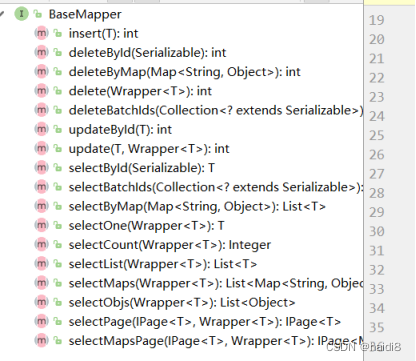
一旦继承BaseMapper之后,系统内置了有十几个CRUD相关的方法,这些方法可以直接使用,不用自己来定义!
在MyBatis Plus的底层。这些接口的SQL语句是自动生成的,不需要去管SQL语句!说白了,直接调用就可以!
2.8、EmployeeMappper.xml
DOCTYPE mapper PUBLIC "-//mybatis.org//DTD Mapper 3.0//EN" "http://mybatis.org/dtd/mybatis-3-mapper.dtd"> <mapper namespace="com.haidi8.mapper.EmployeeMapper"> <insert id="addBatch"> insert into tb_employee values <foreach collection="list" separator="," item="emp"> (null,#{emp.lastName},#{emp.email},#{emp.gender},#{emp.age}) foreach> insert> mapper>- 1
- 2
- 3
- 4
- 5
- 6
- 7
- 8
- 9
- 10
- 11
- 12
- 13
- 14
- 15
- 16
特别说明: Mybatis依赖请勿加入项目配置,以免引起版本冲突!!!
Mybatis-Plus 会自动帮你维护!
MyBatisPlus包是一个综合包(包含MyBatis包,不用再导入一遍的!)

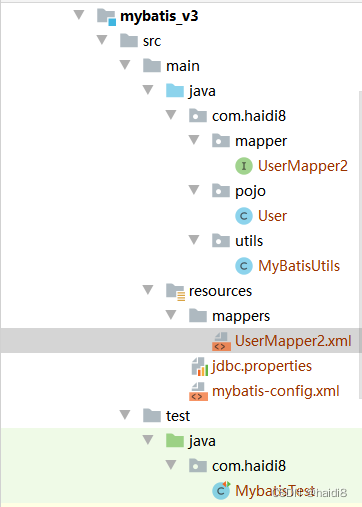
2.9、项目目录和pom文件
<project xmlns="http://maven.apache.org/POM/4.0.0" xmlns:xsi="http://www.w3.org/2001/XMLSchema-instance" xsi:schemaLocation="http://maven.apache.org/POM/4.0.0 http://maven.apache.org/xsd/maven-4.0.0.xsd"> <parent> <artifactId>parentartifactId> <groupId>com.haidi8.mybatisgroupId> <version>1.0-SNAPSHOTversion> parent> <modelVersion>4.0.0modelVersion> <artifactId>mybatisplusartifactId> <dependencies> <dependency> <groupId>mysqlgroupId> <artifactId>mysql-connector-javaartifactId> <version>8.0.25version> dependency> <dependency> <groupId>com.baomidougroupId> <artifactId>mybatis-plusartifactId> <version>3.1.1version> dependency> <dependency> <groupId>junitgroupId> <artifactId>junitartifactId> <version>4.12version> dependency> <dependency> <groupId>log4jgroupId> <artifactId>log4jartifactId> <version>1.2.17version> dependency> <dependency> <groupId>org.projectlombokgroupId> <artifactId>lombokartifactId> <version>1.18.12version> dependency> dependencies> <build> <resources> <resource> <directory>src/main/javadirectory> <includes> <include>**/*.xmlinclude> includes> resource> <resource> <directory>src/main/resourcesdirectory> <includes> <include>**/*include> includes> resource> resources> build> project>- 1
- 2
- 3
- 4
- 5
- 6
- 7
- 8
- 9
- 10
- 11
- 12
- 13
- 14
- 15
- 16
- 17
- 18
- 19
- 20
- 21
- 22
- 23
- 24
- 25
- 26
- 27
- 28
- 29
- 30
- 31
- 32
- 33
- 34
- 35
- 36
- 37
- 38
- 39
- 40
- 41
- 42
- 43
- 44
- 45
- 46
- 47
- 48
- 49
- 50
- 51
- 52
- 53
- 54
- 55
- 56
- 57
- 58
- 59
- 60
- 61
- 62
- 63
- 64
- 65
- 66
- 67
- 68
2.10、测试
package com.haidi8.test; import com.baomidou.mybatisplus.core.conditions.query.QueryWrapper; import com.haidi8.mapper.EmployeeMapper; import com.haidi8.pojo.Employee; import com.haidi8.utils.MyBatisUtils; import org.apache.ibatis.session.SqlSession; import org.junit.After; import org.junit.Before; import org.junit.Test; import java.util.ArrayList; import java.util.HashMap; import java.util.List; import java.util.Map; public class TestEmployee { SqlSession sqlSession = null; EmployeeMapper em=null; @Before public void init() { sqlSession = MyBatisUtils.getSqlSession(); em = sqlSession.getMapper(EmployeeMapper.class); } @After public void destory(){ sqlSession.close(); } @Test public void testList(){ List<Employee> employees = em.selectList(null);//全查 没有参数 for (Employee employee : employees) { System.out.println(employee); } } @Test public void testAdd(){ Employee employee=new Employee(null,"admiin22","32432423@qq.com","女",44); int count = em.insert(employee); System.out.println(count>0?"新增成功":"新增失败"); } @Test public void testDeleteById(){ int count = em.deleteById(2); System.out.println(count>0?"删除成功":"删除失败"); } @Test public void tesUpdateById(){ Employee employee=new Employee(); employee.setId(3); employee.setAge(100); employee.setLastName("尼古拉斯赵四"); int count = em.updateById(employee); System.out.println(count>0?"更新成功":"更新失败"); } @Test public void testGetByid(){ Employee employee = em.selectById(3); System.out.println(employee); } /** * DELETE FROM tb_employee WHERE gender = ? AND age = ? */ @Test public void testDeleteByMap(){ Map<String,Object> map=new HashMap<String,Object>(); map.put("gender","0"); map.put("age",35); //条件是并且的关系 等值判断 int count = em.deleteByMap(map); System.out.println(count>0?"删除成功":"删除失败"); } /** * SELECT id,last_name,myemail AS email,gender,age FROM tb_employee WHERE gender = ? AND age = ? */ @Test public void testSelectByMap(){ Map<String,Object> map=new HashMap<String,Object>(); map.put("gender","0"); map.put("age",35); //条件是并且的关系 等值判断 List<Employee> employees = em.selectByMap(map); for (Employee employee : employees) { System.out.println(employee); } } /** * SELECT id,last_name,myemail AS email,gender,age FROM tb_employee WHERE id IN ( ? , ? , ? ) */ @Test public void testselectBatchIds(){ List<Integer> ids=new ArrayList<Integer>(); ids.add(1); ids.add(5); ids.add(3); List<Employee> employees = em.selectBatchIds(ids); for (Employee employee : employees) { System.out.println(employee); } } /** * DELETE FROM tb_employee WHERE id IN ( ? , ? , ? ) */ @Test public void testsdeleteBatchIds(){ List<Integer> ids=new ArrayList<Integer>(); ids.add(1); ids.add(5); ids.add(3); int count= em.deleteBatchIds(ids); System.out.println(count>0?"删除成功":"删除失败"); } /** * SELECT id,last_name,myemail AS email,gender,age FROM tb_employee WHERE last_name = ? AND age < ? */ @Test public void test1(){ QueryWrapper qw=new QueryWrapper(); //条件构造器 qw.eq("last_name","Tom"); // last_name = ? qw.lt("age",100); // age < ? List<Employee> employees = em.selectList(qw); for (Employee employee : employees) { System.out.println(employee); } } /** * SELECT id,last_name,myemail AS email,gender,age FROM tb_employee WHERE age BETWEEN ? AND ? OR gender = ? */ @Test public void test2() { QueryWrapper<Employee> qw = new QueryWrapper<Employee>(); qw.between("age",18,20); // age BETWEEN ? AND ? qw.or(); // or qw.eq("gender",1); // gender = ? List<Employee> emps =em.selectList(qw); for (Employee e : emps) { System.out.println(e); } } /** * SELECT id,last_name,myemail AS email,gender,age FROM tb_employee WHERE age BETWEEN ? AND ? AND id < ? */ @Test public void testBetweenAnd(){ List<Employee> employees = em.selectList(new QueryWrapper<Employee>().between("age", 18, 40).lt("id",4)); for (Employee e : employees) { System.out.println(e); } } /** * SELECT id,last_name,myemail AS email,gender,age FROM tb_employee WHERE age BETWEEN ? AND ? OR gender = ? ORDER BY age ASC */ @Test public void test3() { QueryWrapper<Employee> qw = new QueryWrapper<Employee>(); qw.between("age",18,20); // age BETWEEN ? AND ? qw.or(); // OR qw.eq("gender",1); // gender = ? qw.orderByAsc("age"); // ORDER BY age ASC List<Employee> emps =em.selectList(qw); for (Employee e : emps) { System.out.println(e); } } /** * SELECT id,last_name,myemail AS email,gender,age FROM tb_employee WHERE age BETWEEN ? AND ? OR gender = ? ORDER BY age ASC , id DESC */ @Test public void test4() { QueryWrapper<Employee> qw = new QueryWrapper<Employee>(); qw.between("age",18,20); qw.or(); qw.eq("gender",1); qw.orderByAsc("age"); // ORDER BY age ASC qw.orderByDesc("id"); // id DESC List<Employee> emps =em.selectList(qw); for (Employee e : emps) { System.out.println(e); } } /** * SELECT id,last_name,myemail AS email,gender,age FROM tb_employee WHERE age > ? AND last_name LIKE ? * 15(String), %o%(String) */ @Test public void test5(){ List<Employee> emps = em.selectList(new QueryWrapper<Employee>().gt("age","15").like("last_name","o")); for (Employee emp : emps) { System.out.println(emp); } } /** * SELECT id,last_name,myemail AS email,gender,age FROM tb_employee WHERE age > ? AND last_name LIKE ? * 15(String), %o(String) */ @Test public void test6(){ List<Employee> emps = em.selectList(new QueryWrapper<Employee>().gt("age","15").likeLeft("last_name","o")); for (Employee emp : emps) { System.out.println(emp); } } /** * SELECT id,last_name,myemail AS email,gender,age FROM tb_employee WHERE age > ? AND last_name LIKE ? * 15(String), o%(String) */ @Test public void test7(){ List<Employee> emps = em.selectList(new QueryWrapper<Employee>().gt("age","15").likeRight("last_name","o")); for (Employee emp : emps) { System.out.println(emp); } } /** * SELECT id,last_name,myemail AS email,gender,age FROM tb_employee WHERE age > ? AND last_name IS NOT NULL */ @Test public void test8(){ List<Employee> emps = em.selectList(new QueryWrapper<Employee>().gt("age","15").isNotNull("last_name")); for (Employee emp : emps) { System.out.println(emp); } } /** * SELECT id,last_name,myemail AS email,gender,age FROM tb_employee WHERE age > ? AND last_name IS NULL */ @Test public void test9(){ List<Employee> emps = em.selectList(new QueryWrapper<Employee>().gt("age","15").isNull("last_name")); for (Employee emp : emps) { System.out.println(emp); } } /** * SELECT COUNT( 1 ) FROM tb_employee WHERE last_name LIKE ? * %b%(String) */ @Test public void testCount(){ Integer count = em.selectCount(new QueryWrapper<Employee>().like("last_name", "b")); System.out.println(count); } /** * SELECT max(age),min(age) FROM tb_employee */ @Test public void test10(){ List<Map<String, Object>> maps = em.selectMaps(new QueryWrapper<Employee>().select("max(age),min(age)")); for (Map<String, Object> map : maps) { System.out.println(map); } } @Test public void testGroupBy(){ QueryWrapper<Employee> qw = new QueryWrapper<Employee>().select("gender", "max(age)","min(age)").groupBy("gender"); List<Map<String, Object>> maps = em.selectMaps(qw); System.out.println(maps); } /** * SELECT * gender, * max(age), * min(age) * FROM * tb_employee * GROUP BY * gender * HAVING * max(age) > 30 */ @Test public void testHaving(){ QueryWrapper<Employee> qw = new QueryWrapper<Employee>().select("gender", "max(age)","min(age)").groupBy("gender").having("max(age)>30"); List<Map<String, Object>> maps = em.selectMaps(qw); System.out.println(maps); } /** * SELECT id,last_name,myemail AS email,gender,age FROM tb_employee WHERE id NOT IN (?,?,?) */ @Test public void testNotIn(){ List<Integer> ids=new ArrayList<Integer>(); ids.add(1); ids.add(2); ids.add(3); QueryWrapper<Employee> qw = new QueryWrapper<Employee>().notIn("id",ids); List<Employee> employees = em.selectList(qw); for (Employee e : employees) { System.out.println(e); } } @Test public void testaddBatch(){ Employee employee1=new Employee(null,"张三1","32432423@qq.com","女",44); Employee employee2=new Employee(null,"张三3","32432423@qq.com","女",44); Employee employee3=new Employee(null,"张三4","32432423@qq.com","女",44); Employee employee4=new Employee(null,"张三5","32432423@qq.com","女",44); Employee employee5=new Employee(null,"张三6","32432423@qq.com","女",44); Employee employee6=new Employee(null,"张三7","32432423@qq.com","女",44); List<Employee> list=new ArrayList<Employee>(); list.add(employee1); list.add(employee2); list.add(employee3); list.add(employee4); list.add(employee5); list.add(employee6); int count = em.addBatch(list); System.out.println(count>0?"批量成功":"批量失败"); } }- 1
- 2
- 3
- 4
- 5
- 6
- 7
- 8
- 9
- 10
- 11
- 12
- 13
- 14
- 15
- 16
- 17
- 18
- 19
- 20
- 21
- 22
- 23
- 24
- 25
- 26
- 27
- 28
- 29
- 30
- 31
- 32
- 33
- 34
- 35
- 36
- 37
- 38
- 39
- 40
- 41
- 42
- 43
- 44
- 45
- 46
- 47
- 48
- 49
- 50
- 51
- 52
- 53
- 54
- 55
- 56
- 57
- 58
- 59
- 60
- 61
- 62
- 63
- 64
- 65
- 66
- 67
- 68
- 69
- 70
- 71
- 72
- 73
- 74
- 75
- 76
- 77
- 78
- 79
- 80
- 81
- 82
- 83
- 84
- 85
- 86
- 87
- 88
- 89
- 90
- 91
- 92
- 93
- 94
- 95
- 96
- 97
- 98
- 99
- 100
- 101
- 102
- 103
- 104
- 105
- 106
- 107
- 108
- 109
- 110
- 111
- 112
- 113
- 114
- 115
- 116
- 117
- 118
- 119
- 120
- 121
- 122
- 123
- 124
- 125
- 126
- 127
- 128
- 129
- 130
- 131
- 132
- 133
- 134
- 135
- 136
- 137
- 138
- 139
- 140
- 141
- 142
- 143
- 144
- 145
- 146
- 147
- 148
- 149
- 150
- 151
- 152
- 153
- 154
- 155
- 156
- 157
- 158
- 159
- 160
- 161
- 162
- 163
- 164
- 165
- 166
- 167
- 168
- 169
- 170
- 171
- 172
- 173
- 174
- 175
- 176
- 177
- 178
- 179
- 180
- 181
- 182
- 183
- 184
- 185
- 186
- 187
- 188
- 189
- 190
- 191
- 192
- 193
- 194
- 195
- 196
- 197
- 198
- 199
- 200
- 201
- 202
- 203
- 204
- 205
- 206
- 207
- 208
- 209
- 210
- 211
- 212
- 213
- 214
- 215
- 216
- 217
- 218
- 219
- 220
- 221
- 222
- 223
- 224
- 225
- 226
- 227
- 228
- 229
- 230
- 231
- 232
- 233
- 234
- 235
- 236
- 237
- 238
- 239
- 240
- 241
- 242
- 243
- 244
- 245
- 246
- 247
- 248
- 249
- 250
- 251
- 252
- 253
- 254
- 255
- 256
- 257
- 258
- 259
- 260
- 261
- 262
- 263
- 264
- 265
- 266
- 267
- 268
- 269
- 270
- 271
- 272
- 273
- 274
- 275
- 276
- 277
- 278
- 279
- 280
- 281
- 282
- 283
- 284
- 285
- 286
- 287
- 288
- 289
- 290
- 291
- 292
- 293
- 294
- 295
- 296
- 297
- 298
- 299
- 300
- 301
- 302
- 303
- 304
- 305
- 306
- 307
- 308
- 309
- 310
- 311
- 312
- 313
- 314
- 315
- 316
- 317
- 318
- 319
- 320
- 321
- 322
- 323
- 324
- 325
- 326
- 327
- 328
- 329
- 330
- 331
- 332
- 333
- 334
- 335
- 336
- 337
- 338
- 339
- 340
- 341
- 342
- 343
- 344
- 345
主意:Having必须和Group by一起使用!Having作用就是:对分组之后的数据再次筛选
2.11、通用 CRUD 小结
-
以上是基本的 CRUD 操作,如您所见,我们仅仅需要继承一个 BaseMapper 即可实现大部分单表 CRUD 操作。BaseMapper 提供了多达 17 个方法给大家使用, 可以极其方便的实现单一、批量、分页等操作。极大的减少开发负担,难道这就是 MP 的强大之处了吗?
-
提出需求:现有一个需求,我们需要分页查询 tbl_employee 表中,年龄在 18~50 之间性别为男且姓名为 xx 的所有用户,这时候我们该如何实现上述需求呢?
MyBatis : 需要在 SQL 映射文件中编写带条件查询的 SQL,并基于 PageHelper 插件完成分页. 实现以上一个简单的需求,往往需要我们做很多重复单调的工作。普通的 Mapper 能够解决这类痛点吗?
MP: 依旧不用编写 SQL 语句, MP 提供了功能强大的条件构造器EntityWrapper
2.12、分页查询(现在是控制台版本)

配置分页插件(需要配置MyBatis Plus分页插件)
<plugins> <plugin interceptor="com.baomidou.mybatisplus.extension.plugins.PaginationInterceptor"/> plugins>- 1
- 2
- 3

三、踩坑
3.1 、依赖是否导入

3.2、使用MyBatisPlus要继承BassMapper接口

3.3、MyBatis和MyBatisPlus获取SqlSessionFactory的方式是不一样的

3.4、log4j的配置

3.5 、主键自增MyBatisPlus要对主键ID要配置注解识别

3.6、使用MybatisPlus过程中出现数据库表字段和实体类字段不一样的注解解决方式

3.7、BaseMapper接口提供的常见方法

-
相关阅读:
高校教务系统登录页面JS分析——重庆交通大学
如何做架构设计?
【JDK 8-函数式编程】4.6 方法引用与构造函数引用
Python攻城师的成长————Django框架(django操作session、 CBV添加装饰器的三种方式 、django中间件、 csrf跨站请求伪造)
HTML+CSS简单的网页制作期末作业 关于我的家乡——四川文化网页介绍 DW大学生网页作业制作设计 Dreamweaver简单网页成品
PHPStudy安装
网站为什么要进行内容监控审核?国科云谈网站内容监控的必要性
MyBatisplus使用报错--Invalid bound statement
C++实现电话号码的字母组合--Leetcood(17)
【Unity程序技巧】事件管理器
- 原文地址:https://blog.csdn.net/qq_45058208/article/details/126652148
