-
Docker实战-使用HAProxy实现4层的负载均衡
Docker实战-使用HAProxy实现4层的负载均衡
前言
上一篇文章《Docker实战-使用Nginx实现4层的负载均衡》给大家实战使用docker,部署Nginx来实现4层负载均衡。今天这个文章咱们来来看看另一个负载均衡利器HAProxy在Docker里如何进行部署,来实现4层负载均衡。

HAProxy是一款开源的、高性能的、基于TCP(第四层)和HTTP(第七层)应用的负载均衡软件,借助HAProxy可以快速、可靠地提供基于TCP和HTTP应用的负载均衡解决方案。
Docker下安装HAProxy
使用docker拉取Haproxy的镜像
docker imagepull haproxy运行Haproxy
- docker container run -p 6556:6556 -p 30001:30001 -d \
- -v haproxy:/usr/local/etc/haproxy --name haproxy \
- haproxy
配置HAProxy
配置haproxy.cfg(修改haproxy.cfg文件)
vi /var/lib/docker/volumes/haproxy/_data/haproxy.cfg- #----------------
- # Global settings
- #----------------
- global
- log 127.0.0.1 local2
- maxconn 4000
- daemon
- defaults
- mode http
- log global
- option httplog
- option dontlognull
- option http-server-close
- option forwardfor except 127.0.0.0/8
- option redispatch
- retries 3
- timeout http-request 10s
- timeout queue 1m
- timeout connect 10s
- timeout client 1m
- timeout server 1m
- timeout http-keep-alive 10s
- timeout check 10s
- maxconn 500
- #-------------
- #Stats monitor
- #-------------
- frontend stats_monitor
- bind *:30001
- stats enable
- stats uri /stats
- stats auth admin:admin
- stats admin if TRUE
- stats refresh 5s
- stats realm baison-test-Haproxy
- # stats hide-version
- #--------------------
- #Application frontend
- #--------------------
- frontend GEOGLOBE
- bind *:8080
- #ACL#
- acl map_acl path_reg -i /map/
- #USE_BACKEND#
- use_backend map_backend if map_acl
- #map_begin#
- backend map_backend
- balance roundrobin
- mode http
- server map_101 172.15.103.195:20001 check weight 1
- #map_end#
查看日志
root@boot2docker:~# docker container logs -f haproxy- [NOTICE] (1) : New worker (7) forked
- [NOTICE] (1) : Loading success.
- [NOTICE] (7) : haproxy version is 2.5.0-f2e0833
- [NOTICE] (7) : path to executable is /usr/local/sbin/haproxy
- [ALERT] (7) : [haproxy.main()] Cannot chroot(/usr/local/etc/haproxy).
- [NOTICE] (1) : haproxy version is 2.5.0-f2e0833
- [NOTICE] (1) : path to executable is /usr/local/sbin/haproxy
- [WARNING] (1) : Current worker (7) exited with code 1 (Exit)
- [ALERT] (1) : exit-on-failure: killing every processes with SIGTERM
- [WARNING] (1) : All workers exited. Exiting... (1)
- [NOTICE] (1) : New worker (7) forked
- [NOTICE] (1) : Loading success.
- [NOTICE] (7) : haproxy version is 2.5.0-f2e0833
- [NOTICE] (7) : path to executable is /usr/local/sbin/haproxy
- [ALERT] (7) : [haproxy.main()] Cannot chroot(/usr/local/etc/haproxy).
- [NOTICE] (1) : haproxy version is 2.5.0-f2e0833
- [NOTICE] (1) : path to executable is /usr/local/sbin/haproxy
- [WARNING] (1) : Current worker (7) exited with code 1 (Exit)
- [ALERT] (1) : exit-on-failure: killing every processes with SIGTERM
- [WARNING] (1) : All workers exited. Exiting... (1)
- [NOTICE] (1) : New worker (7) forked
- [NOTICE] (1) : Loading success.
- [NOTICE] (7) : haproxy version is 2.5.0-f2e0833
- [NOTICE] (7) : path to executable is /usr/local/sbin/haproxy
- [ALERT] (7) : [haproxy.main()] Cannot chroot(/usr/local/etc/haproxy).
- [NOTICE] (1) : haproxy version is 2.5.0-f2e0833
- [NOTICE] (1) : path to executable is /usr/local/sbin/haproxy
- [WARNING] (1) : Current worker (7) exited with code 1 (Exit)
- [ALERT] (1) : exit-on-failure: killing every processes with SIGTERM
- [WARNING] (1) : All workers exited. Exiting... (1)
- [NOTICE] (1) : haproxy version is 2.5.0-f2e0833
- [NOTICE] (1) : path to executable is /usr/local/sbin/haproxy
- [ALERT] (1) : config : parsing [/usr/local/etc/haproxy/haproxy.cfg:5] : nbproc is not supported any more since HAProxy 2.5. Threads will automatically be used on multi-processor machines if available.
- [ALERT] (1) : config : Error(s) found in configuration file : /usr/local/etc/haproxy/haproxy.cfg
- [ALERT] (1) : config : Fatal errors found in configuration.
- [NOTICE] (1) : New worker (7) forked
- [NOTICE] (1) : Loading success.
- [NOTICE] (1) : haproxy version is 2.5.0-f2e0833
- [NOTICE] (1) : path to executable is /usr/local/sbin/haproxy
- [WARNING] (1) : Exiting Master process...
- [NOTICE] (1) : New worker (7) forked
- [NOTICE] (1) : Loading success.
- [WARNING] (7) : Server map_backend/map_101 is DOWN, reason: Layer4 timeout, check duration: 2004ms. 0 active and 0 backup servers left. 0 sessions active, 0 requeued, 0 remaining in queue.
- [ALERT] (7) : backend 'map_backend' has no server available!
Netty的测试配置
- #----------------
- #Global settings
- #----------------
- global
- log 127.0.0.1 local2
- maxconn 4000
- daemon
- defaults
- mode http
- log global
- option httplog
- option dontlognull
- option http-server-close
- option forwardfor except 127.0.0.0/8
- option redispatch
- retries 3
- timeout http-request 10s
- timeout queue 1m
- timeout connect 10s
- timeout client 1m
- timeout server 1m
- timeout http-keep-alive 10s
- timeout check 10s
- maxconn 500
- #-------------
- #Stats monitor
- #-------------
- frontend stats_monitor
- bind *:30001
- stats enable
- stats uri /stats
- stats auth admin:admin
- stats admin if TRUE
- stats refresh 5s
- stats realm baison-test-Haproxy
- # stats hide-version
- #--------------------
- #Application frontend
- #--------------------
- #frontend GEOGLOBE
- #bind *:6556
- ##ACL#
- #acl map_acl path_reg -i /map/
- ##USE_BACKEND#
- #use_backend map_backend if map_acl
- ##map_begin#
- #backend map_backend
- #balance roundrobin
- #mode tcp
- #server map_101 192.168.56.1:6666 check weight 1
- #server map_102 192.168.56.1:7777 check weight 1
- #map_end#
- listen netty-test
- bind *:6556
- mode tcp
- balance roundrobin
- server map_101 192.168.56.1:6666 check weight 1
- server map_102 192.168.56.1:7777 check weight 1
配置的最下面就是Netty实现的server;
- listen netty-test
- bind *:6556
- mode tcp
- balance roundrobin
- server map_101 192.168.56.1:6666 check weight 1
- server map_102 192.168.56.1:7777 check weight 1
后端的两个tcp的服务断点,分别是192.168.56.1:6666 和 192.168.56.1:7777;
负责均衡的前端入口是Docker部署的HaProxy 容器, 端口是6556;
查看HAProxy统计
访问192.168.56.101:30001/stats; 在配置文件里都已经之地

使用客户端进行测试
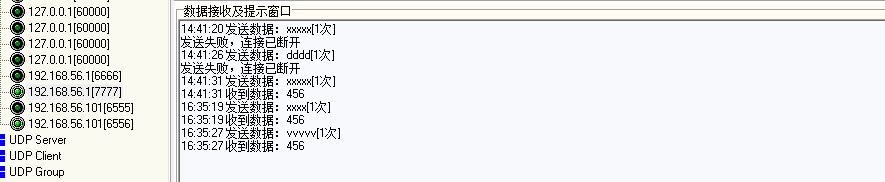
使用tcp客户端调试工具,连接192.168.56.101:6556发送消息


注意
在测试的过程中,会出现客户端连接中断的错误出现;这是haproxy默认情况下,一定时间没有消息的发送会自行断掉连接,可以通过修改配置文件中的timeout的值来进行设定,
两个配置选项 (timeout client 50000 ,timeout server 50000),这个是检查服务端和客户端连接超时情况。把这两个注释后就不会出现连接断开情况
结束语
HAProxy是一款专业的负载均衡软件,相比较Nginx而言,虽然Nginx在19的版本后,也支持4层的负载均衡,但是在性能和稳定性上,还是HAProxy更为市场所接受一些, nginx对web层支持的优秀,使得Nginx更适合做7层的负载均衡, HaProxy以其稳定性和可靠性,可以与硬件级的F5负载均衡设备相媲美。
而且HAProxy拥有一个功能强大的服务器状态监控页面,通过此页面可以实时了解系统的运行状况。HAProxy拥有功能强大的ACL支持,能给使用者带来很大方便。HAProxy是借助于操作系统的技术特性来实现性能最大化的,因此,在使用HAProxy时,对操作系统进行性能调优是非常重要的。在业务系统方面,HAProxy非常适用于那些并发量特别大且需要持久连接或七层处理机制; 另外HAProxy也可用于Mysql数据库(读操作)及Redis的负载均衡。有实战项目influxDB的高可用就是使用HAProxy来实现的,不过笔者还没有做过此方面的实验和对比。 以后有做此方面的实验,一定也会分享一下过程。
-
相关阅读:
无人监测站相关配置
Vue3 从零开始 搭建 简单 干净 的 后台管理系统
无人机+三维实景建模助力古建筑保护,传承历史记忆
React+Electron搭建开发环境
MySQL(case when then end, update)
Linux入门---页表的理解
Java设计模式七大原则-迪米特法则
改名Meta,杀死Oculus,Facebook是押注元宇宙还是“金蝉脱壳”?
Redis之与SSM集成Spring注解式缓存
最常见的几种Java面试题
- 原文地址:https://blog.csdn.net/inthirties/article/details/126621470
