-
练习前端案例
1. 猜数字游戏
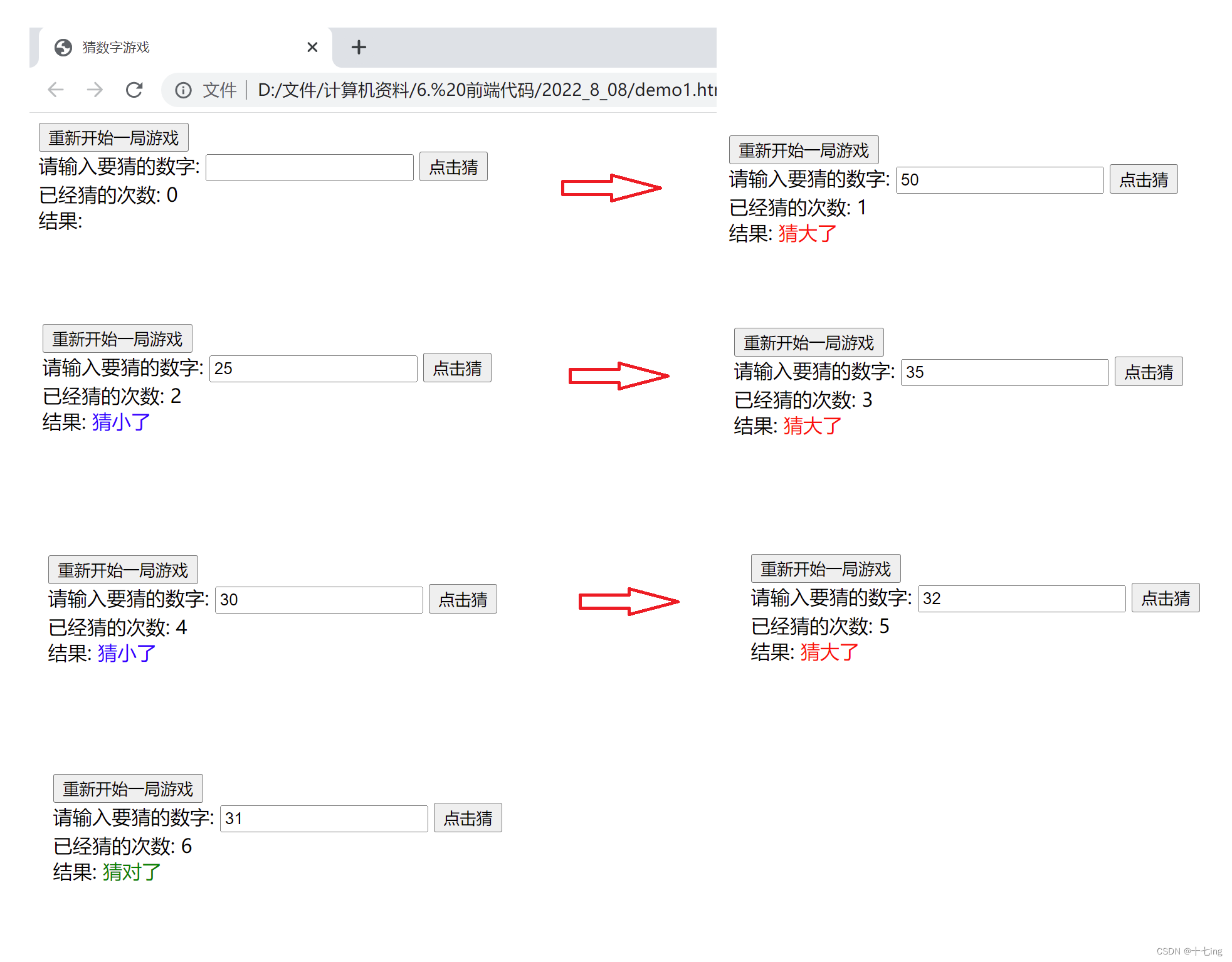
DOCTYPE html> <html lang="en"> <head> <meta charset="UTF-8"> <meta http-equiv="X-UA-Compatible" content="IE=edge"> <meta name="viewport" content="width=device-width, initial-scale=1.0"> <title>猜数字游戏title> head> <body> <button class="reset">重新开始一局游戏button><br/> 请输入要猜的数字: <input type="text" class="number"> <button class="guess">点击猜button><br/> 已经猜的次数: <span class="count"> 0 span><br/> 结果: <span class="result"> span> <script> //1. 拿到每个元素的对象 let reset = document.querySelector('.reset'); let number = document.querySelector('.number'); let guess = document.querySelector('.guess'); let count = document.querySelector('.count'); let result = document.querySelector('.result'); //2. 将猜的次数和生成的随机数放在点击事件的外面 let guessCount = 0; let randomNum = Math.floor( Math.random() * 100 ) + 1; //3. 生成 guess 点击事件 guess.onclick = function() { //(1) 猜的次数 +1 guessCount += 1; count.innerHTML = guessCount; //(2) 将输入的猜的数字从输入框中拿出来,和随机数进行比较 let guessNum = parseInt(number.value); if(guessNum == randomNum) { result.innerHTML = '猜对了'; result.style.color = 'green'; } else if (guessNum > randomNum) { result.innerHTML = '猜大了'; result.style.color = 'red'; } else { result.innerHTML = '猜小了'; result.style.color = 'blue'; } } //4. 设计好重置按钮的逻辑 reset.onclick = function() { //这是一个 BOM API,相当于刷新浏览器的页面 location.reload(); } script> body> html>- 1
- 2
- 3
- 4
- 5
- 6
- 7
- 8
- 9
- 10
- 11
- 12
- 13
- 14
- 15
- 16
- 17
- 18
- 19
- 20
- 21
- 22
- 23
- 24
- 25
- 26
- 27
- 28
- 29
- 30
- 31
- 32
- 33
- 34
- 35
- 36
- 37
- 38
- 39
- 40
- 41
- 42
- 43
- 44
- 45
- 46
- 47
- 48
- 49
- 50
- 51
- 52
- 53
- 54
- 55
- 56
- 57
- 58
- 59
- 60
- 61
- 62
- 63
- 64
展示结果:
2. 表白墙
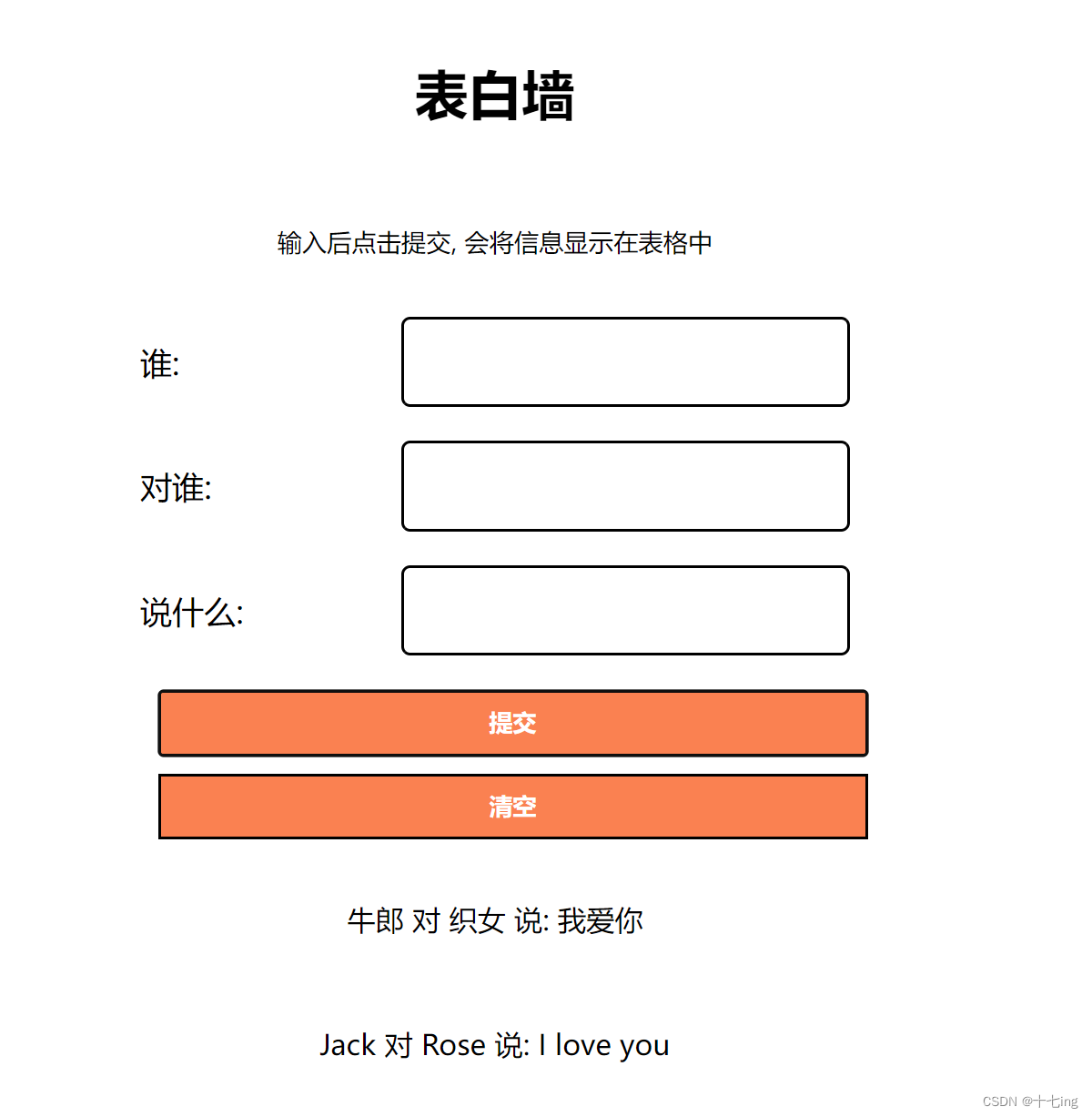
DOCTYPE html> <html lang="en"> <head> <meta charset="UTF-8"> <meta http-equiv="X-UA-Compatible" content="IE=edge"> <meta name="viewport" content="width=device-width, initial-scale=1.0"> <title>demo2title> head> <body> <div class="parent"> <h2> 表白墙 h2> <p>输入后点击提交, 会将信息显示在表格中p> <div class="row"> <span>谁: span> <input type="text"> div> <div class="row"> <span>对谁: span> <input type="text"> div> <div class="row"> <span>说什么: span> <input type="text"> div> <button class="button"> 提交 button> <button class="clear"> 清空 button> div> <script> //1. 获取输入框中的内容 let submit = document.querySelector('.button'); submit.onclick = function() { let input = document.querySelectorAll('input'); let from = input[0].value; let to = input[1].value; let message = input[2].value; //console.log(from + ',' + to + ',' + message); if(from == '' || to == '' || message == '') { return; } //2. 创建节点, 并把节点放入 DOM 树中 let div = document.createElement('div'); div.className = 'row'; div.innerHTML = from + " 对 " + to + " 说: " + message; let parent = document.querySelector('.parent'); parent.appendChild(div); //3. 一趟后,清空输入框 for(let i=0; i<input.length; i++) { input[i].value = ''; } //4. 点击清空,刷新页面 let clear = document.querySelector('.clear'); clear.onclick = function() { location.reload(); } } script> <style> .parent { width: 400px; margin-left: auto; margin-right: auto; /* background-color: aquamarine; */ } h2 { text-align: center; font-size: 30px; padding: 20px; } p { text-align: center; font-size: 14px; padding: 10px; } .row { height: 70px; display: flex; justify-content: center; align-items: center; /* background-color: gray; */ } span { width: 150px; font-size: 18px; /* text-align: center; */ /* background-color: aquamarine; */ } input { width:250px; height: 45px; border-radius: 5px; border-color: black; /* border: none; */ /* background-color: aquamarine; */ } .button, .clear { width: 400px; height: 37px; background-color: coral; color: white; font-weight: bold; text-align: center; line-height: 35px; margin: 10px; display: flex; justify-content: center; align-items: center; /* background-color: aquamarine; */ } .button:hover { background-color: blue; } .clear:hover { background-color: black; } style> body> html>- 1
- 2
- 3
- 4
- 5
- 6
- 7
- 8
- 9
- 10
- 11
- 12
- 13
- 14
- 15
- 16
- 17
- 18
- 19
- 20
- 21
- 22
- 23
- 24
- 25
- 26
- 27
- 28
- 29
- 30
- 31
- 32
- 33
- 34
- 35
- 36
- 37
- 38
- 39
- 40
- 41
- 42
- 43
- 44
- 45
- 46
- 47
- 48
- 49
- 50
- 51
- 52
- 53
- 54
- 55
- 56
- 57
- 58
- 59
- 60
- 61
- 62
- 63
- 64
- 65
- 66
- 67
- 68
- 69
- 70
- 71
- 72
- 73
- 74
- 75
- 76
- 77
- 78
- 79
- 80
- 81
- 82
- 83
- 84
- 85
- 86
- 87
- 88
- 89
- 90
- 91
- 92
- 93
- 94
- 95
- 96
- 97
- 98
- 99
- 100
- 101
- 102
- 103
- 104
- 105
- 106
- 107
- 108
- 109
- 110
- 111
- 112
- 113
- 114
- 115
- 116
- 117
- 118
- 119
- 120
- 121
- 122
- 123
- 124
- 125
- 126
- 127
- 128
- 129
- 130
- 131
- 132
- 133
- 134
- 135
- 136
- 137
- 138
- 139
- 140
- 141
- 142
- 143
- 144
- 145
展示结果:
3. 待办事项
DOCTYPE html> <html lang="en"> <head> <meta charset="UTF-8"> <meta http-equiv="X-UA-Compatible" content="IE=edge"> <meta name="viewport" content="width=device-width, initial-scale=1.0"> <title>待办事项title> head> <body> <div class="parent"> <div class="child1"> <input type="text"> <button class="button1">新建任务button> div> <div class="bar"> <span>未完成span> <span>已完成span> div> <div class="container"> <div class="todo"> <div class="row"> div> div> <div class="done">div> div> div> <script> //1. 实现新增待办事项 //1.1 获取新建任务按钮的对象 let button1 = document.querySelector('.button1'); //1.2 将新建任务这个按钮设为一个点击事件 button1.onclick = function() { //1. 获取输入文本框中的内容 let content = document.querySelector('.child1>input'); let inputContent = content.value; if(inputContent == '') { console.log('你还未输入内容'); return; } //1.3 新增节点 //(1) 创建一个节点 //新创建的节点如果需要原有的属性,必须通过 className 赋值过去 let div = document.createElement('div'); div.className = 'row'; let input = document.createElement('input'); input.type = 'checkbox'; input.className = 'checkbox'; let span = document.createElement('span'); span.innerHTML = inputContent; span.className = 'items'; let button = document.createElement('button'); button.innerHTML = '删除'; button.className = 'button2'; //(2)把这个节点以及节点的子节点全部挂在 DOM 树上 //把三个元素放在 row 属性下 div.appendChild(input); div.appendChild(span); div.appendChild(button); //将 row 属性放在 todo 属性下 let todo = document.querySelector('.todo'); todo.appendChild(div); //每成功新建一次任务,就将上一次的任务给清空了 content.value = ''; //2. 实现待办事项与完成事项之间的转换 //2.1 针对 input 设为一个点击事件,实际上是实现多选框之间转换 input.onclick = function() { if(input.checked) { //如果多选框被选中了,那么就拿到 完成这一列 let target = document.querySelector('.done'); target.appendChild(div); } else { //如果多选框未被选中,那么就拿到 未完成这一列 let target = document.querySelector('.todo'); target.appendChild(div); } } //3. 实现删除操作,针对删除按钮实现一个点击事件 button.onclick = function() { //此时 div 的父元素可能是 todo,也可能是 done //可以直接通过 parentNode 这个属性来获取到元素当前的父元素 let parent = div.parentNode; parent.removeChild(div); } } script> <style> * { margin: 0; padding: 0; box-sizing: border-box; } .parent { width: 700px; margin-left: auto; margin-right: auto; /* background-color: red; */ } .child1 { width: 700px; height: 50px; margin-top: 20px; margin-bottom: 20px; /* background-color: gray; */ } input { width: 580px; height: 40px; margin-right: 10px; /* background-color: gray; */ } .button1 { width: 102px; height: 42px; background-color: orange; color: white; border: none; border-radius: 8px; } .bar { width:700px; height: 40px; line-height: 35px; font-weight: bold; margin-bottom: 20px; background-color:lightslategrey; color: white; display: flex; justify-content: space-around; align-items: center; } .container { width: 700px; height: 800px; /* background-color: aquamarine; */ margin-left: auto; margin-right: auto; /* 让 todo 和 done 这两个 div 放置在同一行 */ display: flex; justify-content: center; } .todo { width: 350px; height: 800px; /* background-color: green; */ } .checkbox { width: 16px; height: 16px; margin-left: 10px; margin-right: 10px; } .items { width: 260px; height:30px; line-height: 30px; } .done { width: 350px; height: 800px; /* background-color: blue; */ } .row { width: 350px;; height:50px; /* line-height: 50px; */ display: flex; align-items: center; } style> body> html>- 1
- 2
- 3
- 4
- 5
- 6
- 7
- 8
- 9
- 10
- 11
- 12
- 13
- 14
- 15
- 16
- 17
- 18
- 19
- 20
- 21
- 22
- 23
- 24
- 25
- 26
- 27
- 28
- 29
- 30
- 31
- 32
- 33
- 34
- 35
- 36
- 37
- 38
- 39
- 40
- 41
- 42
- 43
- 44
- 45
- 46
- 47
- 48
- 49
- 50
- 51
- 52
- 53
- 54
- 55
- 56
- 57
- 58
- 59
- 60
- 61
- 62
- 63
- 64
- 65
- 66
- 67
- 68
- 69
- 70
- 71
- 72
- 73
- 74
- 75
- 76
- 77
- 78
- 79
- 80
- 81
- 82
- 83
- 84
- 85
- 86
- 87
- 88
- 89
- 90
- 91
- 92
- 93
- 94
- 95
- 96
- 97
- 98
- 99
- 100
- 101
- 102
- 103
- 104
- 105
- 106
- 107
- 108
- 109
- 110
- 111
- 112
- 113
- 114
- 115
- 116
- 117
- 118
- 119
- 120
- 121
- 122
- 123
- 124
- 125
- 126
- 127
- 128
- 129
- 130
- 131
- 132
- 133
- 134
- 135
- 136
- 137
- 138
- 139
- 140
- 141
- 142
- 143
- 144
- 145
- 146
- 147
- 148
- 149
- 150
- 151
- 152
- 153
- 154
- 155
- 156
- 157
- 158
- 159
- 160
- 161
- 162
- 163
- 164
- 165
- 166
- 167
- 168
- 169
- 170
- 171
- 172
- 173
- 174
- 175
- 176
- 177
- 178
- 179
- 180
- 181
- 182
- 183
- 184
- 185
- 186
- 187
- 188
- 189
- 190
- 191
- 192
- 193
- 194
- 195
- 196
- 197
- 198
- 199
- 200
- 201
- 202
- 203
- 204
- 205
- 206
- 207
- 208
- 209
展示结果:

-
相关阅读:
Web自动化测试 Selenium 1/3
【雷达成像】雷达SAR成像仿真的应用(Matlab代码实现)
DO280管理和监控OpenShift平台--使用probes监视应用
CSS---flex布局
股票交易sdk接口源码分享
再生龙clonezilla还原windows、linux操作系统(包含银河麒麟、ubuntu、centos等)
HTML 简介
人工智能、深度学习、机器学习常见面试题01~20
zookeeper leader选举机制
算法打卡day48|动态规划篇16| Leetcode 583. 两个字符串的删除操作、72. 编辑距离
- 原文地址:https://blog.csdn.net/lfm1010123/article/details/126558849