-
hyperf笔记
一.环境
1.docker 运行一个hyperf的镜像,一个console镜像
- hyperf镜像
docker run --name hyperf1 -v E:\Web\Docker\Hyperf\:/data/project -p 9501:9501 -p 9502:9502 -p 9503:9503 -it --privileged -u root --entrypoint /bin/sh hyperf/hyperf:8.0-alpine-v3.14-swoole- 1
- consul镜像
docker pull consul docker run --name=consul -p 8500:8500 -d consul- 1
- 2
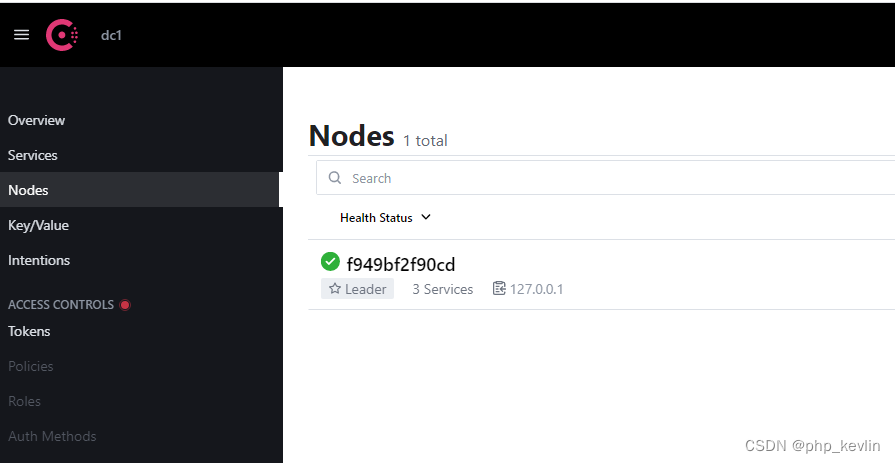
使用ipconfig查看本机的ip,然后用公网ip+端口的方式访问
2.下载框架
composer create-project hyperf/hyperf-skeleton- 1
选择json-rpc组件

3.安装所需要的各个依赖(很多安装包 ,最好全部都安装一次,因为少安装依赖包中间出了很多bug)
composer require hyperf/service-governance-consul # 我忘记了,只写composer.json文件 #provider(服务提供者的composer.json) "require": { "php": ">=8.0", "hyperf/cache": "~2.2.0", "hyperf/command": "~2.2.0", "hyperf/config": "~2.2.0", "hyperf/consul": "*", "hyperf/database": "~2.2.0", "hyperf/db-connection": "~2.2.0", "hyperf/framework": "~2.2.0", "hyperf/guzzle": "~2.2.0", "hyperf/http-server": "~2.2.0", "hyperf/json-rpc": "*", "hyperf/logger": "~2.2.0", "hyperf/memory": "~2.2.0", "hyperf/process": "~2.2.0", "hyperf/redis": "~2.2.0", "hyperf/rpc": "~2.2.0", "hyperf/rpc-client": "*", "hyperf/rpc-server": "*", "hyperf/service-governance": "*", "hyperf/service-governance-consul": "*" }, # (consu)服务消费者的composer.json "require": { "php": ">=8.0", "hyperf/cache": "~3.0.0", "hyperf/command": "~3.0.0", "hyperf/config": "~3.0.0", "hyperf/consul": "*", "hyperf/database": "~3.0.0", "hyperf/db-connection": "~3.0.0", "hyperf/di": "*", "hyperf/framework": "~3.0.0", "hyperf/guzzle": "~3.0.0", "hyperf/http-server": "~3.0.0", "hyperf/json-rpc": "*", "hyperf/logger": "~3.0.0", "hyperf/memory": "~3.0.0", "hyperf/process": "~3.0.0", "hyperf/redis": "~3.0.0", "hyperf/rpc": "~3.0.0", "hyperf/rpc-client": "*", "hyperf/rpc-server": "*", "hyperf/service-governance": "*", "hyperf/service-governance-consul": "*" },- 1
- 2
- 3
- 4
- 5
- 6
- 7
- 8
- 9
- 10
- 11
- 12
- 13
- 14
- 15
- 16
- 17
- 18
- 19
- 20
- 21
- 22
- 23
- 24
- 25
- 26
- 27
- 28
- 29
- 30
- 31
- 32
- 33
- 34
- 35
- 36
- 37
- 38
- 39
- 40
- 41
- 42
- 43
- 44
- 45
- 46
- 47
- 48
- 49
二.服务提供者
- 通过
@RpcService注解对一个类进行定义即可发布这个服务
- provider/app/JsonRpc/CalculatorServiceInterface.php
<?php declare(strict_types=1); namespace App\JsonRpc; interface CalculatorServiceInterface{ public function add(int $a,int $b); }- 1
- 2
- 3
- 4
- 5
- 6
- provider/app/JsonRpc/CalculatorService.php
<?php namespace App\JsonRpc; use Hyperf\RpcServer\Annotation\RpcService; /** * @RpcService(name="CalculatorService", protocol="jsonrpc-http", server="jsonrpc-http", publishTo="consul") */ class CalculatorService implements CalculatorServiceInterface { // 实现一个加法方法,这里简单的认为参数都是 int 类型 public function add(int $a, int $b): int { // 这里是服务方法的具体实现 return $a + $b; } }- 1
- 2
- 3
- 4
- 5
- 6
- 7
- 8
- 9
- 10
- 11
- 12
- 13
- 14
- 15
- 16
- 17
- 18
@RpcService 共有 4 个参数:
name 属性为定义该服务的名称,这里定义一个全局唯一的名字即可,Hyperf 会根据该属性生成对应的 ID 注册到服务中心去;
protocol 属性为定义该服务暴露的协议,目前仅支持 jsonrpc-http, jsonrpc, jsonrpc-tcp-length-check ,分别对应于 HTTP 协议和 TCP 协议下的两种协议,默认值为 jsonrpc-http,这里的值对应在 Hyperf\Rpc\ProtocolManager 里面注册的协议的 key,它们本质上都是 JSON RPC 协议,区别在于数据格式化、数据打包、数据传输器等不同。
server属性为绑定该服务类发布所要承载的 Server,默认值为 jsonrpc-http,该属性对应config/autoload/server.php文件内 servers 下所对应的 name,这里也就意味着我们需要定义一个对应的 Server;
publishTo 属性为定义该服务所要发布的服务中心,目前仅支持 consul、nacos 或为空,为空时代表不发布该服务到服务中心去,但也就意味着您需要手动处理服务发现的问题,要使用此功能需安装 hyperf/service-governance 组件及对应的驱动依赖,具体可参考 服务注册 章节;- 使用 @RpcService 注解需 use Hyperf\RpcServer\Annotation\RpcService; 命名空间。
- 定义server
- provider/config/autoload/server.php
<?php declare(strict_types=1); /** * This file is part of Hyperf. * * @link https://www.hyperf.io * @document https://hyperf.wiki * @contact group@hyperf.io * @license https://github.com/hyperf/hyperf/blob/master/LICENSE */ use Hyperf\Server\Event; use Hyperf\Server\Server; use Swoole\Constant; return [ 'mode' => SWOOLE_PROCESS, 'servers' => [ // [ // 'name' => 'http', // 'type' => Server::SERVER_HTTP, // 'host' => '0.0.0.0', // 'port' => 9501, // 'sock_type' => SWOOLE_SOCK_TCP, // 'callbacks' => [ // Event::ON_REQUEST => [Hyperf\HttpServer\Server::class, 'onRequest'], // ], // ], [ 'name' => 'jsonrpc-http', 'type' => Server::SERVER_HTTP, 'host' => '0.0.0.0', 'port' => 9501, 'sock_type' => SWOOLE_SOCK_TCP, 'callbacks' => [ Event::ON_REQUEST => [\Hyperf\JsonRpc\HttpServer::class, 'onRequest'], ], ] ], 'settings' => [ Constant::OPTION_ENABLE_COROUTINE => true, Constant::OPTION_WORKER_NUM => swoole_cpu_num(), Constant::OPTION_PID_FILE => BASE_PATH . '/runtime/hyperf.pid', Constant::OPTION_OPEN_TCP_NODELAY => true, Constant::OPTION_MAX_COROUTINE => 100000, Constant::OPTION_OPEN_HTTP2_PROTOCOL => true, Constant::OPTION_MAX_REQUEST => 100000, Constant::OPTION_SOCKET_BUFFER_SIZE => 2 * 1024 * 1024, Constant::OPTION_BUFFER_OUTPUT_SIZE => 2 * 1024 * 1024, ], 'callbacks' => [ Event::ON_WORKER_START => [Hyperf\Framework\Bootstrap\WorkerStartCallback::class, 'onWorkerStart'], Event::ON_PIPE_MESSAGE => [Hyperf\Framework\Bootstrap\PipeMessageCallback::class, 'onPipeMessage'], Event::ON_WORKER_EXIT => [Hyperf\Framework\Bootstrap\WorkerExitCallback::class, 'onWorkerExit'], ], ];- 1
- 2
- 3
- 4
- 5
- 6
- 7
- 8
- 9
- 10
- 11
- 12
- 13
- 14
- 15
- 16
- 17
- 18
- 19
- 20
- 21
- 22
- 23
- 24
- 25
- 26
- 27
- 28
- 29
- 30
- 31
- 32
- 33
- 34
- 35
- 36
- 37
- 38
- 39
- 40
- 41
- 42
- 43
- 44
- 45
- 46
- 47
- 48
- 49
- 50
- 51
- 52
- 53
- 54
- 55
- 56
- 57
- 58
- 59
- 60
3.安装consul扩展包,修改配置文件
composer require hyperf/consul #服务治理组件,不然 publishTo 不会生效 composer require hyperf/service-governance #发布consul组件的配置到app,config目录会生成一个consul.php文件 php bin/hyperf.php vendor:publish hyperf/consul- 1
- 2
- 3
- 4
- 5
- provider/config/autoload/services.php
<?php return [ 'enable' => [ 'discovery' => true, 'register' => true, ], 'providers' => [], 'drivers' => [ 'consul' => [ 'uri' => 'http://10.68.47.88:8500', #注意这个地址填写127.0.0.1访问不到,当然配置同一个网络然后使用consul:8500端口也可以(我没试过) 'token' => '', 'check' => [ 'deregister_critical_service_after' => '90m', 'interval' => '1s', ], ], ], ];- 1
- 2
- 3
- 4
- 5
- 6
- 7
- 8
- 9
- 10
- 11
- 12
- 13
- 14
- 15
- 16
- 17
- 18
- 19
直接使用
php bin/hyperf.php start启动,如图所示:

进入consul控制台查看

三. 服务消费者
1.在 config/autoload/services.php 配置文件内进行一些简单的配置,即可通过动态代理自动创建消费者类
- consumer/config/autoload/services.php
<?php use App\JsonRpc\CalculatorServiceInterface; return [ //服务消费者相关配置 'consumers' =>[ //name和服务提供者name相同 [ 'name' => 'CalculatorService', //服务接口名,可选,默认值等于name配置的值,如果name直接定义为接口类可忽略此行配置 'service' => CalculatorServiceInterface::class, //对应容器镜像id,可选,默认值等于service配置的值,用于定义依赖注入的key 'id' =>\App\JsonRpc\CalculatorServiceInterface::class, //服务提供者的服务协议 'protocol' => 'jsonrpc-http', //负载均衡算法 'load_balancer' => 'random', //从哪个服务中心获取节点信息,如不配置则不会从服务中心获取节点信息 'registry' => [ 'protocol' => 'consul', 'address' => 'http://10.68.47.88:8500' ], // // 如果没有指定上面的 registry 配置,即为直接对指定的节点进行消费,通过下面的 nodes 参数来配置服务提供者的节点信息 // 'nodes' => [ // ['host' => '127.0.0.1', 'port' => 9502], // ], 'options' => [ 'connect_timeout' => 5.0, 'recv_timeout' => 5.0, 'settings' => [ 'open_eof_split' => true, 'package_eof' => "\r\n", ], 'retry_count' => 2, 'retyr_interval' => 100, 'heartbeat' => 30, 'pool' => [ 'min_connections' => 1, 'max_connections' => 32, 'connect_timeout' => 10.0, 'wait_timeout' => 3.0, 'heartbeat' => -1, 'max_idle_time' => 60.0, ] ] ], ], ];- 1
- 2
- 3
- 4
- 5
- 6
- 7
- 8
- 9
- 10
- 11
- 12
- 13
- 14
- 15
- 16
- 17
- 18
- 19
- 20
- 21
- 22
- 23
- 24
- 25
- 26
- 27
- 28
- 29
- 30
- 31
- 32
- 33
- 34
- 35
- 36
- 37
- 38
- 39
- 40
- 41
- 42
- 43
- 44
- 45
- 46
- 47
- 48
- 49
- 50
- 51
2.在应用启动时会自动创建客户端类的代理对象,并在容器中使用配置项 id 的值(如果未设置,会使用配置项 service 值代替)来添加绑定关系,这样就和手工编写的客户端类一样,通过注入 CalculatorServiceInterface 接口来直接使用客户端。
- consumer/app/JsonRpc/CalculatorServiceInterface.php
<?php declare(strict_types=1); namespace App\JsonRpc; interface CalculatorServiceInterface{ public function add(int $a,int $b); }- 1
- 2
- 3
- 4
- 5
- 6
3.控制器中直接调用
- consumer/app/Controller/IndexController.php
declare(strict_types=1); /** * This file is part of Hyperf. * * @link https://www.hyperf.io * @document https://hyperf.wiki * @contact group@hyperf.io * @license https://github.com/hyperf/hyperf/blob/master/LICENSE */ namespace App\Controller; use App\JsonRpc\CalculatorServiceInterface; use Hyperf\Utils\ApplicationContext; use Hyperf\Di\Annotation\Inject; class IndexController extends AbstractController { /** * @Inject() * @var CalculatorServiceInterface */ public $calculatorService; public function index() { // return $this->calculatorService->add(1,2); //add()方法不存在 $client = ApplicationContext::getContainer()->get(CalculatorServiceInterface::class); var_dump(get_class($client)); $value = $client->add(10,20); return $value; } }- 1
- 2
- 3
- 4
- 5
- 6
- 7
- 8
- 9
- 10
- 11
- 12
- 13
- 14
- 15
- 16
- 17
- 18
- 19
- 20
- 21
- 22
- 23
- 24
- 25
- 26
- 27
- 28
- 29
- 30
- 31
- 32
- 33
- 34
- 35
- 36
启动项目,访问127.0.0.1:9502,success!

-
相关阅读:
看门狗 WDG
echarts3D,scatter自定义图标的symbolRotate角度动态计算
Java访问权限控制符和static修饰符
JUC学习笔记——共享模型之内存
Vue超详宝典(第二部)--万字长文硬核发布
整数的运算
【数据结构2】算法的基本概念
NER(命名体识别)之 FLAT模型
java集合类史上最细讲解 - Collections工具类
Centos7 |Canal Admin搭建Canal Server集群|
- 原文地址:https://blog.csdn.net/kevlin_V/article/details/126603668
