-
Containerd 安装使用与高级命令行工具 crictl、nerdctl
1. 安装 containerd
yum -y install containerd systemctl status containerd- 1
- 2
修改镜像仓库地址
vi /etc/containerd/config.toml #----------------------------- [plugins."io.containerd.grpc.v1.cri".registry] [plugins."io.containerd.grpc.v1.cri".registry.mirrors] [plugins."io.containerd.grpc.v1.cri".registry.mirrors."docker.io"] endpoint = ["https://4iv7219l.mirror.aliyuncs.com", "https://registry-1.docker.io"] ......- 1
- 2
- 3
- 4
- 5
- 6
- 7

启动可能会报错,参考 journalctl -xeu containerd 删除重复配置
链接systemctl daemon-reload && systemctl restart containerd- 1
2. containerd 基本使用
查看命名空间ctr namespace ls- 1
拉取镜像ctr images pull docker.io/library/alpine:latest- 1
查看镜像ctr images ls ctr -n default image ls- 1
- 2
运行容器ctr run -d --net-host docker.io/library/alpine:latest test-container sh- 1
查看容器ctr container ls ctr -n default container ls ctr -n default task ls- 1
- 2
- 3
镜像打 tagctr images tag docker.io/library/redis:alpine harbor.junengcloud.com/tmp/redis:alpine- 1
3. crictl 安装使用
3.1 crictl 安装
wget https://github.com/kubernetes-sigs/cri-tools/releases/download/v1.24.0/crictl-v1.24.0-linux-amd64.tar.gz- 1
tar -zxvf crictl-v1.24.0-linux-amd64.tar.gz -C /usr/local/bin- 1
cat > /etc/crictl.yaml <<EOF runtime-endpoint: unix:///var/run/containerd/containerd.sock image-endpoint: unix:///var/run/containerd/containerd.sock timeout: 10 debug: false pull-image-on-create: false EOF- 1
- 2
- 3
- 4
- 5
- 6
- 7
systemctl daemon-reload- 1
如果有如下报错:链接

This could be that you are using an incorrect containerd configuration (maybe from a Docker install). You will need to update your containerd configuration to the containerd instance that you are running. One way of doing this is as follows:
mv /etc/containerd/config.toml /etc/containerd/config.bak containerd config default > /etc/containerd/config.toml systemctl daemon-reload sytemctl restart containerd- 1
- 2
- 3
- 4
3.2 crictl 使用
crictl ps crictl images ps crictl pull nginx:1.18.0 crictl pods --name etcd crictl exec -it 1f73f2d81bf98 ls- 1
- 2
- 3
- 4
- 5
4. nerdctl 安装使用
4.1 nerdctl 安装
根据自己的 containerd 版本安装合适的 nerdctl
[21:29:54 root@c7-3~]#containerd --version containerd containerd.io 1.6.8 9cd3357b7fd7218e4aec3eae239db1f68a5a6ec6- 1
- 2
wget https://github.com/containerd/nerdctl/releases/download/v0.22.2/nerdctl-0.22.2-linux-amd64.tar.gz- 1
tar -zxvf nerdctl-0.22.2-linux-amd64.tar.gz mv nerdctl /usr/local/bin- 1
- 2
安装 CNI 插件
wget https://github.com/containernetworking/plugins/releases/download/v1.1.1/cni-plugins-linux-amd64-v1.1.1.tgz mkdir -p /opt/cni/bin tar zxvf cni-plugins-linux-amd64-v1.1.1.tgz -C /opt/cni/bin/- 1
- 2
- 3
4.2 nerdctl 使用
nerdctl pull nginx:1.18.0 nerdctl ps -a nerdctl images -a nerdctl run -d -p 8080:80 --name=nginx --restart=always nginx:1.18.0 nerdctl exec -it 70d014105fed bash nerdctl network ls nerdctl network inspect bridge nerdctl rm -f 600f493049b9- 1
- 2
- 3
- 4
- 5
- 6
- 7
- 8
5. 总结
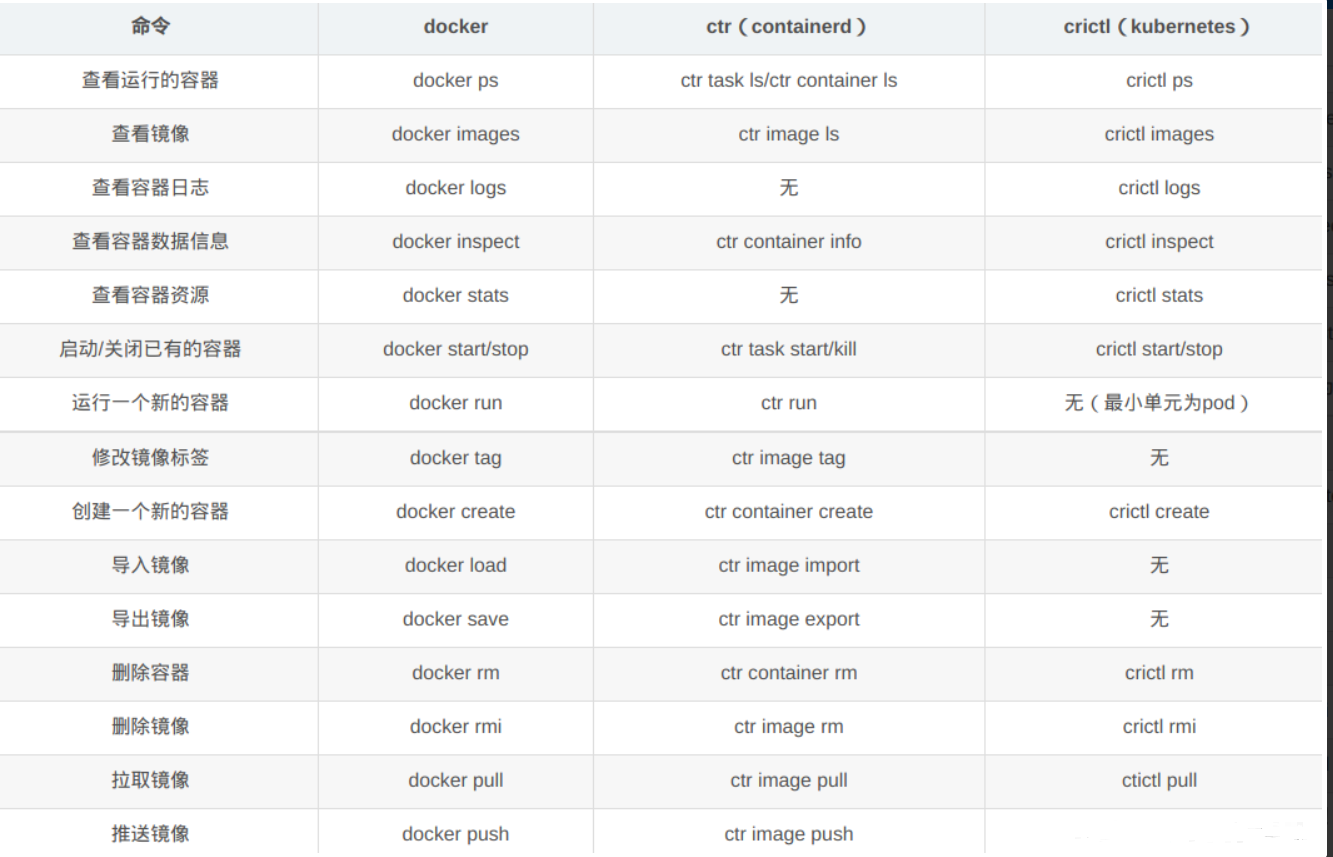
-
相关阅读:
第十三届蓝桥杯大赛软件赛决赛(Java 大学C组)
二:OpenCV图片叠加逻辑运算
df.drop_duplicates() 详解+用法
【AUTOSAR-CanSM】-2.5-参数CanSMBorTxConfirmationPolling详解
iOS App上架全流程及相关处理
聊聊 Java 的单元测试
GitLab CI/CD
计算机毕业设计springboot+vue+elementUI企业制度管理系统
性能优化——资源优化笔记
Spring总结
- 原文地址:https://blog.csdn.net/shenyuanhaojie/article/details/126589149