-
【Vue3】0-99
1. 搭建项目
cli搭建 需cli版本 4.5.0以上 vue create <项目名称> vite搭建 npm init vite-app <项目名称> cd 项目名 npm install(or 'yarn') npm run dev (or 'yarn dev')- 1
- 2
- 3
- 4
- 5
- 6
- 7
- 8
2.setup函数
.set up触发早于 beforeCreate生命周期
//此例子未考虑响应式11
{{name}}
- 1
- 2
- 3
- 4
- 5
- 6
- 7
- 8
- 9
- 10
- 11
- 12
- 13
- 14
- 15
- 16
- 17
- 18
- 19
- 20
- 21
- 22
- 23
- 24
- 25
- 26
- 27
- 28
- 29
- 30
- 31
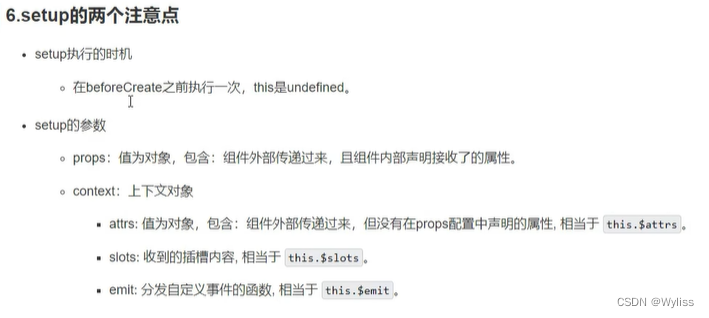
setup(props,context) { console.log(props) console.log(context.attrs) console.log(context.emit) console.log(context.slots) } 1.props:[] //接受父组件传参 也可在setup函数中 使用 context.attrs接收 相当于V2中的$attrs 2.emit:[] 声明父组件传过来的方法 不做声明或接收 会在控制栏报异常 也可在setup函数中 使用 context.emit 3.slots相当于v2中的slots- 1
- 2
- 3
- 4
- 5
- 6
- 7
- 8
- 9
- 10
- 11
- 12
- 13
例子
子组件

父组件

3.ref函数 作用-定义响应式数据
- ref函数不影响ref属性的使用
11
{{name}}
{{age}}
{{job.type}}
{{job.salary}}
- 1
- 2
- 3
- 4
- 5
- 6
- 7
- 8
- 9
- 10
- 11
- 12
- 13
- 14
- 15
- 16
- 17
- 18
- 19
- 20
- 21
- 22
- 23
- 24
- 25
- 26
- 27
- 28
- 29
- 30
- 31
- 32
- 33
- 34
4.reactive函数
- 无法处理基本数据类型
- reactive函数声明对象 可直接在对象内添加新属性
{{job.type}}
{{job.salary}}
{{job.a.b.c.d}}
{{hbby}}
- 1
- 2
- 3
- 4
- 5
- 6
- 7
- 8
- 9
- 10
- 11
- 12
- 13
- 14
- 15
- 16
- 17
- 18
- 19
- 20
- 21
- 22
- 23
- 24
- 25
- 26
- 27
- 28
- 29
- 30
- 31
- 32
- 33
- 34
- 35
- 36
- 37
- 38
- 39
- 40
- 41
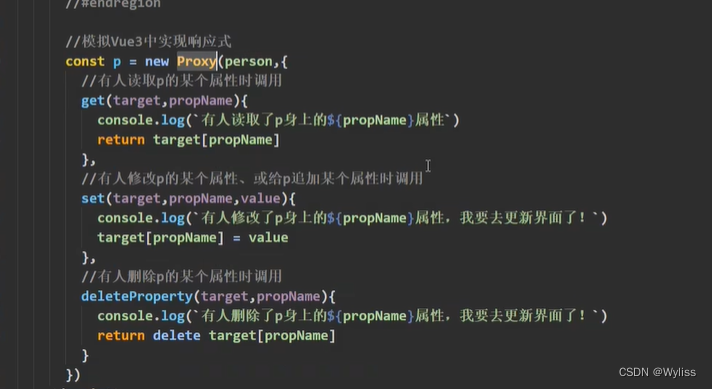
5.模拟V3响应式原理
p.name='李四' //调用set delete p.name //调用 delete- 1
- 2
6.computed计算属性 包括V2用法
一个人的信息
姓:
名:
全名:{{ person.fullName }} 全名:- 1
- 2
- 3
- 4
- 5
- 6
- 7
- 8
- 9
- 10
- 11
- 12
- 13
- 14
- 15
- 16
- 17
- 18
- 19
- 20
- 21
- 22
- 23
- 24
- 25
- 26
- 27
- 28
- 29
- 30
- 31
- 32
- 33
- 34
- 35
- 36
- 37
- 38
- 39
- 40
- 41
- 42
- 43
- 44
- 45
- 46
- 47
- 48
- 49
7.watch监听属性 包括V2用法
当前求和为{{ sum }}
当前为{{ msg }}
当前为{{ person.name }}
当前为{{ person.age }}
当前为{{ person.job.j1.salary }}
- 1
- 2
- 3
- 4
- 5
- 6
- 7
- 8
- 9
- 10
- 11
- 12
- 13
- 14
- 15
- 16
- 17
- 18
- 19
- 20
- 21
- 22
- 23
- 24
- 25
- 26
- 27
- 28
- 29
- 30
- 31
- 32
- 33
- 34
- 35
- 36
- 37
- 38
- 39
- 40
- 41
- 42
- 43
- 44
- 45
- 46
- 47
- 48
- 49
- 50
- 51
- 52
- 53
- 54
- 55
- 56
- 57
- 58
- 59
- 60
- 61
- 62
- 63
- 64
- 65
- 66
- 67
- 68
- 69
- 70
- 71
- 72
- 73
- 74
- 75
- 76
- 77
- 78
- 79
- 80
- 81
- 82
- 83
- 84
- 85
- 86
- 87
- 88
- 89
- 90
- 91
- 92
- 93
- 94
- 95
- 96
- 97
- 98
- 99
- 100
- 101
- 102
// let person = ref({ // age:18, // name:'王五', // job:{ // j1:{ // salary:20 // } // } // }) //监听ref声明的obj类型数据的实现方法 // watch(person.value,(newVlue,oldVlue)=>{ // console.log('sum',newVlue,oldVlue) // }) // watch(person,(newVlue,oldVlue)=>{ // console.log('sum',newVlue,oldVlue) // },{deep:true})- 1
- 2
- 3
- 4
- 5
- 6
- 7
- 8
- 9
- 10
- 11
- 12
- 13
- 14
- 15
- 16
-
相关阅读:
Linux Vim 进阶教程
systemctl 命令设置开机自启动失败
Himall商城安装帮助类AES加密解密(2)
httpclient3.1跳过ssl验证
kafka开发环境搭建
Android毕业设计开题报告基于Uniapp+SSM实现的公园植物介绍APP
Angr-CTF学习笔记11-13
python二次开发CATIA:新建Part文档
AcWing 第 57 场周赛
低代码平台:何以为企业信息安全保驾护航?
- 原文地址:https://blog.csdn.net/YhWyl527/article/details/125986860
