-
ThreadPoolExecutor详解
Executor

线程池继承类如上 :
线程池状态
ThreadPoolExecutor 使用 int 的高 3 位来表示线程池状态,低 29 位表示线程数量
状态名 高3位 接收新任务 处理阻塞任务队列 说明 RUNNING 111 Y Y - SHUTDOWN 000 N N 不会接收新任务,但会处理阻塞队列剩余任务 STOP 001 N N 会中断正在执行的任务,并抛弃阻塞队列任务 TIDYING 010 - - 任务全执行完毕,活动线程为 0 即将进入终结 TERMINATED 011 - - 终结状态 从数字上比较,
TERMINATED>TIDYING>STOP>SHUTDOWN>RUNNING, 最高位为符号位, 1表示负数这些信息存储在一个原子变量 ctl 中,目的是将线程池状态与线程个数合二为一,这样就可以用一次 cas 原子操作进行赋值
// c 为旧值, ctlOf 返回结果为新值 ctl.compareAndSet(c, ctlOf(targetState, workerCountOf(c)))); // rs 为高 3 位代表线程池状态, wc 为低 29 位代表线程个数,ctl 是合并它们 private static int ctlOf(int rs, int wc) { return rs | wc; }- 1
- 2
- 3
- 4
构造方法
public ThreadPoolExecutor(int corePoolSize, int maximumPoolSize, long keepAliveTime, TimeUnit unit, BlockingQueue<Runnable> workQueue, ThreadFactory threadFactory, RejectedExecutionHandler handler)- 1
- 2
- 3
- 4
- 5
- 6
- 7
-
corePoolSize 核心线程数目 (最多保留的线程数)
-
maximumPoolSize 最大线程数目
-
keepAliveTime 生存时间 - 针对救急线程
-
unit 时间单位 - 针对救急线程
-
workQueue 阻塞队列
-
threadFactory 线程工厂 - 可以为线程创建时起个好名字
-
handler 拒绝策略
-
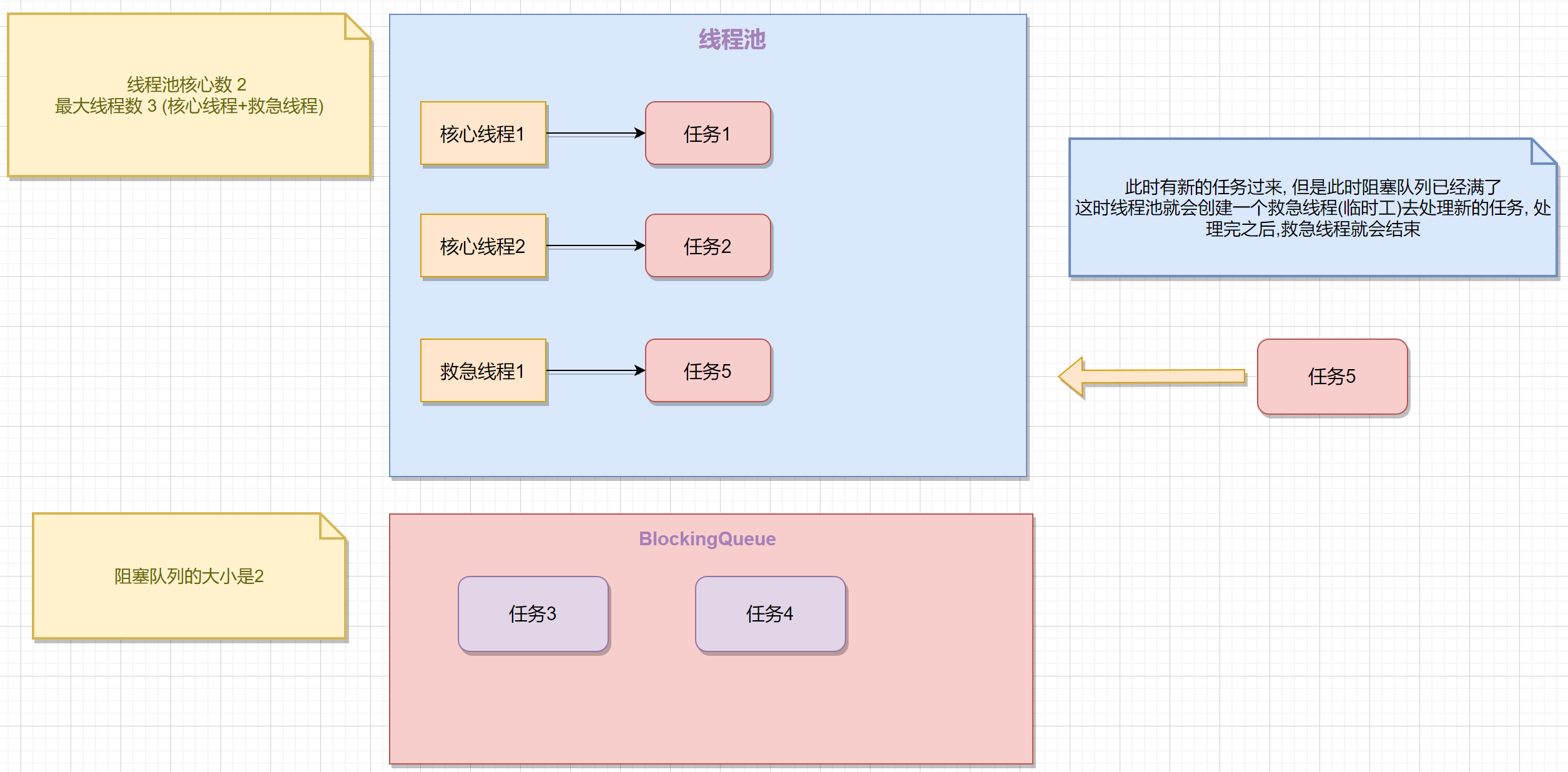
线程池中刚开始没有线程,当一个任务提交给线程池后,线程池会创建一个新线程来执行任务。
-
当线程数达到 corePoolSize 并没有线程空闲,这时再加入任务,新加的任务会被加入workQueue 队列排队,直到有空闲的线程。
-
如果队列选择了有界队列,那么任务超过了队列大小时,会创建 maximumPoolSize - corePoolSize 数目的线程来救急。
-
如果线程到达 maximumPoolSize 仍然有新任务这时会执行拒绝策略。拒绝策略 jdk 提供了 4 种实现,其它著名框架也提供了实现
-
AbortPolicy 让调用者抛出
RejectedExecutionException异常,这是默认策略 -
CallerRunsPolicy 让调用者运行任务
-
DiscardPolicy 放弃本次任务
-
DiscardOldestPolicy 放弃队列中最早的任务,本任务取而代之
-
Dubbo 的实现,在抛出
RejectedExecutionException异常之前会记录日志,并 dump 线程栈信息,方便定位问题
-
Netty 的实现,是创建一个新线程来执行任务
-
ActiveMQ 的实现,带超时等待(60s)尝试放入队列
-
PinPoint 的实现,它使用了一个拒绝策略链,会逐一尝试策略链中每种拒绝策略
-
-
当高峰过去后,超过 corePoolSize 的救急线程如果一段时间没有任务做,需要结束节省资源,这个时间由
keepAliveTime和unit来控制
根据这个构造方法,JDK Executors 类中提供了众多工厂方法来创建各种用途的线程池
newFixedThreadPool
使用
Executors类的newFixedThreadPool方法public static ExecutorService newFixedThreadPool(int nThreads) { return new ThreadPoolExecutor(nThreads, nThreads, 0L, TimeUnit.MILLISECONDS, new LinkedBlockingQueue<Runnable>()); }- 1
- 2
- 3
- 4
- 5
特点 :
- 核心线程数 == 最大线程数(没有救急线程被创建),因此也无需超时时间
- 阻塞队列是无界的,可以放任意数量的任务
适用于任务量已知,相对耗时的任务
newCachedThreadPool
public static ExecutorService newCachedThreadPool() { return new ThreadPoolExecutor(0, Integer.MAX_VALUE, 60L, TimeUnit.SECONDS, new SynchronousQueue<Runnable>()); }- 1
- 2
- 3
- 4
- 5
特点 :
- 核心线程数是 0,最大线程数是
Integer.MAX_VALUE,救急线程的空闲生存时间是 60s,意味着- 全部都是救急线程(60s 后可以回收)
- 救急线程可以无限创建
- 队列采用了
SynchronousQueue实现特点是,它没有容量,没有线程来取是放不进去的(一手交钱、一手交货)
newSingleThreadExecutor
public static ExecutorService newSingleThreadExecutor() { return new FinalizableDelegatedExecutorService (new ThreadPoolExecutor(1, 1, 0L, TimeUnit.MILLISECONDS, new LinkedBlockingQueue<Runnable>())); }- 1
- 2
- 3
- 4
- 5
- 6
使用场景 :
- 希望多个任务排队执行
- 线程数固定为 1,任务数多于 1 时,会放入无界队列排队。任务执行完毕,这唯一的线程也不会被释放。
和自己创建单线程的区别 :
-
自己创建一个单线程串行执行任务,如果任务执行失败而终止那么没有任何补救措施,而线程池还会新建一个线程,保证池的正常工作
-
Executors.newSingleThreadExecutor()线程个数始终为1,不能修改-
FinalizableDelegatedExecutorService应用的是装饰器模式,只对外暴露了ExecutorService接口,因此不能调用 ThreadPoolExecutor 中特有的方法
-
-
Executors.newFixedThreadPool(1)初始时为1,以后还可以修改- 对外暴露的是
ThreadPoolExecutor对象,可以强转后调用setCorePoolSize等方法进行修改
- 对外暴露的是
submit Task
// 执行任务 void execute(Runnable command); // 提交任务 task,用返回值 Future 获得任务执行结果 <T> Future<T> submit(Callable<T> task); // 提交 tasks 中所有任务 <T> List<Future<T>> invokeAll(Collection<? extends Callable<T>> tasks) throws InterruptedException; // 提交 tasks 中所有任务,带超时时间 <T> List<Future<T>> invokeAll(Collection<? extends Callable<T>> tasks,long timeout, TimeUnit unit) throws InterruptedException; // 提交 tasks 中所有任务,哪个任务先成功执行完毕,返回此任务执行结果,其它任务取消 <T> T invokeAny(Collection<? extends Callable<T>> tasks) throws InterruptedException, ExecutionException; // 提交 tasks 中所有任务,哪个任务先成功执行完毕,返回此任务执行结果,其它任务取消,带超时时间 <T> T invokeAny(Collection<? extends Callable<T>> tasks, long timeout, TimeUnit unit) throws InterruptedException, ExecutionException, TimeoutException;- 1
- 2
- 3
- 4
- 5
- 6
- 7
- 8
- 9
- 10
- 11
- 12
- 13
- 14
- 15
- 16
- 17
- 18
- 19
- 20
- 21
- 22
- 23
- 24
submit(Callable task)
我们可以通过实现
Callable接口来得到对应类型的返回值@Test public void submitTest() throws IOException, ExecutionException, InterruptedException { ExecutorService executorService = Executors.newFixedThreadPool(2); Future<String> future = executorService.submit(new Callable<String>() { @Override public String call() throws Exception { log.debug("task running ... "); TimeUnit.SECONDS.sleep(2); return "success"; } }); log.debug("result {} " , future.get()); }- 1
- 2
- 3
- 4
- 5
- 6
- 7
- 8
- 9
- 10
- 11
- 12
- 13
- 14
结果如下 :
14:04:31.116 [pool-1-thread-1] DEBUG ThreadPoolSubmitMethodTest - task running ... 14:04:33.130 [main] DEBUG ThreadPoolSubmitMethodTest - result success Process finished with exit code 0- 1
- 2
- 3
- 4
invokeAll
invokeAll 用来批量提交任务, 主要分为两种 :
- 提交 tasks 中所有任务
invokeAll(Collection> tasks) - 提交 tasks 中所有任务,带超时时间
invokeAll(Collection> tasks,long timeout, TimeUnit unit), 如果固定时间内任务没有全部执行完成, 线程会放弃剩下未执行完的任务
具体的使用方法如下 :
@Test public void invokeAllTest01() throws InterruptedException { ExecutorService executorService = Executors.newFixedThreadPool(2); List<Future<String>> futureList = executorService.invokeAll(Arrays.asList( () -> { log.debug("task1 running ... "); return "a"; }, () -> { log.debug("task2 running ... "); return "b"; }, () -> { log.debug("task3 running ... "); return "c"; } )); futureList.forEach(future -> { try { System.out.println("future = " + future.get()); } catch (InterruptedException e) { throw new RuntimeException(e); } catch (ExecutionException e) { throw new RuntimeException(e); } }); }- 1
- 2
- 3
- 4
- 5
- 6
- 7
- 8
- 9
- 10
- 11
- 12
- 13
- 14
- 15
- 16
- 17
- 18
- 19
- 20
- 21
- 22
- 23
- 24
- 25
- 26
- 27
带超时时间的invokeAll方法 :
@Test public void invokeAllTest02() throws Exception { ExecutorService executorService = Executors.newFixedThreadPool(2); List<Future<String>> futureList = executorService.invokeAll(Arrays.asList( () -> { log.debug("task1 running ... "); TimeUnit.SECONDS.sleep(1); return "a"; }, () -> { log.debug("task2 running ... "); TimeUnit.SECONDS.sleep(1); return "b"; }, () -> { log.debug("task3 running ... "); TimeUnit.SECONDS.sleep(2); return "c"; } ), 2, TimeUnit.SECONDS); futureList.forEach(future -> { try { log.debug("future = " + future.get()); } catch (InterruptedException e) { throw new RuntimeException(e); } catch (ExecutionException e) { throw new RuntimeException(e); } }); }- 1
- 2
- 3
- 4
- 5
- 6
- 7
- 8
- 9
- 10
- 11
- 12
- 13
- 14
- 15
- 16
- 17
- 18
- 19
- 20
- 21
- 22
- 23
- 24
- 25
- 26
- 27
- 28
- 29
- 30
- 31
这里需要注意 :
- 线程池的大小是 2, 也就是说会创建2个核心线程, 最多支持两个并行任务执行
- task1和task2并行执行完需要消耗1s, 然后开始执行task3
- 但是invokeAll方法最大限制时间是2s, task3无法完全执行, 时间一到, task3任务就会被停止
15:24:17.567 [pool-1-thread-2] DEBUG ThreadPoolSubmitMethodTest - task2 running ... 15:24:17.567 [pool-1-thread-1] DEBUG ThreadPoolSubmitMethodTest - task1 running ... 15:24:18.581 [pool-1-thread-2] DEBUG ThreadPoolSubmitMethodTest - task3 running ... 15:24:19.565 [main] DEBUG ThreadPoolSubmitMethodTest - future = a 15:24:19.565 [main] DEBUG ThreadPoolSubmitMethodTest - future = b- 1
- 2
- 3
- 4
- 5
然后会报一个错误
java.util.concurrent.CancellationException, 这个异常出现的原因是 : 异常表示由于任务被取消而无法检索到值生成任务(例如FutureTask )的结果在执行
futureList.forEach(future -> {})的时候出现的异常invokeAny
invokeAny 的作用是
提交 tasks 中所有任务,哪个任务先成功执行完毕,返回此任务执行结果,其它任务取消具体使用和invokeAll类似, 只不过返回值不再是 List
@Test public void invokeAnyTest() throws Exception { ExecutorService executorService = Executors.newFixedThreadPool(2); String result = executorService.invokeAny(Arrays.asList( () -> { log.debug("task1 running ... "); TimeUnit.SECONDS.sleep(4); return "a"; }, () -> { log.debug("task2 running ... "); TimeUnit.SECONDS.sleep(1); return "b"; }, () -> { log.debug("task3 running ... "); TimeUnit.SECONDS.sleep(1); return "c"; } ), 2, TimeUnit.SECONDS); log.debug("result : {} ", result); }- 1
- 2
- 3
- 4
- 5
- 6
- 7
- 8
- 9
- 10
- 11
- 12
- 13
- 14
- 15
- 16
- 17
- 18
- 19
- 20
- 21
- 22
- 23
执行结果 :
15:34:54.785 [pool-1-thread-1] DEBUG ThreadPoolSubmitMethodTest - task1 running ... 15:34:54.785 [pool-1-thread-2] DEBUG ThreadPoolSubmitMethodTest - task2 running ... 15:34:55.798 [pool-1-thread-2] DEBUG ThreadPoolSubmitMethodTest - task3 running ... 15:34:55.798 [main] DEBUG ThreadPoolSubmitMethodTest - result : b- 1
- 2
- 3
- 4
另外需要注意的是 :
- 线程池大小为2, 只有两个核心线程, 任务列表是根据先后顺序来的, 也就是说, 先提交task1和task2 , 然后再提交task3
关闭线程池
shutdown
主要特点 :
- 线程池状态变为 SHUTDOWN
- 不会接收新任务, 但已提交任务会执行完
- 此方法不会阻塞调用线程的执行
ThreadPoolExecutors 的 shutdown() 方法源码 :
public void shutdown() { final ReentrantLock mainLock = this.mainLock; mainLock.lock(); try { checkShutdownAccess(); // 修改线程池状态 advanceRunState(SHUTDOWN); // 仅会打断空闲线程 interruptIdleWorkers(); onShutdown(); // 扩展点 ScheduledThreadPoolExecutor } finally { mainLock.unlock(); } // 尝试终结(没有运行的线程可以立刻终结,如果还有运行的线程也不会等) tryTerminate(); }- 1
- 2
- 3
- 4
- 5
- 6
- 7
- 8
- 9
- 10
- 11
- 12
- 13
- 14
- 15
- 16
使用方法如下 :
ExecutorService executorService = Executors.newFixedThreadPool(2); Future<Integer> future01 = executorService.submit(() -> { log.debug("task1 running ..."); try { TimeUnit.SECONDS.sleep(1); } catch (InterruptedException e) { throw new RuntimeException(e); } log.debug("task1 finshed ..."); return 3; }); Future<Integer> future02 = executorService.submit(() -> { log.debug("task2 running ..."); try { TimeUnit.SECONDS.sleep(2); } catch (InterruptedException e) { throw new RuntimeException(e); } log.debug("task2 finshed ..."); return 3; }); Future<Integer> future03 = executorService.submit(() -> { log.debug("task3 running ..."); try { TimeUnit.SECONDS.sleep(3); } catch (InterruptedException e) { throw new RuntimeException(e); } log.debug("task3 finshed ..."); return 3; }); log.debug("shutdown"); executorService.shutdown();- 1
- 2
- 3
- 4
- 5
- 6
- 7
- 8
- 9
- 10
- 11
- 12
- 13
- 14
- 15
- 16
- 17
- 18
- 19
- 20
- 21
- 22
- 23
- 24
- 25
- 26
- 27
- 28
- 29
- 30
- 31
- 32
- 33
- 34
- 35
- 36
执行结果 :
14:04:30.753 [main] DEBUG ExecutorsShutdownTest - shutdown 14:04:30.753 [pool-1-thread-1] DEBUG ExecutorsShutdownTest - task1 running ... 14:04:30.753 [pool-1-thread-2] DEBUG ExecutorsShutdownTest - task2 running ... Process finished with exit code 0- 1
- 2
- 3
- 4
- 5
shutdownNow
主要特点 :
- 线程池状态变为 STOP
- 不会接收新任务
- 会将队列中的任务返回
- 并用
interrupt的方式中断正在执行的任务
shutdownNow源码 :
public List<Runnable> shutdownNow() { List<Runnable> tasks; final ReentrantLock mainLock = this.mainLock; mainLock.lock(); try { checkShutdownAccess(); // 修改线程池状态 advanceRunState(STOP); // 打断所有的线程 interruptWorkers(); // 获取队列中剩余任务 tasks = drainQueue(); } finally { mainLock.unlock(); } // 尝试终止 tryTerminate(); return tasks; }- 1
- 2
- 3
- 4
- 5
- 6
- 7
- 8
- 9
- 10
- 11
- 12
- 13
- 14
- 15
- 16
- 17
- 18
- 19
使用方法 :
@Test public void testShutdownNow() throws ExecutionException, InterruptedException { ExecutorService executorService = Executors.newFixedThreadPool(2); Future<Integer> future01 = executorService.submit(() -> { log.debug("task1 running ..."); try { TimeUnit.SECONDS.sleep(1); } catch (InterruptedException e) { throw new RuntimeException(e); } log.debug("task1 finshed ..."); return 3; }); Future<Integer> future02 = executorService.submit(() -> { log.debug("task2 running ..."); try { TimeUnit.SECONDS.sleep(2); } catch (InterruptedException e) { throw new RuntimeException(e); } log.debug("task2 finshed ..."); return 3; }); Future<Integer> future03 = executorService.submit(() -> { log.debug("task3 running ..."); try { TimeUnit.SECONDS.sleep(3); } catch (InterruptedException e) { throw new RuntimeException(e); } log.debug("task3 finshed ..."); return 3; }); log.debug("shutdown"); List<Runnable> runnables = executorService.shutdownNow(); log.debug("当前未完成的任务 : {}" , runnables.size()); }- 1
- 2
- 3
- 4
- 5
- 6
- 7
- 8
- 9
- 10
- 11
- 12
- 13
- 14
- 15
- 16
- 17
- 18
- 19
- 20
- 21
- 22
- 23
- 24
- 25
- 26
- 27
- 28
- 29
- 30
- 31
- 32
- 33
- 34
- 35
- 36
- 37
- 38
- 39
- 40
- 41
- 42
结果如下 :
17:42:23.128 [main] DEBUG ExecutorsShutdownTest - shutdown 17:42:23.128 [pool-1-thread-2] DEBUG ExecutorsShutdownTest - task2 running ... 17:42:23.128 [pool-1-thread-1] DEBUG ExecutorsShutdownTest - task1 running ... 17:42:23.131 [main] DEBUG ExecutorsShutdownTest - 当前未完成的任务 : 1 Process finished with exit code 0- 1
- 2
- 3
- 4
- 5
- 6
其他方法
// 不在 RUNNING 状态的线程池,此方法就返回 true boolean isShutdown(); // 线程池状态是否是 TERMINATED boolean isTerminated(); // 调用 shutdown 后,由于调用线程并不会等待所有任务运行结束,因此如果它想在线程池 TERMINATED 后做些事 情,可以利用此方法等待 boolean awaitTermination(long timeout, TimeUnit unit) throws InterruptedException;- 1
- 2
- 3
- 4
- 5
- 6
- 7
代码案例
ThreadPoolExecutors
我们使用参数最多的构造方法来作为案例 :
public ThreadPoolExecutor( int corePoolSize, int maximumPoolSize, long keepAliveTime, TimeUnit unit, BlockingQueue<Runnable> workQueue, ThreadFactory threadFactory) { this(corePoolSize, maximumPoolSize, keepAliveTime, unit, workQueue, threadFactory, defaultHandler); }- 1
- 2
- 3
- 4
- 5
- 6
- 7
- 8
- 9
首先定义以下基本的参数 :
// 核心线程数目 (最多保留的线程数) int corePoolSize = 3; // maximumPoolSize 最大线程数目 int maximumPoolSize = 4; // keepAliveTime 生存时间 - 针对救急线程 int keepAliveTime = 2; // unit 时间单位 - 针对救急线程 TimeUnit unit = TimeUnit.SECONDS; // workQueue 阻塞队列 BlockingQueue<Runnable> blockingQueue = new ArrayBlockingQueue<>(2);- 1
- 2
- 3
- 4
- 5
- 6
- 7
- 8
- 9
- 10
ThreadFactory
然后是我们需要自定义线程工厂类, 用于指定名字 :
static class NameThreadFactory implements ThreadFactory { private final AtomicInteger threadNumber = new AtomicInteger(1); @Override public synchronized Thread newThread(Runnable r) { /** * 这里需要注意的是: 线程池会创建核心线程 * 假如核心线程数是4 => my-thread-4 (最大值), 和任务数无关 * 不要混淆任务数和核心线程数, 二者并不相等 */ return new Thread(r, "my-thread-" + threadNumber.getAndIncrement()); } }- 1
- 2
- 3
- 4
- 5
- 6
- 7
- 8
- 9
- 10
- 11
- 12
- 13
- 14
- 15
另外注意的是:
- 不要混淆核心线程和任务队列的关系, 并不是一个任务创建一个线程, 而是会根据 corePoolSize 创建固定的核心线程
- 比如
corePoolSize = 4, 线程池就会使用ThreadFactory创建4个核心线程
RejectedExecutionHandler
然后我们需要继承
RejectedExecutionHandler策略来实现拒绝策略static class LogRejectedExecutionHandler implements RejectedExecutionHandler { private long timeout = 5; private TimeUnit unit = TimeUnit.SECONDS; public LogRejectedExecutionHandler() { } public LogRejectedExecutionHandler(long timeout, TimeUnit unit) { this.timeout = timeout; this.unit = unit; } /** * 拒绝策略是在有界队列的前提下, 线程池的最大容量(核心+应急线程)已满, 队列也满了, 这个时候才会执行应急策略 * * @param r the runnable task requested to be executed * @param executor the executor attempting to execute this task */ @Override public void rejectedExecution(Runnable r, ThreadPoolExecutor executor) { BlockingQueue<Runnable> queue = executor.getQueue(); log.debug("核心线程已满 , 进入阻塞队列 , 当前线程数 : {} , 核心线程最大容量 {} , 阻塞队列当前任务数 {} , 阻塞队列剩余容量: {} , 被拒绝的任务对象 {} ", executor.getActiveCount(), executor.getMaximumPoolSize(), queue.size(), queue.remainingCapacity(), r); log.debug("当前的拒绝策略是, 让阻塞队列等待5s, 如果无空闲直接抛弃当前任务"); synchronized (this) { try { queue.offer(r, timeout, unit); } catch (InterruptedException e) { log.debug("阻塞队列暂时无空闲, 当前任务 {} 被抛弃", r); } } } }- 1
- 2
- 3
- 4
- 5
- 6
- 7
- 8
- 9
- 10
- 11
- 12
- 13
- 14
- 15
- 16
- 17
- 18
- 19
- 20
- 21
- 22
- 23
- 24
- 25
- 26
- 27
- 28
- 29
- 30
- 31
- 32
- 33
- 34
- 35
上述的拒绝策略是 :
- 如果线程池已满(最大容量满了), 并且阻塞队列满了, 就让阻塞队列等待5s
- 如果5s后有空闲 : 把任务添加到队列中
- 如果5s后无空闲 : 直接抛弃当前任务, 并打印日志
- 另外需要注意的是拒绝策略的触发条件:
- 阻塞队列是有界队列(有大小限制) , 并且已经队列已满
- 线程池最大容量(核心线程+应急线程)已满
Task
除此以外我们还需要封装任务线程对象
@Slf4j public class Task implements Runnable { private String taskName; public Task(String taskName) { this.taskName = taskName; } @Override public void run() { log.debug(this.toString() + " 开始执行 ..."); try { TimeUnit.SECONDS.sleep(1); } catch (InterruptedException e) { throw new RuntimeException(e); } log.debug(this.toString() + " 执行完成 ..."); } public String getTaskName() { return taskName; } @Override public String toString() { return "Task{" + "task=" + taskName + '}'; } }- 1
- 2
- 3
- 4
- 5
- 6
- 7
- 8
- 9
- 10
- 11
- 12
- 13
- 14
- 15
- 16
- 17
- 18
- 19
- 20
- 21
- 22
- 23
- 24
- 25
- 26
- 27
- 28
- 29
- 30
- 31
定义完成以后我们就可以使用了 :
// 核心线程数目 (最多保留的线程数) int corePoolSize = 3; // maximumPoolSize 最大线程数目 int maximumPoolSize = 4; // keepAliveTime 生存时间 - 针对救急线程 int keepAliveTime = 2; // unit 时间单位 - 针对救急线程 TimeUnit unit = TimeUnit.SECONDS; // workQueue 阻塞队列 BlockingQueue<Runnable> blockingQueue = new ArrayBlockingQueue<>(2); // threadFactory 线程工厂 - 可以为线程创建时起个好名字 NameThreadFactory threadFactory = new NameThreadFactory(); RejectedExecutionHandler handler = new LogRejectedExecutionHandler(); // 测试ThreadPoolExecutors构造方法 ThreadPoolExecutor executor = new ThreadPoolExecutor(corePoolSize, maximumPoolSize, keepAliveTime, unit, blockingQueue, threadFactory, handler); for (int i = 1; i < 20; i++) { executor.execute(new Task("task-" + i)); } // 阻塞主线程 System.in.read();- 1
- 2
- 3
- 4
- 5
- 6
- 7
- 8
- 9
- 10
- 11
- 12
- 13
- 14
- 15
- 16
- 17
- 18
- 19
- 20
- 21
- 22
- 23
System.in.read();这一行代码的作用是为了阻塞主线程, 否则不会显示最后几个线程执行结束的打印日志
newFixedThreadPool
@Test public void newFixedThreadPoolTest() throws IOException { // 特点 : // 核心线程 == 最大线程 // 阻塞队列是无界的 ExecutorService executorService = Executors.newFixedThreadPool(5); for (int i = 1; i < 20; i++) { executorService.execute(new Task("task-" + i)); } System.in.read(); }- 1
- 2
- 3
- 4
- 5
- 6
- 7
- 8
- 9
- 10
- 11
- 12
- 13
参考文档
-
相关阅读:
從turtle海龜動畫 學習 Python - 高中彈性課程系列 11.3 連分數演算法與轉轉相除法- 用 turtle 呈現演算法之執行動作
【数据结构】测试7 图
【uniapp小程序】覆盖图片容器cover-image
【VPX611】基于6U VPX总线架构的SATA3.0高性能数据存储板(3.2GByte/s存储带宽)
一文读懂 协方差矩阵
顺序读写函数的介绍:fputs & fgets
MySQL掉落榜首?全新开发者调查报告已出炉
实战回忆录:从Webshell开始突破边界
『现学现忘』Git基础 — 16、Tree对象详解
Leetcode 720. 词典中最长的单词(为啥感觉这道题很难?)
- 原文地址:https://blog.csdn.net/weixin_40040107/article/details/126589954
