-
使用Python开源库Couler编写和提交Argo Workflow工作流
Python 是用户在 Kubernetes 上编写机器学习工作流的流行编程语言。
开箱即用时,Argo 并没有为 Python 提供一流的支持。相反,我们提供Java、Golang 和 Python API 客户端[1]。
但这对大多数用户来说还不够。许多用户需要一个抽象层来添加组件和特定于用例的特性。
今天你有两个选择。
KFP 编译器+ Python 客户端
Argo 工作流被用作执行 Kubeflow 流水线的引擎。你可以定义一个 Kubeflow 流水线,并在 Python 中将其直接编译到 Argo 工作流中。
然后你可以使用Argo Python 客户端[2]向 Argo 服务器 API 提交工作流。
这种方法允许你利用现有的 Kubeflow 组件。
安装:
- pip3 install kfp
- pip3 install argo-workflows
例子:
- import kfp as kfp
- def flip_coin():
- return kfp.dsl.ContainerOp(
- name='Flip a coin',
- image='python:alpine3.6',
- command=['python', '-c', """
- import random
- res = "heads" if random.randint(0, 1) == 0 else "tails"
- with open('/output', 'w') as f:
- f.write(res)
- """],
- file_outputs={'output': '/output'}
- )
- def heads():
- return kfp.dsl.ContainerOp(name='Heads', image="alpine:3.6", command=["sh", "-c", 'echo "it was heads"'])
- def tails():
- return kfp.dsl.ContainerOp(name='Tails', image="alpine:3.6", command=["sh", "-c", 'echo "it was tails"'])
- @kfp.dsl.pipeline(name='Coin-flip', description='Flip a coin')
- def coin_flip_pipeline():
- flip = flip_coin()
- with kfp.dsl.Condition(flip.output == 'heads'):
- heads()
- with kfp.dsl.Condition(flip.output == 'tails'):
- tails()
- def main():
- kfp.compiler.Compiler().compile(coin_flip_pipeline, __file__ + ".yaml")
- if __name__ == '__main__':
- main()
运行这个来创建你的工作流:
- apiVersion: argoproj.io/v1alpha1
- kind: Workflow
- metadata:
- generateName: coin-flip-
- annotations: {pipelines.kubeflow.org/kfp_sdk_version: 1.3.0, pipelines.kubeflow.org/pipeline_compilation_time: '2021-01-21T17:17:54.299235',
- pipelines.kubeflow.org/pipeline_spec: '{"description": "Flip a coin", "name":
- "Coin-flip"}'}
- labels: {pipelines.kubeflow.org/kfp_sdk_version: 1.3.0}
- spec:
- entrypoint: coin-flip
- templates:
- - name: coin-flip
- dag:
- tasks:
- - name: condition-1
- template: condition-1
- when: '"{{tasks.flip-a-coin.outputs.parameters.flip-a-coin-output}}" == "heads"'
- dependencies: [flip-a-coin]
- - name: condition-2
- template: condition-2
- when: '"{{tasks.flip-a-coin.outputs.parameters.flip-a-coin-output}}" == "tails"'
- dependencies: [flip-a-coin]
- - {name: flip-a-coin, template: flip-a-coin}
- - name: condition-1
- dag:
- tasks:
- - {name: heads, template: heads}
- - name: condition-2
- dag:
- tasks:
- - {name: tails, template: tails}
- - name: flip-a-coin
- container:
- command:
- - python
- - -c
- - "\nimport random\nres = \"heads\" if random.randint(0, 1) == 0 else \"tails\"\
- \nwith open('/output', 'w') as f:\n f.write(res) \n "
- image: python:alpine3.6
- outputs:
- parameters:
- - name: flip-a-coin-output
- valueFrom: {path: /output}
- artifacts:
- - {name: flip-a-coin-output, path: /output}
- - name: heads
- container:
- command: [sh, -c, echo "it was heads"]
- image: alpine:3.6
- - name: tails
- container:
- command: [sh, -c, echo "it was tails"]
- image: alpine:3.6
- arguments:
- parameters: []
- serviceAccountName: pipeline-runner
注意,Kubeflow 不支持这种方法。
你可以使用客户端提交上述工作流程如下:
- import yaml
- from argo.workflows.client import (ApiClient,
- WorkflowServiceApi,
- Configuration,
- V1alpha1WorkflowCreateRequest)
- def main():
- config = Configuration(host="http://localhost:2746")
- client = ApiClient(configuration=config)
- service = WorkflowServiceApi(api_client=client)
- with open("coin-flip.py.yaml") as f:
- manifest: dict = yaml.safe_load(f)
- del manifest['spec']['serviceAccountName']
- service.create_workflow('argo', V1alpha1WorkflowCreateRequest(workflow=manifest))
- if __name__ == '__main__':
- main()
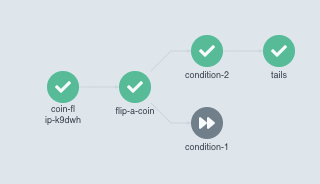
Couler
Couler[3]是一个流行的项目,它允许你以一种平台无感的方式指定工作流,但它主要支持 Argo 工作流(计划在未来支持 Kubeflow 和 AirFlow):
安装:
pip3 install git+https://github.com/couler-proj/couler例子:
- import couler.argo as couler
- from couler.argo_submitter import ArgoSubmitter
- def random_code():
- import random
- res = "heads" if random.randint(0, 1) == 0 else "tails"
- print(res)
- def flip_coin():
- return couler.run_script(image="python:alpine3.6", source=random_code)
- def heads():
- return couler.run_container(
- image="alpine:3.6", command=["sh", "-c", 'echo "it was heads"']
- )
- def tails():
- return couler.run_container(
- image="alpine:3.6", command=["sh", "-c", 'echo "it was tails"']
- )
- result = flip_coin()
- couler.when(couler.equal(result, "heads"), lambda: heads())
- couler.when(couler.equal(result, "tails"), lambda: tails())
- submitter = ArgoSubmitter()
- couler.run(submitter=submitter)
这会创建以下工作流程:
- apiVersion: argoproj.io/v1alpha1
- kind: Workflow
- metadata:
- generateName: couler-example-
- spec:
- templates:
- - name: couler-example
- steps:
- - - name: flip-coin-29
- template: flip-coin
- - - name: heads-31
- template: heads
- when: '{{steps.flip-coin-29.outputs.result}} == heads'
- - name: tails-32
- template: tails
- when: '{{steps.flip-coin-29.outputs.result}} == tails'
- - name: flip-coin
- script:
- name: ''
- image: 'python:alpine3.6'
- command:
- - python
- source: |
- import random
- res = "heads" if random.randint(0, 1) == 0 else "tails"
- print(res)
- - name: heads
- container:
- image: 'alpine:3.6'
- command:
- - sh
- - '-c'
- - echo "it was heads"
- - name: tails
- container:
- image: 'alpine:3.6'
- command:
- - sh
- - '-c'
- - echo "it was tails"
- entrypoint: couler-example
- ttlStrategy:
- secondsAfterCompletion: 600
- activeDeadlineSeconds: 300

参考资料
Java、Golang和Python API客户端: https://github.com/argoproj-labs/argo-client-gen
[2]
Argo Python客户端: https://github.com/argoproj-labs/argo-client-python
[3]
Couler: https://github.com/couler-proj/couler
-
相关阅读:
15贪心:合并区间
Day17-购物车页面-收获地址-初步封装my-address组件
如何使用vuex
C++中变量是按值访问的, Python 中变量的值是按引用访问的示例说明
Simplicity Studio 生成的工程移植到 Linux 上编译
爆肝!阿里最新版的Spring Security源码手册,强行霸占GitHub榜首
NCCL源码解析⑤:路径计算
solidity开发环境配置,vscode搭配remix
编译原理--基本块的划分
(续)SSM整合之springmvc笔记(域对象共享数据)(P136-138)
- 原文地址:https://blog.csdn.net/a772304419/article/details/126585061