-
gulimall基础篇回顾Day-09
前言
本文主要记录谷粒商城的P70-74的视频内容,P70里面有对商品属性及属性分组进行描述,这一集的内容有非常多的概念和细节需要我们去理清思路,不然后面进行代码环节将会是一脸懵逼。
一、SPU 与 SKU
SPU:Standard Product Unit(标准化产品单元) 是商品信息聚合的最小单位,是一组可复用、易检索的标准化信息的集合,该集合描述了一个产品的特性。
SKU:Stock Keeping Unit(库存量单位) 即库存进出计量的基本单元,可以是以件,盒,托盘等为单位。SKU 这是对于大型连锁超市DC(配送中心)物流管理的一个必要的方法。现在已经被引申为产品统一编号的简称,每种产品均对应有唯一的 SKU 号。


iphoneX 是 SPU、MI 8 是 SPU
iphoneX 64G 黑曜石 是 SKU
MI8 8+64G+黑色 是 SKUSPU-SKU-属性

SPU-SKU-属性表

二、基本属性(规格参数)与销售属性
2.1 每个分类下的商品共享规格参数与销售属性,只是有些商品不一定要用这个分类下全部的属性;
属性是以三级分类组织起来的
规格参数中有些是可以提供检索的
规格参数也是基本属性,他们具有自己的分组
属性的分组也是以三级分类组织起来的
属性名确定的,但是值是每一个商品不同来决定的2.2 属性分组-规格参数-销售属性-三级分类之间表的关联关系如下

当一进入手机分类下,我们可以根据手机三级分类id去属性分组表查询手机分类下的属性分组列表(如下图主体,基本信息,主芯片等),而某个属性分组如主体又对应着很多属性如入网型号,品牌,产品名称等,这些属性对应着属性表。

三、属性分组-效果
如下图点击左侧某个层级等于三的三级分类右边能够查询该分类下的属性分组。

后台接口实现:获取分类属性分组请求路径:

请求参数:
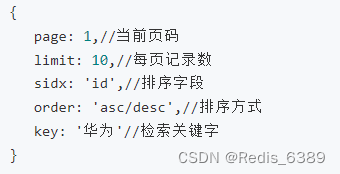
响应数据:

AttrGroupController 属性分组 Controller:
/** * 获取分类属性分组 */ @RequestMapping("/list/{catelogId}") public R list(@RequestParam Map<String, Object> params, @PathVariable("catelogId") Long catelogId){ PageUtils page = attrGroupService.queryPage(params,catelogId); return R.ok().put("page", page); }- 1
- 2
- 3
- 4
- 5
- 6
- 7
- 8
- 9
- 10
AttrGroupService 属性分组接口 Service:
public interface AttrGroupService extends IService<AttrGroupEntity> { PageUtils queryPage(Map<String, Object> params); PageUtils queryPage(Map<String, Object> params, Long catelogId); List<AttrGroupWithAttrsVo> getAttrGroupWithAttrsByCatelogId(Long catelogId); }- 1
- 2
- 3
- 4
- 5
AttrGroupServiceImpl 属性分组接口实现类 ServiceImpl:
@Override public PageUtils queryPage(Map<String, Object> params, Long catelogId) { String key = (String) params.get("key"); //select * from pms_attr_group where catelog_id=? and (attr_group_id=key or attr_group_name like %key%) QueryWrapper<AttrGroupEntity> wrapper = new QueryWrapper<AttrGroupEntity>(); if (!StringUtils.isEmpty(key)) { wrapper.and((obj)->{ obj.eq("attr_group_id",key).or().like("attr_group_name",key); }); } if (catelogId == 0){ IPage<AttrGroupEntity> page = this.page(new Query<AttrGroupEntity>().getPage(params), wrapper); return new PageUtils(page); }else{ wrapper.eq("catelog_id",catelogId); IPage<AttrGroupEntity> page = this.page(new Query<AttrGroupEntity>().getPage(params),wrapper); return new PageUtils(page); } }- 1
- 2
- 3
- 4
- 5
- 6
- 7
- 8
- 9
- 10
- 11
- 12
- 13
- 14
- 15
- 16
- 17
- 18
- 19
- 20
- 21
- 22
代码完成后,数据库 gulimall_pms 的属性分组表 pms_attr_group 添加如下数据并重启商品服务。

点击手机三级分类出现如下数据,模糊搜索也通过测试。

四、属性分组-分组新增-级联选择
属性分组功能点击新增按钮,如下图所示:

原本的所属分类输入框是不符合业务要求的,应该做成级联选择才符合界面要求,如下图所示(前端内容不做介绍):

五、属性分组-分组修改-级联选择回显
属性分组功能点击修改按钮,如下图所示:
原本所属分类是不能回显当前分类的完整路径的不符合界面要求,应该做成如上图所示。AttrGroupEntity 属性分组实体类增加 catelogPath 字段用来收集当前属性分组的完整路径并标注 @TableField(exist = false) 注解表面该字段不属于表中字段。
@TableField(exist = false) private Long[] catelogPath;- 1
- 2
AttrGroupController 属性分组 Controller
@RequestMapping("/info/{attrGroupId}") public R info(@PathVariable("attrGroupId") Long attrGroupId){ //根据attrGroupId查询当前属性分组 AttrGroupEntity attrGroup = attrGroupService.getById(attrGroupId); //根据属性分组获得其分类id Long catelogId = attrGroup.getCatelogId(); //根据分类id获取到其父分类id并收集cheng数组 Long[] path = categoryService.findCatelogPath(catelogId); //set设置catelogPath数组值 attrGroup.setCatelogPath(path); //返回封装好的数据 return R.ok().put("attrGroup", attrGroup); }- 1
- 2
- 3
- 4
- 5
- 6
- 7
- 8
- 9
- 10
- 11
- 12
- 13
CategoryService 三级分类 Service
public interface CategoryService extends IService<CategoryEntity> { PageUtils queryPage(Map<String, Object> params); List<CategoryEntity> listWithTree(); void removeMenuByIds(List<Long> asList); /* *找到catelogId的完整路径 * [父/子/孙子] */ Long[] findCatelogPath(Long catelogId); void updateCascade(CategoryEntity category); }- 1
- 2
- 3
- 4
- 5
- 6
- 7
- 8
- 9
- 10
- 11
- 12
- 13
- 14
- 15
- 16
//[2,25,225] @Override public Long[] findCatelogPath(Long catelogId) { List<Long> paths = new ArrayList<>(); List<Long> parentPath = findParentPath(catelogId, paths); Collections.reverse(parentPath); //数组逆序 return parentPath.toArray(new Long[parentPath.size()]); // .toArray() 转换成数组 } //[2/25/225] private List<Long> findParentPath(Long catelogId,List<Long> paths){ //1收集当前节点id paths.add(catelogId); //根据当前分类id获取分类实体信息 CategoryEntity byId = this.getById(catelogId); //如果还有byId.getParentCid() != 0 表明还有父分类 继续递归判断 if (byId.getParentCid() != 0) { findParentPath(byId.getParentCid(), paths); } return paths; }- 1
- 2
- 3
- 4
- 5
- 6
- 7
- 8
- 9
- 10
- 11
- 12
- 13
- 14
- 15
- 16
- 17
- 18
- 19
- 20
- 21
- 22
测试传入分类id是否能够返回完整路径
@Autowired CategoryService categoryService; @Test public void testFindPath() { Long[] catelogPath = categoryService.findCatelogPath(225L); //Arrays.asList()转成List 不然直接打印数组就是个地址值 log.info("完整路径: {}", Arrays.asList(catelogPath)); }- 1
- 2
- 3
- 4
- 5
- 6
- 7
- 8
- 9
测试结果如下:
2022-08-28 16:09:26.595 DEBUG 8156 --- [ main] c.a.g.p.dao.CategoryDao.selectById : ==> Parameters: 2(Long) 2022-08-28 16:09:26.597 DEBUG 8156 --- [ main] c.a.g.p.dao.CategoryDao.selectById : <== Total: 1 2022-08-28 16:09:26.598 INFO 8156 --- [ main] c.a.g.p.GulimallProductApplicationTests : 完整路径: [2, 34, 225]- 1
- 2
- 3
点击修改,也能够正确回显

-
相关阅读:
SCI论文投稿经验分享,建议收藏!
滚珠螺母的生产流程
Spring Security(10)权限处理
Win10-常用cmd命令与快捷键
HT for Web (Hightopo) 使用心得(7)- 3D场景环境配置(阴影,灯光,环境光)
Cross-View Transformers for Real-Time Map-View Semantic Segmentation 论文阅读
Android开发的UI设计——Material Design
黑马JVM总结(三十六)
音视频同步
Java23种设计模式系列——结构型模式之组合模式day4-3
- 原文地址:https://blog.csdn.net/m0_49692893/article/details/126568306
