-
【SpringBoot】12.SpringBoot整合Dubbo+Zookeeper
1. 准 备
1.1 Dubbo 简介
Apache Dubbo 是一款高性能、轻量级的开源 Java RPC 框架,它提供了三大核心能力:面向接口的远程方法调用、智能容错和
负载均衡、以及服务自动注册和发现。
更多详细的介绍,可以去 Dubbo 的官网了解。1.2 安 装
Windows下安装zookeeper
这里用到 zookeeper 作为注册中心,所以首先,先在 Window 下安装 zookeeper。

直接下载压缩包,然后解压,接着在 conf 目录下,创建一个配置文件 zoo.cfg,内容如下:# The number of milliseconds of each tick tickTime=2000 # The number of ticks that the initial # synchronization phase can take initLimit=10 # The number of ticks that can pass between # sending a request and getting an acknowledgement syncLimit=5 # the directory where the snapshot is stored. # do not use /tmp for storage, /tmp here is just # example sakes. dataDir=/tmp/zookeeper # the port at which the clients will connect clientPort=2181 # the maximum number of client connections. # increase this if you need to handle more clients #maxClientCnxns=60 # # Be sure to read the maintenance section of the # administrator guide before turning on autopurge. # # http://zookeeper.apache.org/doc/current/zookeeperAdmin.html#sc_maintenance # # The number of snapshots to retain in dataDir #autopurge.snapRetainCount=3 # Purge task interval in hours # Set to "0" to disable auto purge feature #autopurge.purgeInterval=1 ## Metrics Providers # # https://prometheus.io Metrics Exporter #metricsProvider.className=org.apache.zookeeper.metrics.prometheus.PrometheusMetricsProvider #metricsProvider.httpPort=7000 #metricsProvider.exportJvmInfo=true- 1
- 2
- 3
- 4
- 5
- 6
- 7
- 8
- 9
- 10
- 11
- 12
- 13
- 14
- 15
- 16
- 17
- 18
- 19
- 20
- 21
- 22
- 23
- 24
- 25
- 26
- 27
- 28
- 29
- 30
- 31
- 32
- 33
- 34
- 35

找到 bin 目录下的 zkServer.cmd ,双击运行,启动 zookeeper 注册中心
测试一下连接情况,是正常的。
到这里注册中心 zookeeper 安装完成。Windows下安装Dubbo
Dubbo 本身是一个 jar 包,不需要安装,只需在用到的时候,引入项目中即可。
2. 整 合
由于 SpringBoot 整合 Dubbo 的测试,需要一个服务提供者和一个服务消费者,因此这里需要新建两个项目,一个 springboot-provider 作为服务提供者,另外一个是 springboot-consumer 作为服务消费者。
2.1 服务提供者springboot-provider
开发环境:
- IDEA
- Dubbo 3.1.0
- SpringBoot 2.7.3
- JDK 1.8
2.1.1 新建项目
利用 IDEA 新建一个 springboot-provider 项目,这个项目的 pom.xml 文件信息如下:
<project xmlns="http://maven.apache.org/POM/4.0.0" xmlns:xsi="http://www.w3.org/2001/XMLSchema-instance" xsi:schemaLocation="http://maven.apache.org/POM/4.0.0 https://maven.apache.org/xsd/maven-4.0.0.xsd"> <modelVersion>4.0.0modelVersion> <parent> <groupId>org.springframework.bootgroupId> <artifactId>spring-boot-starter-parentartifactId> <version>2.7.3version> <relativePath/> parent> <groupId>com.yuhuofeigroupId> <artifactId>springboot-providerartifactId> <version>0.0.1-SNAPSHOTversion> <name>springboot-providername> <description>provider project for Spring Bootdescription> <properties> <java.version>1.8java.version> properties> <dependencies> <dependency> <groupId>org.springframework.bootgroupId> <artifactId>spring-boot-starter-webartifactId> dependency> <dependency> <groupId>org.springframework.bootgroupId> <artifactId>spring-boot-starter-testartifactId> <scope>testscope> dependency> <dependency> <groupId>org.apache.dubbogroupId> <artifactId>dubbo-spring-boot-starterartifactId> <version>3.1.0version> dependency> <dependency> <groupId>org.apache.curatorgroupId> <artifactId>curator-x-discoveryartifactId> <version>5.3.0version> dependency> dependencies> <build> <plugins> <plugin> <groupId>org.springframework.bootgroupId> <artifactId>spring-boot-maven-pluginartifactId> plugin> plugins> build> project>- 1
- 2
- 3
- 4
- 5
- 6
- 7
- 8
- 9
- 10
- 11
- 12
- 13
- 14
- 15
- 16
- 17
- 18
- 19
- 20
- 21
- 22
- 23
- 24
- 25
- 26
- 27
- 28
- 29
- 30
- 31
- 32
- 33
- 34
- 35
- 36
- 37
- 38
- 39
- 40
- 41
- 42
- 43
- 44
- 45
- 46
- 47
- 48
- 49
- 50
- 51
- 52
- 53
- 54
- 55
- 56
- 57
我们实际需要引入的依赖就是下面的两个而已
<dependency> <groupId>org.apache.dubbogroupId> <artifactId>dubbo-spring-boot-starterartifactId> <version>3.1.0version> dependency> <dependency> <groupId>org.apache.curatorgroupId> <artifactId>curator-x-discoveryartifactId> <version>5.3.0version> dependency>- 1
- 2
- 3
- 4
- 5
- 6
- 7
- 8
- 9
- 10
- 11
- 12
- 13
2.1.2 更改配置
修改 application.properties 的内容,如下所示:
server.port=8082 #dubbo配置 dubbo.application.name=springboot-provider dubbo.protocol.name=dubbo dubbo.protocol.port=21882 dubbo.registry.address=zookeeper://127.0.0.1:2181 dubbo.registry.timeout=60000 dubbo.scan.base-packages=com.yuhuofei.service- 1
- 2
- 3
- 4
- 5
- 6
- 7
- 8
- 9
2.1.3 编写对外提供服务的接口
编写一个ProviderUserInfo 接口,内容如下
package com.yuhuofei.service; /** * @Description * @InterfaceName ProviderUserInfo * @Author yuhuofei * @Date 2022/8/28 12:11 * @Version 1.0 */ public interface ProviderUserInfo { String getName(); }- 1
- 2
- 3
- 4
- 5
- 6
- 7
- 8
- 9
- 10
- 11
- 12
- 13
- 14
- 15
编写上面这个接口的实现类,并加上 @DubboService 注解,表示这是一个 Dubbo 接口
package com.yuhuofei.service.impl; import com.yuhuofei.service.ProviderUserInfo; import org.apache.dubbo.config.annotation.DubboService; /** * @Description 服务提供者 * @ClassName ProviderUserInfoImpl * @Author yuhuofei * @Date 2022/8/28 12:11 * @Version 1.0 */ @DubboService public class ProviderUserInfoImpl implements ProviderUserInfo { @Override public String getName() { System.out.println("======dubbo接口被调用了======"); return "王小贱"; } }- 1
- 2
- 3
- 4
- 5
- 6
- 7
- 8
- 9
- 10
- 11
- 12
- 13
- 14
- 15
- 16
- 17
- 18
- 19
- 20
- 21
- 22

到这里,服务提供者,就算完成了。2.2 服务消费者springboot-consumer
开发环境:
- IDEA
- Dubbo 3.1.0
- SpringBoot 2.7.3
- JDK 1.8
2.2.1 新建项目
利用 IDEA 新建一个 springboot-consumer 项目,这个项目的 pom.xml 文件信息如下:
<project xmlns="http://maven.apache.org/POM/4.0.0" xmlns:xsi="http://www.w3.org/2001/XMLSchema-instance" xsi:schemaLocation="http://maven.apache.org/POM/4.0.0 https://maven.apache.org/xsd/maven-4.0.0.xsd"> <modelVersion>4.0.0modelVersion> <parent> <groupId>org.springframework.bootgroupId> <artifactId>spring-boot-starter-parentartifactId> <version>2.7.3version> <relativePath/> parent> <groupId>com.yuhuofeigroupId> <artifactId>springboot-consumerartifactId> <version>0.0.1-SNAPSHOTversion> <name>springboot-consumername> <description>Consumer project for Spring Bootdescription> <properties> <java.version>1.8java.version> properties> <dependencies> <dependency> <groupId>org.springframework.bootgroupId> <artifactId>spring-boot-starter-webartifactId> dependency> <dependency> <groupId>org.springframework.bootgroupId> <artifactId>spring-boot-starter-testartifactId> <scope>testscope> dependency> <dependency> <groupId>org.apache.dubbogroupId> <artifactId>dubbo-spring-boot-starterartifactId> <version>3.1.0version> dependency> <dependency> <groupId>org.apache.curatorgroupId> <artifactId>curator-x-discoveryartifactId> <version>5.3.0version> dependency> <dependency> <groupId>com.yuhuofeigroupId> <artifactId>springboot-providerartifactId> <version>0.0.1-SNAPSHOTversion> dependency> dependencies> <build> <plugins> <plugin> <groupId>org.springframework.bootgroupId> <artifactId>spring-boot-maven-pluginartifactId> plugin> plugins> build> project>- 1
- 2
- 3
- 4
- 5
- 6
- 7
- 8
- 9
- 10
- 11
- 12
- 13
- 14
- 15
- 16
- 17
- 18
- 19
- 20
- 21
- 22
- 23
- 24
- 25
- 26
- 27
- 28
- 29
- 30
- 31
- 32
- 33
- 34
- 35
- 36
- 37
- 38
- 39
- 40
- 41
- 42
- 43
- 44
- 45
- 46
- 47
- 48
- 49
- 50
- 51
- 52
- 53
- 54
- 55
- 56
- 57
- 58
- 59
- 60
- 61
- 62
用到的依赖信息,基本和服务提供者的是一致的。
2.2.2 更改配置
服务消费者的配置信息如下,这里要注意的是,端口号不能和服务提供者的相同,那会导致端口冲突。
server.port=8081 #dubbo配置 dubbo.application.name=springboot-consumer dubbo.protocol.name=dubbo dubbo.protocol.port=21881 dubbo.registry.address=zookeeper://127.0.0.1:2181 dubbo.registry.timeout=60000 dubbo.scan.base-packages=com.yuhuofei.service- 1
- 2
- 3
- 4
- 5
- 6
- 7
- 8
- 9
2.2.3 编写接口
编写接口,调用服务提供者提供的接口,实现业务逻辑
controller 层的接口 UserController,内容如下
package com.yuhuofei.controller; import com.yuhuofei.service.UserInfo; import org.springframework.beans.factory.annotation.Autowired; import org.springframework.web.bind.annotation.GetMapping; import org.springframework.web.bind.annotation.RequestMapping; import org.springframework.web.bind.annotation.RestController; /** * @Description * @ClassName UserController * @Author yuhuofei * @Date 2022/8/28 12:14 * @Version 1.0 */ @RestController @RequestMapping("/user") public class UserController { @Autowired private UserInfo userInfo; @GetMapping("/user-name") public String userName(){ return userInfo.userName(); } }- 1
- 2
- 3
- 4
- 5
- 6
- 7
- 8
- 9
- 10
- 11
- 12
- 13
- 14
- 15
- 16
- 17
- 18
- 19
- 20
- 21
- 22
- 23
- 24
- 25
- 26
- 27
- 28
- 29
service 层的接口 UserInfo,内容如下
package com.yuhuofei.service; /** * @Description * @InterfaceName UserInfo * @Author yuhuofei * @Date 2022/8/28 12:20 * @Version 1.0 */ public interface UserInfo { String userName(); }- 1
- 2
- 3
- 4
- 5
- 6
- 7
- 8
- 9
- 10
- 11
- 12
- 13
- 14
接口的实现类 UserInfoImpl ,因为要调用服务提供者提供的接口,因此需要用到注解 @DubboReference ,这是不能漏掉的。
package com.yuhuofei.service.impl; import com.yuhuofei.service.ProviderUserInfo; import com.yuhuofei.service.UserInfo; import org.apache.dubbo.config.annotation.DubboReference; import org.springframework.stereotype.Service; /** * @Description * @ClassName UserInfoImpl * @Author yuhuofei * @Date 2022/8/28 12:21 * @Version 1.0 */ @Service public class UserInfoImpl implements UserInfo { @DubboReference private ProviderUserInfo providerUserInfo; @Override public String userName() { return providerUserInfo.getName(); } }- 1
- 2
- 3
- 4
- 5
- 6
- 7
- 8
- 9
- 10
- 11
- 12
- 13
- 14
- 15
- 16
- 17
- 18
- 19
- 20
- 21
- 22
- 23
- 24
- 25
- 26

至此,服务消费者也算是完成了。3. 测 试
第一步,双击 zkServer.cmd ,启动 zookeeper 服务器
如下,这样就相当于把注册中心,给启动起来了。

第二步,启动服务提供者
利用 IDEA 启动服务提供者 springboot-provider ,它会自动注册到注册中心的。
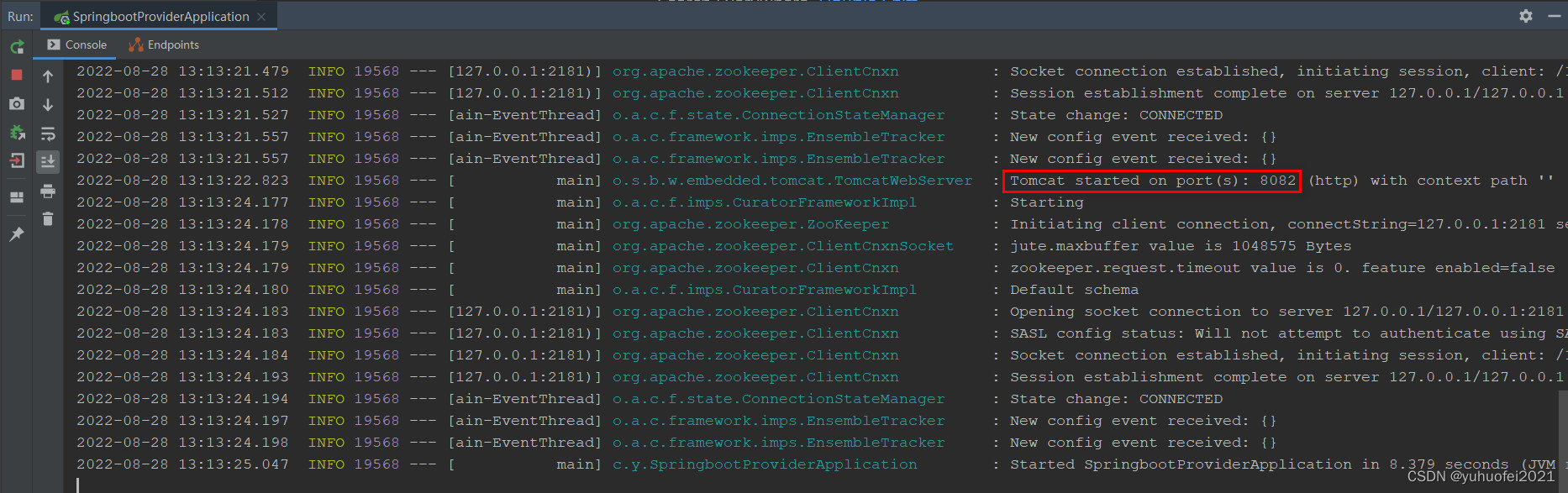
第三步,启动服务消费者
利用 IDEA 启动服务消费者 springboot-consumer ,它也会自动注册到注册中心的,并在里面寻找自己调用的服务

第四步,打开浏览器调用接口
打开浏览器,调用 http://localhost:8081/user/user-name ,得到的结果如下

日志输出如下所示,虽然日志打印语句是写在服务提供者里面,但由于是消费者调用了,因此会打印到消费者所在服务,相当于是谁调用,就打印在谁那里。

至此,SpringBoot 整合 Dubbo+Zookeeper,就完成了。
-
相关阅读:
Redis常用命令
~/.bashrc配置文件说明
delphi技术专题---获取网卡物理地址之NetBios网络编程接口LANA介绍
Sql文件导入数据库-保姆级教程
c语言入门
图神经网络入门基础
SpringAOP源码解析之advice构建排序(二)
如何将多模态数据融入到BERT架构中-多模态BERT的两类预训练任务
FFMPEG+Qt 实时显示本机USB摄像头1080p画面以及同步录制mp4视频
甘特图组件DHTMLX Gantt示例 - 如何有效管理团队工作时间?(一)
- 原文地址:https://blog.csdn.net/Crezfikbd/article/details/126563392