-
超好用的excel异步导入导出组件
同步有什么问题
- 从用户体验上来讲,大批量的数据导入导出响应时间很长,可能几分钟到几十分钟都有,此时你如果用同步,那么用户需要在这个页面等上很久,而且还不能动,直到接口返回。正常情况下用户等个30秒没反应可能就会一直点一直点,然后你知道的。
- 从性能方面来说,一般大文件导入,如果使用同步,一个4MB的excel如果在内存中展开可能达到几百MB,主要原因是,程序要为每个单元格创建好几个套娃对象。
那么就可以想象用户一直点一直点,点几下,你要么内存溢出,要么fullGC 然后程序就挂了。
异步有什么好处
- 用户体验上来说,用户提交完数据,就能够立即返回一个任务id给他,然后他就可以去做别的事情了,等导入完成后可以通过站内信,短信,或者各种各样的方式通知用户导入完成。然后用户在接着回过头处理剩余的操作。
- 性能上,异步之后我们可以对数据量进行把控,比如一次处理一条数据,给GC充分的时间进行内存回收,系统更顺畅。
异步需要做那些事情
导入流程
- 用户提交完文件之后返回一个任务id给用户
- 系统启动一个异步线程分页读取文件
- 将读取的文件交给业务代码处理
- 如果出错将错误写入到一个文件中
- 将结果记录到数据库,给用户查询
- 用户通过查寻到的结果进行错误文件下载
- 如果没有错误,反馈用户任务完成
导出流程
- 用户提交条件返回一个任务id给用户
- 系统启动一个异步线程分页读取数据库
- 将分页数据写入文件循环执行
- 执行完成后将结果记录到数据库,给用户查询
- 用户通过查询到的结果进行导出文件下载。
当然其中还有很多其它逻辑要处理,比如出了非业务异常,如何让用户知道,处理进度如何让用户知道,需要事务怎么办。要处理以上这些问题也并非那么容易。
那么有没有好用的开源组件呢?一款使用起来很简单的异步excel组件asyncexcelasyncexcel介绍
1、asyncexcel基于阿里的easyexcel包装,抽取异步骨架,不改变easyexcel的特性
2、有个小坑就是@excelproperty注解的index无法使用了,所以编写excel model的时候需要注意编写顺序需要于excel中的表头顺序一致。支持的功能列表:
- 支持线程池外部声明,可传入SystemContext;
- 仅支持单行表头
- 支持表头校验
- 支持格式转换错误校验出错写入错误文件
- 支持业务错误写出错误文件
- 支持行数限制
- 支持不分页事务
- 支持查看进度
- 支持异步分批次导入导出,分页大小可自定义
- 支持动态表头导出
- 支持多租户隔离
- 支持多模块隔离
- 支持用户权限隔离
- 支持自定义存储,如果不设置默认使用本地存储,存储路径/tmp/upload 如果自定义只要实现接口IStorageService 实现String write(String name, InputStream data)方法即可 声明成bean即可
asyncexcel集成
引入包
maven中央库搜索<dependency> <groupId>com.asyncexcelgroupId> <artifactId>async-excel-springboot-starterartifactId> <version>1.0.0version> dependency>- 1
- 2
- 3
- 4
- 5
内置mybatis-plus orm框架所以还需要引入mybatis-plus-starter
初始化数据库
drop table if exists excel_task; CREATE TABLE `excel_task` ( `id` bigint(20) NOT NULL AUTO_INCREMENT COMMENT '主键id', `type` tinyint(2) NOT NULL COMMENT '类型:1-导入,2-导出', `status` tinyint(2) NOT NULL DEFAULT 0 COMMENT '状态:0-初始,1-进行中,2-完成,3-失败', `estimate_count` int(20) NOT NULL DEFAULT 0 COMMENT '预估总记录数', `total_count` bigint(20) NOT NULL DEFAULT 0 COMMENT '实际总记录数', `success_count` bigint(20) NOT NULL DEFAULT 0 COMMENT '成功记录数', `failed_count` bigint(20) NOT NULL DEFAULT 0 COMMENT '失败记录数', `file_name` varchar(200) DEFAULT NULL COMMENT '文件名', `file_url` varchar(500) DEFAULT NULL COMMENT '文件路径', `failed_file_url` varchar(500) DEFAULT NULL COMMENT '失败文件路径', `failed_message` varchar(255) DEFAULT NULL COMMENT '失败消息', `start_time` datetime DEFAULT NULL COMMENT '开始时间', `end_time` datetime DEFAULT NULL COMMENT '结束时间', `tenant_code` varchar(50) default NULL COMMENT '租户编码', `create_user_code` varchar(50) default NULL COMMENT '用户编码', `business_code` varchar(50) default NULL COMMENT '业务编码', PRIMARY KEY (`id`) ) ENGINE=InnoDB AUTO_INCREMENT=1 DEFAULT CHARSET=utf8mb4 COMMENT='导入导出任务';- 1
- 2
- 3
- 4
- 5
- 6
- 7
- 8
- 9
- 10
- 11
- 12
- 13
- 14
- 15
- 16
- 17
- 18
- 19
- 20
配置数据源
spring.excel.datasource.url=jdbc:mysql://localhost:3306/async-excel?serverTimezone=GMT%2B8&autoReconnect=true&allowMultiQueries=true&useUnicode=true&characterEncoding=utf8&zeroDateTimeBehavior=convertToNull&useSSL=false&&useCursorFetch=true&&rewriteBatchedStatements=true spring.excel.datasource.driver-class-name=com.mysql.cj.jdbc.Driver spring.excel.datasource.password=root spring.excel.datasource.username=root- 1
- 2
- 3
- 4
引入你的pom文件然后在main函数上注解@EenableAsyncExcel就可以完成了以上所说的所有过程,你只需要专注于你的业务代码就可以了。
然后编写业务处理类
导出示例head model
@Data public class UserExportModel extends ExportRow { @ExcelProperty("用户编码") private String userCode; @ExcelProperty("用户姓名") private String userName; @ExcelProperty("手机号") private String mobile; @ExcelProperty("备注") private String remarks; }- 1
- 2
- 3
- 4
- 5
- 6
- 7
- 8
- 9
- 10
- 11
- 12
- 13
- 14
- 15
- 16
- 17
业务处理类需要实现ExportHandler接口 添加@ExcelHandle注解
@ExcelHandle public class UserExportHandler implements ExportHandler<UserExportModel> { @Autowired IUserService userService; @Override public ExportPage<UserExportModel> exportData(int startPage, int limit, DataExportParam dataExportParam) { IPage<User> iPage = new Page<>(startPage, limit); IPage page = userService.page(iPage); List<UserExportModel> list = ExportListUtil.transform(page.getRecords(), UserExportModel.class); ExportPage<UserExportModel> result = new ExportPage<>(); result.setTotal(page.getTotal()); result.setCurrent(page.getCurrent()); result.setSize(page.getSize()); result.setRecords(list); return result; } }- 1
- 2
- 3
- 4
- 5
- 6
- 7
- 8
- 9
- 10
- 11
- 12
- 13
- 14
- 15
- 16
- 17
- 18
添加controller
//导出最简示例 @PostMapping("/exports") public Long exports(){ DataExportParam dataExportParam=new DataExportParam() .setExportFileName("用户导出") .setLimit(5) .setHeadClass(UserExportModel.class); return excelService.doExport(UserExportHandler.class,dataExportParam); }- 1
- 2
- 3
- 4
- 5
- 6
- 7
- 8
- 9
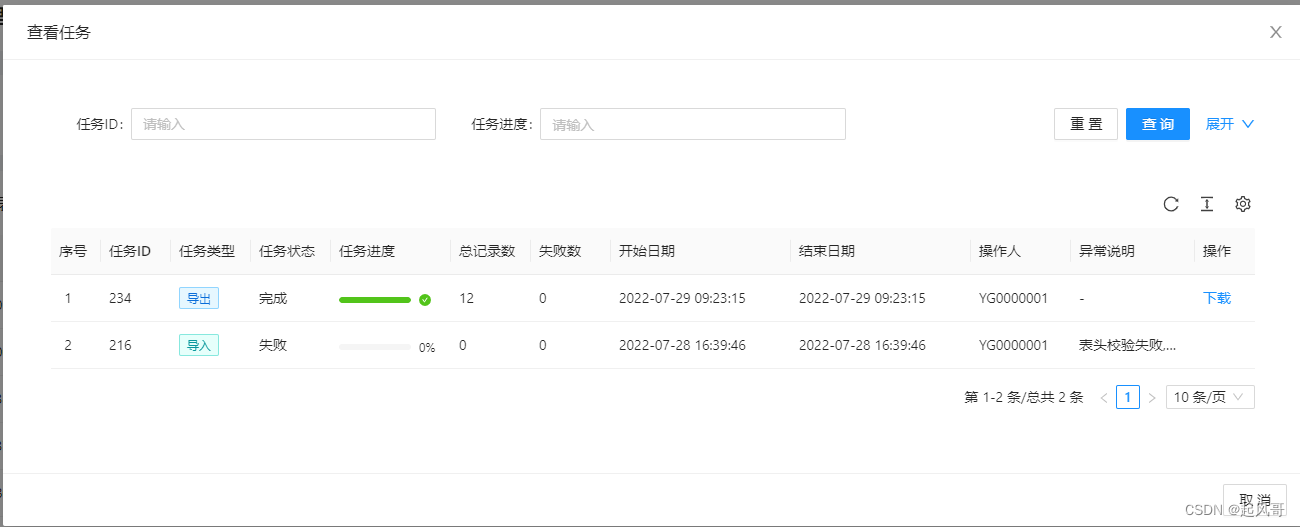
最后效果如下,前端代码还需要你自己写的哈
示例项目https://github.com/2229499815/async-excel-sample.git更多详情请查看开源项目https://github.com/2229499815/async-excel.git
-
相关阅读:
分层测试(三):接口测试
希尔伯特变换分析及应用
Linux | 进程间通信 | system V共享内存 | 介绍和使用
java中的实体类
Vue中如何进行本地存储(LocalStorage)
Qt Model&View&Delegate(模型-视图-代理) 介绍和使用
Maven环境搭建以及eclipse-maven3-plugin插件安装
【Unity】URP屏幕后处理UI模糊效果实现
中科驭数DPU技术开放日秀“肌肉”:云原生网络、RDMA、安全加速、低延时网络等方案组团亮相
集群服务器是什么有什么优势
- 原文地址:https://blog.csdn.net/a807719447/article/details/126554338
