-
最简单的SpringCloudStream集成Kafka教程
开发中,服务与服务之间通信通常会用到消息中间件,如果我们使用了某一个MQ,那么消息中间件与我们的系统算是高耦合。将来有一天,要替换成另外的MQ,我们的改动就会比较大。为了解决这个问题,我们可以使用Spring Cloud Stream 来整合我们的消息中间件,降低耦合度,使服务可以更多关注自己的业务逻辑等。
今天为大家带来一个人人可实操的SpringCloudStream集成Kafka的快速入门示例。
1 前言
SpringCloudStream是一个构建高扩展性的事件消息驱动的微服务框架。简单点说就是帮助你操作MQ,可以与底层MQ框架解耦。将来想要替换MQ框架的时候会比较容易。

Kafka是一个分布式发布 - 订阅消息系统,源于LinkedIn的一个项目,2011年成为开源Apache项目。
ZooKeeper 是 Apache 软件基金会的一个软件项目,它为大型分布式计算提供开源的分布式配置服务、同步服务和命名注册,Kafka的实现同时也依赖于zookeeper。
2 Windows搭建简单的Kafka
2.1 启动zookeeper
使用Kafka首先需要启动zookeeper,windows中搭建zookeeper也很简单。以下几步即可完成:
- 下载zookeeper (本文使用3.7.0版本,下载链接在文章末尾。)
- 配置基本环境变量:
- 将conf文件夹下面的 zoo_sample.cfg 重命名zoo.cfg。并修改其工作目录dataDir。
- bin文件夹下面有zkEnv.cmd有zookeeper相关的配置,其中就包括JAVA_HOME,所以系统环境变量需要配置JAVA_HOME,或者直接用Java的路径来替换。
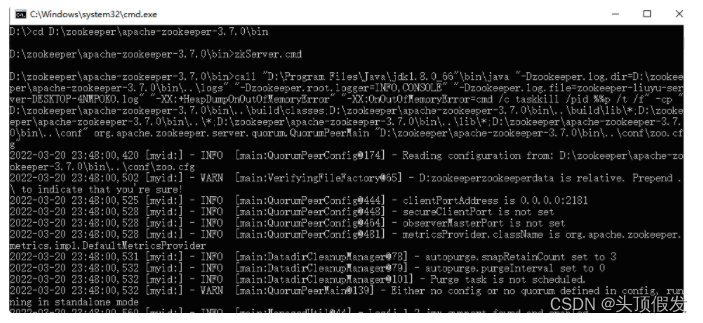
- 启动,在bin目录下运行zkServer.cmd脚本启动zookeeper。
默认启动端口2181为。
正常启动如下:
2.2 搭建Kafka
本地使用kafka同样也是如下的几个步骤:
- 下载Kafka(本文使用2.11版本,下载链接见文章末尾)
- 环境变量配置:
- 查看config文件下面的 server.properties配置文件中的zookeeper的配置zookeeper.connect=localhost:2181
- 在bin/windows文件夹下面kafka-run-class.bat文件中有JAVA_HOME的配置,同样也可以直接改成系统的Java路径.
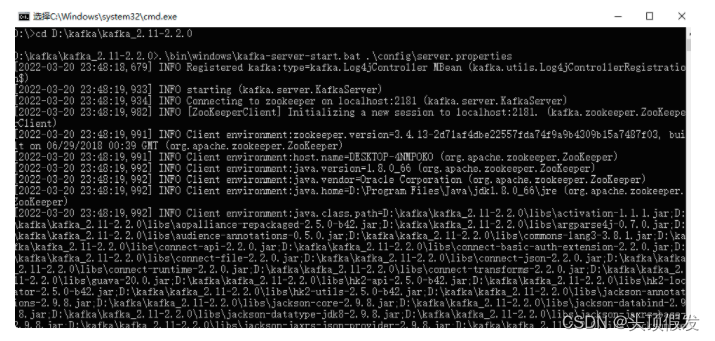
- 在kafka根目录下使用如下命令启动kafka,并在zookeeper中注册。# .\bin\windows\kafka-server-start.bat .\config\server.properties
- 创建topic,在bin\windows目录下使用如下命令。创建名称为“test”的topickafka-topics.bat --create --zookeeper localhost:2181 --replication-factor 1 --partitions 1 --topic test
- 使用windows命令窗口的producer和consumer,在bin\windows目录下使用如下命令#test topic的消息生产者
kafka-console-producer.bat --broker-list localhost:9092 --topic test#test topic的消息消费者
kafka-console-consumer.bat --bootstrap-server localhost:9092 --topic test#test topic的消息消费者(从头消费)
kafka-console-consumer.bat --bootstrap-server localhost:9092 --from-beginning --topic
kafka启动windows界面如下
3 SpringCloudStream集成Kafka
3.1 引入依赖
由于我们直接使用Spring Cloud Stream 集成Kafka,官方也已经有现成的starter。
- <dependency>
- <groupId>org.springframework.cloud</groupId>
- <artifactId>spring-cloud-starter-stream-kafka</artifactId>
- <version>2.1.0.RELEASE</version>
- </dependency>
3.2 关于kafka的配置
- spring:
- application:
- name: shop-server
- cloud:
- stream:
- bindings:
- #配置自己定义的通道与哪个中间件交互
- input: #MessageChannel里Input和Output的值
- destination: test #目标主题 相当于kafka的topic
- output:
- destination: test1 #本例子创建了另外一个topic (test1)用于区分不同的功能区分。
- default-binder: kafka #默认的binder是kafka
- kafka:
- binder:
- zk-nodes: localhost:2181
- bootstrap-servers: localhost:9092 #kafka服务地址,集群部署的时候需要配置多个,
- consumer:
- group-id: consumer1
- producer:
- key-serializer: org.apache.kafka.common.serialization.ByteArraySerializer
- value-serializer: org.apache.kafka.common.serialization.ByteArraySerializer
- client-id: producer1
- server:
- port: 8100
3.3 消费者示例
首先需要定义SubscribableChannel 接口方法使用Input注解。
- public interface Sink {
- String INPUT = "input";
- @Input("input")
- SubscribableChannel input();
- }
然后简单的使用 StreamListener 监听某一通道的消息。
- @Service
- @EnableBinding(Sink.class)
- public class MessageSinkHandler {
- @StreamListener(Sink.INPUT)
- public void handler(Message
msg){ - System.out.println(" received message : "+msg);
- }
- }
cloud stream配置中绑定了对应的Kafka topic,如下
- cloud:
- stream:
- bindings:
- #配置自己定义的通道与哪个中间件交互
- input: #SubscribableChannel里Input值
- destination: test #目标主题
我们使用Kafka console producer 生产消息。
kafka-console-producer.bat --broker-list localhost:9092 --topic test同时启动我们的示例SpringBoot项目,使用producer推送几条消息。

我们同时启动一个Kafka console consumer
kafka-console-consumer.bat --bootstrap-server localhost:9092 --topic test消费结果如下:

Spring Boot 项目消费消息如下:

3.4 生产者示例
首先需要定义生产者MessageChannel,这里会用到Output注解
- public interface KafkaSource {
- String OUTPUT = "output";
- @Output(KafkaSource.OUTPUT)
- MessageChannel output();
- }
使用MessageChannel 发送消息。
- @Component
- public class MessageService {
- @Autowired
- private KafkaSource source;
- public Object sendMessage(Object msg) {
- source.output().send(MessageBuilder.withPayload(msg).build());
- return msg;
- }
定义一个Rest API 来触发消息发送
- @RestController
- public class MessageController {
- @Autowired
- private MessageService messageService;
- @GetMapping(value = "/sendMessage/{msg}")
- public String sendMessage(@PathVariable("msg") String msg){
- messageService.sendMessage("messageService send out : " + msg + LocalDateTime.now());
- return "sent message";
- }
- }
配置中关于producer的配置如下
- cloud:
- stream:
- bindings:
- input:
- destination: test
- output:
- destination: test1 #目标topic
启动SpringBoot App, 并触发如下API call
http://localhost:8100/sendMessage/JavaNorthProducer
我们同时启动一个Kafka console consumer,这里我们使用另一个test1 topic
kafka-console-consumer.bat --bootstrap-server localhost:9092 --topic test1console consumer消费消息如下:

总结
本章初步介绍了Spring Cloud Stream 集成Kafka的简单示例,实现了简单的发布-订阅功能。但是Spring Cloud Stream肯定还有更多的功能,我们后续还将继续深入学习更多Stream的功能。
-
相关阅读:
MySQ之备份与恢复
GO七天开发挑战:7天实现Web框架-Gee(day 4 分组控制Group)
网络安全检测与防范 测试题(五)
Unity之ShaderGraph如何实现无贴图水球效果
0.96寸OLED屏显示测试和代码详细分析SPI通信
基于鲲鹏服务器搭建简单的开源论坛系统(LAMP)实践分享
Pwn 学习 fmt_test_2格式化字符串
Python+pytest接口自动化之参数关联
JS EventListener
golang学习5,glang的web的restful接口
- 原文地址:https://blog.csdn.net/lt_xiaodou/article/details/126527224
