-
详解GaussDB(DWS) 资源监控
摘要:本文主要着重介绍资源池资源监控以及用户资源监控。
本文分享自华为云社区《GaussDB(DWS)资源监控之用户、队列资源监控》,作者: 一只菜菜鸟。
GaussDB(DWS)资源监控功能包含实例资源监控、内存资源监控、资源池资源监控、查询监控以及用户资源监控,本文主要着重介绍资源池资源监控以及用户资源监控;
多租户
用户是使用数据库系统以及执行业务的主要手段,在GaussDB(DWS)中将用户场景分为两种方案,分别是普通方案以及多租户方案;为了更好的使用GaussDB(DWS)的资源分组管理,建议依托多租户场景构造具体的使用情况;
多租户引入了两级用户机制,分别为组用户以及业务用户;两级用户分别关联不同的资源池以及存储空间;
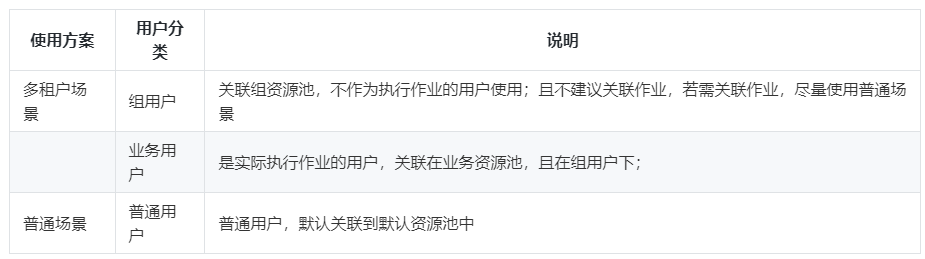
示例
1、创建组用户关联到组资源池
CREATE USER user_g RESOURCE POOL 'respool_g1' PASSWORD 'Gauss_234';2、创建业务用户关联到业务资源池
CREATE USER user_1 RESOURCE POOL 'respool_g1' USER GROUP 'user_g' PASSWORD 'Gauss_234';注:创建业务用户时,业务资源池(resource pool)和组用户(user group)为必选字段;
用户资源监控
用户资源监控中记录所有用户使用资源(内存、CPU核数、存储空间、临时空间、算子落盘以及IO)的实时使用情况,也可以通过查询历史表访问用户资源的历史使用情况;
相关GUC参数:

相关视图/表:
实时视图为:pg_total_user_resource_info;
- username | used_memory | total_memory | used_cpu | total_cpu | used_space | total_space | used_temp_space | total_temp_space | used_spill_space | total_spill_space | read_kbytes | write_kbytes | read_counts | write_counts | read_speed | write_speed
- -----------------+-------------+--------------+----------+-----------+------------+-------------+-----------------+------------------+------------------+-------------------+-------------+--------------+-------------+--------------+------------+-------------
- perfadm | 0 | 0 | 0 | 0 | 0 | -1 | 0 | -1 | 0 | -1 | 0 | 0 | 0 | 0 | 0 | 0
- user_g1_job_2 | 0 | 1113 | 0 | 24 | 0 | -1 | 0 | -1 | 0 | -1 | 0 | 0 | 0 | 0 | 0 | 0
- user_grp_2 | 0 | 5574 | 0 | 24 | 0 | -1 | 0 | -1 | 0 | -1 | 0 | 0 | 0 | 0 | 0 | 0
- user_g1_job_1_2 | 0 | 1113 | 0 | 24 | 0 | -1 | 0 | -1 | 0 | -1 | 0 | 0 | 0 | 0 | 0 | 0
- user_2 | 0 | 27876 | 0 | 24 | 0 | -1 | 0 | -1 | 0 | -1 | 0 | 0 | 0 | 0 | 0 | 0
- user_grp_1 | 0 | 5574 | 0 | 24 | 0 | -1 | 0 | -1 | 0 | -1 | 0 | 0 | 0 | 0 | 0 | 0
- user_1 | 0 | 27876 | 0 | 24 | 0 | -1 | 0 | -1 | 0 | -1 | 0 | 0 | 0 | 0 | 0 | 0
- user_4 | 0 | 27876 | 0 | 24 | 0 | -1 | 0 | -1 | 0 | -1 | 0 | 0 | 0 | 0 | 0 | 0
- user_g1_job_1_1 | 0 | 1113 | 0 | 24 | 0 | -1 | 0 | -1 | 0 | -1 | 0 | 0 | 0 | 0 | 0 | 0
- user_g2_job_1 | 0 | 1113 | 0 | 24 | 0 | -1 | 0 | -1 | 0 | -1 | 0 | 0 | 0 | 0 | 0 | 0
- user_5 | 0 | 27876 | 0 | 24 | 0 | -1 | 0 | -1 | 0 | -1 | 0 | 0 | 0 | 0 | 0 | 0
- user_3 | 0 | 27876 | 0 | 24 | 0 | -1 | 0 | -1 | 0 | -1 | 0 | 0 | 0 | 0 | 0 | 0
- user_g2_job_2 | 0 | 1113 | 0 | 24 | 0 | -1 | 0 | -1 | 0 | -1 | 0 | 0 | 0 | 0 | 0 | 0
- (13 rows)
历史视图为:gs_wlm_user_resource_history;
- username | timestamp | used_memory | total_memory | used_cpu | total_cpu | used_space | total_space | used_temp_space | total_temp_space | used_spill_space | total_spill_space | read_kbytes | write_kbytes | read_counts | write_counts | read_speed | write_speed
- -------------------+-------------------------------+-------------+--------------+----------+-----------+------------+-------------+-----------------+------------------+------------------+-------------------+-------------+--------------+-------------+--------------+------------+-------------
- perfadm | 2022-06-29 14:26:32.063948+08 | 0 | 0 | 0 | 0 | 0 | -1 | 0 | -1 | 0 | -1 | 0 | 0 | 0 | 0 | 0 | 0
- user_3 | 2022-06-29 14:26:32.063948+08 | 0 | 27876 | 0 | 24 | 0 | -1 | 0 | -1 | 0 | -1 | 0 | 0 | 0 | 0 | 0 | 0
- user_5 | 2022-06-29 14:26:32.063948+08 | 0 | 27876 | 0 | 24 | 0 | -1 | 0 | -1 | 0 | -1 | 0 | 0 | 0 | 0 | 0 | 0
- user_g2_job_1 | 2022-06-29 14:26:32.063948+08 | 0 | 1113 | 0 | 24 | 0 | -1 | 0 | -1 | 0 | -1 | 0 | 0 | 0 | 0 | 0 | 0
- user_g1_job_1_1 | 2022-06-29 14:26:32.063948+08 | 0 | 1113 | 0 | 24 | 0 | -1 | 0 | -1 | 0 | -1 | 0 | 0 | 0 | 0 | 0 | 0
- user_4 | 2022-06-29 14:26:32.063948+08 | 0 | 27876 | 0 | 24 | 0 | -1 | 0 | -1 | 0 | -1 | 0 | 0 | 0 | 0 | 0 | 0
- user_1 | 2022-06-29 14:26:32.063948+08 | 0 | 27876 | 0 | 24 | 0 | -1 | 0 | -1 | 0 | -1 | 0 | 0 | 0 | 0 | 0 | 0
- user_grp_1 | 2022-06-29 14:26:32.063948+08 | 0 | 5574 | 0 | 24 | 0 | -1 | 0 | -1 | 0 | -1 | 0 | 0 | 0 | 0 | 0 | 0
- user_2 | 2022-06-29 14:26:32.063948+08 | 0 | 27876 | 0 | 24 | 0 | -1 | 0 | -1 | 0 | -1 | 0 | 0 | 0 | 0 | 0 | 0
- user_g1_job_1_2 | 2022-06-29 14:26:32.063948+08 | 0 | 1113 | 0 | 24 | 0 | -1 | 0 | -1 | 0 | -1 | 0 | 0 | 0 | 0 | 0 | 0
- user_grp_2 | 2022-06-29 14:26:32.063948+08 | 0 | 5574 | 0 | 24 | 0 | -1 | 0 | -1 | 0 | -1 | 0 | 0 | 0 | 0 | 0 | 0
- user_g2_job_2 | 2022-06-29 14:26:32.063948+08 | 0 | 1113 | 0 | 24 | 0 | -1 | 0 | -1 | 0 | -1 | 0 | 0 | 0 | 0 | 0 | 0
- user_g1_job_2 | 2022-06-29 14:26:32.063948+08 | 0 | 1113 | 0 | 24 | 0 | -1 | 0 | -1 | 0 | -1 | 0 | 0 | 0 | 0 | 0 | 0
- user_1 | 2022-06-29 14:26:01.987779+08 | 0 | 27876 | 0 | 24 | 0 | -1 | 0 | -1 | 0 | -1 | 0 | 0 | 0 | 0 | 0 | 0
- user_g2_job_2 | 2022-06-29 14:26:01.987779+08 | 0 | 1113 | 0 | 24 | 0 | -1 | 0 | -1 | 0 | -1 | 0 | 0 | 0 | 0 | 0 | 0
资源池资源监控
多租户场景下,用户关联资源池执行业务,其消耗的资源汇总到其对应的资源池上,可以通过资源池资源监控视图,实时查看其相应数值,以及历史表记录的资源历史使用情况;
相关GUC参数
同用户资源监控相关GUC参数。
相关视图/表
资源池实时信息监控视图:GS_RESPOOL_RUNTIME_INFO
- nodegroup | rpname | ref_count | fast_run | fast_wait | slow_run | slow_wait
- -----------+------------------+-----------+----------+-----------+----------+-----------
- lc1 | respool_grp_1 | 0 | 0 | 0 | 0 | 0
- lc1 | default_pool | 0 | 0 | 0 | 0 | 0
- lc1 | respool_g1_job_1 | 0 | 0 | 0 | 0 | 0
- lc1 | respool_g1_job_2 | 0 | 0 | 0 | 0 | 0
- lc1 | respool_grp_2 | 0 | 0 | 0 | 0 | 0
- lc1 | respool_g2_job_1 | 0 | 0 | 0 | 0 | 0
- lc1 | respool_g2_job_2 | 0 | 0 | 0 | 0 | 0
- lc1 | respool_1 | 0 | 0 | 0 | 0 | 0
- lc1 | respool_2 | 0 | 0 | 0 | 0 | 0
- lc2 | default_pool | 0 | 0 | 0 | 0 | 0
- lc1 | respool_3 | 0 | 0 | 0 | 0 | 0
- (11 rows)
资源池实时资源监控视图:GS_RESPOOL_RESOURCE_INFO
- nodegroup | rpname | cgroup | ref_count | fast_run | fast_wait | fast_limit | slow_run | slow_wait | slow_limit | used_cpu | cpu_limit | used_mem | estimate_mem | mem_limit | read_kbytes | write_kbytes | read_counts | write_counts | read_speed | write_speed
- -----------+------------------+---------------------+-----------+----------+-----------+------------+----------+-----------+------------+----------+-----------+----------+--------------+-----------+-------------+--------------+-------------+--------------+------------+-------------
- lc1 | respool_grp_1 | ClassG1 | 0 | 0 | 0 | -1 | 0 | 0 | 10 | 0 | 24 | 0 | 0 | 5574 | 0 | 0 | 0 | 0 | 0 | 0
- lc1 | default_pool | DefaultClass:Medium | 0 | 0 | 0 | -1 | 0 | 0 | -1 | 0 | 24 | 0 | 0 | 27876 | 0 | 0 | 0 | 0 | 0 | 0
- lc1 | respool_g1_job_1 | ClassG1:wg1_1 | 0 | 0 | 0 | -1 | 0 | 0 | 10 | 0 | 24 | 0 | 0 | 1113 | 0 | 0 | 0 | 0 | 0 | 0
- lc1 | respool_g1_job_2 | ClassG1:wg1_2 | 0 | 0 | 0 | -1 | 0 | 0 | 10 | 0 | 24 | 0 | 0 | 1113 | 0 | 0 | 0 | 0 | 0 | 0
- lc1 | respool_grp_2 | ClassG2 | 0 | 0 | 0 | -1 | 0 | 0 | 10 | 0 | 24 | 0 | 0 | 5574 | 0 | 0 | 0 | 0 | 0 | 0
- lc1 | respool_g2_job_1 | ClassG2:wg2_1 | 0 | 0 | 0 | -1 | 0 | 0 | 10 | 0 | 24 | 0 | 0 | 1113 | 0 | 0 | 0 | 0 | 0 | 0
- lc1 | respool_g2_job_2 | ClassG2:wg2_2 | 0 | 0 | 0 | -1 | 0 | 0 | 10 | 0 | 24 | 0 | 0 | 1113 | 0 | 0 | 0 | 0 | 0 | 0
- lc1 | respool_1 | ClassN1:wn1 | 0 | 0 | 0 | -1 | 0 | 0 | 10 | 0 | 24 | 0 | 0 | 27876 | 0 | 0 | 0 | 0 | 0 | 0
- lc1 | respool_2 | ClassN1:wn2 | 0 | 0 | 0 | -1 | 0 | 0 | 10 | 0 | 24 | 0 | 0 | 27876 | 0 | 0 | 0 | 0 | 0 | 0
- lc2 | default_pool | DefaultClass:Medium | 0 | 0 | 0 | -1 | 0 | 0 | -1 | 0 | 24 | 0 | 0 | 27876 | 0 | 0 | 0 | 0 | 0 | 0
- lc1 | respool_3 | ClassN2:wn3 | 0 | 0 | 0 | -1 | 0 | 0 | 10 | 0 | 24 | 0 | 0 | 27876 | 0 | 0 | 0 | 0 | 0 | 0
- (11 rows)
资源池历史资源监控表:GS_RESPOOL_RESOURCE_HISTORY
- timestamp | nodegroup | rpname | cgroup | ref_count | fast_run | fast_wait | fast_limit | slow_run | slow_wait | slow_limit | used_cpu | cpu_limit | used_mem | estimate_mem | mem_limit | read_kbytes | write_kbytes | read_counts | write_counts | read_speed | write_speed
- -------------------------------+-----------+----------------------+---------------------+-----------+----------+-----------+------------+----------+-----------+------------+----------+-----------+----------+--------------+-----------+-------------+--------------+-------------+--------------+------------+-------------
- 2022-06-29 14:35:02.262234+08 | lc1 | respool_grp_1 | ClassG1 | 0 | 0 | 0 | -1 | 0 | 0 | 10 | 0 | 24 | 0 | 0 | 5574 | 0 | 0 | 0 | 0 | 0 | 0
- 2022-06-29 14:35:02.262234+08 | lc1 | respool_3 | ClassN2:wn3 | 0 | 0 | 0 | -1 | 0 | 0 | 10 | 0 | 24 | 0 | 0 | 27876 | 0 | 0 | 0 | 0 | 0 | 0
- 2022-06-29 14:35:02.262234+08 | lc2 | default_pool | DefaultClass:Medium | 0 | 0 | 0 | -1 | 0 | 0 | -1 | 0 | 24 | 0 | 0 | 27876 | 0 | 0 | 0 | 0 | 0 | 0
- 2022-06-29 14:35:02.262234+08 | lc1 | respool_2 | ClassN1:wn2 | 0 | 0 | 0 | -1 | 0 | 0 | 10 | 0 | 24 | 0 | 0 | 27876 | 0 | 0 | 0 | 0 | 0 | 0
- 2022-06-29 14:35:02.262234+08 | lc1 | respool_1 | ClassN1:wn1 | 0 | 0 | 0 | -1 | 0 | 0 | 10 | 0 | 24 | 0 | 0 | 27876 | 0 | 0 | 0 | 0 | 0 | 0
- 2022-06-29 14:35:02.262234+08 | lc1 | respool_g2_job_2 | ClassG2:wg2_2 | 0 | 0 | 0 | -1 | 0 | 0 | 10 | 0 | 24 | 0 | 0 | 1113 | 0 | 0 | 0 | 0 | 0 | 0
- 2022-06-29 14:35:02.262234+08 | lc1 | respool_g2_job_1 | ClassG2:wg2_1 | 0 | 0 | 0 | -1 | 0 | 0 | 10 | 0 | 24 | 0 | 0 | 1113 | 0 | 0 | 0 | 0 | 0 | 0
- 2022-06-29 14:35:02.262234+08 | lc1 | respool_grp_2 | ClassG2 | 0 | 0 | 0 | -1 | 0 | 0 | 10 | 0 | 24 | 0 | 0 | 5574 | 0 | 0 | 0 | 0 | 0 | 0
- 2022-06-29 14:35:02.262234+08 | lc1 | respool_g1_job_2 | ClassG1:wg1_2 | 0 | 0 | 0 | -1 | 0 | 0 | 10 | 0 | 24 | 0 | 0 | 1113 | 0 | 0 | 0 | 0 | 0 | 0
- 2022-06-29 14:35:02.262234+08 | lc1 | respool_g1_job_1 | ClassG1:wg1_1 | 0 | 0 | 0 | -1 | 0 | 0 | 10 | 0 | 24 | 0 | 0 | 1113 | 0 | 0 | 0 | 0 | 0 | 0
- 2022-06-29 14:35:02.262234+08 | lc1 | default_pool | DefaultClass:Medium | 0 | 0 | 0 | -1 | 0 | 0 | -1 | 0 | 24 | 0 | 0 | 27876 | 0 | 0 | 0 | 0 | 0 | 0
- 2022-06-29 14:34:31.517585+08 | lc1 | respool_g2_job_1 | ClassG2:wg2_1 | 0 |
-
相关阅读:
Mac硬件设备系统环境的升级/更新 macOS
hms学习
cuda 换源 ubuntu 就他了 速度很快
Linux免密登录
金仓数据库 KingbaseGIS 使用手册(6.13. Overlay函数)
RS485收发自动切换电路 [原创www.cnblogs.com/helesheng]
C# 将图片字符化(转为ASCII字符)
用katalon解决接口/自动化测试拦路虎--参数化
JVM 内存布局详解(荣耀典藏版)
求直角三角形第三点的坐标
- 原文地址:https://blog.csdn.net/devcloud/article/details/126538415
