-
Unity笔记(10):SHOOT GAME EXAMPLE【2D】
目录
1、素材准备
三张图片

2、调整大小设为预制体

3、创建空物体设置开火点

4、给物体创建移动脚本
让手枪跟随鼠标移动
不带旋转角:
Unity 代码实现物体跟随鼠标移动_红叶920的博客-CSDN博客_unity物体跟随鼠标移动
带旋转角:
Unity让物体跟随鼠标移动_李公子lm的博客-CSDN博客_unity物体跟随鼠标
- using System.Collections;
- using System.Collections.Generic;
- using UnityEngine;
- public class Movement : MonoBehaviour
- {
- // Start is called before the first frame update
- void Start()
- {
- }
- // Update is called once per frame
- void Update()
- {
- // 此时的摄像机必须转换 2D摄像机 来实现效果(即:摄像机属性Projection --> Orthographic)
- Vector3 dis = Camera.main.ScreenToWorldPoint(Input.mousePosition); //获取鼠标位置并转换成世界坐标
- dis.z = this.transform.position.z; //固定z轴
- this.transform.position = dis; //使物体跟随鼠标移动
- }
- }
可以看到,开火点会跟随手枪移动
5、为武器设计一个开火动画

动画变量

脚本控制
- using System.Collections;
- using System.Collections.Generic;
- using UnityEngine;
- public class Movement : MonoBehaviour
- {
- public Animator animator;//加载动画组件
- bool isFire;
- void Start()
- {
- isFire = false;
- }
- // Update is called once per frame
- void Update()
- {
- // 此时的摄像机必须转换 2D摄像机 来实现效果(即:摄像机属性Projection --> Orthographic)
- Vector3 dis = Camera.main.ScreenToWorldPoint(Input.mousePosition); //获取鼠标位置并转换成世界坐标
- dis.z = this.transform.position.z; //固定z轴
- this.transform.position = dis; //使物体跟随鼠标移动
- if (Input.GetMouseButtonDown(0))
- {//按下鼠标左键
- isFire = true;
- animator.SetBool("Fire", isFire);
- }else
- {
- isFire = false;
- animator.SetBool("Fire", isFire);
- }
- }
- }
开火按钮也可写做
if (Input.GetButtonDown("Fire1"))因为默认设置的Fire1就是鼠标左键
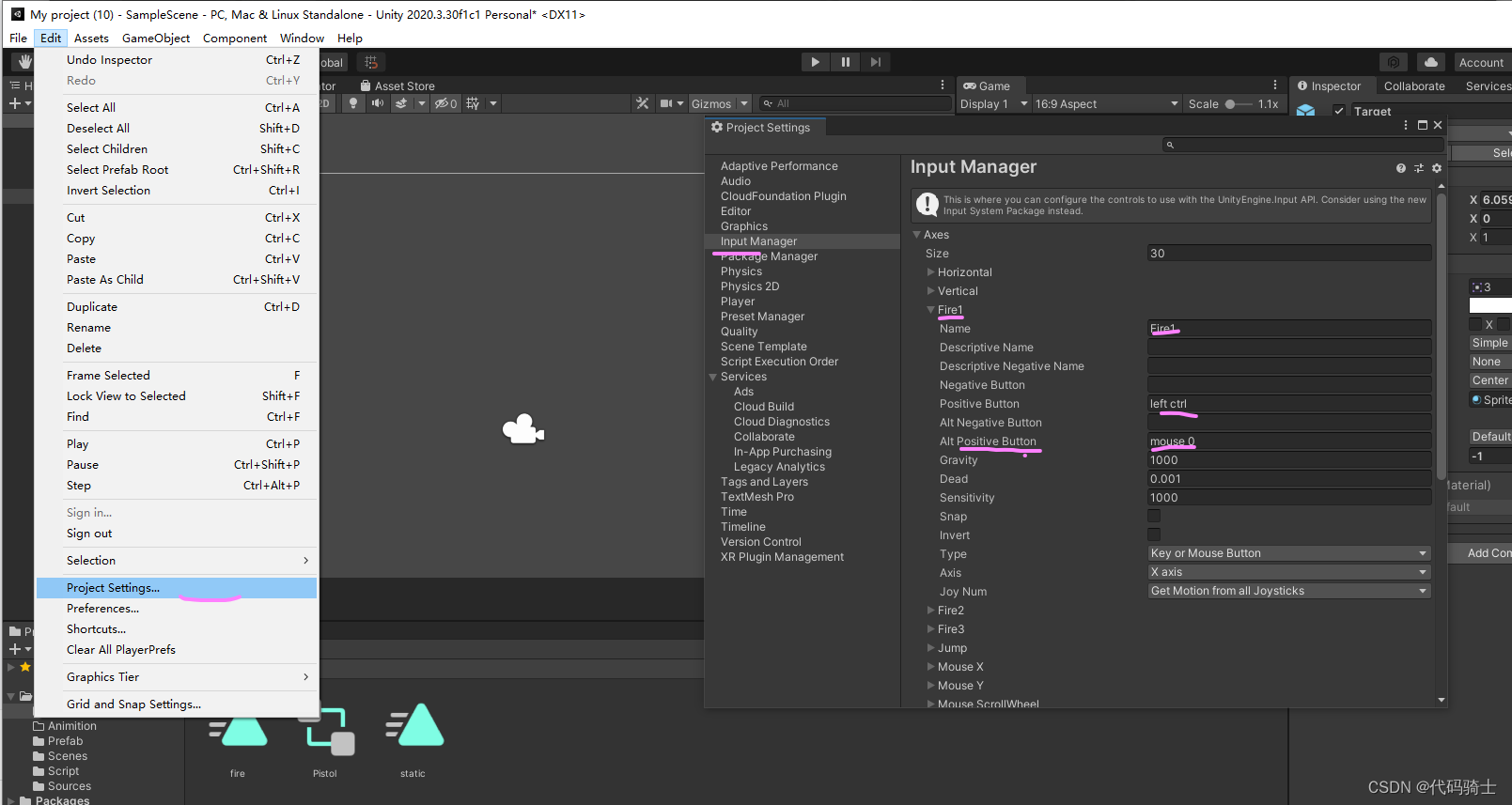
也可以改为其他按键(space-空格或者abcd……)

6、给子弹预制体添加刚体组件
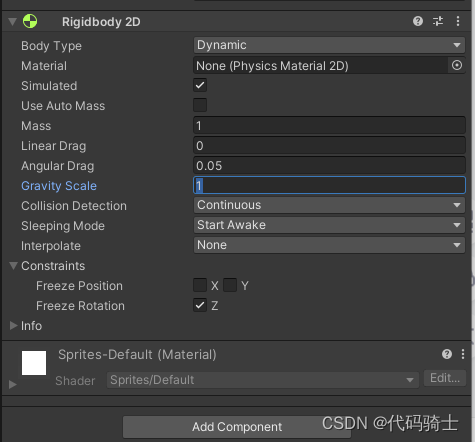
Collision Detection改为Continuous为了在快速移动中检测所有物体。
Constraints中的勾选是为了限制沿z轴的旋转。
7、添加碰撞盒

8、编辑 shoot()
- using System.Collections;
- using System.Collections.Generic;
- using UnityEngine;
- public class Movement : MonoBehaviour
- {
- public Animator animator;//加载动画组件
- public Transform firePoint;//获取开火点位置
- public GameObject bulletPrefeb;//获取子弹预制体
- bool isFire;
- void Start()
- {
- isFire = false;
- }
- // Update is called once per frame
- void Update()
- {
- // 此时的摄像机必须转换 2D摄像机 来实现效果(即:摄像机属性Projection --> Orthographic)
- Vector3 dis = Camera.main.ScreenToWorldPoint(Input.mousePosition); //获取鼠标位置并转换成世界坐标
- dis.z = this.transform.position.z; //固定z轴
- this.transform.position = dis; //使物体跟随鼠标移动
- if (Input.GetButtonDown("Fire1"))
- {//按下鼠标左键
- isFire = true;
- animator.SetBool("Fire", isFire);
- //开火逻辑
- Shoot();
- }else
- {
- isFire = false;
- animator.SetBool("Fire", isFire);
- }
- }
- //开火函数
- void Shoot()
- {
- //预制体实例化
- Instantiate(bulletPrefeb, firePoint.position, firePoint.rotation);//预制体文件、位置、旋转
- }
- }
很鬼畜,子弹刚出来就掉下去了,因此,我们要给子弹添加速度
9、给预制体子弹添加移动脚本
- using System.Collections;
- using System.Collections.Generic;
- using UnityEngine;
- public class Bullet : MonoBehaviour
- {
- public float speed = 20f;
- public Rigidbody2D rb;
- void Start()
- {
- rb.velocity = transform.right * speed;//让子弹沿着初始方向飞一会~
- }
- void OnCollisionEnter2D()//发生碰撞,则销毁子弹
- {
- Destroy(gameObject);
- }
- void OnTriggerEnter2D()
- {//使用时需要在刚体组件里面勾选Trigger
- Destroy(gameObject);
- }
- }
刚体组件拖过来

10、给目标添加碰撞盒和刚体组件

Finsh
-
相关阅读:
【机器学习】21天挑战赛学习笔记(六)
SUSE 12 SP5 安装MySQL后第一次修改mysql密码
矿山定位系统-矿井人员定位系统在矿山自动化安全监控过程中的应用
Ubuntu Flask 运行 gunicorn+Nginx 部署
flutter开发报错The instance member ‘widget‘ can‘t be accessed in an initializer
Elastic Stack--09--ElasticsearchRestTemplate
[附源码]SSM计算机毕业设计班级风采网站JAVA
部署WekaFS并行文件系统的10大理由
JavaScript | 闭包
2023 ICCV和 CVPR论文集合
- 原文地址:https://blog.csdn.net/qq_51701007/article/details/126513302