-
Vue前端框架搭建
一、安装 NodeJS
二、安装 vue-cli
1.vue-cli 2.x 升级到 3.x
(1)卸载 2.x 版本
npm uninstall -g vue-cli- 1
(2)安装
npm install -g @vue/cli- 1
(3)查看版本
vue -V- 1
vue -V @vue/cli 5.0.8- 1
- 2
三、创建项目
1.vue-cli 2.x 项目
(1)创建
vue init webpack test2.0- 1
D:\test>vue init webpack test2.0 ? Project name test2.0 ? Project description A Vue.js project ? Author chaoyue <chaoyue@qq.com> ? Vue build standalone ? Install vue-router? Yes ? Use ESLint to lint your code? Yes ? Pick an ESLint preset Standard ? Set up unit tests No ? Setup e2e tests with Nightwatch? No ? Should we run `npm install` for you after the project has been created? (recommended) yarn vue-cli · Generated "test2.0". # Installing project dependencies ... # ======================== yarn install v1.22.19 info No lockfile found. [1/5] Validating package.json... [2/5] Resolving packages... warning autoprefixer > browserslist@2.11.3: Browserslist 2 could fail on reading Browserslist >3.0 config used in other tools. warning babel-core > babel-register > core-js@2.6.12: core-js@<3.23.3 is no longer maintained and not recommended for usage due to the number of issues. Because of the V8 engine whims, feature detection in old core-js versions could cause a slowdown up to 100x even if nothing is polyfilled. Some versions have web compatibility issues. Please, upgrade your dependencies to the actual version of core-js. warning babel-core > babel-runtime > core-js@2.6.12: core-js@<3.23.3 is no longer maintained and not recommended for usage due to the number of issues. Because of the V8 engine whims, feature detection in old core-js versions could cause a slowdown up to 100x even if nothing is polyfilled. Some versions have web compatibility issues. Please, upgrade your dependencies to the actual version of core-js. warning babel-eslint@8.2.6: babel-eslint is now @babel/eslint-parser. This package will no longer receive updates. warning css-loader > cssnano > autoprefixer > browserslist@1.7.7: Browserslist 2 could fail on reading Browserslist >3.0 config used in other tools. warning css-loader > cssnano > postcss-merge-rules > browserslist@1.7.7: Browserslist 2 could fail on reading Browserslist >3.0 config used in other tools. warning css-loader > cssnano > postcss-merge-rules > caniuse-api > browserslist@1.7.7: Browserslist 2 could fail on reading Browserslist >3.0 config used in other tools. warning css-loader > cssnano > postcss-svgo > svgo@0.7.2: This SVGO version is no longer supported. Upgrade to v2.x.x. warning css-loader > cssnano > postcss-merge-rules > postcss-selector-parser > flatten@1.0.3: flatten is deprecated in favor of utility frameworks such as lodash. warning eslint > file-entry-cache > flat-cache > circular-json@0.3.3: CircularJSON is in maintenance only, flatted is its successor. warning eslint-loader@1.9.0: This loader has been deprecated. Please use eslint-webpack-plugin warning extract-text-webpack-plugin@3.0.2: Deprecated. Please use https://github.com/webpack-contrib/mini-css-extract-plugin warning html-webpack-plugin@2.30.1: out of support warning optimize-css-assets-webpack-plugin > cssnano > cssnano-preset-default > postcss-svgo > svgo@1.3.2: This SVGO version is no longer supported. Upgrade to v2.x.x. warning optimize-css-assets-webpack-plugin > cssnano > cssnano-preset-default > postcss-svgo > svgo > stable@0.1.8: Modern JS already guarantees Array#sort() is a stable sort, so this library is deprecated. See the compatibility table on MDN: https://developer.mozilla.org/en-US/docs/Web/JavaScript/Reference/Global_Objects/Array/sort#browser_compatibility warning uglifyjs-webpack-plugin > uglify-es@3.3.9: support for ECMAScript is superseded by `uglify-js` as of v3.13.0 warning webpack > watchpack > watchpack-chokidar2 > chokidar@2.1.8: Chokidar 2 does not receive security updates since 2019. Upgrade to chokidar 3 with 15x fewer dependencies warning webpack > node-libs-browser > url > querystring@0.2.0: The querystring API is considered Legacy. new code should use the URLSearchParams API instead. warning webpack > watchpack > watchpack-chokidar2 > chokidar > fsevents@1.2.13: fsevents 1 will break on node v14+ and could be using insecure binaries. Upgrade to fsevents 2. warning webpack > watchpack > watchpack-chokidar2 > chokidar > braces > snapdragon > source-map-resolve@0.5.3: See https://github.com/lydell/source-map-resolve#deprecated warning webpack > watchpack > watchpack-chokidar2 > chokidar > braces > snapdragon > source-map-resolve > resolve-url@0.2.1: https://github.com/lydell/resolve-url#deprecated warning webpack > watchpack > watchpack-chokidar2 > chokidar > braces > snapdragon > source-map-resolve > source-map-url@0.4.1: See https://github.com/lydell/source-map-url#deprecated warning webpack > watchpack > watchpack-chokidar2 > chokidar > braces > snapdragon > source-map-resolve > urix@0.1.0: Please see https://github.com/lydell/urix#deprecated warning webpack-bundle-analyzer > bfj-node4@5.3.1: Switch to the `bfj` package for fixes and new features! warning webpack-dev-server > chokidar@2.1.8: Chokidar 2 does not receive security updates since 2019. Upgrade to chokidar 3 with 15x fewer dependencies warning webpack-dev-server > sockjs > uuid@3.4.0: Please upgrade to version 7 or higher. Older versions may use Math.random() in certain circumstances, which is known to be problematic. See https://v8.dev/blog/math-random for details. [3/5] Fetching packages... [4/5] Linking dependencies... [5/5] Building fresh packages... success Saved lockfile. Done in 63.15s. Running eslint --fix to comply with chosen preset rules... # ======================== yarn run v1.22.19 $ eslint --ext .js,.vue src --fix Done in 8.24s. # Project initialization finished! # ======================== To get started: cd test2.0 npm run dev Documentation can be found at https://vuejs-templates.github.io/webpack- 1
- 2
- 3
- 4
- 5
- 6
- 7
- 8
- 9
- 10
- 11
- 12
- 13
- 14
- 15
- 16
- 17
- 18
- 19
- 20
- 21
- 22
- 23
- 24
- 25
- 26
- 27
- 28
- 29
- 30
- 31
- 32
- 33
- 34
- 35
- 36
- 37
- 38
- 39
- 40
- 41
- 42
- 43
- 44
- 45
- 46
- 47
- 48
- 49
- 50
- 51
- 52
- 53
- 54
- 55
- 56
- 57
- 58
- 59
- 60
- 61
- 62
- 63
- 64
- 65
- 66
- 67
- 68
- 69
- 70
- 71
- 72
创建完成后,项目目录结构如下:

(2)启动
cd test2.0 npm install npm run dev- 1
- 2
- 3

(3)安装 vux
①不使用模板安装
npm install vux --save npm install vux-loader --save-dev npm install less less-loader --save-dev- 1
- 2
- 3
修改 build\webpack.base.conf.js :
const vuxLoader = require('vux-loader') const originalConfig = { ... const webpackConfig = originalConfig // 原来的 module.exports 代码赋值给变量 webpackConfig module.exports = vuxLoader.merge(webpackConfig, { plugins: ['vux-ui'] })- 1
- 2
- 3
- 4
- 5
- 6
- 7
- 8
- 9
- 10
src 下创建 views 目录,新建 test.vue 文件:
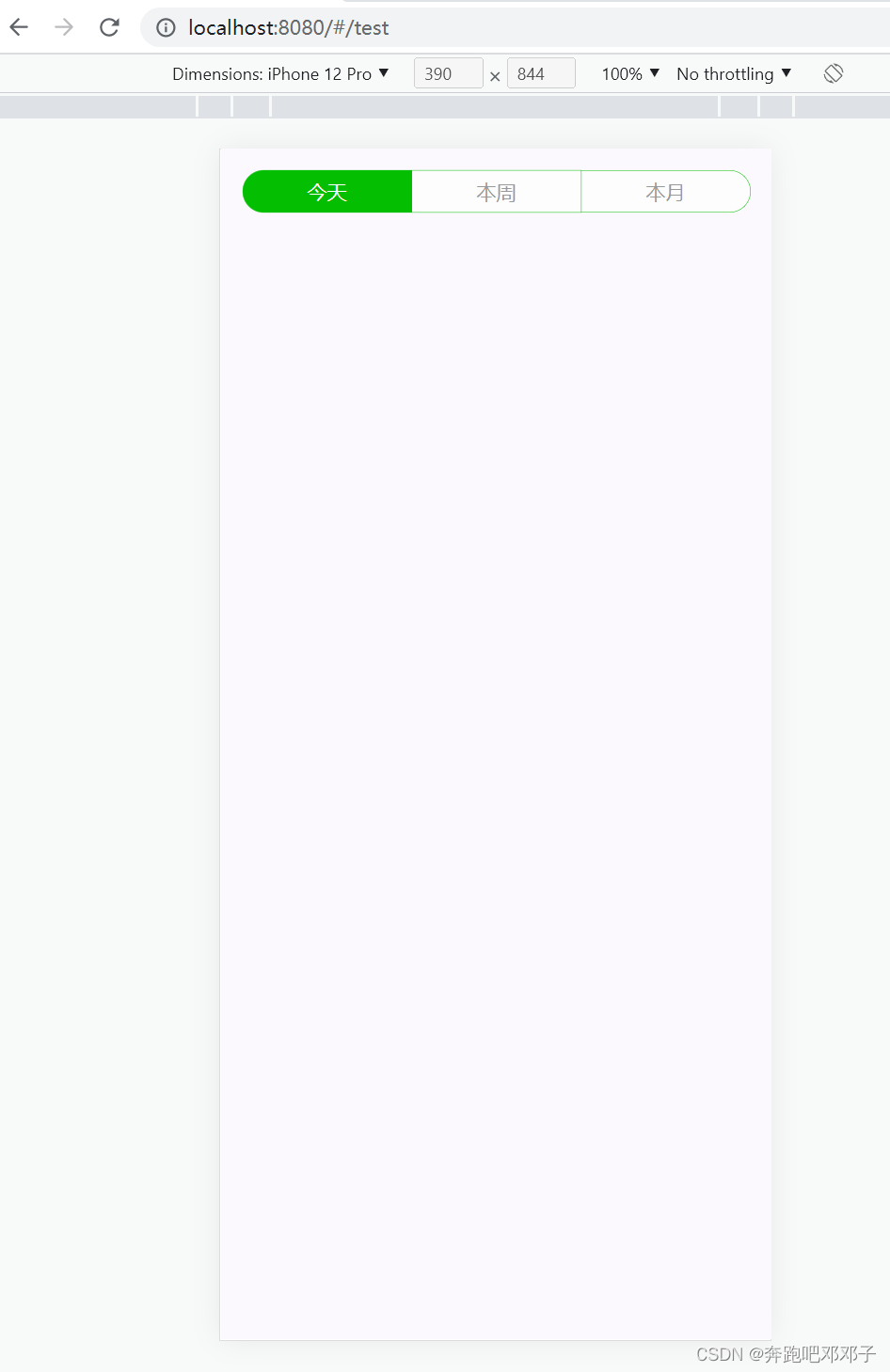
<template> <div style="padding: 15px;"> <button-tab> <button-tab-item selected>{{ today }}</button-tab-item> <button-tab-item>{{ week }}</button-tab-item> <button-tab-item>{{ month }}</button-tab-item> </button-tab> </div> </template> <script> import {ButtonTab, ButtonTabItem} from 'vux' export default { components: { ButtonTab, ButtonTabItem }, data () { return { today: '今天', week: '本周', month: '本月' } } } </script> <style scoped> </style>- 1
- 2
- 3
- 4
- 5
- 6
- 7
- 8
- 9
- 10
- 11
- 12
- 13
- 14
- 15
- 16
- 17
- 18
- 19
- 20
- 21
- 22
- 23
- 24
- 25
- 26
- 27
- 28
- 29
- 30
配置路由 router\index.js :
import Vue from 'vue' import Router from 'vue-router' import HelloWorld from '@/components/HelloWorld' import Test from '@/views/test' Vue.use(Router) export default new Router({ routes: [ { path: '/', name: 'HelloWorld', component: HelloWorld }, { path: '/test', name: 'test', component: Test } ] })- 1
- 2
- 3
- 4
- 5
- 6
- 7
- 8
- 9
- 10
- 11
- 12
- 13
- 14
- 15
- 16
- 17
- 18
- 19
- 20
- 21
访问 http://localhost:8080/#/test :
常见错误:
1.Module build failed: TypeError: this.getOptions is not a function
解决方法:
less 和 less-loader 版本过高,安装低版本:npm install less@3.9.0 less-loader@4.1.0 --save-dev- 1
2.You may use special comments to disable some warnings.
Use // eslint-disable-next-line to ignore the next line.
Use /* eslint-disable */ to ignore all warnings in a file.
解决方法:
原因是开启了 eslint 编码规范检查,修改 build\webpack.base.conf.js ,注释掉以下一行代码://...(config.dev.useEslint ? [createLintingRule()] : []),- 1
②使用模板安装
vue init airyland/vux2 test-t2.0- 1
D:\test>vue init airyland/vux2 test-t2.0 ? Project name test-t2.0 ? Project description A Vue.js project ? Author chaoyue <chaoyue@qq.com> ? Vue build standalone ? Install vue-router? Yes ? Use ESLint to lint your code? Yes ? Pick an ESLint preset Standard ? Setup unit tests No ? Setup e2e tests with Nightwatch? No vue-cli · Generated "test-t2.0". To get started: cd test-t2.0 npm install npm run dev Documentation can be found at https://vuejs-templates.github.io/webpack- 1
- 2
- 3
- 4
- 5
- 6
- 7
- 8
- 9
- 10
- 11
- 12
- 13
- 14
- 15
- 16
- 17
- 18
- 19
- 20
- 21
官网模板的路由是以常量的形式写在 main.js 中,我们改造到 router/index.js 中去:
修改 main.js:// The Vue build version to load with the `import` command // (runtime-only or standalone) has been set in webpack.base.conf with an alias. import Vue from 'vue' import FastClick from 'fastclick' import router from './router' // import VueRouter from 'vue-router' import App from './App' // import Home from './components/HelloFromVux' // // Vue.use(VueRouter) // // const routes = [{ // path: '/', // component: Home // }] // // const router = new VueRouter({ // routes // }) FastClick.attach(document.body) Vue.config.productionTip = false /* eslint-disable no-new */ new Vue({ router, render: h => h(App) }).$mount('#app-box')- 1
- 2
- 3
- 4
- 5
- 6
- 7
- 8
- 9
- 10
- 11
- 12
- 13
- 14
- 15
- 16
- 17
- 18
- 19
- 20
- 21
- 22
- 23
- 24
- 25
- 26
- 27
- 28
- 29
修改 index.js:
import Vue from 'vue' import Router from 'vue-router' // import HelloWorld from '@/components/HelloWorld' import Hello from '@/components/HelloFromVux' import Test from '@/views/test' Vue.use(Router) export default new Router({ routes: [ { path: '/', name: 'Hello', component: Hello }, { path: '/test', name: 'test', component: Test } ] })- 1
- 2
- 3
- 4
- 5
- 6
- 7
- 8
- 9
- 10
- 11
- 12
- 13
- 14
- 15
- 16
- 17
- 18
- 19
- 20
- 21
- 22
启动:
cd test-t2.0 npm install npm run dev- 1
- 2
- 3
访问 http://localhost:8080/

(4)安装 axios
npm install axios --save-dev- 1
(5)安装 vuex
npm install vuex --save-dev- 1
2.vue-cli 3.x 项目
(1)创建
vue create test- 1
-
相关阅读:
origin中optimal cluster安装报错解决
Jenkins教程-20-常用插件-Parameterized Trigger
CSS复习笔记
【笔试强训】day1
创建型设计模式
详解 SSL(三):SSL 证书该如何选择?
这17个小工具,让我的开发效率提升了50%
前端国密SM4加密代码
通过Docker安装ElasticSearch和Kibana
Maya常见的3个问题,这么解决准没错
- 原文地址:https://blog.csdn.net/u012069313/article/details/126283833