-
仿真鸟群-Python实现(Win11)
参考书籍《Python极客项目编程》。
运行环境
操作系统Win11。
Python 3.10.5。
电脑连接互联网。
安装相关包
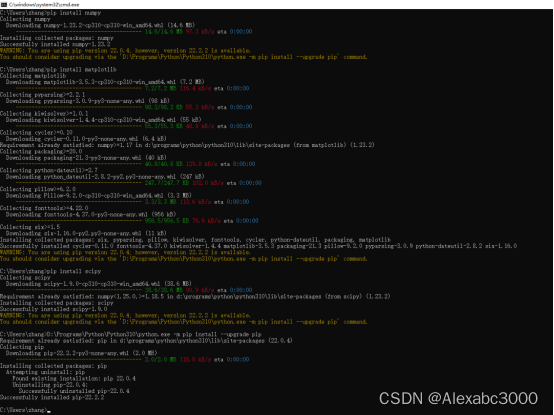
在命令行窗口使用pip命令(我的电脑上,“pip.exe”文件所在目录是“D:\Programs\Python\Python310\Scripts”)安装numpy、matplotlib、scipy等相关包,命令如下:
pip install numpy
pip install matplotlib
pip install scipy
并根据提示使用如下命令升级:
D:\Programs\Python\Python310\python.exe -m pip install --upgrade pip
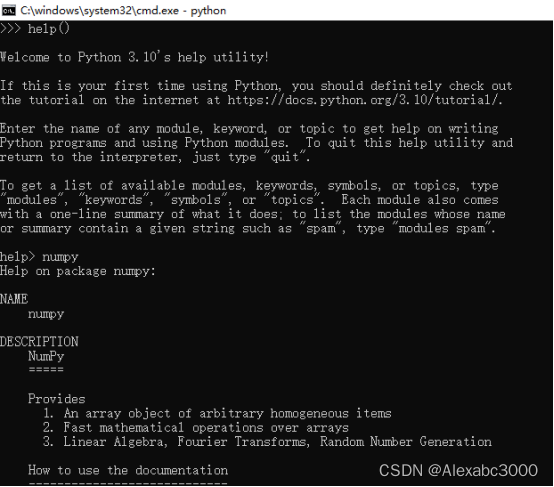
安装包相关信息的查看(以numpy为例)
启动python,进入python提示符,依次键入import numpy、print(numpy)、dir(numpy);或者help()、numpy,显示该模块的相关信息。(help(numpy)也可以)。

源代码
源代码网址: pp/boids.py at master · electronut/pp · GitHub
源代码如下:
- """
- boids.py
- Implementation of Craig Reynold's BOIDs
- Author: Mahesh Venkitachalam
- """
- import sys, argparse
- import math
- import numpy as np
- import matplotlib.pyplot as plt
- import matplotlib.animation as animation
- from scipy.spatial.distance import squareform, pdist, cdist
- from numpy.linalg import norm
- width, height = 640, 480
- class Boids:
- """Class that represents Boids simulation"""
- def __init__(self, N):
- """ initialize the Boid simulation"""
- # init position & velocities
- self.pos = [width/2.0, height/2.0] + 10*np.random.rand(2*N).reshape(N, 2)
- # normalized random velocities
- angles = 2*math.pi*np.random.rand(N)
- self.vel = np.array(list(zip(np.sin(angles), np.cos(angles))))
- self.N = N
- # min dist of approach
- self.minDist = 25.0
- # max magnitude of velocities calculated by "rules"
- self.maxRuleVel = 0.03
- # max maginitude of final velocity
- self.maxVel = 2.0
- def tick(self, frameNum, pts, beak):
- """Update the simulation by one time step."""
- # get pairwise distances
- self.distMatrix = squareform(pdist(self.pos))
- # apply rules:
- self.vel += self.applyRules()
- self.limit(self.vel, self.maxVel)
- self.pos += self.vel
- self.applyBC()
- # update data
- pts.set_data(self.pos.reshape(2*self.N)[::2],
- self.pos.reshape(2*self.N)[1::2])
- vec = self.pos + 10*self.vel/self.maxVel
- beak.set_data(vec.reshape(2*self.N)[::2],
- vec.reshape(2*self.N)[1::2])
- def limitVec(self, vec, maxVal):
- """limit magnitide of 2D vector"""
- mag = norm(vec)
- if mag > maxVal:
- vec[0], vec[1] = vec[0]*maxVal/mag, vec[1]*maxVal/mag
- def limit(self, X, maxVal):
- """limit magnitide of 2D vectors in array X to maxValue"""
- for vec in X:
- self.limitVec(vec, maxVal)
- def applyBC(self):
- """apply boundary conditions"""
- deltaR = 2.0
- for coord in self.pos:
- if coord[0] > width + deltaR:
- coord[0] = - deltaR
- if coord[0] < - deltaR:
- coord[0] = width + deltaR
- if coord[1] > height + deltaR:
- coord[1] = - deltaR
- if coord[1] < - deltaR:
- coord[1] = height + deltaR
- def applyRules(self):
- # apply rule #1 - Separation
- D = self.distMatrix < 25.0
- vel = self.pos*D.sum(axis=1).reshape(self.N, 1) - D.dot(self.pos)
- self.limit(vel, self.maxRuleVel)
- # different distance threshold
- D = self.distMatrix < 50.0
- # apply rule #2 - Alignment
- vel2 = D.dot(self.vel)
- self.limit(vel2, self.maxRuleVel)
- vel += vel2;
- # apply rule #1 - Cohesion
- vel3 = D.dot(self.pos) - self.pos
- self.limit(vel3, self.maxRuleVel)
- vel += vel3
- return vel
- def buttonPress(self, event):
- """event handler for matplotlib button presses"""
- # left click - add a boid
- if event.button is 1:
- self.pos = np.concatenate((self.pos,
- np.array([[event.xdata, event.ydata]])),
- axis=0)
- # random velocity
- angles = 2*math.pi*np.random.rand(1)
- v = np.array(list(zip(np.sin(angles), np.cos(angles))))
- self.vel = np.concatenate((self.vel, v), axis=0)
- self.N += 1
- # right click - scatter
- elif event.button is 3:
- # add scattering velocity
- self.vel += 0.1*(self.pos - np.array([[event.xdata, event.ydata]]))
- def tick(frameNum, pts, beak, boids):
- #print frameNum
- """update function for animation"""
- boids.tick(frameNum, pts, beak)
- return pts, beak
- # main() function
- def main():
- # use sys.argv if needed
- print('starting boids...')
- parser = argparse.ArgumentParser(description="Implementing Craig Reynold's Boids...")
- # add arguments
- parser.add_argument('--num-boids', dest='N', required=False)
- args = parser.parse_args()
- # number of boids
- N = 100
- if args.N:
- N = int(args.N)
- # create boids
- boids = Boids(N)
- # setup plot
- fig = plt.figure()
- ax = plt.axes(xlim=(0, width), ylim=(0, height))
- pts, = ax.plot([], [], markersize=10,
- c='k', marker='o', ls='None')
- beak, = ax.plot([], [], markersize=4,
- c='r', marker='o', ls='None')
- anim = animation.FuncAnimation(fig, tick, fargs=(pts, beak, boids),
- interval=50)
- # add a "button press" event handler
- cid = fig.canvas.mpl_connect('button_press_event', boids.buttonPress)
- plt.show()
- # call main
- if __name__ == '__main__':
- main()
运行结果
将上述代码保存为文件“d:\temp\boids.py”。
在命令行窗口执行命令 “python d:\temp\boids.py”,运行结果如下:

-
相关阅读:
内网渗透学习 day1
米哈游、复旦发布,具备感知、大脑、行动的大语言模型“智能体”
java基础语法,,220811,,
EWSD交换机加电过程
“非旺玖原装的PL2303,......“解决办法
c++day3
AWS考试认证学习
Python可视化应用实战案例30篇(一)-基础绘图命令详解含大量示例代码(附Python代码)
在人物第一次死亡后会退出第一个循环,图片却一直卡在人物死亡的画面不动而不是重新开始(标签-游戏)
JAVA基础算法(8)----- 设计循环双端队列
- 原文地址:https://blog.csdn.net/Alexabc3000/article/details/126512405
