-
Vue--Router--解决watch监听路由无效的问题
原文网址:Vue--Router--解决watch监听路由无效的问题_IT利刃出鞘的博客-CSDN博客
简介
说明
本文用实例介绍如何解决watch监听路由无效的问题。
需求
有两个组件:CompA和CompB,它们对应的path分别是:/compA、/compB。CompA组件引入CompB组件,并通过router-link跳转到B组件。想在CompA和CompB两个组件中打印出路由跳转的日志。
问题复现
代码
路由(router/index.js)
- import Vue from 'vue'
- import VueRouter from 'vue-router'
- import CompA from '../components/CompA'
- import CompB from '../components/CompB'
- Vue.use(VueRouter)
- const routes = [
- {
- path: '/compA',
- name: 'CompA',
- component: CompA
- },
- {
- path: '/compB',
- name: 'CompB',
- component: CompB
- }
- ]
- const router = new VueRouter({
- routes
- })
- export default router
A组件
- <template>
- <div class="outer">
- <div>
- 这是CompA
- div>
- <router-link :to="{name:'CompB'}">跳转到CompBrouter-link>
- div>
- template>
- <script>
- export default {
- name: 'CompA',
- watch: {
- $route: {
- handler (to, from) {
- console.log('组件:' + this.$options.name)
- console.log('来自:' + from.name)
- console.log('去往:' + to.name)
- }
- }
- // 也可以这么写:
- // $route (to, from) {
- // console.log('组件:' + this.$options.name)
- // console.log('来自:' + from.name)
- // console.log('去往:' + to.name)
- // }
- }
- }
- script>
- <style scoped>
- .outer {
- margin: 20px;
- border: 2px solid blue;
- padding: 20px;
- }
- style>
B组件
- <template>
- <div class="outer">
- 这是CompB
- div>
- template>
- <script>
- export default {
- name: 'CompB',
- watch: {
- $route: {
- handler (to, from) {
- console.log('组件:' + this.$options.name)
- console.log('来自:' + from.name)
- console.log('去往:' + to.name)
- }
- }
- }
- }
- script>
- <style scoped>
- .outer {
- margin: 20px;
- border: 2px solid blue;
- padding: 20px;
- }
- style>
测试
访问:http://localhost:8080/#/compA

可以发现:没有打印任何路由变化的日志!
解决方案
方案1:immediate: true
watch的属性:immediate: true //一旦监听到路由的变化立即执行
代码
只修改watch部分,改为:
- watch: {
- $route: {
- handler (to, from) {
- console.log('组件:' + this.$options.name)
- console.log('来自:' + from)
- console.log('去往:' + to.name)
- },
- immediate: true
- }
- }
测试
访问:http://localhost:8080/#/compA
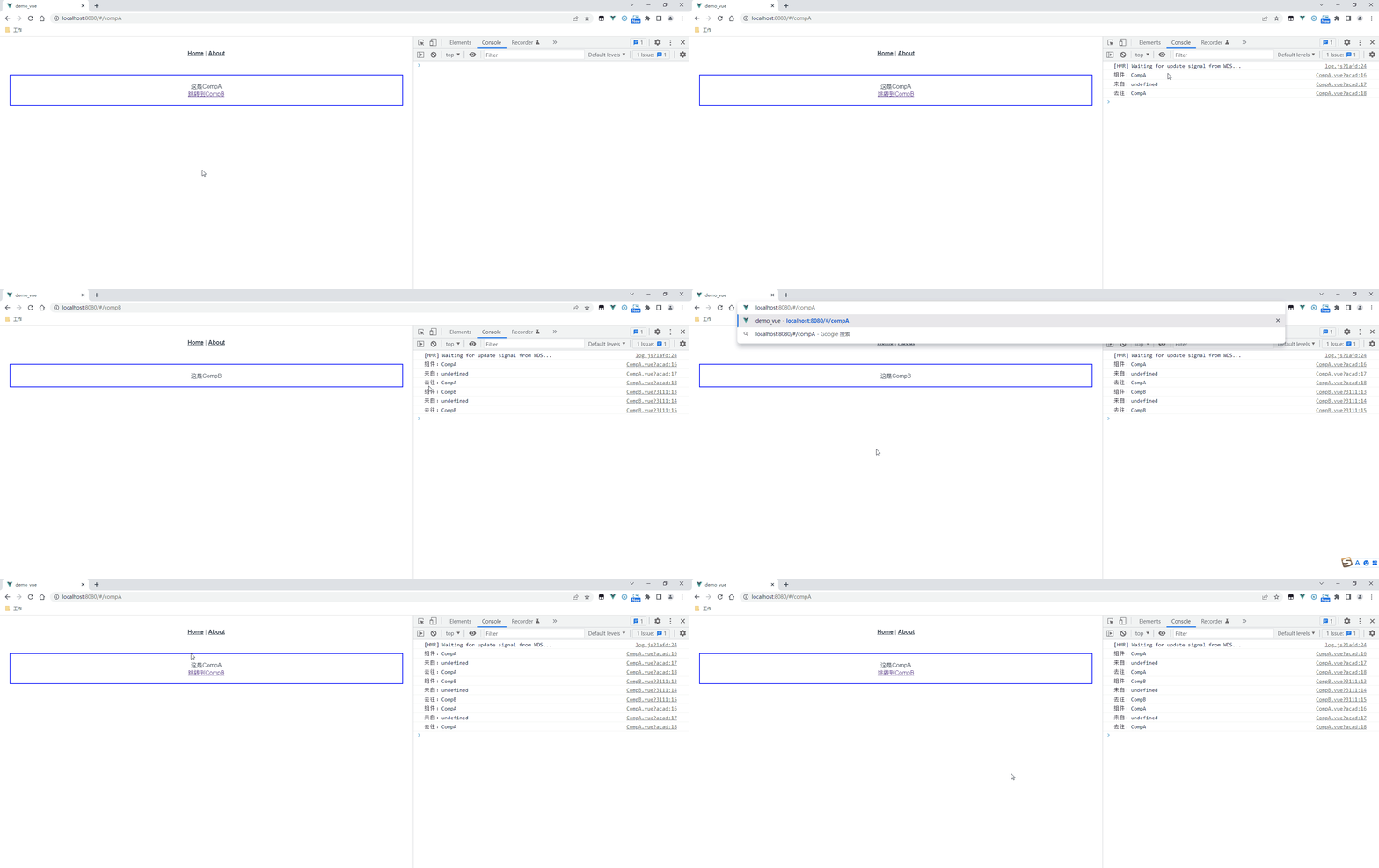
可以发现:子路由之间的跳转只能获得目的路由,无法获得来源路由。
方案2:路由包含子路由
代码
路由设置(router/index.js)
- import Vue from 'vue'
- import VueRouter from 'vue-router'
- import Parent from '../components/Parent'
- import CompA from '../components/CompA'
- import CompB from '../components/CompB'
- Vue.use(VueRouter)
- const routes = [
- {
- path: '/',
- name: 'Parent',
- component: Parent,
- children: [
- {
- path: 'compA',
- name: 'CompA',
- component: CompA
- },
- {
- path: 'compB',
- name: 'CompB',
- component: CompB
- }
- ]
- }
- ]
- const router = new VueRouter({
- routes
- })
- export default router
父组件(components/Parent.vue)
- <template>
- <div class="outer">
- <div>
- 这是CompA
- div>
- <router-link :to="{name:'CompB'}">跳转到CompBrouter-link>
- div>
- template>
- <script>
- export default {
- name: 'CompA',
- watch: {
- $route: {
- handler (to, from) {
- console.log('组件:' + this.$options.name)
- console.log('来自:' + from.name)
- console.log('去往:' + to.name)
- }
- }
- }
- }
- script>
- <style scoped>
- .outer {
- margin: 20px;
- border: 2px solid blue;
- padding: 20px;
- }
- style>
子组件(components/CompA.vue)
- <template>
- <div class="outer">
- <div>
- 这是CompA
- div>
- <router-link :to="{name:'CompB'}">跳转到CompBrouter-link>
- div>
- template>
- <script>
- export default {
- name: 'CompA',
- watch: {
- $route: {
- handler (to, from) {
- console.log('组件:' + this.$options.name)
- console.log('来自:' + from.name)
- console.log('去往:' + to.name)
- }
- }
- }
- }
- script>
- <style scoped>
- .outer {
- margin: 20px;
- border: 2px solid blue;
- padding: 20px;
- }
- style>
子组件(components/CompB.vue)
- <template>
- <div class="outer">
- 这是CompB
- div>
- template>
- <script>
- export default {
- name: 'CompB',
- watch: {
- $route: {
- handler (to, from) {
- console.log('组件:' + this.$options.name)
- console.log('来自:' + from.name)
- console.log('去往:' + to.name)
- }
- }
- }
- }
- script>
- <style scoped>
- .outer {
- margin: 20px;
- border: 2px solid blue;
- padding: 20px;
- }
- style>
测试
测试1:CompA跳转CompB
访问:http://localhost:8080/#/compA

可以发现:子路由之间的跳转可以获得来源路由和目的路由。
测试2:Parent跳转CompA,CompA跳转CompB

可以发现:父=> 子、子=> 子、子=> 父,这三个之间的跳转可以获得来源路由和目的路由。
-
相关阅读:
基于SSH开发网络在线考试系统
「运维有小邓」如何更有效的避免密码攻击
【Android】【Gradle】
解析ajax服务请求——客户端的数据配置解析——服务端node的接收数据的解析——其他状态——fetch——ajax封装fetch
C++:指针
Learning with Mini-Batch
echart双柱状图
拼多多电商API接口详情
我的创作纪念日,成为创作者的第1024天。| ⑰【知识图谱·跨模态·自监督学习SSL】知识增强型推荐系统,跨模态对比学习方案 | 附:分享两款好用的WOS文献阅读插件
阿里云CDN缓存配置及优化-oss绑定CDN缓存自动刷新功能
- 原文地址:https://blog.csdn.net/feiying0canglang/article/details/126275930
