-
threejs绘制线并且可以设置线的宽度
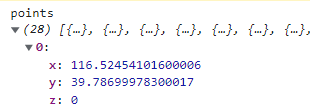
points格式:
import {LineGeometry} from 'three/examples/jsm/lines/LineGeometry'; import {LineMaterial} from 'three/examples/jsm/lines/LineMaterial'; import {Line2} from 'three/examples/jsm/lines/Line2'; drawLine(points, index) { const coordinates = points.map(item => { return [item.x, item.y, item.z]; }); const pts = []; if (coordinates && coordinates.length) { coordinates.forEach(v => { const coord = this.customCoords.lngLatToCoord(v); pts.push(...coord, 0); }); const geometry = new LineGeometry(); geometry.setPositions(pts); const material = new LineMaterial({ linewidth: 5 }); // 改变颜色 material.color.setStyle(_color); // 透明度 material.opacity=0.5; material.transparent=true; material.resolution.set(window.innerWidth, window.innerHeight); this[`line${index}`] = new Line2(geometry, material); this[`line${index}`].computeLineDistances(); this[`line${index}`].position.setZ(0.2); // 更新颜色 // this[`line${index}`].material.color.setStyle(_color); this.scene.add(this[`line${index}`]); } }- 1
- 2
- 3
- 4
- 5
- 6
- 7
- 8
- 9
- 10
- 11
- 12
- 13
- 14
- 15
- 16
- 17
- 18
- 19
- 20
- 21
- 22
- 23
- 24
- 25
- 26
- 27
- 28
- 29
- 30
- 31
- 32
- 33
- 34
v的格式:

coordinates.forEach(v => { pts.push(new THREE.Vector2(v[0],v[1])); }); const basicLine = new THREE.LineBasicMaterial( { color: 0xff8900, linewidth: 1 }); const shape = new THREE.Shape(pts); const spacedPoints = shape.getSpacedPoints( 100 ); const geometrySpacedPoints = new THREE.BufferGeometry().setFromPoints( spacedPoints ); this.line = new THREE.Line( geometrySpacedPoints, basicLine); this.line.computeLineDistances(); this.line.position.setZ(1); this.scene.add(this.line);- 1
- 2
- 3
- 4
- 5
- 6
- 7
- 8
- 9
- 10
- 11
- 12
- 13
- 14
-
相关阅读:
国内外工业RFID识别厂商介绍
Leedcode【899】. 有序队列——Java解法
Latex在图片中添加文字
接口测试基本知识点
接口自动化测试框架:Pytest+Allure+Excel
七层负载均衡-nginx
Docker 命令详解:容器、镜像、网络和数据卷管理
2022-11-21 mysql列存储引擎-架构实现缺陷梳理-P1
Maven发布自己项目到maven中央仓库
大数据(9g)FlinkCEP
- 原文地址:https://blog.csdn.net/bidepanm/article/details/126510434
