-
Mysql协议分析之slave注册实战(Java版)
警告:下面内容太干了,有条件的大佬自带润滑油
1. 业务场景
业务开发中经常需要根据一些数据变更实现相对应的操作。例如,用户登录P站,购买了一件商品,这时候需要去加积分,积分加完通知钱包扣款,扣款完成后通知短信服务发送短信给用户表示成功(后续的业务可能会进行用户的数据统计等等),如果这时候公司老板需要统计用户的消费信息,月度积分积累,以及用户年月日的消费情况,这时候怎么办?

2. 技术选型
2.1 业务系统
第一种方案直接通过业务系统进行调用,每个业务系统都通过接口进行调用统计中心,将自身的业务数据发送给统计服务,这种方案直接跟业务系统耦合了,而且随着产品的增长,代码量会越来越多,后续人员的维护会非常困难

2.2 canal


2.2.1 简介
canal,译意为水道/管道/沟渠,主要用途是基于 MySQL 数据库增量日志解析,提供增量数据订阅和消费。
2.2.2 工作原理
- canal 模拟 MySQL slave 的交互协议,伪装自己为 MySQL slave ,向 MySQL master 发送dump 协议
- MySQL master 收到 dump 请求,开始推送 binary log 给 slave (即 canal )
- canal 解析 binary log 对象(原始为 byte 流)
2.2.3 优点
apache顶级开源框架,功能比较完备,提供了数据转发MQ的功能,以及客户端订阅功能
2.2.4 弊端
canal采用的使用 C/S 架构,会在服务器上单独部署服务端需要进行维护,如果出现服务端宕机就会导致所有的客户端都接收不了mysql的事件,而且比较重,对于后期的维护难度会非常高
2.3 mysql-binlog-connector
2.3.1 简介
github上面提供的一个开源mysql协议slave封装库,主要用于发起slave请求 https://github.com/osheroff/mysql-binlog-connector-java
2.3.2 工作原理
- canal 模拟 MySQL slave 的交互协议,伪装自己为 MySQL slave ,向 MySQL master 发送dump 协议
- 解析对应的事件
2.3.3 优点
非常轻量级,java开发直接可以嵌入到自己的微服务当中
2.3.4 弊端
太轻了,以至于这个组件就只有封装 slave 请求以及最基本的事件封装,其余什么都没有做,功能都需要自己进行开发
3. 协议扫盲
3.1 什么是协议?
协议,网络协议的简称,网络协议是通信计算机双方必须共同遵从的一组约定。如怎么样建立连接、怎么样互相识别等。只有遵守这个约定,计算机之间才能相互通信交流。它的三要素是:语法、语义、时序。
3.2 mysql协议
客户端与服务端交互协议:https://dev.mysql.com/doc/internals/en/client-server-protocol.html
3.2.1 基本数据类型
在mysql协议中,会有以下三种类型用于定义协议的结构,根据对应的数据类型可以解析出对应协议的格式
- Integer Types:
- 定长整数类型:例如:int<3> 表示3个字节长度的整型,字节存储就为 01 00 00
- 长度编码整数类型 int
:例如:>= 251 && < 2^16,字节格式存储为 fc+2字节整数,如果要解码长度编码需要判断第一个字节的类型;如果小于 251 只需要 1个字节的整数
- String Types:
- 固定长度字符串 string(fx) :已经知道字符串的长度
- 0结尾的字符串 string(NUL):从数据开始一直读取到 [00] 字节结尾
- 可变长字符串 string(var) : 通过解析其它字段获取到当前字符串的长度
- 以长度编码整数为前缀的字符串 string(lenenc):首位是长度编码整数类型,用于定义字符串的长度
- 字符串数据包是最后的组成部分 string(EOF) :长度为整个数据包长度减去当前位置来计算
- Describeing Packets:数据包描述协议,用于描述协议包的类型
3.2.2 mysql数据包
客户端和服务端以最大 16MByte 大小的数据包进行交换,下面是数据包头的结构:
[外链图片转存失败,源站可能有防盗链机制,建议将图片保存下来直接上传(img-bySo0Gmq-1661327746629)(images/1659585504785.png)]
COM_QUIT 断开连接包例子:
字节包 说明 01 00 00 00 01 长度:1
sequence_id:00
协议数据包:0x013.2.3 响应包
- OK_Packet:标识命令执行成功的数据包
数据类型 说明 int<1> 包类型:[00]代表OK包、[fe]代表EOF包 int受影响的行数 int 最后插入的id数 下面通过if else进行判断客户端是否支持的能力 if (capabilities & CLIENT_PROTOCOL_41) { int<2> 状态标识 int<2> 告警计数器 } else if(capabilities & CLIENT_TRANSACTIONS) { int<2> 状态标识 } if status_flags & SERVER_SESSION_STATE_CHANGED { string 会话状态改变信息 if 状态标识 & SERVER_SESSION_STATE_CHANGED { string 会话状态信息 } } else { string 剩余数据就是状态信息 } - 1
- 2
- 3
- 4
- 5
- 6
- 7
- 8
- 9
- 10
- 11
- 12
- 13
- 14
- 15
- 16
- 17
- 18
- 19
- 20
- 21
- 22
- 23
- 24
- 25
- ERR_Packet:错误包
数据类型 说明 int<1> 包类型:[ff]代表错误包 int<2> 错误码 if capabilities & CLIENT_PROTOCOL_41 { string[1] sql状态标记 string[5] sql标记 } string剩下所有的错误信息 - 1
- 2
- 3
- 4
- 5
- 6
- 7
- 8
- EOF_Packet:在MYSQL C/S 协议中,EOF和OK的作用是相同的
数据类型 说明 int<1> 包类型:[fe] if capabilities & CLIENT_PROTOCOL_41 { int[2] 警告数量 int[2] 状态标记 } string剩下所有的错误信息 - 1
- 2
- 3
- 4
- 5
- 6
- 7
- Status Flags:https://dev.mysql.com/doc/internals/en/status-flags.html 状态值说明
3.3 连接生命周期
在mysql中连接生命周期有两个阶段,一个是连接阶段,一个是命令阶段
3.3.1 连接阶段(Connection Phase)
初始握手方式
初始握手方式在mysql中目前有两种
- 普通握手(5点几的版本使用普通握手的方式进行)
- 服务端发送初始握手包
- 客户端响应握手包
- SSL握手(目前mysql8以上的版本都使用的是TLS1.2进行的加密握手)
- 服务端返回初始握手包
- 客户端返回 SSL 连接请求包
- SSL交换连接进行SSL连接
- 客户端发送握手响应包
连接阶段数据包
https://dev.mysql.com/doc/internals/en/connection-phase-packets.html
客户端创建连接时服务端返回的版本号是:HandshakeV10
长度 说明 1 [0a] protocol version #协议版本号 V10 string[NUL] server version #mysql服务端采用的版本号 4 connection id #当前连接的id string[8] auth-plugin-data-part-1 #加密数据 1 [00] filler #填充物 2 capability flags (lower 2 bytes) #能力标识符低2位 if more data in the packet: #下面就是具体数据包数据集 1 character set #采用的编码集 2 status flags #状态标识符 2 capability flags (upper 2 bytes) #扩展服务端能力 if capabilities & CLIENT_PLUGIN_AUTH { 1 length of auth-plugin-data #验证插件的长度 } else { 1 [00] } string[10] reserved (all [00]) #保留位全部是 [00] if capabilities & CLIENT_SECURE_CONNECTION { string[$len] auth-plugin-data-part-2 ($len=MAX(13, length of auth-plugin-data - 8)) if capabilities & CLIENT_PLUGIN_AUTH { string[NUL] auth-plugin name #验证插件的名称插件名称 }- 1
- 2
- 3
- 4
- 5
- 6
- 7
- 8
- 9
- 10
- 11
- 12
- 13
- 14
- 15
- 16
- 17
- 18
- 19
- 20
- 21
- 22
- 23
- 24
- 25
注意点:capability flags整个由4个字节组成,上面包中将能力标识分成高低位进行传输,下面是详细的客户端能力标识位,协议中涉及到的标识位
- CLIENT_PLUGIN_AUTH:0x80000
- CLIENT_SECURE_CONNECTION:0x8000
https://dev.mysql.com/doc/internals/en/capability-flags.html#packet-Protocol::CapabilityFlags
下面是创建mysql连接时,服务端返回的初始数据包

SSLRequest
上面在采用初始握手之后,如果采用SSL进行连接,客户端需要按照下面的包进行返回,目的是将普通的握手升级为SSL
4 capability flags, CLIENT_SSL always set 4 max-packet size 1 character set string[23] reserved (all [0])- 1
- 2
- 3
- 4
上面包的目的是将普通连接,升级为SSL连接,下面的包需要在上面发送之后再发送认证包
4 capability flags 4 max-packet size 1 character set string[23] reserved (all [0]) stringusername用户名设置后的0结尾 string password通过对应的插件加密密码 string schema数据库名称,如果不为空的话(数据库为空,可以不写这个值) string plugin name 插件名称 - 1
- 2
- 3
- 4
- 5
- 6
- 7
- 8
能力标识:
- CLIENT_SSL:0x0800
握手返回数据包
在mysql中为了兼容新老协议的客户端握手响应,使用了两种协议进行区分
- HandshakeResponse41
长度 说明 4 capability flags, CLIENT_PROTOCOL_41 always set #客户端 的能力标识 4 max-packet size #包最大的长度 1 character set #编码方式 string[23] reserved (all [0]) #填充符 string[NUL] username #用户名称以0结尾 if capabilities & CLIENT_PLUGIN_AUTH_LENENC_CLIENT_DATA { #根据客户端能力进行写入 lenenc-int length of auth-response string[n] auth-response } else if capabilities & CLIENT_SECURE_CONNECTION { 1 length of auth-response #数据长度 string[n] auth-response #数据值 } else { string[NUL] auth-response } if capabilities & CLIENT_CONNECT_WITH_DB { #是否直接连接数据库 string[NUL] database #数据库名称 } if capabilities & CLIENT_PLUGIN_AUTH { string[NUL] auth plugin name #插件名称 } if capabilities & CLIENT_CONNECT_ATTRS { #写入扩展字段 lenenc-int length of all key-values #key和values的长度 lenenc-str key lenenc-str value if-more data in 'length of all key-values', more keys and value pairs }- 1
- 2
- 3
- 4
- 5
- 6
- 7
- 8
- 9
- 10
- 11
- 12
- 13
- 14
- 15
- 16
- 17
- 18
- 19
- 20
- 21
- 22
- 23
- 24
- 25
- 26
- 27
- 28
- 29
- HandshakeResponse320
长度 说明 2 capability flags, CLIENT_PROTOCOL_41 never set #客户端 的能力标识 3 max-packet size #包最大的长度 string[NUL] username if capabilities & CLIENT_CONNECT_WITH_DB { string[NUL] auth-response #数据 string[NUL] database #数据库名称 } else { string[EOF] auth-response #数据 }- 1
- 2
- 3
- 4
- 5
- 6
- 7
- 8
- 9
- 10
3.3.2 命令阶段(Command Phase)
在命令阶段客户端需要发送一个,序列号为 [00] 用来标识开启了命令阶段,例如:
13 00 00 00 03 53 ... 01 00 00 00 01 ^^- command-byte (命令类型) ^^---- sequence-id == 0 (序列号)- 1
- 2
- 3
- 4
3.4 常用协议
在mysql协议中一共分为20种子协议进行区分以下列举部分例子:
3.4.1 COM_QUIT
请求包
断开连接命令
1 [01] COM_QUIT 例如:01 00 00 00 01 #三个字节的长度,1个字节的序列号,01就代表类型- 1
- 2
- 3
响应包
OK_Packet
3.4.2 COM_QUERY
请求包
1 [03] 协议类型 string[EOF] 执行的sql语句- 1
- 2
响应包
响应包分为4种类型:
- ERR_Packet
- OK_Packet
- LOCAL_INFILE_Reuqest
- Resultset
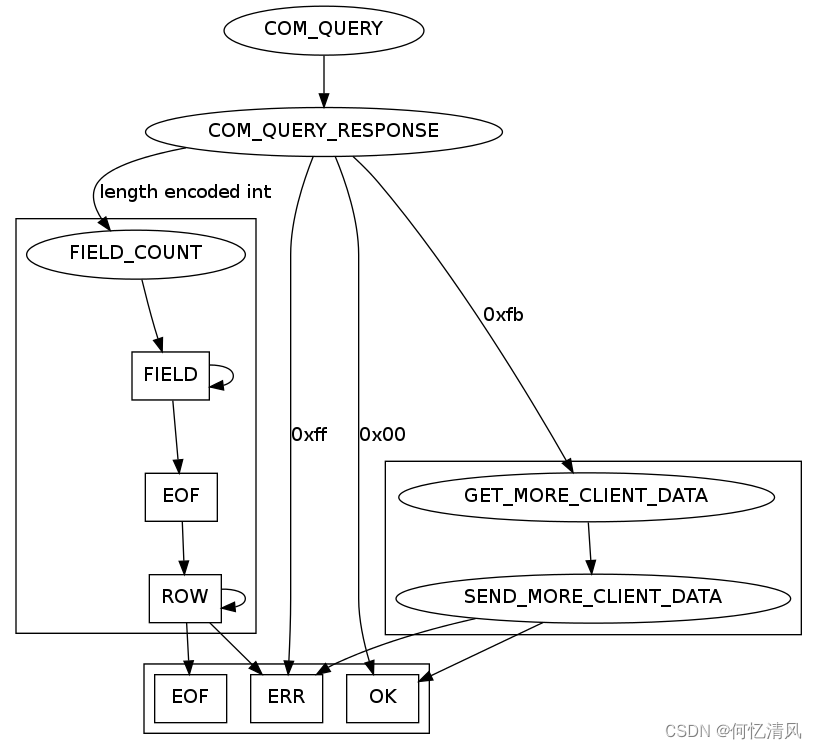
当发起一个查询请求时,会先返回一个 int
类型的整数,表示结果集的数量 payload lenenc-int number of columns in the resultset- 1
- 2
-
如果返回的数据为 0:说明这是一个 OK_Packet 包
-
如果不是一个有效的 int
类型的数据:说明时一个 ERR_Packet 或者是 INFILE 类型的包
Resultset:结果集由一个定义列数的数据包开始,然后就是一个同样数量的列定义数据包,以一个 EOF 包进行分割(如果客户端没有设置 CLIENT_DEPRECATE_EOF 则为数据包)
-
包含一个 LengthEncodeInteger 数据包:用来表示列数
-
ColumnDefinition数据包:列定义数据包
-
根据客户端设置:CLIENT_DEPRECATE_EOF 表示,包含一个 EOF_Packet 包
-
一个或者多个 ResultsetRow,真正存数据的数据包,每列的数据
- 如果为空发送 0xfb
- 其他的所有内容通过 string
进行数据的编码
-
ERR_Packet或者 EOF_Packet 进行结尾
Java示例:上面进行读取时可以通过 EOF_Packet 进行分割读取
private ResultSetRowPacket[] readResult(PacketChannel channel) throws IOException { //先读取出列数的数据包,可以不使用,channel.read();读取整个数据包 byte[] statementResults = channel.read(); //跳过不是 0xFE 的包,如果是 0xFE数据分割,这里跳过的是列定义的数据包 while (channel.read()[0] != (byte) 0xFE) { } List<ResultSetRowPacket> resultSet = new LinkedList(); byte[] bytes; //读取 ResultSetRow 的数据包,如果读取到 0xFE或者0xFF 就退出 while ((bytes = channel.read())[0] != (byte) 0xFE) { //需要验证是否是0xFF包,错误包 resultSet.add(new ResultSetRowPacket(bytes)); } return resultSet.toArray(new ResultSetRowPacket[0]); }- 1
- 2
- 3
- 4
- 5
- 6
- 7
- 8
- 9
- 10
- 11
- 12
- 13
- 14
3.4.3 COM_REGISTER_SLAVE
注册从服务协议
请求包
1 [15] 协议id 4 服务id,不能重复 1 从协议的ip地址长度 string[$len] ip地址 1 用户名长度 string[$len] 从服务用户名 1 密码长度 string[$len] 从服务密码 2 从服务mysql端口 4 可以忽略,副本的排名 4 主mysql的id,通常为o- 1
- 2
- 3
- 4
- 5
- 6
- 7
- 8
- 9
- 10
- 11
响应包
OK_Pakcet 或者 ERR_Packet
3.4.4 COM_BINLOG_DUMP
binlog监听协议:
- 在使用此协议时,8.0之前需要先注册slave用于进行监听
- 在8.0之后的版本,通过当前协议的标识符,可以直接开启一个网络流,就不需要再注册slave了
请求包
1 [12] 协议id 4 binlog的写位置 2 标识符,在8.0之后可以写入 0x01,表示不阻塞 4 服务id string[EOF] binlog文件名称- 1
- 2
- 3
- 4
- 5
响应包
- 一个 binlog 的网络流
- ERR_Packet
- 或者设置表示符为0x01后,返回的EOF_Packet
3.4.5 COM_BINLOG_DUMP_GTID
在mysql5.6版本开始的新特性,保证事务id在集群中的唯一性用于故障回复以及容错能力,需要在mysql配置中开启,可以在mysql中通过 select @@gtid_mode; 查询是否开启
请求包
1 [1e] 协议类型 2 标识符,有三个 0x01、0x02、0x04 4 服务id 4 binlog名称长度 string[len] binlog文件名称 8 binlog写入的位置 if flags & BINLOG_THROUGH_GTID { 4 数据长度 string[len] 数据 }- 1
- 2
- 3
- 4
- 5
- 6
- 7
- 8
- 9
- 10
3.5 Binlog Event
3.5.1 头部协议
4 时间戳 1 事件类型:https://dev.mysql.com/doc/internals/en/binlog-event-type.html 4 服务id 4 事件数据长度 if binlog-version > 1: 4 下一个事件的位置 2 binlog的标识符:https://dev.mysql.com/doc/internals/en/binlog-event-flag.html- 1
- 2
- 3
- 4
- 5
- 6
- 7
3.5.2 事件类型
二进制协议将 NULL 值作为位图进行发送,而不是像前面 ResultsetRow 发送完整字节(查询),如果发送的数据 NULL值比较多,使用 null-bitmap发送更加节省空间


QUERY_TYPE_EVENT
4 线程id 4 执行的事件 1 数据库名称的长度 2 错误码 if binlog-version ≥ 4: 2 状态变量长度 string[$len] 状态值变量 string[$len] 数据库名称,通过上面的数据库名称长度决定 1 [00] string[EOF] 剩下所有的数据为查询语句- 1
- 2
- 3
- 4
- 5
- 6
- 7
- 8
- 9
- 10
- 11
TABLE_MAP_EVENT
在进行表写入或者修改时,会发送当前时间用于通知当前表的字段结构以及类型
post-header: 6 table_id #表id 2 flags payload: 1 schema name length #数据库名称的长度 string schema name #数据库名称 1 [00] 1 table name length #表名长度 string table name #表名 1 [00] lenenc-int column-count #列的数量 string.var_len [length=$column-count] column-def #列定义的数组,每个字段类型一个字节 lenenc-str column-meta-def #元信息数组,长度是元信息数组的总长度,每个元信息的长度取决于列字段的类型 n NULL-bitmask, length: (column-count + 8) / 7 #位图掩码,包含每一列的位图- 1
- 2
- 3
- 4
- 5
- 6
- 7
- 8
- 9
- 10
- 11
- 12
- 13
- 14
- 15
ROWS_EVENT
- UPDATE_ROWS_EVENT:修改事件
- WRITE_ROWS_EVENT:写事件
- DELETE_ROWS_EVENT:删除事件
以上三个事件,在mysql5.6.x以后的版本使用v2的版本,5.1.15到5.6.x使用v1版本,5.1.10到5.1.15使用v0版本,
这里我使用的是8.0.18以后的版本使用的是v1版本进行解析;
说明: 在mysql每次进行表数据修改时,都会发布一个 TABLE_MAP_EVENT 时间用于通知当前表的结构,其中包含每个字段的类型
header: 6 table_id #6个字节为表id 2 flags #标识符 if version == 2 { #版本号 2 extra-data-length #额外数据的长度 string.var_len extra-data } body: lenenc_int number of columns #列的数量 string.var_len columns-present-bitmap1, length: (num of columns+7)/8 #根据列的长度加上7然后除以8获取到列的长度 if UPDATE_ROWS_EVENTv1 or v2 { string.var_len columns-present-bitmap2, length: (num of columns+7)/8 } rows: string.var_len nul-bitmap, length (bits set in 'columns-present-bitmap1'+7)/8 #返回可能为null的位图(如果是修改,这个字段是修改前的数据) string.var_len value的类型值定义在table-map事件中 if UPDATE_ROWS_EVENTv1 or v2 { string.var_len nul-bitmap, length (bits set in 'columns-present-bitmap2'+7)/8 #这个值是修改后的数据索引(标识哪个字段是为null) string.var_len value的类型值定义在table-map事件中 }- 1
- 2
- 3
- 4
- 5
- 6
- 7
- 8
- 9
- 10
- 11
- 12
- 13
- 14
- 15
- 16
- 17
- 18
- 19
- 20
- 21
- 22
- 23
- 24
- 25
在 ROW_EVENT事件中,mysql对null的值的发送采用的是 null-bitmap 进行发送数据,相对于全值发送更加的节省空间,下面是计算的方式
NULL-bitmap-byte = ((field-pos + offset) / 8) #计算字节位
NULL-bitmap-bit = ((field-pos + offset) % 8) #计算位的位
Resultset Row, 9 fields, 9th field is a NULL (9th field -> field-index == 8, offset == 2) nulls -> [00] [00] byte_pos = (10 / 8) = 1 bit_pos = (10 % 8) = 2 #一个字节8位,通过字段跟8进行取莫,可以分布在 0 - 7之间 nulls[byte_pos] |= 1 << bit_pos nulls[1] |= 1 << 2; #通过左移异取值 nulls -> [00] [04]- 1
- 2
- 3
- 4
- 5
- 6
- 7
- 8
- 9
- 10
- 11
取值的算法:
public void test_bitmap() { Integer[] values = {1,2,3,null}; //设置初始索引数据值 byte[] bytes = new byte[(values.length + 7) >> 3]; for (int i = 0; i < values.length; i++) { if (values[i] != null) { //通过算法设置对应位的数据 bytes[(i + 2) >> 3] |= (1 << ((i + 2) % 8)); } } //通过BitSet获取到对应索引数据 BitSet set = new BitSet(); for (int i = 0; i < values.length; i++) { if ((bytes[(i + 2) >> 3] & (1 << ((i + 2) % 8))) != 0) { set.set(i); } } System.out.println(set.toString()); }- 1
- 2
- 3
- 4
- 5
- 6
- 7
- 8
- 9
- 10
- 11
- 12
- 13
- 14
- 15
- 16
- 17
3.6 代码实战
下面是根据 mysql-binlog-connector 进行的一个简单的通过握手然后监听 binlog 的流程实战
3.6.1 connector
- 开启Socket连接mysql,获取到 mysql server端的响应
- 解析mysql initial packet
- 通过SSL发送请求,将socket升级为 TLS 请求
- 根据返回的加密插件,通过插件对密码进行加密后进行发送
- 判断是否登录成功
- 通过 show master status 查询当前 mysql server的 binlog 状态
- 查询 binlog_checksum 通过4个额外字节做校检应用
- 查询服务id
- 发送 binlog dump的消息
- 监听binlog网络流
public void test_connector() throws IOException { Socket socket = new Socket(); socket.connect(new InetSocketAddress("localhost", 3306)); //对包连接进行封装一层,初始化连接时,服务端会返回初始的握手包 PacketChannel channel = new PacketChannel(socket); //读取首次发送请求返回的数据信息 byte[] initialHandshakePacket = channel.read(); GreetingPacket greetingPacket = new GreetingPacket(initialHandshakePacket); System.out.println(greetingPacket); SSLRequestCommand sslRequestCommand = new SSLRequestCommand(); //通过将mysql返回的服务端的支持的各种能力参数设置到 ssl请求的实体中,再调用 toByteArray 会进行计算,详细参数可以查看mysql文档 sslRequestCommand.setCollation(greetingPacket.getServerCollation()); //发送ssl请求的参数 channel.write(sslRequestCommand); //将管道连接升级为 SSL进行连接 channel.upgradeToSSL(SocketFactory.SSL_SOCKET_FACTORY); //进行密码的发送,服务端返回的加密插件进行加密 Command authenticateCommand; authenticateCommand = getAuthenticateCommand(greetingPacket); channel.write(authenticateCommand); //读取响应体 byte[] authenticationResult = channel.read(); //判断第1个包是否为0x00 switch (authenticationResult[0]) { case (byte) 0x00: // success break; case (byte) 0xFF: // error byte[] bytes = Arrays.copyOfRange(authenticationResult, 1, authenticationResult.length); ErrorPacket errorPacket = new ErrorPacket(bytes); throw new AuthenticationException(errorPacket.getErrorMessage(), errorPacket.getErrorCode(), errorPacket.getSqlState()); case (byte) 0xFE: break; } //验证完成,需要将 packetNumber 置为0开始新一轮的登录 channel.authenticationComplete(); //拉取binlog文件,获取到binlog的名称以及position channel.write(new QueryCommand("show master status")); ResultSetRowPacket[] resultSetRowPackets = readResult(channel); ResultSetRowPacket resultSetRow = resultSetRowPackets[0]; String binlogFilename = resultSetRow.getValue(0); long binlogPosition = Long.parseLong(resultSetRow.getValue(1)); System.out.println("binlog文件名:" + binlogFilename + "binlog位置信息:" + binlogPosition); //查询到 binlog_checksum channel.write(new QueryCommand("show global variables like 'binlog_checksum'")); ResultSetRowPacket[] rowPackets = readResult(channel); String upperCase = rowPackets[0].getValue(1).toUpperCase(); if ("CRC32".equals(upperCase)) { channel.write(new QueryCommand("set @master_binlog_checksum= @@global.binlog_checksum")); byte[] statementResult = channel.read(); } //设置服务的id channel.write(new QueryCommand("select @@server_id")); ResultSetRowPacket[] readResult = readResult(channel); long serverId = Long.parseLong(readResult[0].getValue(0)); //发起 binlog的请求 DumpBinaryLogCommand command = new DumpBinaryLogCommand(serverId, binlogFilename, binlogPosition); channel.write(command); //获取到对应的输入流进行读取 binlog 的二进制日志流 ByteArrayInputStream inputStream = channel.getInputStream(); try { while (inputStream.peek() != -1) { //读取包的长度 int packetLength = inputStream.readInteger(3); //跳过sequence_id inputStream.skip(1L); int marker = inputStream.read(); //兼容数据包是否大于16m ByteArrayInputStream byteArrayInputStream = packetLength == 16777215 ? new ByteArrayInputStream(readPacketSplitInChunks(inputStream, packetLength)) : inputStream; EventHeader header = new EventHeader(); header.setTimestamp(byteArrayInputStream.readLong(4) * 1000L); header.setEventType(byteArrayInputStream.readInteger(1)); header.setServerId(byteArrayInputStream.readLong(4)); header.setEventLength(byteArrayInputStream.readLong(4)); header.setNextPosition(byteArrayInputStream.readLong(4)); header.setFlags(byteArrayInputStream.readInteger(2)); } } catch (Exception v) { System.out.println(v.getMessage()); } }- 1
- 2
- 3
- 4
- 5
- 6
- 7
- 8
- 9
- 10
- 11
- 12
- 13
- 14
- 15
- 16
- 17
- 18
- 19
- 20
- 21
- 22
- 23
- 24
- 25
- 26
- 27
- 28
- 29
- 30
- 31
- 32
- 33
- 34
- 35
- 36
- 37
- 38
- 39
- 40
- 41
- 42
- 43
- 44
- 45
- 46
- 47
- 48
- 49
- 50
- 51
- 52
- 53
- 54
- 55
- 56
- 57
- 58
- 59
- 60
- 61
- 62
- 63
- 64
- 65
- 66
- 67
- 68
- 69
- 70
- 71
- 72
- 73
- 74
- 75
- 76
- 77
- 78
- 79
- 80
- 81
- 82
- 83
- 84
- 85
- 86
- 87
- 88
- 89
- 90
- 91
3.6.2 channel
只是将 socket 进行封装,并且封装了ssl升级的方法以及写入和读取的操作
public class PacketChannel implements Channel { //发送包数 private int packetNumber; //是否验证完成 private boolean authenticationComplete; //是否是ssl private boolean isSSL; //套接字 private Socket socket; //输入流 private ByteArrayInputStream inputStream; //输出流 private ByteArrayOutputStream outputStream; public PacketChannel(String hostname, int port) throws IOException { this(new Socket(hostname, port)); } public PacketChannel(Socket socket) throws IOException { this.packetNumber = 0; this.isSSL = false; this.socket = socket; this.inputStream = new ByteArrayInputStream(new BufferedSocketInputStream(socket.getInputStream())); this.outputStream = new ByteArrayOutputStream(socket.getOutputStream()); } public ByteArrayInputStream getInputStream() { return this.inputStream; } public ByteArrayOutputStream getOutputStream() { return this.outputStream; } public void authenticationComplete() { this.authenticationComplete = true; } public byte[] read() throws IOException { //通过读取头部的3个字节确定包的长度,一次性读一个整包 int length = this.inputStream.readInteger(3); int sequence = this.inputStream.read(); if (sequence != this.packetNumber++) { throw new IOException("unexpected sequence #" + sequence); } else { return this.inputStream.read(length); } } public void write(Command command) throws IOException { //发送协议数据 byte[] body = command.toByteArray(); ByteArrayOutputStream buffer = new ByteArrayOutputStream(); //先写包的长度 buffer.writeInteger(body.length, 3); if (this.authenticationComplete) { this.packetNumber = 0; } //写入序列id buffer.writeInteger(this.packetNumber++, 1); //写入消息 buffer.write(body, 0, body.length); this.outputStream.write(buffer.toByteArray()); this.outputStream.flush(); } public void upgradeToSSL(SSLSocketFactory sslSocketFactory) throws IOException { //通过 SSL工厂,将当前socket套接字升级为 SSL SSLSocket sslSocket = sslSocketFactory.createSocket(this.socket); sslSocket.startHandshake(); this.socket = sslSocket; //替换原有的输入输出流 this.inputStream = new ByteArrayInputStream(sslSocket.getInputStream()); this.outputStream = new ByteArrayOutputStream(sslSocket.getOutputStream()); this.isSSL = true; } public boolean isSSL() { return this.isSSL; } public boolean isOpen() { return !this.socket.isClosed(); } public void close() throws IOException { try { this.socket.shutdownInput(); } catch (Exception var3) { } try { this.socket.shutdownOutput(); } catch (Exception var2) { } this.socket.close(); } }- 1
- 2
- 3
- 4
- 5
- 6
- 7
- 8
- 9
- 10
- 11
- 12
- 13
- 14
- 15
- 16
- 17
- 18
- 19
- 20
- 21
- 22
- 23
- 24
- 25
- 26
- 27
- 28
- 29
- 30
- 31
- 32
- 33
- 34
- 35
- 36
- 37
- 38
- 39
- 40
- 41
- 42
- 43
- 44
- 45
- 46
- 47
- 48
- 49
- 50
- 51
- 52
- 53
- 54
- 55
- 56
- 57
- 58
- 59
- 60
- 61
- 62
- 63
- 64
- 65
- 66
- 67
- 68
- 69
- 70
- 71
- 72
- 73
- 74
- 75
- 76
- 77
- 78
- 79
- 80
- 81
- 82
- 83
- 84
- 85
- 86
- 87
- 88
- 89
- 90
- 91
- 92
- 93
- 94
- 95
- 96
- 97
- 98
- 99
3.6.3 握手包
Command
封装协议消息体顶级接口
public interface Command { byte[] toByteArray() throws IOException; }- 1
- 2
- 3
GreetingPacket
用户读取初始连接mysql服务端后返回的数据包
public class GreetingPacket { private int protocolVersion; private String serverVersion; private long threadId; private String scramble; private int serverCapabilities; private int serverCollation; private int serverStatus; private int pluginDataLength; private String pluginProvidedData; public GreetingPacket(byte[] bytes) throws IOException { ByteArrayInputStream buffer = new ByteArrayInputStream(bytes); //读取协议号,是否采用的 HandshakeV10 this.protocolVersion = buffer.readInteger(1); //读取服务端的版本号,是否以 [00] 结尾 this.serverVersion = buffer.readZeroTerminatedString(); //读取4个字节的连接id this.threadId = buffer.readLong(4); //插件加密数据第一部分,一直读取到 [00] String scramblePrefix = buffer.readZeroTerminatedString(); //服务端能力标识 this.serverCapabilities = buffer.readInteger(2); //服务端采用的编码集 this.serverCollation = buffer.readInteger(1); //服务器状态 this.serverStatus = buffer.readInteger(2); int extendServerCapabilities = buffer.readInteger(2); boolean match = (extendServerCapabilities & 0x08) >> 3 == 1; if (match) { //插件的长度 this.pluginDataLength = buffer.readInteger(1); } buffer.skip(10L); //读取到加密字符 if ((this.serverCapabilities & 0x8000) >> 15 == 1) { //判断是加密插件的数据是否超过了 13,如果超过了13就直接返回13,减1的目的是去掉后面 [00] 分隔符,因为插件长度只有12个字节 byte[] bytes1 = buffer.read(Integer.max(13, this.pluginDataLength - 8) - 1); String s = new String(bytes1); this.scramble = scramblePrefix + s; buffer.skip(1L); } if (match) { //插件名称 this.pluginProvidedData = buffer.readZeroTerminatedString(); } } public String toString() { return String.format("服务端返回协议版本:[%s]\n" + "Mysql版本号:[%s]\n" + "连接Id:[%d]\n" + "服务端能力标识:[%d]\n" + "编码集Id:[%d]\n" + "服务端状态:[%d]\n" + "Scramble:[%s]\n" + "采用的插件:[%s]", this.protocolVersion, this.serverVersion, this.threadId, this.serverCapabilities, this.serverCollation, this.serverStatus, this.scramble, this.pluginProvidedData); } }- 1
- 2
- 3
- 4
- 5
- 6
- 7
- 8
- 9
- 10
- 11
- 12
- 13
- 14
- 15
- 16
- 17
- 18
- 19
- 20
- 21
- 22
- 23
- 24
- 25
- 26
- 27
- 28
- 29
- 30
- 31
- 32
- 33
- 34
- 35
- 36
- 37
- 38
- 39
- 40
- 41
- 42
- 43
- 44
- 45
- 46
- 47
- 48
- 49
- 50
- 51
- 52
- 53
- 54
- 55
- 56
- 57
- 58
- 59
- 60
- 61
- 62
- 63
- 64
- 65
- 66
- 67
SSLRequestCommand
升级SSL请求协议实体
public class SSLRequestCommand implements Command { private int clientCapabilities; private int collation; public SSLRequestCommand() { } public void setClientCapabilities(int clientCapabilities) { this.clientCapabilities = clientCapabilities; } public void setCollation(int collation) { this.collation = collation; } public byte[] toByteArray() throws IOException { ByteArrayOutputStream buffer = new ByteArrayOutputStream(); int clientCapabilities = this.clientCapabilities; if (clientCapabilities == 0) { /** * 采用插件的方式进行连接、 * 使用CLIENT_PROTOCOL_41协议 * 支持本地插件的验证方式 * 期望更长的标志 */ //翻译成二进制位 10001000001000000100 clientCapabilities = 557572; } //采用SSLRequest方式进行连接 clientCapabilities |= 2048; //写入4个字节 buffer.writeInteger(clientCapabilities, 4); buffer.writeInteger(0, 4); //客户端的字符集,根据服务端的返回进行选择 buffer.writeInteger(this.collation, 1); //写入23个填充符 for(int i = 0; i < 23; ++i) { buffer.write(0); } return buffer.toByteArray(); } }- 1
- 2
- 3
- 4
- 5
- 6
- 7
- 8
- 9
- 10
- 11
- 12
- 13
- 14
- 15
- 16
- 17
- 18
- 19
- 20
- 21
- 22
- 23
- 24
- 25
- 26
- 27
- 28
- 29
- 30
- 31
- 32
- 33
- 34
- 35
- 36
- 37
- 38
- 39
- 40
- 41
- 42
- 43
- 44
- 45
QueryCommand
查询协议封装实体
public class QueryCommand implements Command { private String sql; public QueryCommand(String sql) { this.sql = sql; } public byte[] toByteArray() throws IOException { ByteArrayOutputStream buffer = new ByteArrayOutputStream(); buffer.writeInteger(3, 1); buffer.writeString(this.sql); return buffer.toByteArray(); } }- 1
- 2
- 3
- 4
- 5
- 6
- 7
- 8
- 9
- 10
- 11
- 12
- 13
- 14
DumpBinaryLogCommand
开启 binlog 网络流协议实体
public class DumpBinaryLogCommand implements Command { private long serverId; private String binlogFilename; private long binlogPosition; public DumpBinaryLogCommand(long serverId, String binlogFilename, long binlogPosition) { this.serverId = serverId; this.binlogFilename = binlogFilename; this.binlogPosition = binlogPosition; } public byte[] toByteArray() throws IOException { ByteArrayOutputStream buffer = new ByteArrayOutputStream(); buffer.writeInteger(18, 1); buffer.writeLong(this.binlogPosition, 4); buffer.writeInteger(0, 2); buffer.writeLong(this.serverId, 4); buffer.writeString(this.binlogFilename); return buffer.toByteArray(); } }- 1
- 2
- 3
- 4
- 5
- 6
- 7
- 8
- 9
- 10
- 11
- 12
- 13
- 14
- 15
- 16
- 17
- 18
- 19
- 20
- 21
3.6.4 ResultSetRowPacket
用于读取 ResultSetRow 类型的协议包
public class ResultSetRowPacket { private String[] values; public ResultSetRowPacket(byte[] bytes) throws IOException { ByteArrayInputStream buffer = new ByteArrayInputStream(bytes); LinkedList values = new LinkedList(); while(buffer.available() > 0) { values.add(buffer.readLengthEncodedString()); } this.values = (String[])values.toArray(new String[values.size()]); } public String[] getValues() { return this.values; } public String getValue(int index) { return this.values[index]; } public int size() { return this.values.length; } }- 1
- 2
- 3
- 4
- 5
- 6
- 7
- 8
- 9
- 10
- 11
- 12
- 13
- 14
- 15
- 16
- 17
- 18
- 19
- 20
- 21
- 22
- 23
- 24
- 25
- 26
3.6.5 SSLSocketFactory
ssl工厂接口
public interface SSLSocketFactory { SSLSocket createSocket(Socket var1) throws SocketException; }- 1
- 2
- 3
- 4
3.6.6 SocketFactory
用于创建 ssl 工厂类
public class SocketFactory { public static final SSLSocketFactory SSL_SOCKET_FACTORY = new DefaultSSLSocketFactory() { protected void initSSLContext(SSLContext sc) throws GeneralSecurityException { sc.init((KeyManager[])null, new TrustManager[]{new X509TrustManager() { public void checkClientTrusted(X509Certificate[] x509Certificates, String s) throws CertificateException { } public void checkServerTrusted(X509Certificate[] x509Certificates, String s) throws CertificateException { } public X509Certificate[] getAcceptedIssuers() { return new X509Certificate[0]; } }}, (SecureRandom)null); } }; public static Socket createSocket() { return new Socket(); } public static SSLSocket createSslSocket(Socket socket) throws SocketException { return SSL_SOCKET_FACTORY.createSocket(socket); } /** * 实现了 SSLSocketFactory */ public static class DefaultSSLSocketFactory implements SSLSocketFactory { private final String protocol; public DefaultSSLSocketFactory() { //设置使用 TLSv1 的版本进行连接 this("TLSv1"); } public DefaultSSLSocketFactory(String protocol) { this.protocol = protocol; } public SSLSocket createSocket(Socket socket) throws SocketException { SSLContext sc; try { sc = SSLContext.getInstance(this.protocol); this.initSSLContext(sc); } catch (GeneralSecurityException var5) { throw new SocketException(var5.getMessage()); } try { return (SSLSocket)sc.getSocketFactory().createSocket(socket, socket.getInetAddress().getHostAddress(), socket.getPort(), true); } catch (IOException var4) { throw new SocketException(var4.getMessage()); } } protected void initSSLContext(SSLContext sc) throws GeneralSecurityException { sc.init((KeyManager[])null, (TrustManager[])null, (SecureRandom)null); } } }- 1
- 2
- 3
- 4
- 5
- 6
- 7
- 8
- 9
- 10
- 11
- 12
- 13
- 14
- 15
- 16
- 17
- 18
- 19
- 20
- 21
- 22
- 23
- 24
- 25
- 26
- 27
- 28
- 29
- 30
- 31
- 32
- 33
- 34
- 35
- 36
- 37
- 38
- 39
- 40
- 41
- 42
- 43
- 44
- 45
- 46
- 47
- 48
- 49
- 50
- 51
- 52
- 53
- 54
- 55
- 56
- 57
- 58
- 59
- 60
- 61
- 62
- 63
- 64
3.6.7 加密插件类
AuthenticateSecurityPasswordCommand
public class AuthenticateSecurityPasswordCommand implements Command { //数据库 private String schema; //用户名 private String username; //密码 private String password; //加密字符串 private String salt; //客户端能力标识符 private int clientCapabilities; //采用的字符集 private int collation; public AuthenticateSecurityPasswordCommand(String schema, String username, String password, String salt, int collation) { this.schema = schema; this.username = username; this.password = password; this.salt = salt; this.collation = collation; } public void setClientCapabilities(int clientCapabilities) { this.clientCapabilities = clientCapabilities; } public void setCollation(int collation) { this.collation = collation; } @Override public byte[] toByteArray() throws IOException { ByteArrayOutputStream buffer = new ByteArrayOutputStream(); int clientCapabilities = this.clientCapabilities; if (clientCapabilities == 0) { clientCapabilities = ClientCapabilities.LONG_FLAG | ClientCapabilities.PROTOCOL_41 | ClientCapabilities.SECURE_CONNECTION | ClientCapabilities.PLUGIN_AUTH; if (schema != null) { clientCapabilities |= ClientCapabilities.CONNECT_WITH_DB; } } buffer.writeInteger(clientCapabilities, 4); buffer.writeInteger(0, 4); // maximum packet length buffer.writeInteger(collation, 1); for (int i = 0; i < 23; i++) { buffer.write(0); } buffer.writeZeroTerminatedString(username); byte[] passwordSHA1 = passwordCompatibleWithMySQL411(password, salt); buffer.writeInteger(passwordSHA1.length, 1); buffer.write(passwordSHA1); if (schema != null) { buffer.writeZeroTerminatedString(schema); } buffer.writeZeroTerminatedString("mysql_native_password"); return buffer.toByteArray(); } /** * see mysql/sql/password.c scramble(...) * @param password the password * @param salt salt received from server * @return hashed password */ public static byte[] passwordCompatibleWithMySQL411(String password, String salt) { if ("".equals(password) || password == null) { return new byte[0]; } MessageDigest sha; try { sha = MessageDigest.getInstance("SHA-1"); } catch (NoSuchAlgorithmException e) { throw new RuntimeException(e); } byte[] passwordHash = sha.digest(password.getBytes()); return CommandUtils.xor(passwordHash, sha.digest(union(salt.getBytes(), sha.digest(passwordHash)))); } private static byte[] union(byte[] a, byte[] b) { byte[] r = new byte[a.length + b.length]; System.arraycopy(a, 0, r, 0, a.length); System.arraycopy(b, 0, r, a.length, b.length); return r; } }- 1
- 2
- 3
- 4
- 5
- 6
- 7
- 8
- 9
- 10
- 11
- 12
- 13
- 14
- 15
- 16
- 17
- 18
- 19
- 20
- 21
- 22
- 23
- 24
- 25
- 26
- 27
- 28
- 29
- 30
- 31
- 32
- 33
- 34
- 35
- 36
- 37
- 38
- 39
- 40
- 41
- 42
- 43
- 44
- 45
- 46
- 47
- 48
- 49
- 50
- 51
- 52
- 53
- 54
- 55
- 56
- 57
- 58
- 59
- 60
- 61
- 62
- 63
- 64
- 65
- 66
- 67
- 68
- 69
- 70
- 71
- 72
- 73
- 74
- 75
- 76
- 77
- 78
- 79
- 80
- 81
- 82
- 83
- 84
- 85
- 86
- 87
- 88
- 89
AuthenticateSHA2Command
public class AuthenticateSHA2Command implements Command { //数据库 private String schema; //用户名 private String username; //密码 private String password; //加密字符串 private String scramble; //客户端能力标识符 private int clientCapabilities; //采用的字符集 private int collation; private boolean rawPassword = false; public AuthenticateSHA2Command(String schema, String username, String password, String scramble, int collation) { this.schema = schema; this.username = username; this.password = password; this.scramble = scramble; this.collation = collation; } public AuthenticateSHA2Command(String scramble, String password) { this.rawPassword = true; this.password = password; this.scramble = scramble; } public void setClientCapabilities(int clientCapabilities) { this.clientCapabilities = clientCapabilities; } public byte[] toByteArray() throws IOException { ByteArrayOutputStream buffer = new ByteArrayOutputStream(); if (this.rawPassword) { //对密码进行编码 byte[] passwordSHA1 = this.encodePassword(); buffer.write(passwordSHA1); return buffer.toByteArray(); } else { //设置对应的客户端能力位 int clientCapabilities = this.clientCapabilities; if (clientCapabilities == 0) { clientCapabilities |= 4; clientCapabilities |= 512; clientCapabilities |= 32768; clientCapabilities |= 524288; clientCapabilities |= 2097152; if (this.schema != null) { clientCapabilities |= 8; } } buffer.writeInteger(clientCapabilities, 4); buffer.writeInteger(0, 4); buffer.writeInteger(this.collation, 1); for(int i = 0; i < 23; ++i) { buffer.write(0); } buffer.writeZeroTerminatedString(this.username); byte[] passwordSHA1 = this.encodePassword(); buffer.writeInteger(passwordSHA1.length, 1); buffer.write(passwordSHA1); if (this.schema != null) { buffer.writeZeroTerminatedString(this.schema); } buffer.writeZeroTerminatedString("caching_sha2_password"); return buffer.toByteArray(); } } private byte[] encodePassword() { if (this.password != null && !"".equals(this.password)) { try { MessageDigest md = MessageDigest.getInstance("SHA-256"); int CACHING_SHA2_DIGEST_LENGTH = 32; byte[] dig1 = new byte[CACHING_SHA2_DIGEST_LENGTH]; byte[] dig2 = new byte[CACHING_SHA2_DIGEST_LENGTH]; byte[] scramble1 = new byte[CACHING_SHA2_DIGEST_LENGTH]; md.update(this.password.getBytes(), 0, this.password.getBytes().length); md.digest(dig1, 0, CACHING_SHA2_DIGEST_LENGTH); md.reset(); md.update(dig1, 0, dig1.length); md.digest(dig2, 0, CACHING_SHA2_DIGEST_LENGTH); md.reset(); md.update(dig2, 0, dig1.length); md.update(this.scramble.getBytes(), 0, this.scramble.getBytes().length); md.digest(scramble1, 0, CACHING_SHA2_DIGEST_LENGTH); return CommandUtils.xor(dig1, scramble1); } catch (NoSuchAlgorithmException var6) { throw new RuntimeException(var6); } catch (DigestException var7) { throw new RuntimeException(var7); } } else { return new byte[0]; } } }- 1
- 2
- 3
- 4
- 5
- 6
- 7
- 8
- 9
- 10
- 11
- 12
- 13
- 14
- 15
- 16
- 17
- 18
- 19
- 20
- 21
- 22
- 23
- 24
- 25
- 26
- 27
- 28
- 29
- 30
- 31
- 32
- 33
- 34
- 35
- 36
- 37
- 38
- 39
- 40
- 41
- 42
- 43
- 44
- 45
- 46
- 47
- 48
- 49
- 50
- 51
- 52
- 53
- 54
- 55
- 56
- 57
- 58
- 59
- 60
- 61
- 62
- 63
- 64
- 65
- 66
- 67
- 68
- 69
- 70
- 71
- 72
- 73
- 74
- 75
- 76
- 77
- 78
- 79
- 80
- 81
- 82
- 83
- 84
- 85
- 86
- 87
- 88
- 89
- 90
- 91
- 92
- 93
- 94
- 95
- 96
- 97
- 98
- 99
- 100
- 101
- 102
- 103
3.6.8 数据流
对 input、output一些常用的操作进行封装
BufferedSocketInputStream
public class BufferedSocketInputStream extends FilterInputStream { private byte[] buffer; private int offset; private int limit; public BufferedSocketInputStream(InputStream in) { this(in, 524288); } public BufferedSocketInputStream(InputStream in, int bufferSize) { super(in); this.buffer = new byte[bufferSize]; } public int available() throws IOException { return this.limit - this.offset + this.in.available(); } public int read() throws IOException { if (this.offset < this.limit) { return this.buffer[this.offset++] & 255; } else { this.offset = 0; this.limit = this.in.read(this.buffer, 0, this.buffer.length); return this.limit != -1 ? this.buffer[this.offset++] & 255 : -1; } } public int read(byte[] b, int off, int len) throws IOException { if (this.offset >= this.limit) { if (len >= this.buffer.length) { return this.in.read(b, off, len); } this.offset = 0; this.limit = this.in.read(this.buffer, 0, this.buffer.length); } int bytesRemainingInBuffer = Math.min(len, this.limit - this.offset); System.arraycopy(this.buffer, this.offset, b, off, bytesRemainingInBuffer); this.offset += bytesRemainingInBuffer; return bytesRemainingInBuffer; } }- 1
- 2
- 3
- 4
- 5
- 6
- 7
- 8
- 9
- 10
- 11
- 12
- 13
- 14
- 15
- 16
- 17
- 18
- 19
- 20
- 21
- 22
- 23
- 24
- 25
- 26
- 27
- 28
- 29
- 30
- 31
- 32
- 33
- 34
- 35
- 36
- 37
- 38
- 39
- 40
- 41
- 42
- 43
- 44
- 45
ByteArrayInputStream
public class ByteArrayInputStream extends InputStream { private InputStream inputStream; private Integer peek; private Integer pos; private Integer markPosition; private int blockLength; public ByteArrayInputStream(InputStream inputStream) { this.blockLength = -1; this.inputStream = inputStream; this.pos = 0; } public ByteArrayInputStream(byte[] bytes) { this((InputStream)(new java.io.ByteArrayInputStream(bytes))); } public int readInteger(int length) throws IOException { int result = 0; for(int i = 0; i < length; ++i) { result |= this.read() << (i << 3); } return result; } public long readLong(int length) throws IOException { long result = 0L; for(int i = 0; i < length; ++i) { result |= (long)this.read() << (i << 3); } return result; } public String readString(int length) throws IOException { return new String(this.read(length)); } public String readLengthEncodedString() throws IOException { return this.readString(this.readPackedInteger()); } public String readZeroTerminatedString() throws IOException { ByteArrayOutputStream s = new ByteArrayOutputStream(); int b; while((b = this.read()) != 0) { s.writeInteger(b, 1); } return new String(s.toByteArray()); } public byte[] read(int length) throws IOException { byte[] bytes = new byte[length]; this.fill(bytes, 0, length); return bytes; } public void fill(byte[] bytes, int offset, int length) throws IOException { int read; for(int remaining = length; remaining != 0; remaining -= read) { read = this.read(bytes, offset + length - remaining, remaining); if (read == -1) { throw new EOFException(); } } } public BitSet readBitSet(int length, boolean bigEndian) throws IOException { byte[] bytes = this.read(length + 7 >> 3); bytes = bigEndian ? bytes : this.reverse(bytes); BitSet result = new BitSet(); for(int i = 0; i < length; ++i) { if ((bytes[i >> 3] & 1 << i % 8) != 0) { result.set(i); } } return result; } private byte[] reverse(byte[] bytes) { int i = 0; for(int length = bytes.length >> 1; i < length; ++i) { int j = bytes.length - 1 - i; byte t = bytes[i]; bytes[i] = bytes[j]; bytes[j] = t; } return bytes; } public int readPackedInteger() throws IOException { Number number = this.readPackedNumber(); if (number == null) { throw new IOException("Unexpected NULL where int should have been"); } else if (number.longValue() > 2147483647L) { throw new IOException("Stumbled upon long even though int expected"); } else { return number.intValue(); } } public Number readPackedNumber() throws IOException { int b = this.read(); if (b < 251) { return b; } else if (b == 251) { return null; } else if (b == 252) { return (long)this.readInteger(2); } else if (b == 253) { return (long)this.readInteger(3); } else if (b == 254) { return this.readLong(8); } else { throw new IOException("Unexpected packed number byte " + b); } } public int available() throws IOException { return this.blockLength != -1 ? this.blockLength : this.inputStream.available(); } public int peek() throws IOException { if (this.peek == null) { this.peek = this.readWithinBlockBoundaries(); } return this.peek; } public int read() throws IOException { int result; if (this.peek == null) { result = this.readWithinBlockBoundaries(); } else { result = this.peek; this.peek = null; } if (result == -1) { throw new EOFException(); } else { this.pos = this.pos + 1; return result; } } private int readWithinBlockBoundaries() throws IOException { if (this.blockLength != -1) { if (this.blockLength == 0) { return -1; } --this.blockLength; } return this.inputStream.read(); } public void close() throws IOException { this.inputStream.close(); } public void enterBlock(int length) { this.blockLength = length < -1 ? -1 : length; } public void skipToTheEndOfTheBlock() throws IOException { if (this.blockLength != -1) { this.skip((long)this.blockLength); this.blockLength = -1; } } public int getPosition() { return this.pos; } public synchronized void mark(int readlimit) { this.markPosition = this.pos; this.inputStream.mark(readlimit); } public boolean markSupported() { return this.inputStream.markSupported(); } public synchronized void reset() throws IOException { this.pos = this.markPosition; this.inputStream.reset(); } public synchronized long fastSkip(long n) throws IOException { long skipOf = n; if (this.blockLength != -1) { skipOf = Math.min((long)this.blockLength, n); this.blockLength = (int)((long)this.blockLength - skipOf); if (this.blockLength == 0) { this.blockLength = -1; } } this.pos = this.pos + (int)skipOf; return this.inputStream.skip(skipOf); } }- 1
- 2
- 3
- 4
- 5
- 6
- 7
- 8
- 9
- 10
- 11
- 12
- 13
- 14
- 15
- 16
- 17
- 18
- 19
- 20
- 21
- 22
- 23
- 24
- 25
- 26
- 27
- 28
- 29
- 30
- 31
- 32
- 33
- 34
- 35
- 36
- 37
- 38
- 39
- 40
- 41
- 42
- 43
- 44
- 45
- 46
- 47
- 48
- 49
- 50
- 51
- 52
- 53
- 54
- 55
- 56
- 57
- 58
- 59
- 60
- 61
- 62
- 63
- 64
- 65
- 66
- 67
- 68
- 69
- 70
- 71
- 72
- 73
- 74
- 75
- 76
- 77
- 78
- 79
- 80
- 81
- 82
- 83
- 84
- 85
- 86
- 87
- 88
- 89
- 90
- 91
- 92
- 93
- 94
- 95
- 96
- 97
- 98
- 99
- 100
- 101
- 102
- 103
- 104
- 105
- 106
- 107
- 108
- 109
- 110
- 111
- 112
- 113
- 114
- 115
- 116
- 117
- 118
- 119
- 120
- 121
- 122
- 123
- 124
- 125
- 126
- 127
- 128
- 129
- 130
- 131
- 132
- 133
- 134
- 135
- 136
- 137
- 138
- 139
- 140
- 141
- 142
- 143
- 144
- 145
- 146
- 147
- 148
- 149
- 150
- 151
- 152
- 153
- 154
- 155
- 156
- 157
- 158
- 159
- 160
- 161
- 162
- 163
- 164
- 165
- 166
- 167
- 168
- 169
- 170
- 171
- 172
- 173
- 174
- 175
- 176
- 177
- 178
- 179
- 180
- 181
- 182
- 183
- 184
- 185
- 186
- 187
- 188
- 189
- 190
- 191
- 192
- 193
- 194
- 195
- 196
- 197
- 198
- 199
- 200
- 201
- 202
- 203
- 204
- 205
- 206
- 207
- 208
- 209
- 210
- 211
- 212
- 213
- 214
- 215
- 216
- 217
ByteArrayOutputStream
public class ByteArrayOutputStream extends OutputStream { private OutputStream outputStream; public ByteArrayOutputStream() { this(new java.io.ByteArrayOutputStream()); } public ByteArrayOutputStream(OutputStream outputStream) { this.outputStream = outputStream; } public void writeInteger(int value, int length) throws IOException { for(int i = 0; i < length; ++i) { this.write(255 & value >>> (i << 3)); } } public void writeLong(long value, int length) throws IOException { for(int i = 0; i < length; ++i) { this.write((int)(255L & value >>> (i << 3))); } } public void writeString(String value) throws IOException { this.write(value.getBytes()); } public void writeZeroTerminatedString(String value) throws IOException { if (value != null) { this.write(value.getBytes()); } this.write(0); } public void write(int b) throws IOException { this.outputStream.write(b); } public void write(byte[] bytes) throws IOException { this.outputStream.write(bytes); } public byte[] toByteArray() { return this.outputStream instanceof java.io.ByteArrayOutputStream ? ((java.io.ByteArrayOutputStream)this.outputStream).toByteArray() : new byte[0]; } public void flush() throws IOException { this.outputStream.flush(); } public void close() throws IOException { this.outputStream.close(); } }- 1
- 2
- 3
- 4
- 5
- 6
- 7
- 8
- 9
- 10
- 11
- 12
- 13
- 14
- 15
- 16
- 17
- 18
- 19
- 20
- 21
- 22
- 23
- 24
- 25
- 26
- 27
- 28
- 29
- 30
- 31
- 32
- 33
- 34
- 35
- 36
- 37
- 38
- 39
- 40
- 41
- 42
- 43
- 44
- 45
- 46
- 47
- 48
- 49
- 50
- 51
- 52
- 53
- 54
- 55
- 56
- 57
3.6.9 EventHeader
事件头部实体
public class EventHeader { private long timestamp; private int eventType; private long serverId; private long eventLength; private long nextPosition; private int flags; public EventHeader readHeader(ByteArrayInputStream byteArrayInputStream) throws IOException { this.setTimestamp(byteArrayInputStream.readLong(4) * 1000L); this.setEventType(byteArrayInputStream.readInteger(1)); this.setServerId(byteArrayInputStream.readLong(4)); this.setEventLength(byteArrayInputStream.readLong(4)); //下一个事件开始的位置 this.setNextPosition(byteArrayInputStream.readLong(4)); this.setFlags(byteArrayInputStream.readInteger(2)); return this; } }- 1
- 2
- 3
- 4
- 5
- 6
- 7
- 8
- 9
- 10
- 11
- 12
- 13
- 14
- 15
- 16
- 17
- 18
- 19
3.7 canal实战
3.7.1 服务端
配置mysql
server-id=1 log-bin=mysql-bin binlog_format=row binlog-do-db=test- 1
- 2
- 3
- 4
配置canal
canal.id = 1 #设置id,用于集群部署 canal.ip = 192.168.8.106 #ip地址,默认用本机 canal.port = 11111 #默认端口 canal.metrics.pull.port = 11112 #设置监控数据的拉取端口 canal.zkServers = #flush data to zk canal.zookeeper.flush.period = 1000 canal.withoutNetty = false #tcp, kafka, RocketMQ canal.serverMode = tcp #flush meta cursor/parse position to file canal.destinations = example # canal.instance.mysql.slaveId=2 #设置从数据的id #enable gtid use true/false canal.instance.gtidon=false #position info canal.instance.master.address=127.0.0.1:3306 #设置数据库的ip地址 canal.instance.dbUsername=root #设置用户名 canal.instance.dbPassword=123456 #设置密码 canal.instance.connectionCharset = UTF-8 canal.instance.defaultDatabaseName =设置默认数据库 #enable druid Decrypt database password canal.instance.enableDruid=false- 1
- 2
- 3
- 4
- 5
- 6
- 7
- 8
- 9
- 10
- 11
- 12
- 13
- 14
- 15
- 16
- 17
- 18
- 19
- 20
- 21
- 22
- 23
3.7.2 客户端
public class CanalClient implements InitializingBean { Logger logger = LoggerFactory.getLogger(CanalClient.class); @Override public void afterPropertiesSet() { CanalConnector connector = CanalConnectors.newSingleConnector(new InetSocketAddress("192.168.8.190", 11111), "example", "", ""); try { connector.connect(); connector.subscribe(".*\\..*"); connector.rollback(); while (true) { Message message = connector.getWithoutAck(1000); long batchId = message.getId(); List<CanalEntry.Entry> entries = message.getEntries(); int size = entries.size(); if (batchId == -1 || size == 0) { logger.info("休眠。。。。"); Thread.sleep(2000); } else { entries.forEach(item -> { CanalEntry.EntryType entryType = item.getEntryType(); if (!(entryType == CanalEntry.EntryType.TRANSACTIONBEGIN || entryType == CanalEntry.EntryType.TRANSACTIONEND)) { try { CanalEntry.RowChange rowChange = CanalEntry.RowChange.parseFrom(item.getStoreValue()); CanalEntry.EventType eventType = rowChange.getEventType(); logger.info("事件类型:" + eventType); logger.info("数据信息:binlog[%s:%s],name[%s,%s],envent[%s]", item.getHeader().getLogfileName(),item.getHeader().getLogfileOffset() ,item.getHeader().getSchemaName(),item.getHeader().getTableName(),eventType); List<CanalEntry.RowData> rowDatasList = rowChange.getRowDatasList(); rowDatasList.forEach(data -> { if (eventType == CanalEntry.EventType.DELETE) { List<CanalEntry.Column> beforeColumnsList = data.getBeforeColumnsList(); System.out.println("=======================【删除事件】======================"); beforeColumnsList.forEach(column -> { logger.info("字段[%s],value[%s]",column.getName(),column.getValue()); }); //如果是新增语句 } else if (eventType == CanalEntry.EventType.INSERT) { System.out.println("=======================【插入事件】======================"); List<CanalEntry.Column> afterColumnsList = data.getAfterColumnsList(); afterColumnsList.forEach(column -> { logger.info("字段[%s],value[%s]",column.getName(),column.getValue()); }); } else { //变更前的数据 System.out.println("=======================【更新事件】======================"); List<CanalEntry.Column> beforeColumnsList = data.getBeforeColumnsList(); System.out.println("------->; before"); beforeColumnsList.forEach(column -> { logger.info("字段[%s],value[%s]",column.getName(),column.getValue()); }); //变更后的数据 List<CanalEntry.Column> afterColumnsList = data.getAfterColumnsList(); System.out.println("------->; after"); afterColumnsList.forEach(column -> { logger.info("字段[%s],value[%s]",column.getName(),column.getValue()); }); } }); } catch (InvalidProtocolBufferException e) { e.printStackTrace(); } } }); } } } catch (Exception e) { e.printStackTrace(); } } }- 1
- 2
- 3
- 4
- 5
- 6
- 7
- 8
- 9
- 10
- 11
- 12
- 13
- 14
- 15
- 16
- 17
- 18
- 19
- 20
- 21
- 22
- 23
- 24
- 25
- 26
- 27
- 28
- 29
- 30
- 31
- 32
- 33
- 34
- 35
- 36
- 37
- 38
- 39
- 40
- 41
- 42
- 43
- 44
- 45
- 46
- 47
- 48
- 49
- 50
- 51
- 52
- 53
- 54
- 55
- 56
- 57
- 58
- 59
- 60
- 61
- 62
- 63
- 64
- 65
- 66
- 67
- 68
- 69
- 70
- 71
- 72
- 73
- 74
3.8 mysql-binlog-connector
根据组件 https://github.com/osheroff/mysql-binlog-connector-java 实战demo;
实战例子非常简单,只需要通过 BinaryLogClient 类创建一个客户端用于监听数据,后续通过 Listener 进行数据库的监听就可以了
public class MyLogBinClient { public static void main(String[] args) { BinaryLogClient logClient = new BinaryLogClient("192.168.8.106", 3306, "root", "root"); EventDeserializer eventDeserializer = new EventDeserializer(); eventDeserializer.setCompatibilityMode(EventDeserializer.CompatibilityMode.CHAR_AND_BINARY_AS_BYTE_ARRAY, EventDeserializer.CompatibilityMode.DATE_AND_TIME_AS_LONG); logClient.registerLifecycleListener(new BinaryLogClient.LifecycleListener() { @Override public void onConnect(BinaryLogClient client) { System.out.println("启动完成"); } @Override public void onCommunicationFailure(BinaryLogClient client, Exception ex) { System.out.println("监听binlog异常"); } @Override public void onEventDeserializationFailure(BinaryLogClient client, Exception ex) { System.out.println("事件序列化失败"); } @Override public void onDisconnect(BinaryLogClient client) { System.out.println("客户端断开连接"); } }); logClient.setEventDeserializer(eventDeserializer); logClient.registerEventListener(event -> { EventData eventData = event.getData(); if (eventData instanceof TableMapEventData) { TableMapEventData tableMapEventData = (TableMapEventData) eventData; System.out.println(String.format("表Id:%s,数据库:%s,表名:%s", tableMapEventData.getTableId(), tableMapEventData.getDatabase(), tableMapEventData.getTable())); } if (eventData instanceof UpdateRowsEventData) { System.out.println("修改数据:" + eventData); UpdateRowsEventData updateRowsEventData = (UpdateRowsEventData) eventData; for (Map.Entry<Serializable[], Serializable[]> row : updateRowsEventData.getRows()) { Serializable[] rowKey = row.getKey(); for (Serializable serializable : rowKey) { if (serializable instanceof byte[]) { System.out.println(new String((byte[]) serializable).trim()); } else { System.out.println(serializable); } } } } if (eventData instanceof WriteRowsEventData) { System.out.println("插入数据:" + eventData); } if (eventData instanceof DeleteRowsEventData) { System.out.println("删除:" + eventData); } }); try { logClient.connect(); } catch (IOException e) { e.printStackTrace(); } } }- 1
- 2
- 3
- 4
- 5
- 6
- 7
- 8
- 9
- 10
- 11
- 12
- 13
- 14
- 15
- 16
- 17
- 18
- 19
- 20
- 21
- 22
- 23
- 24
- 25
- 26
- 27
- 28
- 29
- 30
- 31
- 32
- 33
- 34
- 35
- 36
- 37
- 38
- 39
- 40
- 41
- 42
- 43
- 44
- 45
- 46
- 47
- 48
- 49
- 50
- 51
- 52
- 53
- 54
- 55
- 56
- 57
- 58
- 59
- 60
- 61
- 62
- 63
- 64
- 65
- 66
3.8 spring-mysql-connector-start
通过 mysql-binlog-connector 跟springboot框架进行整合实现自动装配以及通过注解进行处理
- 注解式启动客户端
- 封装查询了数据库列名
- 数据库表结构的缓存构建
- 注解式注册生命周期
- 自定义事件序列化器
- 自定义数据库表自定义匹配模式
3.8.1 Start
用于开启springboot服务
@SpringBootApplication @EnableMysqlSlave public class Start { public static void main(String[] args) { SpringApplication.run(Start.class); } }- 1
- 2
- 3
- 4
- 5
- 6
- 7
- 8
- 9
3.8.2 LifecycleListener
生命周期监听函数
@LifecycleListener(serverId = "test") public class LifecycleListener { @OnConnect public void onConnect(String name, BinaryLogClient client) { System.out.println("启动完成"); } @OnDisconnect public void OnDisconnect(BinaryLogClient client) { System.out.println("客户端断开连接"); } @OnCommunicationFailure public void onCommunicationFailure(BinaryLogClient client, Exception ex) { System.out.println("监听binlog异常"); } @OnEventDeserializationFailure public void onEventDeserializationFailure(BinaryLogClient client, Exception ex) { System.out.println("事件序列化失败"); } }- 1
- 2
- 3
- 4
- 5
- 6
- 7
- 8
- 9
- 10
- 11
- 12
- 13
- 14
- 15
- 16
- 17
- 18
- 19
- 20
- 21
- 22
- 23
- 24
3.8.3 EventListner
支持多客户端进行数据库订阅,以及监听通过表达式进行订阅
@Slf4j @EventListener(subscribe = "test.user") // test.* 监听test库下所有的事件 public class CommonEventListener extends AbstractApplicationEventListener { @Override protected void dispose(Entity entity) { log.info("接收到修改事件:{}", entity); } }- 1
- 2
- 3
- 4
- 5
- 6
- 7
- 8
3.8.4 代码结构

-
相关阅读:
Java线程池和Spring异步处理高级篇
哈尔滨等保测评驱动下的智慧城市建设思考
「PAT乙级真题解析」Basic Level 1081 检查密码 (问题分析+完整步骤+伪代码描述+提交通过代码)
Java System.gc()具有什么功能呢?
[020量化交易] python读取股票信息并写入数据库2
java计算机毕业设计企业固定资产信息管理系统源码+系统+数据库+lw文档+mybatis+运行部署
C 语言结构体(struct)
使用poi操作excel详解
实操Hadoop大数据高可用集群搭建(hadoop3.1.3+zookeeper3.5.7+hbase3.1.3+kafka2.12)
Mysql 索引与事务
- 原文地址:https://blog.csdn.net/weixin_43915643/article/details/126506492