-
Vue实战篇三十四:给新闻WebApp加入模拟注册登录功能
系列文章目录
Vue基础篇一:编写第一个Vue程序
Vue基础篇二:Vue组件的核心概念
Vue基础篇三:Vue的计算属性与侦听器
Vue基础篇四:Vue的生命周期(秒杀案例实战)
Vue基础篇五:Vue的指令
Vue基础篇六:Vue使用JSX进行动态渲染
Vue提高篇一:使用Vuex进行状态管理
Vue提高篇二:使用vue-router实现静态路由
Vue提高篇三:使用vue-router实现动态路由
Vue提高篇四:使用Element UI组件库
Vue提高篇五:使用Jest进行单元测试
Vue提高篇六: 使用Vetur+ESLint+Prettier插件提升开发效率
Vue实战篇一: 使用Vue搭建注册登录界面
Vue实战篇二: 实现邮件验证码发送
Vue实战篇三:实现用户注册
Vue实战篇四:创建多步骤表单
Vue实战篇五:实现文件上传
Vue实战篇六:表格渲染动态数据
Vue实战篇七:表单校验
Vue实战篇八:实现弹出对话框进行交互
Vue实战篇九:使用省市区级联选择插件
Vue实战篇十:响应式布局
Vue实战篇十一:父组件获取子组件数据的常规方法
Vue实战篇十二:多项选择器的实际运用
Vue实战篇十三:实战分页组件
Vue实战篇十四:前端excel组件实现数据导入
Vue实战篇十五:表格数据多选在实际项目中的技巧
Vue实战篇十六:导航菜单
Vue实战篇十七:用树型组件实现一个知识目录
Vue实战篇十八:搭建一个知识库框架
Vue实战篇十九:使用printjs打印表单
Vue实战篇二十:自定义表格合计
Vue实战篇二十一:实战Prop的双向绑定
Vue实战篇二十二:生成二维码
Vue实战篇二十三:卡片风格与列表风格的切换
Vue实战篇二十四:分页显示
Vue实战篇二十五:使用ECharts绘制疫情折线图
Vue实战篇二十六:创建动态仪表盘
Vue实战篇二十七:实现走马灯效果的商品轮播图
Vue实战篇二十八:实现一个手机版的购物车
Vue实战篇二十九:模拟一个简易留言板
Vue项目实战篇一:实现一个完整的留言板(带前后端源码下载)
Vue实战篇三十:实现一个简易版的头条新闻
Vue实战篇三十一:实现一个改进版的头条新闻
Vue实战篇三十二:实现新闻的无限加载
Vue实战篇三十三:实现新闻的浏览历史
一、背景
- 在上一篇文章中,我们加入了用户浏览新闻历史的功能,本篇文章我们再来模拟用户的注册与登录。

二、实现登录功能
- 我们把原来的我的页面进行改造,加入一个是否登录状态,如果状态为已登录,则显示浏览历史、收藏等信息,如果状态为未登录,则显示登录页面。
- 注意,本文仅模拟登录的功能,没有进行后台验证(后续将提供完整的前后端功能)
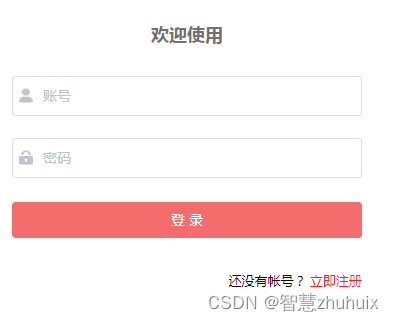
2.1 添加登录状态的状态管理器
- 为了记录该登录状态,我们需要在状态管理器源码中,加入登录状态的管理

const my = { state: { ... // 是否已登录 logined: false }, mutations: { ... SET_LOGIN: (state, login) => { state.logined = login } }, actions: { ... setLogin({ commit }, login) { return new Promise(resolve => { commit('SET_LOGIN', login) }) } } } export default my- 1
- 2
- 3
- 4
- 5
- 6
- 7
- 8
- 9
- 10
- 11
- 12
- 13
- 14
- 15
- 16
- 17
- 18
- 19
- 20
- 21
- 22
- 23
- 24
- 25
- 26
- 27
- 28
- 29
2.2 编写登录表单
- 以下是改造后完整源码
<template> <div v-if="logined == true" class="content"> <div class="header"> <div class="user"> <img class="avatar" src="@/assets/images/avatar.png"> <p class="user-name">{{ loginForm.username }}p> <img class="right" src="@/assets/images/right.png"> div> <div class="info"> <div class="histroy" @click="toHistroy()"> <span class="histroy-count">{{ histroryCount }}span> <span class="histroy-text">{{ '浏览历史' }}span> div> <div class="fav"> <span class="fav-count">{{ favCount }}span> <span class="fav-text">{{ '我的收藏' }}span> div> div> div> <div class="logout"> <el-button size="medium" type="danger" style="width: 90%" @click.native.prevent="logout" > <span>退 出 登 录span> el-button> div> div> <div v-else> <el-form ref="loginForm" :model="loginForm" :rules="loginRules" label-position="left" label-width="0px" class="login-form" > <h2 class="title">欢迎使用h2> <el-form-item prop="username"> <el-input v-model="loginForm.username" type="text" auto-complete="off" placeholder="账号" > <svg-icon slot="prefix" icon-class="user" class="el-input__icon input-icon" /> el-input> el-form-item> <el-form-item prop="password"> <el-input v-model="loginForm.password" type="password" auto-complete="off" placeholder="密码" @keyup.enter.native="handleLogin" > <svg-icon slot="prefix" icon-class="password" class="el-input__icon input-icon" /> el-input> el-form-item> <el-form-item style="width: 100%"> <el-button :loading="loading" size="medium" type="danger" style="width: 100%" @click.native.prevent="handleLogin" > <span v-if="!loading">登 录span> <span v-else>登 录 中...span> el-button> el-form-item> <p class="register"> 还没有帐号? <a href="/register" type="primary">立即注册a> p> el-form> div> template> <script> export default { data() { return { loginForm: { username: '', password: '' }, loginRules: { username: [ { required: true, trigger: 'blur', message: '用户名不能为空' } ], password: [ { required: true, trigger: 'blur', message: '密码不能为空' } ] }, loading: false } }, computed: { histroryCount() { return this.$store.state.my.histroy.length }, favCount() { return this.$store.state.my.favourite.length }, // 从状态管理器中获取登录状态 logined() { return this.$store.state.my.logined } }, methods: { // 模拟登录成功 handleLogin() { this.$refs.loginForm.validate((valid) => { if (valid) { this.loading = true this.$store.commit('SET_LOGIN', true) this.loading = false } else { console.log('error submit!!') return false } }) }, // 模拟注销登录 logout() { this.$store.commit('SET_LOGIN', false) this.loginForm.username = '' this.loginForm.password = '' }, toHistroy() { if (this.histroryCount > 0) { this.$router.push('/list') } } } } script> <style lang="scss" scoped> .login-form { border-radius: 6px; background: #ffffff; width: 100%; padding: 25px 25px 5px 25px; margin-top: 25px; .el-input { height: 38px; input { height: 38px; } } .input-icon { height: 39px; width: 14px; margin-left: 2px; } } .title { margin: 0 auto 30px auto; text-align: center; color: #707070; } .register { float: right; font-size: 13px; // color: rgb(24, 144, 255); } a { color: #e72521; text-decoration: none; background-color: transparent; outline: none; cursor: pointer; transition: color 0.3s; } a:hover { color: #e72521; } .content { width: 100%; height: 100%; background-color: rgb(252, 248, 248); } .header { width: 100%; height: 5.33rem; background-color: #fff; } .user { margin-top: 0.5rem; overflow: hidden; padding: 0.5rem; height: 2.5rem; width: 100%; } .avatar { float: left; width: 1.8rem; height: 1.8rem; border-radius: 50%; } .user-name { float: left; margin-top: 0.6rem; margin-left: 0.5rem; color: #404040; font-size: 18px; } .right { float: right; width: 0.8rem; height: 0.8rem; margin-top: 0.6rem; } .info { float: left; padding: 1rem; height: 2.5rem; width: 100%; } .histroy { display: flex; float: left; flex-direction: column; align-items: center; justify-content: center; cursor: pointer; } .histroy-count { color: #404040; font-size: 18px; } .histroy-text { margin-top: 0.1rem; color: #9b9191; font-size: 14px; } .fav { display: flex; float: right; flex-direction: column; align-items: center; justify-content: center; cursor: pointer; } .fav-count { color: #404040; font-size: 18px; } .fav-text { margin-top: 0.1rem; color: #9b9191; font-size: 14px; } .logout { display: flex; align-items: center; justify-content: center; margin-top: 2rem; } style>- 1
- 2
- 3
- 4
- 5
- 6
- 7
- 8
- 9
- 10
- 11
- 12
- 13
- 14
- 15
- 16
- 17
- 18
- 19
- 20
- 21
- 22
- 23
- 24
- 25
- 26
- 27
- 28
- 29
- 30
- 31
- 32
- 33
- 34
- 35
- 36
- 37
- 38
- 39
- 40
- 41
- 42
- 43
- 44
- 45
- 46
- 47
- 48
- 49
- 50
- 51
- 52
- 53
- 54
- 55
- 56
- 57
- 58
- 59
- 60
- 61
- 62
- 63
- 64
- 65
- 66
- 67
- 68
- 69
- 70
- 71
- 72
- 73
- 74
- 75
- 76
- 77
- 78
- 79
- 80
- 81
- 82
- 83
- 84
- 85
- 86
- 87
- 88
- 89
- 90
- 91
- 92
- 93
- 94
- 95
- 96
- 97
- 98
- 99
- 100
- 101
- 102
- 103
- 104
- 105
- 106
- 107
- 108
- 109
- 110
- 111
- 112
- 113
- 114
- 115
- 116
- 117
- 118
- 119
- 120
- 121
- 122
- 123
- 124
- 125
- 126
- 127
- 128
- 129
- 130
- 131
- 132
- 133
- 134
- 135
- 136
- 137
- 138
- 139
- 140
- 141
- 142
- 143
- 144
- 145
- 146
- 147
- 148
- 149
- 150
- 151
- 152
- 153
- 154
- 155
- 156
- 157
- 158
- 159
- 160
- 161
- 162
- 163
- 164
- 165
- 166
- 167
- 168
- 169
- 170
- 171
- 172
- 173
- 174
- 175
- 176
- 177
- 178
- 179
- 180
- 181
- 182
- 183
- 184
- 185
- 186
- 187
- 188
- 189
- 190
- 191
- 192
- 193
- 194
- 195
- 196
- 197
- 198
- 199
- 200
- 201
- 202
- 203
- 204
- 205
- 206
- 207
- 208
- 209
- 210
- 211
- 212
- 213
- 214
- 215
- 216
- 217
- 218
- 219
- 220
- 221
- 222
- 223
- 224
- 225
- 226
- 227
- 228
- 229
- 230
- 231
- 232
- 233
- 234
- 235
- 236
- 237
- 238
- 239
- 240
- 241
- 242
- 243
- 244
- 245
- 246
- 247
- 248
- 249
- 250
- 251
- 252
- 253
- 254
- 255
- 256
- 257
- 258
- 259
- 260
- 261
- 262
- 263
- 264
- 265
- 266
- 267
- 268
- 269
- 270
- 271
- 272
- 273
- 274
- 275
- 276
- 277
- 278
- 279
- 280
- 281
- 282
- 283
- 284
- 285
- 286
- 287
- 288
- 289
- 290
- 291
- 292
- 293
- 294
2.3 动图演示

三、添加新的注册页面
1、用户在登录前,需要向系统进行注册。
2、注册时输入用户名,密码(密码需两次输入一致)
3、本文只实现模拟注册(后续将提供完整的前后端功能)

- 完整的注册页面源码:
<template> <div> <el-form ref="signupForm" :model="signupForm" :rules="signupRules" label-position="left" label-width="0px" class="login-form" > <h2 class="title">欢迎注册h2> <el-form-item prop="username"> <el-input v-model="signupForm.username" type="text" auto-complete="off" placeholder="账号" > <svg-icon slot="prefix" icon-class="user" class="el-input__icon input-icon" /> el-input> el-form-item> <el-form-item prop="password"> <el-input v-model="signupForm.password" type="password" auto-complete="off" placeholder="密码" > <svg-icon slot="prefix" icon-class="password" class="el-input__icon input-icon" /> el-input> el-form-item> <el-form-item prop="password2"> <el-input v-model="signupForm.password2" type="password" auto-complete="off" placeholder="确认密码" @keyup.enter.native="handleSignup" > <svg-icon slot="prefix" icon-class="password" class="el-input__icon input-icon" /> el-input> el-form-item> <el-form-item style="width: 100%"> <el-button :loading="loading" size="medium" type="danger" style="width: 100%" @click.native.prevent="handleSignup" > <span v-if="!loading">注 册span> <span v-else>注 册 中...span> el-button> el-form-item> el-form> div> template> <script> export default { data() { // 二次密码输入校验 var checkpass = (rule, value, callback) => { console.log(value) if (value === '') { callback(new Error('请再次输入密码')) } else if (value !== this.signupForm.password) { callback(new Error('两次输入密码不一致')) } else { callback() } } return { signupForm: { username: '', password: '', password2: '' }, signupRules: { username: [ { required: true, trigger: 'blur', message: '用户名不能为空' } ], password: [ { required: true, trigger: 'blur', message: '密码不能为空' } ], password2: [ { trigger: 'blur', validator: checkpass } ] }, loading: false } }, methods: { // 模拟注册成功 handleSignup() { this.$refs.signupForm.validate((valid) => { if (valid) { this.loading = true this.$store.commit('SET_LOGIN', true) this.loading = false this.$router.push('/my') } else { console.log('error signup!!') return false } }) } } } script> <style lang="scss" scoped> .login-form { border-radius: 6px; background: #ffffff; width: 100%; padding: 25px 25px 5px 25px; margin-top: 25px; .el-input { height: 38px; input { height: 38px; } } .input-icon { height: 39px; width: 14px; margin-left: 2px; } } .title { margin: 0 auto 30px auto; text-align: center; color: #707070; } style>- 1
- 2
- 3
- 4
- 5
- 6
- 7
- 8
- 9
- 10
- 11
- 12
- 13
- 14
- 15
- 16
- 17
- 18
- 19
- 20
- 21
- 22
- 23
- 24
- 25
- 26
- 27
- 28
- 29
- 30
- 31
- 32
- 33
- 34
- 35
- 36
- 37
- 38
- 39
- 40
- 41
- 42
- 43
- 44
- 45
- 46
- 47
- 48
- 49
- 50
- 51
- 52
- 53
- 54
- 55
- 56
- 57
- 58
- 59
- 60
- 61
- 62
- 63
- 64
- 65
- 66
- 67
- 68
- 69
- 70
- 71
- 72
- 73
- 74
- 75
- 76
- 77
- 78
- 79
- 80
- 81
- 82
- 83
- 84
- 85
- 86
- 87
- 88
- 89
- 90
- 91
- 92
- 93
- 94
- 95
- 96
- 97
- 98
- 99
- 100
- 101
- 102
- 103
- 104
- 105
- 106
- 107
- 108
- 109
- 110
- 111
- 112
- 113
- 114
- 115
- 116
- 117
- 118
- 119
- 120
- 121
- 122
- 123
- 124
- 125
- 126
- 127
- 128
- 129
- 130
- 131
- 132
- 133
- 134
- 135
- 136
- 137
- 138
- 139
- 140
- 141
- 142
- 143
- 144
- 145
- 146
- 147
- 148
- 149
- 150
- 151
- 152
- 153
- 154
- 155
四、效果演示

五、源码地址
- 请关注文末的微信公众号,回复“新闻客户端”。

- 在上一篇文章中,我们加入了用户浏览新闻历史的功能,本篇文章我们再来模拟用户的注册与登录。
-
相关阅读:
状压dp:Gym - 102832J
kotlin协程并发/并行与串行互相切换,CoroutineScope与await
公众号自定义菜单(含个性化)
福彩双色球,中巨奖到底有多难? 试试 run 《仿真模拟双色球》代码就晓得了。
Spring Cloud(三):Spring Cloud Alibaba Ribbon
wsl2安装rancher并导入和创建k8s集群
金仓数据库 KingbaseGIS 使用手册(6.21. 长事务支持)
efcore如何优雅的实现按年分库按月分表
ImportError: cannot import name 'SQLAlchemy' from 'flask_sqlalchemy' (unknown location)
多实例tomcat+nginx实现负载均衡
- 原文地址:https://blog.csdn.net/jpgzhu/article/details/126498004
