-
Spring Cloud Config Server 和Client 基本配置
官网:http://cloud.spring.io/spring-cloud-config/single/spring-cloud-config.html#_quick_start
Git 文件配置创建
我的服务地址(码云):https://gitee.com/xiechenxuyuan/SpringCouldConfig
如下:
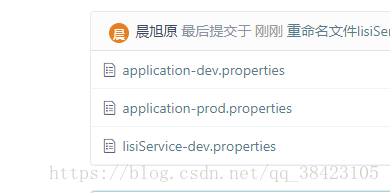

Spring Cloud Config Server
1、创建项目
从spring官网 :http://start.spring.io/创建一个简单的spring boot项目
2、添加依赖
org.springframework.boot spring-boot-starter-web org.springframework.cloud spring-cloud-starter-config org.springframework.cloud spring-cloud-config-server org.springframework.boot spring-boot-starter-test test - 1
- 2
- 3
- 4
- 5
- 6
- 7
- 8
- 9
- 10
- 11
- 12
- 13
- 14
- 15
- 16
- 17
- 18
- 19
- 20
- 21
- 22
- 23
- 24
- 25
3、在application.properties 里添加配置
#服务端口 server.port=8091 #服务名称 spring.application.name=configServer #服务注册中心 ,需要eureka 可以解开 #eureka.client.service-url.defaultZone=http://localhost:9761/eureka/ #服务的git仓库地址 spring.cloud.config.server.git.uri=https://gitee.com/xiechenxuyuan/SpringCouldConfig- 1
- 2
- 3
- 4
- 5
- 6
- 7
- 8
4、启动类添加注解
@SpringBootApplication @EnableConfigServer //@EnableDiscoveryClient //eurekaClinet注解 public class SpringCloudConfigServerApplication { public static void main(String[] args) { SpringApplication.run(SpringCloudConfigServerApplication.class, args); } }- 1
- 2
- 3
- 4
- 5
- 6
- 7
- 8
- 9
- 10
- 11
测试:http://localhost:8091/application/dev
访问资源的形式如下:
The HTTP service has resources in the following form:
/{application}/{profile}[/{label}]
/{application}-{profile}.yml
/{label}/{application}-{profile}.yml
/{application}-{profile}.properties
/{label}/{application}-{profile}.properties{ "name": "application", "profiles": [ "dev" ], "label": null, "version": "e0fa159ad38a0a064963b37a6abca0f7bfeb2fac", "state": null, "propertySources": [ { "name": "https://gitee.com/xiechenxuyuan/SpringCouldConfig/application-dev.properties", "source": { "name": "shuaiqi", "age": "22", "version": "dev" } } ] }- 1
- 2
- 3
- 4
- 5
- 6
- 7
- 8
- 9
- 10
- 11
- 12
- 13
- 14
- 15
- 16
- 17
- 18
- 19
Spring Cloud Config Client
1、创建基本的项目 ,如上
2、添加依赖
org.springframework.boot spring-boot-starter-web org.springframework.cloud spring-cloud-starter-config org.springframework.cloud spring-cloud-config-server org.springframework.boot spring-boot-starter-test test - 1
- 2
- 3
- 4
- 5
- 6
- 7
- 8
- 9
- 10
- 11
- 12
- 13
- 14
- 15
- 16
- 17
- 18
- 19
- 20
- 21
- 22
- 23
- 24
- 25
3、创建bootstrap.properties
#文件夹名 spring.application.name=application # dev根据具体情况来修改 spring.cloud.config.profile=dev spring.cloud.config.label=master #eureka.client.service-url.defaultZone=http://localhost:9761/eureka/ spring.cloud.config.uri= http://localhost:8091/ #spring.cloud.config.discovery.enabled=true #文件服务的服务名 spring.cloud.config.discovery.service-id=configServer server.port=2008- 1
- 2
- 3
- 4
- 5
- 6
- 7
- 8
- 9
- 10
- 11
4、启动项添加注解 和测试内容
@RestController @SpringBootApplication //@EnableDiscoveryClient // 表示这是一个Eureka客户端 public class SpringCloudConfigClientApplication { public static void main(String[] args) { SpringApplication.run(SpringCloudConfigClientApplication.class, args); } @Value("${name}") String name; @Value("${version}") String version; @Value("${age}") String age; @RequestMapping("/") public String home() { return "name:" + name+",age:"+age+",version:"+version; } }- 1
- 2
- 3
- 4
- 5
- 6
- 7
- 8
- 9
- 10
- 11
- 12
- 13
- 14
- 15
- 16
- 17
- 18
- 19
- 20
- 21
- 22
- 23
测试:输入localhost:2008

-
相关阅读:
为什么推荐 Java 开发人员都学习并使用 Kotlin?
根据int颜色值获取带透明度的颜色
java计算机毕业设计航帆学院网站MyBatis+系统+LW文档+源码+调试部署
Python学习笔记 - 函数和lambda表达式 (2)
【leetcode】两个链表的第一个重合节点
熟悉Vue路由的beforeEach陷入死循环的情况
大数据在电力行业的应用案例100讲(十九)-按钮设计与开发落地
Vue中表单手机号验证与手机号归属地查询
HTML、CSS和JavaScript编写的吹泡泡的网页代码和注释:
tqdm高级使用方法(类keras进度条)
- 原文地址:https://blog.csdn.net/iijik55/article/details/126496801