-
Shiro入门(五)Shiro自定义Realm和加密算法
前言
本章讲解shiro自定义的realm和它的加密算法
方法
1.概念
通过前面的讲解,我已经带入了自定义Realm的相关概念。那么为什么要自定义realm呢?显而易见,我们在数据库中创建的users表和它的字段受限于shiro自己的jdbcRealm,所以通常情况下我们需要使用自己的表,跟着必须使用自定义realm。
再者,在用户表中,密码字段的值是一个敏感的存在。我们需要采取某些加密算法保证在数据库中保存密码值的复杂性。那么常见的加密算法就是md5、sha等等。通过在传统加密算法上“加盐”和增加迭代次数,可以有效保证密码安全性。
2.自定义realm的实现
首先来观察shiro中realm的继承关系:

我们不难发现,我们的JdbcRealm继承了AuthorizingRealm,同样道理,我们的自定义realm也需要继承该类!
初步编写代码如下:
package cn.edu.ccut.test; import org.apache.shiro.authc.AuthenticationException; import org.apache.shiro.authc.AuthenticationInfo; import org.apache.shiro.authc.AuthenticationToken; import org.apache.shiro.authz.AuthorizationInfo; import org.apache.shiro.realm.AuthorizingRealm; import org.apache.shiro.subject.PrincipalCollection; /** * @Auther:jwang * @Date:2019/5/11 * @Description:cn.edu.ccut.test * @Version 1.0 **/ public class MyJdbcRealm extends AuthorizingRealm { @Override protected AuthorizationInfo doGetAuthorizationInfo(PrincipalCollection principals) { return null; } @Override protected AuthenticationInfo doGetAuthenticationInfo(AuthenticationToken token) throws AuthenticationException { return null; } }- 1
- 2
- 3
- 4
- 5
- 6
- 7
- 8
- 9
- 10
- 11
- 12
- 13
- 14
- 15
- 16
- 17
- 18
- 19
- 20
- 21
- 22
- 23
- 24
- 25
- 26
我们发现,他有两个方法需要重写,一个是认证方法、一个是授权方法,我们当然先重写认证方法doGetAuthenticationInfo!
通过阅读jdbcRealm的源码,我们很容易编写自定义的realm如下:
package cn.edu.ccut.test; import org.apache.shiro.authc.*; import org.apache.shiro.authz.AuthorizationInfo; import org.apache.shiro.realm.AuthorizingRealm; import org.apache.shiro.subject.PrincipalCollection; /** * @Auther:jwang * @Date:2019/5/11 * @Description:cn.edu.ccut.test * @Version 1.0 **/ public class MyJdbcRealm extends AuthorizingRealm { @Override public String getName() { return "MyJdbcRealm"; } @Override protected AuthorizationInfo doGetAuthorizationInfo(PrincipalCollection principals) { return null; } @Override protected AuthenticationInfo doGetAuthenticationInfo(AuthenticationToken token) throws AuthenticationException { UsernamePasswordToken upToken = (UsernamePasswordToken) token; String username = upToken.getUsername(); //假设通过username取出密码为1234,jdbc代码略 String password = "1234"; SimpleAuthenticationInfo info = new SimpleAuthenticationInfo(username, password.toCharArray(), getName()); return info; } }- 1
- 2
- 3
- 4
- 5
- 6
- 7
- 8
- 9
- 10
- 11
- 12
- 13
- 14
- 15
- 16
- 17
- 18
- 19
- 20
- 21
- 22
- 23
- 24
- 25
- 26
- 27
- 28
- 29
- 30
- 31
- 32
- 33
- 34
- 35
在shiro.ini文件中配置自定义realm
[main] dataSource = com.mchange.v2.c3p0.ComboPooledDataSource dataSource.driverClass = oracle.jdbc.driver.OracleDriver dataSource.jdbcUrl = jdbc:oracle:thin:@localhost:1521:orcl dataSource.user = scott dataSource.password = tiger jdbcRealm = org.apache.shiro.realm.jdbc.JdbcRealm myJdbcRealm = cn.edu.ccut.test.MyJdbcRealm #iniRealm = cn.edu.ccut.test.MyRealm # $相当于spring的依赖注入 jdbcRealm.dataSource = $dataSource #authenticationStrategy = org.apache.shiro.authc.pam.AtLeastOneSuccessfulStrategy #securityManager.authenticator.authenticationStrategy = $authenticationStrategy securityManager.realms = $myJdbcRealm- 1
- 2
- 3
- 4
- 5
- 6
- 7
- 8
- 9
- 10
- 11
- 12
- 13
- 14
那么我么依然使用之前的测试类,用户名密码输入为zhangsan/1234,验证通过!
注意:自定义realm中我省略了在数据库中getPassword的过程,大家可根据喜好自行设置表,通过jdbc的相关知识进行获取即可!
3.shiro加密算法
1)shiro加密算法探讨
在shiro中,存在md5和sha的加密散列算法

首先我们来编写一个简单的使用shiroMd5Hash类加密的小例子:
import org.apache.shiro.crypto.hash.Md5Hash; import org.junit.Test; /** * @Auther:jwang * @Date:2019/5/11 * @Description:PACKAGE_NAME * @Version 1.0 **/ public class PasTest { @Test public void testMd5(){ String password = "1111"; Md5Hash md5 = new Md5Hash(password); System.out.println(password+"加密后的结果:"+md5.toString()); } }- 1
- 2
- 3
- 4
- 5
- 6
- 7
- 8
- 9
- 10
- 11
- 12
- 13
- 14
- 15
- 16
- 17
- 18
运行结果如下:

我们到知名的md5破解网站上去破解(解密)一下:
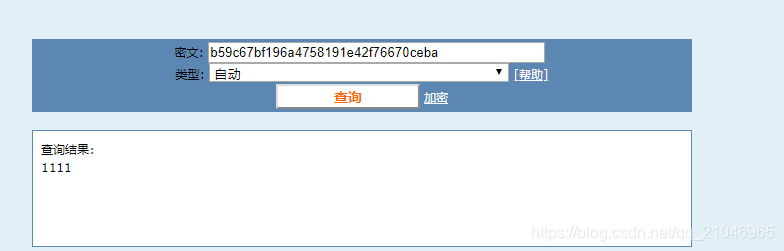
很显然,这也是不安全的。。。。。
这个时候我们需要加盐:
import org.apache.shiro.crypto.hash.Md5Hash; import org.junit.Test; /** * @Auther:jwang * @Date:2019/5/11 * @Description:PACKAGE_NAME * @Version 1.0 **/ public class PasTest { @Test public void testMd5(){ String password = "1111"; //加盐,设置颜值为==》open String password_salt = "open"; Md5Hash md5 = new Md5Hash(password,password_salt); System.out.println(password+"加密后的结果:"+md5.toString()); } }- 1
- 2
- 3
- 4
- 5
- 6
- 7
- 8
- 9
- 10
- 11
- 12
- 13
- 14
- 15
- 16
- 17
- 18
- 19
- 20
运行结果如下:


完了,这也是不太安全。。。
没事,我们还有大招!加迭代次数,也就是继续加密。
import org.apache.shiro.crypto.hash.Md5Hash; import org.junit.Test; /** * @Auther:jwang * @Date:2019/5/11 * @Description:PACKAGE_NAME * @Version 1.0 **/ public class PasTest { @Test public void testMd5(){ String password = "1111"; //加盐,设置颜值为==》open String password_salt = "open"; //迭代次数 int hashIterations = 2; Md5Hash md5 = new Md5Hash(password,password_salt,hashIterations); System.out.println(password+"加密后的结果:"+md5.toString()); } }- 1
- 2
- 3
- 4
- 5
- 6
- 7
- 8
- 9
- 10
- 11
- 12
- 13
- 14
- 15
- 16
- 17
- 18
- 19
- 20
- 21
- 22
运行结果如下:

md5解密网站效果如下:

咱也不知道咋回事,咱也不敢问啊。但是还是比前面的安全。
2)realm中使用加密算法
将我们之前讲到的自定义realm改成如下:
package cn.edu.ccut.test; import org.apache.shiro.authc.*; import org.apache.shiro.authz.AuthorizationInfo; import org.apache.shiro.realm.AuthorizingRealm; import org.apache.shiro.subject.PrincipalCollection; import org.apache.shiro.util.ByteSource; /** * @Auther:jwang * @Date:2019/5/11 * @Description:cn.edu.ccut.test * @Version 1.0 **/ public class MyJdbcRealm extends AuthorizingRealm { @Override public String getName() { return "MyJdbcRealm"; } @Override protected AuthorizationInfo doGetAuthorizationInfo(PrincipalCollection principals) { return null; } @Override protected AuthenticationInfo doGetAuthenticationInfo(AuthenticationToken token) throws AuthenticationException { UsernamePasswordToken upToken = (UsernamePasswordToken) token; String username = upToken.getUsername(); //假设通过username取出密码为85b768bc6ac28bd054c7cd670046c706(1234加密后),jdbc代码略 String password = "85b768bc6ac28bd054c7cd670046c706"; //假设通过username取出颜值为open String password_salt = "open"; SimpleAuthenticationInfo info = new SimpleAuthenticationInfo(username, password.toCharArray(), ByteSource.Util.bytes(password_salt), getName()); return info; } }- 1
- 2
- 3
- 4
- 5
- 6
- 7
- 8
- 9
- 10
- 11
- 12
- 13
- 14
- 15
- 16
- 17
- 18
- 19
- 20
- 21
- 22
- 23
- 24
- 25
- 26
- 27
- 28
- 29
- 30
- 31
- 32
- 33
- 34
- 35
- 36
- 37
- 38
那么我们需要告诉realm使用什么凭证匹配器,也就是说让其如何解密。。
我们通过源码,发现realm中有个属性credentialsMatcher就是凭证匹配器

由于我们使用的是md5的加密算法,所以使用md5的凭证匹配器:

配置shiro文件如下:
[main] dataSource = com.mchange.v2.c3p0.ComboPooledDataSource dataSource.driverClass = oracle.jdbc.driver.OracleDriver dataSource.jdbcUrl = jdbc:oracle:thin:@localhost:1521:orcl dataSource.user = scott dataSource.password = tiger jdbcRealm = org.apache.shiro.realm.jdbc.JdbcRealm myJdbcRealm = cn.edu.ccut.test.MyJdbcRealm #配置凭证匹配器 md5CredentialsMatcher = org.apache.shiro.authc.credential.Md5CredentialsMatcher #迭代次数 md5CredentialsMatcher.hashIterations = 2 myJdbcRealm.credentialsMatcher = $md5CredentialsMatcher #iniRealm = cn.edu.ccut.test.MyRealm # $相当于spring的依赖注入 jdbcRealm.dataSource = $dataSource #authenticationStrategy = org.apache.shiro.authc.pam.AtLeastOneSuccessfulStrategy #securityManager.authenticator.authenticationStrategy = $authenticationStrategy securityManager.realms = $myJdbcRealm- 1
- 2
- 3
- 4
- 5
- 6
- 7
- 8
- 9
- 10
- 11
- 12
- 13
- 14
- 15
- 16
- 17
- 18
- 19
- 20
注意:改配置文件无需配置颜值,颜值请在数据库中获取,回忆一下之前设置的数据库表结构:

这个时候,你就会明白password_salt字段的含义了!
运行上面的登录验证代码结果如下:

-
相关阅读:
使用uni-app创建扫码连接wifi小程序
Centos安装RabbitMQ超详细(必须收藏)
给指针初始化为0与nullptr
等保2.0对云计算有哪些特定的安全要求?
微信小程序游戏开发│智力测试游戏——button版
Grafana+Prometheus+jmx实现微服务与多台服务器的jvm监控
Java并发 | 23.[设计模式] 保护性暂停
2024年csdn最新最全的Postman接口测试: postman实现参数化
matlab几种求解器的选择fsolve-sole-vpasolve
为什么PDF打开没有密码,但是不能编辑?
- 原文地址:https://blog.csdn.net/m0_67401545/article/details/126496254