-
springcloud+nacos+gateway约会
Nacos作为注册中心和配置中心,下面结合Spring Cloud Gateway作为网关一起进行尝试。
网关是所有微服务的门户,常用的应用场景有请求路由,服务限流、统一鉴权等。Spring Cloud Gateway作为网关,几个关键概念如下- 路由(Route):它是网关的基本组件,由ID、目标URI、Predicate集合、Filter集合组成;
- 断言(Predicate):参照Java8的新特性Predicate,允许开发人员匹配HTTP请求中的任何内容,比如头或参数;
- 过滤器(Filter):可以在返回请求之前或之后修改请求和响应的内容;
实例
项目结构参考如下
Nacos服务作为注册中心和配置中心
项目前缀-gateway工程作为服务网关
项目前缀-order作为订单服务
项目前缀-product作为商品服务1、启动Nacos服务,具体下载安装启动请参考上篇《https://blog.csdn.net/leijie0322/article/details/126426099?spm=1001.2014.3001.5501》
windows环境下进入bin目录,执行如下命令start -m standalone启动即可。
2、创建gateway工程,其他参数上篇
pom依赖<!--Spring Cloud & Alibaba--> <dependency> <groupId>org.springframework.cloud</groupId> <artifactId>spring-cloud-starter-bootstrap</artifactId> </dependency> <dependency> <groupId>org.springframework.cloud</groupId> <artifactId>spring-cloud-starter-gateway</artifactId> </dependency> <!-- 注册中心--> <dependency> <groupId>com.alibaba.cloud</groupId> <artifactId>spring-cloud-starter-alibaba-nacos-discovery</artifactId> </dependency> <dependency> <groupId>org.springframework.cloud</groupId> <artifactId>spring-cloud-starter-loadbalancer</artifactId> </dependency> <!-- 配置中心 --> <dependency> <groupId>com.alibaba.cloud</groupId> <artifactId>spring-cloud-starter-alibaba-nacos-config</artifactId> </dependency>- 1
- 2
- 3
- 4
- 5
- 6
- 7
- 8
- 9
- 10
- 11
- 12
- 13
- 14
- 15
- 16
- 17
- 18
- 19
- 20
- 21
- 22
- 23
- 24
- 25
- 26
- 27
bootstrap.yml文件
spring: application: name: msbd-gateway profiles: active: dev- 1
- 2
- 3
- 4
- 5
- 6
其中name对应Nacos配置管理中的Data Id,在Nacos中,Data Id的完成格式如下
${prefix}-${spring.profiles.active}.${file-extension}- 1
- prefix默认为spring.application.name的值,也可以通过配置项spring.cloud.nacos.config.prefix来配置;
- spirng.profiles.active即为当前环境对应的profile。注意:当spring.profiles.active为空时,对应的连接符-也将不存在,dataId的拼接格式变为 p r e f i x . {prefix}. prefix.{file-extension}
- file-extension为配置内容的数据格式,可以通过配置项spring.cloud.nacos.config.file-extension来配置,目前只支持properties和yaml类型;
server: port: 9999 spring: cloud: nacos: # 注册中心 discovery: server-addr: http://localhost:8848 # 配置中心 config: # 本地启动 ## server-addr: ${spring.cloud.nacos.discovery.server-addr} server-addr: http://localhost:8848 file-extension: yaml shared-configs[0]: data-id: youlai-common.yaml refresh: true gateway: discovery: locator: # 使用服务发现路由 enabled: true # 设置路由id 理论上随便写,建议用服务名 routes: - id: mall-order #uri: http://localhost:8803 uri: lb://mall-order predicates: - Path=/order/** - id: mall-product #uri: http://localhost:8804 uri: lb://mall-product predicates: - Path=/product/**- 1
- 2
- 3
- 4
- 5
- 6
- 7
- 8
- 9
- 10
- 11
- 12
- 13
- 14
- 15
- 16
- 17
- 18
- 19
- 20
- 21
- 22
- 23
- 24
- 25
- 26
- 27
- 28
- 29
- 30
- 31
- 32
- 33
- 34
- 35
- 36
上面配置中字段的含义简单说明下:
- id:自定义路由ID,保持唯一。
- uri:目标服务地址,支持普通URI及lb://应用注册服务名称,后者表示从注册中心获取集群服务地址。
- predicates:路由条件,根据匹配的结果决定是否执行该请求路由。
启动类
@EnableDiscoveryClient @SpringBootApplication public class MsbdGatewayApplication { public static void main(String[] args) { SpringApplication.run(MsbdGatewayApplication.class, args); } }- 1
- 2
- 3
- 4
- 5
- 6
- 7
- 8
- 9
3、应用
启动gateway服务,order服务,product服务,在Nacos中如下

访问order服务

访问product服务

访问网关的地址


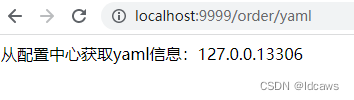
读取Nacos配置管理中order服务的配置

-
相关阅读:
一篇万字博文带你入坑爬虫这条不归路 【万字图文】
计算机网络复习第一章 概述
【Node.js】zlib 模块
Android init.rc语言全解析
MacOS下brew切换为国内源
代理模式(Proxy模式)
resubmit 渐进式防重复提交框架简介
高内聚、低耦合、高并发、高可用、分布式这些名称到底什么意思?
openssl客户端编程:一个不起眼的函数导致的SSL会话失败问题
数据结构——栈和队列
- 原文地址:https://blog.csdn.net/leijie0322/article/details/126471368
