-
Vue学习之--------全局事件总线(2022/8/22)
1、全局事件总线基础知识(GlobalEventBus)
1、一种组件间通信的方式,适用于任意组件间通信。
2、安装全局事件总线:
提示:在main.js中安装全局事件总线
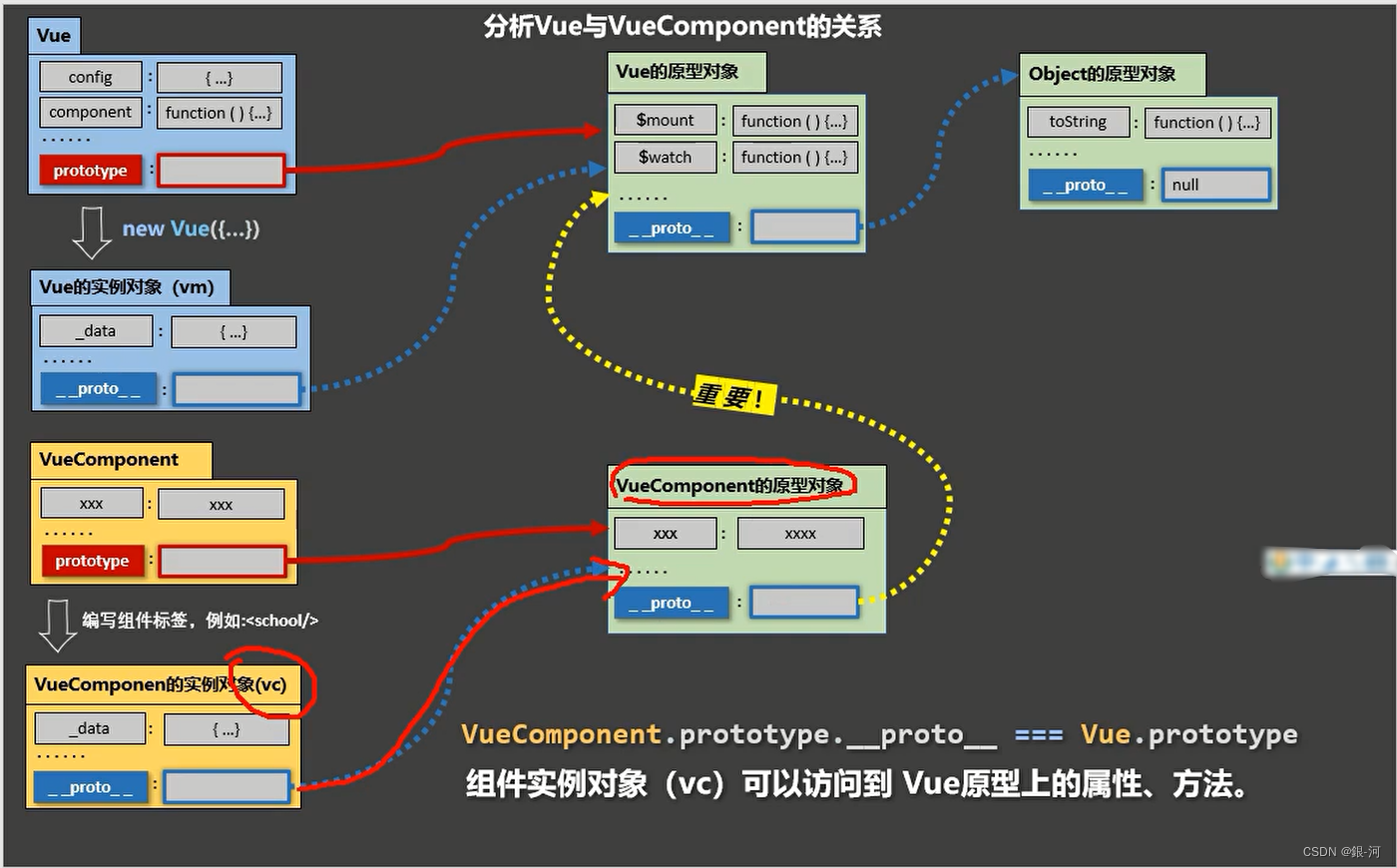
new Vue({ ...... beforeCreate() { Vue.prototype.$bus = this //安装全局事件总线,$bus就是当前应用的vm }, ...... })- 1
- 2
- 3
- 4
- 5
- 6
- 7
3、使用事件总线:
- 接收数据:A组件想接收数据,则在A组件中给$bus绑定自定义事件,事件的回调留在A组件自身。
methods(){ demo(data){......} } ...... mounted() { this.$bus.$on('xxxx',this.demo) }- 1
- 2
- 3
- 4
- 5
- 6
- 7
- 8
- 提供数据:
this.$bus.$emit('xxxx',数据)
4、最好在beforeDestroy钩子中,用$off去解绑当前组件所用到的事件。
2、图解过程
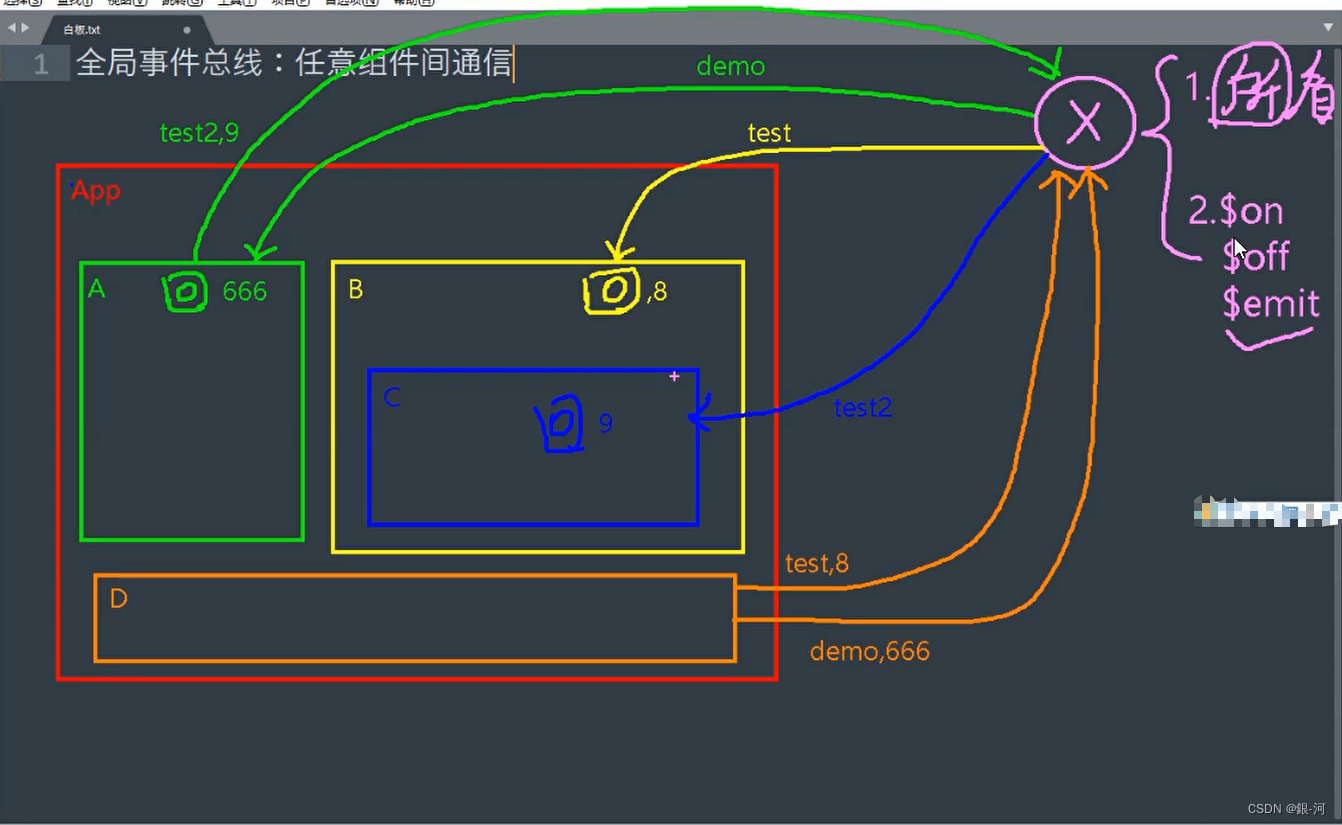
3、代码实例
实现组件间的通信(通过全局事件总线)
3.1 main.js
//引入Vue import Vue from 'vue' //引入App import App from './App.vue' //关闭Vue的生产提示 Vue.config.productionTip = false //创建vm new Vue({ el:'#app', render: h => h(App), beforeCreate() { Vue.prototype.$bus = this }, })- 1
- 2
- 3
- 4
- 5
- 6
- 7
- 8
- 9
- 10
- 11
- 12
- 13
- 14
- 15
3.1 App.vue
<template> <div class="app"> <h1>{{msg}}</h1> <School/> <Student/> </div> </template> <script> import Student from './components/Student' import School from './components/School' export default { name:'App', components:{School,Student}, data() { return { msg:'你好啊!', } } } </script> <style scoped> .app{ background-color: gray; padding: 5px; } </style>- 1
- 2
- 3
- 4
- 5
- 6
- 7
- 8
- 9
- 10
- 11
- 12
- 13
- 14
- 15
- 16
- 17
- 18
- 19
- 20
- 21
- 22
- 23
- 24
- 25
- 26
- 27
- 28
- 29
- 30
3.2 School.vue
<template> <div class="school"> <h2>学校名称:{{name}}</h2> <h2>学校地址:{{address}}</h2> </div> </template> <script> export default { name:'School', data() { return { name:'尚硅谷', address:'北京', } }, mounted() { // console.log('School',this) this.$bus.$on('hello',(data)=>{ console.log('我是School组件,收到了数据',data) }) }, beforeDestroy() { this.$bus.$off('hello') }, } </script> <style scoped> .school{ background-color: skyblue; padding: 5px; } </style>- 1
- 2
- 3
- 4
- 5
- 6
- 7
- 8
- 9
- 10
- 11
- 12
- 13
- 14
- 15
- 16
- 17
- 18
- 19
- 20
- 21
- 22
- 23
- 24
- 25
- 26
- 27
- 28
- 29
- 30
- 31
- 32
- 33
- 34
3.3 Student.vue
<template> <div class="student"> <h2>学生姓名:{{name}}</h2> <h2>学生性别:{{sex}}</h2> <button @click="sendStudentName">把学生名给School组件</button> </div> </template> <script> export default { name:'Student', data() { return { name:'张三', sex:'男', } }, mounted() { // console.log('Student',this.x) }, methods: { sendStudentName(){ this.$bus.$emit('hello',this.name) } }, } </script> <style lang="less" scoped> .student{ background-color: pink; padding: 5px; margin-top: 30px; } </style>- 1
- 2
- 3
- 4
- 5
- 6
- 7
- 8
- 9
- 10
- 11
- 12
- 13
- 14
- 15
- 16
- 17
- 18
- 19
- 20
- 21
- 22
- 23
- 24
- 25
- 26
- 27
- 28
- 29
- 30
- 31
- 32
- 33
- 34
- 35
- 36
-
相关阅读:
Java多线程并发编程核心知识
关于web3营销的一切知识
MySQL系统架构设计
基础知识:临界阻尼
【书籍篇】Git 学习指南(一)基础概念及入门
[ 常用工具篇 ] AntSword 蚁剑安装及使用详解
关于 Android 没有文件存储权限保存文件的问题
用户投稿|Cursor——软件开发行业新变革
Spring Boot Actuator 介绍
深度优先(DFS) (例子:全排列,迷宫,pta龙龙送外卖)
- 原文地址:https://blog.csdn.net/weixin_43304253/article/details/126475369