-
【Vue 路由(route) 一】介绍、基本使用、嵌套路由
目录
1:在src根目录创建router目录,在目录中创建index.js,代码如下:
前言
想要学习完整内容请关注主页的专栏————>Vue学习
本次的代码段是结合体,被我分开发文,我以在看代码段时,已经截图展示,所看部分
一、介绍、安装
1.定义
vue-router是Vue.js官方的路由插件,它和vue.js是深度集成的,适合用于构建单页面应用。
路由:route 一组key-v的对应关系(路径的改变对应的组件进行切换)
路由器:router 多个路由需要路由器管理
为了实现单页面应用
2.安装
npm i vue-router@3 安装3版本
如果使用 vue ui 就没有以下的操作,因为在创建项目的时候已经配置好了
1:在src根目录创建router目录,在目录中创建index.js,代码如下:
- import Vue from 'vue';
- //导入vue-router
- import VueRouter from 'vue-router'
- //应用插件
- Vue.use(VueRouter)
- //创建router规则对象
- const routes = [
- ]
- //创建router
- const router = new VueRouter({
- routes
- })
- //导出router
- export default router
2:main.js 中进行挂载
- import Vue from 'vue'
- import App from './App.vue'
- import router from './router'
- Vue.config.productionTip = false
- new Vue({
- router,
- render: h => h(App)
- }).$mount('#app')
二、基本使用(代码后赋)
以下例子展现路由的基本使用
css样式已经写好了,直接实现路由效果
展示效果
首先学习的效果


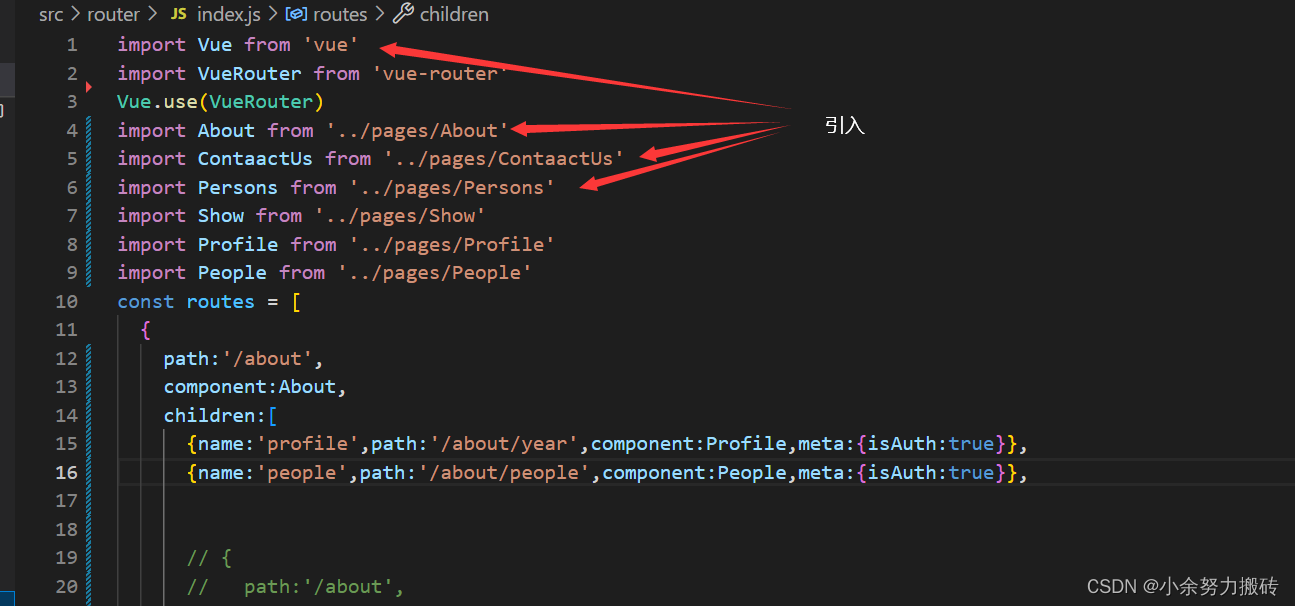

代码(看对应的代码段)
app.vue代码,此代码含有样式
- <div id="root">
- <div class="main">
- <div class="header">
- <h1>路由的演示h1>
- <button @click="back">后退button>
- div>
- div>
- <div class="main">
- <div class="left">
- <ul>
- <li><router-link to="/about" active-class="hover">公司简介router-link>li>
- <li><router-link to="/contaactus" active-class="hover">联系方式router-link>li>
- <li><router-link to="/persons" active-class="hover">公司人员router-link>li>
- ul>
- div>
- <div class="right">
- <router-view>router-view>
- div>
- <div style="clear: both;">div>
- div>
- div>
- <script>
- export default {
- name:'App',
- methods: {
- back(){
- this.$router.back()
- }
- },
- components:{
- },
- }
- script>
- <style>
- .c{
- clear: both;
- }
- *{
- margin: 0px;
- padding: 0px;
- }
- li{
- list-style: none;
- }
- a{text-decoration: none;}
- .main{width: 800px;margin: auto;}
- .header{box-sizing: border-box;padding: 20px;border:1px solid #666;}
- .left{
- height: 500px;
- border: 1px solid #666;
- width: 200px;
- float: left;
- }
- .left li{
- height: 50px;
- line-height: 50px;
- text-align: center;
- border-bottom: 1px solid #666;
- width: 100%;
- }
- .left li a{
- color: #333;display: block;
- }
- .left li a.hover{
- background: blue;color: #fff;
- }
- .right{float: right;
- border:1px solid #61DAFB;
- width: 590px;
- height: 500px;
- }
- .nav li{
- float: left;
- }
- .nav li a{
- width: 150px;
- text-align: center;
- height: 40px;line-height: 40px;
- text-align: center;
- border:1px solid #000000;
- display: block;
- }
- .nav li a.hover{
- background: #0000FF;color: #fff;
- }
- style>
三个路由组件的代码
about
- <div>
- <ul class="nav">
- <li><router-link to="/about/year" active-class="hover">创建年份router-link>li>
- <li><router-link to="/about/people" active-class="hover">创建人router-link>li>
- ul>
- <keep-alive include="People">
- <router-view class="c">router-view>
- keep-alive>
- div>
- <script>
- export default {
- name: 'About',
- data() {
- return {
- };
- },
- mounted() {
- },
- methods: {
- },
- };
- script>
- <style scoped>
- style>
ContaactUs
- <div>
- 联系方式
- div>
- <script>
- export default {
- name: 'ContaactUs',
- data() {
- return {
- };
- },
- mounted() {
- },
- methods: {
- },
- };
- script>
- <style scoped>
- style>
persons
- <div>
- <ul >
- <li v-for="item in persons" :key="item.id">
- <router-link :to="`/persons/show/${item.id}/${item.realname}`">姓名:{{item.realname}}router-link>
- <button @click="push(item)">点击跳转button>
- li>
- ul>
- <hr>
- <router-view>router-view>
- div>
- template>
- <script>
- export default {
- name:'Persons',
- data(){
- return{
- persons:[
- {id:1,realname:'张三'},
- {id:2,realname:'李四'},
- {id:3,realname:'王五'},
- {id:4,realname:'赵六'}
- ]
- }
- },
- methods: {
- push(item){
- this.$router.push(`/persons/show/${item.id}/${item.realname}`)
- },
- },
- }
- script>
- <style>
- style>
router
- import Vue from 'vue'
- import VueRouter from 'vue-router'
- Vue.use(VueRouter)
- import About from '../pages/About'
- import ContaactUs from '../pages/ContaactUs'
- import Persons from '../pages/Persons'
- // import Show from '../pages/Show'
- // import Profile from '../pages/Profile'
- // import People from '../pages/People'
- const routes = [
- {
- path:'/about',
- component:About,
- children:[
- // {name:'profile',path:'/about/year',component:Profile,meta:{isAuth:true}},
- // {name:'people',path:'/about/people',component:People,meta:{isAuth:true}},
- // {
- // path:'/about',
- // redirect:'/about/year'
- // },
- ]},
- {
- path:'/contaactus',
- component:ContaactUs
- },
- {
- path:'/persons',
- component:Persons,
- // children:[
- // {
- // path:'show/:id/:realname',component:Show,props:true
- // // name:'show', path:'show',component:Show
- // }
- // ]
- },
- {
- path:'/',
- redirect:'/about'
- },
- ]
- const router = new VueRouter({
- mode:'history',
- routes
- })
- // router.beforeEach((to,from,next)=>{
- // if(to.name=="people" || to.name=="profile"){
- // if(localStorage.getItem("token")=="123"){
- // next();
- // }
- // }else{
- // next();
- // }
- // })
- // router.beforeEach((to,from,next)=>{
- // if(to.meta.isAuth){
- // if(localStorage.getItem("token")=="123"){
- // next();
- // }
- // }else{
- // next();
- // }
- // })
- export default router
以上就能实现,视屏上的的切换的路由效果,如果有不懂的,私信问我,源码私聊免费提供
三、嵌套路由
1.布局逻辑
嵌套路由在,最开始的路由下,加入路由
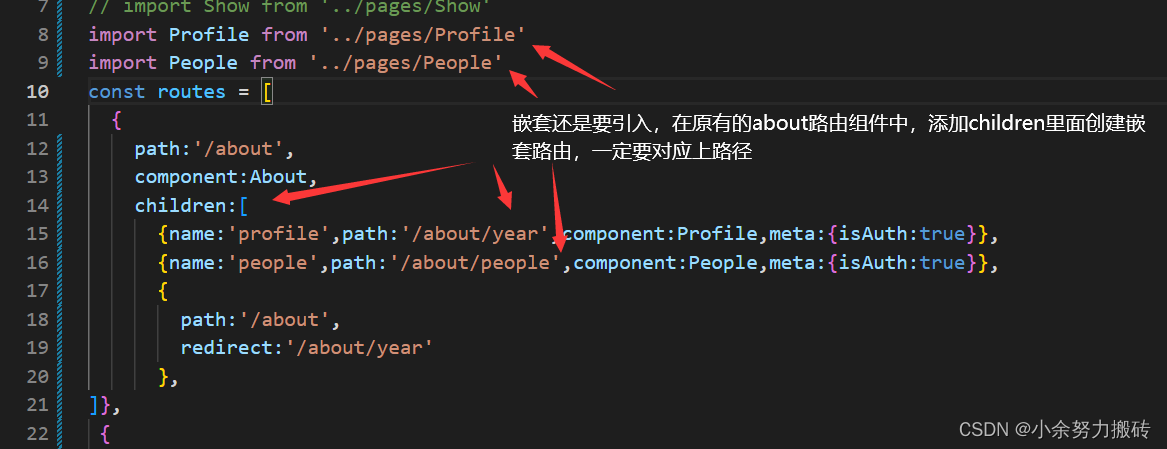
在about路由组件中

再次创建两个路由组件,点击是,获得相对应的内容,实现路由效果

2.效果展示

3.代码
about
- <div>
- <ul class="nav">
- <li><router-link to="/about/year" active-class="hover">创建年份router-link>li>
- <li><router-link to="/about/people" active-class="hover">创建人router-link>li>
- ul>
- <keep-alive include="People">
- <router-view class="c">router-view>
- keep-alive>
- div>
- <script>
- export default {
- name: 'About',
- data() {
- return {
- };
- },
- mounted() {
- },
- methods: {
- },
- };
- script>
- <style scoped>
- style>
两个路由组件
Profile
- <div>
- 2002 08-20
- div>
- <script>
- export default {
- name:'Profile',
- // beforeDestroy () {
- // console.log('已销毁');
- // },
- }
- script>
- <style>
- style>
People
- <div>
- <span>傅小余span> <input type="text">
- div>
- template>
- <script>
- export default {
- name:"People",
- // beforeDestroy () {
- // console.log('已销毁');
- // },
- }
- script>
- <style>
- style>
四、注意
这里我都使用到了默认路径,所以页面点开就会有展示效果
代码如下
第一个里面的默认
- {
- path:'/',
- redirect:'/about'
- },
第二个
- {
- path:'/about',
- redirect:'/about/year'
- },
-
相关阅读:
ElasticSearch7.3学习(三十二)----logstash三大插件(input、filter、output)及其综合示例
DOX-TF/Ce6/IgG 转铁蛋白/光敏剂/单抗IgG修饰阿霉素/阿霉素白蛋白纳米粒的制备
python+requests实现接口自动化测试
MyBatis配置日志和使用注解
【波形/信号发生器】基于 STC1524K32S4 for C on Keil
2024-03-11,12(HTML,CSS)
Java Design Patterns 之 抽象工厂模式 02
Java可重复注解接口(Repeatable Annotation Interfaces)
C++哈希+哈希改造
【前端笔记】Ant Design Form组件 resetFields() 与 setFieldsValue() 之比较
- 原文地址:https://blog.csdn.net/yzq0820/article/details/126474809