-
微服务环境搭建
我们本次是使用的电商项目中的商品微服务、订单微服务为案例进行讲解。
1 案例准备
1.1 技术选型
maven:3.5.0+
数据库:MySQL 5.7 以上
持久层: Mybatis-plus 《Mybatis Mapper Mybatis-plus》
其他: SpringCloud Alibaba 技术栈 druid
1.2 模块设计
day0818-springcloud 父工程 ----jar的版本管理 公共jar的引入
springcloud-common 公共模块【实体类】 《实体类,公共依赖,工具类。》
springcloud-product 商品微服务 【端口: 8080~8089 搭建集群】
springcloud-order 订单微服务 【端口: 8090~8099 搭建集群】


其中pom.xml(day0818-springcloud)文件中
- "1.0" encoding="UTF-8"?>
- <project xmlns="http://maven.apache.org/POM/4.0.0" xmlns:xsi="http://www.w3.org/2001/XMLSchema-instance"
- xsi:schemaLocation="http://maven.apache.org/POM/4.0.0 https://maven.apache.org/xsd/maven-4.0.0.xsd">
- <modelVersion>4.0.0modelVersion>
- <modules>
- <module>springcloud-commonmodule>
- <module>springcloud-ordermodule>
- <module>springcloud-productmodule>
- modules>
- <parent>
- <groupId>org.springframework.bootgroupId>
- <artifactId>spring-boot-starter-parentartifactId>
- <version>2.3.12.RELEASEversion>
- <relativePath/>
- parent>
- <groupId>com.lqhgroupId>
- <artifactId>day0818-springcloudartifactId>
- <version>0.0.1-SNAPSHOTversion>
- <name>day0818-springcloudname>
- <description>day0818-springclouddescription>
- <packaging>pompackaging>
- <properties>
- <java.version>1.8java.version>
- <project.build.sourceEncoding>UTF-8project.build.sourceEncoding>
- <project.reporting.outputEncoding>UTF- 8project.reporting.outputEncoding>
- <spring-cloud.version>Hoxton.SR8spring-cloud.version>
- <spring-cloud-alibaba.version>2.2.3.RELEASEspring-cloud-alibaba.version>
- properties>
- <dependencyManagement>
- <dependencies>
- <dependency>
- <groupId>org.springframework.cloudgroupId>
- <artifactId>spring-cloud-dependenciesartifactId>
- <version>${spring-cloud.version}version>
- <type>pomtype>
- <scope>importscope>
- dependency>
- <dependency>
- <groupId>com.alibaba.cloudgroupId>
- <artifactId>spring-cloud-alibaba-dependenciesartifactId>
- <version>${spring-cloud-alibaba.version}version>
- <type>pomtype>
- <scope>importscope>
- dependency>
- dependencies>
- dependencyManagement>
- <dependencies>
- <dependency>
- <groupId>mysqlgroupId>
- <artifactId>mysql-connector-javaartifactId>
- dependency>
- <dependency>
- <groupId>com.baomidougroupId>
- <artifactId>mybatis-plus-boot-starterartifactId>
- <version>3.5.2version>
- dependency>
- dependencies>
- <build>
- <plugins>
- <plugin>
- <groupId>org.springframework.bootgroupId>
- <artifactId>spring-boot-maven-pluginartifactId>
- plugin>
- plugins>
- build>
- project>
版本对应:

1 创建基础模块(Maven工程)
1.1springcloud-common

1 创建 springcloud-common 模块,在pom.xml中添加依赖
- "1.0" encoding="UTF-8"?>
- <project xmlns="http://maven.apache.org/POM/4.0.0"
- xmlns:xsi="http://www.w3.org/2001/XMLSchema-instance"
- xsi:schemaLocation="http://maven.apache.org/POM/4.0.0 http://maven.apache.org/xsd/maven-4.0.0.xsd">
- <parent>
- <artifactId>day0818-springcloudartifactId>
- <groupId>com.lqhgroupId>
- <version>0.0.1-SNAPSHOTversion>
- parent>
- <modelVersion>4.0.0modelVersion>
- <artifactId>springcloud-commonartifactId>
- <properties>
- <maven.compiler.source>8maven.compiler.source>
- <maven.compiler.target>8maven.compiler.target>
- <project.build.sourceEncoding>UTF-8project.build.sourceEncoding>
- properties>
- <dependencies>
- <dependency>
- <groupId>org.projectlombokgroupId>
- <artifactId>lombokartifactId>
- dependency>
- <dependency>
- <groupId>com.baomidougroupId>
- <artifactId>mybatis-plus-boot-starterartifactId>
- <version>3.5.2version>
- dependency>
- dependencies>
- project>
2 创建实体类
Order
- package com.lqh.entity;
- import com.baomidou.mybatisplus.annotation.IdType;
- import com.baomidou.mybatisplus.annotation.TableId;
- import com.baomidou.mybatisplus.annotation.TableName;
- import lombok.Data;
- @Data
- @TableName("shop_order")
- public class Order {
- @TableId(type = IdType.AUTO)
- private Long oid; //订单id
- private Integer uid;//用户id
- private String username;//用户名
- private Integer pid;//商品id
- private String pname;//商品名称
- private Double pprice;//商品价格
- private Integer number;//购买数量
- }
Product
- package com.lqh.entity;
- import com.baomidou.mybatisplus.annotation.IdType;
- import com.baomidou.mybatisplus.annotation.TableId;
- import com.baomidou.mybatisplus.annotation.TableName;
- import lombok.Data;
- @Data
- @TableName(value="shop_product")
- public class Product {
- @TableId(type= IdType.AUTO)
- private Integer pid;
- private String pname;//商品名称
- private Double pprice;//商品价格
- private Integer stock;//库存
- }
1.2 创建商品微服务springcloud-product

1 创建一个名为springcloud-product 的模块,并添加springboot依赖 pom.xml
- "1.0" encoding="UTF-8"?>
- <project xmlns="http://maven.apache.org/POM/4.0.0"
- xmlns:xsi="http://www.w3.org/2001/XMLSchema-instance"
- xsi:schemaLocation="http://maven.apache.org/POM/4.0.0 http://maven.apache.org/xsd/maven-4.0.0.xsd">
- <parent>
- <artifactId>day0818-springcloudartifactId>
- <groupId>com.lqhgroupId>
- <version>0.0.1-SNAPSHOTversion>
- parent>
- <modelVersion>4.0.0modelVersion>
- <artifactId>springcloud-productartifactId>
- <properties>
- <maven.compiler.source>8maven.compiler.source>
- <maven.compiler.target>8maven.compiler.target>
- <project.build.sourceEncoding>UTF-8project.build.sourceEncoding>
- properties>
- <dependencies>
- <dependency>
- <groupId>org.springframework.bootgroupId>
- <artifactId>spring-boot-starter-webartifactId>
- dependency>
- <dependency>
- <groupId>com.lqhgroupId>
- <artifactId>springcloud-commonartifactId>
- <version>0.0.1-SNAPSHOTversion>
- <scope>compilescope>
- dependency>
- <dependency>
- <groupId>com.alibaba.cloudgroupId>
- <artifactId>spring-cloud-starter-alibaba-nacos-discoveryartifactId>
- dependency>
- dependencies>
- project>
2 创建工程的主类 ProductApp
- package com.lqh;
- import org.mybatis.spring.annotation.MapperScan;
- import org.springframework.boot.SpringApplication;
- import org.springframework.boot.autoconfigure.SpringBootApplication;
- /**
- * @author: Li Qinghua
- * @create: 2022-08-18 13:50
- **/
- @SpringBootApplication
- public class ProductApp {
- public static void main(String[] args) {
- SpringApplication.run(ProductApp.class,args);
- }
- }
3 创建配置文件application.yml
- server:
- port: 8081
- spring:
- datasource:
- url: jdbc:mysql://localhost:3306/springcloud?serverTimezone=Asia/Shanghai
- driver-class-name: com.mysql.cj.jdbc.Driver
- username: root
- password: 123456
- cloud:
- nacos:
- discovery:
- server-addr: localhost:8848
- enabled: true
- application:
- name: product
- mybatis-plus:
- configuration:
- log-impl: org.apache.ibatis.logging.stdout.StdOutImpl
4 创建ProductDao接口
- package com.lqh.dao;
- import com.baomidou.mybatisplus.core.mapper.BaseMapper;
- import com.lqh.entity.Product;
- import org.apache.ibatis.annotations.Mapper;
- @Mapper
- public interface ProductDao extends BaseMapper
{ - }
5 创建ProductService接口
- package com.lqh.server;
- import com.lqh.entity.Product;
- public interface ProductServer {
- Product getProduct(Integer pid);
- }
6 创建ProductServiceImpl实现类
- package com.lqh.server.impl;
- import com.lqh.dao.ProductDao;
- import com.lqh.entity.Product;
- import com.lqh.server.ProductServer;
- import org.springframework.beans.factory.annotation.Autowired;
- import org.springframework.stereotype.Service;
- /**
- * @author: Li Qinghua
- * @create: 2022-08-18 13:30
- **/
- @Service
- public class ProductServerImpl implements ProductServer {
- @Autowired
- private ProductDao productDao;
- @Override
- public Product getProduct(Integer pid) {
- Product product = productDao.selectById(pid);
- return product;
- }
- }
7 创建ProductController类
- package com.lqh.controller;
- import com.lqh.entity.Product;
- import com.lqh.server.ProductServer;
- import com.lqh.utils.CommonResult;
- import org.springframework.beans.factory.annotation.Autowired;
- import org.springframework.web.bind.annotation.GetMapping;
- import org.springframework.web.bind.annotation.PathVariable;
- import org.springframework.web.bind.annotation.RequestMapping;
- import org.springframework.web.bind.annotation.RestController;
- /**
- * @author: Li Qinghua
- * @create: 2022-08-18 13:29
- **/
- @RestController
- @RequestMapping("/product")
- public class ProductController {
- @Autowired
- private ProductServer productServer;
- @GetMapping("/search/{pid}")
- public Product searchProduct(@PathVariable Integer pid){
- Product product = productServer.getProduct(pid);
- if(product!=null){
- return product;
- }else return null;
- }
- }
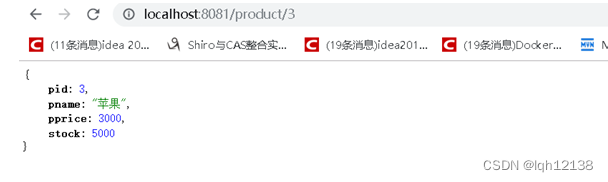
8 启动工程,等到数据库表创建完毕之后,加入测试数据

9.通过浏览器访问服务
1.3创建订单微服务 springcloud-order

1 创建一个名为 springcloud-order 的模块,并添加springboot依赖 pom.xml
- "1.0" encoding="UTF-8"?>
- <project xmlns="http://maven.apache.org/POM/4.0.0"
- xmlns:xsi="http://www.w3.org/2001/XMLSchema-instance"
- xsi:schemaLocation="http://maven.apache.org/POM/4.0.0 http://maven.apache.org/xsd/maven-4.0.0.xsd">
- <parent>
- <artifactId>day0818-springcloudartifactId>
- <groupId>com.lqhgroupId>
- <version>0.0.1-SNAPSHOTversion>
- parent>
- <modelVersion>4.0.0modelVersion>
- <artifactId>springcloud-orderartifactId>
- <properties>
- <maven.compiler.source>8maven.compiler.source>
- <maven.compiler.target>8maven.compiler.target>
- <project.build.sourceEncoding>UTF-8project.build.sourceEncoding>
- properties>
- <dependencies>
- <dependency>
- <groupId>org.springframework.bootgroupId>
- <artifactId>spring-boot-starter-webartifactId>
- dependency>
- <dependency>
- <groupId>com.alibabagroupId>
- <artifactId>fastjsonartifactId>
- <version>2.0.5version>
- dependency>
- <dependency>
- <groupId>com.lqhgroupId>
- <artifactId>springcloud-commonartifactId>
- <version>0.0.1-SNAPSHOTversion>
- <scope>compilescope>
- dependency>
- <dependency>
- <groupId>com.alibaba.cloudgroupId>
- <artifactId>spring-cloud-starter-alibaba-nacos-discoveryartifactId>
- dependency>
- <dependency>
- <groupId>org.springframework.cloudgroupId>
- <artifactId>spring-cloud-starter-openfeignartifactId>
- dependency>
- dependencies>
- project>
2 创建启动类
- package com.lqh;
- import org.springframework.boot.SpringApplication;
- import org.springframework.boot.autoconfigure.SpringBootApplication;
- import org.springframework.cloud.client.loadbalancer.LoadBalanced;
- import org.springframework.cloud.openfeign.EnableFeignClients;
- import org.springframework.context.annotation.Bean;
- import org.springframework.web.client.RestTemplate;
- /**
- * @author: Li Qinghua
- * @create: 2022-08-18 14:02
- **/
- @SpringBootApplication
- @EnableFeignClients
- public class OrderApp {
- public static void main(String[] args) {
- SpringApplication.run(OrderApp.class,args);
- }
- }
3 创建配置文件application.yml
- server:
- port: 8092
- spring:
- datasource:
- url: jdbc:mysql://localhost:3306/springcloud?serverTimezone=Asia/Shanghai
- driver-class-name: com.mysql.cj.jdbc.Driver
- username: root
- password: 123456
- cloud:
- nacos:
- discovery:
- server-addr: localhost:8848
- enabled: true
- application:
- name: order
- mybatis-plus:
- configuration:
- log-impl: org.apache.ibatis.logging.stdout.StdOutImpl
4 创建OrderDao接口
- package com.lqh.dao;
- import com.baomidou.mybatisplus.core.mapper.BaseMapper;
- import com.lqh.entity.Order;
- import org.apache.ibatis.annotations.Mapper;
- @Mapper
- public interface OrderDao extends BaseMapper
{ - }
5 创建OrderService接口
- package com.lqh.server;
- import com.lqh.entity.Order;
- /**
- * @author: Li Qinghua
- * @create: 2022-08-18 14:11
- **/
- public interface OrderServer {
- Order saveProductOrder(Integer pid, Integer num);
- }
6 创建OrderServiceImpl实现类
- package com.lqh.server.impl;
- import com.lqh.dao.OrderDao;
- import com.lqh.entity.Order;
- import com.lqh.entity.Product;
- import com.lqh.server.OrderServer;
- import org.springframework.beans.factory.annotation.Autowired;
- import org.springframework.stereotype.Service;
- import org.springframework.web.client.RestTemplate;
- /**
- * @author: Li Qinghua
- * @create: 2022-08-18 14:11
- **/
- @Service
- public class OrderServerImpl implements OrderServer {
- @Autowired
- private OrderDao orderDao;
- @Autowired
- private RestTemplate restTemplate;
- @Override
- public Order saveProductOrder(Integer pid, Integer num) {
- Order order=new Order();
- order.setUid(1);
- order.setUsername("zhangsan");
- Product product = restTemplate.getForObject("http://localhost:8081/product/search/" + pid, Product.class);
- order.setPid(product.getPid());
- System.out.println(product);
- order.setPname(product.getPname());
- order.setPprice(product.getPprice());
- order.setNumber(num);
- orderDao.insert(order);
- return order;
- }
- }
7 创建OrderController类
- package com.lqh.controller;
- import com.lqh.entity.Order;
- import com.lqh.server.OrderServer;
- import com.lqh.utils.CommonResult;
- import org.springframework.beans.factory.annotation.Autowired;
- import org.springframework.beans.factory.annotation.Value;
- import org.springframework.cloud.context.config.annotation.RefreshScope;
- import org.springframework.web.bind.annotation.GetMapping;
- import org.springframework.web.bind.annotation.PathVariable;
- import org.springframework.web.bind.annotation.RequestMapping;
- import org.springframework.web.bind.annotation.RestController;
- /**
- * @author: Li Qinghua
- * @create: 2022-08-18 14:10
- **/
- @RestController
- @RequestMapping("/order")
- @RefreshScope
- public class OrderController {
- @Autowired
- private OrderServer orderServer;
- @GetMapping("/save/{pid}/{num}")
- public CommonResult saveOrder(@PathVariable Integer pid,@PathVariable Integer num){
- Order order = orderServer.saveProductOrder(pid, num);
- if(order!=null){
- return new CommonResult(200,"订单保存成功",order);
- }
- return new CommonResult(500,"订单保存失败",null);
- }
- }
8 启动工程并在浏览器上测试

-
相关阅读:
Java中三种I/O模型 BIO,NIO,AIO
第十节:继承【java】
硬件工程师必备的35个资料网站
飞书API 2-2:如何使用 API 建多维表
Redis高可用之战:主从架构
夏季预防声带息肉的方法有哪些?
自定义windows右键菜单,软件卸载后 右键菜单残留 打开方式残留 解决方法
技能学习链接
[AndroidStudio]_[初级]_[修改虚拟设备镜像文件的存放位置]
分布式医疗大数据存储方案研究综述
- 原文地址:https://blog.csdn.net/m0_58212960/article/details/126450573
