-
SpringBoot使用JSP
SpringBoot使用JSP
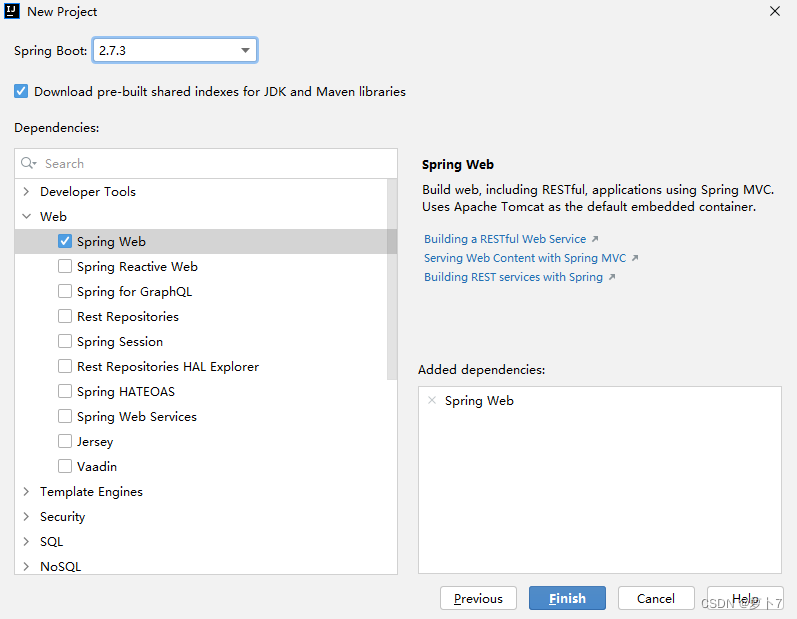
新建SpringBoot项目
-

-
选择SpringWeb
-
-
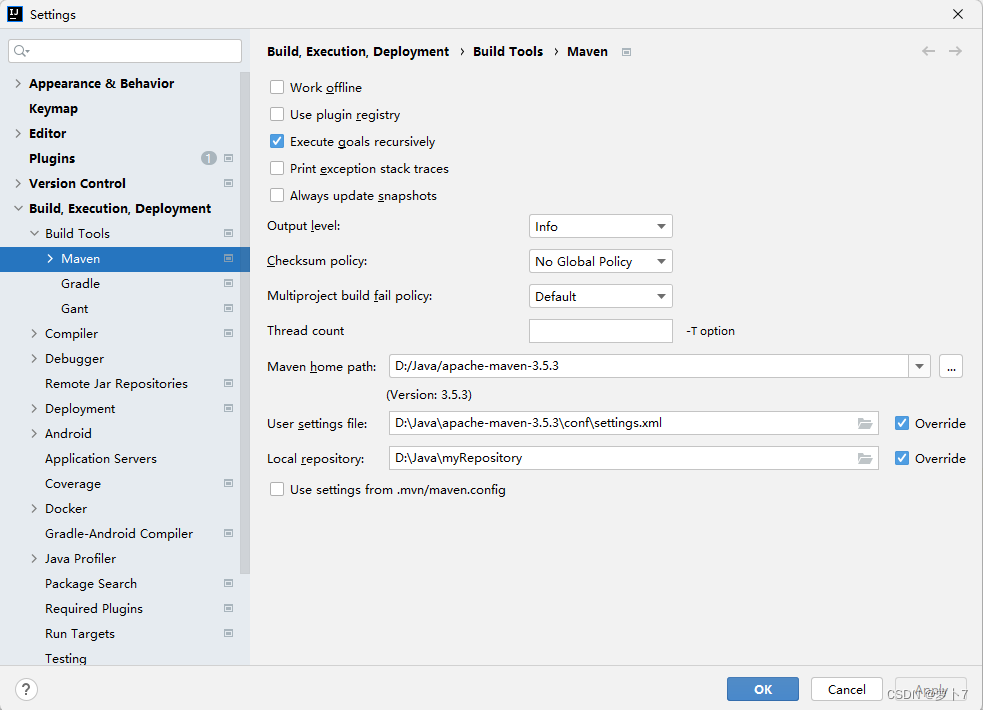
修改Maven配置
-
-
确认SpringBoot起步依赖
-
<dependencies> <dependency> <groupId>org.springframework.boot</groupId> <artifactId>spring-boot-starter-web</artifactId> </dependency> <dependency> <groupId>org.springframework.boot</groupId> <artifactId>spring-boot-starter-test</artifactId> <scope>test</scope> </dependency> </dependencies>- 1
- 2
- 3
- 4
- 5
- 6
- 7
- 8
- 9
- 10
- 11
- 12
配置文件
启动类
-

-
@SpringBootApplication : @SpringBootApplication 是 一 个 复 合 注 解 , 是 由@SpringBootConfiguration, @EnableAutoConfiguration ,@ComponentScan 联合在一起组成的。
-
@SpringBootConfiguration : 就 是 @Configuration 这 个 注 解 的 功 能 , 使 用@SpringBootConfiguration 这个注解的类就是配置文件的作用。
-
@EnableAutoConfiguration:开启自动配置, 把一些对象加入到 spring 容器中。
-
@ComponentScan:组件扫描器, 扫描注解,根据注解的功能,创建 java bean,给属性赋值等等。组件扫描器默认扫描的是 @ComponentScan 注解所在的类, 类所在的包和子包。
核心配置文件
- Spring Boot 的核心配置文件用于配置 Spring Boot 程序,名字必须以 application 开始
使用JSP
依赖支持
-
<!--引入Spring Boot内嵌的Tomcat对JSP的解析包,不加解析不了jsp页面--> <!--如果只是使用JSP页面,可以只添加该依赖--> <dependency> <groupId>org.apache.tomcat.embed</groupId> <artifactId>tomcat-embed-jasper</artifactId> </dependency> <!--如果要使用servlet必须添加该以下两个依赖--> <!-- servlet依赖的jar包--> <dependency> <groupId>javax.servlet</groupId> <artifactId>javax.servlet-api</artifactId> </dependency> <dependency> <groupId>javax.servlet.jsp</groupId> <artifactId>javax.servlet.jsp-api</artifactId> <version>2.3.1</version> </dependency> <!--如果使用JSTL必须添加该依赖--> <!--jstl标签依赖的jar包start--> <dependency> <groupId>javax.servlet</groupId> <artifactId>jstl</artifactId> </dependency>- 1
- 2
- 3
- 4
- 5
- 6
- 7
- 8
- 9
- 10
- 11
- 12
- 13
- 14
- 15
- 16
- 17
- 18
- 19
- 20
- 21
- 22
- 23
- 24
- 25
- 26
修改编译路径
-
SpringBoot 要求 jsp 文件必须编译到指定的 META-INF/resources 目录下才能访问,否则访问不到,配置pom文件中的build标签,添加以下配置
-
<resources> <resource> <!--源文件位置--> <directory>src/main/webapp</directory> <!--指定编译到META-INF/resource,该目录不能随便写--> <targetPath>META-INF/resources</targetPath> <!--指定要把哪些文件编译进去,**表示 webapp 目录及子 目录,*.*表示所有文件--> <includes> <include>**/*.*- 1
- 2
- 3
- 4
- 5
- 6
- 7
- 8
- 9
- 10
- 11
- 12
- 13
-
在src/main文件夹下面创建 webapp文件夹,并配置成Web资源路径
-

application.properties配置
# 端口 server.port=8080 # 访问根路径 server.servlet.context-path=/ #配置 SpringMVC 的视图解析器 #其中:/相当于 src/main/webapp 目录 spring.mvc.view.prefix=/ spring.mvc.view.suffix=.jsp- 1
- 2
- 3
- 4
- 5
- 6
- 7
- 8
- 9
Controller接口
-
@Controller public class SpringBootController { @RequestMapping(value = "/index") public String index(Model model){ model.addAttribute("data", "SpringBoot框架集成jsp页面"); return "index"; } @RequestMapping("/say") @ResponseBody public String json(){ return "hello"; } }- 1
- 2
- 3
- 4
- 5
- 6
- 7
- 8
- 9
- 10
- 11
- 12
- 13
- 14
- 15
- 16
- 17
JSP文件
-
在webapp下创建index.jsp
-
<%@ page contentType="text/html;charset=UTF-8" language="java" %>SpringBoot ${data}
- 1
- 2
- 3
- 4
- 5
- 6
- 7
- 8
- 9
结果
-
-
相关阅读:
分享一个完全免费的GPT4站点,gpts也可以用
MISSING COURSE-shell
debian/ubuntu/windows配置wiregurad内网服务器(包含掉线自启动)
Vue-cli3.0脚手架安装
WEIXIN day_09(8.26) 学子影院项目实践5
Hive CLI和Beeline命令行的基本使用
NMap使用技巧总结(三)
SpringCloud Gateway 3.x 响应头添加 Skywalking TraceId
Python进阶必备之JS逆向-某榜某博数据采集
uniapp开发h5项目引入weixin-sdk报错wx.miniprogram undefined
- 原文地址:https://blog.csdn.net/qq_40675243/article/details/126465614


