-
javaIO流01:文件,创建文件三种方式,获取文件相关信息,目录操作
文件
- 什么是文件
- 文件就是我们保存数据的地方,类似word文档,excel文件,png图片,MP4视频,…这些都是存储数据的地方
1.文件流
- 文件流:文件在程序中是以流的形式进行操作的.
- 流:数据在数据源(文件)和程序(内存)之间经历的路径.
- 输入流:数据从数据源(文件)到程序(内存)之间的路径.
- 输出流:数据从程序(内存)到数据源(文件)之间的路径.
- 图片理解:输入输出流是根据内存为判断依据,进入内存称为输入,从内存到其他位置为输出

2.创建文件
- 相关方法:
new File(String pathname) //根据路径构建一个file对象
new File(File parent,String child) //根据父目录文件+子路径构建
new File(String parent,String child) //根据父目录+子路径构建
createNewFile方法 //创建一个新文件
import org.junit.Test; import java.io.File; import java.io.IOException; public class Demo1 { public static void main(String[] args) { } //方式1 //@Test表示这个方法是JUnit测试时候会运行的 //引入junit.jar包,然后import org.junit.Test; //程序就不会报错 @Test public void Create1(){ //方式1 //new File(String pathname) String FilePath="D:/IOFile/news1.txt"; //这里我们只是创建了一个File对象,还没有创建文件,所以我们调用createNewFile File file = new File(FilePath); //这里也可以直接写成File file = new File("E:\\news1.txt"); //我们直接调用createNewFile方法会报出一个IO异常,所以我们使用trycatch // file.createNewFile(); try { //只有我们调用了createNewFile方法,才会在硬盘(磁盘)中创建文件 file.createNewFile(); System.out.println("文件news1.txt创建成功"); } catch (IOException e) { e.printStackTrace(); } } //方式2 @Test public void Create2(){ //父目录文件路径 File parentPath=new File("D:/IOFile"); //子路径 String fileName="news2.txt"; //方式2:new File(File parent,String child) File file=new File(parentPath,fileName); try { file.createNewFile(); System.out.println("文件news2.txt创建成功"); } catch (IOException e) { e.printStackTrace(); } } //方式3 @Test public void Create3(){ String parentpath="D:/IOFile"; String sonpath="news3.txt"; File file = new File(parentpath, sonpath); try { file.createNewFile(); System.out.println("文件news3.txt创建成功"); } catch (IOException e) { e.printStackTrace(); } } }- 1
- 2
- 3
- 4
- 5
- 6
- 7
- 8
- 9
- 10
- 11
- 12
- 13
- 14
- 15
- 16
- 17
- 18
- 19
- 20
- 21
- 22
- 23
- 24
- 25
- 26
- 27
- 28
- 29
- 30
- 31
- 32
- 33
- 34
- 35
- 36
- 37
- 38
- 39
- 40
- 41
- 42
- 43
- 44
- 45
- 46
- 47
- 48
- 49
- 50
- 51
- 52
- 53
- 54
- 55
- 56
- 57
- 58
- 59
- 60
- 61
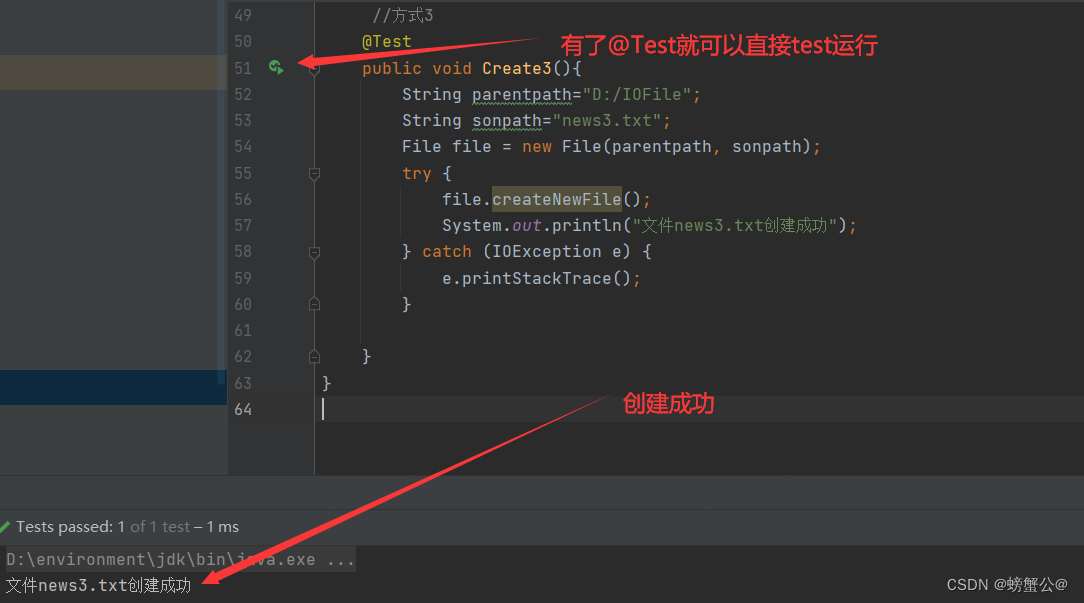
3.获取文件相关信息
import org.junit.Test; import java.io.File; public class Demo2 { public static void main(String[] args) { } @Test public void Test(){ File file = new File("D:/IOFile/news1.txt"); System.out.println("文件名:"+file.getName()); System.out.println("文件绝对路径:"+file.getAbsolutePath()); System.out.println("文件父级目录:"+file.getParent()); //我在文件中写入张三123,记事本用的是utf-8的编码,所以一个数字一个字节,一个汉字是三个字节,一共9个字节(byte) System.out.println("文件大小(字节):"+file.length()); System.out.println("文件是否存在:"+file.exists()); System.out.println("是不是一个文件:"+file.isFile()); System.out.println("是不是一个目录:"+file.isDirectory()); } }- 1
- 2
- 3
- 4
- 5
- 6
- 7
- 8
- 9
- 10
- 11
- 12
- 13
- 14
- 15
- 16
- 17
- 18
- 19
- 20
- 21
- 22
- 23
输出结果:
文件名:news1.txt 文件绝对路径:D:\IOFile\news1.txt 文件父级目录:D:\IOFile 文件大小(字节):9 文件是否存在:true 是不是一个文件:true 是不是一个目录:false- 1
- 2
- 3
- 4
- 5
- 6
- 7
目录操作
使用mkdir创建一级目录,使用mkdirs创建多级目录
@Test public void Test1(){ File file = new File("D:/IOFile/news3.txt"); File file1 = new File("D:/IOFile/news"); //需求1:D:/IOFile/news3.txt是否存在,如果存在就删除 if (file.exists()){ if (file.delete()){ System.out.println("文件存在并且删除成功"); }else{ System.out.println("文件存在但是删除失败"); } }else{ System.out.println("文件不存在"); } //需求2:D:/IOFile/news是否存在,如果不存在就创建该目录 if (file1.exists()){ System.out.println("该目录存在"); }else{ if (file1.mkdir()){ System.out.println("目录创建成功"); }else{ System.out.println("目录创建失败"); } } }- 1
- 2
- 3
- 4
- 5
- 6
- 7
- 8
- 9
- 10
- 11
- 12
- 13
- 14
- 15
- 16
- 17
- 18
- 19
- 20
- 21
- 22
- 23
- 24
- 25
- 26
-
相关阅读:
用HTML+CSS+JS做一个漂亮简单的游戏网页——全屏游戏美术大赛作品(4个滚动页面)
Java工程师常见面试题集锦
huggingface下载文件,可以看下载进度
QT sqlite BLOB类型 写入数组
使用python进行数据分析(二)
rabbitMQ 中三种常用交换机:direct、topic、fanout的使用以及区别和queue消息的Ack,Nack ,Reject 消息类型
我为什么建议不要用CMake
C. Zero Path
MetaCost与重采样结合的不平衡分类算法——RS-MetaCost
通过Linux deploy搭建Android服务器(包括git)
- 原文地址:https://blog.csdn.net/m0_52051155/article/details/126453845
