-
【数据分析实战】kaggle项目:bike sharing demand
一、 导入数据
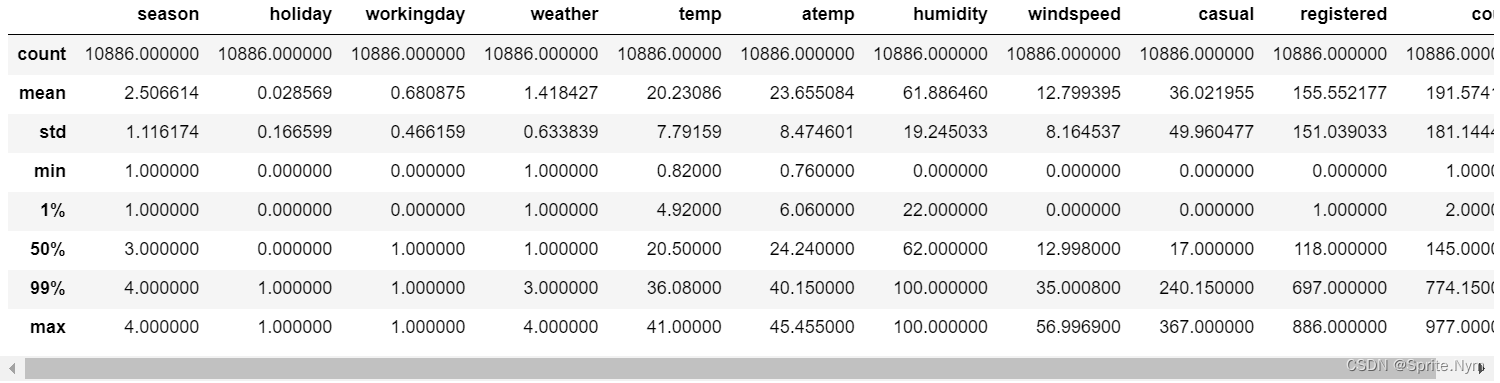
import numpy as np import pandas as pd import matplotlib.pyplot as plt import seaborn as sns sns.set() %config InlineBackend.figure_format = 'svg' bike_df0 = pd.read_csv('data/bike/train.csv') bike_df0.info() """RangeIndex: 10886 entries, 0 to 10885 Data columns (total 12 columns): # Column Non-Null Count Dtype --- ------ -------------- ----- 0 datetime 10886 non-null object 1 season 10886 non-null int64 2 holiday 10886 non-null int64 3 workingday 10886 non-null int64 4 weather 10886 non-null int64 5 temp 10886 non-null float64 6 atemp 10886 non-null float64 7 humidity 10886 non-null int64 8 windspeed 10886 non-null float64 9 casual 10886 non-null int64 10 registered 10886 non-null int64 11 count 10886 non-null int64 dtypes: float64(3), int64(8), object(1) memory usage: 1020.7+ KB """ bike_df0.describe([0.01, 0.99])- 1
- 2
- 3
- 4
- 5
- 6
- 7
- 8
- 9
- 10
- 11
- 12
- 13
- 14
- 15
- 16
- 17
- 18
- 19
- 20
- 21
- 22
- 23
- 24
- 25
- 26
- 27
- 28
- 29
- 30
- 31
- 32
二、 特征工程
2.1 类型转换
bike_df1 = bike_df0.copy() def transform_datetime(df): # 将datetime处理成datetime类型 df.datetime = pd.to_datetime(df.datetime) # 分别得到year、hour特征 df['year'] = df.datetime.dt.year df['hour'] = df.datetime.dt.hour # 原来的datetime抛弃 df.drop(columns=['datetime'], inplace=True) transform_datetime(bike_df1)- 1
- 2
- 3
- 4
- 5
- 6
- 7
- 8
- 9
- 10
- 11
- 12
2.2 特征筛选
# 查看相关系数 plt.figure(figsize=(12, 8)) sns.heatmap(bike_df1.corr(), vmin=-1, cmap=plt.cm.coolwarm, annot=True)- 1
- 2
- 3

# 丢弃atemp列、holiday列、windspeed列和count列 bike_df1.drop(columns=['atemp', 'holiday', 'windspeed', 'count'], inplace=True)- 1
- 2
2.3 异常值处理
# 画图查看hour列、temp列、humidity列与count的关系 def show_img(df, col_name, value_name): temp = pd.pivot_table(df, index=[col_name], values=[value_name], aggfunc='mean') plt.figure(figsize=(6,4)) sns.lineplot( x=col_name, y=value_name, data=temp ) plt.title(f'{col_name}-{value_name}') plt.show() for col in ['hour', 'humidity', 'temp']: for value in ['casual', 'registered']: show_img(bike_df1, col, value)- 1
- 2
- 3
- 4
- 5
- 6
- 7
- 8
- 9
- 10
- 11
- 12
- 13
- 14
- 15

从上图可以看出,湿度<20和>20,数据表现完全不同,认定湿度<20的样本为异常值,排除。另外温度低、中、高的数据表现也不同,考虑分成三个训练集去建模预测,最后整合。# 处理hour # 再次画图查看hour列 hour = pd.pivot_table(bike_df1, index=['hour'], values=['registered']) sns.barplot(x=hour.index, y=hour['registered'])- 1
- 2
- 3
- 4

这里尝试分箱,效果不好,放弃分箱。# 处理humidity 认定humidity < 20的为异常数据,丢弃 def drop_data(df, col, tol): df.drop(index=df[df[col]<tol].index, inplace=True) drop_data(bike_df1, 'humidity', 20) # 处理temp # 认定3摄氏度以下为异常数据,删除 drop_data(bike_df1, 'temp', 3) # 尝试将温度拆分成3段来建模预测,但后续效果不好 # def split_df(df, col_name, bins): # return [df[(bins[i] <= df[col_name]) & (df[col_name] < bins[i+1])] for i in range(len(bins)-1)] # df_list = split_df(bike_df1, 'temp', [0, 32, 37, 50])- 1
- 2
- 3
- 4
- 5
- 6
- 7
- 8
- 9
- 10
- 11
- 12
- 13
2.4 类别特征转哑变量
bike_df1['season'] = bike_df1['season'].map({1: 'spring', 2: 'summer', 3: 'fall', 4: 'winter'}) bike_df1['weather'] = bike_df1['weather'].map({1: 'clear', 2: 'cloudy', 3: 'light_rain', 4: 'heavy_rain'}) bike_df1['workingday'] = bike_df1['workingday'].map({0: 'no_workingday', 1: 'is_workingday'}) def to_dummies(df, cols): return pd.concat([pd.get_dummies(df[col]) for col in cols] + [df.drop(columns=cols)], axis=1) bike_df2 = to_dummies(bike_df1, ['season', 'weather', 'workingday', 'year'])- 1
- 2
- 3
- 4
- 5
- 6
- 7
- 8
三、建模
from xgboost import XGBRegressor from catboost import CatBoostRegressor from sklearn.ensemble import RandomForestRegressor, StackingRegressor, VotingRegressor from sklearn.svm import SVR from sklearn.neighbors import KNeighborsRegressor from sklearn.model_selection import train_test_split from sklearn.model_selection import GridSearchCV, cross_val_score X_train, X_test, y_train, y_test = train_test_split(bike_df2.drop(columns=['casual', 'registered']), bike_df2[['casual', 'registered']], test_size=0.2) # 定义一个简单的试探建模效果的函数 def easy_try(model, X_train, X_test, y_train, y_test): model.fit(X_train, y_train['casual']) print('casual', model.score(X_test, y_test['casual'])) model.fit(X_train, y_train['registered']) print('registered', model.score(X_test, y_test['registered']))- 1
- 2
- 3
- 4
- 5
- 6
- 7
- 8
- 9
- 10
- 11
- 12
- 13
- 14
- 15
- 16
3.1 XGB
%%time easy_try(XGBRegressor(n_estimators=10), X_train, X_test, y_train, y_test) # XGB支持多标签建模预测,这里就不区分casual和registered了 # 多次调参以使预测结果不要出现负数 xgb = XGBRegressor(n_estimators=14, max_depth=10, reg_lambda=10) xgb.fit(X_train, y_train) # 查看R²值 print(xgb.score(X_test, y_test)) # 0.9059309080369857 # 查看预测值是否出现负数,如果出现了能否接受 pd.DataFrame(xgb.predict(X_test)).describe()- 1
- 2
- 3
- 4
- 5
- 6
- 7
- 8
- 9
- 10
- 11

3.2 随机森林
%%time easy_try(RandomForestRegressor(), X_train, X_test, y_train, y_test) """ casual 0.8873701620424612 registered 0.9220132387157473 CPU times: total: 4.84 s Wall time: 4.47 s """- 1
- 2
- 3
- 4
- 5
- 6
- 7
- 8
3.3 CatBoost
%%time easy_try(CatBoostRegressor(), X_train, X_test, y_train, y_test) """ casual 0.8942355038852897 registered 0.9379193613461692 CPU times: total: 27.9 s Wall time: 5.22 s """ # 和XGB一样调参防止负数 cbr = CatBoostRegressor(iterations=1000, depth=10, loss_function='Poisson') cbr.fit(X_train, y_train['registered']) # 查看R²值 print(cbr.score(X_test, y_test['registered'])) # 0.9377051781734137 # 查看是否有负数 pd.DataFrame(cbr.predict(X_test)).describe()- 1
- 2
- 3
- 4
- 5
- 6
- 7
- 8
- 9
- 10
- 11
- 12
- 13
- 14
- 15
- 16

3.4 其他
svm、knn尝试过,效果不好。
stacking和voting效果无明显提升。
四、预测
test_df0 = pd.read_csv('data/bike/test.csv') test_df1 = test_df0.copy() test_df1.describe([0.01, 0.99])- 1
- 2
- 3

test_df1.head()- 1

# 时间做类型转换 transform_datetime(test_df1) # 丢弃不需要的特征 test_df1.drop(columns=['atemp', 'holiday', 'windspeed'], inplace=True) # 处理类别特征成哑变量 test_df1['season'] = test_df1['season'].map({1: 'spring', 2: 'summer', 3: 'fall', 4: 'winter'}) test_df1['weather'] = test_df1['weather'].map({1: 'clear', 2: 'cloudy', 3: 'light_rain', 4: 'heavy_rain'}) test_df1['workingday'] = test_df1['workingday'].map({0: 'no_workingday', 1: 'is_workingday'}) test_df2 = to_dummies(test_df1, ['season', 'weather', 'workingday', 'year']) # 定义一个预测函数 def bike_predict(model, train_df, test_df, target_list): result = [test_df] for target in target_list: model.fit(train_df.drop(columns=target_list), train_df[target]) result.append(pd.DataFrame(model.predict(test_df).reshape(-1,1)).rename(columns={0:target})) return pd.concat(result, axis=1) # 使用XGB预测 result_df1 = bike_predict(XGBRegressor(n_estimators=14, max_depth=10, reg_lambda=10), bike_df2, test_df2, ['casual', 'registered']) # 使用CatBoost预测 # result_df1 = bike_predict(CatBoostRegressor(iterations=1000, depth=10, loss_function='Poisson'), bike_df2, test_df2, ['casual', 'registered']) # 检查有无负数,负数能否接受 result_df1[['casual', 'registered']].describe()- 1
- 2
- 3
- 4
- 5
- 6
- 7
- 8
- 9
- 10
- 11
- 12
- 13
- 14
- 15
- 16
- 17
- 18
- 19
- 20
- 21
- 22
- 23
- 24
- 25
- 26
- 27
- 28
- 29
- 30

# 后续拼接处理 result_df2 = pd.concat([test_df0[['datetime']], result_df1], axis=1) result_df2['count'] = result_df2['casual'] + result_df2['registered'] result_df2['count'] = np.round(result_df2['count'].map(lambda x: 0 if x < 0 else x)) result_df2.set_index('datetime', inplace=True) result_df2['count'].to_csv('data/bike/s.csv')- 1
- 2
- 3
- 4
- 5
- 6
五、提交效果


由于比赛已经结束,成绩无法在分数板上显示。
-
相关阅读:
Selective Search学习笔记
【教程】Python科研数据可视化、MATLAB科研数据可视化
【Vue】内置指令真的很常用!
Go语言环境安装
qemu-img操作文件出现“Could not read snapshots: File too large”问题解决办法
软考 系统架构设计师系列知识点之软件架构风格(6)
flink 总结
Kubernetes网络组件介绍
【Docker容器】Docker容器日志查询工具dozzle的安装与使用
藻红蛋白/牛血清蛋白/β2-微球蛋白修饰二氧化硅微球偶联免疫球蛋白(IgG)的制备
- 原文地址:https://blog.csdn.net/SpriteNym/article/details/126462050
