-
axios源码分析
axios学习
官网给出的特性:
拦截请求和响应
转换请求和响应数据
取消请求
自动转换JSON数据
客户端对防止XSRF的支持1.拦截器
Axios 提供了请求拦截器和响应拦截器来分别处理请求和响应,它们的作用如下:
- 请求拦截器:该类拦截器的作用是在请求发送前统一执行某些操作,比如在请求头中添加 token 字段。
- 响应拦截器:该类拦截器的作用是在接收到服务器响应后统一执行某些操作,比如发现响应状态码为 401 时,自动跳转到登录页。

2.适配器
如何区分是node环境和浏览器环境

xhr适配器
xhr适配器就是适用于浏览器端

if (utils.isFormData(requestData)) { delete requestHeaders['Content-Type']; // Let the browser set it } var request = new XMLHttpRequest(); // HTTP basic authentication if (config.auth) { var username = config.auth.username || ''; var password = config.auth.password ? unescape(encodeURIComponent(config.auth.password)) : ''; requestHeaders.Authorization = 'Basic ' + btoa(username + ':' + password); }- 1
- 2
- 3
- 4
- 5
- 6
- 7
- 8
- 9
- 10
- 11
- 12

// Set the request timeout in MS request.timeout = config.timeout; if ('onloadend' in request) { // Use onloadend if available request.onloadend = onloadend; } else { // Listen for ready state to emulate onloadend request.onreadystatechange = function handleLoad() { if (!request || request.readyState !== 4) { return; } // The request errored out and we didn't get a response, this will be // handled by onerror instead // With one exception: request that using file: protocol, most browsers // will return status as 0 even though it's a successful request if (request.status === 0 && !(request.responseURL && request.responseURL.indexOf('file:') === 0)) { return; } // readystate handler is calling before onerror or ontimeout handlers, // so we should call onloadend on the next 'tick' setTimeout(onloadend); }; }- 1
- 2
- 3
- 4
- 5
- 6
- 7
- 8
- 9
- 10
- 11
- 12
- 13
- 14
- 15
- 16
- 17
- 18
- 19
- 20
- 21
- 22
- 23
- 24
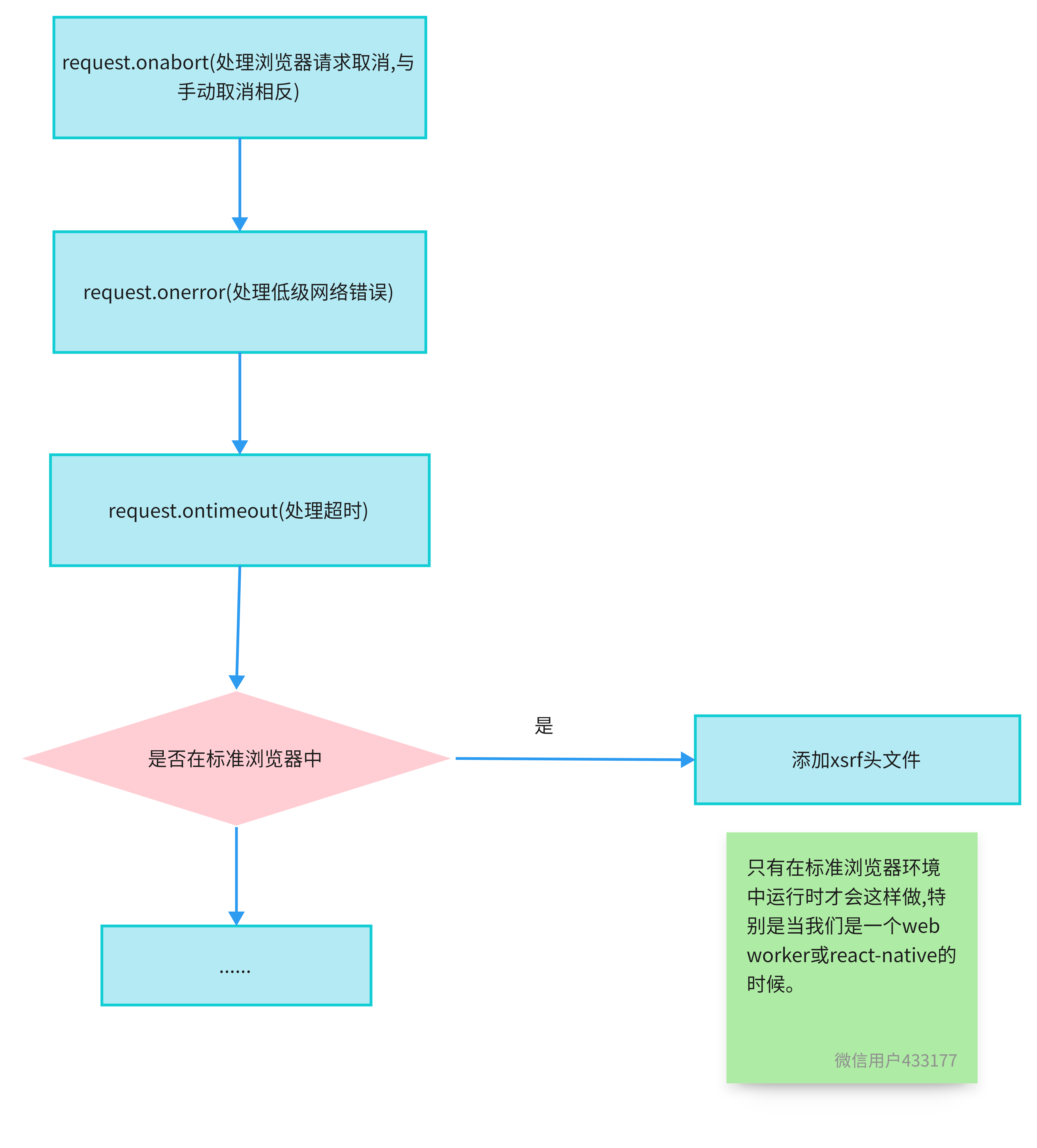
// Handle browser request cancellation (as opposed to a manual cancellation) request.onabort = function handleAbort() { if (!request) { return; } reject(createError('Request aborted', config, 'ECONNABORTED', request)); // Clean up request request = null; }; // Handle low level network errors request.onerror = function handleError() { // Real errors are hidden from us by the browser // onerror should only fire if it's a network error reject(createError('Network Error', config, null, request)); // Clean up request request = null; }; // Handle timeout request.ontimeout = function handleTimeout() { var timeoutErrorMessage = config.timeout ? 'timeout of ' + config.timeout + 'ms exceeded' : 'timeout exceeded'; var transitional = config.transitional || transitionalDefaults; if (config.timeoutErrorMessage) { timeoutErrorMessage = config.timeoutErrorMessage; } reject(createError( timeoutErrorMessage, config, transitional.clarifyTimeoutError ? 'ETIMEDOUT' : 'ECONNABORTED', request)); // Clean up request request = null; }; // Add xsrf header // This is only done if running in a standard browser environment. // Specifically not if we're in a web worker, or react-native. if (utils.isStandardBrowserEnv()) { // Add xsrf header var xsrfValue = (config.withCredentials || isURLSameOrigin(fullPath)) && config.xsrfCookieName ? cookies.read(config.xsrfCookieName) : undefined; if (xsrfValue) { requestHeaders[config.xsrfHeaderName] = xsrfValue; } }- 1
- 2
- 3
- 4
- 5
- 6
- 7
- 8
- 9
- 10
- 11
- 12
- 13
- 14
- 15
- 16
- 17
- 18
- 19
- 20
- 21
- 22
- 23
- 24
- 25
- 26
- 27
- 28
- 29
- 30
- 31
- 32
- 33
- 34
- 35
- 36
- 37
- 38
- 39
- 40
- 41
- 42
- 43
- 44
- 45
- 46
- 47
- 48
- 49
- 50
- 51
- 52

// Add headers to the request if ('setRequestHeader' in request) { utils.forEach(requestHeaders, function setRequestHeader(val, key) { if (typeof requestData === 'undefined' && key.toLowerCase() === 'content-type') { // Remove Content-Type if data is undefined delete requestHeaders[key]; } else { // Otherwise add header to the request request.setRequestHeader(key, val); } }); } // Add withCredentials to request if needed if (!utils.isUndefined(config.withCredentials)) { request.withCredentials = !!config.withCredentials; } // Add responseType to request if needed if (responseType && responseType !== 'json') { request.responseType = config.responseType; } // Handle progress if needed if (typeof config.onDownloadProgress === 'function') { request.addEventListener('progress', config.onDownloadProgress); } // Not all browsers support upload events if (typeof config.onUploadProgress === 'function' && request.upload) { request.upload.addEventListener('progress', config.onUploadProgress); } if (config.cancelToken || config.signal) { // Handle cancellation // eslint-disable-next-line func-names onCanceled = function(cancel) { if (!request) { return; } reject(!cancel || (cancel && cancel.type) ? new Cancel('canceled') : cancel); request.abort(); request = null; }; config.cancelToken && config.cancelToken.subscribe(onCanceled); if (config.signal) { config.signal.aborted ? onCanceled() : config.signal.addEventListener('abort', onCanceled); } } if (!requestData) { requestData = null; } // Send the request request.send(requestData);- 1
- 2
- 3
- 4
- 5
- 6
- 7
- 8
- 9
- 10
- 11
- 12
- 13
- 14
- 15
- 16
- 17
- 18
- 19
- 20
- 21
- 22
- 23
- 24
- 25
- 26
- 27
- 28
- 29
- 30
- 31
- 32
- 33
- 34
- 35
- 36
- 37
- 38
- 39
- 40
- 41
- 42
- 43
- 44
- 45
- 46
- 47
- 48
- 49
- 50
- 51
- 52
- 53
- 54
- 55
- 56
- 57
下面为xhr全部逻辑图(过长,所以上面我有分解了一下,以免视觉疲劳)

http适配器
http适配器运用于node环境中
定义resolve,reject,当promise结束时,需要取消abort函数
请求头名称全部小写
设置user-agent,如果没有则定义为axios/版本号
判断请求体数据是否为正常,数据必须为字符串或者ArratyBuffer、Buffer、Stream
Data after transformation must be a string, an ArrayBuffer, a Buffer, or a Stream
如果是ArrayBuffer,需要使用Buffer.from(newUint8Array(data));转换
如果是字符串,使用 Buffer.from(data, ‘utf-8’);
如果是Buffer,Nothing to do…什么都不需要执行
其他数据一律不能进行请求

请求响应确定

var options = { path: buildURL(parsed.path, config.params, config.paramsSerializer).replace(/^\?/, ''), method: config.method.toUpperCase(), headers: headers, agent: agent, agents: { http: config.httpAgent, https: config.httpsAgent }, auth: auth };- 1
- 2
- 3
- 4
- 5
- 6
- 7
- 8
如果响应的请求是代理请求
如果是代理,需要判断代理url,是否代理环境,是否需要代理
如果确定代理,需要请求头添加host属性,如果使用代理,任何重定向也必须通过代理,确定基本的代理授权创建实例,传输实例,区分是http和https,发起请求
如果存在config.insecureHTTPParser,则需要在请求头上绑定
创建请求
如果请求体的aborted属性为true,则取消请求
如果需要,透明地解压响应主体
在重定向的情况下返回最后一个请求
如果没有内容,是HEAD请求或解压缩禁用我们不应该解压缩
如果请求头的content-encoding属性为deflate
将解拉链添加到车身流处理管道中,并且删除请求头的content-encoding属性以避免混淆下游操作
处理响应体var response = { status: res.statusCode, statusText: res.statusMessage, headers: res.headers, config: config, request: lastRequest };- 1
- 2
- 3
- 4
- 5
- 6
- 7
如果响应体类型为stream,根据响应状态解析或拒绝promise。
如果是ArrayBuffer或者Buffer,则进行stream.on方法,进行统计data保存在数组中,统计数据长度
如果超出请求头里限定的maxContentLength,则直接返回错误提示if (config.responseType === 'stream') { response.data = stream; settle(resolve, reject, response); } else { var responseBuffer = []; var totalResponseBytes = 0; stream.on('data', function handleStreamData(chunk) { responseBuffer.push(chunk); totalResponseBytes += chunk.length; // make sure the content length is not over the maxContentLength if specified if (config.maxContentLength > -1 && totalResponseBytes > config.maxContentLength) { // stream.destoy() emit aborted event before calling reject() on Node.js v16 rejected = true; stream.destroy(); reject(createError('maxContentLength size of ' + config.maxContentLength + ' exceeded', config, null, lastRequest)); } });- 1
- 2
- 3
- 4
- 5
- 6
- 7
- 8
- 9
- 10
- 11
- 12
- 13
- 14
- 15
- 16
- 17
- 18
- 19
进行stream.aborted方法
进行stream.error方法
进行stream.end方法,
如果config.responseType !== ‘arraybuffer’,调用responseData.toString(config.responseEncoding);
如果config.responseEncoding === ‘utf8’,则删除字节顺序标记。这捕获EF BB BF (UTF-8 BOM)
最后根据响应状态解析或拒绝promisestream.on('aborted', function handlerStreamAborted() { if (rejected) { return; } stream.destroy(); reject(createError('error request aborted', config, 'ERR_REQUEST_ABORTED', lastRequest)); }); stream.on('error', function handleStreamError(err) { if (req.aborted) return; reject(enhanceError(err, config, null, lastRequest)); }); stream.on('end', function handleStreamEnd() { try { var responseData = responseBuffer.length === 1 ? responseBuffer[0] : Buffer.concat(responseBuffer); if (config.responseType !== 'arraybuffer') { responseData = responseData.toString(config.responseEncoding); if (!config.responseEncoding || config.responseEncoding === 'utf8') { responseData = utils.stripBOM(responseData); } } response.data = responseData; } catch (err) { reject(enhanceError(err, config, err.code, response.request, response)); } settle(resolve, reject, response); });- 1
- 2
- 3
- 4
- 5
- 6
- 7
- 8
- 9
- 10
- 11
- 12
- 13
- 14
- 15
- 16
- 17
- 18
- 19
- 20
- 21
- 22
- 23
- 24
- 25
- 26
- 27
- 28
处理响应体错误
处理socket连接,设置TCP保持连接,防止对等体丢弃连接,缺省情况下,发送ack报文的时间间隔为1分钟
处理请求响应超时,这是强制一个int超时,以避免在’ req '接口不处理其他类型时出现问题。
有时,响应会非常慢,不响应,连接事件将被事件循环系统阻塞。// Handle errors req.on('error', function handleRequestError(err) { if (req.aborted && err.code !== 'ERR_FR_TOO_MANY_REDIRECTS') return; reject(enhanceError(err, config, null, req)); }); // set tcp keep alive to prevent drop connection by peer req.on('socket', function handleRequestSocket(socket) { // default interval of sending ack packet is 1 minute socket.setKeepAlive(true, 1000 * 60); }); // Handle request timeout if (config.timeout) { // This is forcing a int timeout to avoid problems if the `req` interface doesn't handle other types. var timeout = parseInt(config.timeout, 10); if (isNaN(timeout)) { reject(createError( 'error trying to parse `config.timeout` to int', config, 'ERR_PARSE_TIMEOUT', req )); return; }- 1
- 2
- 3
- 4
- 5
- 6
- 7
- 8
- 9
- 10
- 11
- 12
- 13
- 14
- 15
- 16
- 17
- 18
- 19
- 20
- 21
- 22
- 23
- 24
- 25
- 26
- 27
- 28
定时器回调将被触发,并在连接之前调用abort(),然后获取“套接字挂起”并编码ECONNRESET。
在这个时候,如果我们有大量的请求,nodejs会在后台挂起一些套接字。这个数字会越来越高。
然后这些被挂起的socket将一点点地吞噬CPU。
ClientRequest。setTimeout将在指定的毫秒级触发,并且可以确保在连接之后触发abort()。req.setTimeout(timeout, function handleRequestTimeout() { req.abort(); var timeoutErrorMessage = ''; if (config.timeoutErrorMessage) { timeoutErrorMessage = config.timeoutErrorMessage; } else { timeoutErrorMessage = 'timeout of ' + config.timeout + 'ms exceeded'; } var transitional = config.transitional || transitionalDefaults; reject(createError( timeoutErrorMessage, config, transitional.clarifyTimeoutError ? 'ETIMEDOUT' : 'ECONNABORTED', req )); });- 1
- 2
- 3
- 4
- 5
- 6
- 7
- 8
- 9
- 10
- 11
- 12
- 13
- 14
- 15
- 16
处理取消
如果config.cancelToken || config.signal设置为true,则执行取消操作
发送请求
Send the request3.防止CSRF攻击
Axios 提供了 xsrfCookieName 和 xsrfHeaderName 两个属性来分别设置 CSRF 的 Cookie 名称和 HTTP 请求头的名称,它们的默认值如下所示:
// lib/defaults.js var defaults = { adapter: getDefaultAdapter(), // 省略部分代码 xsrfCookieName: 'XSRF-TOKEN', xsrfHeaderName: 'X-XSRF-TOKEN', };- 1
- 2
- 3
- 4
- 5
- 6
- 7
- 8
- 9
/ lib/adapters/xhr.js
// Add xsrf header // This is only done if running in a standard browser environment. // Specifically not if we're in a web worker, or react-native. if (utils.isStandardBrowserEnv()) { // Add xsrf header var xsrfValue = (config.withCredentials || isURLSameOrigin(fullPath)) && config.xsrfCookieName ? cookies.read(config.xsrfCookieName) : undefined; if (xsrfValue) { requestHeaders[config.xsrfHeaderName] = xsrfValue; } }- 1
- 2
- 3
- 4
- 5
- 6
- 7
- 8
- 9
- 10
- 11
- 12
- 13
最后,我觉得里面的一些判断数据类型的方法,很实用,比如isArrayBuffer,isBuffer,isFormData,isArrayBufferView,isPlainObject(确定一个值是否为普通object)
确定我们是否运行在标准的浏览器环境中isStandardBrowserEnv
合并一个对象到另一个对象中merge
数据类型的判断都是通过原型链的toString属性绑定call来判断,如下:
Object.prototype.toString.call(xxx) === ‘[object ArrayBuffer]’
/lib/utiles.js// utils is a library of generic helper functions non-specific to axios var toString = Object.prototype.toString; /** * Determine if a value is an Array * * @param {Object} val The value to test * @returns {boolean} True if value is an Array, otherwise false */ function isArray(val) { return Array.isArray(val); } /** * Determine if a value is undefined * * @param {Object} val The value to test * @returns {boolean} True if the value is undefined, otherwise false */ function isUndefined(val) { return typeof val === 'undefined'; } /** * Determine if a value is a Buffer * * @param {Object} val The value to test * @returns {boolean} True if value is a Buffer, otherwise false */ function isBuffer(val) { return val !== null && !isUndefined(val) && val.constructor !== null && !isUndefined(val.constructor) && typeof val.constructor.isBuffer === 'function' && val.constructor.isBuffer(val); } /** * Determine if a value is an ArrayBuffer * * @param {Object} val The value to test * @returns {boolean} True if value is an ArrayBuffer, otherwise false */ function isArrayBuffer(val) { return toString.call(val) === '[object ArrayBuffer]'; } /** * Determine if a value is a FormData * * @param {Object} val The value to test * @returns {boolean} True if value is an FormData, otherwise false */ function isFormData(val) { return toString.call(val) === '[object FormData]'; } /** * Determine if a value is a view on an ArrayBuffer * * @param {Object} val The value to test * @returns {boolean} True if value is a view on an ArrayBuffer, otherwise false */ function isArrayBufferView(val) { var result; if ((typeof ArrayBuffer !== 'undefined') && (ArrayBuffer.isView)) { result = ArrayBuffer.isView(val); } else { result = (val) && (val.buffer) && (isArrayBuffer(val.buffer)); } return result; } /** * Determine if a value is a String * * @param {Object} val The value to test * @returns {boolean} True if value is a String, otherwise false */ function isString(val) { return typeof val === 'string'; } /** * Determine if a value is a Number * * @param {Object} val The value to test * @returns {boolean} True if value is a Number, otherwise false */ function isNumber(val) { return typeof val === 'number'; } /** * Determine if a value is an Object * * @param {Object} val The value to test * @returns {boolean} True if value is an Object, otherwise false */ function isObject(val) { return val !== null && typeof val === 'object'; } /** * Determine if a value is a plain Object * * @param {Object} val The value to test * @return {boolean} True if value is a plain Object, otherwise false */ function isPlainObject(val) { if (toString.call(val) !== '[object Object]') { return false; } var prototype = Object.getPrototypeOf(val); return prototype === null || prototype === Object.prototype; } /** * Determine if a value is a Date * * @param {Object} val The value to test * @returns {boolean} True if value is a Date, otherwise false */ function isDate(val) { return toString.call(val) === '[object Date]'; } /** * Determine if a value is a File * * @param {Object} val The value to test * @returns {boolean} True if value is a File, otherwise false */ function isFile(val) { return toString.call(val) === '[object File]'; } /** * Determine if a value is a Blob * * @param {Object} val The value to test * @returns {boolean} True if value is a Blob, otherwise false */ function isBlob(val) { return toString.call(val) === '[object Blob]'; } /** * Determine if a value is a Function * * @param {Object} val The value to test * @returns {boolean} True if value is a Function, otherwise false */ function isFunction(val) { return toString.call(val) === '[object Function]'; } /** * Determine if a value is a Stream * * @param {Object} val The value to test * @returns {boolean} True if value is a Stream, otherwise false */ function isStream(val) { return isObject(val) && isFunction(val.pipe); } /** * Determine if a value is a URLSearchParams object * * @param {Object} val The value to test * @returns {boolean} True if value is a URLSearchParams object, otherwise false */ function isURLSearchParams(val) { return toString.call(val) === '[object URLSearchParams]'; } /** * Trim excess whitespace off the beginning and end of a string * * @param {String} str The String to trim * @returns {String} The String freed of excess whitespace */ function trim(str) { return str.trim ? str.trim() : str.replace(/^\s+|\s+$/g, ''); } /** * Determine if we're running in a standard browser environment * * This allows axios to run in a web worker, and react-native. * Both environments support XMLHttpRequest, but not fully standard globals. * * web workers: * typeof window -> undefined * typeof document -> undefined * * react-native: * navigator.product -> 'ReactNative' * nativescript * navigator.product -> 'NativeScript' or 'NS' */ function isStandardBrowserEnv() { if (typeof navigator !== 'undefined' && (navigator.product === 'ReactNative' || navigator.product === 'NativeScript' || navigator.product === 'NS')) { return false; } return ( typeof window !== 'undefined' && typeof document !== 'undefined' ); } /** * Iterate over an Array or an Object invoking a function for each item. * * If `obj` is an Array callback will be called passing * the value, index, and complete array for each item. * * If 'obj' is an Object callback will be called passing * the value, key, and complete object for each property. * * @param {Object|Array} obj The object to iterate * @param {Function} fn The callback to invoke for each item */ function forEach(obj, fn) { // Don't bother if no value provided if (obj === null || typeof obj === 'undefined') { return; } // Force an array if not already something iterable if (typeof obj !== 'object') { /*eslint no-param-reassign:0*/ obj = [obj]; } if (isArray(obj)) { // Iterate over array values for (var i = 0, l = obj.length; i < l; i++) { fn.call(null, obj[i], i, obj); } } else { // Iterate over object keys for (var key in obj) { if (Object.prototype.hasOwnProperty.call(obj, key)) { fn.call(null, obj[key], key, obj); } } } } /** * Accepts varargs expecting each argument to be an object, then * immutably merges the properties of each object and returns result. * * When multiple objects contain the same key the later object in * the arguments list will take precedence. * * Example: * * ```js * var result = merge({foo: 123}, {foo: 456}); * console.log(result.foo); // outputs 456 * ``` * * @param {Object} obj1 Object to merge * @returns {Object} Result of all merge properties */ function merge(/* obj1, obj2, obj3, ... */) { var result = {}; function assignValue(val, key) { if (isPlainObject(result[key]) && isPlainObject(val)) { result[key] = merge(result[key], val); } else if (isPlainObject(val)) { result[key] = merge({}, val); } else if (isArray(val)) { result[key] = val.slice(); } else { result[key] = val; } } for (var i = 0, l = arguments.length; i < l; i++) { forEach(arguments[i], assignValue); } return result; } /** * Remove byte order marker. This catches EF BB BF (the UTF-8 BOM) * * @param {string} content with BOM * @return {string} content value without BOM */ function stripBOM(content) { if (content.charCodeAt(0) === 0xFEFF) { content = content.slice(1); } return content; }- 1
- 2
- 3
- 4
- 5
- 6
- 7
- 8
- 9
- 10
- 11
- 12
- 13
- 14
- 15
- 16
- 17
- 18
- 19
- 20
- 21
- 22
- 23
- 24
- 25
- 26
- 27
- 28
- 29
- 30
- 31
- 32
- 33
- 34
- 35
- 36
- 37
- 38
- 39
- 40
- 41
- 42
- 43
- 44
- 45
- 46
- 47
- 48
- 49
- 50
- 51
- 52
- 53
- 54
- 55
- 56
- 57
- 58
- 59
- 60
- 61
- 62
- 63
- 64
- 65
- 66
- 67
- 68
- 69
- 70
- 71
- 72
- 73
- 74
- 75
- 76
- 77
- 78
- 79
- 80
- 81
- 82
- 83
- 84
- 85
- 86
- 87
- 88
- 89
- 90
- 91
- 92
- 93
- 94
- 95
- 96
- 97
- 98
- 99
- 100
- 101
- 102
- 103
- 104
- 105
- 106
- 107
- 108
- 109
- 110
- 111
- 112
- 113
- 114
- 115
- 116
- 117
- 118
- 119
- 120
- 121
- 122
- 123
- 124
- 125
- 126
- 127
- 128
- 129
- 130
- 131
- 132
- 133
- 134
- 135
- 136
- 137
- 138
- 139
- 140
- 141
- 142
- 143
- 144
- 145
- 146
- 147
- 148
- 149
- 150
- 151
- 152
- 153
- 154
- 155
- 156
- 157
- 158
- 159
- 160
- 161
- 162
- 163
- 164
- 165
- 166
- 167
- 168
- 169
- 170
- 171
- 172
- 173
- 174
- 175
- 176
- 177
- 178
- 179
- 180
- 181
- 182
- 183
- 184
- 185
- 186
- 187
- 188
- 189
- 190
- 191
- 192
- 193
- 194
- 195
- 196
- 197
- 198
- 199
- 200
- 201
- 202
- 203
- 204
- 205
- 206
- 207
- 208
- 209
- 210
- 211
- 212
- 213
- 214
- 215
- 216
- 217
- 218
- 219
- 220
- 221
- 222
- 223
- 224
- 225
- 226
- 227
- 228
- 229
- 230
- 231
- 232
- 233
- 234
- 235
- 236
- 237
- 238
- 239
- 240
- 241
- 242
- 243
- 244
- 245
- 246
- 247
- 248
- 249
- 250
- 251
- 252
- 253
- 254
- 255
- 256
- 257
- 258
- 259
- 260
- 261
- 262
- 263
- 264
- 265
- 266
- 267
- 268
- 269
- 270
- 271
- 272
- 273
- 274
- 275
- 276
- 277
- 278
- 279
- 280
- 281
- 282
- 283
- 284
- 285
- 286
- 287
- 288
- 289
- 290
- 291
- 292
- 293
- 294
- 295
- 296
- 297
- 298
- 299
- 300
- 301
- 302
-
相关阅读:
毕设准备---HelloServlet
JavaScript class和function的区别
基于Docker构建MySQL主从复制数据库
Java(SpringBoot05)
Leetcode 907. 子数组的最小值之和
腾讯云服务器便宜吗?价格多少?附腾讯云服务器优惠购买链接
Real-Time Rendering——8.1.4 Rendering with RGB Colors8.1.4用RGB颜色渲染
泽众APM性能监控软件
C++ 运算符重载
mac Network: use --host to expose
- 原文地址:https://blog.csdn.net/qq_44859233/article/details/126456114
