-
【JDBC】数据库连接池技术
1.为什么需要数据库连接池?
我们在讲多线程的时候说过,创建线程是一个昂贵的操作,如果有大量的小任务需要执行,并且频繁地创建和销毁线程,实际上会消耗大量的系统资源,往往创建和消耗线程所耗费的时间比执行任务的时间还长,所以,为了提高效率,可以用线程池。
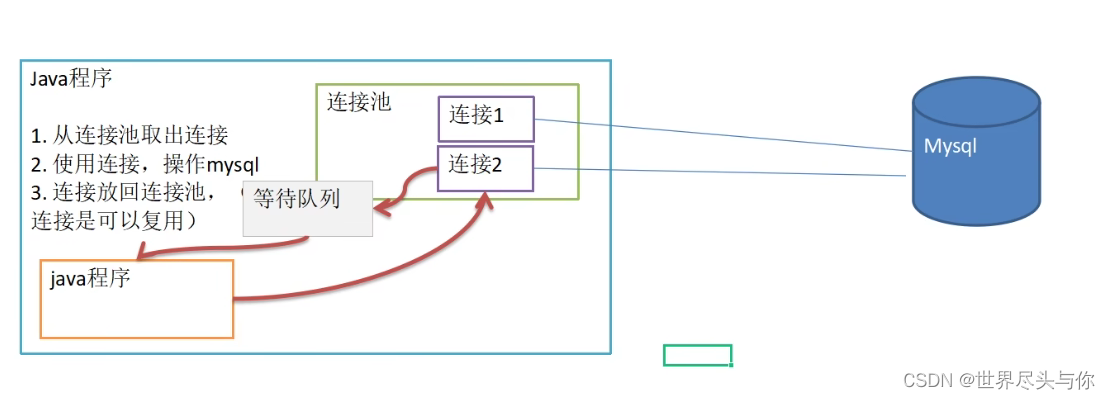
类似的,在执行JDBC的增删改查的操作时,如果每一次操作都来一次打开连接,操作,关闭连接,那么创建和销毁JDBC连接的开销就太大了。为了避免频繁地创建和销毁JDBC连接,我们可以通过连接池(Connection Pool)复用已经创建好的连接。
JDBC连接池有一个标准的接口
javax.sql.DataSource,注意这个类位于Java标准库中,但仅仅是接口。要使用JDBC连接池,我们必须选择一个JDBC连接池的实现。常用的JDBC连接池有:- HikariCP
- C3P0
- BoneCP
- Druid(推荐使用!🐀)
示意图:
2.C3P0连接池
C3P0是一个开源的JDBC连接池,它实现了数据源和JNDI绑定,支持JDBC3规范和JDBC2的标准扩展。c3p0是异步操作的,缓慢的JDBC操作通过帮助进程完成。扩展这些操作可以有效的提升性能。目前使用它的开源项目有hibernate,spring等。是一个成熟的、高并发的JDBC连接池库,用于缓存和重用PreparedStatements支持。c3p0具有自动回收空闲连接功能。
🦔
注意:下面这个这是c3p0数据库连接池的辅助包,如果没有这个包系统启动时会报
classnotfoundexception,这是更新c3p0-0.9.2版本后分离出来的包,0.9.1的时候还是只是一个包mchange-commons-java-0.2.15.jar下载地址
或者更简单的,直接使用Maven导包:
<dependency> <groupId>com.mchangegroupId> <artifactId>c3p0artifactId> <version>0.9.5.2version> dependency>- 1
- 2
- 3
- 4
- 5
- 6
使用的第一种方式:相关参数在程序中指定:
/** * 相关参数在程序中指定 */ @Test public void test1() throws IOException, PropertyVetoException, SQLException { // 创建数据库对象 ComboPooledDataSource comboPooledDataSource = new ComboPooledDataSource(); Properties properties = new Properties(); properties.load(new FileInputStream("src\\mysql.properties")); String user = properties.getProperty("user"); String password = properties.getProperty("password"); String url = properties.getProperty("url"); String driver = properties.getProperty("driver"); // 给数据源comboPooledDataSource设置相关参数 comboPooledDataSource.setDriverClass(driver); comboPooledDataSource.setJdbcUrl(url); comboPooledDataSource.setUser(user); comboPooledDataSource.setPassword(password); // 初始化连接数 comboPooledDataSource.setInitialPoolSize(10); // 设置最大连接数,其余的将会进入等待队列 comboPooledDataSource.setMaxPoolSize(50); // 获取连接 Connection connection = comboPooledDataSource.getConnection(); System.out.println("连接成功!"); connection.close(); }- 1
- 2
- 3
- 4
- 5
- 6
- 7
- 8
- 9
- 10
- 11
- 12
- 13
- 14
- 15
- 16
- 17
- 18
- 19
- 20
- 21
- 22
- 23
- 24
- 25
- 26
- 27
使用的第二种方式:使用配置文件模板来完成连接:
c3p0-config.xml文件:(文件名不要改)<c3p0-config> <named-config name="imustctf"> <property name="driverClass">com.mysql.cj.jdbc.Driverproperty> <property name="jdbcUrl">jdbc:mysql://localhost:3306/jdbc_test?useSSL=false&serverTimezone=GMT%2B8&rewriteBatchedStatements=trueproperty> <property name="user">rootproperty> <property name="password">rootproperty> <property name="initialPoolSize">10property> <property name="maxPoolSize">50property> <property name="minPoolSize">5property> <property name="maxIdleTime">60property> <property name="maxStatements">50property> <property name="acquireIncrement">5property> <property name="acquireRetryAttempts">5property> <property name="acquireRetryDelay">1000property> named-config> c3p0-config>- 1
- 2
- 3
- 4
- 5
- 6
- 7
- 8
- 9
- 10
- 11
- 12
- 13
- 14
- 15
- 16
- 17
- 18
- 19
- 20
- 21
- 22
- 23
- 24
- 25
- 26
- 27
测试代码:
/** * 使用配置文件模板来完成连接 */ @Test public void test2() throws SQLException { ComboPooledDataSource comboPooledDataSource = new ComboPooledDataSource("imustctf"); Connection connection = comboPooledDataSource.getConnection(); System.out.println("连接成功!"); connection.close(); }- 1
- 2
- 3
- 4
- 5
- 6
- 7
- 8
- 9
- 10
3.徳鲁伊连接池
Druid连接池是阿里巴巴开源的数据库连接池项目。Druid连接池为监控而生,内置强大的监控功能,监控特性不影响性能。功能强大,能防SQL注入,内置Loging能诊断Hack应用行为。
或者使用Maven:
<dependency> <groupId>com.alibabagroupId> <artifactId>druidartifactId> <version>1.2.14version> dependency>- 1
- 2
- 3
- 4
- 5
- 6
druid.properties文件:(文件名可以改,文件中key值不要改)driverClassName=com.mysql.cj.jdbc.Driver url=jdbc:mysql://localhost:3306/jdbc_test?useSSL=false&serverTimezone=GMT%2B8&rewriteBatchedStatements=true username=root password=root initialSize=10 minIdle=5 maxActive=20 maxWait=5000- 1
- 2
- 3
- 4
- 5
- 6
- 7
- 8
Druid连接池测试连接代码:
Properties properties = new Properties(); properties.load(new FileInputStream("src\\druid.properties")); // 创建一个指定参数的数据库连接池 DataSource dataSource = DruidDataSourceFactory.createDataSource(properties); Connection connection = dataSource.getConnection(); System.out.println("连接成功!"); connection.close();- 1
- 2
- 3
- 4
- 5
- 6
- 7
4.Druid工具类
工具类:
/** * DruidJDBC工具类 */ public class DruidJdbcUtils { private static DataSource ds = null; static { try { Properties properties = new Properties(); properties.load(new FileInputStream("src\\druid.properties")); ds = DruidDataSourceFactory.createDataSource(properties); } catch (Exception e) { throw new RuntimeException(e); } } /** * 获取数据库连接池连接 * * @return 一个连接池连接 */ public static Connection getConnection() throws SQLException { return ds.getConnection(); } /** * 关闭连接 * 并不是真的关闭连接,而是把Connection对象放回连接池 * * @param resultSet 结果集 * @param statement 用于执行sql语句的对象 * @param connection 数据库连接 */ public static void close(ResultSet resultSet, Statement statement, Connection connection) { try { if (resultSet != null) { resultSet.close(); } if (statement != null) { statement.close(); } if (connection != null) { connection.close(); } } catch (SQLException e) { throw new RuntimeException(e); } } }- 1
- 2
- 3
- 4
- 5
- 6
- 7
- 8
- 9
- 10
- 11
- 12
- 13
- 14
- 15
- 16
- 17
- 18
- 19
- 20
- 21
- 22
- 23
- 24
- 25
- 26
- 27
- 28
- 29
- 30
- 31
- 32
- 33
- 34
- 35
- 36
- 37
- 38
- 39
- 40
- 41
- 42
- 43
- 44
- 45
- 46
- 47
- 48
- 49
- 50
- 51
测试类:
/** * DruidJdbcUtils测试 */ public class DruidJdbcUtilsTest { public static void main(String[] args) { Connection connection = null; PreparedStatement preparedStatement = null; String sql = "update user set school = ? where id = ?"; try { connection = DruidJdbcUtils.getConnection(); preparedStatement = connection.prepareStatement(sql); preparedStatement.setString(1, "北疆大学"); preparedStatement.setInt(2, 50); preparedStatement.executeUpdate(); } catch (SQLException e) { throw new RuntimeException(e); } finally { // 关闭连接 DruidJdbcUtils.close(null, preparedStatement, connection); } } }- 1
- 2
- 3
- 4
- 5
- 6
- 7
- 8
- 9
- 10
- 11
- 12
- 13
- 14
- 15
- 16
- 17
- 18
- 19
- 20
- 21
- 22
-
相关阅读:
无人机航迹规划:七种智能优化算法(DBO、LO、SWO、COA、LSO、KOA、GRO)求解无人机路径规划--提供MATLAB代码
【算法与数据结构】二叉树的三种遍历代码实现(下)—— 非递归方式实现(大量图解)
产业项目招商活动会议课程报名签到h5小程序pc开源版开发
leetcode1669. 合并两个链表(java)
终端天线—9.4G手机调试
【MATLAB源码-第43期】基于matlab的turbo码误码率仿真比较不同迭代次数,采用logmap/sova算法。
【JVM】 类加载机制、类加载器、双亲委派模型详解
.Net全网最简RabbitMQ操作【强烈推荐】
计算机网络
【设计大赛】基于RT-Thread和RA6M4实现samba服务的移动网盘
- 原文地址:https://blog.csdn.net/Gherbirthday0916/article/details/126447993