-
Android Studio实现简单的页面跳转(简单教程)
项目实现:(实现Android Studio 基本有两种实现方式:一种为.MainActivity跳转;第二种是Relatelayout布局跳转。
这里着重介绍第一种:(首先需要建立两个XML文件,进行布局的相互的跳转,然后使用两个JAVA进行相关的的设计!)
(左上角四个文件为此次建立的新文件夹)

首先设置Activity_main的文件设置:
- "1.0" encoding="utf-8"?>
- <RelativeLayout xmlns:android="http://schemas.android.com/apk/res/android"
- xmlns:app="http://schemas.android.com/apk/res-auto"
- xmlns:tools="http://schemas.android.com/tools"
- android:layout_width="match_parent"
- android:layout_height="match_parent"
- android:background = "@mipmap/bc"
- tools:context=".MainActivity">
- <TextView
- android:id="@+id/one"
- android:layout_width="200dp"
- android:layout_height="100dp"
- android:layout_centerInParent="true"
- />
- <Button
- android:id="@+id/button"
- android:layout_width="299dp"
- android:layout_height="63dp"
- android:layout_below="@+id/one"
- android:layout_centerHorizontal="true"
- android:layout_marginTop="87dp"
- android:text="你这背景太假了"
- tools:ignore="MissingConstraints" />
- RelativeLayout>
另一个页面布局的设计:

代码设计:
- "1.0" encoding="utf-8"?>
- <LinearLayout xmlns:android="http://schemas.android.com/apk/res/android"
- xmlns:app="http://schemas.android.com/apk/res-auto"
- xmlns:tools="http://schemas.android.com/tools"
- android:layout_width="match_parent"
- android:layout_height="match_parent"
- android:background = "@mipmap/ck"
- tools:context=".MainActivity">
- <TextView
- android:id="@+id/two"
- android:layout_width="wrap_content"
- android:layout_height="wrap_content"
- android:text="这是第二个页面!"
- android:textSize="25dp"
- android:textColor="#663399"
- app:layout_constraintBottom_toBottomOf="parent"
- app:layout_constraintLeft_toLeftOf="parent"
- app:layout_constraintRight_toRightOf="parent"
- app:layout_constraintTop_toTopOf="parent" />
- LinearLayout>
然后是第一个JAVA代码的设计:
- public class MainActivity extends AppCompatActivity {
- @Override
- protected void onCreate(Bundle savedInstanceState) {
- super.onCreate(savedInstanceState);
- setContentView(R.layout.activity_main);
- //获取按钮
- Button button = (Button) findViewById(R.id.button);
- //按钮进行监听
- button.setOnClickListener(new View.OnClickListener() {
- @Override
- public void onClick(View v) {
- //监听按钮,如果点击,就跳转
- Intent intent = new Intent();
- //前一个(MainActivity.this)是目前页面,后面一个是要跳转的下一个页面
- intent.setClass(MainActivity.this,Sencond.class);
- startActivity(intent);
- }
- });
- }
- }
另一个跳转文件所需要的页面JAVA代码:
- public class Sencond extends AppCompatActivity {
- @Override
- protected void onCreate(Bundle savedInstanceState) {
- super.onCreate(savedInstanceState);
- //这个是获取布局文件的,这里是你下一个页面的布局文件//注意这个是跳转界面的不能设置错,应该是第一个
- setContentView(R.layout.sencond);
- }
- }
最后一点着重说明一下项目实现的遇到的问题:
1.没有注册相关的文件名称:
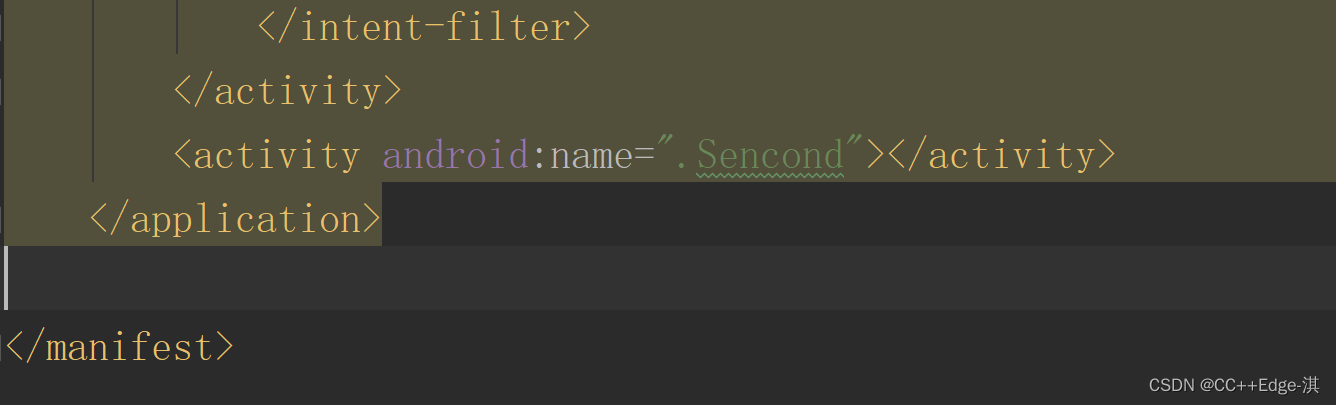
2.新建XML文件的时候的字符设计出现大写错误(设置XML文件的时候注意了,别设置超过的大写)
- Error:Error: 'O' is not a valid file-based resource name character: File-based resource names must contain only lowercase a-z, 0-9, or underscore
- Error:Execution failed for task ':bluetooth:mergeDebugResources'.
- F:\Android_Studio_Project\BLE_APP\bluetooth\src\main\res\layout\automaticOpenLayout.xml: Error: 'O' is not a valid file-based resource name character: File-based resource names must contain only lowercase a-z, 0-9, or underscore
- F:\Android_Studio_Project\BLE_APP\bluetooth\src\main\res\layout\automaticOpenLayout.xml
3.遇到的第三个小问题(出现导入图片文件错位,主要设置背景图片需要将图片复制到相关的
xhdpi文件当中)
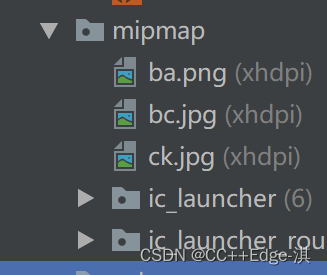
最终效果:

跳转后的界面:

-
相关阅读:
API接口中大数据在淘宝中的应用【获取商品详情接口,商品价格,SKU数据,订单……】
Java中System类的简介说明
QTableView样式设置
文件操作和IO
SpringBoot自动配置原理解析
痞子衡嵌入式:RT-MFB - 一种灵活的i.MXRT下多串行NOR Flash型号选择的量产方案
数商云:加强供应商管理,助推航空运输企业与供应商高效协同
Python爬虫库urllib使用详解
echarts问题总结2
[buuctf]刮开有奖
- 原文地址:https://blog.csdn.net/m0_64148096/article/details/126445653
