-
kvm虚拟化
kvm虚拟化
一. 虚拟化介绍
1. 常见的虚拟化软件
-
vmware 面向个人,支持windows,linux,macos
- VMware workstation
- VMware fusion
-
esxi 面向企业,VMware企业版,装到服务器上,有客户端进行管理
-
kvm 面向企业,底层是一个linux操作系统,有一个web界面进行管理
-
xen 面向桌面化,是一个直接运行在计算机硬件之上的用以替代操作系统的软件层,它能够在计算机硬件上并发的运行多个客户操作系统(Guest OS)。目前Xen支持Linux、NetBSD、FreeBSD、Solaris、 Windows和其他常用的操作系统作为客户操作系统在其管理程序上运行。
-
citrix 银行
-
virtualbox 面向个人,亦可面向服务器
-
hyper-v 微软,只能在Windows server上使用
2. 介绍
-
虚拟化是云计算的基础。简单的说,虚拟化使得在一台物理的服务器上可以跑多台虚拟机,虚拟机共享物理机的 CPU、内存、IO 硬件资源,但逻辑上虚拟机之间是相互隔离的。
-
物理机称为宿主机(Host),宿主机上面的虚拟机称为客户机(Guest)。
-
根据 Hypervisor(程序) 的实现方式和所处的位置,虚拟化又分为两种:
- 全虚拟化
- 半虚拟化
2.1 全虚拟化
- Hypervisor 直接安装在物理机上,多个虚拟机在 Hypervisor 上运行。Hypervisor 实现方式一般是一个特殊定制的 Linux 系统。Xen 和 VMWare 的 ESXi 都属于这个类型

2.2 半虚拟化
- 物理机上首先安装常规的操作系统,比如 Redhat、Ubuntu 和 Windows。Hypervisor 作为 OS 上的一个程序模块运行,并对管理虚拟机进行管理。KVM、VirtualBox 和 VMWare Workstation 都属于这个类型

2.3理论上讲:
- 全虚拟化一般对硬件虚拟化功能进行了特别优化,性能上比半虚拟化要高,不需要操作系统,效率上高
- 半虚拟化因为基于普通的操作系统,会比较灵活,比如支持虚拟机嵌套。嵌套意味着可以在KVM虚拟机中再运行KVM,多层虚拟,需要资源足够
3. kvm介绍
-
kVM 全称是 Kernel-Based Virtual Machine。 KVM 是基于 Linux 内核实现的。kvm是管理虚拟化的软件
-
KVM有一个内核模块叫 kvm.ko,只用于管理虚拟 CPU 和内存。
-
IO 的虚拟化,比如存储和网络设备则是由 Linux 内核与Qemu来实现
-
作为一个 Hypervisor,KVM 本身只关注虚拟机调度和内存管理这两个方面。
-
IO 外设的任务交给 Linux 内核和 Qemu。
-
Libvirt 就是 KVM 的管理工具。
-
Libvirt 除了能管理 KVM 这种 Hypervisor,还能管理 Xen,VirtualBox 等。
Libvirt 包含 3 个东西:后台 daemon 程序 libvirtd(服务)、API 库和命令行工具 virsh
- libvirtd是服务程序,接收和处理 API 请求;
- API 库使得其他人可以开发基于 Libvirt 的高级工具, virt-manager,这是图形化的 KVM 管理工具;
- virsh 是KVM 命令行工具
二. centos7部署kvm
1. 部署
1.1 环境
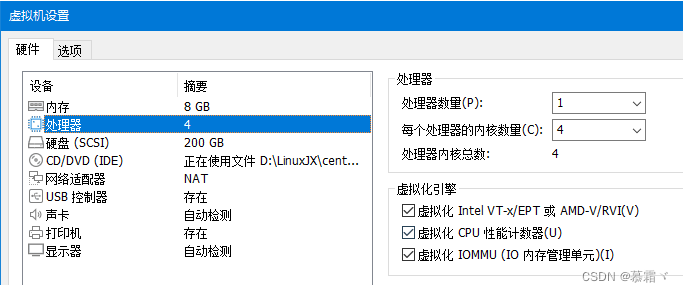
系统类型 IP CentOS Linux release 7.9 192.168.232.130 1.2 部署前请确保你的CPU虚拟化功能已开启。分为两种情况:
- 虚拟机要关机设置CPU虚拟化
- 物理机要在BIOS里开启CPU虚拟化
1.3 关闭防火墙与SELINUX
[root@node5 ~]# vim /etc/selinux/config [root@node5 ~]# systemctl disable --now firewalld [root@node5 ~]# getenforce Disabled [root@node5 ~]# yum -y install epel-release 已加载插件:fastestmirror Loading mirror speeds from cached hostfile 匹配 epel-release-7-11.noarch 的软件包已经安装。正在检查更新。 无须任何处理 验证CPU是否支持KVM;如果结果中有vmx(Intel)或svm(AMD)字样,就说明CPU的支持的 [root@node5 ~]# egrep -o 'vmx|svm' /proc/cpuinfo vmx vmx vmx vmx- 1
- 2
- 3
- 4
- 5
- 6
- 7
- 8
- 9
- 10
- 11
- 12
- 13
- 14
- 15
- 16
- 17
- 18
1.4 kvm安装
[root@node5 ~]# yum -y install qemu-kvm qemu-kvm-tools qemu-img virt-manager libvirt libvirt-python libvirt-client virt-install virt-viewer bridge-utils libguestfs-tools- 1
1.5 配置网卡
-
因为虚拟机中网络,我们一般都是和公司的其他服务器是同一个网段,所以我们需要把 \ KVM服务器的网卡配置成桥接模式。这样的话KVM的虚拟机就可以通过该桥接网卡和公司内部 \ 其他服务器处于同一网段- 1
- 2
- 3
[root@node5 ~]# cd /etc/sysconfig/network-scripts/ [root@node5 network-scripts]# ls ifcfg-ens33 ifdown-Team ifup-post ifcfg-lo ifdown-TeamPort ifup-ppp ifdown ifdown-tunnel ifup-routes ifdown-bnep ifup ifup-sit ifdown-eth ifup-aliases ifup-Team ifdown-ib ifup-bnep ifup-TeamPort ifdown-ippp ifup-eth ifup-tunnel ifdown-ipv6 ifup-ib ifup-wireless ifdown-isdn ifup-ippp init.ipv6-global ifdown-post ifup-ipv6 network-functions ifdown-ppp ifup-isdn network-functions-ipv6 ifdown-routes ifup-plip ifdown-sit ifup-plusb [root@node5 network-scripts]# cp ifcfg-ens33 ifcfg-br0 [root@node5 network-scripts]# vim ifcfg-ens33 [root@node5 network-scripts]# cat ifcfg-ens33 TYPE=Ethernet BOOTPROTO=static NAME=ens33 DEVICE=ens33 ONBOOT=yes BRIDGE=br0 NM_CONTROLLED=no [root@node5 network-scripts]# vim ifcfg-br0 [root@node5 network-scripts]# cat ifcfg-br0 TYPE=Bridge BOOTPROTO=static NAME=br0 DEVICE=br0 ONBOOT=yes NM_CONTROLLED=no IPADDR=192.168.232.130 NETMASK=255.255.255.0 GATEWAY=192.168.232.2 DNS1=114.114.114.114 重启网络 [root@node5 network-scripts]# cd [root@node5 ~]# systemctl restart network [root@node5 ~]# ip a 1: lo: <LOOPBACK,UP,LOWER_UP> mtu 65536 qdisc noqueue state UNKNOWN group default qlen 1000 link/loopback 00:00:00:00:00:00 brd 00:00:00:00:00:00 inet 127.0.0.1/8 scope host lo valid_lft forever preferred_lft forever inet6 ::1/128 scope host valid_lft forever preferred_lft forever 2: ens33: <BROADCAST,MULTICAST,UP,LOWER_UP> mtu 1500 qdisc pfifo_fast master br0 state UP group default qlen 1000 link/ether 00:0c:29:c6:ab:3e brd ff:ff:ff:ff:ff:ff inet6 fe80::20c:29ff:fec6:ab3e/64 scope link valid_lft forever preferred_lft forever 3: br0: <BROADCAST,MULTICAST,UP,LOWER_UP> mtu 1500 qdisc noqueue state UP group default qlen 1000 link/ether 00:0c:29:c6:ab:3e brd ff:ff:ff:ff:ff:ff inet 192.168.232.130/24 brd 192.168.232.255 scope global br0 valid_lft forever preferred_lft forever inet6 fe80::20c:29ff:fec6:ab3e/64 scope link valid_lft forever preferred_lft forever [root@node5 ~]#- 1
- 2
- 3
- 4
- 5
- 6
- 7
- 8
- 9
- 10
- 11
- 12
- 13
- 14
- 15
- 16
- 17
- 18
- 19
- 20
- 21
- 22
- 23
- 24
- 25
- 26
- 27
- 28
- 29
- 30
- 31
- 32
- 33
- 34
- 35
- 36
- 37
- 38
- 39
- 40
- 41
- 42
- 43
- 44
- 45
- 46
- 47
- 48
- 49
- 50
- 51
- 52
- 53
- 54
- 55
- 56
- 57
- 58
- 59
- 60
1.6 启动服务并验证
[root@node5 ~]# systemctl enable --now libvirtd [root@node5 ~]# lsmod|grep kvm kvm_intel 188740 0 kvm 637289 1 kvm_intel irqbypass 13503 1 kvm [root@node5 ~]# virsh -c qemu:///system list Id 名称 状态 ---------------------------------------------------- [root@node5 ~]# [root@node5 ~]# virsh --version 4.5.0 [root@node5 ~]# virt-install --version 1.5.0 [root@node5 ~]# [root@node5 ~]# ln -s /usr/libexec/qemu-kvm /usr/bin/qemu-kvm [root@node5 ~]# ll /usr/bin/qemu-kvm lrwxrwxrwx 1 root root 21 8月 19 22:35 /usr/bin/qemu-kvm -> /usr/libexec/qemu-kvm [root@node5 ~]# 查看网桥信息 [root@node5 ~]# brctl show bridge name bridge id STP enabled interfaces br0 8000.000c29c6ab3e no ens33 virbr0 8000.525400bdf9c5 yes virbr0-nic [root@node5 ~]# stp:生成树协议- 1
- 2
- 3
- 4
- 5
- 6
- 7
- 8
- 9
- 10
- 11
- 12
- 13
- 14
- 15
- 16
- 17
- 18
- 19
- 20
- 21
- 22
- 23
- 24
- 25
- 26
- 27
- 28
- 29
- 30
2. kvm web管理界面安装
- kvm 的 web 管理界面是由 webvirtmgr 程序提供的
2.1 安装依赖包
[root@node5 ~]# yum -y install git python-pip libvirt-python libxml2-python python-websockify supervisor nginx python-devel- 1
2.2 从github上下载webvirtmgr代码
[root@node5 ~]# cd /usr/local/src/ [root@node5 src]# git clone https://github.com/retspen/webvirtmgr.git 正克隆到 'webvirtmgr'... remote: Enumerating objects: 5614, done. remote: Total 5614 (delta 0), reused 0 (delta 0), pack-reused 5614 接收对象中: 100% (5614/5614), 2.97 MiB | 828.00 KiB/s, done. 处理 delta 中: 100% (3606/3606), done. [root@node5 src]# ls webvirtmgr [root@node5 src]# 安装webvirtmgr [root@node5 src]# cd webvirtmgr/ [root@node5 webvirtmgr]# ls conf images networks setup.py console instance README.rst storages create interfaces requirements.txt templates deploy locale secrets Vagrantfile dev-requirements.txt manage.py serverlog vrtManager hostdetail MANIFEST.in servers webvirtmgr [root@node5 webvirtmgr]# cat requirements.txt django==1.5.5 gunicorn==19.5.0 # Utility Requirements # for SECURE_KEY generation lockfile>=0.9 # Uncoment for support ldap #django-auth-ldap==1.2.0 [root@node5 webvirtmgr]# pip2 install -r requirements.txt Collecting django==1.5.5 (from -r requirements.txt (line 1)) Downloading https://files.pythonhosted.org/packages/38/49/93511c5d3367b6b21fc2995a0e53399721afc15e4cd6eb57be879ae13ad4/Django-1.5.5.tar.gz (8.1MB) 100% |████████████████████████████████| 8.1MB 14kB/s Collecting gunicorn==19.5.0 (from -r requirements.txt (line 2)) Retrying (Retry(total=4, connect=None, read=None, redirect=None)) after connection broken by 'ReadTimeoutError("HTTPSConnectionPool(host='pypi.org', port=443): Read timed out. (read timeout=15)",)': /simple/gunicorn/ Downloading https://files.pythonhosted.org/packages/f9/4e/f4076a1a57fc1e75edc0828db365cfa9005f9f6b4a51b489ae39a91eb4be/gunicorn-19.5.0-py2.py3-none-any.whl (113kB) 100% |████████████████████████████████| 122kB 30kB/s Collecting lockfile>=0.9 (from -r requirements.txt (line 5)) Downloading https://files.pythonhosted.org/packages/c8/22/9460e311f340cb62d26a38c419b1381b8593b0bb6b5d1f056938b086d362/lockfile-0.12.2-py2.py3-none-any.whl Installing collected packages: django, gunicorn, lockfile Running setup.py install for django ... done Successfully installed django-1.5.5 gunicorn-19.5.0 lockfile-0.12.2 You are using pip version 8.1.2, however version 22.2.2 is available. You should consider upgrading via the 'pip install --upgrade pip' command. [root@node5 webvirtmgr]# 检查sqlite3是否安装 [root@node5 webvirtmgr]# python Python 2.7.5 (default, Jun 28 2022, 15:30:04) [GCC 4.8.5 20150623 (Red Hat 4.8.5-44)] on linux2 Type "help", "copyright", "credits" or "license" for more information. >>> import sqlite3 >>> exit() [root@node5 webvirtmgr]# 初始化帐号信息 [root@node5 webvirtmgr]# pwd /usr/local/src/webvirtmgr [root@node5 webvirtmgr]# python manage.py syncdb WARNING:root:No local_settings file found. Creating tables ... Creating table auth_permission Creating table auth_group_permissions Creating table auth_group Creating table auth_user_groups Creating table auth_user_user_permissions Creating table auth_user Creating table django_content_type Creating table django_session Creating table django_site Creating table servers_compute Creating table instance_instance Creating table create_flavor You just installed Django's auth system, which means you don't have any superusers defined. Would you like to create one now? (yes/no): yes//问你是否创建超级管理员帐号 Username (leave blank to use 'root'): Email address: 1@2.com //设置超级管理员邮箱 Password: admin//设置超级管理员密码 Password (again): //再次输入超级管理员密码 Superuser created successfully. Installing custom SQL ... Installing indexes ... Installed 6 object(s) from 1 fixture(s) [root@node5 webvirtmgr]#- 1
- 2
- 3
- 4
- 5
- 6
- 7
- 8
- 9
- 10
- 11
- 12
- 13
- 14
- 15
- 16
- 17
- 18
- 19
- 20
- 21
- 22
- 23
- 24
- 25
- 26
- 27
- 28
- 29
- 30
- 31
- 32
- 33
- 34
- 35
- 36
- 37
- 38
- 39
- 40
- 41
- 42
- 43
- 44
- 45
- 46
- 47
- 48
- 49
- 50
- 51
- 52
- 53
- 54
- 55
- 56
- 57
- 58
- 59
- 60
- 61
- 62
- 63
- 64
- 65
- 66
- 67
- 68
- 69
- 70
- 71
- 72
- 73
- 74
- 75
- 76
- 77
- 78
- 79
- 80
- 81
- 82
- 83
- 84
2.3 拷贝web网页至指定目录
[root@node5 webvirtmgr]# mkdir /var/www [root@node5 webvirtmgr]# cp -a /usr/local/src/webvirtmgr /var/www/ [root@node5 webvirtmgr]# chown -R nginx.nginx /var/www/webvirtmgr/ [root@node5 webvirtmgr]# ll /var/www 总用量 4 drwxr-xr-x 20 nginx nginx 4096 8月 20 10:01 webvirtmgr [root@node5 webvirtmgr]#- 1
- 2
- 3
- 4
- 5
- 6
- 7
2.4 生成密钥
[root@node5 ~]# ssh-keygen -t rsa Generating public/private rsa key pair. Enter file in which to save the key (/root/.ssh/id_rsa): Created directory '/root/.ssh'. Enter passphrase (empty for no passphrase): Enter same passphrase again: Your identification has been saved in /root/.ssh/id_rsa. Your public key has been saved in /root/.ssh/id_rsa.pub. The key fingerprint is: SHA256:MWr33xMiXMGi/wJJqWDpmxm+v46FLfqokE5JfiKkTNQ root@node5 The key's randomart image is: +---[RSA 2048]----+ | . | | . . o | | . E . oo . . | |. + .+o . | | + o .ooS+ . | |B.. o+..o.+ . . | |=* oo=o ..o . . | |= oo=+ ..... | |.oo.+++. .. .. | +----[SHA256]-----+ [root@node5 ~]# 由于这里webvirtmgr和kvm服务部署在同一台机器,所以这里本地信任。如果kvm部署在其他机器,那么这个是它的ip [root@node5 ~]# ssh-copy-id 192.168.232.130 /usr/bin/ssh-copy-id: INFO: Source of key(s) to be installed: "/root/.ssh/id_rsa.pub" The authenticity of host '192.168.232.130 (192.168.232.130)' can't be established. ECDSA key fingerprint is SHA256:yI7Vw6dzG3BFR36FymKEbCEWMvFYxbAGF8uB5x8LlXc. ECDSA key fingerprint is MD5:17:9d:66:e9:d1:80:f4:c8:42:ba:78:db:03:d3:87:18. Are you sure you want to continue connecting (yes/no)? yes /usr/bin/ssh-copy-id: INFO: attempting to log in with the new key(s), to filter out any that are already installed /usr/bin/ssh-copy-id: INFO: 1 key(s) remain to be installed -- if you are prompted now it is to install the new keys root@192.168.232.130's password: Number of key(s) added: 1 Now try logging into the machine, with: "ssh '192.168.232.130'" and check to make sure that only the key(s) you wanted were added. [root@node5 ~]# ssh 192.168.232.130 Last login: Sat Aug 20 10:12:30 2022 from node5 [root@node5 ~]# exit 登出 Connection to 192.168.232.130 closed. [root@node5 ~]#- 1
- 2
- 3
- 4
- 5
- 6
- 7
- 8
- 9
- 10
- 11
- 12
- 13
- 14
- 15
- 16
- 17
- 18
- 19
- 20
- 21
- 22
- 23
- 24
- 25
- 26
- 27
- 28
- 29
- 30
- 31
- 32
- 33
- 34
- 35
- 36
- 37
- 38
- 39
- 40
- 41
- 42
- 43
- 44
- 45
- 46
2.5 配置端口转发
[root@node5 ~]# ssh-copy-id 192.168.232.130 [root@node5 ~]# ssh 192.168.232.130 -L localhost:8000:localhost:8000 -L localhost:6080:localhost:60 Last login: Sat Aug 20 10:13:24 2022 from node5 [root@node5 ~]# ss -antl State Recv-Q Send-Q Local Address:Port Peer Address:Port LISTEN 0 128 *:111 *:* LISTEN 0 5 192.168.122.1:53 *:* LISTEN 0 128 *:22 *:* LISTEN 0 100 127.0.0.1:25 *:* LISTEN 0 128 127.0.0.1:6080 *:* LISTEN 0 128 127.0.0.1:8000 *:* LISTEN 0 128 [::]:111 [::]:* LISTEN 0 128 [::]:22 [::]:* LISTEN 0 100 [::1]:25 [::]:* LISTEN 0 128 [::1]:6080 [::]:* LISTEN 0 128 [::1]:8000 [::]:* [root@node5 ~]#- 1
- 2
- 3
- 4
- 5
- 6
- 7
- 8
- 9
- 10
- 11
- 12
- 13
- 14
- 15
- 16
- 17
2.6 配置nginx
[root@node5 ~]# vim /etc/nginx/nginx.conf [root@node5 ~]# cat /etc/nginx/nginx.conf user nginx; worker_processes auto; error_log /var/log/nginx/error.log; pid /run/nginx.pid; include /usr/share/nginx/modules/*.conf; events { worker_connections 1024; } http { log_format main '$remote_addr - $remote_user [$time_local] "$request" ' '$status $body_bytes_sent "$http_referer" ' '"$http_user_agent" "$http_x_forwarded_for"'; access_log /var/log/nginx/access.log main; sendfile on; tcp_nopush on; tcp_nodelay on; keepalive_timeout 65; types_hash_max_size 2048; include /etc/nginx/mime.types; default_type application/octet-stream; include /etc/nginx/conf.d/*.conf; server { listen 80; server_name localhost; include /etc/nginx/default.d/*.conf; location / { root html; index index.html index.htm; } error_page 404 /404.html; location = /40x.html { } error_page 500 502 503 504 /50x.html; location = /50x.html { } } } [root@node5 ~]# [root@node5 ~]# vim /etc/nginx/conf.d/webvirtmgr.conf [root@node5 ~]# cat /etc/nginx/conf.d/webvirtmgr.conf server { listen 80 default_server; server_name $hostname; #access_log /var/log/nginx/webvirtmgr_access_log; location /static/ { root /var/www/webvirtmgr/webvirtmgr; expires max; } location / { proxy_pass http://127.0.0.1:8000; proxy_set_header X-Real-IP $remote_addr; proxy_set_header X-Forwarded-for $proxy_add_x_forwarded_for; proxy_set_header Host $host:$server_port; proxy_set_header X-Forwarded-Proto $remote_addr; proxy_connect_timeout 600; proxy_read_timeout 600; proxy_send_timeout 600; client_max_body_size 1024M; } } [root@node5 ~]# 确保bind绑定的是本机的8000端口 [root@node5 ~]# vim /var/www/webvirtmgr/conf/gunicorn.conf.py bind = '0.0.0.0:8000' backlog = 2048 重启nginx [root@node5 ~]# systemctl enable --now nginx Created symlink from /etc/systemd/system/multi-user.target.wants/nginx.service to /usr/lib/systemd/system/nginx.service. [root@node5 ~]# [root@node5 ~]# systemctl restart nginx- 1
- 2
- 3
- 4
- 5
- 6
- 7
- 8
- 9
- 10
- 11
- 12
- 13
- 14
- 15
- 16
- 17
- 18
- 19
- 20
- 21
- 22
- 23
- 24
- 25
- 26
- 27
- 28
- 29
- 30
- 31
- 32
- 33
- 34
- 35
- 36
- 37
- 38
- 39
- 40
- 41
- 42
- 43
- 44
- 45
- 46
- 47
- 48
- 49
- 50
- 51
- 52
- 53
- 54
- 55
- 56
- 57
- 58
- 59
- 60
- 61
- 62
- 63
- 64
- 65
- 66
- 67
- 68
- 69
- 70
- 71
- 72
- 73
- 74
- 75
- 76
- 77
- 78
- 79
- 80
- 81
- 82
- 83
- 84
- 85
- 86
- 87
- 88
- 89
- 90
- 91
- 92
2.7 设置supervisor
[root@node5 ~]# vim /etc/supervisord.conf 在最后加入以下内容 [program:webvirtmgr] command=/usr/bin/python2 /var/www/webvirtmgr/manage.py run_gunicorn -c /var/www/webvirtmgr/conf/gunicorn.conf.py directory=/var/www/webvirtmgr autostart=true autorestart=true logfile=/var/log/supervisor/webvirtmgr.log log_stderr=true user=nginx [program:webvirtmgr-console] command=/usr/bin/python2 /var/www/webvirtmgr/console/webvirtmgr-console directory=/var/www/webvirtmgr autostart=true autorestart=true stdout_logfile=/var/log/supervisor/webvirtmgr-console.log redirect_stderr=true user=nginx 启动supervisor并设置开机自启 [root@node5 ~]# systemctl enable --now supervisord Created symlink from /etc/systemd/system/multi-user.target.wants/supervisord.service to /usr/lib/systemd/system/supervisord.service.- 1
- 2
- 3
- 4
- 5
- 6
- 7
- 8
- 9
- 10
- 11
- 12
- 13
- 14
- 15
- 16
- 17
- 18
- 19
- 20
- 21
- 22
- 23
2.8 配置nginx用户
[root@node5 ~]# su - nginx -s /bin/bash -bash-4.2$ ssh-keygen -t rsa Generating public/private rsa key pair. Enter file in which to save the key (/var/lib/nginx/.ssh/id_rsa): Created directory '/var/lib/nginx/.ssh'. Enter passphrase (empty for no passphrase): Enter same passphrase again: Your identification has been saved in /var/lib/nginx/.ssh/id_rsa. Your public key has been saved in /var/lib/nginx/.ssh/id_rsa.pub. The key fingerprint is: SHA256:jcPXGJ7PGc+mQMzIvmE2xZk2QVA+VvwooTc8k5DNTAQ nginx@node5 The key's randomart image is: +---[RSA 2048]----+ | E@=.. | | oo=.. | | +*o o | | o.XOX. . | | S.^=o | | . * + = | | * . + + | | o + . o | | . . | +----[SHA256]-----+ -bash-4.2$ -bash-4.2$ touch ~/.ssh/config && echo -e "StrictHostKeyChecking=no\nUserKnownHostsFile=/dev/null" >> ~/.ssh/config -bash-4.2$ chmod 0600 ~/.ssh/config -bash-4.2$ cat ~/.ssh/config StrictHostKeyChecking=no //不验证主机身份 UserKnownHostsFile=/dev/null -bash-4.2$ ssh-copy-id root@192.168.232.130 /bin/ssh-copy-id: INFO: Source of key(s) to be installed: "/var/lib/nginx/.ssh/id_rsa.pub" /bin/ssh-copy-id: INFO: attempting to log in with the new key(s), to filter out any that are already installed /bin/ssh-copy-id: INFO: 1 key(s) remain to be installed -- if you are prompted now it is to install the new keys Warning: Permanently added '192.168.232.130' (ECDSA) to the list of known hosts. root@192.168.232.130's password: Number of key(s) added: 1 Now try logging into the machine, with: "ssh 'root@192.168.232.130'" and check to make sure that only the key(s) you wanted were added. -bash-4.2$ exit logout [root@node5 ~]# [root@node5 ~]# vim /etc/polkit-1/localauthority/50-local.d/50-libvirt-remote-access.pkla [root@node5 ~]# cat /etc/polkit-1/localauthority/50-local.d/50-libvirt-remote-access.pkla [Remote libvirt SSH access] Identity=unix-user:root Action=org.libvirt.unix.manage ResultAny=yes ResultInactive=yes ResultActive=yes [root@node5 ~]# systemctl restart nginx libvirtd [root@node5 ~]# ll /etc/polkit-1/localauthority/50-local.d/50-libvirt-remote-access.pkla -rw-r--r-- 1 root root 133 8月 20 10:34 /etc/polkit-1/localauthority/50-local.d/50-libvirt-remote-access.pkla [root@node5 ~]#- 1
- 2
- 3
- 4
- 5
- 6
- 7
- 8
- 9
- 10
- 11
- 12
- 13
- 14
- 15
- 16
- 17
- 18
- 19
- 20
- 21
- 22
- 23
- 24
- 25
- 26
- 27
- 28
- 29
- 30
- 31
- 32
- 33
- 34
- 35
- 36
- 37
- 38
- 39
- 40
- 41
- 42
- 43
- 44
- 45
- 46
- 47
- 48
- 49
- 50
- 51
- 52
- 53
- 54
- 55
- 56
- 57
- 58
- 59
- 60
- 61
- 62
3. kvm web界面管理
- 访问出现too many open files
3.1 第一次通过web访问kvm时可能会一直访问不了,一直转圈,而命令行界面一直报错(too many open files)
- 需要对nginx进行配置
[root@node5 ~]# vim /etc/nginx/nginx.conf ....此处省略N行 user nginx; worker_processes auto; error_log /var/log/nginx/error.log; pid /run/nginx.pid; worker_rlimit_nofile 655350; //添加此行配置 # Load dynamic modules. See /usr/share/nginx/README.dynamic. ....此处省略N行 [root@node5 ~]# systemctl restart nginx- 1
- 2
- 3
- 4
- 5
- 6
- 7
- 8
- 9
- 10
- 11
- 对系统参数进行设置
[root@node5 ~]# vim /etc/security/limits.conf [root@node5 ~]# tail -3 /etc/security/limits.conf # End of file * soft nofile 655350 * hard nofile 655350 [root@node5 ~]#- 1
- 2
- 3
- 4
- 5
- 6
- 再次访问

3.2 kvm连接管理
- 创建SSH连接:


3.3 kvm存储管理
- 创建存储


- 进入存储:


3.4 通过远程连接软件上传ISO镜像文件至存储目录/var/lib/libvirt/images/
[root@node5 ~]# cd /var/lib/libvirt/images/ [root@node5 images]# ls [root@node5 images]# ls CentOS-Stream-8-x86_64-20220223-dvd1.iso [root@node5 images]#- 1
- 2
- 3
- 4
- 5
- 6
3.5 在 web 界面查看ISO镜像是否存在

3.6 创建系统安装镜像
- 添加镜像

- 查看

3.7 kvm网络管理
- 添加桥接网络


4. 实例管理
1. 实例(虚拟机)创建
- 创建虚拟机

- 定制虚拟机

- 创建虚拟机

- 虚拟机插入光盘

- 设置在 web 上访问虚拟机的密码

- 启动虚拟机


-
安装虚拟机


-
-
相关阅读:
单目目标检测
PHP数组转json和php的json转数组
MySql的开发环境
桥接模式:解耦抽象与实现,实现灵活多变的扩展结构
l8-d15 IO多路复用select函数
热噪声 Thermal noise
Discourse 的无效附件清理
HarmonyOS 开发之———应用程序入口—UIAbility的使用
Java on VS Code 十月更新|调试体验提升与编码体验改进:虚拟线程支持、Lombok 快捷代码操作及其他
基于显扬科技自主研发3D机器视觉HY-M5在传送带箱包贴标签中的应用
- 原文地址:https://blog.csdn.net/mushuangpanny/article/details/126445522

