-
【P182~P184】类模板案例-数组类封装
1 需求分析
案例描述:
实现一个通用的数组类,要求如下:·可以对内置数据类型以及自定义数据类型的数据进行存储;
·将数组中的数据存储到堆区;
·构造函数中可以传入数组的容量;
·提供对应的拷贝构造函数以及operator=防止浅拷贝问题;
·提供尾插法和尾删法对数组中的数据进行增加和删除;
·可以通过下标的方式访问数组中的元素;
·可以获取数组中当前元素个数和数组的容量;
2 代码实现(上)
MyArray.hpp
实现
·可以对内置数据类型以及自定义数据类型的数据进行存储;
·将数组中的数据存储到堆区;
·构造函数中可以传入数组的容量;
·提供对应的拷贝构造函数以及operator=防止浅拷贝问题;//自己的通用数组类 #pragma once #includeusing namespace std; template class MyArray { public: //有参构造 MyArray(int capacity) { cout << "MyArray有参构造" << endl; this->m_Capacity = capacity; this->m_Size = 0; this->pAddress = new T[this->m_Capacity]; } //拷贝构造 MyArray(const MyArray& arr) { cout << "MyArray拷贝构造" << endl; this->m_Capacity = arr.m_Capacity; this->m_Size = arr.m_Size; //深拷贝 this->pAddress = new T[arr.m_Capacity]; //将arr中数据拷贝过来 for (int i = 0; i < arr.m_Size; i++) this->pAddress[i] = arr.pAddress[i]; } //重载赋值运算符 operator= 防止浅拷贝问题 MyArray& operator=(const MyArray& arr) { //先判断原来堆区是否有数据,如有先释放掉 cout << "MyArray重载赋值运算符operator= " << endl; if (this->pAddress != NULL) { delete[] this->pAddress; this->pAddress = NULL; this->m_Capacity = 0; this->m_Size = 0; } //深拷贝 this->m_Capacity = arr.m_Capacity; this->m_Size = arr.m_Size; this->pAddress = new T[arr.m_Capacity]; for (int i = 0; i < arr.m_Size; i++) this->pAddress[i] = arr.pAddress[i]; return *this; } //析构函数 ~MyArray() { if (this->pAddress != NULL) { cout << "MyArray析构函数" << endl; delete[] this->pAddress; this->pAddress = NULL; } } private: T* pAddress;//指针指向堆区开辟的真实数组 int m_Capacity;//数组容量 int m_Size;//数组大小 }; - 1
- 2
- 3
- 4
- 5
- 6
- 7
- 8
- 9
- 10
- 11
- 12
- 13
- 14
- 15
- 16
- 17
- 18
- 19
- 20
- 21
- 22
- 23
- 24
- 25
- 26
- 27
- 28
- 29
- 30
- 31
- 32
- 33
- 34
- 35
- 36
- 37
- 38
- 39
- 40
- 41
- 42
- 43
- 44
- 45
- 46
- 47
- 48
- 49
- 50
- 51
- 52
- 53
- 54
- 55
- 56
- 57
- 58
- 59
- 60
- 61
- 62
- 63
- 64
- 65
- 66
- 67
- 68
#include"MyArray.hpp" int main() { MyArrayarr1(100); MyArray arr2(arr1); MyArray arr3(300); arr3 = arr2; } - 1
- 2
- 3
- 4
- 5
- 6
- 7
- 8

3 代码实现(下)
添加
·提供尾插法和尾删法对数组中的数据进行增加和删除;
·可以通过下标的方式访问数组中的元素;
·可以获取数组中当前元素个数和数组的容量;MyArray.hpp中增加了插入、删除、查找、容量、大小函数
//尾插法 void Push_Back(const T& val) { //判断容量是否等于大小 if (this->m_Capacity == this->m_Size) { cout << "容量已满,无法插入" << endl; return; } this->pAddress[this->m_Size] = val;//在数组末尾插入数据 this->m_Size++;//更新数组大小 } //尾删法 void Pop_Back() { //让用户访问不到最后一个元素,即为尾删,逻辑删除 this->m_Size--; //数组大小减1,就访问不到最后一个了 } //下标访问数据,,,,中括号重载 T& operator[](int index) { return this->pAddress[index]; } //返回数组容量 int getCapacity() { return this->m_Capacity; } //返回数组大小 int getSize(){ return this->m_Size; }- 1
- 2
- 3
- 4
- 5
- 6
- 7
- 8
- 9
- 10
- 11
- 12
- 13
- 14
- 15
- 16
- 17
- 18
- 19
- 20
- 21
- 22
- 23
- 24
- 25
- 26
- 27
- 28
- 29
- 30
- 31
- 32
4 测试(内置数据、自定义数据)
//测试内置数据类型 int
#include"MyArray.hpp" //测试内置数据类型 int void printIntArray(MyArray& arr) { for (int i = 0; i < arr.getSize(); i++) cout << arr[i] << endl; } void test1() { MyArray arr1(100); MyArray arr2(arr1); MyArray arr3(arr2);//拷贝构造 arr3 = arr1;//拷贝构造 //尾插法测试 for (int i = 0; i < 5; i++) arr1.Push_Back(i); cout << "\n arr1的容量为:" << arr1.getCapacity() << endl; cout << "arr1的大小为:" << arr1.getSize() << endl; cout << "arr1打印输出:" << endl; printIntArray(arr1); //尾删法测试 arr1.Pop_Back(); cout << "arr1删除尾元素后容量为:" << arr1.getCapacity() << endl; cout << "arr1删除尾元素后大小为:" << arr1.getSize() << endl; cout << "arr1删除尾元素后打印输出:" << endl; printIntArray(arr1); } - 1
- 2
- 3
- 4
- 5
- 6
- 7
- 8
- 9
- 10
- 11
- 12
- 13
- 14
- 15
- 16
- 17
- 18
- 19
- 20
- 21
- 22
- 23
- 24
- 25
- 26
- 27
- 28
- 29
- 30
- 31
- 32
int main() { test1(); return 0; }- 1
- 2
- 3
- 4
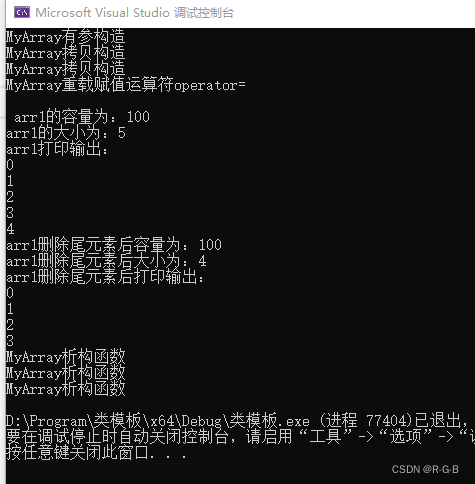
//测试自定义数据类型 Person
//测试自定义数据类型 Person #include"MyArray.hpp" class Person { public: Person() {}; Person(string name, int age) { this->m_name = name; this->m_age = age; } int m_age; string m_name; }; void printPersonArray(MyArray& arr) { for (int i = 0; i < arr.getSize(); i++) cout << "姓名:"< - 1
- 2
- 3
- 4
- 5
- 6
- 7
- 8
- 9
- 10
- 11
- 12
- 13
- 14
- 15
- 16
- 17
- 18
- 19
- 20
- 21
- 22
- 23
- 24
- 25
- 26
- 27
- 28
- 29
- 30
- 31
- 32
- 33
- 34
- 35
- 36
- 37
- 38
- 39
- 40
- 41
int main() { test2(); return 0; }- 1
- 2
- 3
- 4

-
相关阅读:
08.OpenWrt-连接wifi网络
【pen200-lab】10.11.1.10
“智能与未来”2024世亚国际智能机器人展会(简称:世亚智博会)
机智云无需代码就能搞定IoT小程序开发和管理
Hadoop的第二个核心组件:MapReduce框架第四节
hive语法之insert overwrite/insert into
从0开始的异世界编程 [3]
StableSwarmUI:功能强大且易于使用的Stable Diffusion WebUI
路网编辑器技术预研
js非常常见的面试题
- 原文地址:https://blog.csdn.net/m0_51233386/article/details/126441793
