-
boost搜索引擎
一.项目简介
1.1 项目背景
我们平时在用浏览器搜索时,服务器给我们返回的分别是跟搜索关键字相关的一个个网站信息,网站信息分别包括网站的标题,网站内容的简述,和该网站的url。在点击标题后,会跳转到对应链接的页面。平时我们用的搜索引擎,比如说百度,谷歌等等,他们都是搜索全网的信息的,我们项目做的是一个小范围的搜索引擎,一个用boost库实现的boost站内搜索。

1.2 相关技术和库
1.2.1 正排索引
正排索引:从通过文档ID找到文档内容
文档1: 我喜欢用C/C++写代码
文档2: 我喜欢阅读典籍
文档ID 文档内容 文档1 我喜欢用C/C++写代码 文档2 我喜欢阅读典籍 1.2.2 倒排索引
倒排索引:通过关键字联系到相关的文档ID
文档1: 我喜欢用C/C++写代码
文档2: 我喜欢阅读典籍
分词:
文档1: 我 | 喜欢 | 用 | C | C++ | C/C++ | 写 | 代码 | 写代码
文档2: 我 | 喜欢 | 阅读 | 典籍
关键字 我 文档1,文档2 喜欢 文档1,文档2 用 文档1 C 文档1 C++ 文档1 C/C++ 文档1 写 文档1 代码 文档1 写代码 文档1 阅读 文档2 典籍 文档2 1.2.3 相关库
cppjieba: 提供分词的相关接口
boost: 提供在当前目录下遍历所有子目录文件的迭代器
Jsoncpp: 提供可以将格式化的数据和json字符串相互转换的接口
cpp-httplib: 提供http相关接口
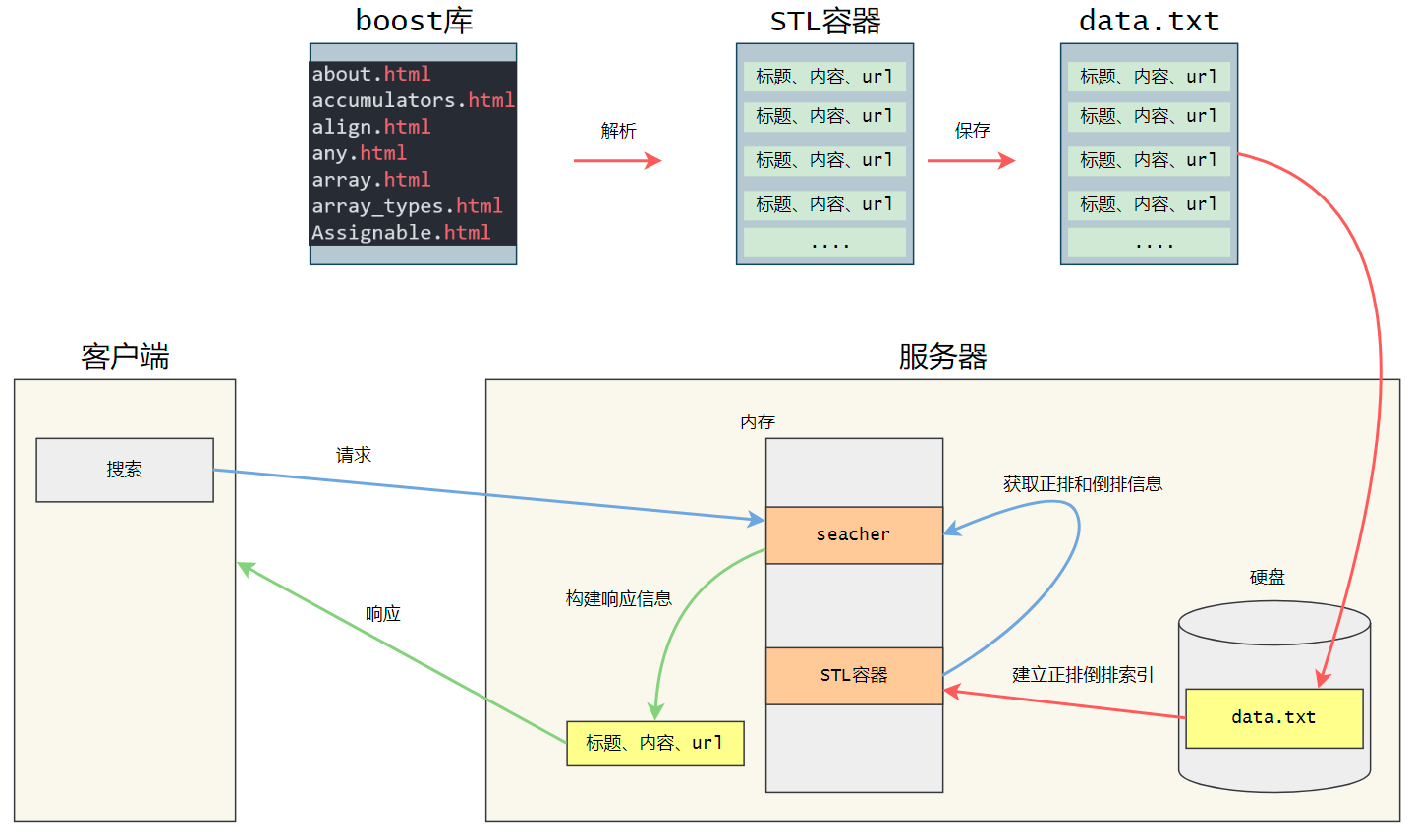
1.3 搜索引擎的原理简述
第一步: 我们需要去boost官网下载boost库,这个库里面包含boost官网的所有文档的html文件。
第二步: 我们写一个解析程序从一个个html文件的源码中提取标题、内容和url,将他们保存到硬盘的一个data.txt文件中。
第三步: 读取data.txt文件,建立正排和倒排索引,提供索引的接口来获取正排和倒排数据
第四步: 写一个html页面,提供给用户一个搜索功能。
一次访问过程: 当用户通过浏览器向服务器发送搜索信息时,服务器会根据搜索的关键字获取对应倒排数据,然后通过倒排数据找到正排ID,从而找到正排的文档内容。然后构建出网页的标题,简述(内容的一部分),url,通过json字符串响应回去,然后在用户的浏览器显示出一个个网页信息。
二. 项目的实现过程
2.1 下载boost文档库
2.1.1下载
// 链接:https://www.boost.org/users/download/ // 如果网络比较卡大家可以私信我给网盘链接- 1
- 2

2.1.2 解压
# 关于拷贝文件:怎么把文件从windows拷贝Linux大家可以在网上搜一下教程 # 我是在代码的目录建一个tool目录,专门放解压包的 # 解压命令(大家如果下的版本不一样记得把1_80_0换成你们下的版本) tar -zxf boost_1_80_0.tar.gz- 1
- 2
- 3
- 4
- 5

2.1.3 将文档拷贝到代码目录
# 因为boost库的文档有20000多个,为了减轻代码调试阶段服务器的压力,我们只拷贝部分的html文件 # 我在调试阶段只拷贝了boost_1_80_0/doc/html目录下的.html(不包括子目录的) # 第一步:在代码的目录建一个boost_1_80_0/doc/html目录 mkdir -p boost_1_80_0/doc/html # -p选项可以递归创建目录 # 第二步:然后在代码的目录下执行下面命令 cp -rf tool/boost_1_80_0/doc/html/*.html boost_1_80_0/doc/html/ # 通过tree命令查看就可以发现后缀为.html的文件被我们复制过去了(没有安装tree的大家可以安装一下)- 1
- 2
- 3
- 4
- 5
- 6
- 7
- 8
- 9
- 10

2.2 解析文档
2.2.1 整体框架
#include#include #include const char* src_path = "./boost_1_80_0"; // html文档的根目录 const char* dest_path = "./data.txt"; // 保存数据的文件路径 struct DocInfo { std::string title; // 标题 std::string conent; // 内容 std::string url; // 链接 }; void EnumFile(const std::string& src_path, std::vector<std::string>* files_path) {} void Parser(const std::vector<std::string>& files_path, std::vector<DocInfo>* doc_list) {} void Save(const std::vector<DocInfo>& doc_list, const std::string& dest_path) {} int main() { // 一. 枚举所有html文件 std::vector<std::string> files_path; EnumFile(src_path, &files_path); // 二. 读取文件,解析出标题、内容、url std::vector<DocInfo> doc_list; Parser(files_path, &doc_list); // 三. 保存解析出来的信息 Save(doc_list, dest_path); return 0; } - 1
- 2
- 3
- 4
- 5
- 6
- 7
- 8
- 9
- 10
- 11
- 12
- 13
- 14
- 15
- 16
- 17
- 18
- 19
- 20
- 21
- 22
- 23
- 24
- 25
- 26
- 27
- 28
- 29
- 30
- 31
- 32
- 33
- 34
- 35
- 36
2.2.2 安装boost库
# 枚举文件的时候我们需要用到boost库,下面是安装命令 sudo yum install -y boost-devel- 1
- 2
2.2.3 parser.cpp的实现
// Parser.cpp #include#include #include #include // sudo yum install -y boost-devel下载boost库 #include // for ifstream ofstream const char* src_path = "./boost_1_80_0"; // html文档的根目录 const char* dest_path = "./data.txt"; // 保存数据的文件路径 struct DocInfo { std::string title; // 标题 std::string conent; // 内容 std::string url; // 链接 }; void EnumFile(const std::string& src_path, std::vector<std::string>* files_path) { namespace fs = boost::filesystem; fs::path root_path(src_path); // 设置html文档的根目录,后面递归是在这个跟目录遍历的 if (!fs::exists(root_path)) { std::cerr << src_path << "is not exists!" << std::endl; } // 递归的目录/文件迭代器 fs::recursive_directory_iterator end; // 定义一个空的迭代器,用来判断遍历是否结束 for (fs::recursive_directory_iterator it(root_path); it != end; it++) { // 排除扩展名不是.html的文件 if (it->path().extension() != ".html") { continue; } files_path->push_back(std::move(it->path().string())); } } bool ParserTitle(const std::string& read_data, DocInfo* doc) { // I am title! 我们需要提取的是I am title这部分的数据 size_t start = read_data.find(""</span><span class="token punctuation">)</span><span class="token punctuation">;</span> <span class="token comment">// 注意这里找到位置仅仅是<title>的开头位置</span> start <span class="token operator">+=</span> std<span class="token double-colon punctuation">::</span><span class="token function">string</span><span class="token punctuation">(</span><span class="token string">" ").size(); // 我们需要越过的长度才到达标题的开头I的位置</span> size_t end <span class="token operator">=</span> read_data<span class="token punctuation">.</span><span class="token function">find</span><span class="token punctuation">(</span><span class="token string">" ", start); // 找到的开头,也就是我们标题的结尾位置 if (start == std::string::npos || end == std::string::npos || start > end) { return false; } doc->title = read_data.substr(start, end - start); return true; } void ParserContent(const std::string& read_data, DocInfo* doc) { // 状态机 enum status { LABLE, // 标签状态 CONTENT // 内容状态 }; status s = LABLE; // 开始为标签状态 for (const auto& ch : read_data) { //For Test
,像这里我们需要的内容是For Test if (LABLE == s) { if (ch == '>') { s = CONTENT; } } else { if (ch == '<') { s = LABLE; } else { doc->conent += ch; } } } } bool ParserUrl(const std::string& file, DocInfo* doc) { // ./boost_1_80_0/doc/html/about.html 我们本地html的相对路径 // https://www.boost.org/doc/libs/1_80_0/doc/html/about.html // boost官方库的链接 // 我们的目标就是将本地的路径拼接成boost官方库的链接 // 我们可以https://www.boost.org/doc/libs/ + 1_80_0/doc/html/about.html这样拼接 doc->url = "https://www.boost.org/doc/libs/"; size_t pos = file.find("1_80_0"); if (std::string::npos == pos) { return false; } doc->url += file.substr(pos); // 拼接 return true; } void Parser(const std::vector<std::string>& files_path, std::vector<DocInfo>* doc_list) { DocInfo doc; for (const auto& file : files_path) { std::ifstream in(file, std::ios::in); if (!in.is_open()) { std::cerr << file << " open failed!" << std::endl; continue; } // 一行一行读取,最后放到一个大的字符串read_data里面 std::string line; std::string read_data; while (std::getline(in, line)) { read_data += line; } // 1. 解析标题 if (!ParserTitle(read_data, &doc)) { continue; } // 2. 解析内容 ParserContent(read_data, &doc); // 3. 拼接url if (!ParserUrl(file, &doc)) { continue; } doc_list->push_back(std::move(doc)); // 将doc转换成右值,减少拷贝 } } bool Save(const std::vector<DocInfo>& doc_list, const std::string& dest_path) { // 我们保存的格式是title\3content\3url\ntitle\3 // 也就是用\3将title、content、url分开,用\n将每个文档的数据分开 // 将所有文档信息保存到一个字符串里面 std::string save_str; for (const auto& doc : doc_list) { save_str += doc.title; save_str += '\3'; save_str += doc.conent; save_str += '\3'; save_str += doc.url; save_str += '\n'; } std::ofstream out(dest_path, std::ios::out | std::ios::binary); if (!out.is_open()) { std::cerr << dest_path << " open failed!" << std::endl; return false; } out.write(save_str.c_str(), save_str.size()); return true; } int main() { // 一. 枚举所有html文件 std::vector<std::string> files_path; EnumFile(src_path, &files_path); // 二. 读取文件,解析出标题、内容、url std::vector<DocInfo> doc_list; Parser(files_path, &doc_list); // 三. 保存解析出来的信息 if (!Save(doc_list, dest_path)) { std::cerr << "Save erro!" << std::endl; return 1; } return 0; }- 1
- 2
- 3
- 4
- 5
- 6
- 7
- 8
- 9
- 10
- 11
- 12
- 13
- 14
- 15
- 16
- 17
- 18
- 19
- 20
- 21
- 22
- 23
- 24
- 25
- 26
- 27
- 28
- 29
- 30
- 31
- 32
- 33
- 34
- 35
- 36
- 37
- 38
- 39
- 40
- 41
- 42
- 43
- 44
- 45
- 46
- 47
- 48
- 49
- 50
- 51
- 52
- 53
- 54
- 55
- 56
- 57
- 58
- 59
- 60
- 61
- 62
- 63
- 64
- 65
- 66
- 67
- 68
- 69
- 70
- 71
- 72
- 73
- 74
- 75
- 76
- 77
- 78
- 79
- 80
- 81
- 82
- 83
- 84
- 85
- 86
- 87
- 88
- 89
- 90
- 91
- 92
- 93
- 94
- 95
- 96
- 97
- 98
- 99
- 100
- 101
- 102
- 103
- 104
- 105
- 106
- 107
- 108
- 109
- 110
- 111
- 112
- 113
- 114
- 115
- 116
- 117
- 118
- 119
- 120
- 121
- 122
- 123
- 124
- 125
- 126
- 127
- 128
- 129
- 130
- 131
- 132
- 133
- 134
- 135
- 136
- 137
- 138
- 139
- 140
- 141
- 142
- 143
- 144
- 145
- 146
- 147
- 148
- 149
- 150
- 151
- 152
- 153
- 154
- 155
- 156
- 157
- 158
- 159
- 160
- 161
- 162
- 163
- 164
- 165
- 166
- 167
- 168
- 169
- 170
- 171
- 172
- 173
- 174
- 175
- 176
- 177
- 178
- 179
- 180
- 181
- 182
- 183
- 184
- 185
- 186
- 187
- 188
2.2.5 编译Parser.cpp的命令
g++ -o parser parser.cpp -std=c++11 -lboost_system -lboost_filesystem- 1
2.2.6 运行结果

2.3 建立索引
2.3.1 整体框架
#include#include #include #include namespace bt_index { struct DocInfo { std::string title; std::string content; std::string url; uint32_t doc_id; }; struct InvertedElem { uint32_t doc_id; std::string word; int weight; }; class index { private: // 成员变量 std::vector<DocInfo> forward_list; // 保存正排索引的数据 std::unordered_map<std::string, std::vector<InvertedElem>> inverted_list; // 保存倒排索引的数据 static index* instance; // 指向单例对象的指针 static std::mutex mtx; public: // 1. 建立倒排和正排索引 bool BuildIndex(const std::string& data_path) {} // 2. 获取索引信息 DocInfo* GetForwardIndex(const uint32_t& doc_id) {} std::vector<InvertedElem>* GetInvetedIndex(const std::string& word) {} // 3. 获取单例 static index* GetInstance() {} ~index(){}; private: index(){}; index(const index& ind) = delete; index& operator=(const index& ind) = delete; // 建立正排索引 DocInfo* BuildForwardIndex(const std::string& line) {} // 建立倒排索引 bool BuildInvertedIndex(const DocInfo& doc) {} }; // 静态成员变量的初始化 index* index::instance = nullptr; std::mutex index::mtx; } - 1
- 2
- 3
- 4
- 5
- 6
- 7
- 8
- 9
- 10
- 11
- 12
- 13
- 14
- 15
- 16
- 17
- 18
- 19
- 20
- 21
- 22
- 23
- 24
- 25
- 26
- 27
- 28
- 29
- 30
- 31
- 32
- 33
- 34
- 35
- 36
- 37
- 38
- 39
- 40
- 41
- 42
- 43
- 44
- 45
- 46
- 47
- 48
- 49
- 50
- 51
- 52
- 53
- 54
- 55
- 56
- 57
- 58
- 59
- 60
- 61
3.3.2 安装cppjieba分词库
3.3.2.1 cppjieba安装
# cppjieba是一个用来分词的库 tar -zxf cppjieba.tgz # 解压命令 # 为了能够正常使用这个库我们还需要将deps目录下的limonp复制一份到include/cppjieba目录下 cp -rf deps/limonp/ include/cppjieba # 复制的命令,注意这条命令是在解压出来的cppjieba目录下执行的- 1
- 2
- 3
- 4
- 5

3.3.2.2 cppjieba使用
建立软链接
# 首先是在代码所在目录(我的是newboost)建立软链接,方便使用 ln -s tool/cppjieba/dict ./dict ln -s tool/cppjieba/include/cppjieba/ ./cppjieba- 1
- 2
- 3
测试代码
#include "cppjieba/Jieba.hpp" // 我的cppjieba已经软链接到当前目录了 #includeusing namespace std; const char* const DICT_PATH = "./dict/jieba.dict.utf8"; const char* const HMM_PATH = "./dict/hmm_model.utf8"; const char* const USER_DICT_PATH = "./dict/user.dict.utf8"; const char* const IDF_PATH = "./dict/idf.utf8"; const char* const STOP_WORD_PATH = "./dict/stop_words.utf8"; int main() { cppjieba::Jieba jieba(DICT_PATH, HMM_PATH, USER_DICT_PATH, IDF_PATH, STOP_WORD_PATH); vector<string> words; // 接收切分的词 string s; s = "小明硕士毕业于中国科学院计算所"; cout << "原句:" << s << endl; jieba.CutForSearch(s, words); cout << "分词后:"; for (auto& word : words) { cout << word << " | "; } cout << endl; } - 1
- 2
- 3
- 4
- 5
- 6
- 7
- 8
- 9
- 10
- 11
- 12
- 13
- 14
- 15
- 16
- 17
- 18
- 19
- 20
- 21
- 22
- 23
- 24
- 25
运行结果

3.3.3 index.hpp的实现
#pragma once #include#include #include #include #include // for ifstream #include #include "cppjieba/Jieba.hpp" #include // cppjieba分词想要用到的字典库 const char* const DICT_PATH = "./dict/jieba.dict.utf8"; const char* const HMM_PATH = "./dict/hmm_model.utf8"; const char* const USER_DICT_PATH = "./dict/user.dict.utf8"; const char* const IDF_PATH = "./dict/idf.utf8"; const char* const STOP_WORD_PATH = "./dict/stop_words.utf8"; // 解析好的数据路径 const char* const data_path = "./data.txt"; namespace bt_index { struct DocInfo { std::string title; std::string content; std::string url; uint32_t doc_id; }; struct InvertedElem { uint32_t doc_id; std::string word; int weight; }; class jieba_util { private: static cppjieba::Jieba jieba; public: static bool CutString(const std::string& str, std::vector<std::string>* word_list) { jieba.CutForSearch(str, *word_list); return true; } }; cppjieba::Jieba jieba_util::jieba(DICT_PATH, HMM_PATH, USER_DICT_PATH, IDF_PATH, STOP_WORD_PATH); class index { private: // 成员变量 std::vector<DocInfo> forward_list; // 保存正排索引的数据 std::unordered_map<std::string, std::vector<InvertedElem>> inverted_list; // 保存倒排索引的数据 static index* instance; // 指向单例对象的指针 static std::mutex mtx; public: // 获取正排索引数据 DocInfo* GetForwardIndex(const uint32_t& doc_id) { if (doc_id < forward_list.size()) { return &forward_list[doc_id]; } else { std::cerr << "out of range!" << std::endl; return nullptr; } } // 获取倒排拉链 std::vector<InvertedElem>* GetInvetedIndex(const std::string& word) { auto it = inverted_list.find(word); if (inverted_list.end() == it) { std::cerr << "have not found" << std::endl; return nullptr; } else { return &it->second; } } // 建立正排和倒排拉链 bool BuildIndex(const std::string& data_path) { std::ifstream in(data_path, std::ios::in | std::ios::binary); if (!in.is_open()) { std::cerr << data_path << " open failed!" << std::endl; return false; } std::string line; while (std::getline(in, line)) { DocInfo* doc = BuildForwardIndex(line); if (nullptr == doc) { continue; } else { BuildInvertedIndex(*doc); } } in.close(); return true; } // 获取单例 static index* GetInstance() { // 双重判断,避免获取单例之后还继续上锁,提高效率 if (nullptr == instance) { mtx.lock(); if (nullptr == instance) { instance = new index(); } mtx.unlock(); } return instance; } ~index(){}; private: index(){}; index(const index& ind) = delete; index& operator=(const index& ind) = delete; // 建立正排索引 DocInfo* BuildForwardIndex(const std::string& line) { DocInfo doc; std::vector<std::string> result; // 用来接收切分好的数据 // 当有多个'\3'出现时,token_compress_on可以过滤多余的空行 boost::split(result, line, boost::is_any_of("\3"), boost::token_compress_on); if (result.size() != 3) { std::cerr << "split erro!" << std::endl; return nullptr; } doc.title = result[0]; doc.content = result[1]; doc.url = result[2]; doc.doc_id = forward_list.size(); // 用forward_list的数组下标做doc_id forward_list.push_back(std::move(doc)); return &forward_list.back(); } // 建立倒排索引 bool BuildInvertedIndex(const DocInfo& doc) { struct cnt { int title_cnt; int content_cnt; }; std::unordered_map<std::string, cnt> cnt_map; // 切分标题 std::vector<std::string> title_words; jieba_util::CutString(doc.title, &title_words); // 分词 for (const auto& word : title_words) { auto& tmp_cnt = cnt_map[word]; tmp_cnt.title_cnt++; } std::vector<std::string> content_words; jieba_util::CutString(doc.content, &content_words); for (const auto& word : content_words) { auto& tmp_cnt = cnt_map[word]; tmp_cnt.content_cnt++; } for (const auto& pair : cnt_map) { InvertedElem elem; elem.doc_id = doc.doc_id; elem.word = pair.first; // 在标题出现权重加10,内容加1,因为标题出现的会在内容重复出现,所以出现在标题加9就好了 elem.weight = pair.second.title_cnt * 9 + pair.second.content_cnt * 1; inverted_list[pair.first].push_back(std::move(elem)); } } }; // 静态成员变量的初始化 index* index::instance = nullptr; std::mutex index::mtx; } - 1
- 2
- 3
- 4
- 5
- 6
- 7
- 8
- 9
- 10
- 11
- 12
- 13
- 14
- 15
- 16
- 17
- 18
- 19
- 20
- 21
- 22
- 23
- 24
- 25
- 26
- 27
- 28
- 29
- 30
- 31
- 32
- 33
- 34
- 35
- 36
- 37
- 38
- 39
- 40
- 41
- 42
- 43
- 44
- 45
- 46
- 47
- 48
- 49
- 50
- 51
- 52
- 53
- 54
- 55
- 56
- 57
- 58
- 59
- 60
- 61
- 62
- 63
- 64
- 65
- 66
- 67
- 68
- 69
- 70
- 71
- 72
- 73
- 74
- 75
- 76
- 77
- 78
- 79
- 80
- 81
- 82
- 83
- 84
- 85
- 86
- 87
- 88
- 89
- 90
- 91
- 92
- 93
- 94
- 95
- 96
- 97
- 98
- 99
- 100
- 101
- 102
- 103
- 104
- 105
- 106
- 107
- 108
- 109
- 110
- 111
- 112
- 113
- 114
- 115
- 116
- 117
- 118
- 119
- 120
- 121
- 122
- 123
- 124
- 125
- 126
- 127
- 128
- 129
- 130
- 131
- 132
- 133
- 134
- 135
- 136
- 137
- 138
- 139
- 140
- 141
- 142
- 143
- 144
- 145
- 146
- 147
- 148
- 149
- 150
- 151
- 152
- 153
- 154
- 155
- 156
- 157
- 158
- 159
- 160
- 161
- 162
- 163
- 164
- 165
- 166
- 167
- 168
- 169
- 170
- 171
- 172
- 173
- 174
- 175
- 176
- 177
- 178
- 179
- 180
- 181
- 182
- 183
- 184
- 185
- 186
- 187
- 188
- 189
- 190
- 191
- 192
- 193
- 194
- 195
- 196
- 197
- 198
- 199
- 200
- 201
- 202
- 203
- 204
- 205
2.4 搜索模块
2.4.1 整体框架
#pragma once #include "index.hpp" #include// for sort #include namespace bt_searcher { struct InvertedElems { uint32_t doc_id; std::vector<std::string> words; int weight; InvertedElems():weight(0){} }; class searcher { private: bt_index::index* index; public: // 初始化 void InitSearcher(const std::string& data_path) { } // 提供搜索,获取倒排和正排索引数据 bool Searcher(const std::string& input, std::string* json_str) { } }; } - 1
- 2
- 3
- 4
- 5
- 6
- 7
- 8
- 9
- 10
- 11
- 12
- 13
- 14
- 15
- 16
- 17
- 18
- 19
- 20
- 21
- 22
- 23
- 24
- 25
- 26
- 27
- 28
- 29
- 30
- 31
2.4.2 安装jsoncpp
2.4.2.1 安装jsoncpp
# 安装命令 sudo yum install -y jsoncpp-devel- 1
- 2
2.4.2.2 使用jsoncpp
代码
#include#include using namespace std; int main() { Json::Value root; root["name"] = "李华"; // 可以看成是一种key-value结构 root["ID"] = "0001"; Json::FastWriter write; string json_str = write.write(root); // 将root对象转换成字符串 cout << json_str << endl; } - 1
- 2
- 3
- 4
- 5
- 6
- 7
- 8
- 9
- 10
- 11
- 12
- 13
- 14
编译
g++ demo.cpp -ljsoncpp # 需要链接josncpp的动态库- 1
运行结果

2.4.3 searcher.hpp的实现
#pragma once #include "index.hpp" #include// for sort #include namespace bt_searcher { // 将word变成数组,因为搜索的关键字中可能有多个关键字对应一个文档 // 为了使文档只出现一次,我们将所以倒排拉链的文档都去重 // 相同文档的将权重加起来,把映射这个文档的关键字填写到数组里面 struct InvertedElems { uint32_t doc_id; std::vector<std::string> words; int weight; InvertedElems():weight(0){} }; class searcher { private: bt_index::index* index; public: // 初始化 void InitSearcher(const std::string& data_path) { // 1. 获取单例 index = bt_index::index::GetInstance(); std::cout << "获取单例成功" << std::endl; // 2. 建立索引 index->BuildIndex(data_path); std::cout << "建立索引成功" << std::endl; } // 提供搜索,获取倒排和正排索引数据 bool Searcher(const std::string& input, std::string* json_str) { // 将输入的关键字进行分词 std::vector<std::string> words; bt_index::jieba_util::CutString(input, &words); // 获取倒排索引 std::vector<InvertedElems> inverted_list_all; std::unordered_map<uint32_t, InvertedElems> tokens_map; for (const auto& word : words) { std::cout << word << std::endl; std::vector<bt_index::InvertedElem>* inverted_list = index->GetInvetedIndex(word); if (nullptr == inverted_list) { return false; } for (const auto& elem : *inverted_list) { InvertedElems& item = tokens_map[elem.doc_id]; item.doc_id = elem.doc_id; item.words.push_back(elem.word); item.weight += elem.weight; } for (auto& pair : tokens_map) { inverted_list_all.push_back(std::move(pair.second)); } } // 排序 std::sort(inverted_list_all.begin(), inverted_list_all.end(), [](const InvertedElems& e1, const InvertedElems& e2){ return e1.weight > e2.weight; }); // 获取正排索引,将数据写入json字符串里面 Json::Value root; for (const InvertedElems& elem : inverted_list_all) { bt_index::DocInfo* doc = index->GetForwardIndex(elem.doc_id); Json::Value item; item["title"] = doc->title; item["desc"] = GetDescribe(elem.words[0], doc->content); item["url"] = doc->url; root.append(item); } Json::FastWriter write; *json_str = write.write(root); return true; } private: std::string GetDescribe(const std::string& word, const std::string& content) { // 我们想要截取的描述是这个词的前50字节到这个词的后100个字节 size_t start = 0; // start和end先设置一个默认值 size_t end = content.size(); size_t pos = content.find(word); if (std::string::npos == pos) { std::cerr << "erro!!!" << std::endl; return "none"; } // 调整start和end的位置 if (pos > 50) { start = pos - 50; } if (pos + 100 < content.size()) { end = pos + 100; } std::string str = content.substr(start, end - start); str += "..."; return str; } }; } - 1
- 2
- 3
- 4
- 5
- 6
- 7
- 8
- 9
- 10
- 11
- 12
- 13
- 14
- 15
- 16
- 17
- 18
- 19
- 20
- 21
- 22
- 23
- 24
- 25
- 26
- 27
- 28
- 29
- 30
- 31
- 32
- 33
- 34
- 35
- 36
- 37
- 38
- 39
- 40
- 41
- 42
- 43
- 44
- 45
- 46
- 47
- 48
- 49
- 50
- 51
- 52
- 53
- 54
- 55
- 56
- 57
- 58
- 59
- 60
- 61
- 62
- 63
- 64
- 65
- 66
- 67
- 68
- 69
- 70
- 71
- 72
- 73
- 74
- 75
- 76
- 77
- 78
- 79
- 80
- 81
- 82
- 83
- 84
- 85
- 86
- 87
- 88
- 89
- 90
- 91
- 92
- 93
- 94
- 95
- 96
- 97
- 98
- 99
- 100
- 101
- 102
- 103
- 104
- 105
- 106
- 107
- 108
- 109
- 110
- 111
- 112
- 113
- 114
- 115
- 116
- 117
2.5 服务模块
2.5.1 安装httplib
# 下载0.7.15版本的zip,传到我们的云服务器或者虚拟机解压 # https://github.com/yhirose/cpp-httplib/tags?after=v0.8.3- 1
- 2

2.5.2 升级gcc/g++版本
# httplib需要比较新的编译器去编译,我们要把gcc/g++升级成比较新的 # 本次项目的编译器是升级到7.3.1 httplib用的是0.7.15版本 # 查看gcc/g++版本 gcc -v g++ -v # 安装scl工具 sudo yum install centos-release-scl scl-utils-build # 升级gcc/g++ sudo yum install -y devtoolset-7-gcc devtoolset-7-gcc-c++ # 临时开启scl scl enable devtoolset-7 bash # 开启后,再查看gcc/g++版本就变成7.3.1了 # 设置开机自动开启scl vim ~/.bash_profile # scl enable devtoolset-7 bash 将这条命令添加的最后- 1
- 2
- 3
- 4
- 5
- 6
- 7
- 8
- 9
- 10
- 11
- 12
- 13
- 14
- 15
- 16
- 17
2.5.3 httplib的使用
代码
// 编译时需要添加 -lpthread选项 #include#include "httplib.h" using namespace std; int main() { httplib::Server server; server.Get("/s", [](const httplib::Request& req, httplib::Response& res){ res.set_content("hello", "text/plain; charset=utf-8"); }); server.listen("0.0.0.0", 8081); return 0; } - 1
- 2
- 3
- 4
- 5
- 6
- 7
- 8
- 9
- 10
- 11
- 12
- 13
- 14
运行截图

2.5.4 server.cpp的实现
#include "searcher.hpp" #include "index.hpp" #include "httplib.h" const char* const html_root = "./html"; int main() { // 1. 创建对象,进行搜索初始化 bt_searcher::searcher search; search.InitSearcher(data_path); httplib::Server server; server.set_base_dir(html_root); // 设置网页的根目录 // http://192.168.1.10:8081/s?word=hello // s?后面跟的是搜索参数, word就是一个搜索关键字 server.Get("/s", [&search](const httplib::Request& req, httplib::Response& res){ if (!req.has_param("word")) { std::cout << "收到请求,客户端没有带参数" << std::endl; res.set_content("必须要有搜索关键字", "text/plain;charset=utf-8"); return; } std::string json_str; std::string word = req.get_param_value("word"); // 获取搜索关键字的值 search.Searcher(word, &json_str); res.set_content(json_str, "application/json"); }); server.listen("0.0.0.0", 8081); return 0; }- 1
- 2
- 3
- 4
- 5
- 6
- 7
- 8
- 9
- 10
- 11
- 12
- 13
- 14
- 15
- 16
- 17
- 18
- 19
- 20
- 21
- 22
- 23
- 24
- 25
- 26
- 27
- 28
- 29
- 30
- 31
2.5.5 编译命令
g++ -o server server.cpp -std=c++11 -ljsoncpp -lpthread- 1
2.5.6 index.html文件
DOCTYPE html> <html lang="en"> <head> <meta charset="UTF-8"> <meta http-equiv="X-UA-Compatible" content="IE=edge"> <meta name="viewport" content="width=device-width, initial-scale=1.0"> <script src="http://code.jquery.com/jquery-2.1.1.min.js">script> <title>boost 搜索引擎title> <style> /* 去掉网页中的所有的默认内外边距,html的盒子模型 */ * { /* 设置外边距 */ margin: 0; /* 设置内边距 */ padding: 0; } /* 将我们的body内的内容100%和html的呈现吻合 */ html, body { height: 100%; } /* 类选择器.container */ .container { /* 设置div的宽度 */ width: 800px; /* 通过设置外边距达到居中对齐的目的 */ margin: 0px auto; /* 设置外边距的上边距,保持元素和网页的上部距离 */ margin-top: 15px; } /* 复合选择器,选中container 下的 search */ .container .search { /* 宽度与父标签保持一致 */ width: 100%; /* 高度设置为52px */ height: 52px; } /* 先选中input标签, 直接设置标签的属性,先要选中, input:标签选择器*/ /* input在进行高度设置的时候,没有考虑边框的问题 */ .container .search input { /* 设置left浮动 */ float: left; width: 600px; height: 50px; /* 设置边框属性:边框的宽度,样式,颜色 */ border: 2px solid gray; /* 去掉input输入框的有边框 */ border-right: none; /* 设置内边距,默认文字不要和左侧边框紧挨着 */ padding-left: 10px; /* 设置input内部的字体的颜色和样式 */ color: #CCC; font-size: 14px; } /* 先选中button标签, 直接设置标签的属性,先要选中, button:标签选择器*/ .container .search button { /* 设置left浮动 */ float: left; width: 150px; height: 54px; /* 设置button的背景颜色,#4e6ef2 */ background-color: #4e4ef2; border:2px solid #4e6ef2; /* 设置button中的字体颜色 */ color: #FFF; /* 设置字体的大小 */ font-size: 19px; font-family:Georgia, 'Times New Roman', Times, serif; } .container .result { width: 100%; } .container .result .item { margin-top: 15px; } .container .result .item a { /* 设置为块级元素,单独站一行 */ display: block; /* a标签的下划线去掉 */ text-decoration: none; /* 设置a标签中的文字的字体大小 */ font-size: 20px; /* 设置字体的颜色 */ color: #4e6ef2; } .container .result .item a:hover { text-decoration: underline; } .container .result .item p { margin-top: 5px; font-size: 16px; font-family:'Lucida Sans', 'Lucida Sans Regular', 'Lucida Grande', 'Lucida Sans Unicode', Geneva, Verdana, sans-serif; } .container .result .item i{ /* 设置为块级元素,单独站一行 */ display: block; /* 取消斜体风格 */ font-style: normal; color: green; } style> head> <body> <div class="container"> <div class="search"> <input type="text" value="请输入搜索关键字"> <button onclick="Search()">搜索一下button> div> <div class="result"> div> div> <script> function Search(){ // 是浏览器的一个弹出框 // alert("hello js!"); // 1. 提取数据, $可以理解成就是JQuery的别称 let query = $(".container .search input").val(); console.log("query = " + query); //console是浏览器的对话框,可以用来进行查看js数据 //2. 发起http请求,ajax: 属于一个和后端进行数据交互的函数,JQuery中的 $.ajax({ type: "GET", url: "/s?word=" + query, success: function(data){ console.log(data); BuildHtml(data); } }); } function BuildHtml(data){ // 获取html中的result标签 let result_lable = $(".container .result"); // 清空历史搜索结果 result_lable.empty(); for( let elem of data){ // console.log(elem.title); // console.log(elem.url); let a_lable = $("", { text: elem.title, href: elem.url, // 跳转到新的页面 target: "_blank" }); let p_lable = $(""
, { text: elem.desc }); let i_lable = $("", { text: elem.url }); let div_lable = $("", { class: "item" }); a_lable.appendTo(div_lable); p_lable.appendTo(div_lable); i_lable.appendTo(div_lable); div_lable.appendTo(result_lable); } } script> body> html>- 1
- 2
- 3
- 4
- 5
- 6
- 7
- 8
- 9
- 10
- 11
- 12
- 13
- 14
- 15
- 16
- 17
- 18
- 19
- 20
- 21
- 22
- 23
- 24
- 25
- 26
- 27
- 28
- 29
- 30
- 31
- 32
- 33
- 34
- 35
- 36
- 37
- 38
- 39
- 40
- 41
- 42
- 43
- 44
- 45
- 46
- 47
- 48
- 49
- 50
- 51
- 52
- 53
- 54
- 55
- 56
- 57
- 58
- 59
- 60
- 61
- 62
- 63
- 64
- 65
- 66
- 67
- 68
- 69
- 70
- 71
- 72
- 73
- 74
- 75
- 76
- 77
- 78
- 79
- 80
- 81
- 82
- 83
- 84
- 85
- 86
- 87
- 88
- 89
- 90
- 91
- 92
- 93
- 94
- 95
- 96
- 97
- 98
- 99
- 100
- 101
- 102
- 103
- 104
- 105
- 106
- 107
- 108
- 109
- 110
- 111
- 112
- 113
- 114
- 115
- 116
- 117
- 118
- 119
- 120
- 121
- 122
- 123
- 124
- 125
- 126
- 127
- 128
- 129
- 130
- 131
- 132
- 133
- 134
- 135
- 136
- 137
- 138
- 139
- 140
- 141
- 142
- 143
- 144
- 145
- 146
- 147
- 148
- 149
- 150
- 151
- 152
- 153
- 154
- 155
- 156
- 157
- 158
- 159
- 160
- 161
- 162
- 163
- 164
- 165
- 166
- 167
- 168
- 169
- 170
- 171
- 172
- 173
- 174
- 175
- 176
- 177
- 178
- 179
- 180
- 181
- 182
- 183
- 184
- 185
- 186
- 187
- 188
- 189
- 190
- 191
- 192
注意,index.html需要放在你的网页根目录上,我的网络根目录是代码目录下的html目录
2.5.7 运行结果
启动服务器

浏览器访问

搜索结果

- 相关阅读:
Arrays工具类的常见方法总结
Redis持久化
汽车电子电气架构演进驱动主机厂多重变化
JIRA 如何在项目之间移动 Issue
SQL拦截:想要限制每次查询的结果集不能超过10000行,该如何实现?
C#通过Process调用Python脚本
未备份cf卡数据删除了怎么办?有这3个恢复方法
外汇天眼:美国10月份核心PCE物价低于预期!初请人数下降,美联储可以大胆放缓加息
javascript二维数组(19)不要键名只保留值的算法
C语言学习之路(基础篇)—— 数据类型 01
- 原文地址:https://blog.csdn.net/Yohe1937/article/details/126438389
