-
harbor总结
镜像仓库
镜像仓库负责管理,存储,分发镜像。镜像仓库管理多个repository,repository通过名字来区分,每个repository包含一个或多个镜像,镜像通过镜像名称和标签(Tag)来区分。
镜像仓库遵循的规范

如果本地启动了docker registry,可以通过curl来查看
curl 127.0.0.1:5000/v2/ curl 127.0.0.1:5000/v2/_catalog curl 127.0.0.1:5000/v2/httpserver/tags/list- 1
- 2
- 3

数据和块文件
镜像由元数据和块文件两部分组成,镜像仓库的核心功能就是管理这两项数据。

元数据
元数据用于描述一个镜像的核心信息,包含镜像的镜像仓库、仓库、标签、校验码、文件层、镜像构建描述等信息。
通过这些信息,可以从抽象层面完整地描述一个镜像:它是如何构建出来的、运行过什么构建命令、构建的每一个文件层的校验码、打的标签、镜像的校验码等。
块文件(blob)
块文件是组成镜像的联合文件层的实体,每一个块文件是一个文件层,内部包含对应文件层的变更。
harbor
Harbor 是 VMware 开源的企业级镜像仓库,目前已是 CNCF 的毕业项目。它拥有完整的仓库管理、镜像管理、基于角色的权限控制、镜像安全扫描集成、镜像签名等。
harbor提供的服务
- Harbor 核心服务:提供 Harbor 的核心管理服务 APl,包括仓库管理、认证管理、授权管理、配置管理、项目管理、配额管理、签名管理、副本管理等。
- Harbor Portal: Harbor 的 Web 界面。
- Registry: Registry 负责接收客户端的 pull/push 请求,其核心为 Docker/Distribution。
- 副本控制器:Harbor 可以以主从模式来部署镜像仓库,副本控制器将镜像从主镜像服务分发到从镜像服务。
- 日志收集器:收集各模块的日志。
- 垃圾回收控制器:回收日常操作中删除镜像记录后遗留在块存储中的孤立块文件。

harbor的架构
harbor本身提供了多种客户端的支持,通过访问不同的端口,nginx转发到不同的地址如webUI,registry。

harbor的安装部署
- 添加harbor的repo
helm repo add https://helm.goharbor.io helm repo list- 1
- 2

- 本地下载harbor的chart
helm search repo harbor helm pull bitnami/harbor tar xvf harbor-11.2.2.tgz -O > harbor-11.2.2- 1
- 2
- 3

- 创建harbor命名空间
k create ns harbor- 1
- 创建secret
# 生成ca openssl genrsa -out ca.key 4096 openssl req -x509 -new -nodes -sha512 -days 3650 -subj "/CN=harbor.wghdr.top" -key ca.key -out ca.crt # 生成key openssl genrsa -out harbor.wghdr.top.key 4096 openssl req -sha512 -new -subj "/C=CN/ST=ZheJiang/L=HangZhou/O=wghdr/OU=Personal/CN=harbor.wghdr.top" -key harbor.wghdr.top.key -out harbor.wghdr.top.csr # 创建v3.ext文件 vim v3.ext authorityKeyIdentifier=keyid,issuer basicConstraints=CA:FALSE keyUsage = digitalSignature, nonRepudiation, keyEncipherment, dataEncipherment extendedKeyUsage = serverAuth subjectAltName = @alt_names [alt_names] DNS.1=harbor.wghdr.top # 生成crt openssl x509 -req -sha512 -days 3650 -extfile v3.ext -CA ca.crt -CAkey ca.key -CAcreateserial -in harbor.wghdr.top.csr -out harbor.wghdr.top.crt # 转换成cert openssl x509 -inform PEM -in harbor.wghdr.top.crt -out harbor.wghdr.top.cert # 创建secret k create secret tls harbor.wghdr.top --key harbor.wghdr.top.key --cert harbor.wghdr.top.cert -n harbor k get secret -n harbor | grep harbor.wghdr.top- 1
- 2
- 3
- 4
- 5
- 6
- 7
- 8
- 9
- 10
- 11
- 12
- 13
- 14
- 15
- 16
- 17
- 18
- 19
- 20
- 21
- 22

- 修改chart的value.yaml
# 修改global中: storageClass: "nfs-client" # 修改externalURL为你自己的域名 externalURL: https://harbor.wghdr.top # 修改harbor密码 harborAdminPassword: "Harbor12345" # 修改ingress中 enabled: true hosts: core: harbor.wghdr.top notary: notary.harbor.wghdr.top- 1
- 2
- 3
- 4
- 5
- 6
- 7
- 8
- 9
- 10
- 11
- 安装harbor
helm install harbor harbor-11.2.2/ -n harbor helm list -n harbor- 1
- 2

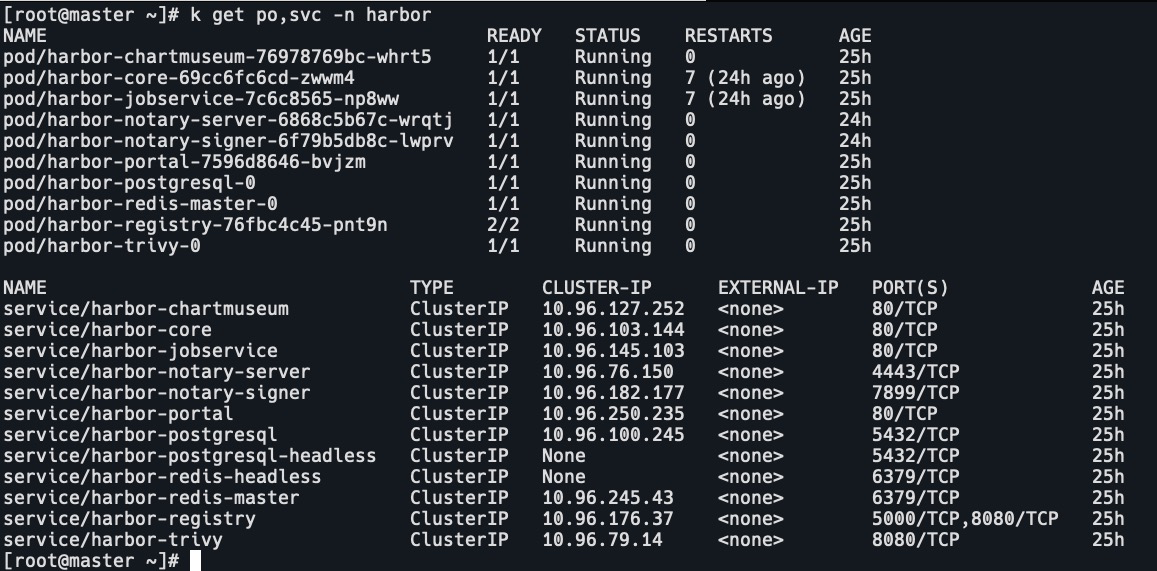
- 查看pod,svc情况
k get po,svc -n harbor # 注意:镜像拉取可能会很慢,pod会多次重启没关系。harbor-notary-server和harbor-notary-signer 的pod可能会CrashLoopbackOFF,describe查看日志是probe探测失败了,可以修改deploy,删除liveness和readnessprobe。- 1
- 2
- 修改ingress,添加ingressClass
ingressClassName: nginx- 1

- 查看ingress
k get ingress -n harbor- 1

- 访问harbor,换成你自己的域名,安装完成。
harbor高可用架构
负载均衡+冗余部署

垃圾回收
镜像删除时,blob 文件不会被删除。
因为容器镜像是基于overlayfs的,基础镜像都是复用的,某一个blobs可能被多个容器所共享,直接删除会导致其他容器故障。
所以需要通过垃圾回收机制来删除不用的 blob,进而回收存储空间。
镜像推送
先在harbor页面上创建项目k8s。

docker推送
# 设置insure-registries cat /etc/docker/daemon.json {"insecure-registries": ["https://harbor.wghdr.top"]} # 重启docker systemctl restart docker # 登录harbor docker login -u admin https://harbor.wghdr.top # 拉取nginx镜像 docker pull nginx # 设置tag docker tag nginx:latest harbor.wghdr.top/k8s/nginx:latest # 推送镜像 docker push harbor.wghdr.top/k8s/nginx:latest- 1
- 2
- 3
- 4
- 5
- 6
- 7
- 8
- 9
- 10
- 11
- 12
- 13

查看k8s镜像仓库中的nginx镜像。

containerd推送
ctr -n k8s.io i ls | grep harbor-core ctr -n k8s.io i tag docker.io/bitnami/harbor-core:2.4.1-debian-10-r24 harbor.wghdr.top/k8s/harbor-core:2.4.1-debian-10-r24 ctr -n k8s.io i ls | grep harbor-core- 1
- 2
- 3

ctr -n k8s.io i push -k -u admin harbor.wghdr.top/k8s/harbor-core:2.4.1-debian-10-r24- 1

查看k8s镜像仓库中的harbor-core镜像。

拉取harbor镜像
# 设置docker配置文件 cat /etc/docker/daemon.json {"insecure-registries": ["harbor.wghdr.top"]} # 添加harbor证书 mkdir /etc/docker/certs.d/harbor.wghdr.top scp harbor-11.2.2/cert/harbor.wghdr.top* /etc/docker/certs.d/harbor.wghdr.top # 重启docker systemctl daemon-reload && systemctl restart docker # 登录habror docker login -u admin https://harbor.wghdr.top # 拉取镜像 docker pull harbor.wghdr.top/k8s/nginx:latest # 查看镜像 docker images | grep harbor.wghdr.top- 1
- 2
- 3
- 4
- 5
- 6
- 7
- 8
- 9
- 10
- 11
- 12
- 13
- 14


同步阿里云镜像仓库
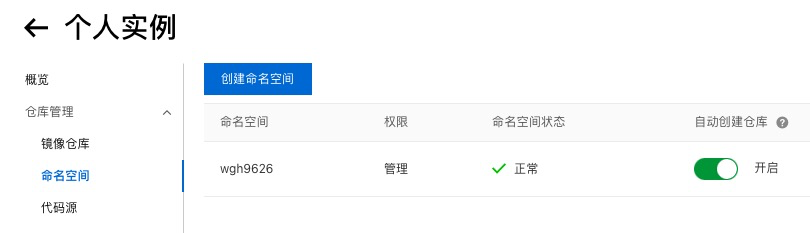
- harbor仓库管理->新建目标
提供者:Alibaba ACR
目标名:ACR的命名空间
目标URL:ACR的zone
ak/sk:在阿里云RAM 访问控制创建ak


- harbor复制管理->新建规则
名称:alibaba-acr(自定义)
复制模式:Pull-based
源仓库:wgh9626-https://registry-vpc.cn-hangzhou.aliyuncs.com
触发模式:手动或者定时都可以

3.点击复制

4.查看任务

5.查看镜像

6.测试下载镜像
docker pull harbor.wghdr.top/wgh9626/webhook:v0.34.1- 1

下载成功,harbor上下载次数变为1

-
相关阅读:
ASTM标准涵盖哪些产品类别?出口美国的产品做ASTM认证需要注意哪些事项?
Ubuntu安装conda以后,给jupyter安装C++内核
一种自定义的progressbar
VS快捷键
蓝桥杯入门即劝退(四)[ 字符串排序 ]
VSCode开发go手记
golang pprof 监控系列(1) —— go trace 统计原理与使用
全志V3S嵌入式驱动开发(驱动开发准备)
技术路线扩容,韶音的雄心不止于骨传导耳机?
Maven最新版的下载与安装教程
- 原文地址:https://blog.csdn.net/weixin_43616190/article/details/126433465
