-
Vue 之 echarts 图表数据可视化常用的一些图表/动态图表/3D图表的简单整理
Vue 之 echarts 图表数据可视化常用的一些图表/动态图表/3D图表的简单整理
目录
Vue 之 echarts 图表数据可视化常用的一些图表/动态图表/3D图表的简单整理
四、各种 echarts 图表(含代码)
一、简单介绍
Vue 开发的一些知识整理,方便后期遇到类似的问题,能够及时查阅使用。
本节介绍,vue 中添加 echarts ,然后在 vue 中简单使用一些 echarts中常用的图表,包括一些动态的图表、3D的图表等 ,如果有不足之处,欢迎指出,或者你有更好的方法,欢迎留言。
ECharts,一个使用 JavaScript 实现的开源可视化库,可以流畅的运行在 PC 和移动设备上,兼容当前绝大部分浏览器(IE9/10/11,Chrome,Firefox,Safari等),底层依赖矢量图形库 ZRender,提供直观,交互丰富,可高度个性化定制的数据可视化图表。
ECharts 提供了常规的折线图、柱状图、散点图、饼图、K线图,用于统计的盒形图,用于地理数据可视化的地图、热力图、线图,用于关系数据可视化的关系图、treemap、旭日图,多维数据可视化的平行坐标,还有用于 BI 的漏斗图,仪表盘,并且支持图与图之间的混搭。
ECharts 针对移动端交互做了细致的优化,例如移动端小屏上适于用手指在坐标系中进行缩放、平移。 PC 端也可以用鼠标在图中进行缩放(用鼠标滚轮)、平移等。
Echarts 官网文档:Handbook - Apache ECharts
Echarts 官网示例:Examples - Apache ECharts
操作环境:
- win 10
- node v14.20.0
- npm 8.5.3
- @vue/cli 5.0.6
- vue 2.6.14
- echarts 5.3.3
- echarts-liquidfill 3.1.0
- echarts-gl 2.0.9
二、效果预览
(有若干图表其实是动态的)

三、注意事项
1、使用水球图时(echarts-liquidfil插件),echarts-liquidfill@3 版本匹配 echarts@5 版本,echarts-liquidfill@2 版本匹配 echarts@4 版本
- npm引入:
- npm install echarts
- npm install echarts-liquidfill
- cdn引入:
- <script src='echarts.js'>script>
- <script src='echarts-liquidfill.js'>script>
2、使用 echarts 3D 的时候,同时也注意下版本匹配,echarts-gl@2 版本匹配 echarts@5 版本,echarts-gl@1 版本匹配 echarts@4 版本
四、各种 echarts 图表(含代码)
1、水球图
注意:除了需要 echarts,还要 echarts-liquidfil 配合
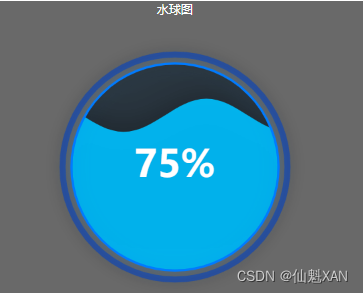
- <template>
- <div class="wrap-container">
- <div class="wp-content">
- <div class="wp-title">水球图div>
- <div class="wp-body">
- <div class="wrap-container">
- <div class="chartsdom" id='chart-polo'>div>
- div>
- div>
- div>
- div>
- template>
- <script>
- // 注意 echartsLiquidfill ver3对应echarts 版本 5;(echartsLiquidfill ver2对应echarts 版本 4)
- // eslint-disable-next-line
- import echartsLiquidfill from "echarts-liquidfill";
- export default {
- name: 'water-polo',
- data() {
- return {
- option: null
- }
- },
- mounted() {
- this.getEchart()
- },
- methods: {
- getEchart() {
- // 获取渲染元素,创建 chart
- let myChart = this.$echarts.init(document.getElementById('chart-polo'))
- this.option = {
- series: [{
- // 水球图类型
- type: 'liquidFill',
- // 名称
- name: "测试",
- // 水波值,可多个
- data: [0.75],
- // 球相对渲染元素的宽高的半径比
- radius: '75%',
- // 水波颜色
- color: ['#00B9F5'],
- // 水波背景的样式
- backgroundStyle: {
- // 背景颜色
- color: 'rgba(0,0,0,0.5)',
- // 边框颜色
- borderColor: '#007bff',
- // 边框宽度
- borderWidth: 3,
- shadowColor: 'rgba(0,123,225,.4)',
- shadowBlur: 20
- },
- // 是否显示外轮廓
- outline: {
- show: true
- },
- }],
- // 鼠标进入是否显示提示
- tooltip:{
- show: true
- }
- }
- myChart.setOption(this.option, true)
- window.addEventListener('resize', () => {
- myChart.resize()
- })
- // 第二种 水球图
- // const dataOption = {
- // value: 0.30,
- // itemStyle: { //渐变水球颜色
- // color: new this.$echarts.graphic.LinearGradient(1, 0, 0, 0, [{
- // offset: 0,
- // color: "pink",
- // },
- // {
- // offset: 1,
- // color: "skyblue",
- // },
- // ]),
- // },
- // };
- // this.option = {
- // series: [{
- // type: "liquidFill",
- // // 这三个属性值设置为false静止的波浪
- // // waveAnimation: false, //静止的波浪效果
- // animationDuration: 1000, // 波浪初始上涨时间
- // // eslint-disable-next-line
- // // animationDurationUpdate: 0,//静止的波浪效果
- // // 这三个属性值设置为false静止的波浪
- // amplitude: "5%", //振幅波浪大小
- // name: "一级预警",
- // data: [dataOption],
- // waveLength: "60%", //波浪长度
- // // eslint-disable-next-line
- // outline: {
- // //隐藏轮廓
- // show: false,
- // },
- // label: {
- // //字体内容、字体颜色、字体大小属性
- // formatter: "测试",
- // color: "#fff",
- // fontSize: 30,
- // },
- // backgroundStyle: {
- // //水球图背景
- // color: "#101fff",
- // },
- // // color: ["#F87900"],
- // }, ],
- // tooltip: {
- // //鼠标滑过展示数据
- // show: true,
- // },
- // };
- // myChart.setOption(this.option);
- }
- }
- }
- script>
- <style lang="scss" scoped>
- .wp-title{
- text-align: center;
- color: white;
- }
- .wrap-container {
- width: 400px;
- height: 400px;
- .chartsdom {
- width: 100%;
- height: 100%;
- }
- }
- style>
2、滚动弧线图

- <template>
- <div class="wrap-container ra-container">
- <div class="ra-content">
- <div class="ra-title">滚动弧线图div>
- <div class="ra-body">
- <div class="wrap-container">
- <div class="chartsdom" id='chart-rollArc'>div>
- div>
- div>
- div>
- div>
- template>
- <script>
- export default {
- name: 'roll-arcline',
- data() {
- return {
- option: null,
- xIndex: 0,
- timer: null,
- xData: [1, 2, 3, 4, 5, 6, 7, 8, 9, 10, 11, 12],
- yData: [54, 86, 46, 77, 96, 89, 88, 23, 38, 3, 66, 98]
- }
- },
- mounted() {
- this.getEchart()
- },
- methods: {
- getEchart() {
- // 图标渲染体
- const chartRollArc = document.getElementById('chart-rollArc')
- // 初始化图表
- let myChart = this.$echarts.init(chartRollArc)
- this.option = {
- tooltip: {
- trigger: 'axis',
- showContent: true,
- axiosPointer: {
- type: 'shadow',
- shadowStyle: {
- color: new this.$echarts.graphic.LinearGradient(0, 0, 0, 1, [{
- offset: 1,
- color: '#5d83ff'
- },
- {
- offset: 0,
- color: 'rgba(255,255,255,0)'
- }
- ])
- }
- },
- // 重新构造图标信息显示(不写会有默认的格式)
- formatter: (params) => {
- // console.log(params)
- params = params[0]
- if (params.seriesIndex === 0)
- // console.log(' origin '+ this.xIndex)
- this.xIndex = parseInt(params.name) - 1
- // console.log(' fuzhi '+ this.xIndex)
- return params.name + '月' + params.seriesName + ':' + params.value + ' 人'
- },
- },
- color: ['#5d83ff'],
- grid: {
- top: 30,
- left: 30,
- right: 20,
- bottom: 20,
- containerLabel: true
- },
- xAxis: {
- type: 'category',
- data: this.xData,
- boundaryGap: false,
- axisTick: {
- show: false
- },
- axisLabel: {
- formatter: '{value} 月'
- },
- axisLine: {
- lineStyle: {
- color: '#999'
- }
- }
- },
- yAxis: {
- type: 'value',
- axisLine: {
- show: false,
- lineStyle: {
- color: '#999'
- }
- },
- },
- series: [{
- name: '人数',
- type: 'line',
- data: this.yData,
- symbolSize: 10,
- itemStyle: {
- opacity: 0,
- },
- emphasis: {
- label: {
- show: true,
- color: '#fff',
- fontSize: 20
- },
- itemStyle: {
- color: '#5d83ff',
- borderColor: '#fff',
- borderWidth: 2,
- opacity: 1
- },
- },
- areaStyle: {
- normal: {
- color: new this.$echarts.graphic.LinearGradient(0, 0, 0, 1, [{
- offset: 0,
- color: '#5d83ff'
- }, {
- offset: 1,
- color: 'rgba(0, 0, 0, 0)'
- }]),
- }
- },
- smooth: true,
- }]
- }
- // 绘制图表
- myChart.setOption(this.option, true);
- // 监听窗口变化
- window.addEventListener('resize', () => {
- myChart.resize();
- });
- // 开启自动显示信息
- this.startChartAutoShowTip(myChart)
- // 鼠标进入停止自动显示信息
- chartRollArc.onmouseover = () => {
- // console.log('mouseover')
- // alert('mouseover')
- this.stopChartAutoShowTip()
- }
- // 退出 chartRollArc 继续自动显示信息
- chartRollArc.onmouseout = () => {
- // console.log('mouseout')
- // alert('mouseout')
- this.startChartAutoShowTip(myChart);
- }
- },
- /**
- * 自动显示图标信息函数
- * @param {Object} myChart
- */
- startChartAutoShowTip(myChart) {
- this.stopChartAutoShowTip()
- this.timer = setInterval(() => {
- // 显示图标信息
- myChart.dispatchAction({
- type: 'showTip',
- seriesIndex: 0,
- dataIndex: this.xIndex
- });
- this.xIndex++;
- // console.log(this.xIndex)
- if (this.xIndex > this.yData.length) {
- this.xIndex = 0;
- }
- }, 1000);
- },
- /**
- * 停止自动显示图标信息函数
- */
- stopChartAutoShowTip() {
- if (this.timer != null) {
- clearInterval(this.timer)
- this.timer = null
- }
- }
- },
- beforeDestroy() {
- // 销毁自动显示信息
- this.stopChartAutoShowTip()
- }
- }
- script>
- <style lang='scss' scoped>
- /* 标题居中 */
- .ra-title {
- text-align: center;
- color: white;
- }
- /* 内容宽高 */
- .wrap-container {
- width: 895px;
- height: 400px;
- .chartsdom {
- width: 100%;
- height: 90%;
- }
- }
- style>
3、旋转饼状图

- <template>
- <div class="wrap-container sn-container">
- <div class="sn-content">
- <div class="sn-title">旋转的饼状图div>
- <div class="sn-body">
- <div class="wrap-container">
- <div class="pie">
- <div class="pies pie1">div>
- <div class="pies pie2">div>
- <div class="pies pie3">div>
- <div class="pie4">div>
- <div class="chartsdom" id='chart-pie'>div>
- div>
- div>
- div>
- div>
- div>
- template>
- <script>
- export default {
- name: 'rotate-pie',
- data() {
- return {
- }
- },
- mounted() {
- this.getEchart()
- },
- methods: {
- getEchart() {
- let myChart = this.$echarts.init(document.getElementById('chart-pie'));
- this.option = {
- tooltip: {
- trigger: 'item',
- formatter: '{a}
{b} : {c} ({d}%)', - },
- legend: {
- show: true,
- orient: 'vertical',
- left: 'center',
- top: 'middle',
- data: ['内存', '存储'],
- textStyle: {
- color: '#4ce5ff',
- fontSize: 14,
- },
- itemWidth: 20,
- itemHeight: 10
- },
- label: {
- normal: {
- show: false
- },
- },
- labelLine: {
- normal: {
- show: false
- }
- },
- series: [{
- name: '磁盘空间',
- type: 'pie',
- radius: [60, 110],
- center: ['50%', '50%'],
- roseType: 'area',
- label: {
- show: false
- },
- emphasis: {
- label: {
- show: false
- }
- },
- data: [{
- value: 6.5,
- name: '内存',
- itemStyle: {
- normal: {
- color: new this.$echarts.graphic.LinearGradient(0, 0, 0, 1, [{
- offset: 0,
- color: '#387ed3'
- }, {
- offset: 1,
- color: '#bc8b68'
- }])
- }
- }
- }, {
- value: 3.5,
- name: '存储',
- itemStyle: {
- normal: {
- color: new this.$echarts.graphic.LinearGradient(0, 0, 0, 1, [{
- offset: 0,
- color: '#188bfd'
- }, {
- offset: 1,
- color: '#51eeff'
- }])
- }
- }
- }, {
- value: 3,
- name: '其他',
- itemStyle: {
- normal: {
- color: 'rgba(0, 0, 106, 1)'
- }
- }
- }, {
- value: 0,
- name: '其他1',
- itemStyle: {
- normal: {
- color: 'rgba(0, 0, 0, 0)'
- }
- }
- }, {
- value: 0,
- name: '其他2',
- itemStyle: {
- normal: {
- color: 'rgba(0, 0, 0, 0)'
- }
- }
- }, {
- value: 0,
- name: '其他3',
- itemStyle: {
- normal: {
- color: 'rgba(0, 0, 0, 0)'
- }
- }
- }]
- }]
- }
- myChart.setOption(this.option, true);
- window.addEventListener('resize', () => {
- myChart.resize();
- });
- }
- }
- }
- script>
- <style lang="scss" scoped>
- .sn-title {
- text-align: center;
- color: white;
- }
- .sn-container{
- border:5px solid aqua;
- border-radius: 25px;
- }
- .wrap-container {
- background: 'rgba(1,1,1,0)';
- width: 432px;
- height: 400px;
- .chartsdom {
- width: 100%;
- height: 100%;
- }
- .pie {
- position: relative;
- top: 0;
- width: 100%;
- height: 100%;
- .pies {
- width: 100%;
- height: 100%;
- top: 0;
- left: 0;
- position: absolute;
- background-repeat: no-repeat;
- background-position: center center;
- }
- .pie1 {
- background-image: url(../../assets/img/whcircle.png);
- animation: mymove 20s linear infinite;
- -webkit-animation: mymove 20s linear infinite;
- }
- .pie2 {
- background-image: url(../../assets/img/circle2.png);
- animation: moveto 20s linear infinite;
- -webkit-animation: moveto 20s linear infinite;
- }
- .pie3 {
- background-image: url(../../assets/img/inner.png);
- }
- // 分割线 内存/存储
- .pie4 {
- position: absolute;
- top: 50%;
- left: 36%;
- width: 76px;
- height: 1px;
- background: linear-gradient(to right, rgb(31, 38, 103), rgb(90, 250, 253), rgb(31, 38, 103));
- }
- }
- }
- /**
- * animation 动画
- */
- @-webkit-keyframes mymove {
- 0% {
- -webkit-transform-origin: center;
- transform-origin: center;
- -webkit-transform: rotate(0deg);
- transform: rotate(0deg)
- }
- 100%{
- -webkit-transform-origin: center;
- transform-origin: center;
- -webkit-transform: rotate(360deg);
- transform: rotate(360deg);
- }
- }
- @keyframes mymove{
- 0% {
- -webkit-transform-origin: center;
- transform-origin: center;
- -webkit-transform: rotate(0deg);
- transform: rotate(0deg);
- }
- 100%{
- -webkit-transform-origin: center;
- transform-origin: center;
- -webkit-transform: rotate(360deg);
- transform: rotate(360deg);
- }
- }
- @-webkit-keyframes moveto {
- 0% {
- -webkit-transform-origin: center;
- transform-origin: center;
- -webkit-transform: rotate(0deg);
- transform: rotate(0deg)
- }
- 100%{
- -webkit-transform-origin: center;
- transform-origin: center;
- -webkit-transform: rotate(-360deg);
- transform: rotate(-360deg);
- }
- }
- @keyframes moveto{
- 0% {
- -webkit-transform-origin: center;
- transform-origin: center;
- -webkit-transform: rotate(0deg);
- transform: rotate(0deg);
- }
- 100%{
- -webkit-transform-origin: center;
- transform-origin: center;
- -webkit-transform: rotate(-360deg);
- transform: rotate(-360deg);
- }
- }
- style>
4、环状饼图

- <template>
- <div class="wrap-container sn-container">
- <div class="sn-content">
- <div class="sn-title">环形饼图div>
- <div class="sn-body">
- <div class="wrap-container ring-pie">
- <div class="back-chart">
- <svg width="100%" height="100%" viewBox="0 0 150 150" version="1.1"
- xmlns="http://www.w3.org/2000/svg" xmlns:xlink="http://www.w3.org/1999/xlink">
- <path id="svg_2"
- d="m3,75c0,-39.77901 32.22099,-72 72,-72c39.77901,0 72,32.22099 72,72c0,39.77901 -32.22099,72 -72,72c-39.77901,0 -72,-32.22099 -72,-72z"
- stroke="#2de6af" fill-opacity="null" fill="none">path>
- svg>
- div>
- <div class="chartsdom" id="chart_rp">div>
- <div class="arrow-cir1">
- <div class="arrow-cir11">div>
- div>
- <div class="arrow-cir2">
- <div class=" arrow-cir22">div>
- div>
- div>
- div>
- div>
- div>
- template>
- <script>
- export default {
- name: 'ring-pie',
- mounted() {
- this.getEchart();
- },
- methods: {
- getEchart() {
- let myChart = this.$echarts.init(document.getElementById('chart_rp'));
- this.option = {
- tooltip:{
- show:true
- },
- series: [{
- name: '环形饼图',
- type: 'pie',
- radius: ['68%', '80%'],
- hoverAnimation: true,
- avoidLabelOverlap: false,
- label: {
- show: false,
- position: 'center'
- },
- emphasis: {
- label: {
- show: true
- }
- },
- labelLine: {
- show: true
- },
- data: [{
- value: 6,
- name: '区块链',
- itemStyle: {
- normal: {
- color: new this.$echarts.graphic.LinearGradient(0, 0, 0, 1, [{
- offset: 0,
- color: '#6984fe'
- }, {
- offset: 1,
- color: '#24d1fd'
- }])
- }
- }
- }, {
- value: 4,
- name: '大数据',
- itemStyle: {
- normal: {
- color: '#ee2'
- }
- }
- }]
- }]
- }
- myChart.setOption(this.option, true);
- window.addEventListener('resize', () => {
- myChart.resize();
- });
- }
- },
- }
- script>
- <style lang="scss" scoped>
- .sn-title {
- text-align: center;
- color: white;
- }
- .sn-container {
- width: 432px;
- height: 400px;
- border: 5px solid aqua;
- border-radius: 25px;
- }
- .wrap-container {
- position: relative;
- width: 432px;
- height: 400px;
- .back-chart {
- position: absolute;
- top: 0;
- left: 0;
- right: 0;
- bottom: 0;
- margin: auto;
- width: 300px;
- height: 300px;
- background: url(../../assets/img/back_chart.png) no-repeat center;
- }
- .chartsdom {
- position: absolute;
- top: 0;
- left: 0;
- right: 0;
- bottom: 0;
- margin: auto;
- width: 300px;
- height: 300px;
- z-index: 9999;
- }
- .arrow-cir1 {
- // border: 5px solid red;
- // border-radius: 25px;
- width: 300px;
- height: 300px;
- offset-distance: 0%;
- position: absolute;
- top: 0;
- left: 0;
- right: 0;
- bottom: 0;
- margin: auto;
- -webkit-animation: arrow-cir1 5s linear infinite;
- animation: arrow-cir1 5s linear infinite;
- .arrow-cir11 {
- position: absolute;
- width: 15px;
- height: 15px;
- top: 0.5%;
- left: 50%;
- background: url(../../assets/img/icon_04.png) no-repeat 50% 50%;
- background-color: blue;
- }
- }
- .arrow-cir2 {
- // border: 5px solid red;
- // border-radius: 25px;
- width: 300px;
- height: 300px;
- offset-distance: 0%;
- position: absolute;
- top: 0;
- left: 0;
- right: 0;
- bottom: 0;
- margin: auto;
- -webkit-animation: arrow-cir2 5s linear infinite;
- animation: arrow-cir2 5s linear infinite;
- .arrow-cir22 {
- position: absolute;
- width: 15px;
- height: 15px;
- top: 0.5%;
- left: 50%;
- background: url(../../assets/img/icon_04.png) no-repeat 50% 50%;
- background-color: yellow;
- }
- }
- }
- @-webkit-keyframes arrow-cir1{
- 0%{
- -webkit-transform-origin: center;
- transform-origin: center;
- -webkit-transform: rotate(0deg);
- transform: rotate(0deg)
- }
- 100% {
- -webkit-transform-origin: center;
- transform-origin: center;
- -webkit-transform: rotate(360deg);
- transform: rotate(360deg);
- }
- }
- @keyframes arrow-cir1{
- 0%{
- -webkit-transform-origin: center;
- transform-origin: center;
- -webkit-transform: rotate(0deg);
- transform: rotate(0deg)
- }
- 100% {
- -webkit-transform-origin: center;
- transform-origin: center;
- -webkit-transform: rotate(360deg);
- transform: rotate(360deg);
- }
- }
- @-webkit-keyframes arrow-cir2{
- 0%{
- -webkit-transform-origin: center;
- transform-origin: center;
- -webkit-transform: rotate(0deg);
- transform: rotate(0deg)
- }
- 100% {
- -webkit-transform-origin: center;
- transform-origin: center;
- -webkit-transform: rotate(-360deg);
- transform: rotate(-360deg);
- }
- }
- @keyframes arrow-cir2{
- 0%{
- -webkit-transform-origin: center;
- transform-origin: center;
- -webkit-transform: rotate(0deg);
- transform: rotate(0deg)
- }
- 100% {
- -webkit-transform-origin: center;
- transform-origin: center;
- -webkit-transform: rotate(-360deg);
- transform: rotate(-360deg);
- }
- }
- style>
5、彩虹饼状图

- <div class="wrap-container sn-container">
- <div class="sn-content">
- <div class="sn-title">彩虹饼状图div>
- <div class="sn-body">
- <div class="wrap-container">
- <div class="chartsdom" id='chart-rainbow'>div>
- <div class="preinfo" v-for='(item,ind) in arrData' :key='ind' :class="`preinfo${ind}`">
- <span>{{ item.percent }}%span>
- <span>{{ item.name }}span>
- div>
- <div class="preinfos" :class="`pre${i}`" v-for="(v, i) in arrData" :key='i'>
- <span>span>
- <span>span>
- div>
- div>
- div>
- div>
- div>
- <script>
- export default {
- name: 'ranbow-pies',
- data() {
- return {
- option: null,
- arrData: [{
- name: '食品类',
- percent: 73
- }, {
- name: '工业类',
- percent: 20
- }, {
- name: '医疗类',
- percent: 32
- }, {
- name: '政务类',
- percent: 60
- }, {
- name: '金融类',
- percent: 14
- }]
- }
- },
- mounted() {
- this.getEchart();
- },
- methods: {
- getEchart() {
- let myChart = this.$echarts.init(document.getElementById('chart-rainbow'));
- let itemStyle = {
- normal: {
- color: 'rgba(0, 0, 0, 0)',
- }
- }
- this.option = {
- color: ['#125ec1', '#3fa5c0', '#d68639', '#ad5b68', '#6082a5'],
- series: [{
- name: '金融类',
- type: 'pie',
- clockWise: false,
- startAngle: 90,
- hoverAnimation: false,
- radius: ['85%', '90%'],
- center: ['50%', '50%'],
- label: {
- normal: {
- show: false
- },
- },
- labelLine: {
- normal: {
- show: false
- }
- },
- itemStyle: {
- shadowColor: '#125ec1',
- shadowBlur: 15
- },
- data: [{
- value: 15,
- name: '15%',
- itemStyle: {
- normal: {
- color: '#125ec1'
- }
- }
- }, {
- value: 85,
- name: '50%',
- itemStyle: itemStyle
- }]
- }, {
- name: '政务类',
- type: 'pie',
- clockWise: false,
- startAngle: 90,
- hoverAnimation: false,
- radius: ['72%', '77%'],
- center: ['50%', '50%'],
- label: {
- normal: {
- show: false
- },
- },
- labelLine: {
- normal: {
- show: false
- }
- },
- itemStyle: {
- shadowColor: '#3fa5c0',
- shadowBlur: 15
- },
- data: [{
- value: 60,
- name: '60%',
- itemStyle: {
- normal: {
- color: '#3fa5c0'
- }
- }
- }, {
- value: 40,
- name: '40%',
- itemStyle: itemStyle
- }]
- }, {
- name: '医疗类',
- type: 'pie',
- clockWise: false,
- startAngle: 90,
- hoverAnimation: false,
- radius: ['59%', '64%'],
- center: ['50%', '50%'],
- label: {
- normal: {
- show: false
- },
- },
- labelLine: {
- normal: {
- show: false
- }
- },
- itemStyle: {
- shadowColor: '#d68639',
- shadowBlur: 15
- },
- data: [{
- value: 32,
- name: '32%',
- itemStyle: {
- normal: {
- color: '#d68639'
- }
- }
- }, {
- value: 68,
- name: '68%',
- itemStyle: itemStyle
- }]
- }, {
- name: '工业类',
- type: 'pie',
- clockWise: false,
- startAngle: 90,
- hoverAnimation: false,
- radius: ['46%', '51%'],
- center: ['50%', '50%'],
- label: {
- normal: {
- show: false
- },
- },
- labelLine: {
- normal: {
- show: false
- }
- },
- itemStyle: {
- shadowColor: '#ad5b68',
- shadowBlur: 15
- },
- data: [{
- value: 20,
- name: '20%',
- itemStyle: {
- normal: {
- color: '#ad5b68'
- }
- }
- }, {
- value: 80,
- name: '80%',
- itemStyle: itemStyle
- }]
- }, {
- name: '食品类',
- type: 'pie',
- clockWise: false,
- startAngle: 90,
- hoverAnimation: false,
- radius: ['33%', '38%'],
- center: ['50%', '50%'],
- label: {
- normal: {
- show: false
- },
- },
- labelLine: {
- normal: {
- show: false
- }
- },
- itemStyle: {
- shadowColor: '#6082a5',
- shadowBlur: 15
- },
- data: [{
- value: 73,
- name: '73%',
- itemStyle: {
- normal: {
- color: '#6082a5'
- }
- }
- }, {
- value: 27,
- name: '27%',
- itemStyle: itemStyle
- }]
- }]
- }
- // 使用制定的配置项和数据显示图表
- myChart.setOption(this.option, true);
- window.addEventListener('resize', () => {
- myChart.resize();
- });
- }
- },
- }
- script>
- <style lang="scss" scoped>
- .sn-title {
- text-align: center;
- color: white;
- }
- .sn-container {
- border: 5px solid aqua;
- border-radius: 25px;
- }
- .wrap-container {
- position: relative;
- width: 432px;
- height: 400px;
- .chartsdom {
- width: 100%;
- height: 100%;
- }
- .preinfo {
- position: absolute;
- left: 68%;
- top: 5%;
- margin-left: -2.5em;
- -webkit-transform: translate(0%, -50%);
- -moz-transform: translate(0%, -50%);
- -ms-transform: translate(0%, -50%);
- -o-transform: translate(0%, -50%);
- transform: translate(0%, -50%);
- white-space: nowrap;
- font-size: 13px;
- span {
- &:nth-child(1) {
- margin-right: 10px;
- }
- }
- &.preinfo0 {
- color: rgb(99, 139, 176);
- margin-top: 25%;
- }
- &.preinfo1 {
- color: rgb(180, 91, 111);
- margin-top: 19%;
- }
- &.preinfo2 {
- color: rgb(232, 138, 50);
- margin-top: 13%;
- }
- &.preinfo3 {
- color: rgb(70, 179, 200);
- margin-top: 7%;
- }
- &.preinfo4 {
- color: rgb(19, 98, 201);
- margin-top: 1%;
- }
- }
- .preinfos {
- position: absolute;
- left: 50%;
- top: 50%;
- width: 1px;
- height: 58px;
- background-color: rgb(99, 139, 176);
- -webkit-transform-origin: 50% 0;
- -moz-transform-origin: 50% 0;
- -ms-transform-origin: 50% 0;
- -o-transform-origin: 50% 0;
- transform-origin: 50% 0;
- span {
- &:nth-child(1) {
- width: 8px;
- height: 8px;
- -webkit-border-radius: 100%;
- -moz-border-radius: 100%;
- border-radius: 100%;
- position: absolute;
- left: -3px;
- top: 50%;
- }
- &:nth-child(2) {
- width: 0;
- height: 0;
- border-width: 12px 5px 5px 5px;
- border-style: solid;
- position: absolute;
- left: -5px;
- top: 100%;
- }
- }
- &.pre0 {
- height: 55px;
- background-color: rgb(99, 139, 176);
- transform: rotate(-62.614deg);
- span {
- &:nth-child(1) {
- background-color: rgb(99, 139, 176);
- }
- &:nth-child(2) {
- border-color: rgb(99, 139, 176) transparent transparent;
- }
- }
- }
- &.pre1 {
- height: 85px;
- background-color: rgb(180, 91, 111);
- transform: rotate(125.593deg);
- span {
- &:nth-child(1) {
- background-color: rgb(180, 91, 111);
- }
- &:nth-child(2) {
- border-color: rgb(180, 91, 111) transparent transparent;
- }
- }
- }
- &.pre2 {
- height: 109px;
- background-color: rgb(232, 138, 50);
- transform: rotate(86.2006deg);
- span {
- &:nth-child(1) {
- background-color: rgb(232, 138, 50);
- }
- &:nth-child(2) {
- border-color: rgb(232, 138, 50) transparent transparent;
- }
- }
- }
- &.pre3 {
- height: 131px;
- background-color: rgb(70, 179, 200);
- transform: rotate(-18.845deg);
- span {
- &:nth-child(1) {
- background-color: rgb(70, 179, 200);
- }
- &:nth-child(2) {
- border-color: rgb(70, 179, 200) transparent transparent;
- }
- }
- }
- &.pre4 {
- height: 158px;
- background-color: rgb(19, 98, 201);
- transform: rotate(149.666deg);
- span {
- &:nth-child(1) {
- background-color: rgb(19, 98, 201);
- }
- &:nth-child(2) {
- border-color: rgb(19, 98, 201) transparent transparent;
- }
- }
- }
- }
- }
- style>
6、动态柱状图

- <template>
- <div class="wrap-container sn-container">
- <div class="sn-content">
- <div class="sn-title">动态柱状图div>
- <div class="sn-body">
- <div class="wrap-container">
- <div class="chartsdom" id='chart-dynamic-bar'>div>
- div>
- div>
- div>
- div>
- template>
- <script>
- export default {
- name: 'dynamic-bar',
- data() {
- return {
- option: null,
- dataMap: {}
- }
- },
- mounted() {
- this.getEchart();
- },
- methods: {
- dataFormatter(obj) {
- let pList = ['长沙', '湘潭', '株洲', '岳阳', '邵阳', '衡阳', '益阳', '娄底', '怀化', '湘西', '张家界', '郴州', '常德', '永州'];
- let temp;
- for (let x = 0; x < 3; x++) {
- let max = 0;
- let sum = 0;
- temp = obj[x];
- for (let i = 0, l = temp.length; i < l; i++) {
- max = Math.max(max, temp[i]);
- sum += temp[i];
- obj[x][i] = {
- name: pList[i],
- value: temp[i]
- };
- }
- obj[x + 'max'] = Math.floor(max / 100) * 100;
- obj[x + 'sum'] = sum;
- }
- return obj;
- },
- getEchart() {
- let myChart = this.$echarts.init(document.getElementById('chart-dynamic-bar'));
- let itemStyle = {
- barBorderRadius: [15, 0],
- color: '#0084ff'
- }
- this.dataMap.dataType = this.dataFormatter({
- 2: [124, 145, 261, 54, 195, 131, 150, 39, 11, 40, 23, 51, 45, 88],
- 1: [136, 159, 205, 41, 306, 7, 77, 101, 24, 34, 8, 15, 14, 9],
- 0: [118, 128, 220, 47, 92, 14, 9, 11, 113, 61, 11, 22, 33, 5],
- });
- console.log("this.dataMap.dataType", this.dataMap.dataType)
- this.option = {
- baseOption: {
- timeline: {
- axisType: 'category',
- autoPlay: true,
- playInterval: 1000,
- data: ['一类', '二类', '三类'],
- left: 80,
- right: 80,
- bottom: 30,
- lineStyle: {
- color: '#179bf1'
- },
- label: {
- color: '#fff'
- },
- checkpointStyle: {
- color: '#01d8ff',
- symbolSize: 10,
- borderColor: 'rgba(1, 216, 255, 0.5)',
- borderWidth: 5,
- },
- controlStyle: {
- show: false,
- },
- itemStyle: {
- borderColor: '#004b85',
- borderWidth: 1,
- shadowColor: 'rgba(1, 216, 225, 0.5)',
- shadowBlur: 5
- },
- emphasis: {
- label: {
- color: '#01d8ff',
- show: false
- },
- checkpointStyle: {
- color: '#01d8ff',
- borderColor: 'rgba(1, 216, 255, 0.5)',
- borderWidth: 5,
- },
- itemStyle: {
- color: '#01d8ff',
- borderColor: 'rgba(1, 216, 225, 0.5)',
- borderWidth: 5
- }
- }
- },
- calculable: true,
- grid: {
- top: '10%',
- bottom: '35%'
- },
- xAxis: [{
- type: 'category',
- axisLabel: {
- interval: 0
- },
- data: ['长沙', '湘潭', '株洲', '岳阳', '邵阳', '衡阳', '益阳', '娄底', '怀化', '湘西', '张家界', '郴州',
- '常德', '永州'
- ],
- splitLine: {
- show: false
- },
- axisTick: {
- show: false
- },
- axisLine: {
- show: true,
- lineStyle: {
- color: '#2867a8',
- }
- },
- }],
- yAxis: [{
- type: 'value',
- name: '家',
- splitLine: {
- show: false
- },
- axisTick: {
- show: false
- },
- axisLine: {
- show: true,
- lineStyle: {
- color: '#2867a8'
- }
- }
- }],
- series: [{
- name: '一类',
- type: 'bar',
- barWidth: 15,
- legendHoverLink: true,
- label: {
- show: true,
- position: 'top',
- color: '#fff'
- },
- }]
- },
- options: [{
- series: [{
- data: this.dataMap.dataType['0'],
- itemStyle: itemStyle
- }]
- }, {
- series: [{
- data: this.dataMap.dataType['1'],
- itemStyle: itemStyle
- }]
- }, {
- series: [{
- data: this.dataMap.dataType['2'],
- itemStyle: itemStyle
- }]
- }]
- }
- myChart.setOption(this.option, true);
- window.addEventListener('resize', () => {
- myChart.resize();
- });
- }
- }
- }
- script>
- <style lang='scss' scoped>
- .sn-title{
- text-align: center;
- color: white;
- }
- .sn-container{
- border: 5px solid aqua;
- border-radius: 20px;
- }
- .wrap-container{
- width: 586px;
- height: 400px;
- .chartsdom{
- width: 100%;
- height: 100%;
- }
- }
- style>
7、仪表盘

- <template>
- <div class="wrap-container sn-container">
- <div class="sn-content">
- <div class="sn-title">仪表盘div>
- <div class="sn-body">
- <div class="wrap-container">
- <div class="chartsdom" id='chart-gauge'>div>
- div>
- div>
- div>
- div>
- template>
- <script>
- export default {
- name: 'gauge-chart',
- data() {
- return {
- option: null,
- timer: null
- }
- },
- mounted() {
- this.getEchart()
- },
- methods: {
- getEchart() {
- let myChart = this.$echarts.init(document.getElementById('chart-gauge'))
- this.option = {
- tooltip: {
- formatter: '{a}
{c} {b}' - },
- series: [{
- name: '速度',
- type: 'gauge',
- min: 0,
- max: 220,
- splitNumber: 11,
- // radius: '50%',
- axisLine: { // 坐标轴线
- lineStyle: { // 属性lineStyle控制线条样式
- color: [
- [0.09, 'lime'],
- [0.82, '#1e90ff'],
- [1, '#ff4500']
- ],
- width: 3,
- // shadowColor: '#fff', //默认透明
- shadowBlur: 10
- }
- },
- axisLabel: { // 坐标轴小标记
- fontWeight: 'bolder',
- color: '#fff',
- shadowColor: '#fff', //默认透明
- shadowBlur: 10
- },
- axisTick: { // 坐标轴小标记
- length: 15, // 属性length控制线长
- lineStyle: { // 属性lineStyle控制线条样式
- color: 'auto',
- // shadowColor: '#fff', //默认透明
- shadowBlur: 10
- }
- },
- splitLine: { // 分隔线
- length: 25, // 属性length控制线长
- lineStyle: { // 属性lineStyle(详见lineStyle)控制线条样式
- width: 3,
- color: '#fff',
- // shadowColor: '#fff', //默认透明
- shadowBlur: 10
- }
- },
- pointer: { // 分隔线
- // shadowColor: '#fff', //默认透明
- shadowBlur: 5
- },
- title: {
- textStyle: { // 其余属性默认使用全局文本样式,详见TEXTSTYLE
- fontWeight: 'bolder',
- fontSize: 20,
- fontStyle: 'italic',
- color: '#fff',
- shadowColor: '#fff', //默认透明
- shadowBlur: 10
- }
- },
- detail: {
- // backgroundColor: 'rgba(30,144,255,0.8)',
- // borderWidth: 1,
- // borderColor: '#fff',
- // shadowColor: '#fff', //默认透明
- // shadowBlur: 5,
- offsetCenter: [0, '50%'], // x, y,单位px
- textStyle: { // 其余属性默认使用全局文本样式,详见TEXTSTYLE
- fontWeight: 'bolder',
- fontSize: 25,
- color: '#fff'
- }
- },
- data: [{
- value: 40,
- name: 'km/h'
- }]
- }]
- }
- myChart.setOption(this.option, true);
- window.addEventListener('resize', () => {
- myChart.resize();
- });
- this.timer = setInterval(()=>{
- this.option.series[0].data[0].value = (Math.random()*200).toFixed(2) -0
- myChart.setOption(this.option, true)
- },1000)
- }
- },
- beforeDestroy() {
- clearInterval(this.timer);
- }
- }
- script>
- <style lang="scss" scoped>
- .sn-title{
- text-align: center;
- color: white;
- }
- .wrap-container{
- width: 432px;
- height: 400px;
- .chartsdom{
- width: 100%;
- height: 100%;
- }
- }
- style>
8、动态折线图

- <template>
- <div class="wrap-container sn-container">
- <div class="sn-content">
- <div class="sn-title">动态折线图div>
- <div class="sn-body">
- <div class="wrap-container">
- <div class="chartsdom" id='chart-dynamic-line'>div>
- div>
- div>
- div>
- div>
- template>
- <script>
- export default {
- name: 'dynamic-line',
- data() {
- return {
- option: null,
- timer: null,
- xData: [],
- now: new Date(2019, 1, 1),
- value: Math.random() * 1000,
- oneDay: 24 * 3600 * 1000
- }
- },
- mounted() {
- this.getEchart();
- },
- methods: {
- randomData() {
- this.now = new Date(+this.now + this.oneDay)
- this.value = this.value + Math.random() * 25 - 10
- return {
- name: this.now.toString(),
- value: [
- [this.now.getFullYear(), this.now.getMonth() , this.now.getDate()].join('/'),
- Math.round(this.value)
- ]
- }
- },
- getEchart() {
- let myChart = this.$echarts.init(document.getElementById('chart-dynamic-line'));
- for (let i = 0; i < 1000; i++) {
- this.xData.push(this.randomData());
- }
- this.option = {
- tooltip: {
- trigger: 'axis',
- axisPointer: {
- type: 'cross',
- axisPointer: {
- type: 'cross',
- label: {
- backgroundColor: '#283b56'
- }
- }
- }
- },
- grid: {
- top: '15%',
- left: '10%',
- right: '12%',
- bottom: '15%',
- containLabel: true
- },
- color: ['#b54c5d'],
- calculable: true,
- xAxis: {
- type: 'time',
- name: '年-月-日',
- boundaryGap: false,
- splitNumber: 5,
- axisLabel: {
- formatter(value) {
- let date = new Date(value);
- return date.getFullYear() + '-' + (date.getMonth() + 1) + '-' + date.getDate();
- }
- },
- axisTick: {
- show: false
- },
- axisLine: {
- show: true,
- lineStyle: {
- color: '#0084ff'
- }
- },
- splitLine: {
- show: false
- }
- },
- yAxis: {
- type: 'value',
- scale: true,
- name: '比特币(美元)',
- min: 0,
- boundaryGap: false,
- axisTick: {
- show: false
- },
- axisLine: {
- show: true,
- lineStyle: {
- color: '#0084ff'
- }
- },
- splitLine: {
- show: false
- },
- },
- series: [{
- name: '实时交易',
- type: 'line',
- xAxisIndex: 0,
- yAxisIndex: 0,
- itemStyle: {
- opacity: 0,
- },
- data: this.xData,
- smooth: true
- }]
- }
- myChart.setOption(this.option, true);
- window.addEventListener('resize', () => {
- myChart.resize();
- });
- this.timer = setInterval(() => {
- for (let i = 0; i < 5; i++){
- this.xData.shift();
- this.xData.push(this.randomData());
- }
- myChart.setOption(this.option, true);
- },200)
- }
- },
- beforeDestroy() {
- clearInterval(this.timer);
- }
- }
- script>
- <style lang="scss" scoped>
- .sn-title{
- text-align: center;
- color: white;
- }
- .wrap-container{
- width: 586px;
- height: 400px;
- .chartsdom{
- width: 100%;
- height: 100%;
- }
- }
- style>
9、雷达图

- <template>
- <div class="wrap-container sn-container">
- <div class="sn-content">
- <div class="sn-title">雷达图div>
- <div class="sn-body">
- <div class="wrap-container">
- <div class="chartsdom" id='chart-radar'>div>
- div>
- div>
- div>
- div>
- template>
- <script>
- export default {
- name: 'radar-chart',
- data() {
- return {
- Option: null,
- timer: null
- }
- },
- mounted() {
- this.getEchart()
- },
- methods: {
- getEchart() {
- let myChart = this.$echarts.init(document.getElementById('chart-radar'))
- this.option = {
- tooltip: {
- trigger: 'axis'
- },
- radar: [{
- indicator: [
- {
- text: '外观',
- max: 100
- },
- {
- text: '拍照',
- max: 100
- },
- {
- text: '系统',
- max: 100
- },
- {
- text: '性能',
- max: 100
- },
- {
- text: '屏幕',
- max: 100
- },
- {
- text: '折叠',
- max: 100
- },
- ],
- radius: '75%',
- center: ['50%', '50%'],
- name: {
- textStyle: {
- color: '#1883ff'
- }
- },
- axisTick: {
- show: false
- },
- axisLabel: {
- show: false
- },
- axisLine: {
- show: true,
- symbol: 'arrow',
- symbolSize: [5, 7.5],
- lineStyle: {
- color: '#1883ff',
- type: 'dashed'
- }
- },
- splitArea: {
- show: false
- },
- splitLine: {
- show: false
- }
- }],
- series: [{
- type: 'radar',
- areaStyle: {},
- symbol: 'none',
- itemStyle: {
- normal: {
- areaStyle: {
- type: 'default'
- }
- }
- },
- lineStyle: {
- opacity: 0,
- },
- data: [
- {
- value: [75, 50, 30, 90, 40, 45],
- name: '智能手机',
- itemStyle: {
- normal: {
- color: new this.$echarts.graphic.LinearGradient(0, 0, 0, 1, [{
- offset: 0,
- color: '#9c6b4e'
- }, {
- offset: 1,
- color: '#2a59ac'
- }]),
- lineStyle: {
- color: '#2a59ac'
- }
- }
- }
- },
- // {
- // value: [70, 40, 55, 55, 30, 55],
- // name: '5G手机',
- // itemStyle: {
- // normal: {
- // color: new this.$echarts.graphic.LinearGradient(0, 0, 0, 1, [{
- // offset: 0,
- // color: '#0855ca'
- // }, {
- // offset: 1,
- // color: '#36a6c7'
- // }]),
- // lineStyle: {
- // color: '#36a6c7'
- // }
- // }
- // }
- // }
- ]
- }]
- }
- myChart.setOption(this.option, true);
- window.addEventListener('resize', () => {
- myChart.resize();
- });
- this.timer = setInterval(()=>{
- let valueArr = this.option.series[0].data[0].value
- for (var i = 0; i < valueArr.length; i++) {
- valueArr[i] = parseInt((Math.random()*100))
- }
- this.option.series[0].data[0].value = valueArr
- myChart.setOption(this.option, true)
- },1000)
- }
- },
- beforeDestroy(){
- clearInterval(this.timer)
- }
- }
- script>
- <style lang="scss" scoped>
- .sn-container{
- text-align: center;
- color: white;
- }
- .wrap-container {
- width: 432px;
- height: 400px;
- .chartsdom {
- width: 100%;
- height: 100%;
- }
- }
- style>
10、柱状图和饼图联动

- <template>
- <div class="wrap-container sn-container">
- <div class="sn-content">
- <div class="sn-title">柱状和饼状图联动div>
- <div class="sn-body">
- <div class="wrap-container">
- <div class="chartsdom" id='chart-bar-pie'>div>
- div>
- div>
- div>
- div>
- template>
- <script>
- export default {
- name: 'union-bar-pie',
- data() {
- return {
- option: null,
- dataMap: {}
- }
- },
- mounted() {
- this.getEchart()
- },
- methods: {
- dataFormatter(obj) {
- let pList = ['金融类', '政务类', '医疗类', '互联网类']
- let temp
- for (let y = 2016; y <= 2020; y++) {
- let max = 0;
- let sum = 0;
- temp = obj[y];
- for (let i = 0, l = temp.length; i < l; i++) {
- max = Math.max(max, temp[i]);
- sum += temp[i];
- obj[y][i] = {
- name: pList[i],
- value: temp[i]
- };
- }
- obj[y + 'max'] = Math.floor(max / 100) * 100;
- obj[y + 'sum'] = sum;
- }
- return obj;
- },
- getEchart() {
- let myChart = this.$echarts.init(document.getElementById('chart-bar-pie'));
- let itemStyleJR = {
- color: '#d6d638'
- }
- let itemStyleZW = {
- color: '#00c86c'
- }
- let itemStyleYL = {
- color: '#07d8ff'
- }
- let itemStyleIT = {
- color: '#0c71cf'
- }
- this.dataMap.dataJR = this.dataFormatter({
- //max : 4000,
- 2020: [136, 159, 905, 305],
- 2019: [124, 145, 562, 285],
- 2018: [118, 128, 207, 265],
- 2017: [112, 122, 234, 245],
- 2016: [101, 110, 804, 225]
- });
- this.dataMap.dataZW = this.dataFormatter({
- //max : 26600,
- 2020: [752, 928, 126, 210],
- 2019: [388, 840, 707, 208],
- 2018: [855, 987, 959, 207],
- 2017: [626, 709, 701, 206],
- 2016: [509, 892, 201, 205]
- });
- this.dataMap.dataYL = this.dataFormatter({
- //max : 25000,
- 2020: [363, 219, 483, 505],
- 2019: [600, 438, 123, 405],
- 2018: [179, 405, 668, 305],
- 2017: [375, 2886, 276, 205],
- 2016: [236, 250, 408, 105]
- });
- this.dataMap.dataIT = this.dataFormatter({
- //max : 26600,
- 2020: [752, 928, 126, 255],
- 2019: [388, 840, 707, 245],
- 2018: [855, 987, 959, 235],
- 2017: [626, 709, 701, 225],
- 2016: [509, 892, 201, 215]
- });
- this.option = {
- baseOption: {
- timeline: {
- axisType: 'category',
- autoPlay: true,
- playInterval: 2000,
- data: ['2016-01-01', '2017-01-01', '2018-01-01', '2019-01-01', '2020-01-01'],
- lineStyle: {
- color: '#179bf1'
- },
- left: 30,
- right: 30,
- bottom: 30,
- label: {
- color: '#2867a8',
- formatter(s) {
- return (new Date(s)).getFullYear();
- }
- },
- checkpointStyle: {
- color: '#01d8ff',
- symbolSize: 10,
- borderColor: 'rgba(1, 216, 255, 0.5)',
- borderWidth: 5,
- },
- controlStyle: {
- showPlayBtn: false,
- borderColor: '#01bde6',
- itemGap: 20
- },
- itemStyle: {
- // color: '#004b85',
- borderColor: '#004b85',
- borderWidth: 1,
- shadowColor: 'rgba(1, 216, 225, 0.5)',
- shadowBlur: 5
- },
- emphasis: {
- label: {
- color: '#01d8ff',
- show: false
- },
- checkpointStyle: {
- color: '#01d8ff',
- borderColor: 'rgba(1, 216, 255, 0.5)',
- borderWidth: 5,
- },
- controlStyle: {
- borderColor: 'rgba(1, 216, 255, 0.5)'
- },
- itemStyle: {
- color: '#01d8ff',
- borderColor: 'rgba(1, 216, 225, 0.5)',
- borderWidth: 5
- }
- }
- },
- // tooltip: {
- // trigger: 'item'
- // },
- grid: {
- bottom: '30%',
- right: "42%"
- },
- calculable: true,
- xAxis: [{
- type: 'category',
- data: ['金融类', '政务类', '医疗类', '互联网类'],
- splitLine: {
- show: false
- },
- axisTick: {
- show: false
- },
- axisLine: {
- show: true,
- lineStyle: {
- color: '#0084ff',
- }
- },
- }],
- yAxis: [{
- type: 'value',
- name: '区块链应用(个)',
- splitLine: {
- show: false
- },
- axisTick: {
- show: false
- },
- axisLine: {
- show: true,
- lineStyle: {
- color: '#0084ff'
- }
- },
- }],
- series: [{
- name: '联盟链',
- type: 'bar',
- barMaxWidth: 15,
- center: ['20%', '65%'],
- seriesLayoutBy: 'row',
- markPoint: {
- symbol: 'pin',
- itemStyle: {
- normal: {
- color: '#eb9b44',
- shadowColor: '#eb9b44',
- shadowBlur: 15
- }
- },
- data: [{
- type: 'max',
- name: '最大值'
- },
- {
- type: 'min',
- name: '最小值'
- }
- ]
- }
- // label: {
- // show: true,
- // position: 'top'
- // },
- },
- {
- name: '应用占比',
- type: 'pie',
- center: ['76%', '20%'],
- radius: '28%',
- z: 100
- }
- ]
- },
- options: [{
- series: [{
- data: [{
- name: '金融类',
- value: this.dataMap.dataJR['2016sum'],
- itemStyle: itemStyleJR
- }, {
- name: '政务类',
- value: this.dataMap.dataZW['2016sum'],
- itemStyle: itemStyleZW
- }, {
- name: '医疗类',
- value: this.dataMap.dataYL['2016sum'],
- itemStyle: itemStyleYL
- }, {
- name: '互联网类',
- value: this.dataMap.dataIT['2016sum'],
- itemStyle: itemStyleIT
- }],
- },
- {
- data: [{
- name: '金融类',
- value: this.dataMap.dataJR['2016sum'],
- itemStyle: itemStyleJR
- }, {
- name: '政务类',
- value: this.dataMap.dataZW['2016sum'],
- itemStyle: itemStyleZW
- }, {
- name: '医疗类',
- value: this.dataMap.dataYL['2016sum'],
- itemStyle: itemStyleYL
- }, {
- name: '互联网类',
- value: this.dataMap.dataIT['2016sum'],
- itemStyle: itemStyleIT
- }]
- }
- ]
- },
- {
- series: [{
- data: [{
- name: '金融类',
- value: this.dataMap.dataJR['2017sum'],
- itemStyle: itemStyleJR
- }, {
- name: '政务类',
- value: this.dataMap.dataZW['2017sum'],
- itemStyle: itemStyleZW
- }, {
- name: '医疗类',
- value: this.dataMap.dataYL['2017sum'],
- itemStyle: itemStyleYL
- }, {
- name: '互联网类',
- value: this.dataMap.dataIT['2017sum'],
- itemStyle: itemStyleIT
- }],
- },
- {
- data: [{
- name: '金融类',
- value: this.dataMap.dataJR['2017sum'],
- itemStyle: itemStyleJR
- }, {
- name: '政务类',
- value: this.dataMap.dataZW['2017sum'],
- itemStyle: itemStyleZW
- }, {
- name: '医疗类',
- value: this.dataMap.dataYL['2017sum'],
- itemStyle: itemStyleYL
- }, {
- name: '互联网类',
- value: this.dataMap.dataIT['2017sum'],
- itemStyle: itemStyleIT
- }]
- }
- ]
- },
- {
- series: [{
- data: [{
- name: '金融类',
- value: this.dataMap.dataJR['2018sum'],
- itemStyle: itemStyleJR
- }, {
- name: '政务类',
- value: this.dataMap.dataZW['2018sum'],
- itemStyle: itemStyleZW
- }, {
- name: '医疗类',
- value: this.dataMap.dataYL['2018sum'],
- itemStyle: itemStyleYL
- }, {
- name: '互联网类',
- value: this.dataMap.dataIT['2018sum'],
- itemStyle: itemStyleIT
- }]
- },
- {
- data: [{
- name: '金融类',
- value: this.dataMap.dataJR['2018sum'],
- itemStyle: itemStyleJR
- }, {
- name: '政务类',
- value: this.dataMap.dataZW['2018sum'],
- itemStyle: itemStyleZW
- }, {
- name: '医疗类',
- value: this.dataMap.dataYL['2018sum'],
- itemStyle: itemStyleYL
- }, {
- name: '互联网类',
- value: this.dataMap.dataIT['2018sum'],
- itemStyle: itemStyleIT
- }]
- }
- ]
- },
- {
- series: [{
- data: [{
- name: '金融类',
- value: this.dataMap.dataJR['2019sum'],
- itemStyle: itemStyleJR
- }, {
- name: '政务类',
- value: this.dataMap.dataZW['2019sum'],
- itemStyle: itemStyleZW
- }, {
- name: '医疗类',
- value: this.dataMap.dataYL['2019sum'],
- itemStyle: itemStyleYL
- }, {
- name: '互联网类',
- value: this.dataMap.dataIT['2019sum'],
- itemStyle: itemStyleIT
- }]
- },
- {
- data: [{
- name: '金融类',
- value: this.dataMap.dataJR['2019sum'],
- itemStyle: itemStyleJR
- }, {
- name: '政务类',
- value: this.dataMap.dataZW['2019sum'],
- itemStyle: itemStyleZW
- }, {
- name: '医疗类',
- value: this.dataMap.dataYL['2019sum'],
- itemStyle: itemStyleYL
- }, {
- name: '互联网类',
- value: this.dataMap.dataIT['2019sum'],
- itemStyle: itemStyleIT
- }]
- }
- ]
- },
- {
- series: [{
- data: [{
- name: '金融类',
- value: this.dataMap.dataJR['2020sum'],
- itemStyle: itemStyleJR
- }, {
- name: '政务类',
- value: this.dataMap.dataZW['2020sum'],
- itemStyle: itemStyleZW
- }, {
- name: '医疗类',
- value: this.dataMap.dataYL['2020sum'],
- itemStyle: itemStyleYL
- }, {
- name: '互联网类',
- value: this.dataMap.dataIT['2020sum'],
- itemStyle: itemStyleIT
- }]
- },
- {
- data: [{
- name: '金融类',
- value: this.dataMap.dataJR['2020sum'],
- itemStyle: itemStyleJR
- }, {
- name: '政务类',
- value: this.dataMap.dataZW['2020sum'],
- itemStyle: itemStyleZW
- }, {
- name: '医疗类',
- value: this.dataMap.dataYL['2020sum'],
- itemStyle: itemStyleYL
- }, {
- name: '互联网类',
- value: this.dataMap.dataIT['2020sum'],
- itemStyle: itemStyleIT
- }]
- }
- ]
- }
- ]
- }
- myChart.setOption(this.option, true);
- window.addEventListener('resize', () => {
- myChart.resize();
- });
- }
- }
- }
- script>
- <style lang="scss" scoped>
- .sn-title {
- text-align: center;
- color: white;
- }
- .wrap-container {
- width: 586px;
- height: 400px;
- .chartsdom {
- width: 100%;
- height: 100%;
- }
- }
- style>
11、3D 柱状图

- <template>
- <div class="wrap-container trigle">
- <div class="sn-content">
- <div class="sn-title">3D柱状图div>
- <div class="sn-body">
- <div class="wrap-container">
- <div class="bar bar-img">div>
- <div class="bar bar-img1">div>
- <div class="bar bar-img2">div>
- <div class="chartsdom" id='chart-3d-bar'>div>
- div>
- div>
- div>
- div>
- template>
- <script>
- import 'echarts-gl'
- export default {
- name: 'three-d-bar',
- data() {
- return {
- option: null
- }
- },
- mounted() {
- this.getEchart()
- },
- methods: {
- getEchart() {
- let myChart = this.$echarts.init(document.getElementById('chart-3d-bar'));
- let xData = ['20-25', '25-30', '30-35', '35-40', '40-45', '45-50'];
- let days = ['1', '2', '3', '4', '5', '6'];
- let sex = ['女', '男'];
- let data = [
- [0, 0, 3, sex[0], xData[0], 500, 25],
- [0, 1, 2.5, sex[0], xData[3], 1000, 35],
- [0, 2, 1.5, sex[1], xData[4], 3000, 5],
- [0, 3, 1, sex[1], xData[1], 300, 15],
- [0, 4, 2, sex[0], xData[2], 500, 55],
- [0, 5, 3, sex[0], xData[3], 1500, 45],
- [1, 5, 6, sex[1], xData[0], 300, 25],
- [1, 1, 4, sex[0], xData[1], 500, 22],
- [1, 2, 2, sex[0], xData[2], 1500, 38],
- [1, 3, 1.5, sex[1], xData[3], 2500, 25],
- [1, 4, 3, sex[0], xData[4], 3500, 49],
- [1, 0, 4, sex[1], xData[5], 5500, 15],
- [2, 2, 3, sex[1], xData[0], 300, 25],
- [2, 1, 2, sex[0], xData[4], 1300, 25],
- [2, 2, 5, sex[0], xData[2], 900, 25],
- [2, 5, 1, sex[1], xData[3], 2000, 25],
- [2, 0, 3, sex[1], xData[1], 2300, 25],
- [2, 0, 10, sex[1], xData[5], 3500, 25],
- [3, 2, 3, sex[0], xData[5], 500, 35],
- [3, 3, 2, sex[0], xData[4], 2300, 55],
- [3, 2, 1, sex[1], xData[3], 3300, 15],
- [3, 5, 5, sex[1], xData[2], 500, 10],
- [3, 1, 2, sex[1], xData[1], 1000, 35],
- [3, 0, 1, sex[0], xData[0], 300, 45],
- [4, 2, 3, sex[1], xData[1], 600, 25],
- [4, 0, 5, sex[0], xData[0], 500, 15],
- [4, 1, 3.5, sex[1], xData[3], 4000, 5],
- [4, 4, 7, sex[0], xData[0], 300, 75],
- [4, 1, 0, sex[1], xData[5], 3000, 85],
- [3, 1, 3, sex[0], xData[2], 2500, 65],
- [5, 2, 3, sex[0], xData[2], 500, 15],
- [5, 1, 2, sex[1], xData[3], 3300, 52],
- [5, 1, 5, sex[0], xData[4], 1000, 88],
- [5, 5, 8, sex[1], xData[0], 200, 12],
- [5, 2, 7, sex[0], xData[0], 300, 45],
- [3, 2, 2, sex[1], xData[1], 5000, 51]
- ];
- this.option = {
- tooltip: {
- borderColor: '#8a704e',
- borderWidth: 1,
- padding: 15,
- formatter: (params) => {
- let html =
- `${params.seriesName}
性别:${params.value[3]}
年龄:${params.value[4]}岁
贷款金额:${params.value[5]}
总人数:${params.value[6]}`; - return html;
- },
- textStyle: {
- color: '#8a704e',
- fontSize: 16
- }
- },
- xAxis3D: {
- type: 'category',
- data: xData
- },
- yAxis3D: {
- type: 'category',
- data: days
- },
- zAxis3D: {
- type: 'value'
- },
- grid3D: {
- show: true,
- boxWidth: 160,
- boxDepth: 80,
- viewControl: {
- alpha: 10,
- beta: 15
- }
- },
- series: [{
- type: 'bar3D',
- name: '当前值',
- // data: data,
- data: data.map((item) => {
- return {
- value: [item[1], item[0], item[2], item[3], item[4], item[5], item[6]],
- }
- }),
- shading: 'lambert',
- label: {
- show: false
- },
- itemStyle: {
- color: '#0084ff',
- opacity: 0.8
- },
- emphasis: {
- label: {
- show: false
- },
- itemStyle: {
- color: '#00eeff'
- }
- }
- }]
- }
- myChart.setOption(this.option, true);
- window.addEventListener('resize', () => {
- myChart.resize();
- });
- }
- }
- }
- script>
- <style lang="scss" scoped>
- .sn-title{
- text-align: center;
- color: white;
- }
- .wrap-container{
- position: relative;
- width: 620px;
- height: 400px;
- .chartsdom{
- width: 100%;
- height: 100%;
- }
- .bar{
- width: 100%;
- height: 100%;
- position: absolute;
- &.bar-img{
- bottom: 5%;
- background: url(../../assets/img/bk_circle.png) no-repeat center 97%;
- background-size: 100%;
- filter:hue-rotate(180deg)
- }
- &.bar-img1{
- bottom: 35%;
- background: url(../../assets/img/bk_circle1.png) no-repeat center 97%;
- background-size: 75%;
- filter: hue-rotate(180deg);
- }
- &.bar-img2 {
- bottom: 60%;
- background: url(../../assets/img/bk_circle2.png) no-repeat center 97%;
- background-size: 50%;
- filter: hue-rotate(180deg);
- }
- }
- }
- style>
12、彩色饼状图组合

- <template>
- <div class="wrap-container sn-container">
- <div class="sn-content">
- <div class="sn-title">彩色饼状图组合div>
- <div class="sn-body">
- <div class="wrap-container">
- <div class="chartsdom" id='chart-colorful-pies'>div>
- div>
- div>
- div>
- div>
- template>
- <script>
- export default {
- name: 'colorful-pies',
- mounted() {
- this.getEchart()
- },
- methods: {
- getEchart() {
- let myChart = this.$echarts.init(document.getElementById('chart-colorful-pies'))
- let option = {
- color: ['#EAEA26', '#906BF9', '#FE5656', '#01E17E', '#3DD1F9', '#FFAD05', '#4465fc'],
- tooltip: {
- trigger: 'item',
- formatter: '{b} : {c} ({d}%)'
- },
- polar: {},
- angleAxis: {
- interval: 1,
- type: 'category',
- data: [],
- z: 10,
- axisLine: {
- show: false,
- lineStyle: {
- color: '#0B4A6B',
- width: 5,
- type: 'solid'
- },
- },
- axisLabel: {
- interval: 0,
- show: true,
- color: '#0B4A6B',
- margin: 8,
- fontSize: 16
- },
- },
- radiusAxis: {
- min: 40,
- max: 120,
- interval: 15,
- axisLine: {
- show: false,
- lineStyle: {
- color: '#0B3E5E',
- width: 1,
- type: 'solid'
- },
- },
- axisLabel: {
- formatter: '{value} %',
- show: false,
- padding: [0, 0, 20, 0],
- color: '#0B3E5E',
- fontSize: 16
- },
- splitLine: {
- lineStyle: {
- color: '#0B3E5E',
- width: 2,
- type: "solid"
- }
- }
- },
- calculable: true,
- series: [{
- type: 'pie',
- radius: ['6%', '10%'],
- hoverAnimation: false,
- labelLine: {
- normal: {
- show: false,
- length: 30,
- length2: 50
- },
- emphasis: {
- show: false
- }
- },
- tooltip: {
- show: false
- },
- data: [{
- name: '',
- value: 0,
- itemStyle: {
- normal: {
- color: '#004A6B'
- }
- }
- }]
- },
- {
- type: 'pie',
- radius: ['70%', '75%'],
- hoverAnimation: false,
- labelLine: {
- normal: {
- show: false,
- length: 30,
- length2: 50
- },
- emphasis: {
- show: false
- }
- },
- tooltip: {
- show: false
- },
- data: [{
- name: '',
- value: 0,
- itemStyle: {
- normal: {
- color: '#004A6B'
- }
- }
- }]
- },
- {
- stack: 'a',
- type: 'pie',
- radius: ['20%', '70%'],
- roseType: 'area',
- zlevel: 10,
- label: {
- normal: {
- show: true,
- formatter: '{b}',
- textStyle: {
- fontSize: 12,
- },
- position: 'outside'
- },
- emphasis: {
- show: true
- }
- },
- labelLine: {
- normal: {
- show: true,
- length: 15,
- length2: 50,
- lineStyle: {
- type: 'dotted'
- }
- },
- emphasis: {
- show: true
- }
- },
- data: [{
- value: 35,
- name: '湖南'
- }, {
- value: 28,
- name: '河北'
- }, {
- value: 23,
- name: '广东'
- }, {
- value: 18,
- name: '四川'
- }, {
- value: 13,
- name: '浙江'
- }, {
- value: 8,
- name: '江苏'
- }, {
- value: 5,
- name: '湖北'
- }]
- }
- ]
- }
- myChart.setOption(option, true);
- window.addEventListener('resize', () => {
- myChart.resize();
- });
- }
- }
- }
- script>
- <style lang="scss" scoped>
- .sn-title{
- text-align: center;
- color: white;
- }
- .wrap-container{
- width: 532px;
- height: 400px;
- .chartsdom{
- width: 100%;
- height: 100%;
- }
- }
- style>
13、多彩柱状图

- <template>
- <div class="wrap-container sn-container">
- <div class="sn-content">
- <div class="sn-title">多彩的柱状图div>
- <div class="sn-body">
- <div class="wrap-container">
- <div class="chartsdom" id='chart-colorful-bar'>div>
- div>
- div>
- div>
- div>
- template>
- <script>
- export default {
- name: 'colorful-bar',
- mounted() {
- this.getEchart()
- },
- methods: {
- getEchart() {
- let myChart = this.$echarts.init(document.getElementById('chart-colorful-bar'))
- let charts = { // 按顺序排列从大到小
- cityList: ['金融行业', '电子政务', '文创版权', '教育行业', '智慧停车', '医疗互联', '物流行业'],
- cityData: [1500, 1200, 900, 600, 400, 300, 100]
- }
- let top10CityList = charts.cityList;
- let top10CityData = charts.cityData;
- // bar 颜色rgba ,alpha 在后边 LinearGradient 补充
- let color = ['rgba(14,109,236', 'rgba(255,91,6', 'rgba(100,255,249', 'rgba(248,195,248', 'rgba(110,234,19',
- 'rgba(255,168,17', 'rgba(218,111,227'
- ];
- let lineY = [];
- for (let i = 0; i < charts.cityList.length; i++) {
- let x = i
- if (x > color.length - 1) {
- x = color.length - 1
- }
- let data = {
- name: charts.cityList[i],
- color: color[x] + ')',
- value: top10CityData[i],
- itemStyle: {
- normal: {
- show: true,
- color: new this.$echarts.graphic.LinearGradient(0, 0, 1, 0, [{
- offset: 0,
- color: color[x] + ', 0.3)'
- }, {
- offset: 1,
- color: color[x] + ', 1)'
- }], false),
- barBorderRadius: 10
- },
- emphasis: {
- shadowBlur: 15,
- shadowColor: 'rgba(0, 0, 0, 0.1)'
- }
- }
- }
- lineY.push(data)
- }
- // 指定配置和数据
- let option = {
- color: color,
- tooltip: {
- trigger: 'item',
- },
- // 图表网格相对html元素的上下左右边界距离
- grid: {
- borderWidth: 0,
- top: '15%',
- left: '12%',
- right: '12%',
- bottom: '10%',
- containLabel: true
- },
- xAxis: [{
- type: 'value',
- axisTick: {
- show: false
- },
- axisLine: {
- show: false
- },
- splitLine: {
- show: false
- },
- axisLabel: {
- show: false
- }
- }],
- yAxis: [{
- type: 'category',
- inverse: true,
- axisTick: {
- show: false
- },
- axisLine: {
- show: false
- },
- axisLabel: {
- show: true,
- inside: false,
- textStyle: {
- color: '#b3ccf8',
- fontSize: 13
- },
- },
- data: top10CityList
- }, {
- type: 'category',
- axisLine: {
- show: false
- },
- axisTick: {
- show: false
- },
- axisLabel: {
- show: true,
- inside: false,
- textStyle: {
- color: '#b3ccf8',
- fontSize: 13
- },
- formatter: (val) => {
- return `${val}`
- }
- },
- splitArea: {
- show: false
- },
- splitLine: {
- show: false
- },
- data: top10CityData.reverse()
- }],
- series: [{
- name: '',
- type: 'bar',
- zlevel: 2,
- barWidth: '10px',
- data: lineY,
- animationDuration: 1500,
- label: {
- normal: {
- color: '#b3ccf8',
- show: false,
- position: [0, '-15px'],
- textStyle: {
- fontSize: 13
- },
- formatter: (a) => {
- return a.name;
- }
- }
- }
- }]
- };
- // 把配置给实例对象
- myChart.setOption(option, true);
- // 添加窗口尺寸变化监听
- window.addEventListener('resize', () => {
- myChart.resize();
- });
- }
- }
- }
- script>
- <style lang="scss" scoped>
- .sn-title{
- text-align: center;
- color: white;
- }
- .wrap-container {
- width: 432px;
- height: 400px;
- .chartsdom {
- width: 100%;
- height: 100%;
- }
- }
- style>
五、工程代码
-
相关阅读:
力扣 -- 10. 正则表达式匹配
ML之PDP:基于titanic泰坦尼克是否获救二分类预测数据集利用PDP部分依赖图对RF随机森林和LightGBM模型实现可解释性案例
Vert.x学习笔记-什么是Verticle
04. 模仿stm32驱动开发
系统检测工具
自研爬虫框架的经验总结(理论及方法)
【MySql】13- 实践篇(十一)
【C++ STL序列容器】list 双向链表
Linux系统配置静态IP地址步骤
MicroExpSTCNN and MicroExpFuseNet-基于三维时空卷积神经网络的自发面部微表情识别
- 原文地址:https://blog.csdn.net/u014361280/article/details/126158141